automatic transmission HONDA CIVIC HATCHBACK 2019 (in English) User Guide
[x] Cancel search | Manufacturer: HONDA, Model Year: 2019, Model line: CIVIC HATCHBACK, Model: HONDA CIVIC HATCHBACK 2019Pages: 699, PDF Size: 35.16 MB
Page 335 of 699
333
uuGeneral Information on the Audio System uHonda App License Agreement
Continued
Features
I. Availability/Interruption. The SOFTWARE and certain SERVICES are made availa ble through your VEHICLE’s compatible multimedia
system when the VEHICLE is turned on. Certain SERVICES may be available only through your compatible mobile device when it is within
the operating range of the VEHICLE and a wireless carrier. The av ailability of the SOFTWARE and SERVICES may be subject to transmission
limitation or interruption, including but no t limited to technical obsolesce or sunsetting of the hardware, software or firmwar e, inside of
or external to the Vehicle, required for data transmission or receipt. HONDA does not guarantee that the SOFTWARE, SERVICES, or any
portion thereof will be available at all times or in all areas. You acknowledge and agree that HONDA is not responsible for per formance
degradation, interruption or dela ys. You acknowledge that HONDA shall not be liable to you if the SOFTWARE or SERVICES in a given
location are not available. If the SOFTWARE or SERVICES are not available within your intended location, you agree that your sole remedy
shall be to cease using the SOFTWARE and SERVICES.
J. PRODUCT SUPPORT: Product support for the SOFTWARE is provided by HONDA. For product support, please refer to HONDA
instructions provided in the DOCUMENTATION. Should you have any questions concerning this AGREEMENT, or if you desire to contact
HONDA for any other reason, please refer to the HONDA contact information provided in the DOCUMENTATION.
K. Termination and Transfer.
1. Termination. This AGREEMENT is effective until te rminated by you or US. WE may terminate this AGREEMENT for any or no reason,
and with or without notice to you. Your rights under this AGR EEMENT will terminate automatically without notice from US if you fail to
comply with any term of this AGREEMENT. U pon termination of this AGREEMENT, you shall cease all use of the SOFTWARE and SERVICE S.
2. Transfer: You may permanently transfer your rights under this AGREEMENT only as part of a sale or transfer of the VEHICLE, provided
you retain no copies, y ou transfer all of the SOFTWARE and HONDA SERVICES (inc luding all component parts, the media and printed
materials, and any upgrades), and the recipient agrees to the terms of this AGREEMENT. You agree to notify HONDA upon the sale or
transfer of the VEHICLE. To contact HO NDA, please refer to the HONDA contact info rmation provided in the DOCUMENTATION.
19 CIVIC 5D HUM (KA KC KL)-31TGG6201.book 333 ページ 2018年10月25日 木曜日 午後4時12分
Page 375 of 699
373
uuCustomized Features u
Continued
Features
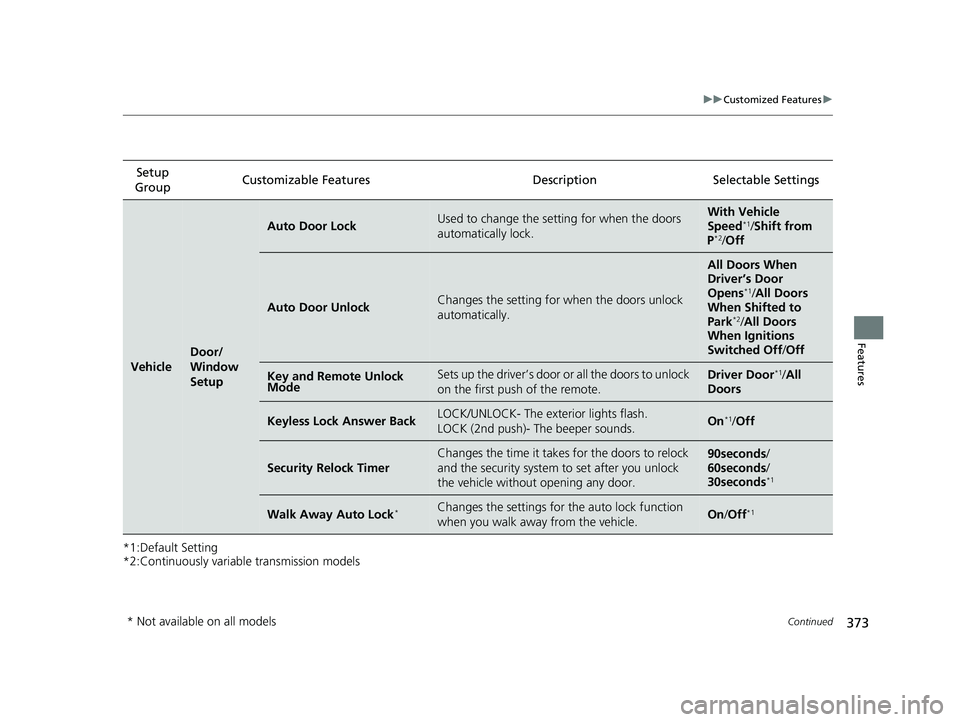
*1:Default Setting
*2:Continuously variable transmission modelsSetup
Group Customizable Features Description Selectable Settings
Vehicle
Door/
Window
Setup
Auto Door LockUsed to change the sett
ing for when the doors
automatically lock.With Vehicle
Speed*1/ Shift from
P*2/ Off
Auto Door UnlockChanges the setting for when the doors unlock
automatically.
All Doors When
Driver’s Door
Opens
*1/ All Doors
When Shifted to
Park
*2/ All Doors
When Ignitions
Switched Off /Off
Key and Remote Unlock
ModeSets up the driver’s door or all the doors to unlock
on the first push of the remote.Driver Door*1/ All
Doors
Keyless Lock Answer BackLOCK/UNLOCK- The exterior lights flash.
LOCK (2nd push)- The beeper sounds.On*1/ Off
Security Relock Timer
Changes the time it takes for the doors to relock
and the security system to set after you unlock
the vehicle without opening any door.90seconds /
60seconds /
30seconds
*1
Walk Away Auto Lock*Changes the settings for the auto lock function
when you walk away from the vehicle.On /Off*1
* Not available on all models
19 CIVIC 5D HUM (KA KC KL)-31TGG6201.book 373 ページ 2018年10月25日 木曜日 午後4時12分
Page 461 of 699
Continued459
uuWhen Driving uShifting
Driving
Use the paddle shifters to change between 1st and 7th speeds without releasing
your hands from the steering wheel. The transmission switches to the 7-speed
manual shift mode when you pull a paddle shifter while driving. This mode is useful
when engine braking is needed.
■When the shift lever is in (D:
The shift mode goes into the 7-speed ma nual shift mode temporarily, and the
number is displayed in the shift indicator.
The 7-speed manual shift mode is canceled automatically if you drive at constant
speed or accelerate, and the number in the shift indicator goes off.
You can cancel this mode by pulling the
(+ paddle shifter for a few seconds.
The 7-speed manual shift mode is especial ly useful when reducing the vehicle speed
temporarily before making a turn.
■When the shift lever is in (S:
The shift mode goes into the 7-speed manual shift mode. The M indicator and the
speed number are displayed in the shift indicator. As the vehicle speed slows down,
the transmission automatically shifts down accordingly. When the vehicle comes to
a stop, it automatically shifts down into 1st.
If the vehicle speed increases and the engi ne speed reaches near the tachometer’s
red zone, the transmission automatically shifts up.
You can only pull away in 1st speed.
When canceling the 7-speed manual shift mode, move the shift lever from
(S to
(D. When the 7-speed manual sh ift mode is canceled, the M indicator and shift
indicator will turn off.
■7-Speed Manual Shift Mode1 7-Speed Manual Shift Mode
In the 7-speed manual shif t mode, the transmission
shifts up or down by opera ting either paddle shifter
under the following conditions:
Shift Up: The engine sp eed reaches the lowest
threshold of the higher speed position.
Shift Down: The engine sp eed reaches the highest
threshold of the lower speed position.
When the engine speed reaches near the
tachometer’s red zone, the transmission shifts up
automatically.
When the engine speed reaches the lowest threshold
of the selected speed positi on, the transmission shifts
down automatically.
Operating the paddle shifte rs on slippery surfaces
may cause the tires to lock up. In this case, the 7-
speed manual shift mode is canceled and goes back
to the normal D driving mode.
19 CIVIC 5D HUM (KA KC KL)-31TGG6201.book 459 ページ 2018年10月25日 木曜日 午後4時12分
Page 531 of 699
Continued529
uuBraking uBrake System
Driving
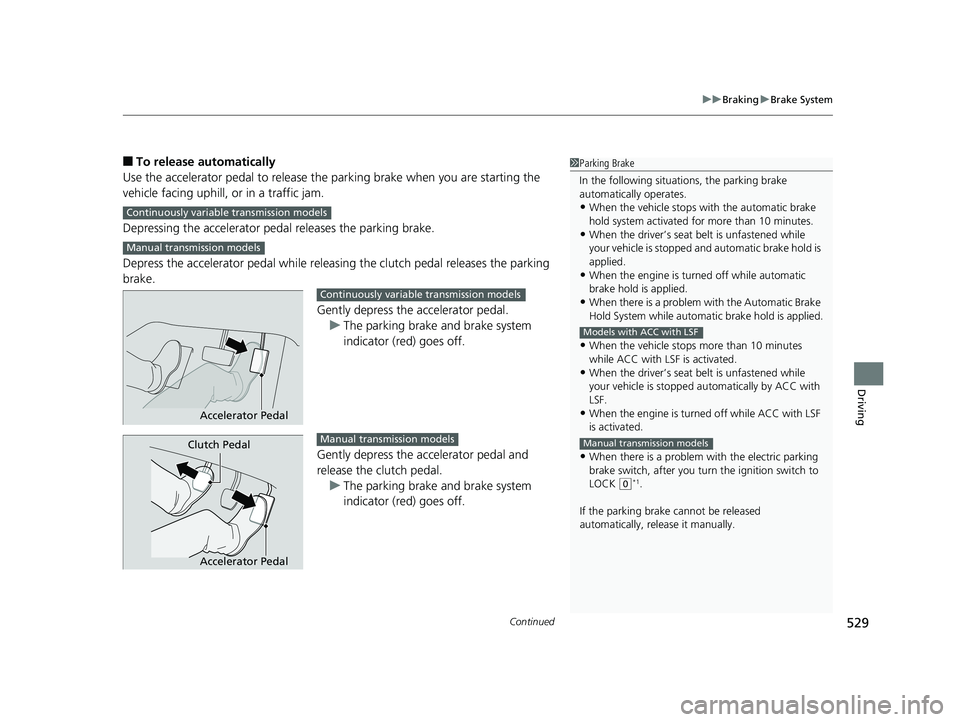
■To release automatically
Use the accelerator pedal to release the parking brake when you are starting the
vehicle facing uphill, or in a traffic jam.
Depressing the accelerator pedal releases the parking brake.
Depress the accelerator pedal while releasing the clutch pedal releases the parking
brake.
Gently depress the accelerator pedal.u The parking brake and brake system
indicator (red) goes off.
Gently depress the accelerator pedal and
release the clutch pedal. u The parking brake and brake system
indicator (red) goes off.1Parking Brake
In the following situations, the parking brake
automatically operates.
•When the vehicle stops with the automatic brake
hold system activated for more than 10 minutes.
•When the driver’s seat belt is unfastened while
your vehicle is stopped a nd automatic brake hold is
applied.
•When the engine is turned off while automatic
brake hold is applied.
•When there is a problem with the Automatic Brake
Hold System while automa tic brake hold is applied.
•When the vehicle stops more than 10 minutes
while ACC with LSF is activated.
•When the driver’s seat belt is unfastened while
your vehicle is stopped au tomatically by ACC with
LSF.
•When the engine is turned off while ACC with LSF
is activated.
•When there is a problem with the electric parking
brake switch, after you turn the ignition switch to
LOCK
( 0*1.
If the parking brake cannot be released
automatically, release it manually.
Models with ACC with LSF
Manual transmission models
Continuously variable transmission models
Manual transmission models
Accelerator Pedal
Continuously variable transmission models
Accelerator Pedal
Clutch PedalManual transmission models
19 CIVIC 5D HUM (KA KC KL)-31TGG6201.book 529 ページ 2018年10月25日 木曜日 午後4時12分
Page 532 of 699
uuBraking uBrake System
530
Driving
The parking brake automatically releases as you depress the accelerator pedal when:
• You are wearing the driver’s seat belt.
• The engine is running.
• The transmission is not in
(P or (N.
• The transmission is not in
(N.
Continuously variable transmission models
Manual transmission models
1Parking Brake
When the vehicle is travel ing uphill, the accelerator
pedal may need to be pressed farther to
automatically release the electric parking brake.
The parking brake cannot be released automatically
while the following indicators are on:
•Malfunction indicator lamp•Transmission system indicator
The parking brake may not be released automatically
while the following indicators are on:
•Parking brake and brake system indicator (red)
•VSA® system indicator•ABS indicator
•Supplemental restraint system indicator
The clutch pedal is fully depressed before gently
depress the accelerator peda l and release the clutch
pedal.
Manual transmission models
19 CIVIC 5D HUM (KA KC KL)-31TGG6201.book 530 ページ 2018年10月25日 木曜日 午後4時12分
Page 534 of 699
uuBraking uBrake System
532
Driving
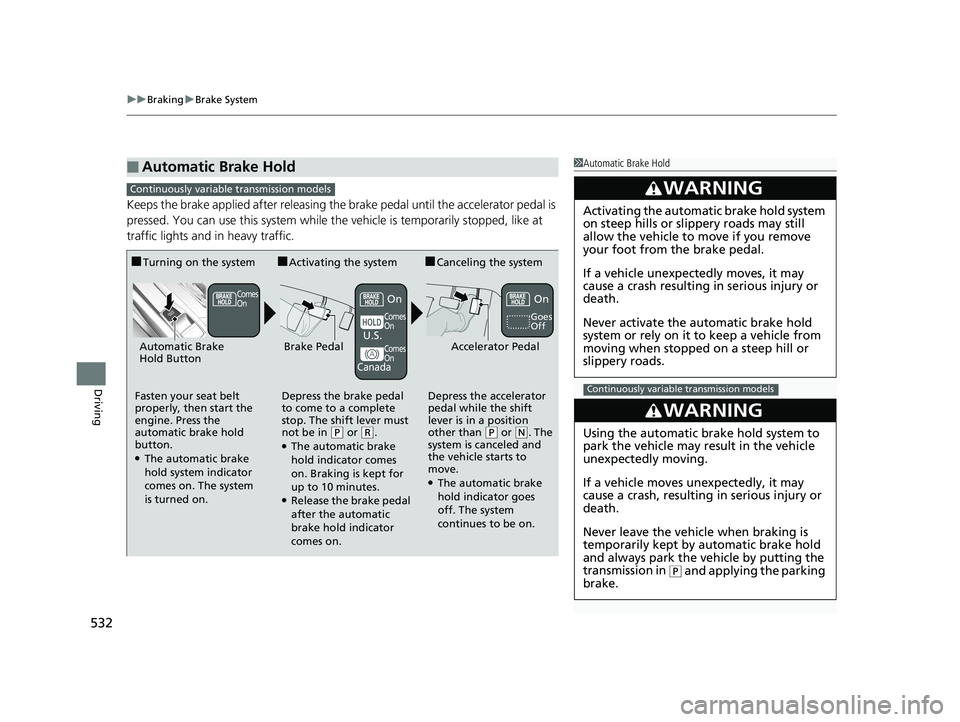
Keeps the brake applied after releasing the brake pedal until the accelerator pedal is
pressed. You can use this system while the vehicle is temporarily stopped, like at
traffic lights and in heavy traffic.
■Automatic Brake Hold1Automatic Brake Hold
3WARNING
Activating the automatic brake hold system
on steep hills or slippery roads may still
allow the vehicle to move if you remove
your foot from the brake pedal.
If a vehicle unexpectedly moves, it may
cause a crash resulting in serious injury or
death.
Never activate the automatic brake hold
system or rely on it to keep a vehicle from
moving when stopped on a steep hill or
slippery roads.
3WARNING
Using the automatic brake hold system to
park the vehicle may result in the vehicle
unexpectedly moving.
If a vehicle moves unexpectedly, it may
cause a crash, resulting in serious injury or
death.
Never leave the vehicle when braking is
temporarily kept by automatic brake hold
and always park the vehicle by putting the
transmission in
( P and applying the parking
brake.
Continuously variable transmission models
Continuously variable transmission models
■Turning on the system
Fasten your seat belt
properly, then start the
engine. Press the
automatic brake hold
button.
●The automatic brake
hold system indicator
comes on. The system
is turned on.
■Activating the system
Depress the brake pedal
to come to a complete
stop. The shift lever must
not be in
( P or (R.●The automatic brake
hold indicator comes
on. Braking is kept for
up to 10 minutes.
●Release the brake pedal
after the automatic
brake hold indicator
comes on.
■Canceling the system
Depress the accelerator
pedal while the shift
lever is in a position
other than
( P or (N. The
system is canceled and
the vehicle starts to
move.
●The automatic brake
hold indicator goes
off. The system
continues to be on.
Accelerator PedalBrake PedalAutomatic Brake
Hold Button
Goes
Off
Comes
On
U.S.
Canada
Comes
On
On
Comes
On
On
19 CIVIC 5D HUM (KA KC KL)-31TGG6201.book 532 ページ 2018年10月25日 木曜日 午後4時12分
Page 535 of 699
533
uuBraking uBrake System
Continued
Driving
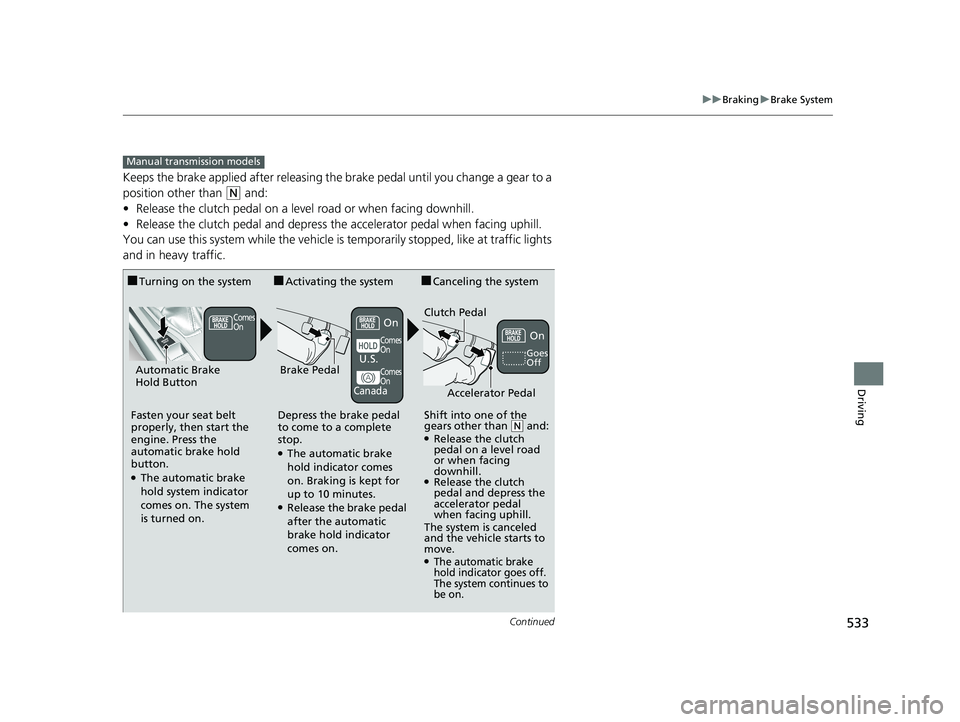
Keeps the brake applied after releasing the brake pedal until you change a gear to a
position other than
(N and:
• Release the clutch pedal on a level road or when facing downhill.
• Release the clutch pedal and depress the accelerator pedal when facing uphill.
You can use this system while the vehicle is temporarily stopped, like at traffic lights
and in heavy traffic.
Manual transmission models
■Turning on the system
Fasten your seat belt
properly, then start the
engine. Press the
automatic brake hold
button.
●The automatic brake
hold system indicator
comes on. The system
is turned on.
■Activating the system
Depress the brake pedal
to come to a complete
stop.
●The automatic brake
hold indicator comes
on. Braking is kept for
up to 10 minutes.
●Release the brake pedal
after the automatic
brake hold indicator
comes on.
■Canceling the system
Shift into one of the
gears other than
( N and: ●Release the clutch
pedal on a level road
or when facing
downhill.
●Release the clutch
pedal and depress the
accelerator pedal
when facing uphill.
The system is canceled
and the vehicle starts to
move.
●The automatic brake
hold indicator goes off.
The system continues to
be on.
Accelerator Pedal
Brake PedalAutomatic Brake
Hold Button
Goes
OffU.S.
Canada
Clutch Pedal
Comes
On
On
Comes
On
Comes
On
On
19 CIVIC 5D HUM (KA KC KL)-31TGG6201.book 533 ページ 2018年10月25日 木曜日 午後4時12分
Page 536 of 699
uuBraking uBrake System
534
Driving
■The system automatically cancels when:
• You engage the parking brake.
• You depress the brake pedal and move the shift lever to
(P or (R.
■The system automatically cancels and the parking brake is applied when:
• Braking is kept for more than 10 minutes.
• The driver’s seat belt is unfastened.
• The engine is turned off.
• There is a problem with au tomatic brake hold system.
• The battery is disconnected.
• The engine stalls.
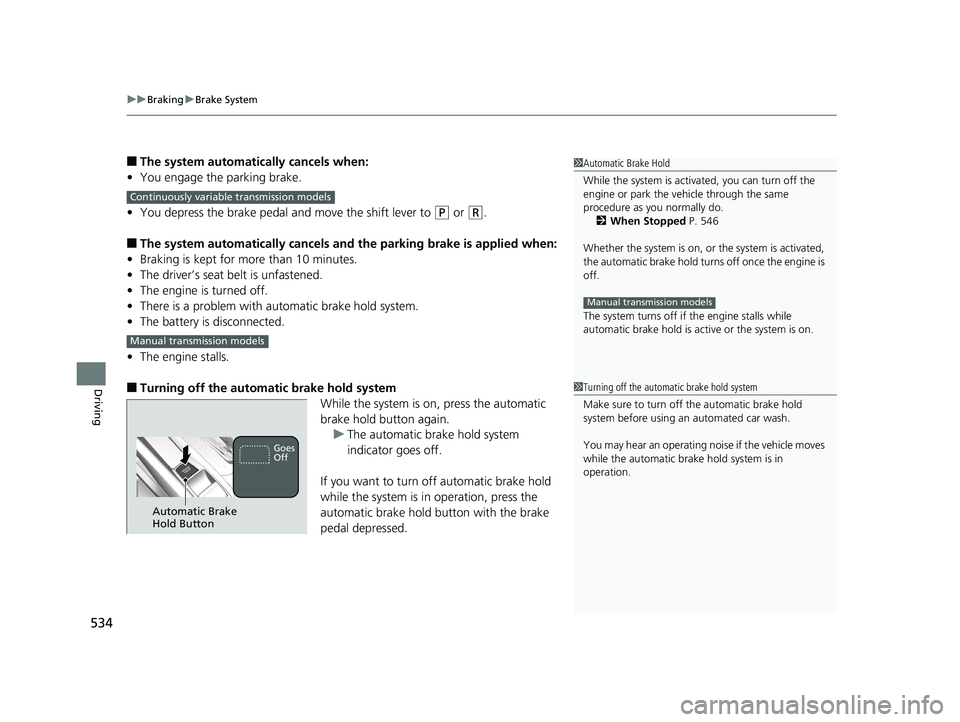
■Turning off the automatic brake hold system
While the system is on, press the automatic
brake hold button again.u The automatic brake hold system
indicator goes off.
If you want to turn off automatic brake hold
while the system is in operation, press the
automatic brake hold button with the brake
pedal depressed.
1 Automatic Brake Hold
While the system is activated, you can turn off the
engine or park the ve hicle through the same
procedure as you normally do. 2 When Stopped P. 546
Whether the system is on, or the system is activated,
the automatic brake hold turn s off once the engine is
off.
The system turns off if the engine stalls while
automatic brake hold is active or the system is on.
Manual transmission models
Continuously variable transmission models
Manual transmission models
1 Turning off the automatic brake hold system
Make sure to turn off the automatic brake hold
system before using an automated car wash.
You may hear an operating noi se if the vehicle moves
while the automatic brake hold system is in
operation.
Automatic Brake
Hold Button
Goes
Off
19 CIVIC 5D HUM (KA KC KL)-31TGG6201.book 534 ページ 2018年10月25日 木曜日 午後4時12分
Page 550 of 699
548
Driving
Multi-View Rear Camera
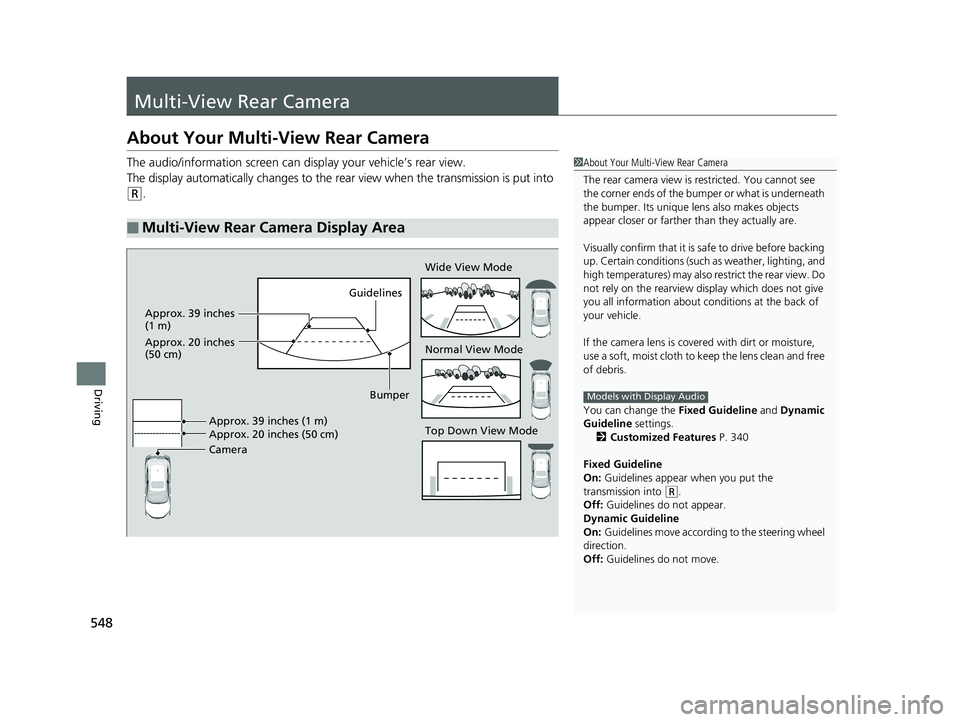
About Your Multi-View Rear Camera
The audio/information screen can display your vehicle’s rear view.
The display automatically changes to the rear view when the transmission is put into
(R.
■Multi-View Rear Camera Display Area
1About Your Multi-View Rear Camera
The rear camera view is restricted. You cannot see
the corner ends of the bum per or what is underneath
the bumper. Its unique le ns also makes objects
appear closer or farther than they actually are.
Visually confirm that it is safe to drive before backing
up. Certain conditions (such as weather, lighting, and
high temperatures) may also restrict the rear view. Do
not rely on the rearview display which does not give
you all information about conditions at the back of
your vehicle.
If the camera lens is cove red with dirt or moisture,
use a soft, moist cloth to keep the lens clean and free
of debris.
You can change the Fixed Guideline and Dynamic
Guideline settings.
2 Customized Features P. 340
Fixed Guideline
On: Guidelines appear when you put the
transmission into
( R.
Off: Guidelines do not appear.
Dynamic Guideline
On: Guidelines move according to the steering wheel
direction.
Off: Guidelines do not move.
Models with Display Audio
Guidelines
Bumper Wide View Mode
Normal View Mode
Top Down View Mode
Camera Approx. 39 inches (1 m)
Approx. 20 inches (50 cm)
Approx. 39 inches
(1 m)
Approx. 20 inches
(50 cm)
19 CIVIC 5D HUM (KA KC KL)-31TGG6201.book 548 ページ 2018年10月25日 木曜日 午後4時12分
Page 660 of 699
658
uuIndicator, Coming On/BlinkinguIf the Brake System Indicator (Red) Comes On or Blinks at the Same Time When the Brake System Indicator (Amber) Comes On
Handling the Unexpected
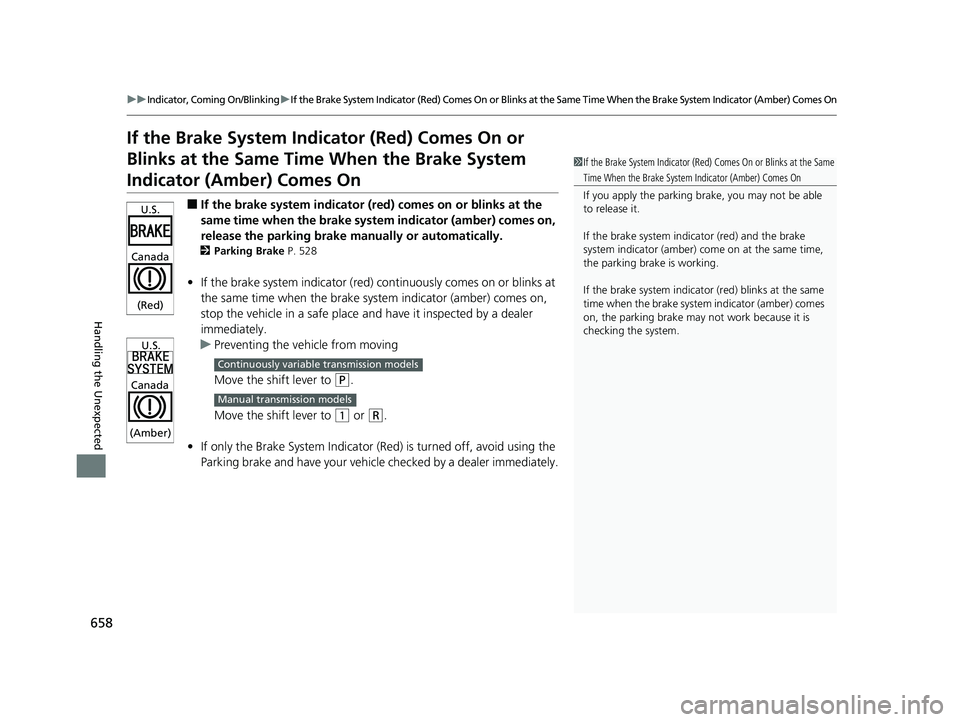
If the Brake System Indicator (Red) Comes On or
Blinks at the Same Time When the Brake System
Indicator (Amber) Comes On
■If the brake system indicator (red) comes on or blinks at the
same time when the brake system indicator (amber) comes on,
release the parking brake manually or automatically.
2 Parking Brake P. 528
•If the brake system indicator (red) co ntinuously comes on or blinks at
the same time when the brake system indicator (amber) comes on,
stop the vehicle in a safe place a nd have it inspected by a dealer
immediately.
u Preventing the vehicle from moving
Move the shift lever to
(P.
Move the shift lever to
(1 or (R.
• If only the Brake System Indicator (R ed) is turned off, avoid using the
Parking brake and have your vehicle checked by a dealer immediately.
1If the Brake System Indicator (Red) Comes On or Blinks at the Same
Time When the Brake System Indicator (Amber) Comes On
If you apply the parking brake, you may not be able
to release it.
If the brake system indicator (red) and the brake
system indicator (amber) come on at the same time,
the parking brake is working.
If the brake system indicator (red) blinks at the same
time when the brake system indicator (amber) comes
on, the parking brake may not work because it is
checking the system.
U.S.
Canada
(Red)
U.S.
Canada
(Amber)
Continuously variable transmission models
Manual transmission models
19 CIVIC 5D HUM (KA KC KL)-31TGG6201.book 658 ページ 2018年10月25日 木曜日 午後4時12分