clock HONDA CIVIC HATCHBACK 2019 Owner's Manual (in English)
[x] Cancel search | Manufacturer: HONDA, Model Year: 2019, Model line: CIVIC HATCHBACK, Model: HONDA CIVIC HATCHBACK 2019Pages: 699, PDF Size: 35.16 MB
Page 4 of 699
Contents
This owner’s manual should be considered a permanent part of the
vehicle and should remain with the vehicle when it is sold.
This owner’s manual covers all models of your vehicle. You may find
descriptions of equipment and features that are not on your
particular model.
Images throughout this owner’s manual (including the front cover)
represent features and equipment that are available on some, but
not all, models. Your particular mo del may not have some of these
features.
This owner’s manual is for vehicles sold in the United States and
Canada.
The information and specifications in cluded in this publication were
in effect at the time of approval for printing. Honda Motor Co., Ltd.
reserves the right, however, to discontinue or change specifications
or design at any time without notice and without incurring any
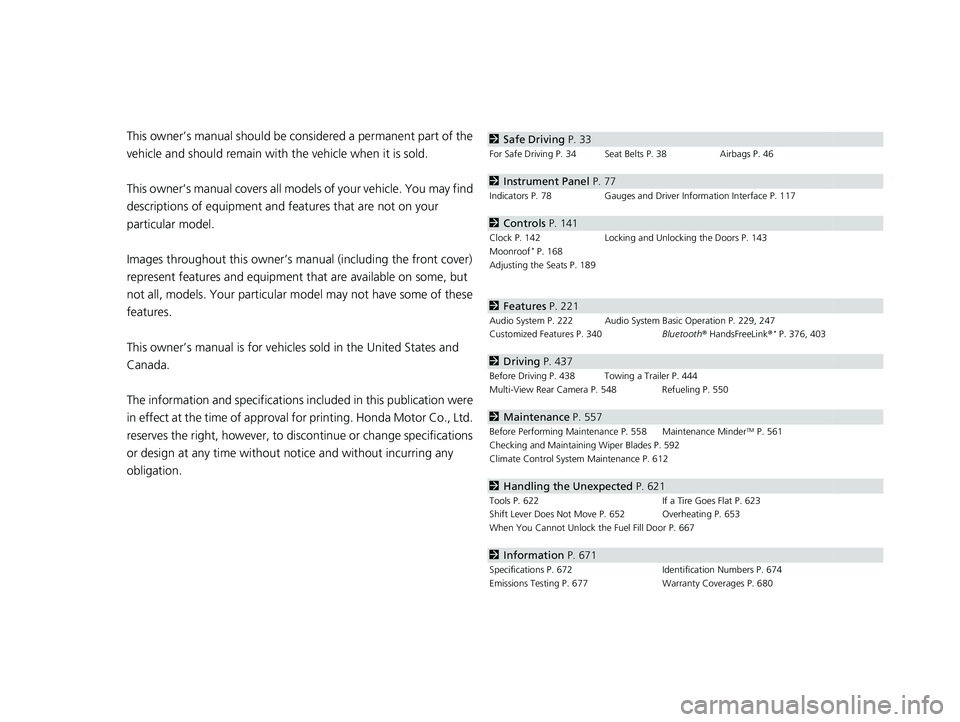
obligation.2 Safe Driving P. 33
For Safe Driving P. 34 Seat Belts P. 38 Airbags P. 46
2Instrument Panel P. 77
Indicators P. 78 Gauges and Driver Information Interface P. 117
2Controls P. 141
Clock P. 142 Locking and Unlocking the Doors P. 143
Moonroof* P. 168
Adjusting the Seats P. 189
2 Features P. 221
Audio System P. 222 Audio System Basic Operation P. 229, 247
Customized Features P. 340 Bluetooth® HandsFreeLink ®* P. 376, 403
2Driving P. 437
Before Driving P. 438 Towing a Trailer P. 444
Multi-View Rear Camera P. 548 Refueling P. 550
2Maintenance P. 557
Before Performing Maintenance P. 558 Maintenance MinderTM P. 561
Checking and Maintaining Wiper Blades P. 592
Climate Control System Maintenance P. 612
2Handling the Unexpected P. 621
Tools P. 622 If a Tire Goes Flat P. 623
Shift Lever Does Not Move P. 652 Overheating P. 653
When You Cannot Unlock the Fuel Fill Door P. 667
2 Information P. 671
Specifications P. 672 Identification Numbers P. 674
Emissions Testing P. 677 Warranty Coverages P. 680
19 CIVIC 5D HUM (KA KC KL)-31TGG6201.book 2 ページ 2018年10月25日 木曜日 午後4時12分
Page 14 of 699
12
Quick Reference Guide
Controls (P 141)
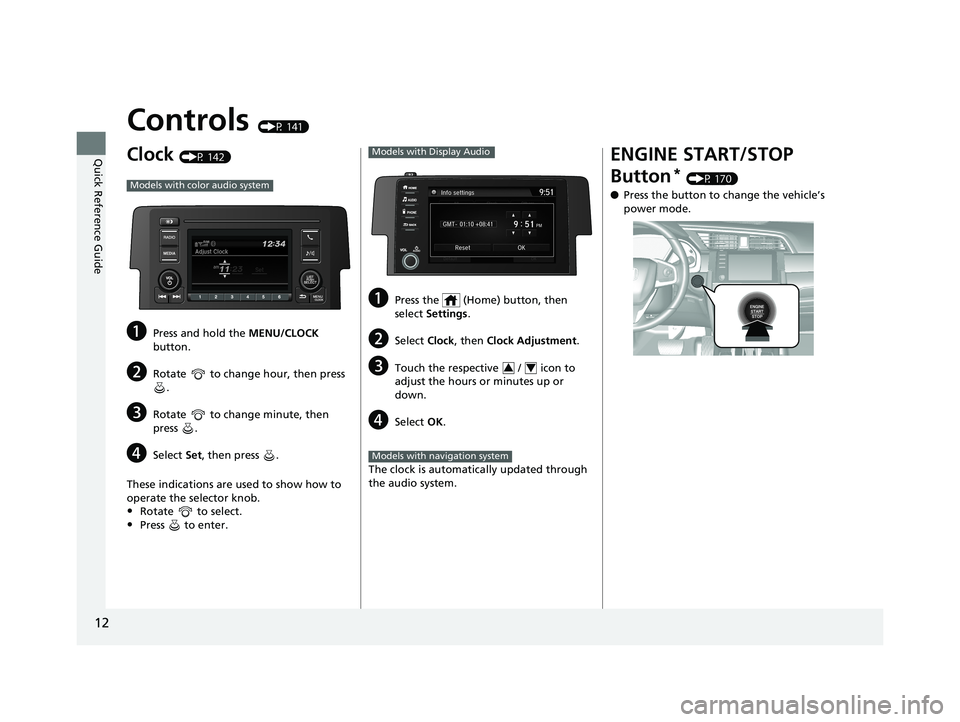
Clock (P 142)
aPress and hold the MENU/CLOCK
button.
bRotate to change hour, then press .
cRotate to change minute, then
press .
dSelect Set, then press .
These indications are used to show how to
operate the selector knob.
•Rotate to select.
•Press to enter.
Models with color audio system
aPress the (Home) button, then
select Settings .
bSelect Clock, then Clock Adjustment .
cTouch the respective / icon to
adjust the hours or minutes up or
down.
dSelect OK.
The clock is automatically updated through
the audio system.
Models with Display Audio
34
Models with navigation system
ENGINE START/STOP
Button
* (P 170)
● Press the button to ch ange the vehicle’s
power mode.
19 CIVIC 5D HUM (KA KC KL)-31TGG6201.book 12 ページ 2018年10月25日 木曜日 午後4時12分
Page 22 of 699
20
Quick Reference Guide
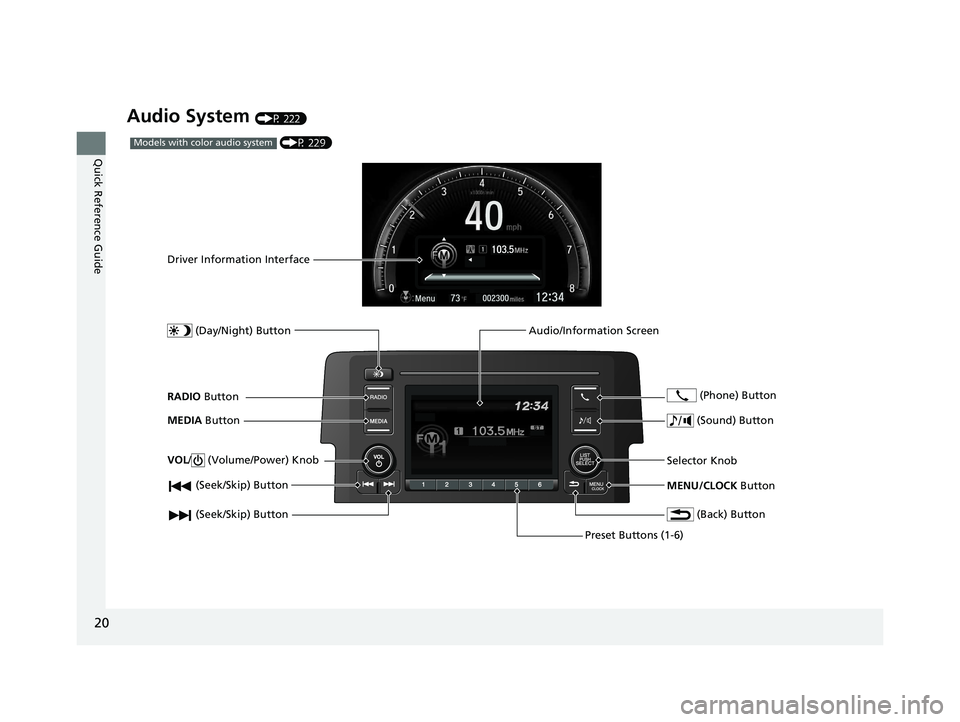
Audio System (P 222)
(P 229)Models with color audio system
(Seek/Skip) Button
RADIO Button
Driver Information Interface
(Day/Night) Button
MEDIA Button
Preset Buttons (1-6)
(Seek/Skip) Button
VOL
/ (Volume/Power) Knob
Audio/Information Screen
(Back) Button
(Sound) Button
MENU/CLOCK Button
Selector Knob (Phone) Button
19 CIVIC 5D HUM (KA KC KL)-31TGG6201.book 20 ページ 2018年10月25日 木曜日 午後4時12分
Page 143 of 699
141
Controls
This chapter explains how to operate the various controls necessary for driving.
Clock.................................................. 142
Locking and Unlocking the Doors
Key Types and Functions .................. 143
Low Smart Entry Remote Signal Strength*.. 144Locking/Unlocking the Doors from the Outside .......................................... 145
Locking/Unlocking the Doors from the Inside ............................................. 154
Childproof Door Locks ..................... 156
Auto Door Locking/Unlocking .......... 157
Opening and Closing the Hatch....... 158
Security System
Immobilizer System .......................... 161
Security System Alarm ...................... 162 Opening and Closing the Windows
... 165
Moonroof
*........................................ 168
Operating the Switches Around the Steering Wheel Ignition Switch
*............................... 169
ENGINE START/STOP Button*........... 170
Ignition Switch and Power Mode Comparison ................................... 173
Turn Signals ..................................... 174
Light Switches.................................. 174
Fog Lights
*...................................... 177
Daytime Running Lights ................... 177
Auto High-Beam
*............................ 178
Wipers and Washers ........................ 181 Brightness Control ........................... 184
Rear Defogger/Heated Door Mirror
*
Button ........................................... 185
Adjusting the Steering Wheel .......... 186
Adjusting the Mirrors
Interior Rearview Mirror ................... 187
Power Door Mirrors ......................... 188
Adjusting the Seats .......................... 189
Interior Lights/Interior Convenience Items ................................................ 197
Climate Control System
Using Automatic Climate Control .... 213
Automatic Climate Control Sensors......220
* Not available on all models
19 CIVIC 5D HUM (KA KC KL)-31TGG6201.book 141 ページ 2018年10月25日 木曜日 午後4時12分
Page 144 of 699
142
Controls
Clock
Adjusting the Clock
You can adjust the time in the clock display with the ignition switch in ON (w*1.
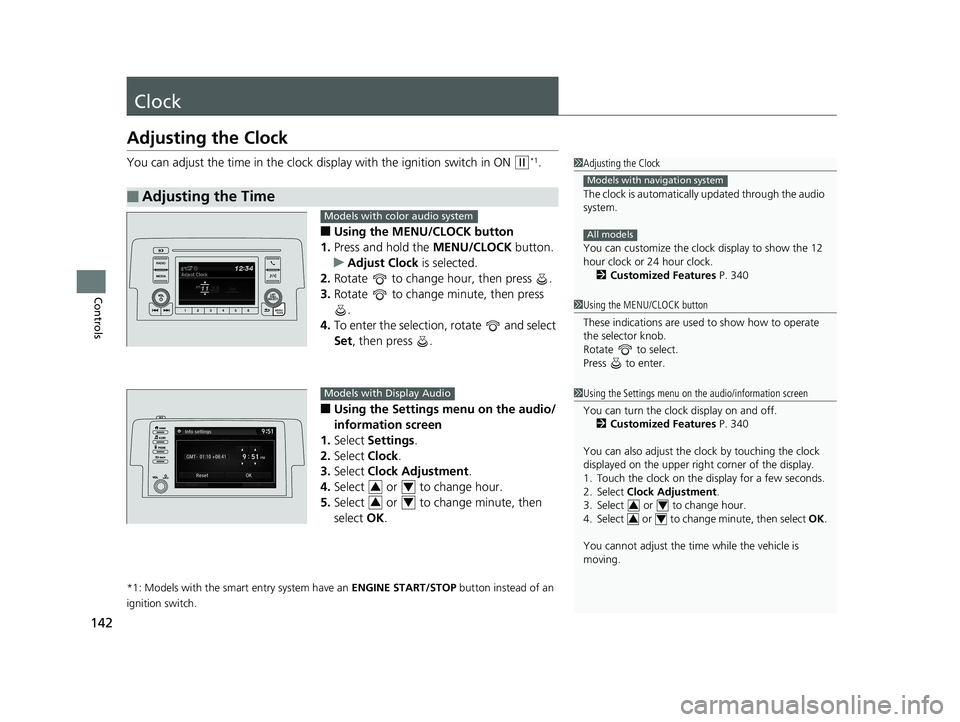
■Using the MENU/CLOCK button
1. Press and hold the MENU/CLOCK button.
u Adjust Clock is selected.
2. Rotate to change hour, then press .
3. Rotate to change minute, then press
.
4. To enter the selection, rotate and select
Set , then press .
■Using the Settings menu on the audio/
information screen
1. Select Settings .
2. Select Clock.
3. Select Clock Adjustment .
4. Select or to change hour.
5. Select or to change minute, then
select OK.
*1: Models with the smart entry system have an ENGINE START/STOP button instead of an
ignition switch.
■Adjusting the Time
1 Adjusting the Clock
The clock is automatically updated through the audio
system.
You can customize the clock display to show the 12
hour clock or 24 hour clock.
2 Customized Features P. 340
Models with navigation system
All models
1Using the MENU/CLOCK button
These indications are used to show how to operate
the selector knob.
Rotate to select.
Press to enter.
1 Using the Settings menu on the audio/information screen
You can turn the clock display on and off.
2 Customized Features P. 340
You can also adjust the clock by touching the clock
displayed on the upper right corner of the display.
1. Touch the clock on the display for a few seconds.
2. Select Clock Adjustment .
3. Select or to change hour.
4. Select or to change minute, then select OK.
You cannot adjust the time while the vehicle is
moving.
34
34
Models with color audio system
Models with Display Audio
34
34
19 CIVIC 5D HUM (KA KC KL)-31TGG6201.book 142 ページ 2018年10月25日 木曜日 午後4時12分
Page 231 of 699
229
Features
Audio System Basic Operation
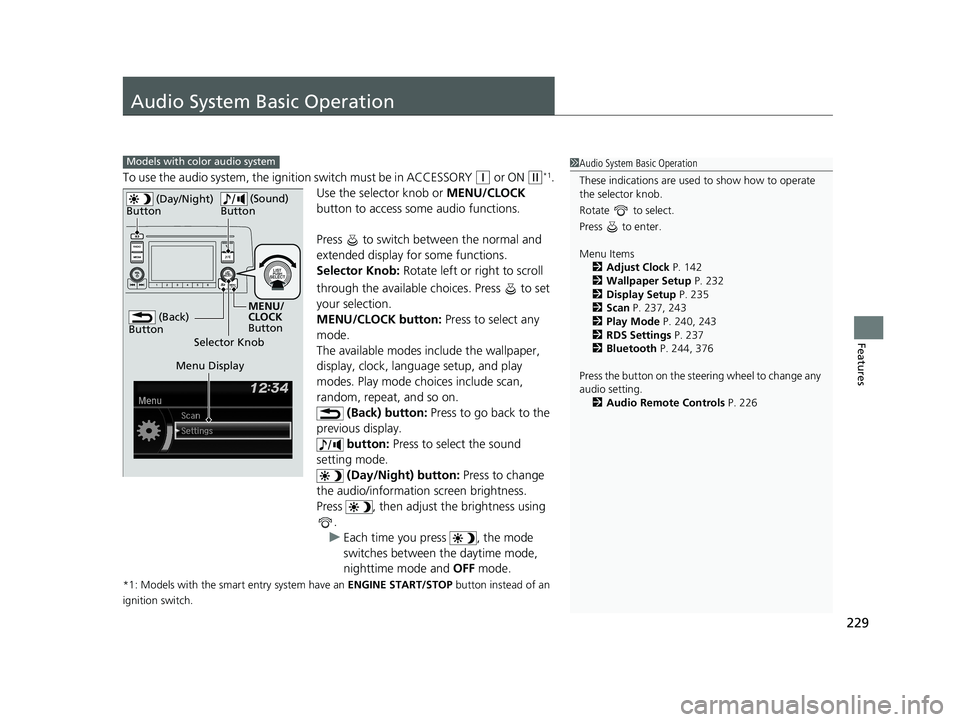
To use the audio system, the ignition switch must be in ACCESSORY (q or ON (w*1.
Use the selector knob or MENU/CLOCK
button to access some audio functions.
Press to switch between the normal and
extended display fo r some functions.
Selector Knob: Rotate left or right to scroll
through the available choices. Press to set
your selection.
MENU/CLOCK button: Press to select any
mode.
The available modes include the wallpaper,
display, clock, language setup, and play
modes. Play mode choices include scan,
random, repeat, and so on. (Back) button: Press to go back to the
previous display. button: Press to select the sound
setting mode.
(Day/Night) button: Press to change
the audio/information screen brightness.
Press , then adjust the brightness using .
u Each time you press , the mode
switches between the daytime mode,
nighttime mode and OFF mode.
*1: Models with the smart entry system have an ENGINE START/STOP button instead of an
ignition switch.
Models with color audio system1 Audio System Basic Operation
These indications are used to show how to operate
the selector knob.
Rotate to select.
Press to enter.
Menu Items 2 Adjust Clock P. 142
2 Wallpaper Setup P. 232
2 Display Setup P. 235
2 Scan P. 237, 243
2 Play Mode P. 240, 243
2 RDS Settings P. 237
2 Bluetooth P. 244, 376
Press the button on the stee ring wheel to change any
audio setting.
2 Audio Remote Controls P. 226
(Back)
Button
Selector Knob MENU/
CLOCK
Button
(Day/Night)
Button
(Sound)
Button
Menu Display
19 CIVIC 5D HUM (KA KC KL)-31TGG6201.book 229 ページ 2018年10月25日 木曜日 午後4時12分
Page 232 of 699
230
uuAudio System Basic Operation uAudio/Information Screen
Features
Audio/Information Screen
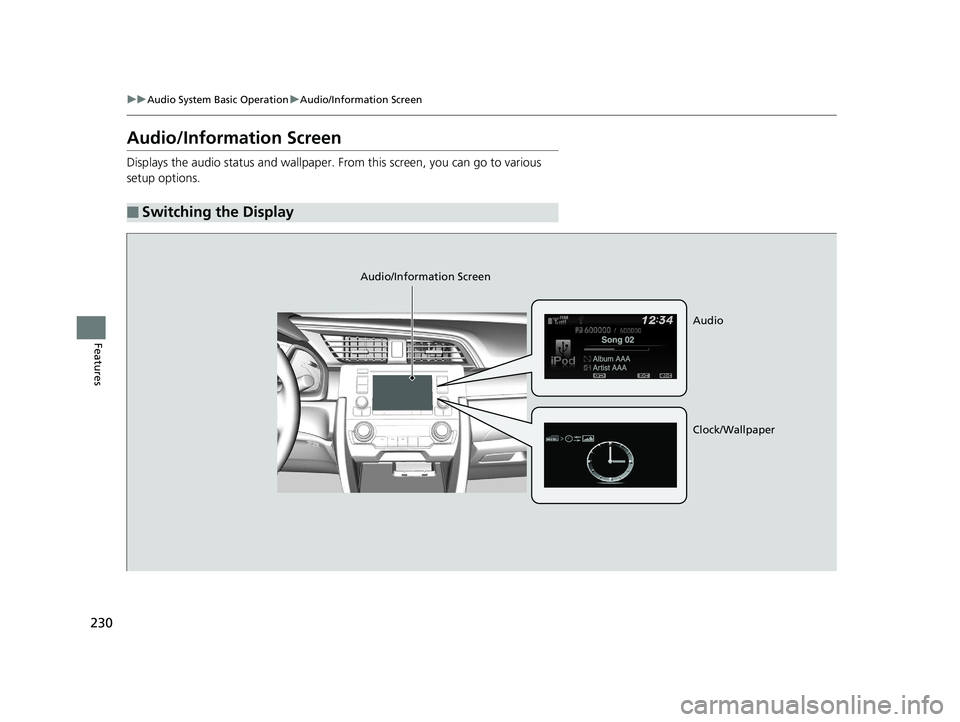
Displays the audio status and wallpaper. From this screen, you can go to various
setup options.
■Switching the Display
Audio/Information Screen
Audio
Clock/Wallpaper
19 CIVIC 5D HUM (KA KC KL)-31TGG6201.book 230 ページ 2018年10月25日 木曜日 午後4時12分
Page 233 of 699
231
uuAudio System Basic Operation uAudio/Information Screen
Continued
Features
■Audio
Shows the current audio information.
■Clock/Wallpaper
Shows a clock screen or an image you import.
■Change display
1. Press the MENU/CLOCK button.
2. Rotate to select Settings, then press .
3. Rotate to select Display Change, then press .
4. Rotate to select Wallpaper, then press .
u If you want to return to the audio display, select Audio.
19 CIVIC 5D HUM (KA KC KL)-31TGG6201.book 231 ページ 2018年10月25日 木曜日 午後4時12分
Page 234 of 699
uuAudio System Basic Operation uAudio/Information Screen
232
Features
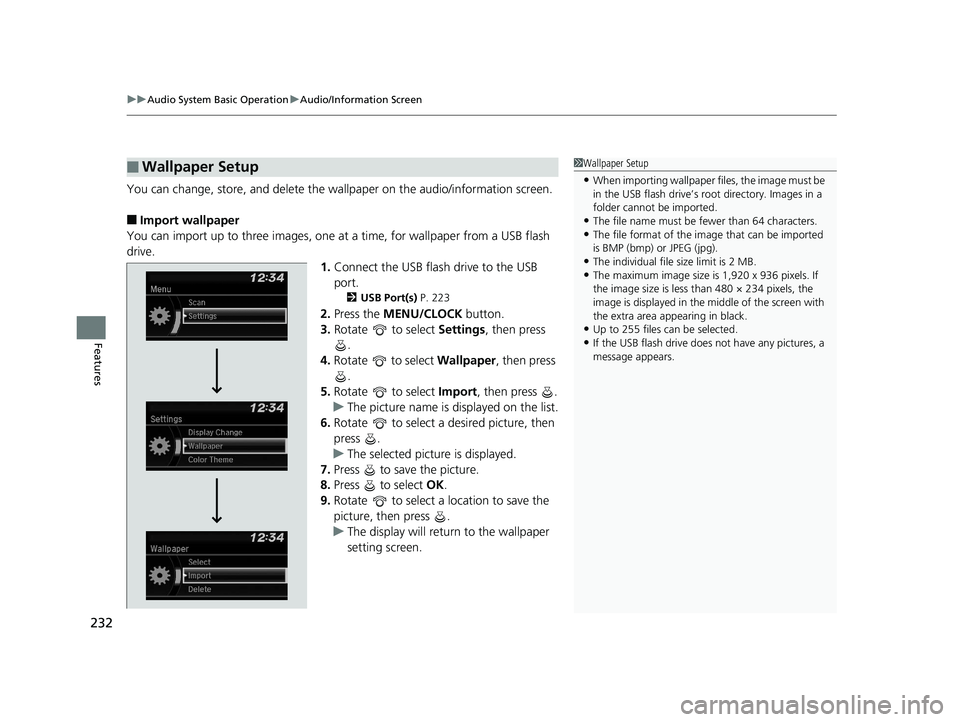
You can change, store, and delete the wallpaper on the audio/information screen.
■Import wallpaper
You can import up to three images, one at a time, for wallpaper from a USB flash
drive.
1.Connect the USB flash drive to the USB
port.
2 USB Port(s) P. 223
2.Press the MENU/CLOCK button.
3. Rotate to select Settings, then press
.
4. Rotate to select Wallpaper , then press
.
5. Rotate to select Import, then press .
u The picture name is displayed on the list.
6. Rotate to select a desired picture, then
press .
u The selected picture is displayed.
7. Press to save the picture.
8. Press to select OK.
9. Rotate to select a location to save the
picture, then press .
u The display will return to the wallpaper
setting screen.
■Wallpaper Setup1Wallpaper Setup
•When importing wallpaper files, the image must be
in the USB flash drive’s root directory. Images in a
folder cannot be imported.
•The file name must be fewer than 64 characters.•The file format of the im age that can be imported
is BMP (bmp) or JPEG (jpg).
•The individual file size limit is 2 MB.•The maximum image size is 1,920 x 936 pixels. If
the image size is less than 480 × 234 pixels, the
image is displayed in the middle of the screen with
the extra area appearing in black.
•Up to 255 files can be selected.
•If the USB flash drive does not have any pictures, a
message appears.
19 CIVIC 5D HUM (KA KC KL)-31TGG6201.book 232 ページ 2018年10月25日 木曜日 午後4時12分
Page 235 of 699
233
uuAudio System Basic Operation uAudio/Information Screen
Features
■Select wallpaper
1. Press the MENU/CLOCK button.
2. Rotate to select Settings, then press .
3. Rotate to select Wallpaper, then press .
4. Rotate to select Select, then press .
u The screen changes to the wallpaper list.
5. Rotate to select a desired wallpaper, then press .
■Delete wallpaper
1. Press the MENU/CLOCK button.
2. Rotate to select Settings, then press .
3. Rotate to select Wallpaper, then press .
4. Rotate to select Delete, then press .
u The screen changes to the wallpaper list.
5. Rotate to select a wallpaper that you want to delete, then press .
6. Rotate to select Yes, then press .
u The display will return to the wallpaper setting screen.
1Wallpaper Setup
To go back to the previous screen, press the
(Back) button.
When the file size is large, it takes a while to be
previewed.
19 CIVIC 5D HUM (KA KC KL)-31TGG6201.book 233 ページ 2018年10月25日 木曜日 午後4時12分