service HONDA CIVIC HYBRID 2011 8.G User Guide
[x] Cancel search | Manufacturer: HONDA, Model Year: 2011, Model line: CIVIC HYBRID, Model: HONDA CIVIC HYBRID 2011 8.GPages: 369, PDF Size: 6.85 MB
Page 161 of 369

Depending on where you drive, you
may experience reception problems.
Interf erence can be caused by any of
these conditions:Driving on the north side of a
large commercial truck on an
east/west road.
Driving in tunnels.
Driving on a road beside a vertical
wall, steep clif f , or hill to the south
of you.
Driving on the lower level of a
multi-tiered road.
Driving on a single lane road
alongside dense trees taller than
50 ft. (15 m) to the south of you.
Driving on the north side of an
east/west mountain road.
Large items carried on a roof rack.
There may be other geographic
situations that could af f ect XM Radio
reception. If your XM Radio service has expired
or you purchased your vehicle f rom
a previous owner, you can listen to a
sampling of the broadcasts available
on XM Radio. With the ignition
switch in the ACCESSORY (I) or ON
(II) position, push the power/volume
knob to turn on the audio system and
press the XM RADIO button. A
variety of music types and styles will
play.
If you decide to purchase XM Radio
service, contact XM
Radio at
,orat
1-800-852-9696. You will need to give
them your radio I.D. number and
your credit card number. To get your
radio I.D. number, press the TUNE bar until ‘‘0’’ appears in the display.
Your I.D. will appear in the display.
After you’ve registered with XM
Radio, keep your audio system in the
XM radio mode while you wait f or
activation. This should take about 30
minutes.
While waiting for activation, make
sure your vehicle remains in an open
area with good reception. Once your
audio system is activated, you’ll be
able to listen to XM Radio broadcasts.
XM Radio will continue to send an
activation signal to your vehicle f or
at least 12 hours from the activation
request. If the service has not been
activated after 36 hours, contactXM
Radio. In Canada, contact XM
CANADA
.
As required by the FCC:
Changes or modif ications not expressly approved by the party responsible f orcompliance could void the user’s authority to operate the equipment.
www.xmradio.com
Receiving XM Radio Service
Playing the XMRadio (Models wit h navigat ion system)
Features
157
Main Menu
Page 245 of 369

Bef ore you begin driving your
vehicle, you should know what
gasoline to use and how to check the
levels of important f luids. You also
need to know how to properly store
luggage or packages. The
inf ormation in this section will help
you. If you plan to add any
accessories to your vehicle, please
read the information in this section
first..............................
Break-in Period . 242
.................
Fuel Recommendation . 242
.........
Service Station Procedures . 243
....................................
Ref ueling . 243
OpeningandClosingthe
.......................................
Hood . 244
...................................
Oil Check . 245
.............
Engine Coolant Check . 246
...............................
Fuel Economy . 247
...
Accessories and Modif ications . 250
.............................
Carrying Cargo . 252
Bef ore Driving
Bef ore Driving
241
Main Menu
Page 246 of 369

Help assure your vehicle’s f uture
reliability and perf ormance by paying
extra attention to how you drive
during the f irst 600 miles (1,000 km).
During this period:Avoid full-throttle starts and rapid
acceleration.
You should also f ollow these
recommendations with an
overhauled or exchanged engine, or
when the brakes are replaced. Your vehicle is designed to operate
on unleaded gasoline with a pump
octane number of 87 or higher. Use
of a lower octane gasoline can cause
a persistent, heavy metallic rapping
noise that can lead to engine damage.
Do not change the oil until the
scheduled maintenance time.
Avoidhardbrakingforthefirst
200 miles (300 km). Use of gasoline with these additives
may adversely af f ect perf ormance,
and cause the malfunction indicator
lamp on your instrument panel to
come on. If this happens, contact
your authorized dealer f or service.
Some gasoline today is blended with
oxygenates such as ethanol or
MTBE. Your vehicle is designed to
operate on oxygenated gasoline
containing up to 10% ethanol by
volume and up to 15% MTBE by
volume. Do not use gasoline
containing methanol.
In addition, in order to maintain good
perf ormance, f uel economy, and
emissions control, we strongly
recommend, in areas where it is
available, the use of gasoline that
does NOT contain manganese-based
f uel additives such as MMT.
We recommend using quality
gasolines containing detergent
additives that help prevent fuel
system and engine deposits.
If you notice any undesirable
operating symptoms, try another
service station or switch to another
brand of gasoline.
For f urther important f uel-related
inf ormation f or your vehicle, or
inf ormation on gasoline that does not
contain MMT, visit Owner Link at. In Canada, visit
f or additional
inf ormation on gasoline.
owners.honda.com
www.honda.ca
Break-in Period Fuel Recommendation
Break-in Period, Fuel Recommendation
242
Main Menu
Page 247 of 369
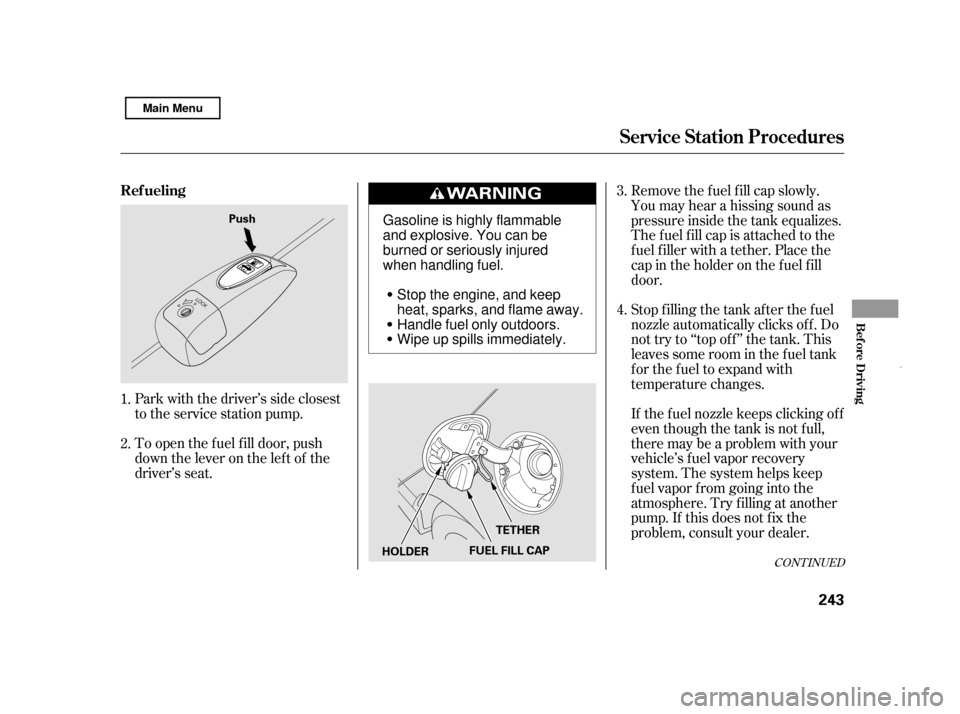
To open the f uel f ill door, push
down the lever on the lef t of the
driver’s seat.Stop f illing the tank af ter the f uel
nozzle automatically clicks of f . Do
not try to ‘‘top off’’ the tank. This
leaves some room in the f uel tank
for the fuel to expand with
temperature changes.
Park with the driver’s side closest
to the service station pump. Removethefuelfillcapslowly.
You may hear a hissing sound as
pressure inside the tank equalizes.
The fuel fill cap is attached to the
f uel f iller with a tether. Place the
cap in the holder on the f uel f ill
door.
If thefuelnozzlekeepsclickingoff
even though the tank is not f ull,
there may be a problem with your
vehicle’s fuel vapor recovery
system. The system helps keep
f uel vapor f rom going into the
atmosphere. Try f illing at another
pump. If this does not f ix the
problem, consult your dealer.
1. 2. 3. 4.
CONT INUED
Service Station Procedures
Ref ueling
Bef ore Driving
243
Push
HOLDERFUEL FILL CAPTETHER
Gasoline is highly flammable
and explosive. You can be
burned or seriously injured
when handling fuel.
Stop the engine, and keep
heat, sparks, and flame away.
Handle fuel only outdoors.
Wipe up spills immediately.
Main Menu
Page 248 of 369
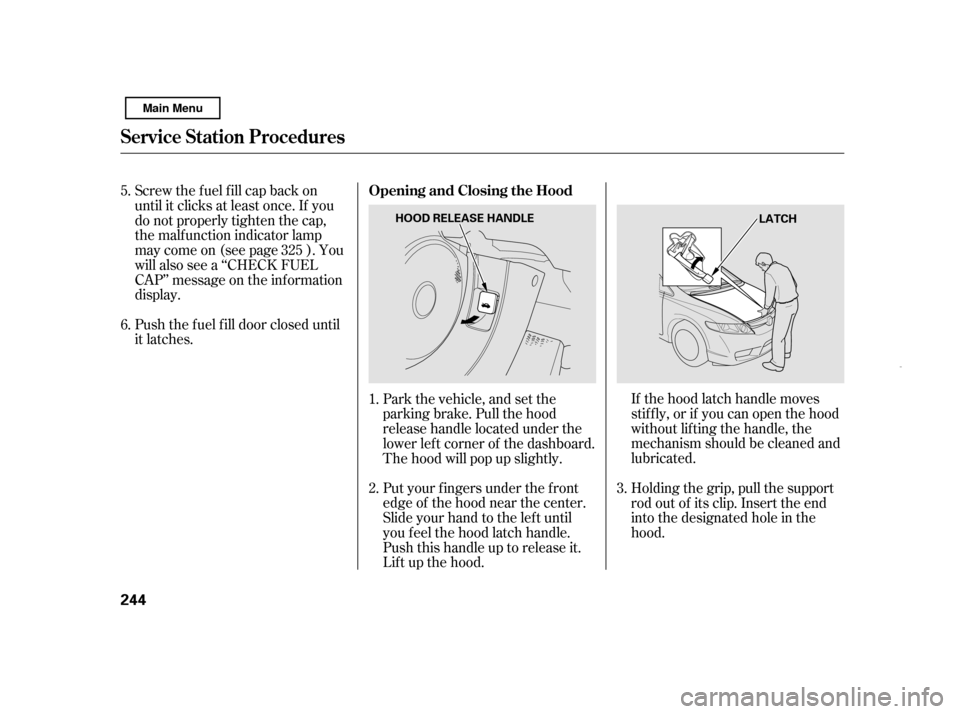
If the hood latch handle moves
stif f ly, or if you can open the hood
without lifting the handle, the
mechanism should be cleaned and
lubricated.
Put your f ingers under the f ront
edge of the hood near the center.
Slide your hand to the lef t until
you f eel the hood latch handle.
Push this handle up to release it.
Lif t up the hood.
Push the f uel f ill door closed until
it latches.
Screw the fuel fill cap back on
until it clicks at least once. If you
do not properly tighten the cap,
the malf unction indicator lamp
maycomeon(seepage ).You
will also see a ‘‘CHECK FUEL
CAP’’ message on the inf ormation
display.
Holding the grip, pull the support
rod out of its clip. Insert the end
into the designated hole in thehood.
Park the vehicle, and set the
parking brake. Pull the hood
release handle located under the
lower lef t corner of the dashboard.
The hood will pop up slightly.
2.
1.
3.
5. 6.
325
Service Station Procedures
Opening and Closing the Hood
244 LATCH
HOOD RELEASE HANDLE
Main Menu
Page 249 of 369
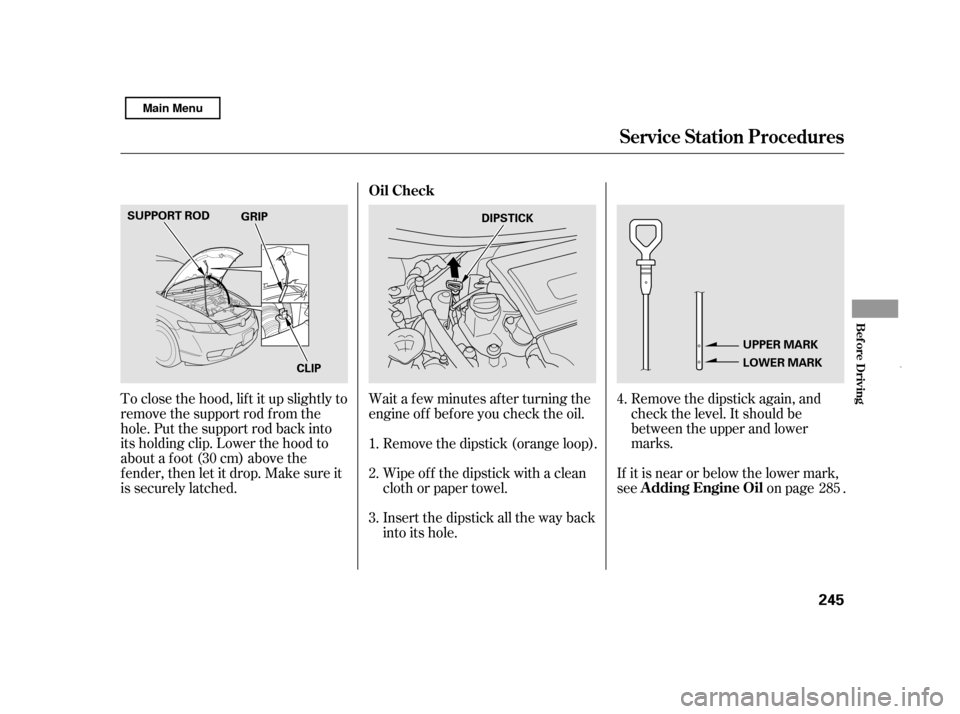
Remove the dipstick again, and
check the level. It should be
between the upper and lower
marks.
To close the hood, lif t it up slightly to
remove the support rod f rom the
hole. Put the support rod back into
its holding clip. Lower the hood to
about a f oot (30 cm) above the
f ender, then let it drop. Make sure it
is securely latched.
If it is near or below the lower mark,
see on page .
Wait a f ew minutes af ter turning the
engine of f bef ore you check the oil.
Remove the dipstick (orange loop).
Wipe of f the dipstick with a clean
cloth or paper towel.
Insert the dipstick all the way back
into its hole.
2. 3.
1.
4.
285
Service Station Procedures
Oil Check
A dding Engine Oil
Bef ore Driving
245
DIPSTICK
UPPER MARK
LOWER MARK
SUPPORT ROD
CLIP
GRIP
Main Menu
Page 250 of 369
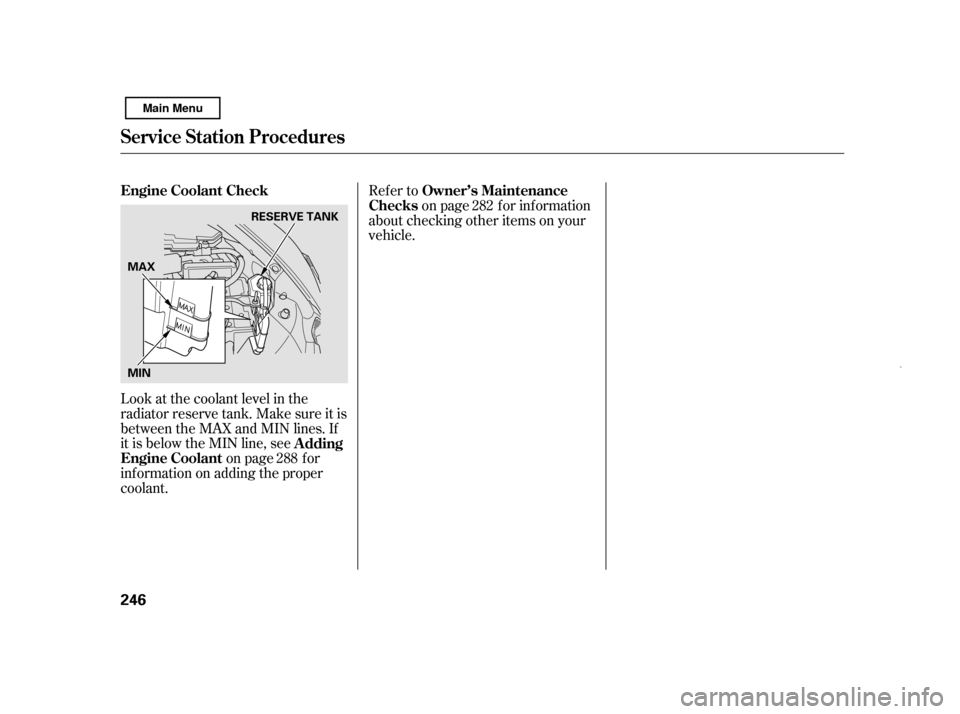
Look at the coolant level in the
radiator reserve tank. Make sure it is
between the MAX and MIN lines. If
it is below the MIN line, seeon page f or
inf ormation on adding the proper
coolant. Refer to
on page f or inf ormation
about checking other items on your
vehicle.
288 282
Engine Coolant Check
A dding
Engine Coolant Owner’s Maintenance
Checks
Service Station Procedures
246 RESERVE TANK
MIN
MAX
Main Menu
Page 276 of 369

When the low tire pressure indicator
is on, one or more of your tires is
signif icantly underinf lated. You
should stop and check your tires as
soon as possible, and inflate them to
the proper pressure as indicated on
the vehicle’s tire inf ormation placard.
If you think you can saf ely drive a
short distance to a service station,
proceed slowly, and inf late the tire to
the recommended pressure shown
on the driver’s doorjamb.
If the tire is f lat, or if the tire
pressure is too low to continue
driving, replace the tire with the
compact spare tire (see page ).
If you cannot make the low tire
pressure indicator go out af ter
inf lating the tires to the specif ied
values, have your dealer check the
system as soon as possible.Driving on a signif icantly under
inf lated tire causes the tire to
overheat and can lead to tire f ailure.
Underinf lation also reduces f uel
efficiency and tire tread life, and may
af f ect the vehicle’s handling and
stopping ability.
Becausetirepressurevariesby
temperature and other conditions,
the low tire pressure indicator may
come on unexpectedly.
Each tire has its own pressure
sensor (not including the spare tire).
If the air pressure of a tire becomes
signif icantly low while driving, the
sensor in that tire immediately sends
a signal that causes the low tire
pressure indicator to come on.
Your vehicle is equipped with a tire
pressure monitoring system (TPMS)
that turns on every time you start the
engine and monitors the pressure in
your tires while driving.
312
U.S. models onlyLow Tire Pressure
Indicator
Tire Pressure Monitoring System (TPMS)
272
Main Menu
Page 278 of 369

If you have a f lat tire, the low tire
pressure indicator will come on.
Replace the flat tire with the
compact spare tire (see page ).
Each wheel (except the compact
sparetirewheel)isequippedwitha
tire pressure sensor. You must use
TPMS specif ic wheels. It is
recommended that you always have
your tires serviced by your dealer or
qualif ied technician.The low tire pressure indicator or
the TPMS indicator will go off, after
several miles (kilometers) driving,
when you replace the spare tire with
the specif ied regular tire equipped
with the tire pressure monitor sensor.
Never use a puncture-repairing agent
in a f lat tire. If used, you will have to
replace the tire pressure sensor.
Havetheflattirerepairedbyyour
dealer as soon as possible.
Your vehicle is not designed to tow a
trailer. Attempting to do so can void
your warranties.
After you replace the flat tire with
thecompactsparetire,thelowtire
pressure indicator stays on. This is
normal; the system is not monitoring
the spare tire pressure. Manually
check the spare tire pressure to be
sure it is correct. Af ter several miles
(kilometers) driving with the
compact spare tire, the TPMS
indicator comes on and the low tire
pressure indicator goes of f . 312
As required by the FCC:
This device complies with Part 15 of the FCC rules. Operation is subject to thef ollowing two conditions: (1) This device may not cause harmf ul interf erence, and(2) this device must accept any interf erence received, includinginterf erence that may cause undesired operation. Changes or modif ications not expressly
approved by the party responsible f orcompliance could void the user’s authority to operate the equipment.
This device complies with IndustryCanada Standard RSS-210. Operation is subject to the f ollowing twoconditions: (1) this device may not cause interf erence, and (2) this device mustaccept any interf erence that may cause undesired operation of the device.
Changing a T ire with T PMS
Towing a Trailer
Tire Pressure Monitoring System (TPMS), Towing a Trailer
274
Main Menu
Page 279 of 369

This section explains why it is
important to keep your vehicle well
maintained and how to f ollow basic
maintenance saf ety precautions.
This section also includes
instructions on how to read the
Maintenance Minder messages on
the information display, and
instructions f or simple maintenance
tasks you may want to take care of
yourself .
If you have the skills and tools to
perf orm more complex maintenance
tasks on your vehicle, you may want
to purchase the service manual. See
page f or inf ormation on how to
obtain a copy, or see your dealer.U.S. Vehicles:
......................
Maintenance Saf ety . 276
.................
Maintenance Minder . 277
..............................
Fluid Locations . 284
........................
Adding Engine Oil . 285
.........
Changing the Oil and Filter . 286
..............................
Engine Coolant . 288
....................
Windshield Washers . 290
........................
Transmission Fluid .291
Continuously Variable ............
Transmission (CVT) . 291
....................................
Brake Fluid . 292
.............................................
Lights . 293
................................
Roof Antenna . 298
................
Cleaning the Seat Belts . 299
.....................................
Floor Mats . 299
..................
DustandPollenFilter .300
.................................
Wiper Blades . 300
...........................................
Wheels . 303
...............................................
Tires . 303
......
Checking the 12 Volt Battery . 308
.............................
Vehicle Storage . 309
..................................
Interior Care . 310
355
Maintenance
Maintenance, replacement, or
repair of emissions control
devices and systems may be done
by any automotive repair
establishment or individual using
parts that are ‘‘certif ied’’ to EPA
standards.
Maint enance
275
TM
Main Menu