check engine HONDA CIVIC HYBRID 2012 9.G User Guide
[x] Cancel search | Manufacturer: HONDA, Model Year: 2012, Model line: CIVIC HYBRID, Model: HONDA CIVIC HYBRID 2012 9.GPages: 313, PDF Size: 8.65 MB
Page 209 of 313
208
uuWhen Driving uVSA
® (Vehicle Stability Assist), aka ESC (Electronic Stability Control), System
Driving
VSA
® (Vehicle Stability Assist), aka ESC (Electronic
Stability Control), SystemVSA
® helps to stabilize the vehicle during cornering if the vehicle turns more or less
than what was intended. It also assists in maintaining traction on slippery surfaces.
It does so by regulating engine output and selectively applying the brakes.
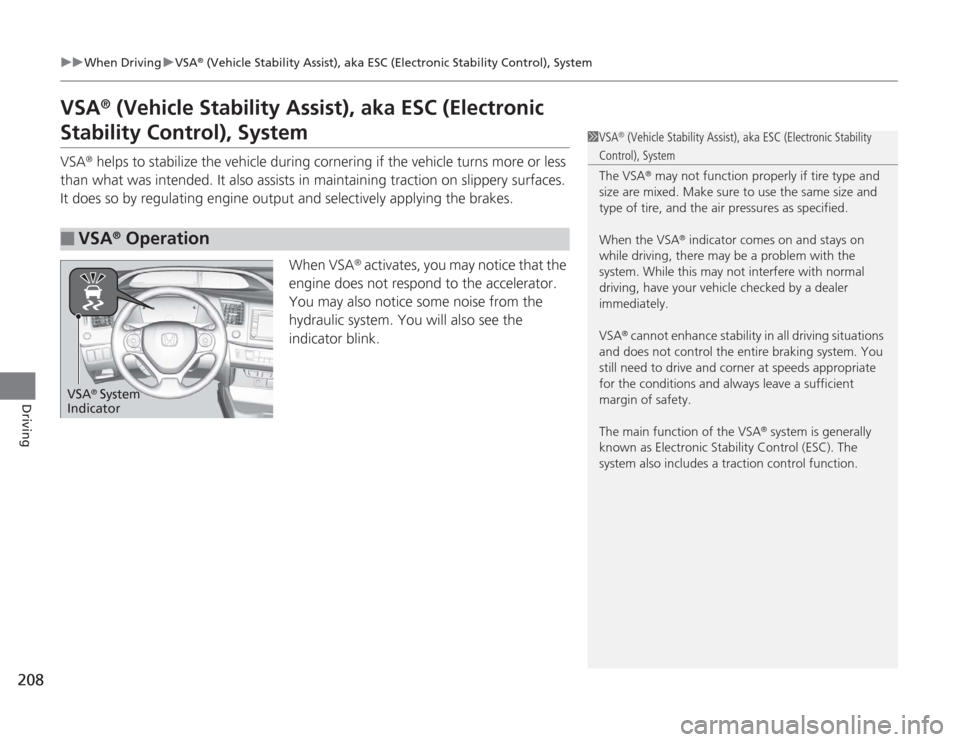
When VSA
® activates, you may notice that the
engine does not respond to the accelerator.
You may also notice some noise from the
hydraulic system. You will also see the
indicator blink.
■
VSA
® Operation
1 VSA
® (Vehicle Stability Assist), aka ESC (Electronic Stability
Control), System
The VSA
® may not function properly if tire type and
size are mixed. Make sure to use the same size and
type of tire, and the ai r pressures as specified.
When the VSA
® indicator comes on and stays on
while driving, there may be a problem with the
system. While this may not interfere with normal
driving, have your vehicle checked by a dealer
immediately.
VSA
® cannot enhance stability in all driving situations
and does not control the entire braking system. You
still need to drive and cor ner at speeds appropriate
for the conditions and always leave a sufficient
margin of safety.
The main function of the VSA
® system is generally
known as Electronic Stability Control (ESC). The
system also includes a traction control function.
VSA
® System
Indicator
Page 210 of 313
209
uuWhen Driving uVSA
® (Vehicle Stability Assist), aka ESC (Electronic Stability Control), System
Driving
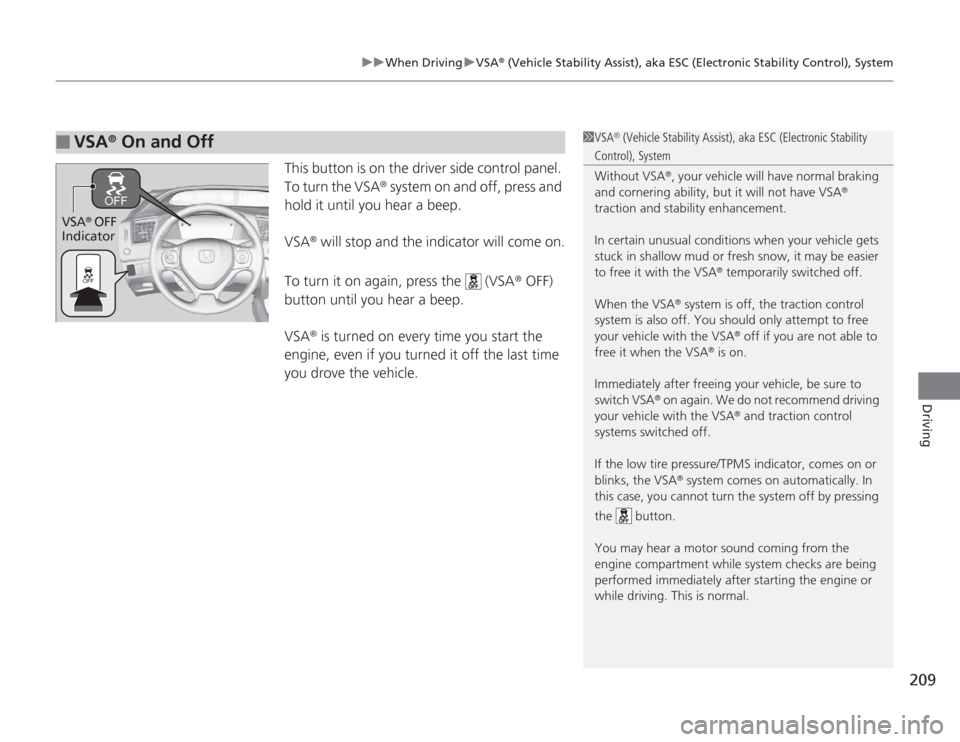
This button is on the driver side control panel.
To turn the VSA
® system on and off, press and
hold it until you hear a beep.
VSA
® will stop and the indicator will come on.
To turn it on again, press the (VSA
® OFF)
button until you hear a beep.
VSA
® is turned on every time you start the
engine, even if you turned it off the last time
you drove the vehicle.
■
VSA
® On and Off
1 VSA
® (Vehicle Stability Assist), aka ESC (Electronic Stability
Control), System
Without VSA
®, your vehicle will have normal braking
and cornering ability, but it will not have VSA
®
traction and stability enhancement.
In certain unusual conditions when your vehicle gets
stuck in shallow mud or fresh snow, it may be easier
to free it with the VSA
® temporarily switched off.
When the VSA
® system is off, the traction control
system is also off. You should only attempt to free
your vehicle with the VSA
® off if you are not able to
free it when the VSA
® is on.
Immediately after freeing your vehicle, be sure to
switch VSA
® on again. We do not recommend driving
your vehicle with the VSA
® and traction control
systems switched off.
If the low tire pressure /TPMS indicator, comes on or
blinks, the VSA
® system comes on automatically. In
this case, you cannot turn the system off by pressing
the button.
You may hear a motor sound coming from the
engine compartment while system checks are being
performed immediatel y after starting the engine or
while driving. This is normal.
VSA
® OFF
Indicator
Page 215 of 313
uuBraking uBrake System
214Driving
Your vehicle is equipped with front disc brakes. The brakes on the rear wheels are
drum. A power assist helps reduce the effort needed on the brake pedal. The brake
assist system increases the stopping force when you depress the brake pedal hard in
an emergency situation. The anti-lock brake system (ABS) helps you retain steering
control when braking very hard.
2 Brake Assist System P. 216
2 ABS (Anti-lock Brake System) P. 215
■
Foot Brake
1Foot Brake
Check the brakes after driving through deep water,
or if there is a buildup of road surface water. If
necessary, dry the brakes by lightly depressing the
pedal several times.
If you hear a continuous metallic friction sound when
applying the brakes, the brake pads need to be
replaced. Have the vehicle checked by a dealer.
Constantly using the brake pedal while going down a
long hill builds up heat, which reduces the brake
effectiveness. Apply engine braking by taking your
foot off the accelerator pedal and downshifting to a
lower gear.
Do not rest your foot on the brake pedal while
driving, as it will lightly apply the brakes and cause
them to lose effectiveness over time and reduce pad
life. It will also confuse drivers behind you.
Page 216 of 313
215
uuBraking uABS (Anti-lock Brake System)
Driving
ABS (Anti-lock Brake System)Helps prevent the wheels from locking up, and helps you retain steering control by
pumping the brakes rapidly, much faster than you.
The electronic brake distribution (EBD) system, which is part of the ABS, also
balances the front-to-rear braking distribution according to vehicle loading.
You should never pump the brake pedal. Let the ABS work for you by always
keeping firm, steady pressure on the brake pedal. This is sometimes referred to as
"stomp and steer."■
ABS operation
The brake pedal may pulsate slightly when the ABS is working. Keep holding the
pedal firmly down. On dry pavement, you will need to press on the brake pedal very
hard before the ABS activates. However, you may feel the ABS activate immediately
if you are trying to stop on snow or ice.
When the vehicle speed goes under 6 mph (10 km/h), the ABS stops.
■
ABS
1 ABS (Anti-lock Brake System)
NOTICEThe ABS may not function correctly if you use an
incorrect tire type and size.
When the ABS indicator comes on while driving,
there may be a problem with the system.
While normal braking is not affected, there is a
possibility of the ABS not operating. Have the vehicle
checked by a dealer immediately.
The ABS does not reduce the time or distance it takes
to stop the vehicle. It only helps with steering control
during hard braking.
In the following cases, your vehicle may need more
stopping distance than a vehicle without the ABS:•When driving on rough road surfaces, including
when driving on uneven surfaces, such as gravel or
snow.•When tire chains are installed.
You may hear a motor sound coming from the
engine compartment while system checks are being
performed immediatel y after starting the engine or
while driving. This is normal.
Page 228 of 313
227
Maintenance
This chapter discusses basic maintenance.
Before Performing MaintenanceInspection and Maintenance ............ 228
Safety When Performing Maintenance .... 229Parts and Fluids Used in Maintenance Service ........................................... 230
Maintenance Minder™ .................... 231
Maintenance Under the HoodMaintenance Items Under the Hood ..... 235Opening the Hood ........................... 236
Recommended Engine Oil ................ 237
Oil Check ......................................... 238
Adding Engine Oil ............................ 239Changing the Engine Oil and Oil Filter .. 240
Engine Coolant ................................ 242
Transmission Fluid ............................ 244
Brake Fluid ....................................... 245
Refilling Window Washer Fluid......... 246
Replacing Light Bulbs ....................... 247
Checking and Maintaining Wiper
Blades .......................................... 252Checking and Maintaining Tires
Checking Tires ................................. 254
Tire and Loading Information Label .. 255
Tire Labeling .................................... 255
DOT Tire Quality Grading (U.S. Vehicles) .. 257Wear Indicators................................ 259 Tire Service Life ................................ 259
Tire and Wheel Replacement ........... 260
Tire Rotation .................................... 261
Winter Tires ..................................... 262
12 Volt Battery .................................. 263
Remote Transmitter Care
Replacing the Battery ....................... 264
Climate Control System Maintenance ...... 265Cleaning
Interior Care .................................... 266
Exterior Care.................................... 268
Page 234 of 313
233
uuMaintenance Minder™ uTo Use Maintenance Minder
TM
Continued
Maintenance
■
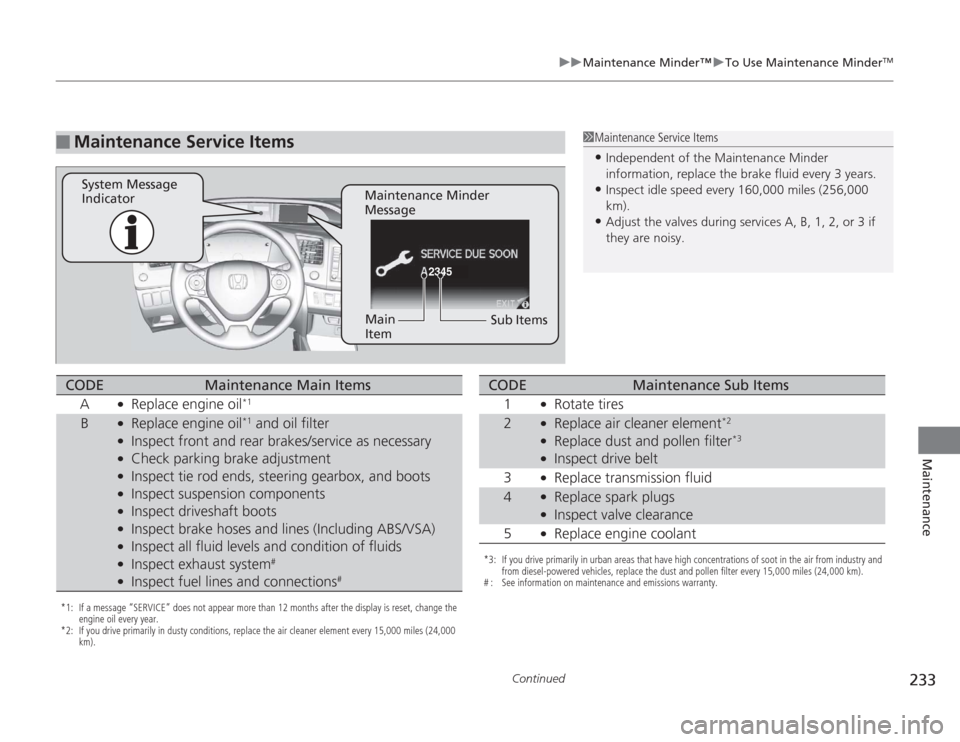
Maintenance Service Items
1Maintenance Service Items•Independent of the Maintenance Minder
information, replace the brake fluid every 3 years.•Inspect idle speed every 160,000 miles (256,000
km).•Adjust the valves during services A, B, 1, 2, or 3 if
they are noisy.
2345
Maintenance Minder
Message
System Message
Indicator
Sub Items
Main
Item
*1: If a message “SERVICE” does not appear more than 12 months after the display is reset, change the
engine oil every year.
*2: If you drive primarily in dusty conditions, replace the air cleaner element every 15,000 miles (24,000 km).CODE
Maintenance Main Items
A
●
Replace engine oil
*1
B
●
Replace engine oil
*1 and oil filter
●
Inspect front and rear brakes/service as necessary
●
Check parking brake adjustment
●
Inspect tie rod ends, steering gearbox, and boots
●
Inspect suspension components
●
Inspect driveshaft boots
●
Inspect brake hoses and lines (Including ABS/VSA)
●
Inspect all fluid levels and condition of fluids
●
Inspect exhaust system
#
●
Inspect fuel lines and connections
#
*3: If you drive primarily in urban areas that have high concentrations of soot in the air from industry and from diesel-powered vehicles, replace the dust and pollen filter every 15,000 miles (24,000 km).
# : See information on maintenance and emissions warranty.CODE
Maintenance Sub Items
1
●
Rotate tires
2
●
Replace air cleaner element
*2
●
Replace dust and pollen filter
*3
●
Inspect drive belt
3
●
Replace transmission fluid
4
●
Replace spark plugs
●
Inspect valve clearance
5
●
Replace engine coolant
Page 239 of 313
238
uuMaintenance Under the Hood uOil Check
Maintenance
Oil CheckWe recommend that you check the engine oil level every time you refuel.
Park the vehicle on level ground.
Wait approximately three minutes after turning the engine off before you check the
oil.
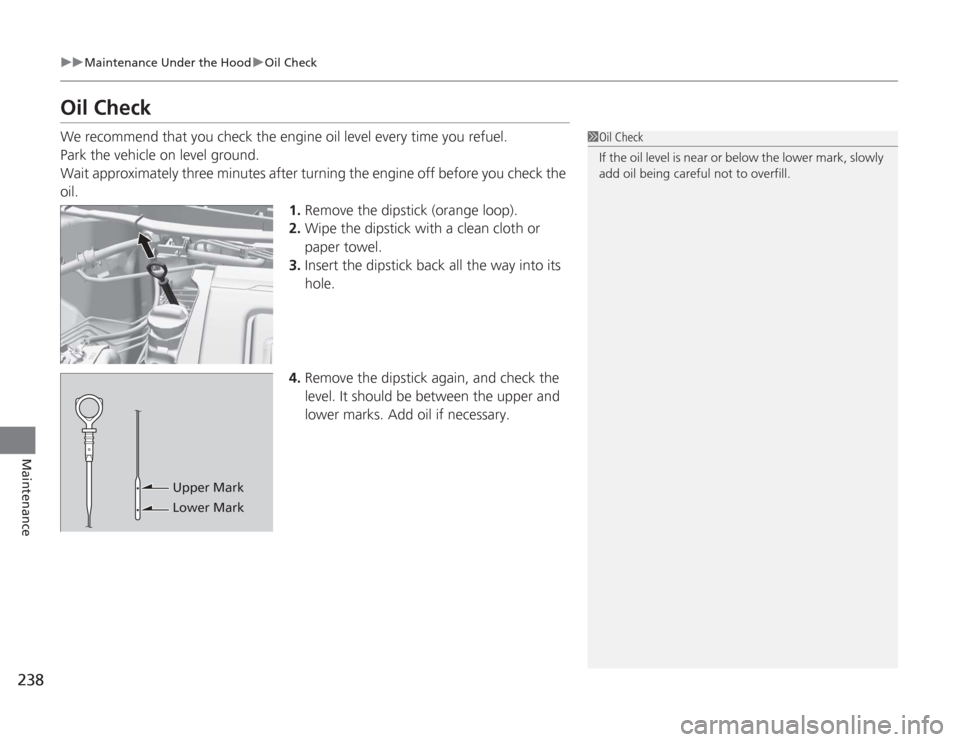
1.Remove the dipstick (orange loop).
2. Wipe the dipstick with a clean cloth or
paper towel.
3. Insert the dipstick back all the way into its
hole.
4. Remove the dipstick again, and check the
level. It should be between the upper and
lower marks. Add oil if necessary.
1Oil Check
If the oil level is near or below the lower mark, slowly
add oil being careful not to overfill.
Upper Mark
Lower Mark
Page 240 of 313
239
uuMaintenance Under the Hood uAdding Engine Oil
Maintenance
Adding Engine Oil
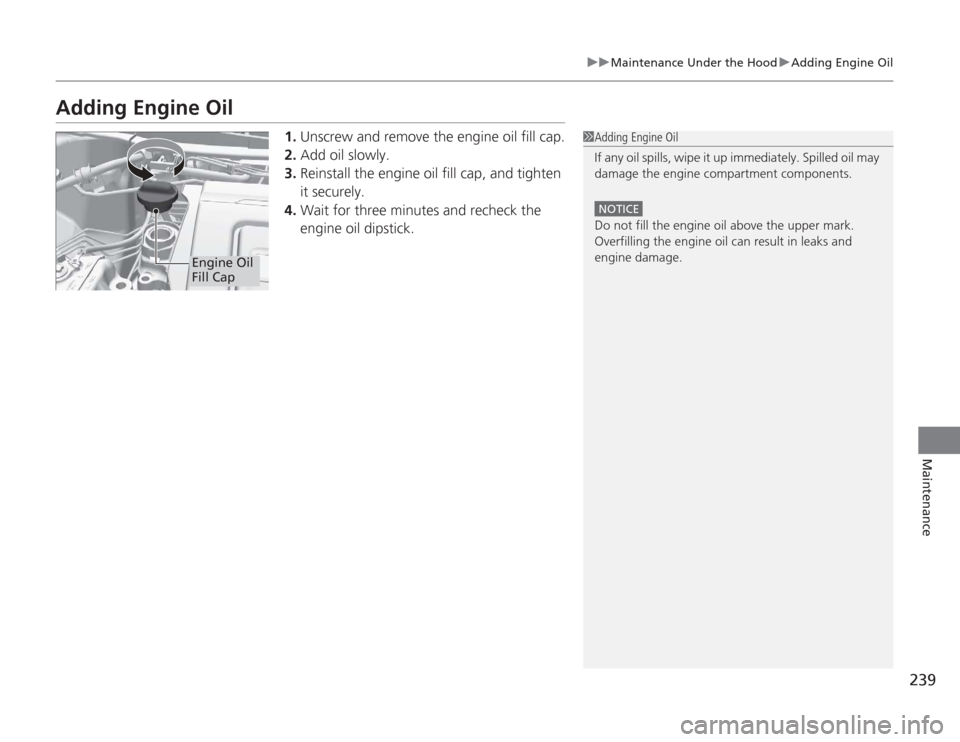
1. Unscrew and remove the engine oil fill cap.
2. Add oil slowly.
3. Reinstall the engine oil fill cap, and tighten
it securely.
4. Wait for three minutes and recheck the
engine oil dipstick.
1Adding Engine Oil
If any oil spills, wipe it up immediately. Spilled oil may
damage the engine compartment components.
NOTICEDo not fill the engine oil above the upper mark.
Overfilling the engine oil can result in leaks and
engine damage.
Engine Oil
Fill Cap
Page 242 of 313
241
uuMaintenance Under the Hood uChanging the Engine Oil and Oil Filter
Maintenance
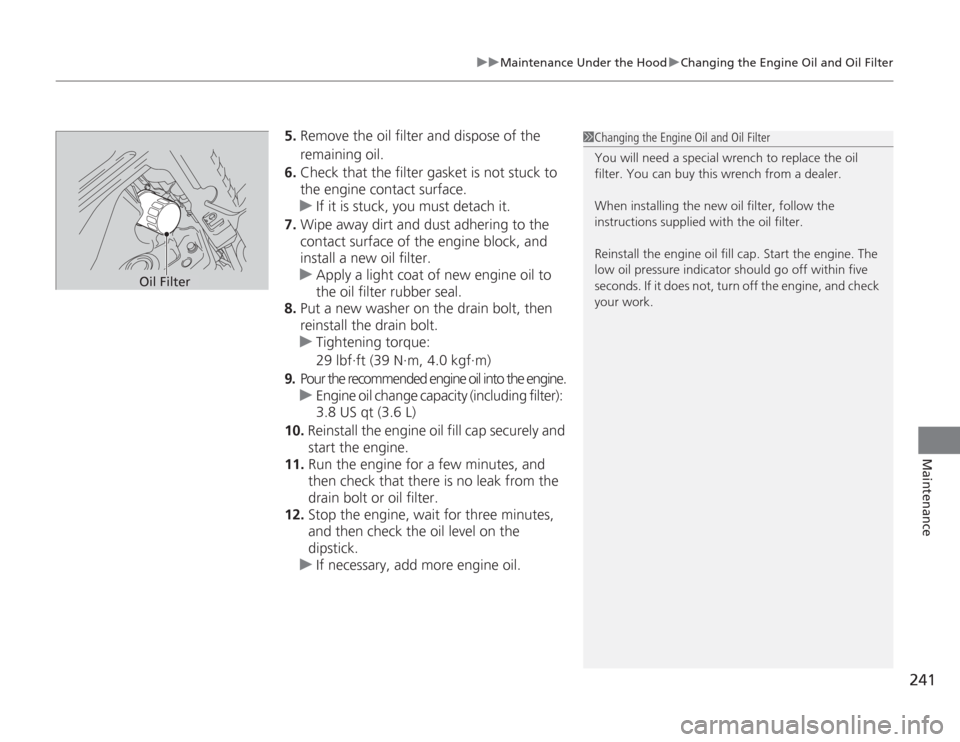
5. Remove the oil filter and dispose of the
remaining oil.
6. Check that the filter gasket is not stuck to
the engine contact surface.
u If it is stuck, you must detach it.
7. Wipe away dirt and dust adhering to the
contact surface of the engine block, and
install a new oil filter.
u Apply a light coat of new engine oil to
the oil filter rubber seal.
8. Put a new washer on the drain bolt, then
reinstall the drain bolt.
u Tightening torque:
29 lbf∙ft (39 N∙m, 4.0 kgf∙m)
9. Pour the recommended engine oil into the engine.
u Engine oil change capacity (including filter):
3.8 US qt (3.6 L)
10. Reinstall the engine oil fill cap securely and
start the engine.
11. Run the engine for a few minutes, and
then check that there is no leak from the
drain bolt or oil filter.
12. Stop the engine, wait for three minutes,
and then check the oil level on the
dipstick.
u If necessary, add more engine oil.
1Changing the Engine Oil and Oil Filter
You will need a special wrench to replace the oil
filter. You can buy this wrench from a dealer.
When installing the new oil filter, follow the
instructions supplied with the oil filter.
Reinstall the engine oil fill cap. Start the engine. The
low oil pressure indicator should go off within five
seconds. If it does not, turn off the engine, and check
your work.
Oil Filter
Page 243 of 313
242
uuMaintenance Under the Hood uEngine Coolant
Maintenance
Engine CoolantThis coolant is premixed with 50% antifreeze and 50% water. Do not add any
straight antifreeze or water.
We recommend you check the engine coolant level every time you refuel. Check the
reserve tank first. If it is completely empty, also check the coolant level in the
radiator. Add the engine coolant accordingly.
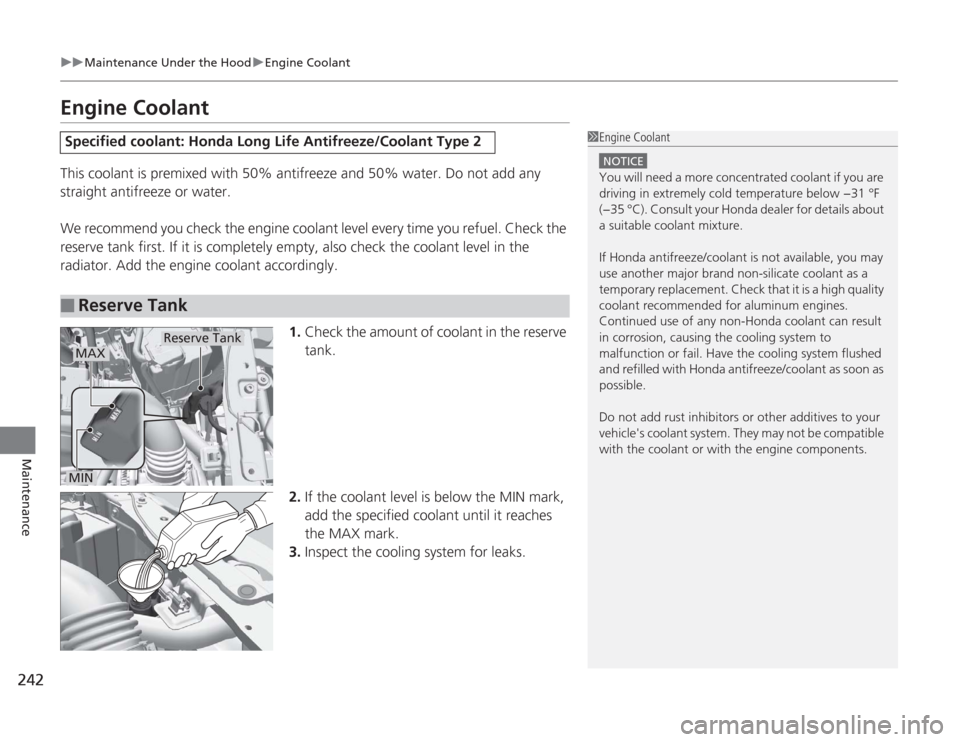
1.Check the amount of coolant in the reserve
tank.
2. If the coolant level is below the MIN mark,
add the specified coolant until it reaches
the MAX mark.
3. Inspect the cooling system for leaks.Specified coolant: Honda Long Life Antifreeze/Coolant Type 2■
Reserve Tank
1Engine Coolant
NOTICEYou will need a more concentrated coolant if you are
driving in extremely cold temperature below −31 °F
(−35 °C). Consult your Honda dealer for details about
a suitable coolant mixture.
If Honda antifreeze/coolant is not available, you may
use another major brand non-silicate coolant as a
temporary replacement. Check that it is a high quality
coolant recommended for aluminum engines.
Continued use of any non-Honda coolant can result
in corrosion, causing the cooling system to
malfunction or fail. Have the cooling system flushed
and refilled with Honda antifreeze/coolant as soon as
possible.
Do not add rust inhibitors or other additives to your
vehicle's coolant system. They may not be compatible
with the coolant or with the engine components.
Reserve Tank
MAXMIN