light HONDA CIVIC HYBRID 2012 9.G Repair Manual
[x] Cancel search | Manufacturer: HONDA, Model Year: 2012, Model line: CIVIC HYBRID, Model: HONDA CIVIC HYBRID 2012 9.GPages: 313, PDF Size: 8.65 MB
Page 281 of 313
280Handling the Unexpected
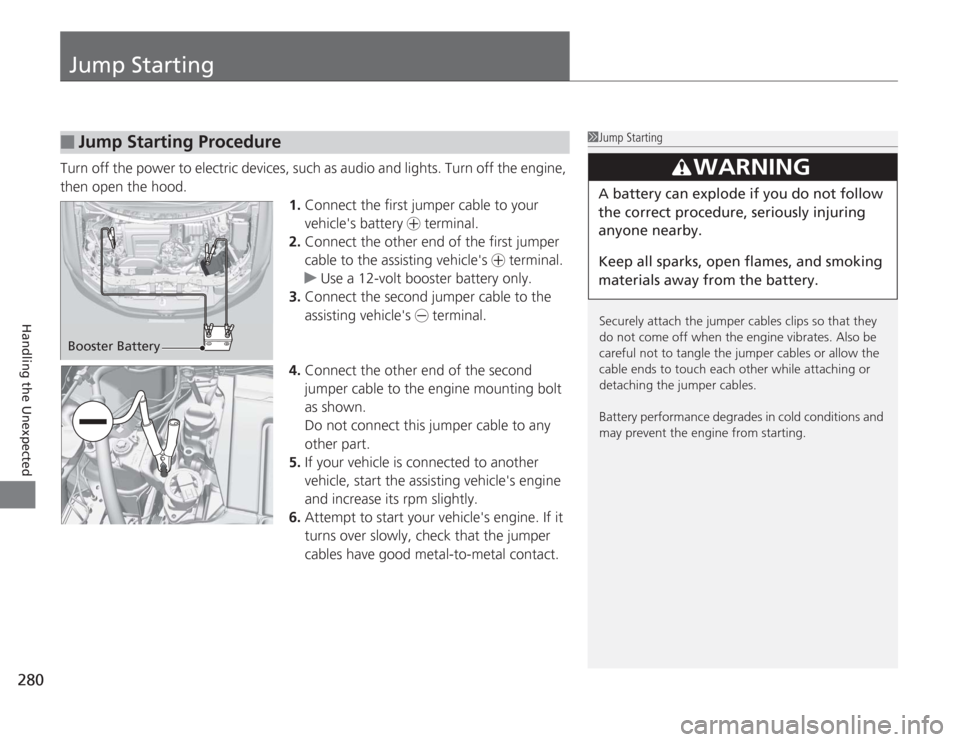
Jump StartingTurn off the power to electric devices, such as audio and lights. Turn off the engine,
then open the hood.1.Connect the first jumper cable to your
vehicle's battery + terminal.
2. Connect the other end of the first jumper
cable to the assisting vehicle's + terminal.
u Use a 12-volt booster battery only.
3. Connect the second jumper cable to the
assisting vehicle's - terminal.
4. Connect the other end of the second
jumper cable to the engine mounting bolt
as shown.
Do not connect this jumper cable to any
other part.
5. If your vehicle is c onnected to another
vehicle, start the assisting vehicle's engine
and increase its rpm slightly.
6. Attempt to start your vehicle's engine. If it
turns over slowly, check that the jumper
cables have good metal-to-metal contact.■
Jump Starting Procedure
1Jump Starting
Securely attach the jumper cables clips so that they
do not come off when the engine vibrates. Also be
careful not to tangle the jumper cables or allow the
cable ends to touch each other while attaching or
detaching the jumper cables.
Battery performance degrades in cold conditions and
may prevent the engine from starting.
3
WARNING
A battery can explode if you do not follow
the correct procedure, seriously injuring
anyone nearby.
Keep all sparks, open flames, and smoking
materials away from the battery.
Booster Battery
Page 284 of 313

283
Continued
Handling the Unexpected
OverheatingHow to Handle OverheatingOverheating symptoms are as follows:
•The high temperature indicator comes on or the engine suddenly loses power.
• Steam is coming out of the engine compartment.■
First thing to do
1. Immediately park the vehicle in a safe place.
u Move the shift lever to
(P
and set the parking brake. Turn off all accessories
and turn on the hazard warning lights.
2. No steam coming out: Keep the engine running and open the hood.
Steam coming out: Turn off the engine and wait until steam goes away. Then,
open the hood.
1 How to Handle Overheating
NOTICEContinuing to drive with the high temperature
indicator on may damage the engine.
3
WARNING
Steam and spray from an overheated
engine can seriously scald you.
Do not open the ho od if steam is coming
out.
Page 286 of 313
285
Handling the Unexpected
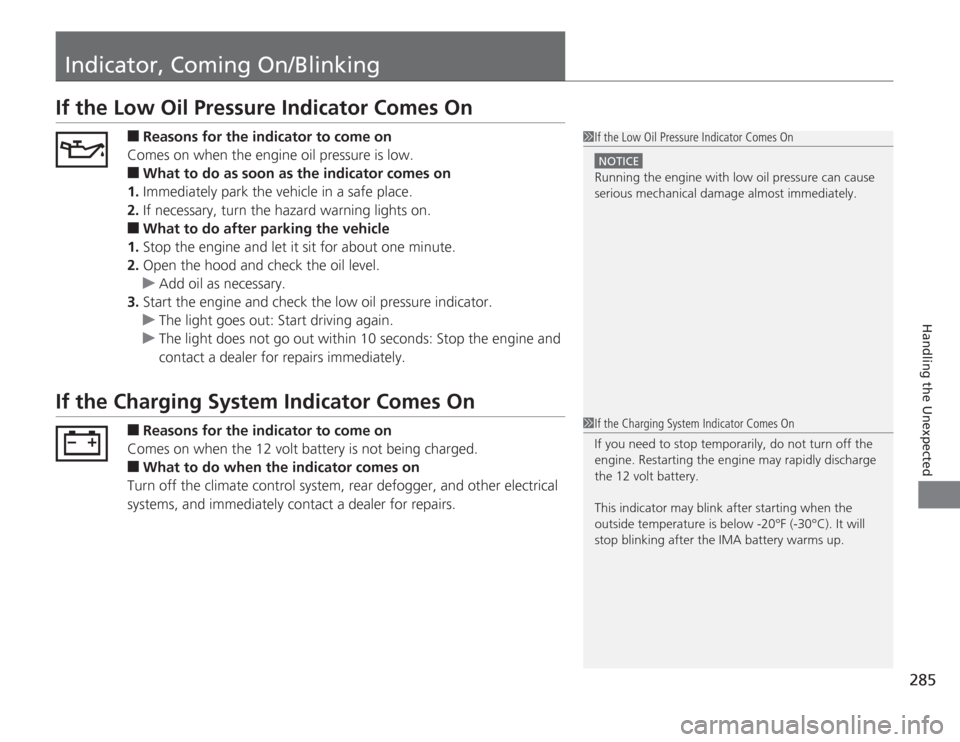
Indicator, Coming On/BlinkingIf the Low Oil Pressure Indicator Comes On
■
Reasons for the indicator to come on
Comes on when the engine oil pressure is low.
■
What to do as soon as the indicator comes on
1. Immediately park the vehicle in a safe place.
2. If necessary, turn the hazard warning lights on.
■
What to do after parking the vehicle
1. Stop the engine and let it sit for about one minute.
2. Open the hood and check the oil level.
u Add oil as necessary.
3. Start the engine and check the low oil pressure indicator.
u The light goes out: Start driving again.
u The light does not go out within 10 seconds: Stop the engine and
contact a dealer for repairs immediately.
If the Charging System Indicator Comes On
■
Reasons for the indicator to come on
Comes on when the 12 volt battery is not being charged.
■
What to do when the indicator comes on
Turn off the climate control system, rear defogger, and other electrical
systems, and immediately contact a dealer for repairs.
1 If the Low Oil Pressure Indicator Comes On
NOTICERunning the engine with low oil pressure can cause
serious mechanical damage almost immediately.1If the Charging System Indicator Comes On
If you need to stop temporarily, do not turn off the
engine. Restarting the engine may rapidly discharge
the 12 volt battery.
This indicator may blink after starting when the
outside temperature is below -20°F (-30°C). It will
stop blinking after the IMA battery warms up.
Page 288 of 313
287
uuIndicator, Coming On/Blinking uIf the Brake System Indicator (Red) Comes On
Handling the Unexpected
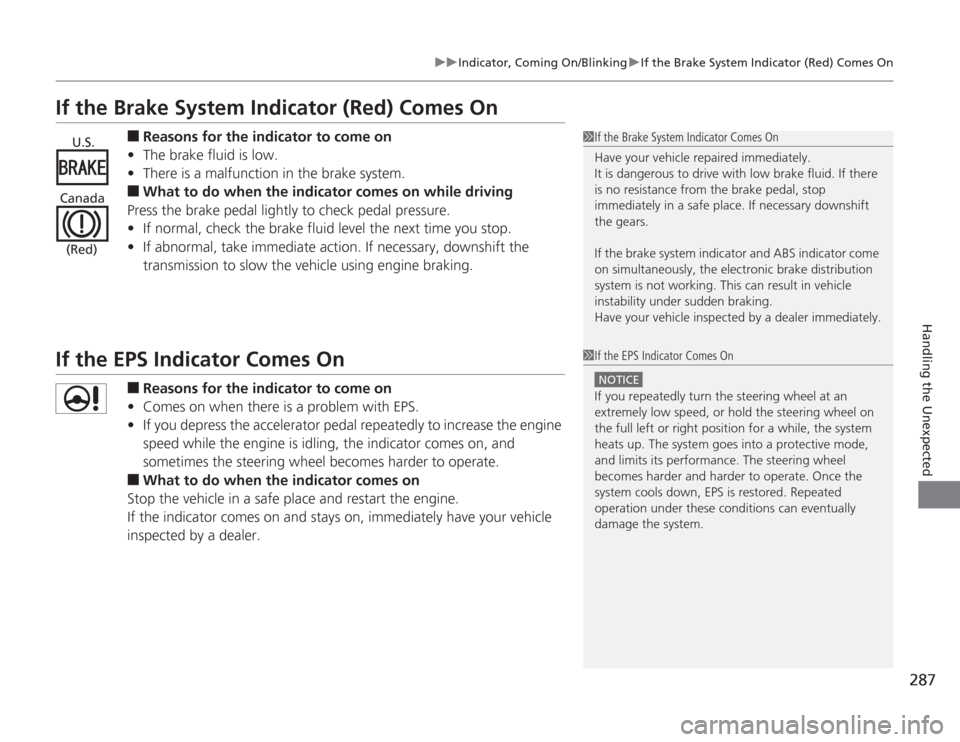
If the Brake System Indicator (Red) Comes On
■
Reasons for the indicator to come on
• The brake fluid is low.
• There is a malfunction in the brake system.
■
What to do when the indicator comes on while driving
Press the brake pedal lightly to check pedal pressure.
• If normal, check the brake fluid level the next time you stop.
• If abnormal, take immediate action. If necessary, downshift the
transmission to slow the vehic le using engine braking.
If the EPS Indicator Comes On
■
Reasons for the indicator to come on
• Comes on when there is a problem with EPS.
• If you depress the accelerator pedal repeatedly to increase the engine
speed while the engine is idling, the indicator comes on, and
sometimes the steering wheel becomes harder to operate.
■
What to do when the indicator comes on
Stop the vehicle in a safe place and restart the engine.
If the indicator comes on and stays on, immediately have your vehicle
inspected by a dealer.
1 If the Brake System Indicator Comes On
Have your vehicle repaired immediately.
It is dangerous to drive with low brake fluid. If there
is no resistance from the brake pedal, stop
immediately in a safe place. If necessary downshift
the gears.
If the brake system indicator and ABS indicator come
on simultaneously, the electronic brake distribution
system is not working. This can result in vehicle
instability under sudden braking.
Have your vehicle inspected by a dealer immediately.
U.S.
Canada (Red)
1 If the EPS Indicator Comes On
NOTICEIf you repeatedly turn the steering wheel at an
extremely low speed, or hold the steering wheel on
the full left or right position for a while, the system
heats up. The system goes into a protective mode,
and limits its performance. The steering wheel
becomes harder and harder to operate. Once the
system cools down, EPS is restored. Repeated
operation under these conditions can eventually
damage the system.
Page 290 of 313
289
Continued
Handling the Unexpected
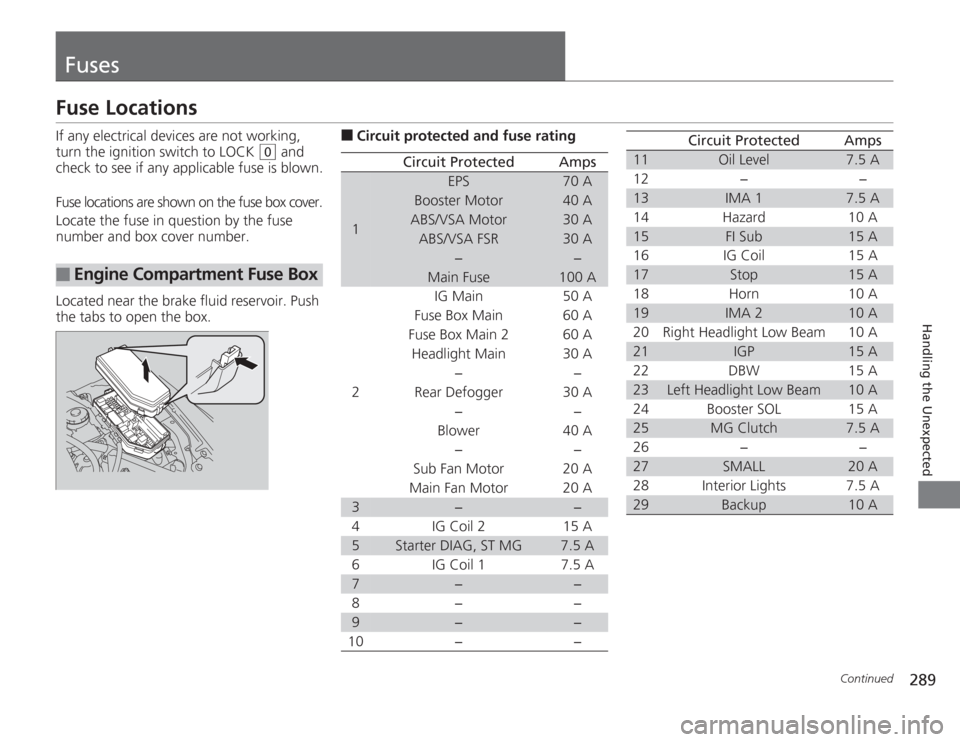
FusesFuse LocationsIf any electrical devices are not working,
turn the ignition switch to LOCK
(0
and
check to see if any applicable fuse is blown.
Fuse locations are shown on the fuse box cover.
Locate the fuse in question by the fuse
number and box cover number.
Located near the brake fluid reservoir. Push
the tabs to open the box.
■
Engine Compartmen t Fuse Box
■
Circuit protected and fuse rating
Circuit Protected
Amps
1
EPS
70 A
Booster Motor
40 A
ABS/VSA Motor
30 A
ABS/VSA FSR
30 A
−
−
Main Fuse
100 A
2
IG Main
50 A
Fuse Box Main 60 A
Fuse Box Main 2
60 A
Headlight Main 30 A
−
−
Rear Defogger 30 A −−
Blower 40 A
−−
Sub Fan Motor 20 A
Main Fan Motor 20 A
3
−
−
4 IG Coil 2 15 A
5
Starter DIAG, ST MG
7.5 A
6 IG Coil 1 7.5 A
7
−
−
8− −
9
−
−
10 − −
11
Oil Level
7.5 A
12 − −
13
IMA 1
7.5 A
14 Hazard 10 A
15
FI Sub
15 A
16 IG Coil 15 A
17
Stop
15 A
18 Horn 10 A
19
IMA 2
10 A
20 Right Headlight Low Beam 10 A
21
IGP
15 A
22 DBW 15 A
23
Left Headlight Low Beam
10 A
24 Booster SOL 15 A
25
MG Clutch
7.5 A
26 − −
27
SMALL
20 A
28 Interior Lights 7.5 A
29
Backup
10 A
Circuit Protected
Amps
Page 291 of 313
290
uuFuses uFuse Locations
Handling the Unexpected
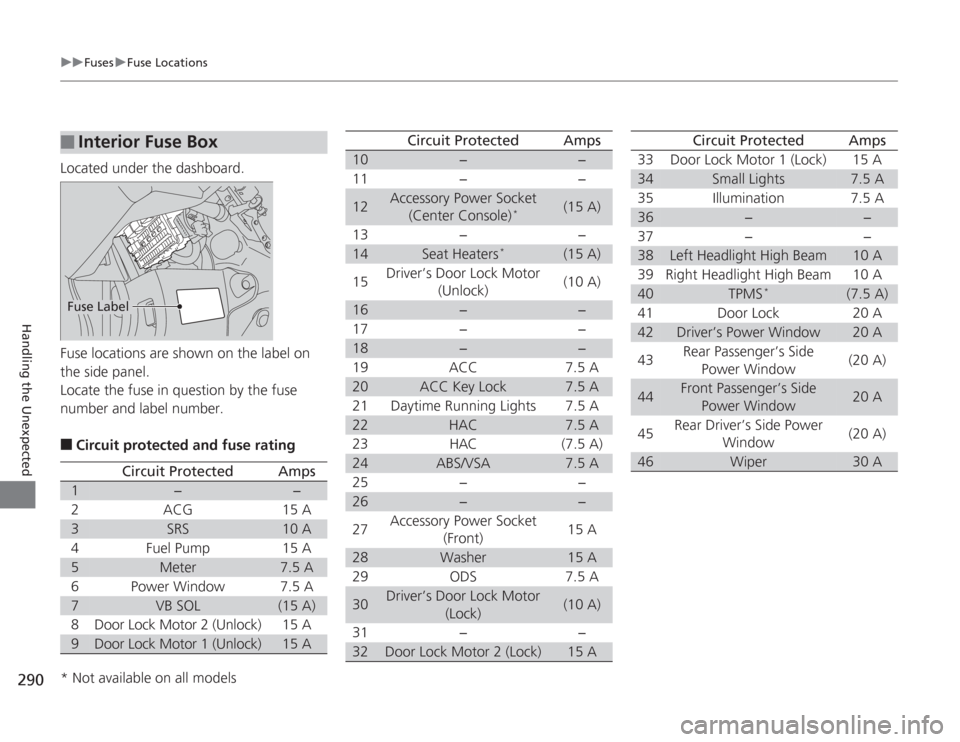
Located under the dashboard.
Fuse locations are shown on the label on
the side panel.
Locate the fuse in question by the fuse
number and label number.■
Circuit protected and fuse rating
■
Interior Fuse BoxFuse Label
Circuit Protected
Amps
1
−
−
2
ACG
15 A
3
SRS
10 A
4
Fuel Pump
15 A
5
Meter
7.5 A
6
Power Window
7.5 A
7
VB SOL
(15 A)
8
Door Lock Motor 2 (Unlock)
15 A
9
Door Lock Motor 1 (Unlock)
15 A
10
−
−
11 − −
12
Accessory Power Socket (Center Console)
*
(15 A)
13 − −
14
Seat Heaters
*
(15 A)
15 Driver’s Door Lock Motor
(Unlock) (10 A)
16
−
−
17 − −
18
−
−
19 ACC 7.5 A
20
ACC Key Lock
7.5 A
21 Daytime Running Lights 7.5 A
22
HAC
7.5 A
23 HAC (7.5 A)
24
ABS/VSA
7.5 A
25 − −
26
−
−
27 Accessory Power Socket
(Front) 15 A
28
Washer
15 A
29 ODS 7.5 A
30
Driver’s Door Lock Motor (Lock)
(10 A)
31 − −
32
Door Lock Motor 2 (Lock)
15 A
Circuit Protected
Amps
33 Door Lock Motor 1 (Lock) 15 A34
Small Lights
7.5 A
35 Illumination 7.5 A
36
−
−
37 − −
38
Left Headlight High Beam
10 A
39 Right Headlight High Beam 10 A
40
TPMS
*
(7.5 A)
41 Door Lock 20 A
42
Driver’s Power Window
20 A
43 Rear Passenger’s Side
Power Window (20 A)
44
Front Passenger’s Side
Power Window
20 A
45 Rear Driver’s Side Power
Window (20 A)
46
Wiper
30 A
Circuit Protected
Amps
* Not available on all models
Page 292 of 313

291
uuFuses uInspecting and Changing Fuses
Handling the Unexpected
Inspecting and Changing Fuses
1. Turn the ignition switch to LOCK
(0
. Turn
headlights and all accessories off.
2. Remove the fuse box cover.
3. Check the large fuse in the engine
compartment.
u If the fuse is blown, use a Phillips-head
screwdriver to remove the screw and
replace it with a new one.
4. Inspect the small fuses in the engine
compartment and the vehicle interior.
u If there is a burned out fuse, remove it
with the fuse puller and replace it with a
new one.
1Inspecting and Changing Fuses
NOTICEReplacing a fuse with one that has a higher rating
greatly increases the chances of damaging the
electrical system.
Replace fuse with a spare fuse of the same specified
amperage.
Confirm the specified amperage using the charts on
P. 289 to 290.
There is a fuse puller on the back of the engine
compartment fuse box cover.
Combined
Fuse Blown FuseFuse Puller
Page 295 of 313
294Information
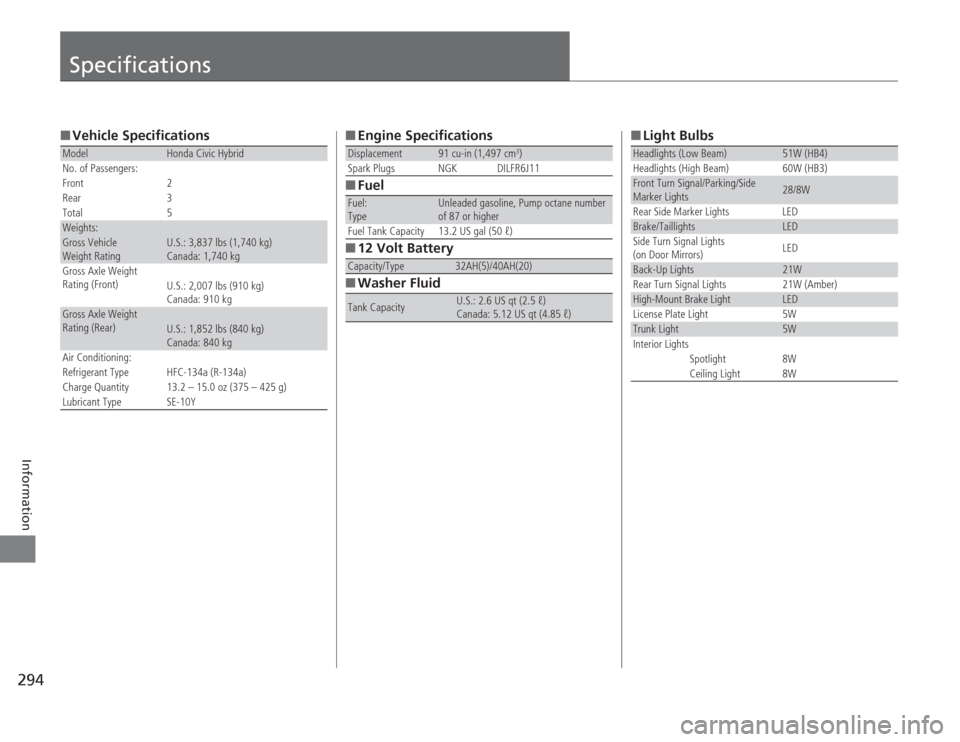
Specifications■Vehicle SpecificationsModel
Honda Civic Hybrid
No. of Passengers:
Front 2
Rear 3
Total 5
Weights:Gross Vehicle
Weight Rating
U.S.: 3,837 lbs (1,740 kg)
Canada: 1,740 kg
Gross Axle Weight
Rating (Front)
U.S.: 2,007 lbs (910 kg)
Canada: 910 kg
Gross Axle Weight
Rating (Rear)
U.S.: 1,852 lbs (840 kg)
Canada: 840 kg
Air Conditioning:
Refrigerant Type HFC-134a (R-134a)
Charge Quantity 13.2 – 15.0 oz (375 – 425 g)
Lubricant Type SE-10Y
■ Engine Specifications
■ Fuel
■ 12 Volt Battery
■ Washer FluidDisplacement
91 cu-in (1,497 cm
3)
Spark Plugs NGK DILFR6J11
Fuel:
Type
Unleaded gasoline, Pump octane number
of 87 or higher
Fuel Tank Capacity 13.2 US gal (50 ℓ)
Capacity/Type
32AH(5)/40AH(20)
Tank Capacity
U.S.: 2.6 US qt (2.5 ℓ)
Canada: 5.12 US qt (4.85 ℓ)
■ Light BulbsHeadlights (Low Beam)
51W (HB4)
Headlights (High Beam) 60W (HB3)
Front Turn Signal/Parking/Side
Marker Lights
28/8W
Rear Side Marker Lights LED
Brake/Taillights
LED
Side Turn Signal Lights
(on Door Mirrors) LED
Back-Up Lights
21W
Rear Turn Signal Lights 21W (Amber)
High-Mount Brake Light
LED
License Plate Light 5W
Trunk Light
5W
Interior Lights
Spotlight 8W
Ceiling Light 8W
Page 301 of 313
300
uuEmissions Testing uTesting of Readiness Codes
Information
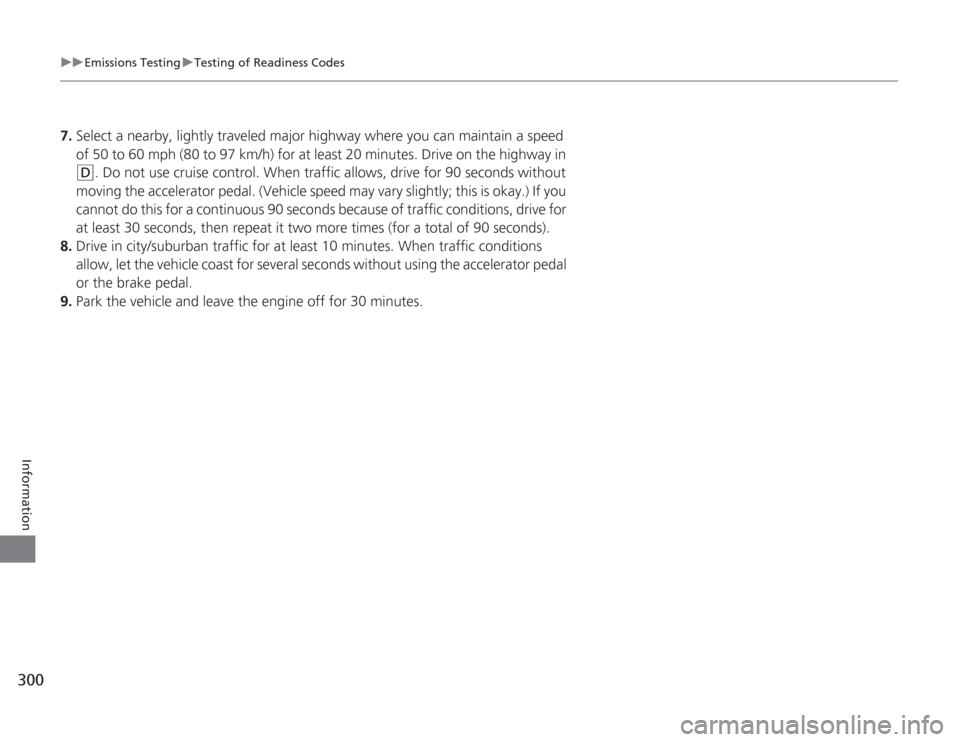
7. Select a nearby, lightly traveled major highway where you can maintain a speed
of 50 to 60 mph (80 to 97 km/h) for at least 20 minutes. Drive on the highway in
(D
. Do not use cruise control. When traffic allows, drive for 90 seconds without
moving the accelerator pedal. (Vehicle speed may vary slightly; this is okay.) If you
cannot do this for a continuous 90 seconds because of traffic conditions, drive for
at least 30 seconds, then repeat it two more times (for a total of 90 seconds).
8. Drive in city/suburban traffic for at least 10 minutes. When traffic conditions
allow, let the vehicle coast for several seconds without using the accelerator pedal
or the brake pedal.
9. Park the vehicle and leave the engine off for 30 minutes.
Page 306 of 313
INDEX
305
INDEX
INDEX
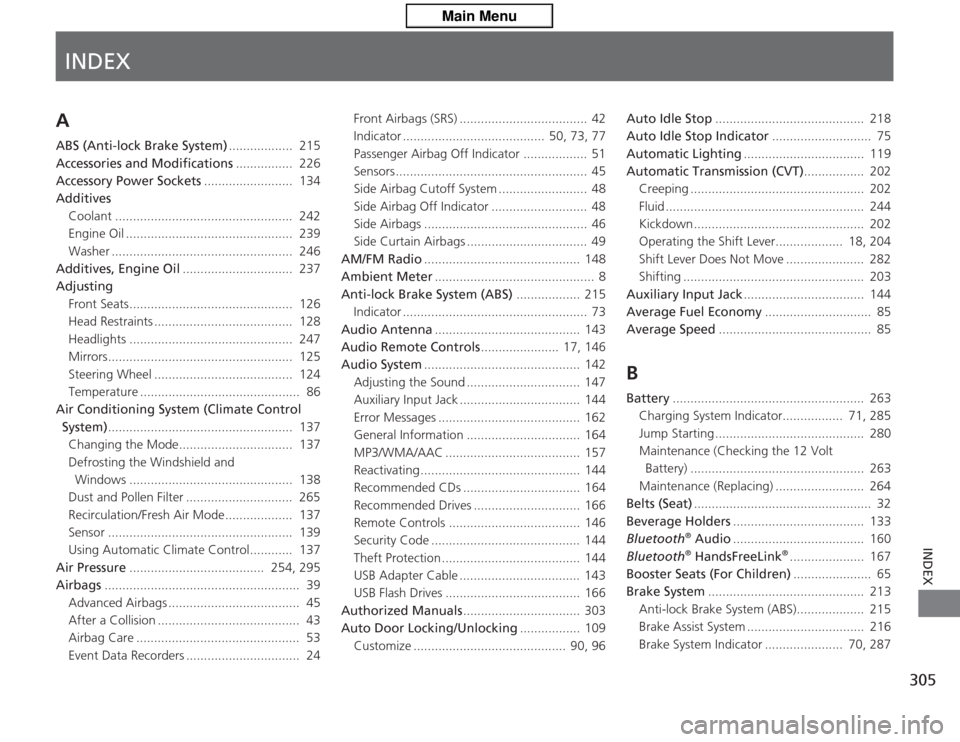
AABS (Anti-lock Brake System).................. 215
Accessories and Modifications ................ 226
Accessory Power Sockets ......................... 134
Additives
Coolant .................................................. 242
Engine Oil ............................................... 239
Washer ................................................... 246
Additives, Engine Oil ............................... 237
Adjusting Front Seats.............................................. 126
Head Restraints ....................................... 128
Headlights .............................................. 247
Mirrors.................................................... 125
Steering Wheel ....................................... 124
Temperature ............................................. 86
Air Conditioning Sys tem (Climate Control
System) .................................................... 137
Changing the Mode................................ 137
Defrosting the Windshield and Windows .............................................. 138
Dust and Pollen Filter .............................. 265
Recirculation/Fresh Air Mode................... 137
Sensor .................................................... 139
Using Automatic Climate Control............ 137
Air Pressure ...................................... 254, 295
Airbags ....................................................... 39
Advanced Airbags ..................................... 45
After a Collision ........................................ 43
Airbag Care .............................................. 53
Event Data Recorders ................................ 24 Front Airbags (SRS) .................................... 42
Indicator ........................................ 50, 73, 77
Passenger Airbag Off Indicator .................. 51
Sensors ...................................................... 45
Side Airbag Cutoff System ......................... 48
Side Airbag Off Indicator ........................... 48
Side Airbags .............................................. 46
Side Curtain Airbags .................................. 49
AM/FM Radio ............................................ 148
Ambient Meter ............................................. 8
Anti-lock Brake System (ABS) .................. 215
Indicator .................................................... 73
Audio Antenna ......................................... 143
Audio Remote Controls ...................... 17, 146
Audio System ............................................ 142
Adjusting the Sound ................................ 147
Auxiliary Input Jack .................................. 144
Error Messages ........................................ 162
General Information ................................ 164
MP3/WMA/AAC ...................................... 157
Reactivating ............................................. 144
Recommended CDs ................................. 164
Recommended Drives .............................. 166
Remote Controls ..................................... 146
Security Code .......................................... 144
Theft Protection ....................................... 144
USB Adapter Cable .................................. 143
USB Flash Drives ...................................... 166
Authorized Manuals ................................. 303
Auto Door Locking/Unlocking ................. 109
Customize ........................................... 90, 96 Auto Idle Stop
.......................................... 218
Auto Idle Stop Indicator ............................ 75
Automatic Lighting .................................. 119
Automatic Transmission (CVT) ................. 202
Creeping ................................................. 202
Fluid ........................................................ 244
Kickdown ................................................ 202
Operating the Shift Lever................... 18, 204
Shift Lever Does Not Move ...................... 282
Shifting ................................................... 203
Auxiliary Input Jack .................................. 144
Average Fuel Economy .............................. 85
Average Speed ........................................... 85
BBattery...................................................... 263
Charging System Indicator................. 71, 285
Jump Starting .......................................... 280
Maintenance (Checking the 12 Volt Battery) ................................................. 263
Maintenance (Replacing) ......................... 264
Belts (Seat) .................................................. 32
Beverage Holders ..................................... 133
Bluetooth
® Audio ..................................... 160
Bluetooth® HandsFreeLink
®..................... 167
Booster Seats (For Children) ...................... 65
Brake System ............................................ 213
Anti-lock Brake System (ABS)................... 215
Brake Assist System ................................. 216
Brake System Indicator ...................... 70, 287