Fluid HONDA CIVIC HYBRID 2012 9.G Owners Manual
[x] Cancel search | Manufacturer: HONDA, Model Year: 2012, Model line: CIVIC HYBRID, Model: HONDA CIVIC HYBRID 2012 9.GPages: 313, PDF Size: 8.65 MB
Page 12 of 313
11Quick Reference Guide
To Keep the IMA Battery in Good Condition Drive your vehicle at least once a month for more than 30 minutes. Parking your vehicle for an extended period can
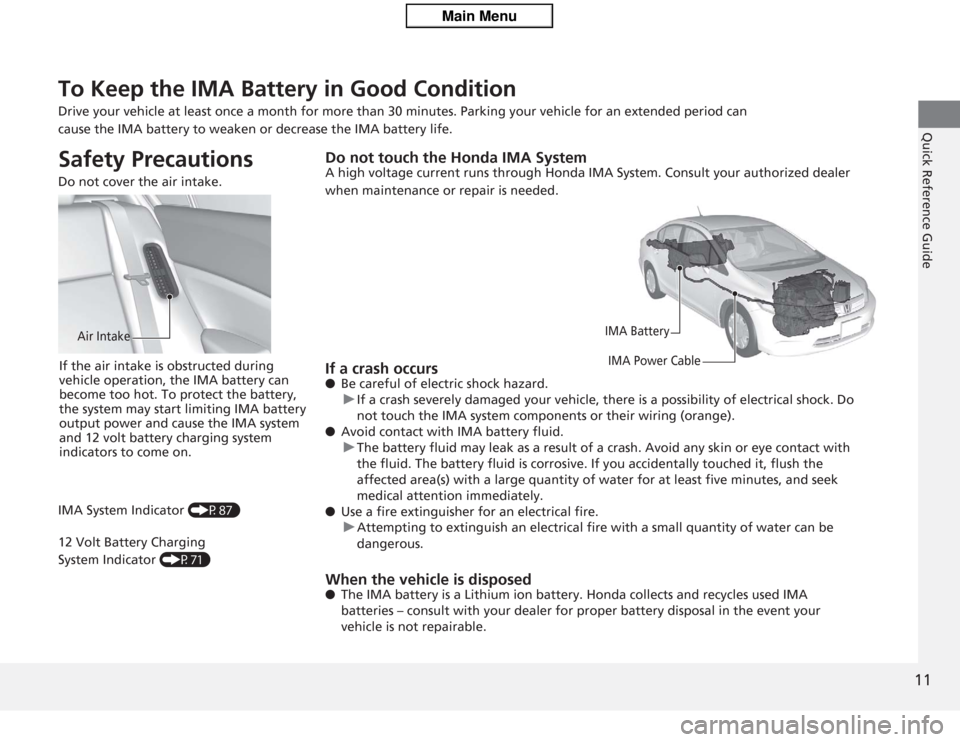
cause the IMA battery to weaken or decrease the IMA battery life.Safety Precautions Do not cover the air intake.
Air Intake
If the air intake is obstructed during
vehicle operation, the IMA battery can
become too hot. To protect the battery,
the system may start limiting IMA battery
output power and cause the IMA system
and 12 volt battery charging system
indicators to come on.
IMA System Indicator (P87)
12 Volt Battery Charging
System Indicator (P71)
Do not touch the Honda IMA SystemA high voltage current runs through Honda IMA System. Consult your authorized dealer
when maintenance or repair is needed.
IMA Battery
IMA Power Cable
If a crash occurs● Be careful of electric shock hazard.
u If a crash severely damaged your vehicle, there is a possibility of electrical shock. Do
not touch the IMA system components or their wiring (orange).
● Avoid contact with IMA battery fluid.
u The battery fluid may leak as a result of a crash. Avoid any skin or eye contact with
the fluid. The battery fluid is corrosive. If you accid entally touched it, flush the
affected area(s) with a large quantity of water for at least five minutes, and seek
medical attention immediately.
● Use a fire extinguisher for an electrical fire.
u Attempting to extinguish an electrical fire with a small quantity of water can be
dangerous.When the vehicle is disposed● The IMA battery is a Lithium ion battery. Honda collects and recycles used IMA
batteries – consult with your dealer for proper battery disposal in the event your
vehicle is not repairable.
Page 15 of 313
14Quick Reference Guide
Controls
(P101)
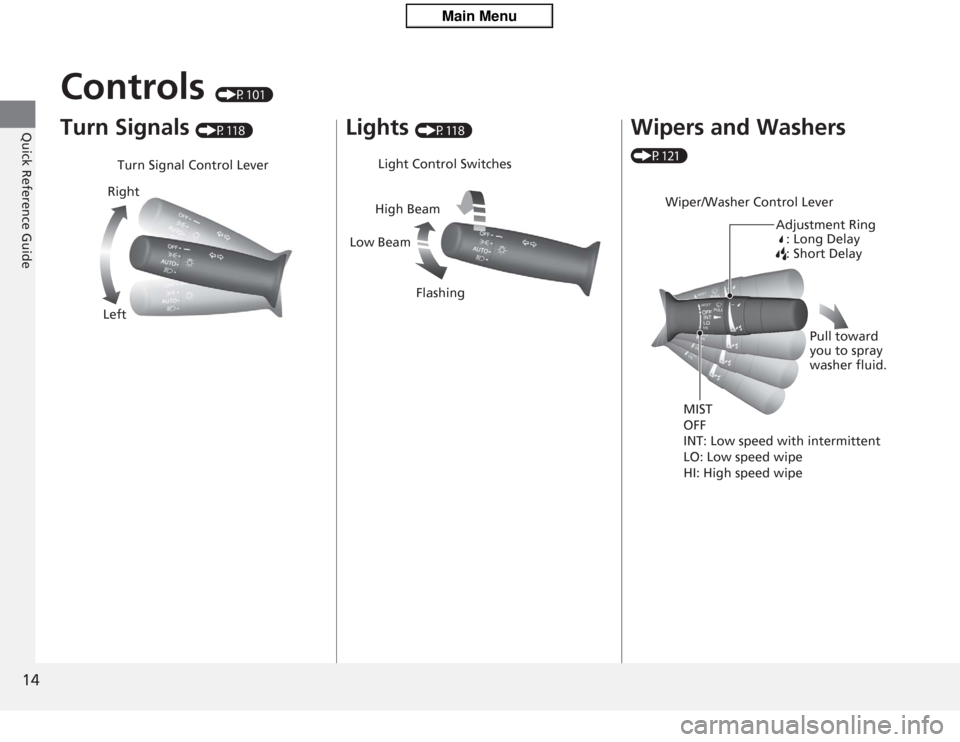
Turn Signals
(P118)
Turn Signal Control Lever
Right
Left
Lights
(P118)
Light Control Switches
Low Beam High Beam
Flashing
Wipers and Washers (P121)
Wiper/Washer Control Lever Adjustment Ring: Long Delay
: Short Delay
MIST
OFF
INT: Low speed with intermittent
LO: Low speed wipe
HI: High speed wipe Pull toward
you to spray
washer fluid.
Page 21 of 313
20Quick Reference Guide
Maintenance
(P227)
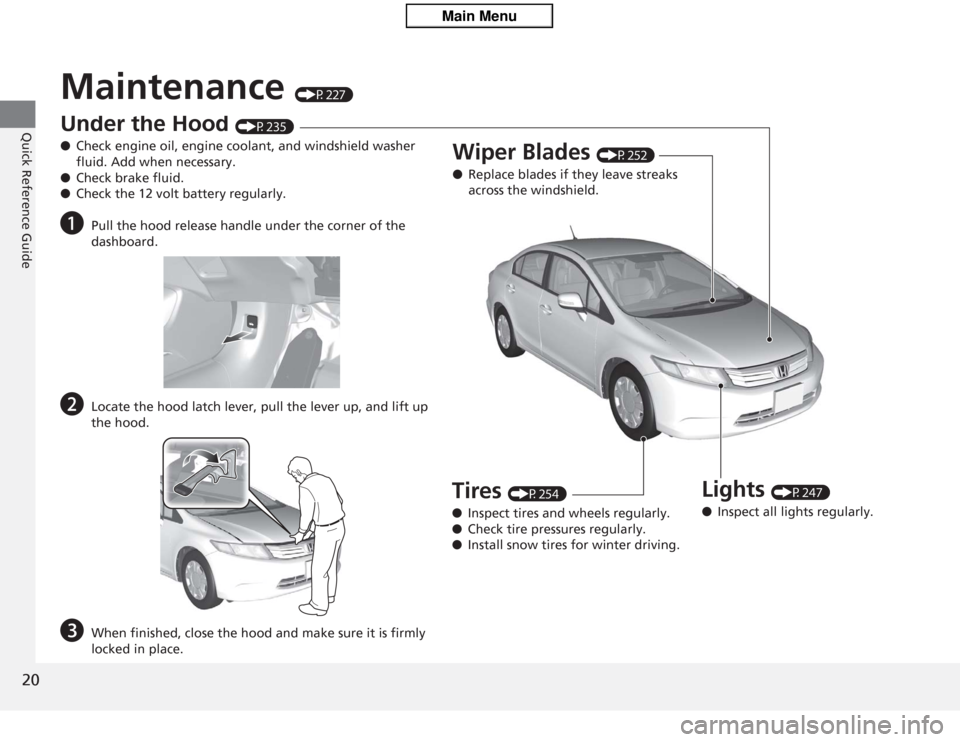
Under the Hood
(P235)
● Check engine oil, engine coolant, and windshield washer
fluid. Add when necessary.
● Check brake fluid.
● Check the 12 volt battery regularly.
a
Pull the hood release handle under the corner of the
dashboard.
b
Locate the hood latch lever, pull the lever up, and lift up
the hood.
c
When finished, close the hood and make sure it is firmly
locked in place.
Lights
(P247)
● Inspect all lights regularly.
Wiper Blades
(P252)
● Replace blades if they leave streaks
across the windshield.
Tires
(P254)
● Inspect tires and wheels regularly.
● Check tire pressures regularly.
● Install snow tires for winter driving.
Page 71 of 313
70Instrument Panel
IndicatorsIndicator
Name
On/Blinking
Explanation
Message
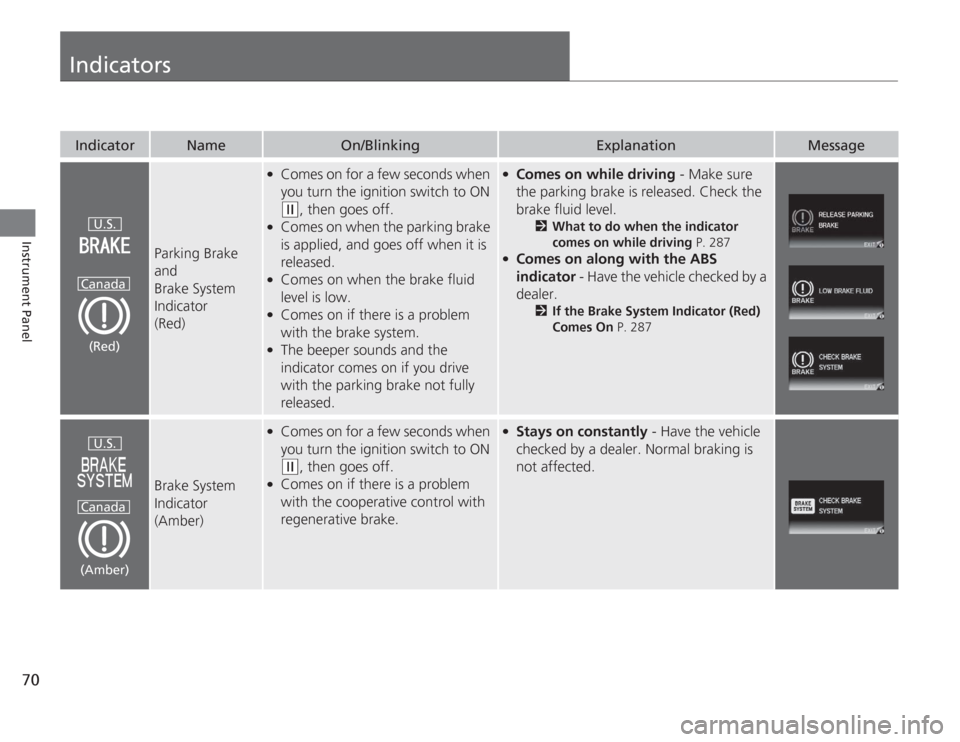
Parking Brake
and
Brake System
Indicator
(Red)
●
Comes on for a few seconds when
you turn the ignition switch to ON (w
, then goes off.
●
Comes on when the parking brake
is applied, and goes off when it is
released.
●
Comes on when the brake fluid
level is low.
●
Comes on if there is a problem
with the brake system.
●
The beeper sounds and the
indicator comes on if you drive
with the parking brake not fully
released.
●
Comes on while driving - Make sure
the parking brake is released. Check the
brake fluid level.
2 What to do when the indicator
comes on while driving P. 287
●
Comes on along with the ABS
indicator - Have the vehicle checked by a
dealer.
2 If the Brake System Indicator (Red)
Comes On P. 287
Brake System
Indicator
(Amber)
●
Comes on for a few seconds when
you turn the ignition switch to ON (w
, then goes off.
●
Comes on if there is a problem
with the cooperative control with
regenerative brake.
●
Stays on constantly - Have the vehicle
checked by a dealer. Normal braking is
not affected.
U.S.
Canada(Red)U.S.
Canada
(Amber)
Page 81 of 313
80
uuIndicators uMulti-Information Display Warn ing and Information Messages
Instrument Panel
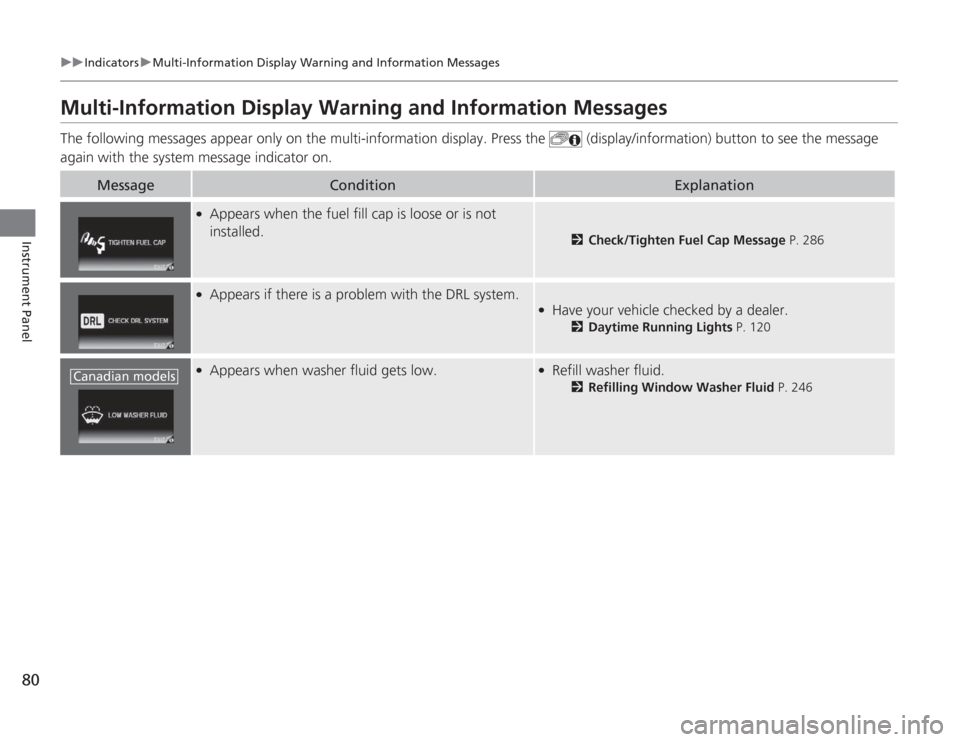
Multi-Information Display Warning and Information MessagesThe following messages appear only on the multi-information display. Press the (display/information) button to see the message
again with the system message indicator on.
Message
Condition
Explanation
●
Appears when the fuel fill cap is loose or is not
installed.
2 Check/Tighten Fuel Cap Message P. 286
●
Appears if there is a problem with the DRL system.
●
Have your vehicle checked by a dealer.
2Daytime Running Lights P. 120
●
Appears when washer fluid gets low.
●
Refill washer fluid.
2Refilling Window Washer Fluid P. 246
Canadian models
Page 122 of 313
121
uuOperating the Switches Around the Steering Wheel uWipers and Washers
Controls
Wipers and Washers
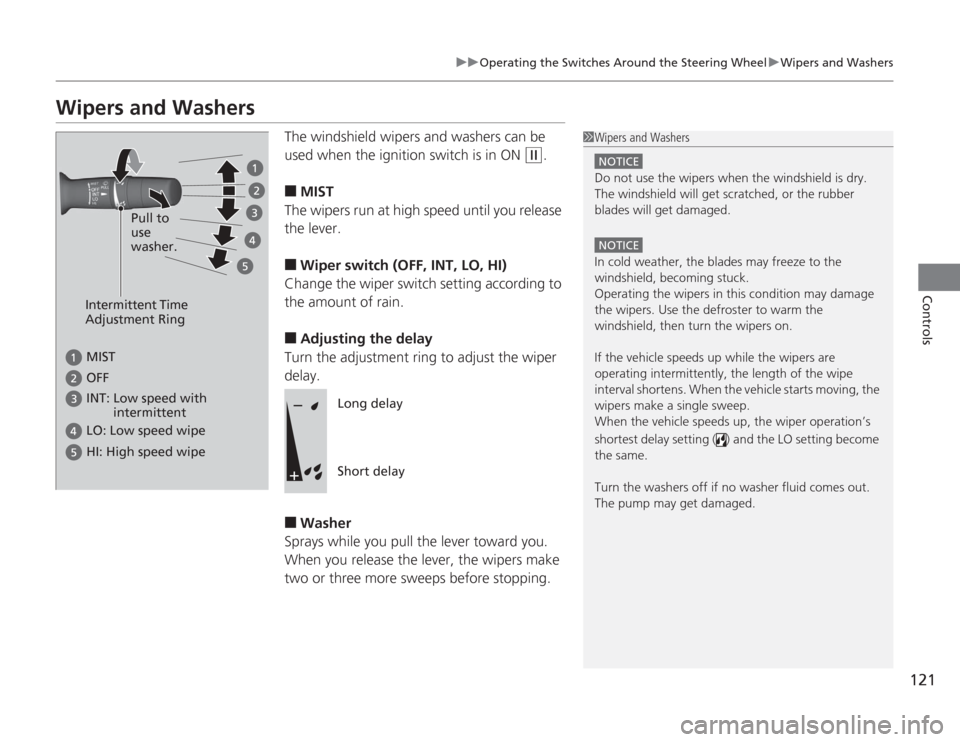
The windshield wipers and washers can be
used when the ignition switch is in ON
(w
.
■
MIST
The wipers run at high speed until you release
the lever.
■
Wiper switch (OFF, INT, LO, HI)
Change the wiper switch setting according to
the amount of rain.
■
Adjusting the delay
Turn the adjustment ring to adjust the wiper
delay.
■
Washer
Sprays while you pull the lever toward you.
When you release the lever, the wipers make
two or three more sweeps before stopping.
1 Wipers and Washers
NOTICEDo not use the wipers when the windshield is dry.
The windshield will get scratched, or the rubber
blades will get damaged.NOTICEIn cold weather, the blades may freeze to the
windshield, becoming stuck.
Operating the wipers in this condition may damage
the wipers. Use the defroster to warm the
windshield, then turn the wipers on.
If the vehicle speeds up while the wipers are
operating intermitte ntly, the length of the wipe
interval shortens. When the vehicle starts moving, the
wipers make a single sweep.
When the vehicle speeds up, the wiper operation’s
shortest delay setting ( ) and the LO setting become
the same.
Turn the washers off if no washer fluid comes out.
The pump may get damaged.
Intermittent Time
Adjustment Ring
MIST INT: Low speed with
intermittent OFF LO: Low speed wipe HI: High speed wipe
Pull to
use
washer.
Long delay
Short delay
Page 202 of 313
201
uuWhen Driving uPrecautions While Driving
Driving
Precautions While DrivingAvoid driving in deep water and on flooded roads. This can damage the engine or
cause electrical component failure.
If there is a strong impact with something under the vehicle, stop in a safe location.
Check the underside of the vehicle for damage or any fluid leaks.■
In Rain
■
Other Precautions
1Precautions While Driving
NOTICEDo not operate the shift lever while pressing the
accelerator pedal. You could damage the
transmission.
If the ignition switch is turned to ACCESSORY
(q
or
LOCK
( 0
while driving, the engine will shut down
and all steering and brake power assist functions will
stop, making it difficult to control the vehicle.
Do not put the shift lever in
( N
, as you will lose
engine braking (and acceleration) performance.
During the first 600 miles (1,000 km) of operation,
avoid sudden acceleration or full throttle operation so
as to not damage the engine or powertrain.
Avoid hard braking for the first 200 miles (300 km).
You should also follow this when the brake pads are
replaced.
NOTICEFollowing can damage the under spoiler:•Parking the vehicle by a parking block•Parallel parking along the road shoulder•Driving towards the bottom of a hill•Driving up or down to a different surface level
(such as a road shoulder)•Driving on a rutted or bumpy road•Driving on a road with potholes
Page 220 of 313
Continued
219
uuParking Your Vehicle uAuto Idle Stop
Driving
The vehicle stops with the shift lever in
(D
and the brake pedal depressed.
■
Auto idle stop does not activate when:
• The low temperature indicator is on.
• The IMA battery charge is low.
• The bars of the electric motor power flow monitor do not move when
accelerating or decelerating.
• The transmission fluid temperature is low.
• The vehicle comes to a stop again before the vehicle speed reaches 9 mph
(15 km/h) after the engine starts.
• Stopped on a steep incline.
• The shift lever is in a position other than
(D
or
(N
.
■
Auto idle stop may not activate when:
• Even if the set temperature and the actual interior temperature are around the
same ambient conditions (strong sun light, high or low temperature etc) can
prevent Auto Idle Stop from activating.
• The vehicle is stopped by braking suddenly.
■
Auto Idle Stop Activates When:
1Auto Idle Stop Activates When:
The brake pedal is depressed, and the vehicle slows
down to a speed below 6 mph (10 km/h).
Page 228 of 313
227
Maintenance
This chapter discusses basic maintenance.
Before Performing MaintenanceInspection and Maintenance ............ 228
Safety When Performing Maintenance .... 229Parts and Fluids Used in Maintenance Service ........................................... 230
Maintenance Minder™ .................... 231
Maintenance Under the HoodMaintenance Items Under the Hood ..... 235Opening the Hood ........................... 236
Recommended Engine Oil ................ 237
Oil Check ......................................... 238
Adding Engine Oil ............................ 239Changing the Engine Oil and Oil Filter .. 240
Engine Coolant ................................ 242
Transmission Fluid ............................ 244
Brake Fluid ....................................... 245
Refilling Window Washer Fluid......... 246
Replacing Light Bulbs ....................... 247
Checking and Maintaining Wiper
Blades .......................................... 252Checking and Maintaining Tires
Checking Tires ................................. 254
Tire and Loading Information Label .. 255
Tire Labeling .................................... 255
DOT Tire Quality Grading (U.S. Vehicles) .. 257Wear Indicators................................ 259 Tire Service Life ................................ 259
Tire and Wheel Replacement ........... 260
Tire Rotation .................................... 261
Winter Tires ..................................... 262
12 Volt Battery .................................. 263
Remote Transmitter Care
Replacing the Battery ....................... 264
Climate Control System Maintenance ...... 265Cleaning
Interior Care .................................... 266
Exterior Care.................................... 268
Page 229 of 313
228Maintenance
Before Performing MaintenanceInspection and MaintenanceFor your safety, perform all listed inspections and maintenance to keep your vehicle
in good condition. If you become aware of any abnormality (noise, smell, insufficient
brake fluid, oil residue on the ground, etc.), have your vehicle inspected by a dealer.
(Note, however, that service at a dealer is not mandatory to keep your \
warranties in
effect.) Refer to the separate maintenance booklet for detailed maintenance and
inspection information.■
Daily inspections
Perform inspections before long distance trips, when washing the vehicle, or when
refueling.
■
Periodic inspections
• Check the continuously variable transmission fluid level monthly.
2 Continuously Variable Transmission (CVT) Fluid P. 244
•Check the brake fluid level monthly.
2 Checking the Brake Fluid P. 245
•Check the tire pressure monthly. Examine the tread for wear and foreign objects.
2 Checking and Maintaining Tires P. 254
•Check the operation of the exterior lights monthly.
2 Replacing Light Bulbs P. 247
•Check the condition of the wiper blades at least every six months.
2Checking and Mainta ining Wiper Blades P. 252
■
Types of Inspection and Maintenance
1Inspection and Maintenance
Maintenance, replacement, or repair of
emissions control devices and systems may be
done by any automotive repair establishment or
individuals using parts that are "certified" to
EPA standards.
According to state and federal regulations, failure to
perform maintenance on the maintenance main
items marked with # will not void your emissions
warranties. However, all maintenance services should
be performed in accordance with the intervals
indicated by the multi-information display. 2 Maintenance Service Items P. 233
If you want to perform complex maintenance tasks
that require more skills and tools, you can purchase a
subscription to the Service Express website at
www.techinfo.honda.com .
2 Authorized Manuals P. 303
If you want to perform maintenance yourself, make
sure that you have the necessary tools and skills first.
After performing maintenance, update the records in
the separate maintenance booklet.
U.S. models