sensor HONDA CIVIC HYBRID 2013 9.G User Guide
[x] Cancel search | Manufacturer: HONDA, Model Year: 2013, Model line: CIVIC HYBRID, Model: HONDA CIVIC HYBRID 2013 9.GPages: 346, PDF Size: 6.95 MB
Page 77 of 346
76
uuIndicatorsu
Instrument Panel
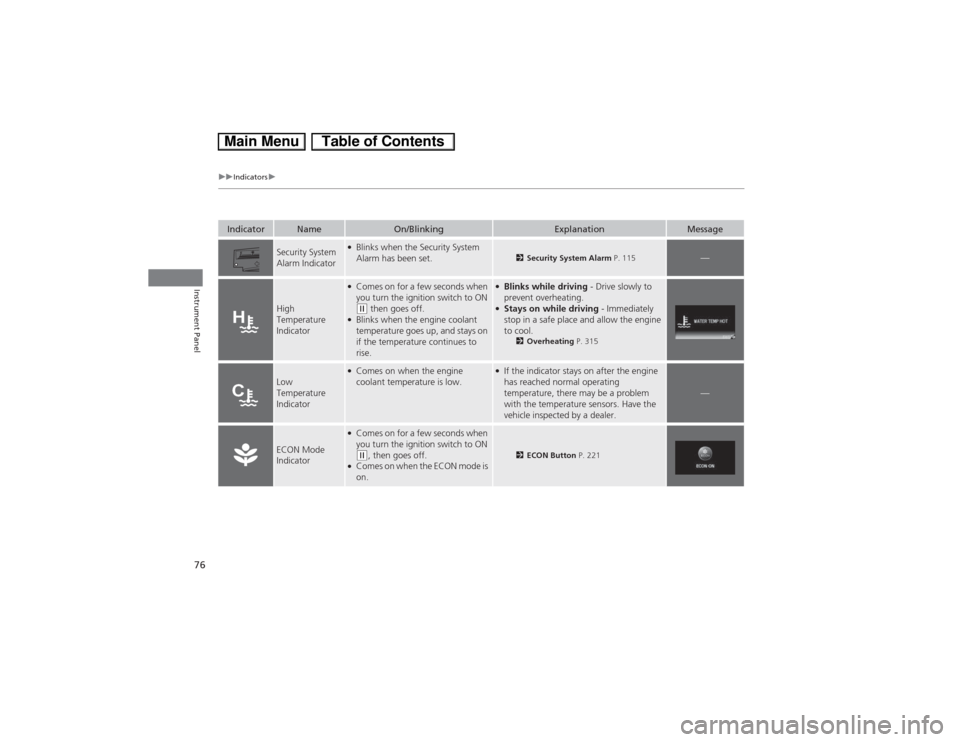
Indicator
Name
On/Blinking
Explanation
Message
Security System
Alarm Indicator
●Blinks when the Security System
Alarm has been set.
2Security System Alarm P. 115
—
High
Temperature
Indicator
●Comes on for a few seconds when
you turn the ignition switch to ON (w then goes off.
●Blinks when the engine coolant
temperature goes up, and stays on
if the temperature continues to
rise.
●Blinks while driving - Drive slowly to
prevent overheating.●Stays on while driving - Immediately
stop in a safe place and allow the engine
to cool.
2Overheating P. 315
Low
Temperature
Indicator
●Comes on when the engine
coolant temperature is low.
●If the indicator stays on after the engine
has reached normal operating
temperature, there may be a problem
with the temperature sensors. Have the
vehicle inspected by a dealer.
—
ECON Mode
Indicator
●Comes on for a few seconds when
you turn the ignition switch to ON (w, then goes off.
●Comes on when the ECON mode is
on.
2ECON Button P. 221
Page 88 of 346
Continued
87
uuGauges and intelligent Multi-Information Display (i-MID)uintelligent Multi-Information Display (i-MID)
Instrument Panel
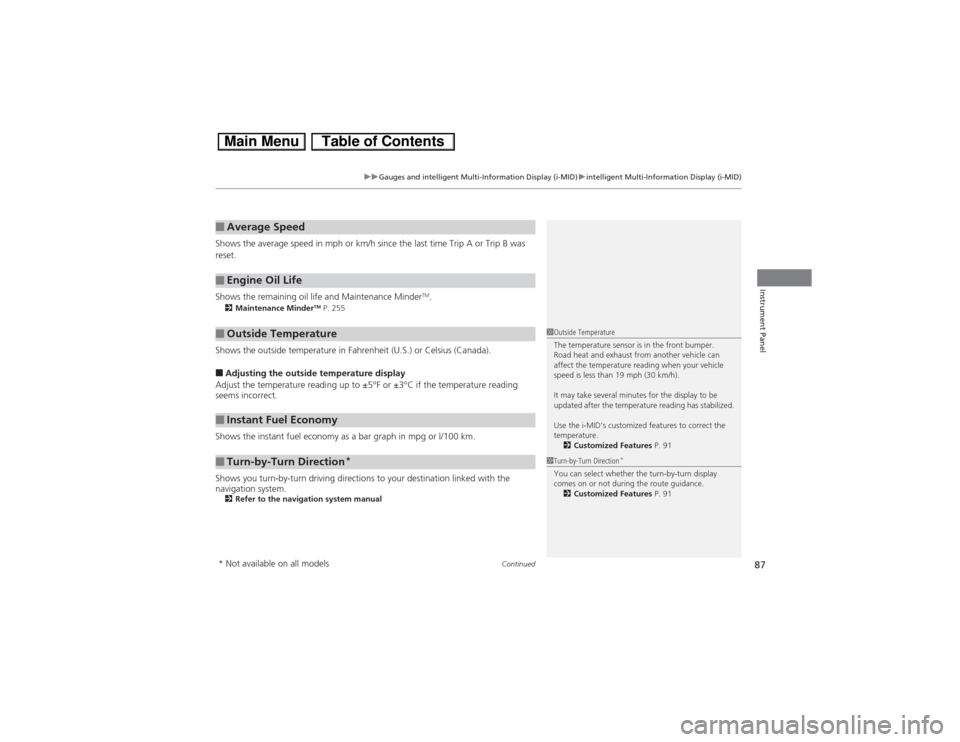
Shows the average speed in mph or km/h since the last time Trip A or Trip B was
reset.
Shows the remaining oil life and Maintenance Minder
TM.
2Maintenance Minder
TM P. 255
Shows the outside temperature in Fahrenheit (U.S.) or Celsius (Canada).■Adjusting the outside temperature display
Adjust the temperature reading up to ±5°F or ±3°C if the temperature reading
seems incorrect.
Shows the instant fuel economy as a bar graph in mpg or l/100 km.
Shows you turn-by-turn driving directions to your destination linked with the
navigation system.2Refer to the navigation system manual■Average Speed■Engine Oil Life■Outside Temperature■Instant Fuel Economy■Turn-by-Turn Direction
*
1Outside Temperature
The temperature sensor is in the front bumper.
Road heat and exhaust from another vehicle can
affect the temperature reading when your vehicle
speed is less than 19 mph (30 km/h).
It may take several minutes for the display to be
updated after the temperature reading has stabilized.
Use the i-MID’s customized features to correct the
temperature.
2Customized Features P. 911Turn-by-Turn Direction
*
You can select whether the turn-by-turn display
comes on or not during the route guidance.
2Customized Features P. 91
* Not available on all models
Page 104 of 346
103
Controls
This chapter explains how to operate the various controls necessary for driving.
Setting the Clock.............................. 104
Locking and Unlocking the Doors
Key Types and Functions .................. 105
Locking/Unlocking the Doors from the
Outside .......................................... 107
Locking/Unlocking the Doors from the
Inside ............................................. 109
Childproof Door Locks ..................... 110
Auto Door Locking/Unlocking .......... 111
Opening and Closing the Trunk....... 112
Security System
Immobilizer System .......................... 115
Security System Alarm ...................... 115Opening and Closing the Windows..... 117
Operating the Switches Around the
Steering Wheel
Ignition Switch ................................. 119
Turn Signals ..................................... 120
Light Switches.................................. 120
Daytime Running Lights ................... 123
Wipers and Washers ........................ 124
Brightness Control ........................... 125
Rear Defogger/Heated Door Mirror
*
Button ........................................... 126
Adjusting the Steering Wheel........... 127Adjusting the Mirrors
Interior Rearview Mirror ................... 128
Power Door Mirrors ......................... 128
Adjusting the Seats
Adjusting the Seat Positions ............. 129
Interior Lights/Interior Convenience
Items
Interior Lights .................................. 134
Interior Convenience Items .............. 135
Climate Control System
Using Automatic Climate Control .... 140
Automatic Climate Control Sensors ...... 142
* Not available on all models
Page 122 of 346
Continued
121
uuOperating the Switches Around the Steering WheeluLight Switches
Controls
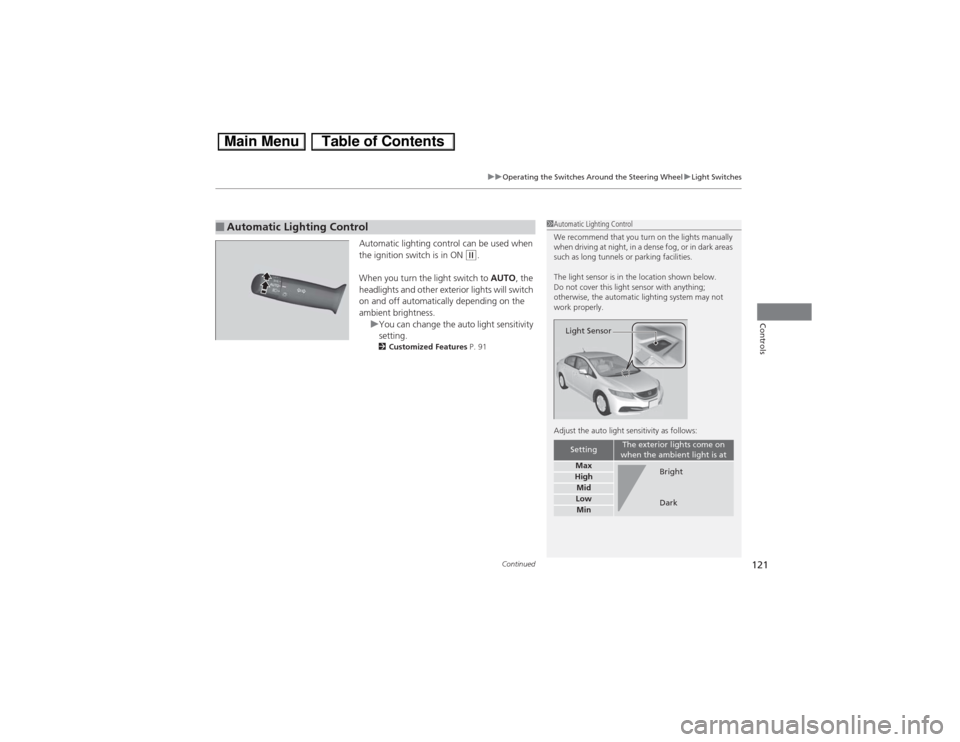
Automatic lighting control can be used when
the ignition switch is in ON
(w.
When you turn the light switch to AUTO, the
headlights and other exterior lights will switch
on and off automatically depending on the
ambient brightness.
uYou can change the auto light sensitivity
setting.
2Customized Features P. 91
■Automatic Lighting Control
1Automatic Lighting Control
We recommend that you turn on the lights manually
when driving at night, in a dense fog, or in dark areas
such as long tunnels or parking facilities.
The light sensor is in the location shown below.
Do not cover this light sensor with anything;
otherwise, the automatic lighting system may not
work properly.
Adjust the auto light sensitivity as follows:
Setting
The exterior lights come on
when the ambient light is at
MaxHighMidLowMinLight Sensor
Bright
Dark
Page 143 of 346
142
uuClimate Control SystemuAutomatic Climate Control Sensors
Controls
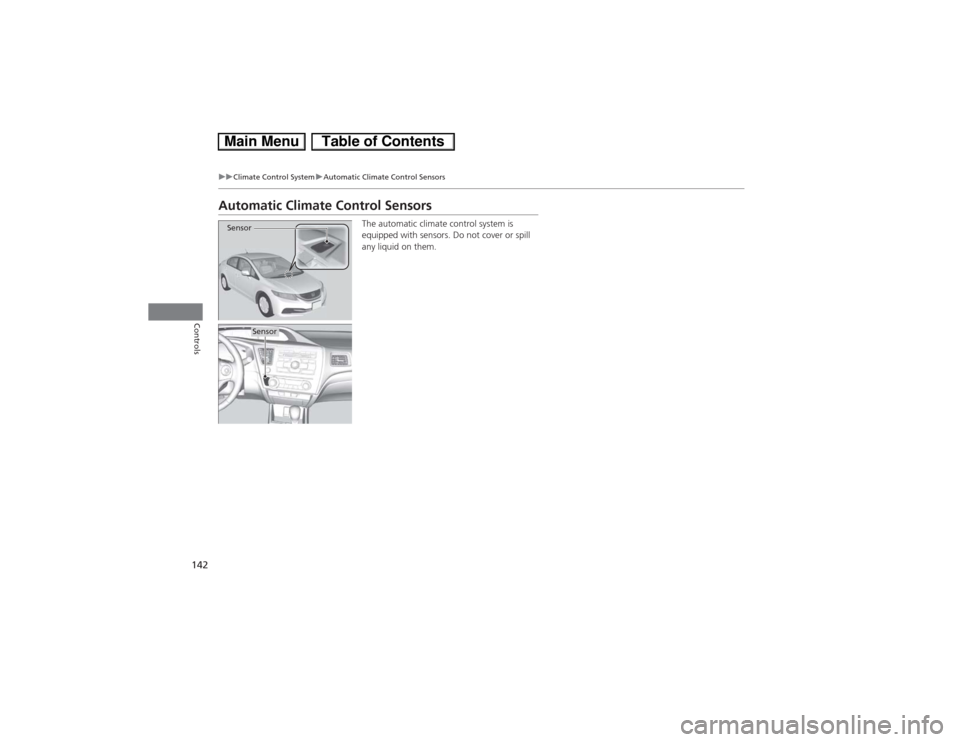
Automatic Climate Control Sensors
The automatic climate control system is
equipped with sensors. Do not cover or spill
any liquid on them.
Sensor
Sensor
Page 211 of 346

210
uuBefore DrivinguDriving Preparation
Driving
•Be sure items placed on the floor behind the front seats cannot roll under the
seats.
uThey can interfere with the driver’s ability to operate the pedals, the operation
of the seats, or the operation of the sensors under the seats.
•Everyone in the vehicle must fasten their seat belt.
2Fastening a Seat Belt P. 35
•Make sure that the indicators in the instrument panel come on when you start the
vehicle, and go off soon after.
uAlways have a dealer check the vehicle if a problem is indicated.
2Indicators P. 68
Page 298 of 346
297
Continued
Handling the Unexpected
If a Tire Goes FlatTemporarily Repairing a Flat TireThis vehicle is not equipped with a spare tire. If the tire has a large cut or is otherwise
severely damaged, you will need to have the vehicle towed. If the tire only has a
small puncture, from a nail for instance, you can use the temporary tire repair kit so
that you can drive to the nearest service station for a more permanent repair.
If a tire goes flat while driving, grasp the steering wheel firmly, and brake gradually
to reduce speed. Then stop in a safe place.
1.Park the vehicle on firm, level, and non-slippery surface and apply the parking
brake.
2.Put the shift lever in
(P.
3.Turn on the hazard warning lights and turn the ignition switch to LOCK
(0.
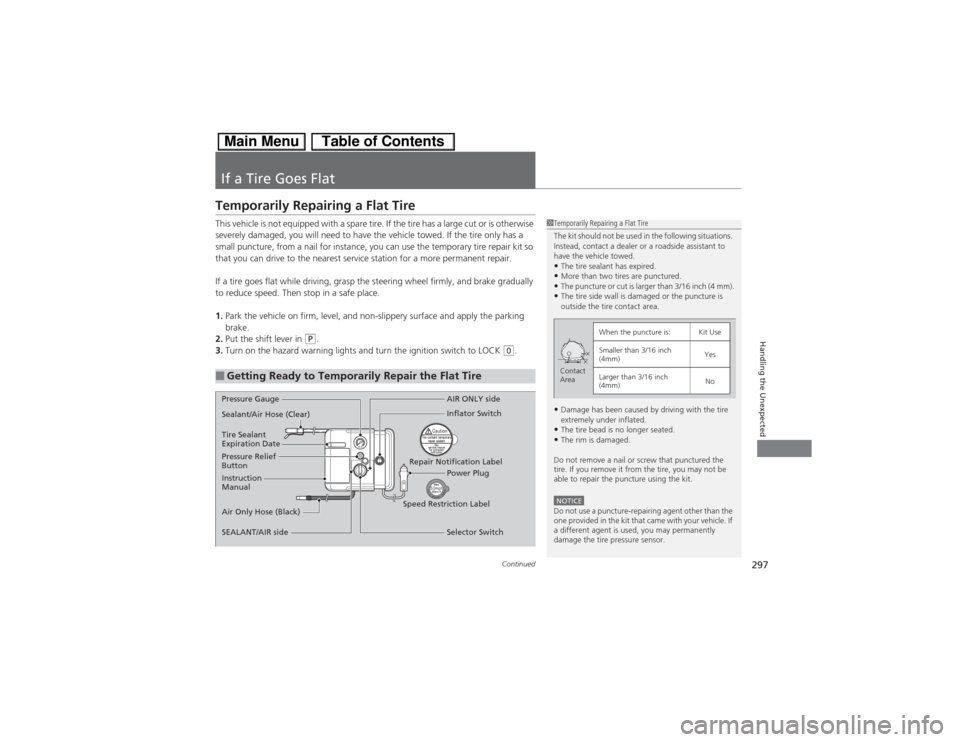
■Getting Ready to Temporarily Repair the Flat Tire
1Temporarily Repairing a Flat Tire
The kit should not be used in the following situations.
Instead, contact a dealer or a roadside assistant to
have the vehicle towed.•The tire sealant has expired.•More than two tires are punctured.•The puncture or cut is larger than 3/16 inch (4 mm).•The tire side wall is damaged or the puncture is
outside the tire contact area.•Damage has been caused by driving with the tire
extremely under inflated.•The tire bead is no longer seated.•The rim is damaged.
Do not remove a nail or screw that punctured the
tire. If you remove it from the tire, you may not be
able to repair the puncture using the kit.NOTICEDo not use a puncture-repairing agent other than the
one provided in the kit that came with your vehicle. If
a different agent is used, you may permanently
damage the tire pressure sensor.
When the puncture is:
Kit Use
Smaller than 3/16 inch
(4mm)
Yes
Larger than 3/16 inch
(4mm)
No
Contact
Area
Pressure Gauge
Sealant/Air Hose (Clear)
Tire Sealant
Expiration Date
Pressure Relief
Button
Instruction
Manual
Air Only Hose (Black)
SEALANT/AIR sideAIR ONLY side
Inflator Switch
Repair Notification Label
Power Plug
Speed Restriction Label
Selector Switch
Page 306 of 346
305
uuIf a Tire Goes FlatuChanging a Flat Tire
Continued
Handling the Unexpected
Changing a Flat TireIf a tire goes flat while driving, grasp the steering wheel firmly, and brake gradually
to reduce speed. Then, stop in a safe place. Replace the flat tire with a compact
spare tire. Go to a dealer as soon as possible to have the full-size tire repaired or
replaced.
1.Park the vehicle on firm, level, non-slippery surface, and apply the parking brake.
2.Move the shift lever to
(P.
3.Set the parking brake.
4.Turn on the hazard warning lights and turn the ignition switch to LOCK
(0.
Models with optional compact spare tire
1Changing a Flat Tire
Follow compact spare precautions:
Periodically check the tire pressure of the compact
spare. It should be set to the specified pressure.
Specified Pressure: 60 psi (420 kPa, 4.2 kgf/cm
2)
When driving with the compact spare tire, keep the
vehicle speed under 50 mph (80 km/h). Replace with
a full-size tire as soon as possible.
The compact spare tire and wheel in your vehicle are
specifically for this model.
Do not use them with another vehicle.
Do not use another type of compact spare tire or
wheel with your vehicle.
Do not mount tire chains on a compact spare tire.
If a chain-mounted front tire goes flat, remove one of
the full-size rear tires and replace it with the compact
spare tire. Remove the flat front tire and replace it
with the full-size tire that was removed from the rear.
Mount the tire chains on the front tire.
Do not use a puncture-repairing agent other than the
Tire Repair Kit provided with your vehicle, as some
tire repair agents can cause damage to the pressure
sensors.
U.S. models only
Page 311 of 346
uuIf a Tire Goes FlatuChanging a Flat Tire
310Handling the Unexpected
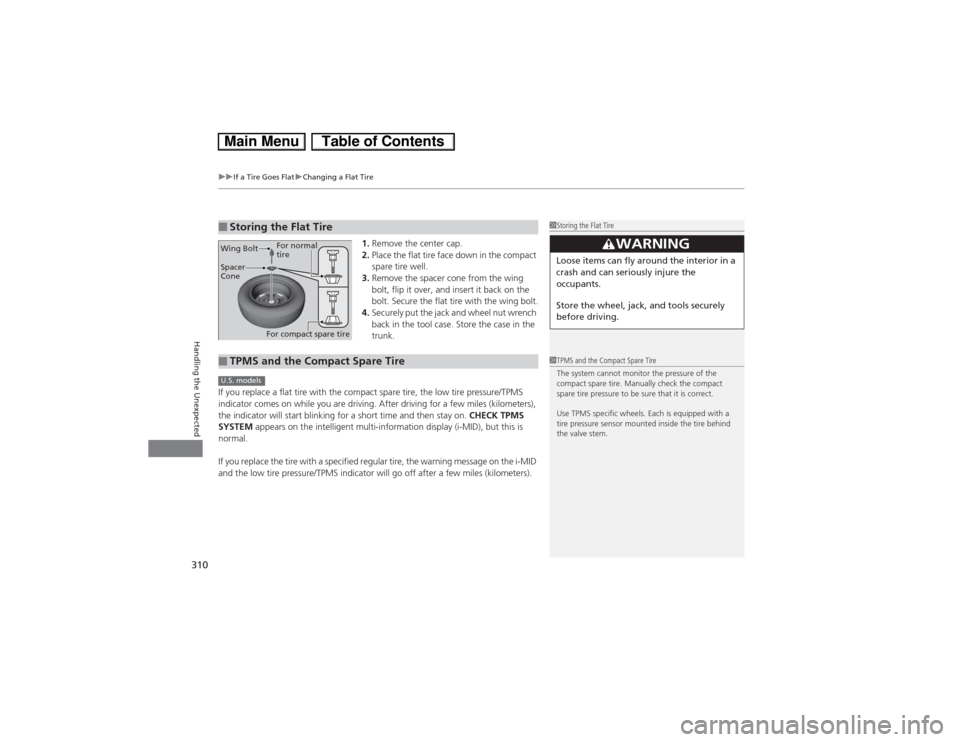
1.Remove the center cap.
2.Place the flat tire face down in the compact
spare tire well.
3.Remove the spacer cone from the wing
bolt, flip it over, and insert it back on the
bolt. Secure the flat tire with the wing bolt.
4.Securely put the jack and wheel nut wrench
back in the tool case. Store the case in the
trunk.
If you replace a flat tire with the compact spare tire, the low tire pressure/TPMS
indicator comes on while you are driving. After driving for a few miles (kilometers),
the indicator will start blinking for a short time and then stay on. CHECK TPMS
SYSTEM appears on the intelligent multi-information display (i-MID), but this is
normal.
If you replace the tire with a specified regular tire, the warning message on the i-MID
and the low tire pressure/TPMS indicator will go off after a few miles (kilometers).
■Storing the Flat Tire
1Storing the Flat Tire
3
WARNING
Loose items can fly around the interior in a
crash and can seriously injure the
occupants.
Store the wheel, jack, and tools securely
before driving.
Spacer
Cone Wing Bolt
For compact spare tireFor normal
tire■TPMS and the Compact Spare Tire
1TPMS and the Compact Spare Tire
The system cannot monitor the pressure of the
compact spare tire. Manually check the compact
spare tire pressure to be sure that it is correct.
Use TPMS specific wheels. Each is equipped with a
tire pressure sensor mounted inside the tire behind
the valve stem.
U.S. models
Page 338 of 346
Index
337Index
Index
AAccessories and Modifications................ 250
Accessory Power Sockets......................... 137
Additives
Coolant .................................................. 266
Engine Oil ............................................... 263
Washer ................................................... 270
Additives, Engine Oil............................... 261
Adjusting
Front Seats.............................................. 129
Head Restraints ....................................... 131
Headlights .............................................. 271
Mirrors.................................................... 128
Steering Wheel ....................................... 127
Temperature ............................................. 87
Air Conditioning System (Climate
Control System)...................................... 140
Changing the Mode................................ 140
Defrosting the Windshield and
Windows .............................................. 141
Dust and Pollen Filter .............................. 290
Recirculation/Fresh Air Mode................... 140
Sensor .................................................... 142
Using Automatic Climate Control............ 140
Air Pressure...................................... 279, 327
Airbags....................................................... 39
Advanced Airbags ..................................... 45
After a Collision ........................................ 43
Airbag Care .............................................. 51
Event Data Recorders ................................ 24
Front Airbags (SRS) ................................... 42Indicator .............................................. 49, 71
Passenger Airbag Off Indicator .................. 50
Sensors...................................................... 45
Side Airbags .............................................. 46
Side Curtain Airbags .................................. 48
AM/FM Radio............................................ 150
Ambient Meter............................................. 8
Anti-lock Brake System (ABS).................. 242
Indicator .................................................... 71
Audio Antenna......................................... 145
Audio Remote Controls...................... 17, 148
Audio System............................................ 144
Adjusting the Sound ................................ 149
Auxiliary Input Jack .................................. 146
Error Messages ........................................ 168
MP3/WMA/AAC ...................................... 163
Reactivating............................................. 146
Recommended CDs ................................. 172
Recommended Drives .............................. 174
Remote Controls ..................................... 148
Security Code .......................................... 146
Theft Protection....................................... 146
USB Adapter Cable .................................. 145
USB Flash Drives ...................................... 174
Authorized Manuals................................. 335
Auto Door Locking/Unlocking................. 111
Customize ........................................... 91, 98
Auto Idle Stop........................................... 222
Auto Idle Stop Indicator............................. 73
Automatic Lighting.................................. 121Automatic Transmission (CVT)................. 218
Creeping ................................................. 218
Fluid ........................................................ 268
Kickdown ................................................ 218
Operating the Shift Lever................... 18, 220
Shift Lever Does Not Move ...................... 314
Shifting ................................................... 219
Auxiliary Input Jack.................................. 146
Average Fuel Economy.............................. 86
Average Speed........................................... 87
BBattery...................................................... 288
Charging System Indicator................. 69, 317
Jump Starting .......................................... 312
Maintenance (Checking the 12 Volt
Battery) ................................................. 288
Maintenance (Replacing) ......................... 289
Belts (Seat).................................................. 32
Beverage Holders..................................... 136
Bluetooth® Audio..................................... 166
Bluetooth® HandsFreeLink®..................... 175
Booster Seats (For Children)...................... 63