lock HONDA CIVIC HYBRID 2013 9.G Owner's Manual
[x] Cancel search | Manufacturer: HONDA, Model Year: 2013, Model line: CIVIC HYBRID, Model: HONDA CIVIC HYBRID 2013 9.GPages: 346, PDF Size: 6.95 MB
Page 61 of 346
uuChild SafetyuSafety of Infants and Small Children
60Safe Driving
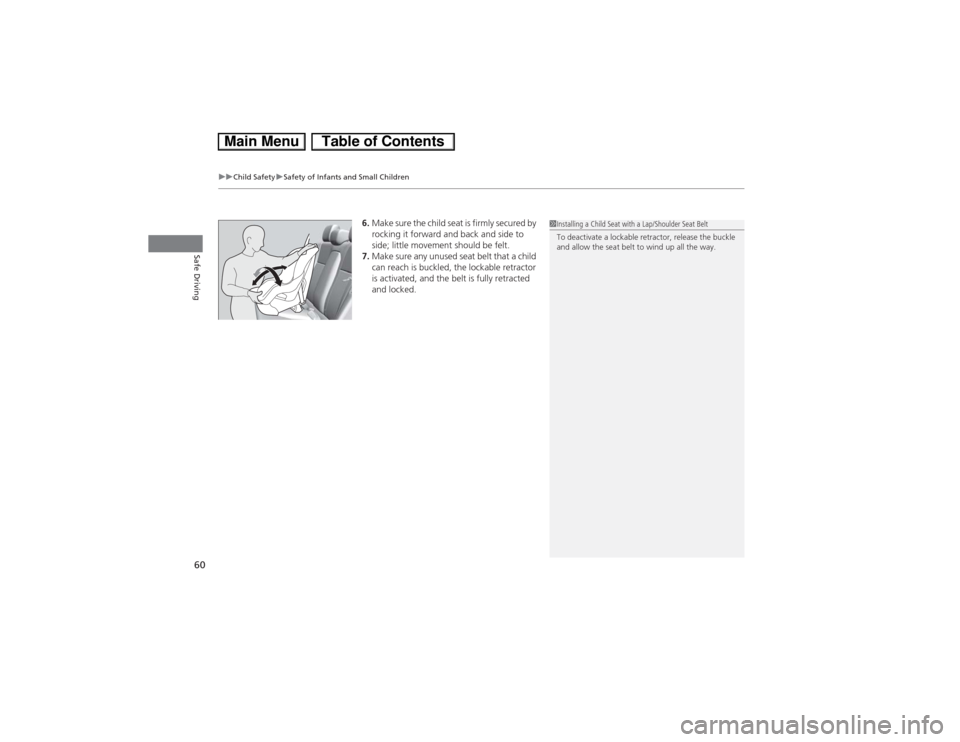
6.Make sure the child seat is firmly secured by
rocking it forward and back and side to
side; little movement should be felt.
7.Make sure any unused seat belt that a child
can reach is buckled, the lockable retractor
is activated, and the belt is fully retracted
and locked.
1Installing a Child Seat with a Lap/Shoulder Seat Belt
To deactivate a lockable retractor, release the buckle
and allow the seat belt to wind up all the way.
Page 72 of 346
71
uuIndicatorsu
Continued
Instrument Panel
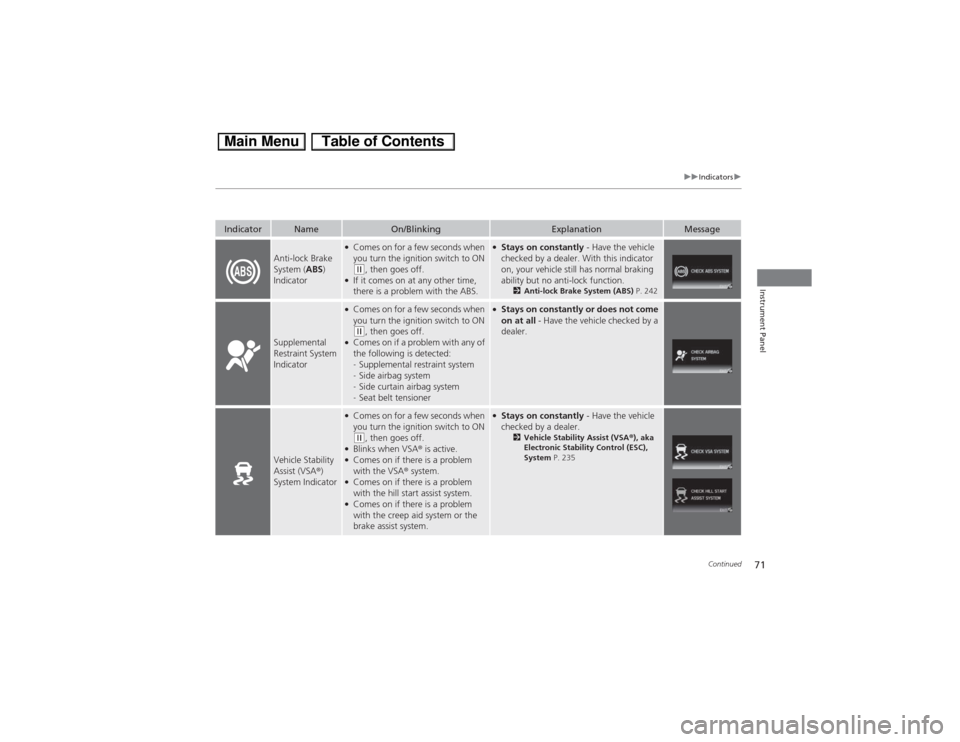
Anti-lock Brake
System (ABS)
Indicator
●Comes on for a few seconds when
you turn the ignition switch to ON (w, then goes off.
●If it comes on at any other time,
there is a problem with the ABS.
●Stays on constantly - Have the vehicle
checked by a dealer. With this indicator
on, your vehicle still has normal braking
ability but no anti-lock function.
2Anti-lock Brake System (ABS) P. 242
Supplemental
Restraint System
Indicator
●Comes on for a few seconds when
you turn the ignition switch to ON (w, then goes off.
●Comes on if a problem with any of
the following is detected:
-Supplemental restraint system
-Side airbag system
-Side curtain airbag system
-Seat belt tensioner
●Stays on constantly or does not come
on at all - Have the vehicle checked by a
dealer.
Vehicle Stability
Assist (VSA®)
System Indicator
●Comes on for a few seconds when
you turn the ignition switch to ON (w, then goes off.
●Blinks when VSA® is active.●Comes on if there is a problem
with the VSA® system.●Comes on if there is a problem
with the hill start assist system.●Comes on if there is a problem
with the creep aid system or the
brake assist system.
●Stays on constantly - Have the vehicle
checked by a dealer.
2Vehicle Stability Assist (VSA®), aka
Electronic Stability Control (ESC),
System P. 235
Indicator
Name
On/Blinking
Explanation
Message
Page 76 of 346
75
uuIndicatorsu
Continued
Instrument Panel
Indicator
Name
On/Blinking
Explanation
Message
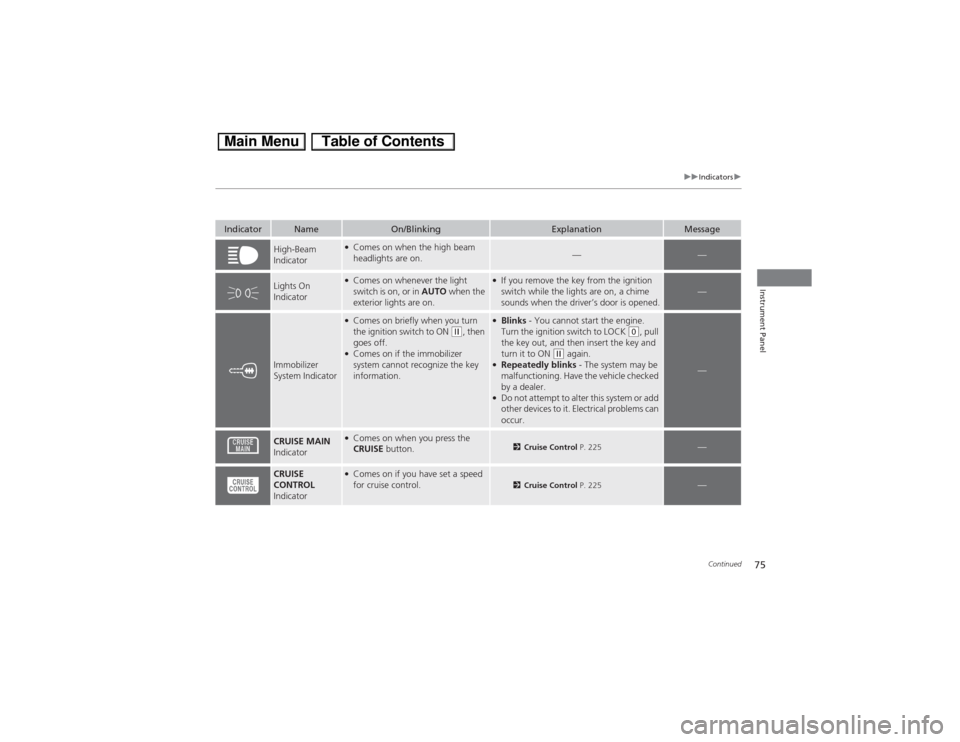
High-Beam
Indicator
●Comes on when the high beam
headlights are on.
—
—
Lights On
Indicator
●Comes on whenever the light
switch is on, or in AUTO when the
exterior lights are on.
●If you remove the key from the ignition
switch while the lights are on, a chime
sounds when the driver’s door is opened.
—
Immobilizer
System Indicator
●Comes on briefly when you turn
the ignition switch to ON
(w, then
goes off.
●Comes on if the immobilizer
system cannot recognize the key
information.
●Blinks - You cannot start the engine.
Turn the ignition switch to LOCK
(0, pull
the key out, and then insert the key and
turn it to ON
(w again.
●Repeatedly blinks - The system may be
malfunctioning. Have the vehicle checked
by a dealer.●Do not attempt to alter this system or add
other devices to it. Electrical problems can
occur.
—
CRUISE MAIN
Indicator
●Comes on when you press the
CRUISE button.
2Cruise Control P. 225
—
CRUISE
CONTROL
Indicator
●Comes on if you have set a speed
for cruise control.
2Cruise Control P. 225
—
Page 78 of 346
77
uuIndicatorsu
Continued
Instrument Panel
Indicator
Name
On/Blinking
Explanation
Message
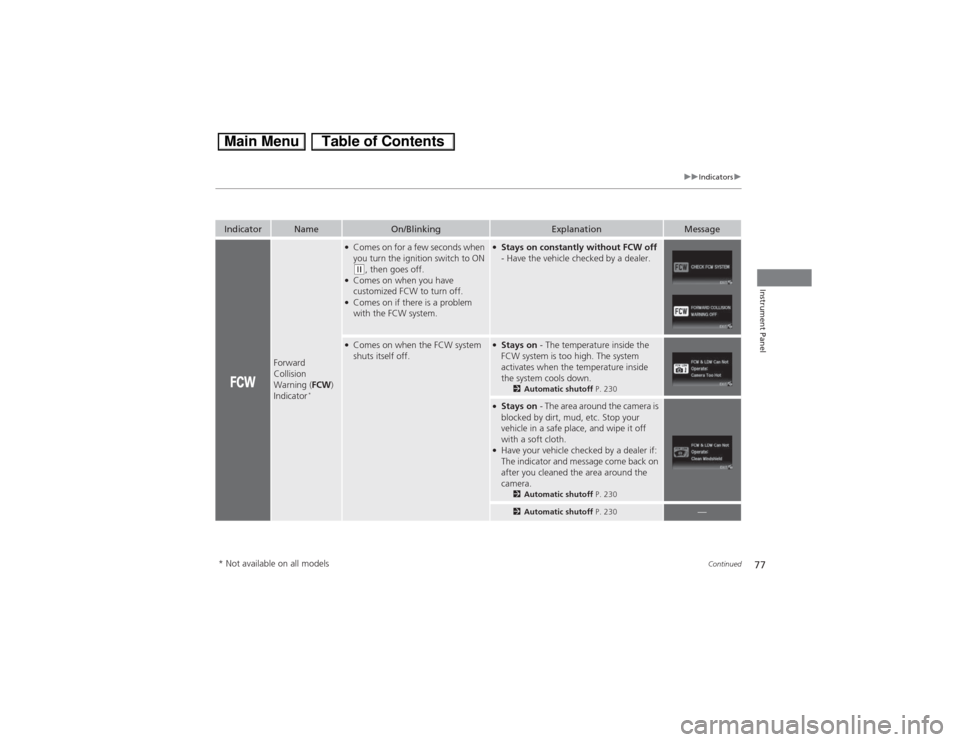
Forward
Collision
Warning (FCW)
Indicator
*
●Comes on for a few seconds when
you turn the ignition switch to ON (w, then goes off.
●Comes on when you have
customized FCW to turn off.●Comes on if there is a problem
with the FCW system.
●Stays on constantly without FCW off
- Have the vehicle checked by a dealer.
●Comes on when the FCW system
shuts itself off.
●Stays on - The temperature inside the
FCW system is too high. The system
activates when the temperature inside
the system cools down.
2Automatic shutoff P. 230
●Stays on - The area around the camera is
blocked by dirt, mud, etc. Stop your
vehicle in a safe place, and wipe it off
with a soft cloth.●Have your vehicle checked by a dealer if:
The indicator and message come back on
after you cleaned the area around the
camera.
2Automatic shutoff P. 2302Automatic shutoff P. 230
—
* Not available on all models
Page 79 of 346
78
uuIndicatorsu
Instrument Panel
Indicator
Name
On/Blinking
Explanation
Message
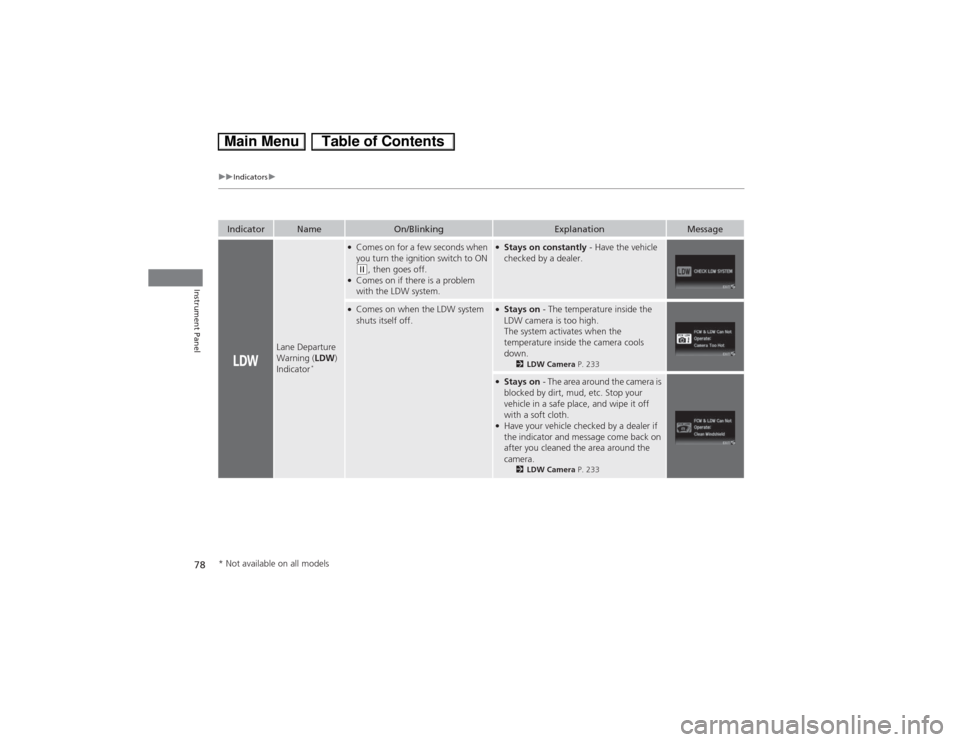
Lane Departure
Warning (LDW)
Indicator
*
●Comes on for a few seconds when
you turn the ignition switch to ON (w, then goes off.
●Comes on if there is a problem
with the LDW system.
●Stays on constantly - Have the vehicle
checked by a dealer.
●Comes on when the LDW system
shuts itself off.
●Stays on - The temperature inside the
LDW camera is too high.
The system activates when the
temperature inside the camera cools
down.
2LDW Camera P. 233
●Stays on - The area around the camera is
blocked by dirt, mud, etc. Stop your
vehicle in a safe place, and wipe it off
with a soft cloth.●Have your vehicle checked by a dealer if
the indicator and message come back on
after you cleaned the area around the
camera.
2LDW Camera P. 233
* Not available on all models
Page 81 of 346
80
uuIndicatorsuintelligent Multi-Information Display (i-MID) Warning and Information Messages
Instrument Panel
Message
Condition
Explanation
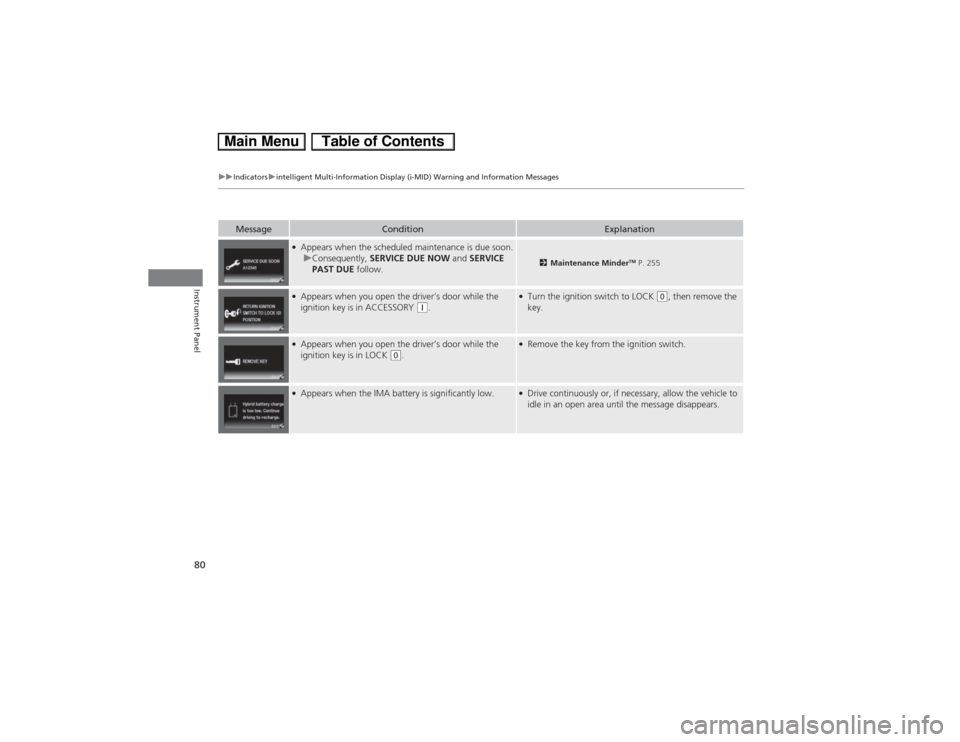
●Appears when the scheduled maintenance is due soon.
uConsequently, SERVICE DUE NOW and SERVICE
PAST DUE follow.
2Maintenance Minder
TM P. 255
●Appears when you open the driver’s door while the
ignition key is in ACCESSORY
(q.
●Turn the ignition switch to LOCK
(0, then remove the
key.
●Appears when you open the driver’s door while the
ignition key is in LOCK
(0.
●Remove the key from the ignition switch.
●Appears when the IMA battery is significantly low.
●Drive continuously or, if necessary, allow the vehicle to
idle in an open area until the message disappears.
Page 84 of 346
83
uuGauges and intelligent Multi-Information Display (i-MID)uintelligent Multi-Information Display (i-MID)
Continued
Instrument Panel
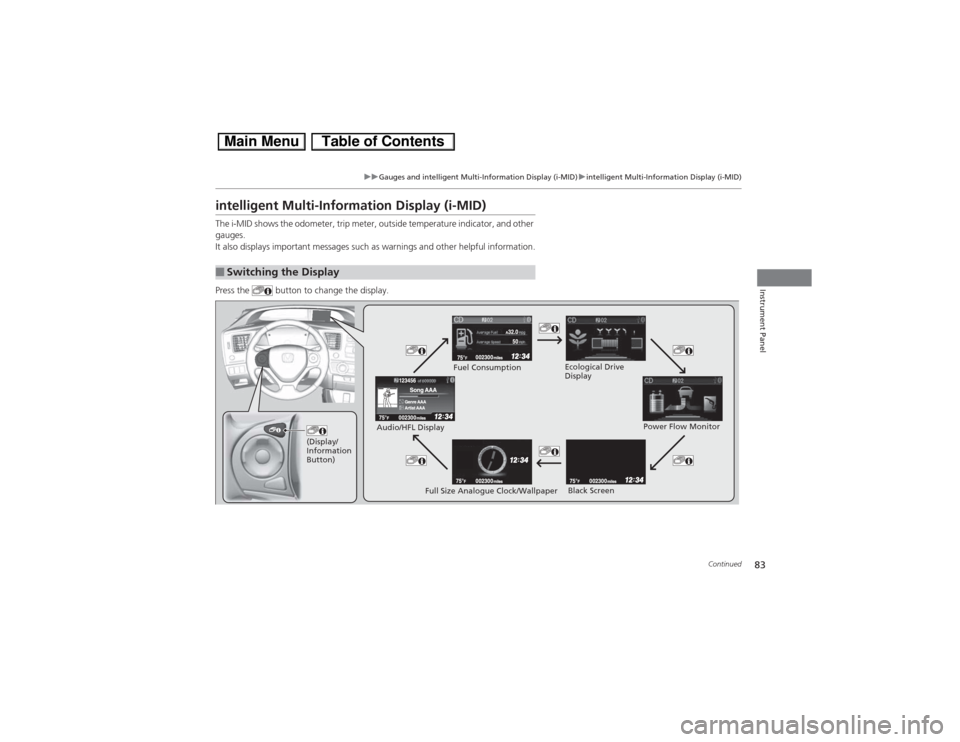
intelligent Multi-Information Display (i-MID)The i-MID shows the odometer, trip meter, outside temperature indicator, and other
gauges.
It also displays important messages such as warnings and other helpful information.
Press the button to change the display.■Switching the Display
(Display/
Information
Button)
Fuel Consumption
Power Flow Monitor
Full Size Analogue Clock/Wallpaper Audio/HFL Display
Black Screen Ecological Drive
Display
Page 89 of 346
88
uuGauges and intelligent Multi-Information Display (i-MID)uintelligent Multi-Information Display (i-MID)
Instrument Panel
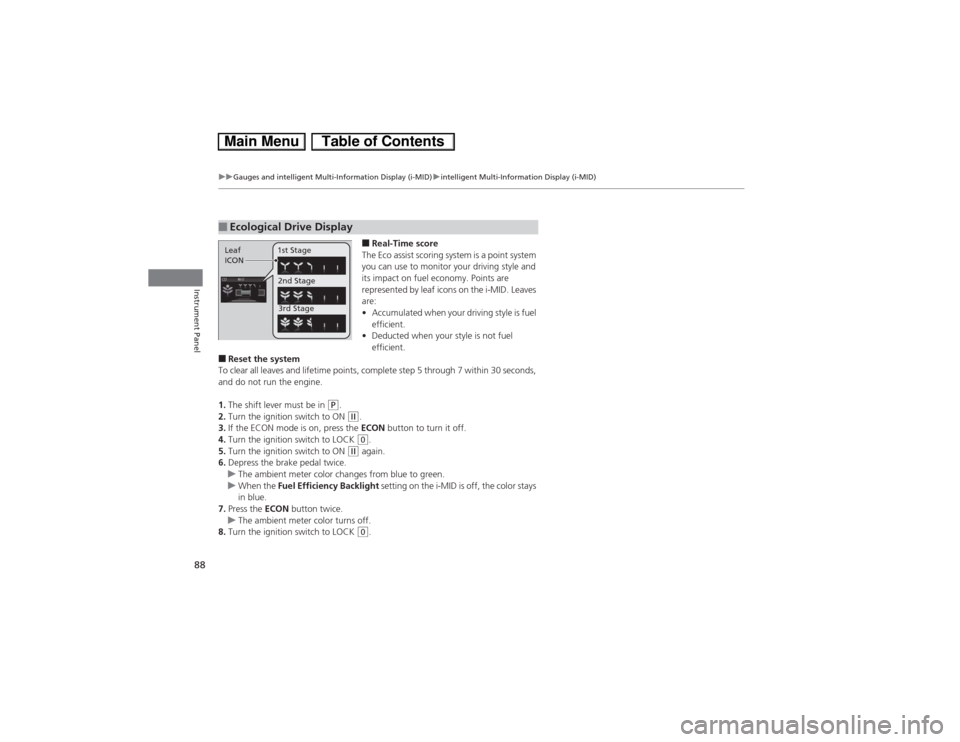
■Real-Time score
The Eco assist scoring system is a point system
you can use to monitor your driving style and
its impact on fuel economy. Points are
represented by leaf icons on the i-MID. Leaves
are:
•Accumulated when your driving style is fuel
efficient.
•Deducted when your style is not fuel
efficient.
■Reset the system
To clear all leaves and lifetime points, complete step 5 through 7 within 30 seconds,
and do not run the engine.
1.The shift lever must be in
(P.
2.Turn the ignition switch to ON (w.
3.If the ECON mode is on, press the ECON button to turn it off.
4.Turn the ignition switch to LOCK (0.
5.Turn the ignition switch to ON
(w again.
6.Depress the brake pedal twice.
uThe ambient meter color changes from blue to green.
uWhen the Fuel Efficiency Backlight setting on the i-MID is off, the color stays
in blue.
7.Press the ECON button twice.
uThe ambient meter color turns off.
8.Turn the ignition switch to LOCK (0.
■Ecological Drive DisplayLeaf
ICON1st Stage
2nd Stage
3rd Stage
Page 93 of 346
92
uuGauges and intelligent Multi-Information Display (i-MID)uintelligent Multi-Information Display (i-MID)
Instrument Panel
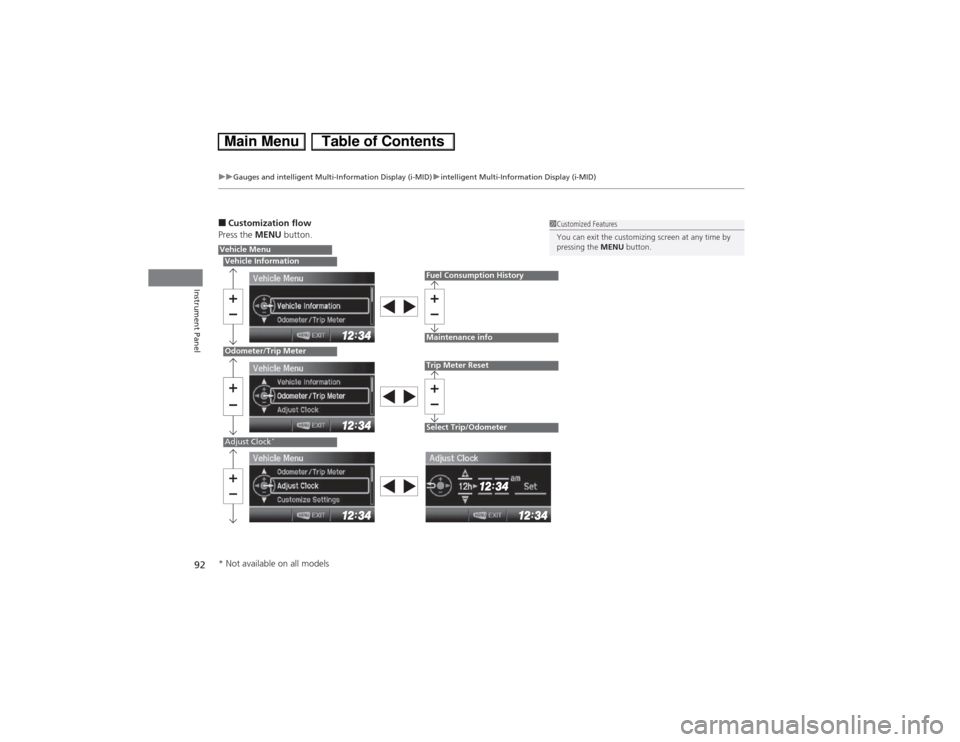
■Customization flow
Press the MENU button.
1Customized Features
You can exit the customizing screen at any time by
pressing the MENU button.
Vehicle MenuVehicle InformationOdometer/Trip MeterAdjust Clock
*
Fuel Consumption HistoryMaintenance infoTrip Meter ResetSelect Trip/Odometer
* Not available on all models
Page 95 of 346
94
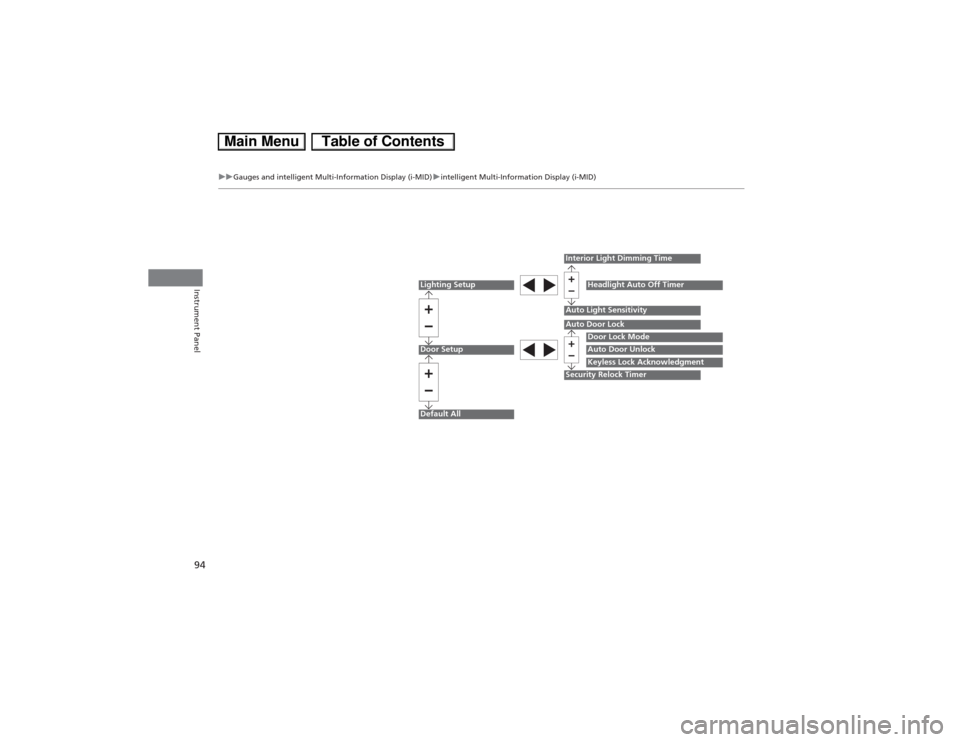
uuGauges and intelligent Multi-Information Display (i-MID)uintelligent Multi-Information Display (i-MID)
Instrument Panel
Lighting SetupDoor SetupDefault All
Auto Light Sensitivity
Door Lock ModeAuto Door UnlockKeyless Lock Acknowledgment
Auto Door LockSecurity Relock TimerInterior Light Dimming Time
Headlight Auto Off Timer