Shift HONDA CIVIC HYBRID 2013 9.G Owners Manual
[x] Cancel search | Manufacturer: HONDA, Model Year: 2013, Model line: CIVIC HYBRID, Model: HONDA CIVIC HYBRID 2013 9.GPages: 346, PDF Size: 6.95 MB
Page 2 of 346
Contents
Child Safety P. 52 Exhaust Gas Hazard P. 64 Safety Labels P. 65Opening and Closing the Trunk P. 112 Security System P. 115 Opening and Closing the Windows P. 117
Adjusting the Mirrors P. 128 Adjusting the Seats P. 129
Climate Control System P. 140Audio Error Messages P. 168 General Information on the Audio System P. 171When Driving P. 214 Braking P. 240 Parking Your Vehicle P. 244
Accessories and Modifications P. 250Maintenance Under the Hood P. 259 Replacing Light Bulbs P. 271
Checking and Maintaining Tires P. 279 12 Volt Battery P. 288 Remote Transmitter Care P. 289
Cleaning P. 291Engine Does Not Start P. 311 Jump Starting P. 312 Shift Lever Does Not Move P. 314
Fuses P. 321 Emergency Towing P. 324Devices that Emit Radio Waves P. 329 Reporting Safety Defects P. 330
Authorized Manuals P. 335 Customer Service Information P. 336
Quick Reference Guide
P. 2
Safe Driving
P. 27
Instrument Panel
P. 67
Controls
P. 103
Features
P. 143
Driving
P. 207
Maintenance
P. 251
Handling the Unexpected
P. 295
Information
P. 325
Index
P. 337
Page 5 of 346
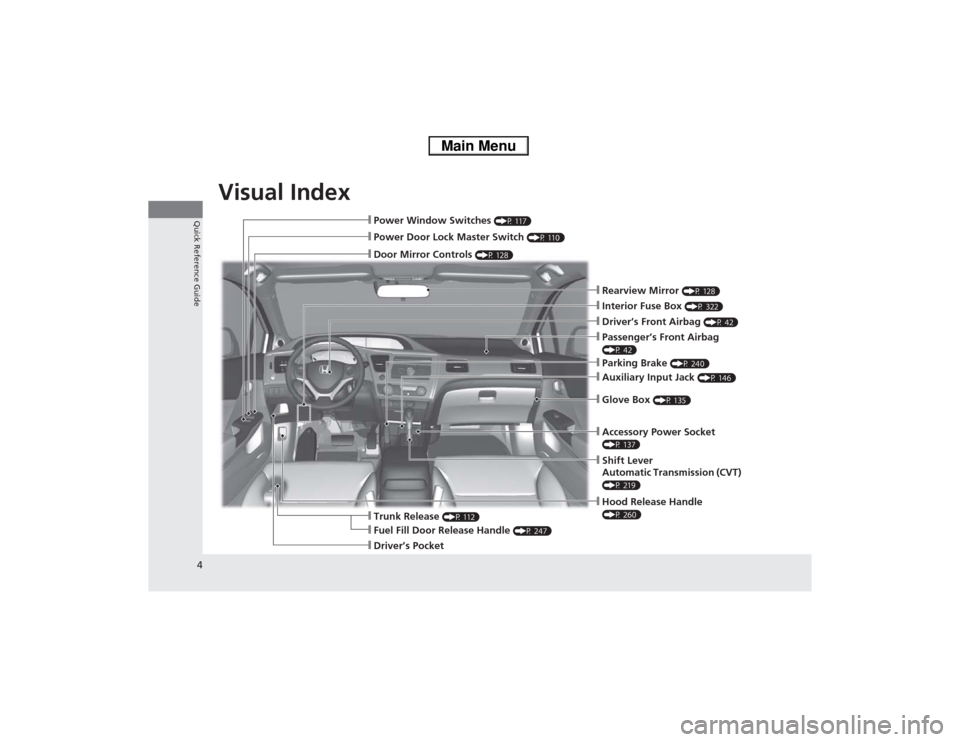
Visual Index
4Quick Reference Guide
❙Hood Release Handle (P 260)
❙Power Window Switches
(P 117)
❙Power Door Lock Master Switch
(P 110)
❙Door Mirror Controls
(P 128)
❙Parking Brake
(P 240)
❙Auxiliary Input Jack
(P 146)
❙Glove Box
(P 135)
❙Shift Lever
Automatic Transmission (CVT) (P 219)❙Interior Fuse Box
(P 322)
❙Trunk Release
(P 112)
❙Driver’s Front Airbag
(P 42)
❙Fuel Fill Door Release Handle
(P 247)
❙Driver’s Pocket
❙Rearview Mirror
(P 128)
❙Passenger’s Front Airbag (P 42)❙Accessory Power Socket (P 137)
Page 14 of 346
13Quick Reference Guide
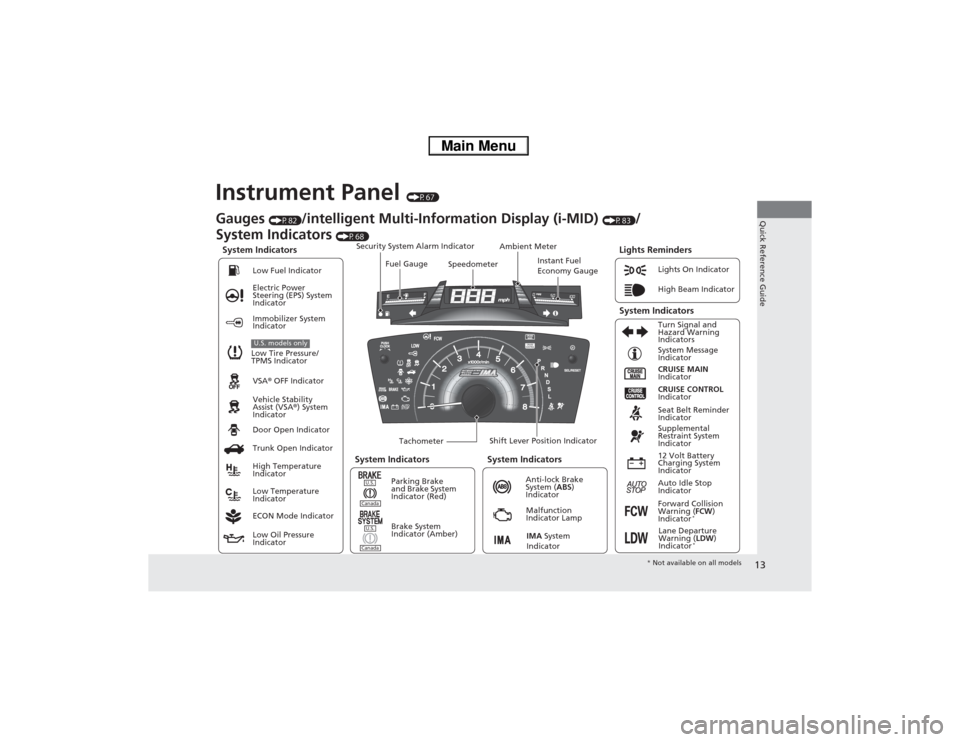
Instrument Panel
(P67)
System Indicators
Malfunction
Indicator Lamp
Low Oil Pressure
IndicatorAnti-lock Brake
System (ABS)
Indicator Vehicle Stability
Assist (VSA®) System
Indicator VSA® OFF Indicator Electric Power
Steering (EPS) System
IndicatorLights On Indicator
High Beam Indicator
Immobilizer System
Indicator
Seat Belt Reminder
Indicator
Lights Reminders
CRUISE MAIN
Indicator System Message
Indicator
Brake System
Indicator (Amber)Supplemental
Restraint System
Indicator
Forward Collision
Warning (FCW)
Indicator
*
Door Open Indicator
TachometerInstant Fuel
Economy Gauge Speedometer Fuel Gauge Security System Alarm Indicator
Shift Lever Position Indicator Low Fuel Indicator
Gauges
(P82)
/intelligent Multi-Information Display (i-MID)
(P83)
/
System Indicators
(P68)
Trunk Open Indicator
ECON Mode IndicatorTurn Signal and
Hazard Warning
Indicators
High Temperature
Indicator
Low Temperature
IndicatorAmbient Meter
System Indicators System Indicators
Low Tire Pressure/
TPMS IndicatorU.S. models only
Parking Brake
and Brake System
Indicator (Red)
IMA System
Indicator
CRUISE CONTROL
Indicator
System Indicators
12 Volt Battery
Charging System
Indicator
Auto Idle Stop
Indicator
U.S.CanadaU.S.Canada
Lane Departure
Warning (LDW)
Indicator
*
* Not available on all models
Page 19 of 346
18Quick Reference Guide
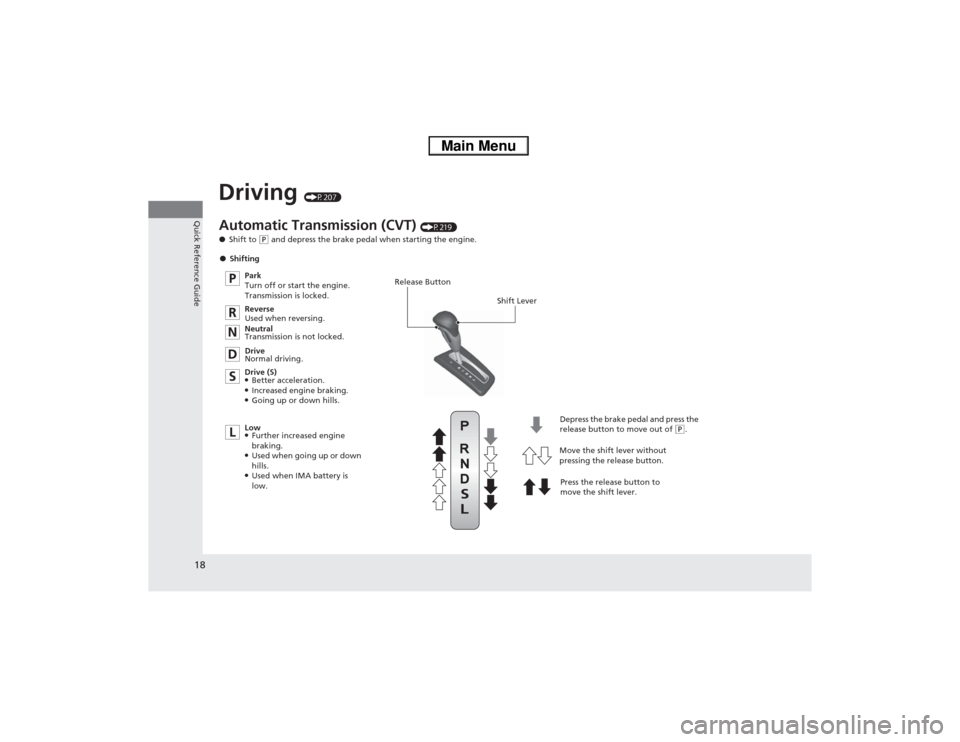
Driving
(P207)
Release Button
Shift Lever
Depress the brake pedal and press the
release button to move out of
(P.
Move the shift lever without
pressing the release button.
Press the release button to
move the shift lever.
Automatic Transmission (CVT)
(P219)
●Shift to
(P and depress the brake pedal when starting the engine.
●Shifting
Park
Turn off or start the engine.
Transmission is locked.
Reverse
Used when reversing.
Neutral
Transmission is not locked.
Drive
Normal driving.
Drive (S)
●Better acceleration.●Increased engine braking.●Going up or down hills.
Low●Further increased engine
braking.●Used when going up or down
hills.●Used when IMA battery is
low.
Page 23 of 346
22Quick Reference Guide
What to Do If
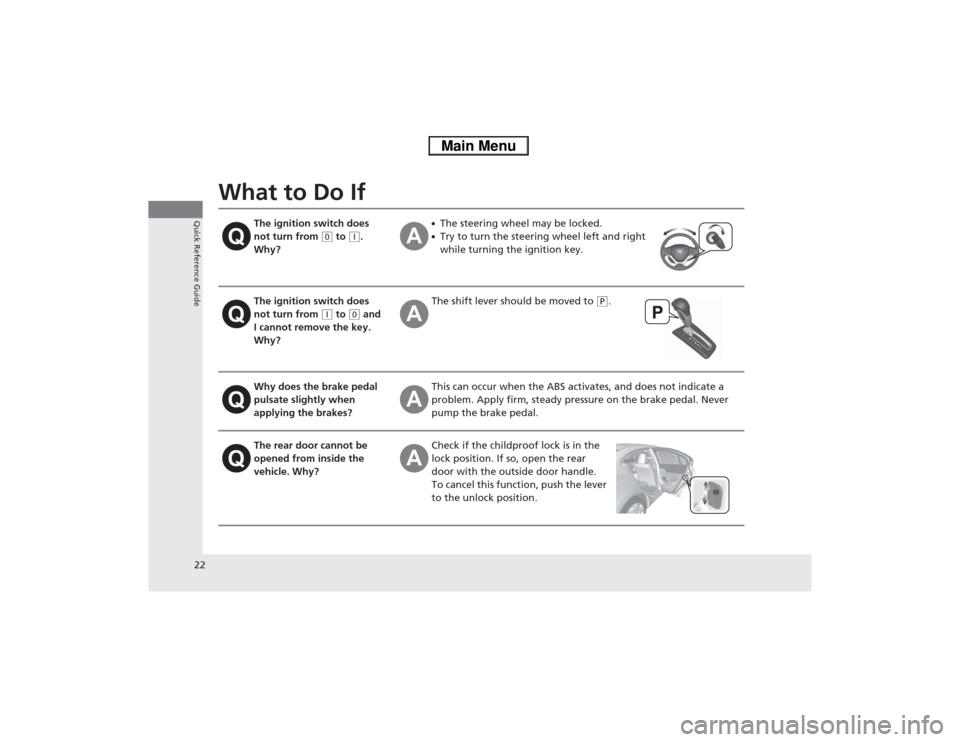
The ignition switch does
not turn from
(0 to
(q.
Why?
●The steering wheel may be locked.●Try to turn the steering wheel left and right
while turning the ignition key.
The ignition switch does
not turn from
(q to
(0 and
I cannot remove the key.
Why?
The shift lever should be moved to
(P.
Why does the brake pedal
pulsate slightly when
applying the brakes?
This can occur when the ABS activates, and does not indicate a
problem. Apply firm, steady pressure on the brake pedal. Never
pump the brake pedal.
The rear door cannot be
opened from inside the
vehicle. Why?
Check if the childproof lock is in the
lock position. If so, open the rear
door with the outside door handle.
To cancel this function, push the lever
to the unlock position.
Page 70 of 346
69
uuIndicatorsu
Continued
Instrument Panel
Indicator
Name
On/Blinking
Explanation
Message
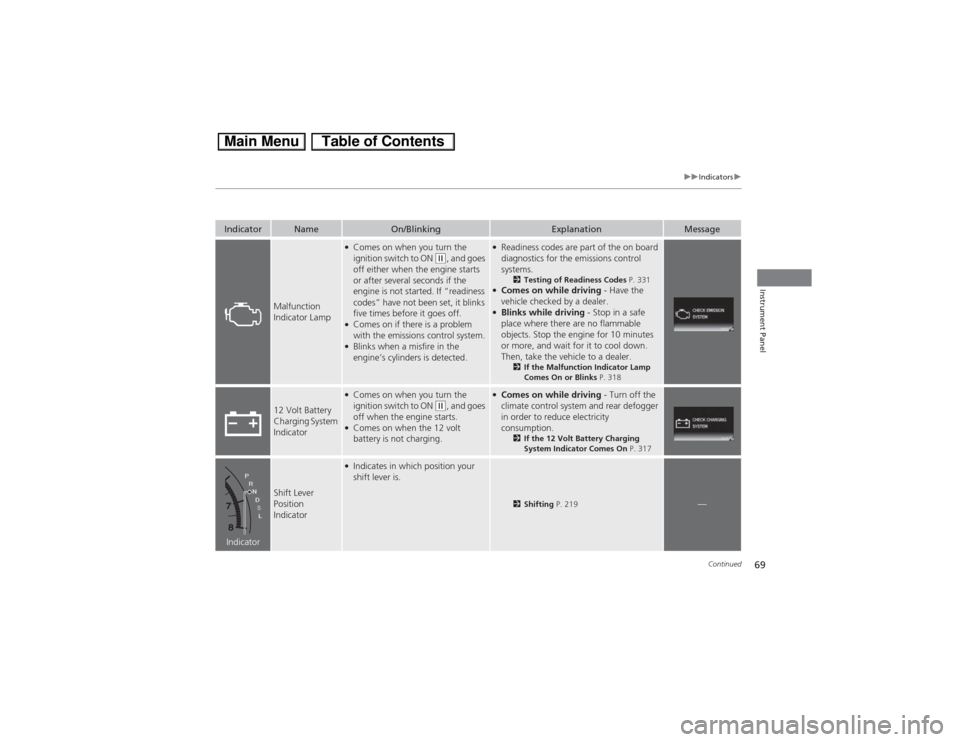
Malfunction
Indicator Lamp
●Comes on when you turn the
ignition switch to ON
(w, and goes
off either when the engine starts
or after several seconds if the
engine is not started. If “readiness
codes” have not been set, it blinks
five times before it goes off.
●Comes on if there is a problem
with the emissions control system.●Blinks when a misfire in the
engine’s cylinders is detected.
●Readiness codes are part of the on board
diagnostics for the emissions control
systems.
2Testing of Readiness Codes P. 331
●Comes on while driving - Have the
vehicle checked by a dealer.●Blinks while driving - Stop in a safe
place where there are no flammable
objects. Stop the engine for 10 minutes
or more, and wait for it to cool down.
Then, take the vehicle to a dealer.
2If the Malfunction Indicator Lamp
Comes On or Blinks P. 318
12 Volt Battery
Charging System
Indicator
●Comes on when you turn the
ignition switch to ON
(w, and goes
off when the engine starts.
●Comes on when the 12 volt
battery is not charging.
●Comes on while driving - Turn off the
climate control system and rear defogger
in order to reduce electricity
consumption.
2If the 12 Volt Battery Charging
System Indicator Comes On P. 317
Indicator
Shift Lever
Position
Indicator
●Indicates in which position your
shift lever is.
2Shifting P. 219
—
Page 89 of 346
88
uuGauges and intelligent Multi-Information Display (i-MID)uintelligent Multi-Information Display (i-MID)
Instrument Panel
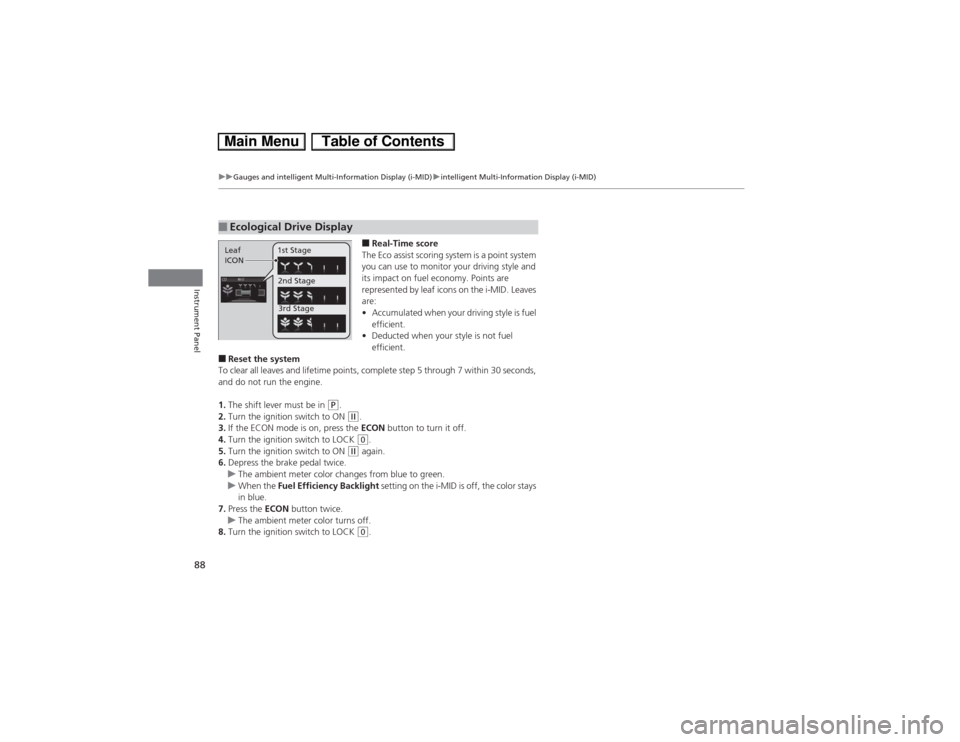
■Real-Time score
The Eco assist scoring system is a point system
you can use to monitor your driving style and
its impact on fuel economy. Points are
represented by leaf icons on the i-MID. Leaves
are:
•Accumulated when your driving style is fuel
efficient.
•Deducted when your style is not fuel
efficient.
■Reset the system
To clear all leaves and lifetime points, complete step 5 through 7 within 30 seconds,
and do not run the engine.
1.The shift lever must be in
(P.
2.Turn the ignition switch to ON (w.
3.If the ECON mode is on, press the ECON button to turn it off.
4.Turn the ignition switch to LOCK (0.
5.Turn the ignition switch to ON
(w again.
6.Depress the brake pedal twice.
uThe ambient meter color changes from blue to green.
uWhen the Fuel Efficiency Backlight setting on the i-MID is off, the color stays
in blue.
7.Press the ECON button twice.
uThe ambient meter color turns off.
8.Turn the ignition switch to LOCK (0.
■Ecological Drive DisplayLeaf
ICON1st Stage
2nd Stage
3rd Stage
Page 99 of 346
98
uuGauges and intelligent Multi-Information Display (i-MID)uintelligent Multi-Information Display (i-MID)
Instrument Panel
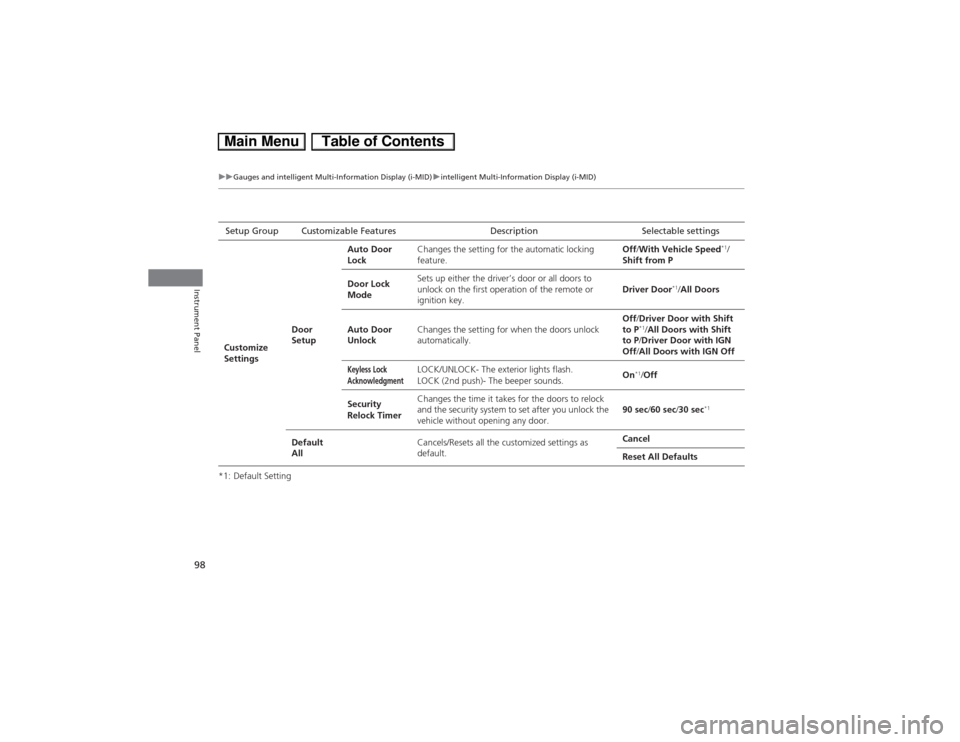
*1: Default SettingSetup Group Customizable Features Description Selectable settings
Customize
SettingsDoor
SetupAuto Door
LockChanges the setting for the automatic locking
feature.Off/With Vehicle Speed
*1/
Shift from P
Door Lock
ModeSets up either the driver’s door or all doors to
unlock on the first operation of the remote or
ignition key.Driver Door
*1/All Doors
Auto Door
UnlockChanges the setting for when the doors unlock
automatically.Off/Driver Door with Shift
to P
*1/All Doors with Shift
to P/Driver Door with IGN
Off/All Doors with IGN Off
Keyless Lock
Acknowledgment
LOCK/UNLOCK- The exterior lights flash.
LOCK (2nd push)- The beeper sounds.On
*1/Off
Security
Relock TimerChanges the time it takes for the doors to relock
and the security system to set after you unlock the
vehicle without opening any door.90 sec/60 sec/30 sec
*1
Default
AllCancels/Resets all the customized settings as
default.Cancel
Reset All Defaults
Page 112 of 346
111
uuLocking and Unlocking the DoorsuAuto Door Locking/Unlocking
Controls
Auto Door Locking/UnlockingYour vehicle locks all doors and unlocks the driver’s door automatically when a
certain condition is met.■Drive lock mode
All doors lock when the vehicle’s speed reaches about 10 mph (15 km/h).■Park unlock mode
The driver’s door unlocks when the shift lever is moved into
(P with the brake pedal
depressed.
■Auto Door Locking■Auto Door Unlocking
1Auto Door Locking/Unlocking
You can turn off or change to another auto door
locking/unlocking setting using the intelligent multi-
information display.
2Customized Features P. 91
Page 120 of 346
119Controls
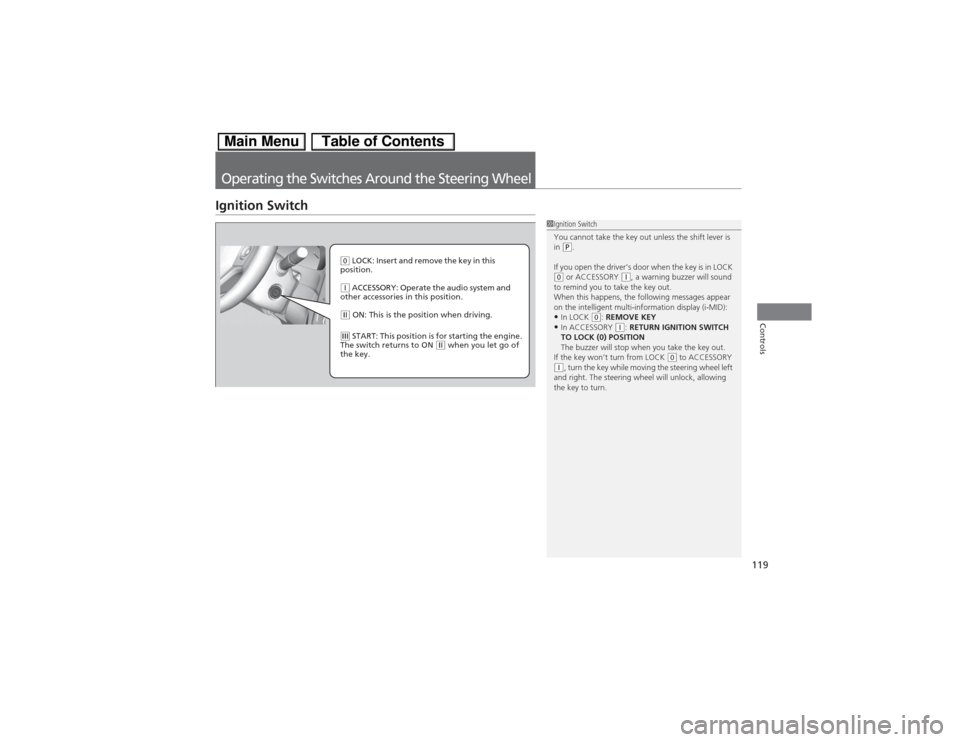
Operating the Switches Around the Steering WheelIgnition Switch
1Ignition Switch
You cannot take the key out unless the shift lever is
in
(P.
If you open the driver’s door when the key is in LOCK
(0 or ACCESSORY
(q, a warning buzzer will sound
to remind you to take the key out.
When this happens, the following messages appear
on the intelligent multi-information display (i-MID):
•In LOCK
(0: REMOVE KEY
•In ACCESSORY
(q: RETURN IGNITION SWITCH
TO LOCK (0) POSITION
The buzzer will stop when you take the key out.
If the key won’t turn from LOCK
(0 to ACCESSORY
(q, turn the key while moving the steering wheel left
and right. The steering wheel will unlock, allowing
the key to turn.
(0 LOCK: Insert and remove the key in this
position.(q ACCESSORY: Operate the audio system and
other accessories in this position.(w ON: This is the position when driving.(e START: This position is for starting the engine.
The switch returns to ON
(w when you let go of
the key.