cruise control HONDA CIVIC HYBRID 2013 9.G Owners Manual
[x] Cancel search | Manufacturer: HONDA, Model Year: 2013, Model line: CIVIC HYBRID, Model: HONDA CIVIC HYBRID 2013 9.GPages: 346, PDF Size: 6.95 MB
Page 4 of 346
3Quick Reference Guide
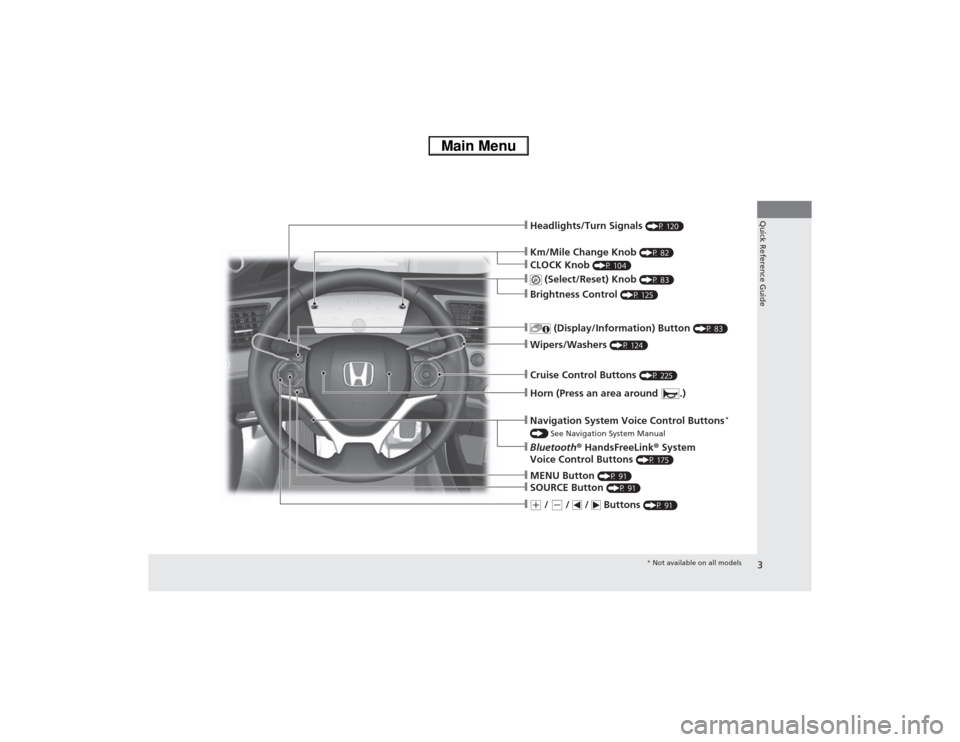
❙Km/Mile Change Knob
(P 82)
❙Headlights/Turn Signals
(P 120)
❙
(Select/Reset) Knob
(P 83)
❙
(Display/Information) Button
(P 83)
❙Wipers/Washers
(P 124)
❙Cruise Control Buttons
(P 225)
❙MENU Button
(P 91)
❙SOURCE Button
(P 91)
❙(+ / (- / / Buttons
(P 91)
❙Navigation System Voice Control Buttons
*
() See Navigation System Manual❙Bluetooth® HandsFreeLink® System
Voice Control Buttons
(P 175)
❙Horn (Press an area around .)❙Brightness Control
(P 125)
❙CLOCK Knob
(P 104)
* Not available on all models
Page 14 of 346
13Quick Reference Guide
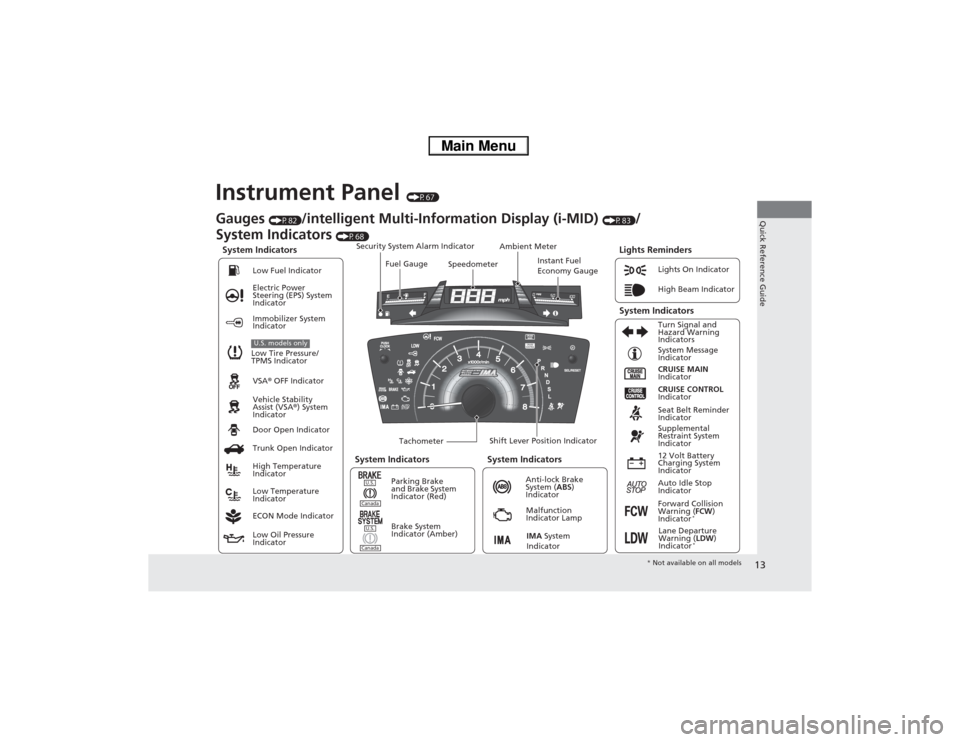
Instrument Panel
(P67)
System Indicators
Malfunction
Indicator Lamp
Low Oil Pressure
IndicatorAnti-lock Brake
System (ABS)
Indicator Vehicle Stability
Assist (VSA®) System
Indicator VSA® OFF Indicator Electric Power
Steering (EPS) System
IndicatorLights On Indicator
High Beam Indicator
Immobilizer System
Indicator
Seat Belt Reminder
Indicator
Lights Reminders
CRUISE MAIN
Indicator System Message
Indicator
Brake System
Indicator (Amber)Supplemental
Restraint System
Indicator
Forward Collision
Warning (FCW)
Indicator
*
Door Open Indicator
TachometerInstant Fuel
Economy Gauge Speedometer Fuel Gauge Security System Alarm Indicator
Shift Lever Position Indicator Low Fuel Indicator
Gauges
(P82)
/intelligent Multi-Information Display (i-MID)
(P83)
/
System Indicators
(P68)
Trunk Open Indicator
ECON Mode IndicatorTurn Signal and
Hazard Warning
Indicators
High Temperature
Indicator
Low Temperature
IndicatorAmbient Meter
System Indicators System Indicators
Low Tire Pressure/
TPMS IndicatorU.S. models only
Parking Brake
and Brake System
Indicator (Red)
IMA System
Indicator
CRUISE CONTROL
Indicator
System Indicators
12 Volt Battery
Charging System
Indicator
Auto Idle Stop
Indicator
U.S.CanadaU.S.Canada
Lane Departure
Warning (LDW)
Indicator
*
* Not available on all models
Page 20 of 346
19Quick Reference Guide
VSA® OFF Button
(P236)
●The vehicle stability assist (VSA®) system
helps stabilize the vehicle during
cornering, and helps maintain traction
while accelerating on loose or slippery
road surfaces.
●VSA® comes on automatically every time
you start the engine.
●To turn VSA® on or off, press and hold
the button until you hear a beep.
Cruise Control
(P225)
●Cruise control allows you to maintain a
set speed without keeping your foot on
the accelerator pedal.
●To use cruise control, press the CRUISE
button, then press –/SET button once you
have achieved the desired speed (above
25 mph or 40 km/h).
Tire Pressure Monitoring
System (TPMS)
(P237)
●TPMS monitors tire pressure.
●TPMS is turned on automatically every
time you start the engine.
U.S. models only
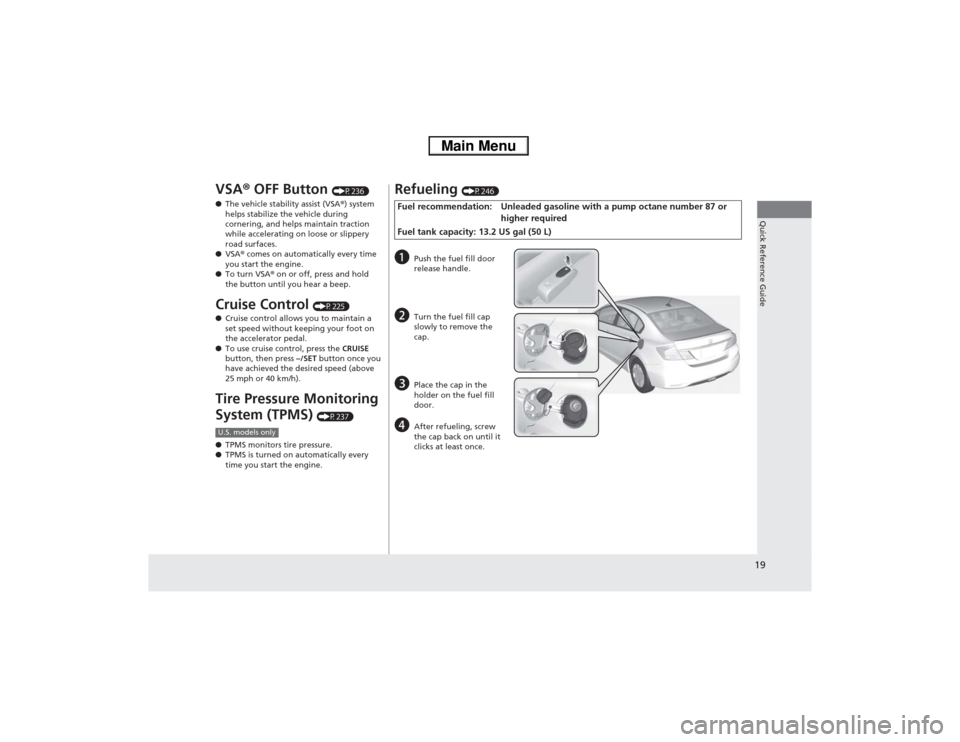
Refueling
(P246)
Fuel recommendation: Unleaded gasoline with a pump octane number 87 or
higher required
Fuel tank capacity: 13.2 US gal (50 L)a
Push the fuel fill door
release handle.
b
Turn the fuel fill cap
slowly to remove the
cap.
c
Place the cap in the
holder on the fuel fill
door.
d
After refueling, screw
the cap back on until it
clicks at least once.
Page 76 of 346
75
uuIndicatorsu
Continued
Instrument Panel
Indicator
Name
On/Blinking
Explanation
Message
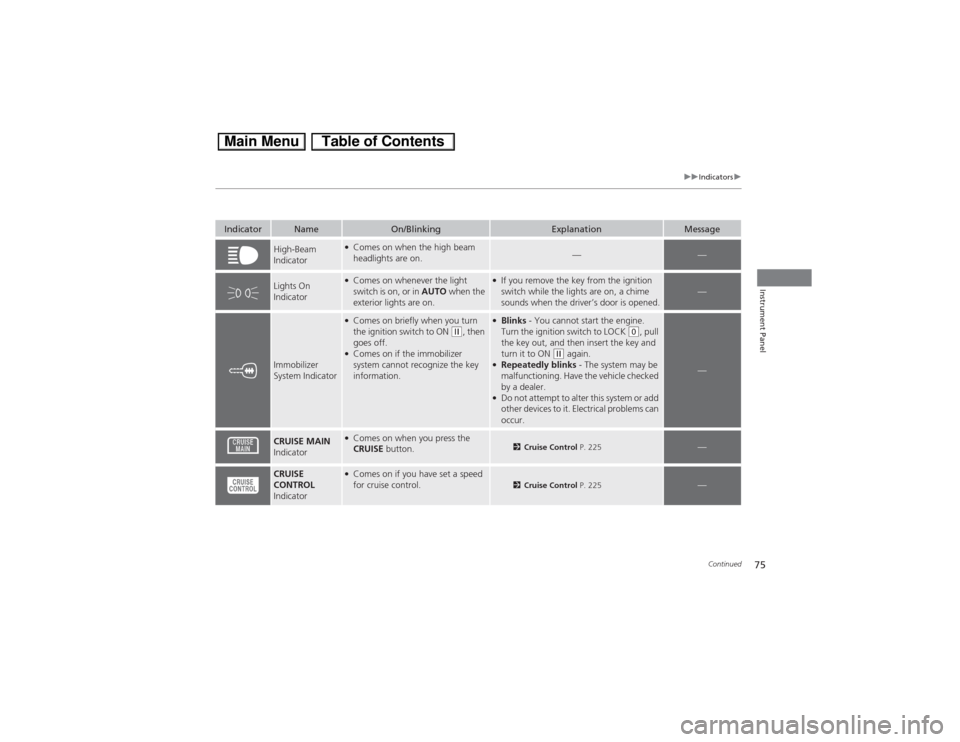
High-Beam
Indicator
●Comes on when the high beam
headlights are on.
—
—
Lights On
Indicator
●Comes on whenever the light
switch is on, or in AUTO when the
exterior lights are on.
●If you remove the key from the ignition
switch while the lights are on, a chime
sounds when the driver’s door is opened.
—
Immobilizer
System Indicator
●Comes on briefly when you turn
the ignition switch to ON
(w, then
goes off.
●Comes on if the immobilizer
system cannot recognize the key
information.
●Blinks - You cannot start the engine.
Turn the ignition switch to LOCK
(0, pull
the key out, and then insert the key and
turn it to ON
(w again.
●Repeatedly blinks - The system may be
malfunctioning. Have the vehicle checked
by a dealer.●Do not attempt to alter this system or add
other devices to it. Electrical problems can
occur.
—
CRUISE MAIN
Indicator
●Comes on when you press the
CRUISE button.
2Cruise Control P. 225
—
CRUISE
CONTROL
Indicator
●Comes on if you have set a speed
for cruise control.
2Cruise Control P. 225
—
Page 208 of 346
207
Driving
This chapter discusses driving, refueling, and information on items such as accessories.
Before Driving
Driving Preparation .......................... 208
Maximum Load Limit........................ 211
Towing a Trailer
Towing Your Vehicle ........................ 213
When Driving
Starting the Engine .......................... 214
Precautions While Driving................. 217
Automatic Transmission (CVT) .......... 218
Shifting ............................................ 219
ECON Button ................................... 221
Auto Idle Stop.................................. 222Cruise Control ................................. 225
Forward Collision Warning (FCW)
*.. 228
Lane Departure Warning (LDW)
*..... 232
Vehicle Stability Assist (VSA®), aka Electronic
Stability Control (ESC), System ............. 235Tire Pressure Monitoring System (TPMS) ... 237
Tire Pressure Monitoring System (TPMS) -
Required Federal Explanation ......... 238
Braking
Brake System ................................... 240
Anti-lock Brake System (ABS) ........... 242
Brake Assist System.......................... 243Parking Your Vehicle
When Stopped ................................ 244
Rearview Camera............................. 245
Refueling
Fuel Information .............................. 246
How to Refuel ................................. 247
Fuel Economy
Improving Fuel Economy .................. 249
Accessories and Modifications
Accessories ...................................... 250
Modifications................................... 250
* Not available on all models
Page 222 of 346
221
uuWhen DrivinguECON Button
Driving
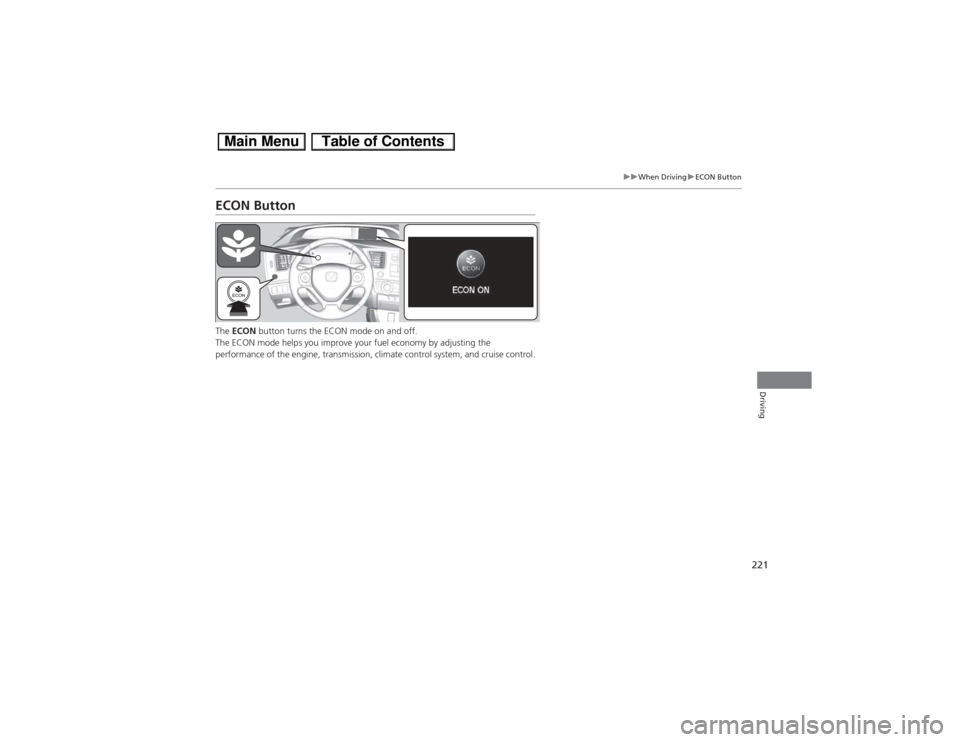
ECON ButtonThe ECON button turns the ECON mode on and off.
The ECON mode helps you improve your fuel economy by adjusting the
performance of the engine, transmission, climate control system, and cruise control.
Page 226 of 346
225
uuWhen DrivinguCruise Control
Continued
Driving
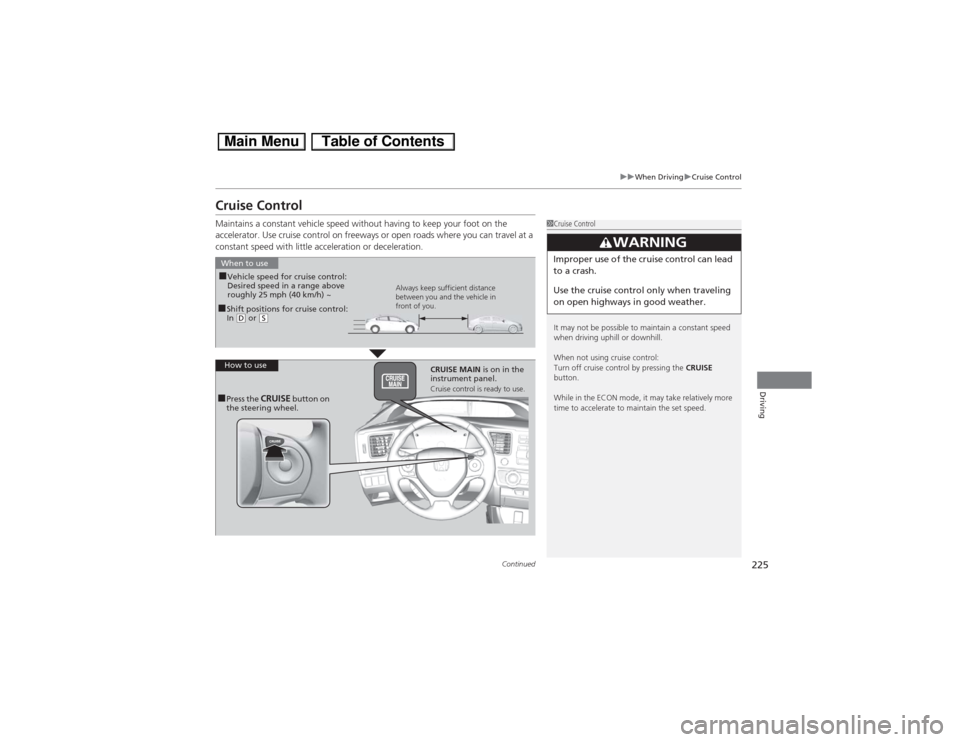
Cruise ControlMaintains a constant vehicle speed without having to keep your foot on the
accelerator. Use cruise control on freeways or open roads where you can travel at a
constant speed with little acceleration or deceleration.
1Cruise Control
It may not be possible to maintain a constant speed
when driving uphill or downhill.
When not using cruise control:
Turn off cruise control by pressing the CRUISE
button.
While in the ECON mode, it may take relatively more
time to accelerate to maintain the set speed.
3
WARNING
Improper use of the cruise control can lead
to a crash.
Use the cruise control only when traveling
on open highways in good weather.
■Shift positions for cruise control:
In (D or
(S
When to use
Always keep sufficient distance
between you and the vehicle in
front of you.
■Vehicle speed for cruise control:
Desired speed in a range above
roughly 25 mph (40 km/h) ~
How to use
CRUISE MAIN is on in the
instrument panel.
Cruise control is ready to use.
■Press the
CRUISE
button on
the steering wheel.
Page 227 of 346
226
uuWhen DrivinguCruise Control
Driving
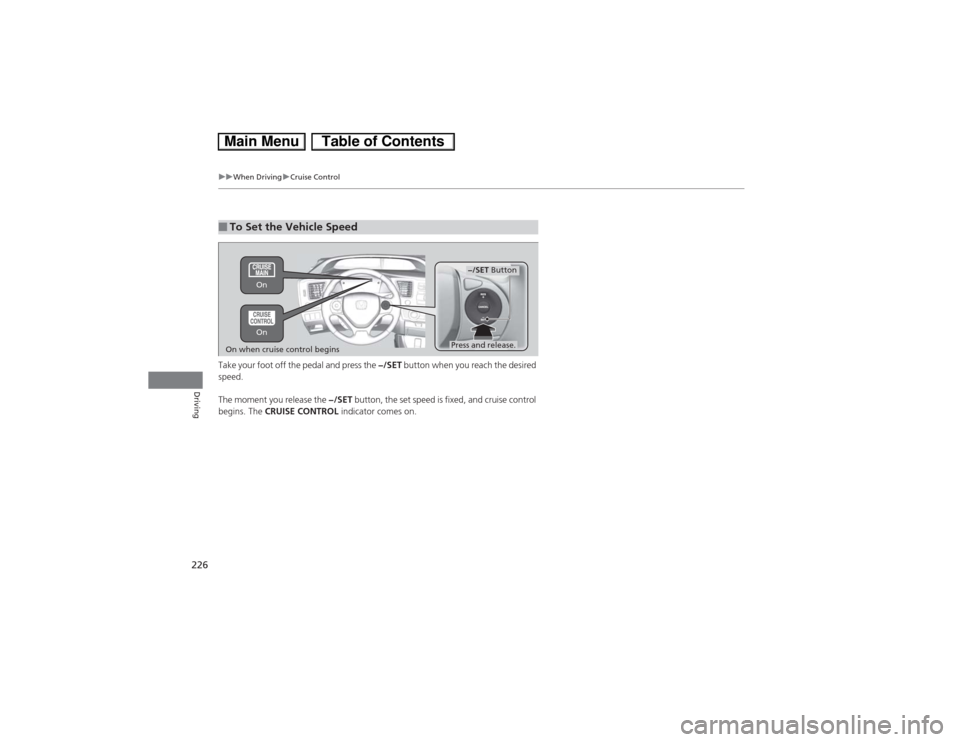
Take your foot off the pedal and press the −/SET button when you reach the desired
speed.
The moment you release the −/SET button, the set speed is fixed, and cruise control
begins. The CRUISE CONTROL indicator comes on.■To Set the Vehicle Speed
−/SET Button
On when cruise control begins
Press and release. On On
Page 228 of 346
227
uuWhen DrivinguCruise Control
Driving
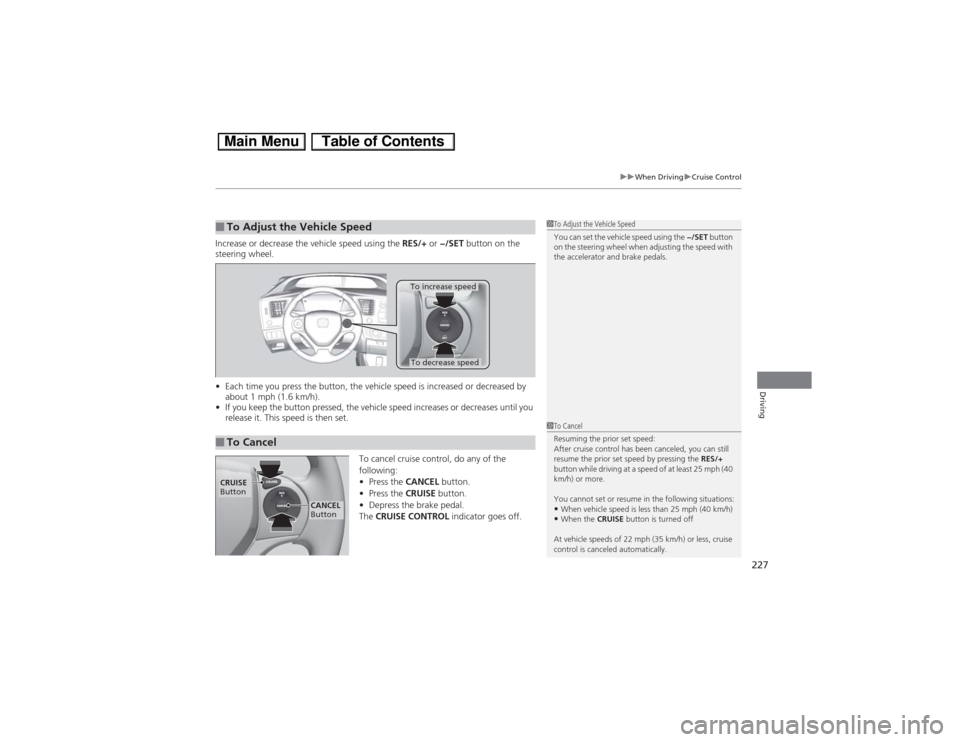
Increase or decrease the vehicle speed using the RES/+ or −/SET button on the
steering wheel.
•Each time you press the button, the vehicle speed is increased or decreased by
about 1 mph (1.6 km/h).
•If you keep the button pressed, the vehicle speed increases or decreases until you
release it. This speed is then set.
To cancel cruise control, do any of the
following:
•Press the CANCEL button.
•Press the CRUISE button.
•Depress the brake pedal.
The CRUISE CONTROL indicator goes off.■To Adjust the Vehicle Speed
1To Adjust the Vehicle Speed
You can set the vehicle speed using the −/SET button
on the steering wheel when adjusting the speed with
the accelerator and brake pedals.
■To Cancel
To decrease speedTo increase speed
1To Cancel
Resuming the prior set speed:
After cruise control has been canceled, you can still
resume the prior set speed by pressing the RES/+
button while driving at a speed of at least 25 mph (40
km/h) or more.
You cannot set or resume in the following situations:•When vehicle speed is less than 25 mph (40 km/h)•When the CRUISE button is turned off
At vehicle speeds of 22 mph (35 km/h) or less, cruise
control is canceled automatically.
CRUISE
Button
CANCEL
Button
Page 333 of 346
332
uuEmissions TestinguTesting of Readiness Codes
Information
7.Select a nearby, lightly traveled major highway where you can maintain a speed
of 50 to 60 mph (80 to 97 km/h) for at least 20 minutes. Drive on the highway in (D. Do not use cruise control. When traffic allows, drive for 90 seconds without
moving the accelerator pedal. (Vehicle speed may vary slightly; this is okay.) If you
cannot do this for a continuous 90 seconds because of traffic conditions, drive for
at least 30 seconds, then repeat it two more times (for a total of 90 seconds).
8.Drive in city/suburban traffic for at least 10 minutes. When traffic conditions
allow, let the vehicle coast for several seconds without using the accelerator pedal
or the brake pedal.
9.Park the vehicle and leave the engine off for 30 minutes.