fuse HONDA CIVIC HYBRID 2013 9.G Owners Manual
[x] Cancel search | Manufacturer: HONDA, Model Year: 2013, Model line: CIVIC HYBRID, Model: HONDA CIVIC HYBRID 2013 9.GPages: 346, PDF Size: 6.95 MB
Page 2 of 346
Contents
Child Safety P. 52 Exhaust Gas Hazard P. 64 Safety Labels P. 65Opening and Closing the Trunk P. 112 Security System P. 115 Opening and Closing the Windows P. 117
Adjusting the Mirrors P. 128 Adjusting the Seats P. 129
Climate Control System P. 140Audio Error Messages P. 168 General Information on the Audio System P. 171When Driving P. 214 Braking P. 240 Parking Your Vehicle P. 244
Accessories and Modifications P. 250Maintenance Under the Hood P. 259 Replacing Light Bulbs P. 271
Checking and Maintaining Tires P. 279 12 Volt Battery P. 288 Remote Transmitter Care P. 289
Cleaning P. 291Engine Does Not Start P. 311 Jump Starting P. 312 Shift Lever Does Not Move P. 314
Fuses P. 321 Emergency Towing P. 324Devices that Emit Radio Waves P. 329 Reporting Safety Defects P. 330
Authorized Manuals P. 335 Customer Service Information P. 336
Quick Reference Guide
P. 2
Safe Driving
P. 27
Instrument Panel
P. 67
Controls
P. 103
Features
P. 143
Driving
P. 207
Maintenance
P. 251
Handling the Unexpected
P. 295
Information
P. 325
Index
P. 337
Page 5 of 346
Visual Index
4Quick Reference Guide
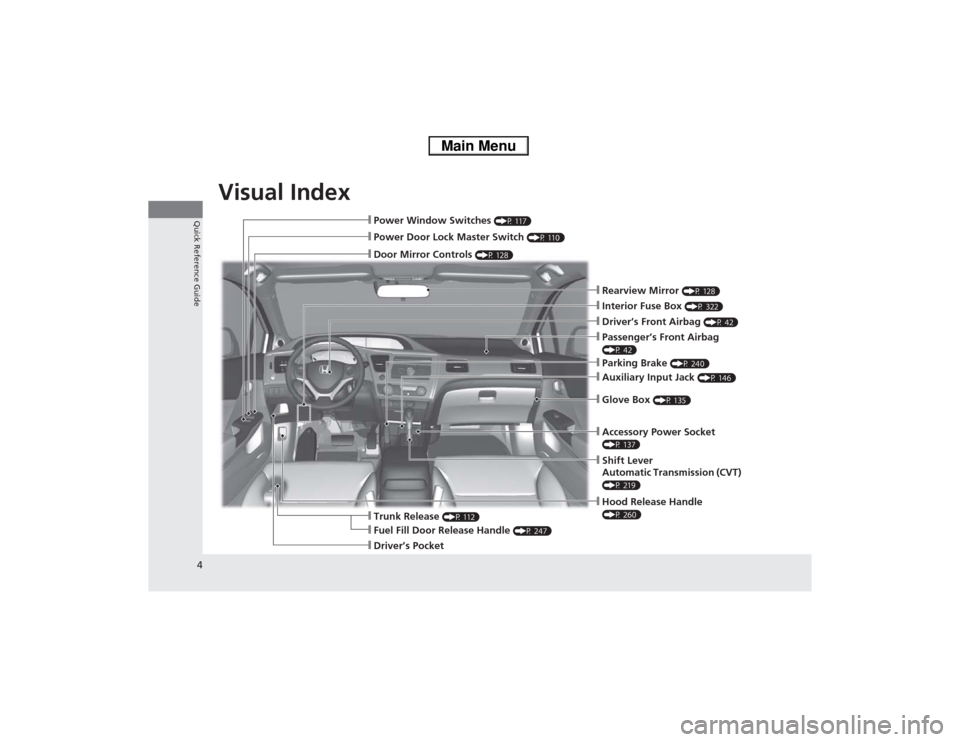
❙Hood Release Handle (P 260)
❙Power Window Switches
(P 117)
❙Power Door Lock Master Switch
(P 110)
❙Door Mirror Controls
(P 128)
❙Parking Brake
(P 240)
❙Auxiliary Input Jack
(P 146)
❙Glove Box
(P 135)
❙Shift Lever
Automatic Transmission (CVT) (P 219)❙Interior Fuse Box
(P 322)
❙Trunk Release
(P 112)
❙Driver’s Front Airbag
(P 42)
❙Fuel Fill Door Release Handle
(P 247)
❙Driver’s Pocket
❙Rearview Mirror
(P 128)
❙Passenger’s Front Airbag (P 42)❙Accessory Power Socket (P 137)
Page 22 of 346
Quick Reference Guide21
Handling the Unexpected
(P295)
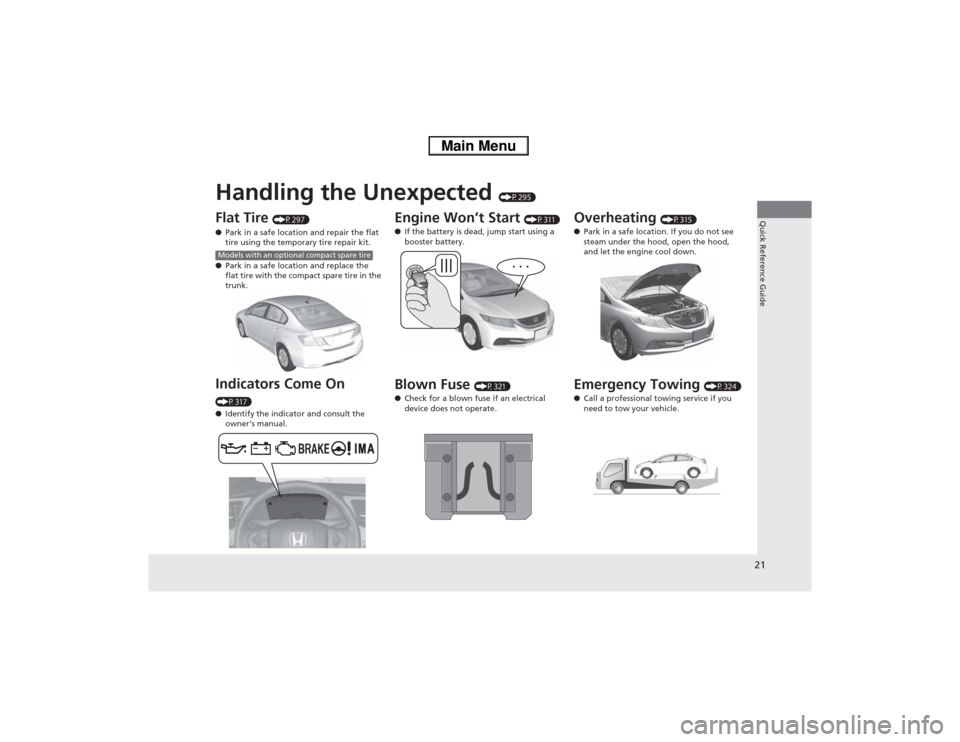
Flat Tire
(P297)
●Park in a safe location and repair the flat
tire using the temporary tire repair kit.
●Park in a safe location and replace the
flat tire with the compact spare tire in the
trunk.
Indicators Come On (P317)
●Identify the indicator and consult the
owner’s manual.Models with an optional compact spare tire
Engine Won’t Start
(P311)
●If the battery is dead, jump start using a
booster battery.
Blown Fuse
(P321)
●Check for a blown fuse if an electrical
device does not operate.
Overheating
(P315)
●Park in a safe location. If you do not see
steam under the hood, open the hood,
and let the engine cool down.
Emergency Towing
(P324)
●Call a professional towing service if you
need to tow your vehicle.
Page 242 of 346
241
uuBrakinguBrake System
Driving
Your vehicle is equipped with front disc brakes. The brakes on the rear wheels are
drum. A vacuum power assist helps reduce the effort needed on the brake pedal.
The brake assist system increases the stopping force when you depress the brake
pedal hard in an emergency situation. The anti-lock brake system (ABS) helps you
retain steering control when braking very hard.2Brake Assist System P. 243
2Anti-lock Brake System (ABS) P. 242■Foot Brake
1Foot Brake
Check the brakes after driving through deep water,
or if there is a buildup of road surface water. If
necessary, dry the brakes by lightly depressing the
pedal several times.
If you hear a continuous metallic friction sound when
applying the brakes, the brake pads need to be
replaced. Have the vehicle checked by a dealer.
Constantly using the brake pedal while going down a
long hill builds up heat, which reduces the brake
effectiveness. Apply engine braking by taking your
foot off the accelerator pedal and downshifting to a
lower speed position.
Do not rest your foot on the brake pedal while
driving, as it will lightly apply the brakes and cause
them to lose effectiveness over time and reduce pad
life. It will also confuse drivers behind you.
Page 251 of 346
250Driving
Accessories and ModificationsAccessoriesWhen installing accessories, check the following:
•Do not install accessories on the windshield. They can obstruct your view and
delay your reaction to driving conditions.
•Do not install accessories on the side pillars or across the side windows.
Accessories installed in these areas may interfere with proper operation of the
side curtain airbags.
•Be sure electronic accessories do not overload electrical circuits or interfere with
proper operation of your vehicle.
2Fuses P. 321
•Before installing any electronic accessory, have the installer contact a dealer for
assistance. If possible, have a dealer inspect the final installation.ModificationsDo not modify your vehicle or use non-Honda components that can affect its
handling, stability, and reliability.
Overall vehicle performance can be affected. Always make sure all equipment is
properly installed and maintained, and that it meets federal, state, province,
territory, and local regulations.
1Accessories and Modifications
Honda Genuine accessories are recommended to
ensure proper operation on your vehicle.
3
WARNING
Improper accessories or modifications can
affect your vehicle’s handling, stability, and
performance, and cause a crash in which
you can be seriously hurt or killed.
Follow all instructions in this owner’s
manual regarding accessories and
modifications.
Page 296 of 346

295
Handling the Unexpected
This chapter explains how to handle unexpected troubles.
Tools
Types of Tools .................................. 296
If a Tire Goes Flat
Temporarily Repairing a Flat Tire....... 297
Changing a Flat Tire ......................... 305
Engine Does Not Start
Checking the Engine ........................ 311
Jump Starting.................................... 312
Shift Lever Does Not Move.............. 314
Overheating
How to Handle Overheating ............. 315Indicator, Coming On/Blinking
If the Low Oil Pressure Indicator Comes
On................................................ 317If the 12 Volt Battery Charging System
Indicator Comes On ....................... 317
If the Malfunction Indicator Lamp Comes
On or Blinks ..................................... 318
If the Brake System Indicator (Red) Comes
On...................................................... 319If the EPS System Indicator Comes On .. 319If the IMA Indicator Comes On......... 320If the Low Tire Pressure/TPMS Indicator
Comes On or Blinks ....................... 320
Fuses
Fuse Locations ................................. 321
Inspecting and Changing Fuses ........ 323
Emergency Towing........................... 324
Page 312 of 346
311Handling the Unexpected
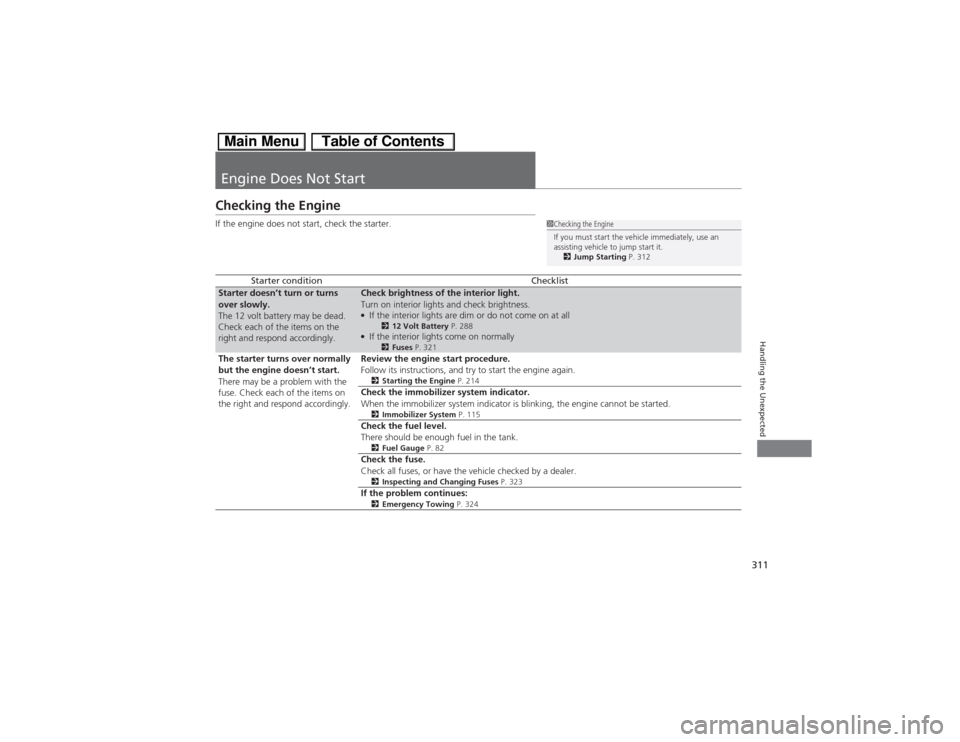
Engine Does Not StartChecking the EngineIf the engine does not start, check the starter.
Starter condition
Checklist
Starter doesn’t turn or turns
over slowly.
The 12 volt battery may be dead.
Check each of the items on the
right and respond accordingly.
Check brightness of the interior light.
Turn on interior lights and check brightness.●If the interior lights are dim or do not come on at all
212 Volt Battery P. 288
●If the interior lights come on normally
2Fuses P. 321
The starter turns over normally
but the engine doesn’t start.
There may be a problem with the
fuse. Check each of the items on
the right and respond accordingly.
Review the engine start procedure.
Follow its instructions, and try to start the engine again.2Starting the Engine P. 214Check the immobilizer system indicator.
When the immobilizer system indicator is blinking, the engine cannot be started.2Immobilizer System P. 115Check the fuel level.
There should be enough fuel in the tank.2Fuel Gauge P. 82Check the fuse.
Check all fuses, or have the vehicle checked by a dealer.2Inspecting and Changing Fuses P. 323If the problem continues:2Emergency Towing P. 324
1Checking the Engine
If you must start the vehicle immediately, use an
assisting vehicle to jump start it.
2Jump Starting P. 312
Page 322 of 346
321
Continued
Handling the Unexpected
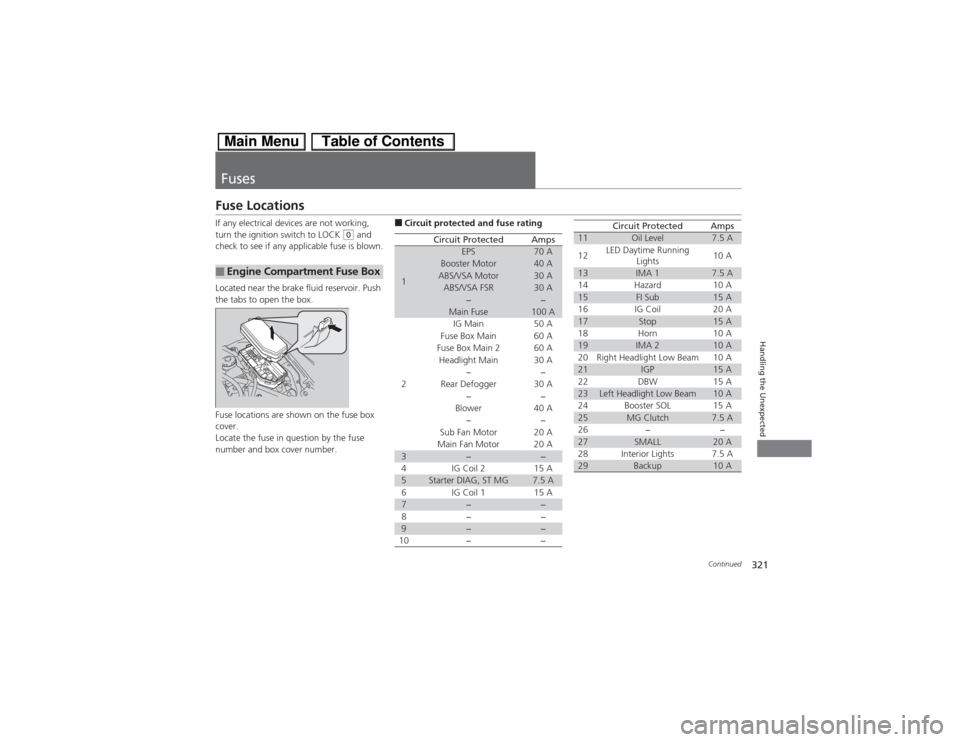
FusesFuse LocationsIf any electrical devices are not working,
turn the ignition switch to LOCK
(0 and
check to see if any applicable fuse is blown.
Located near the brake fluid reservoir. Push
the tabs to open the box.
Fuse locations are shown on the fuse box
cover.
Locate the fuse in question by the fuse
number and box cover number.
■Engine Compartment Fuse Box
■Circuit protected and fuse rating
Circuit Protected
Amps
1
EPS
70 A
Booster Motor
40 A
ABS/VSA Motor
30 A
ABS/VSA FSR
30 A
−
−
Main Fuse
100 A
2
IG Main
50 A
Fuse Box Main 60 A
Fuse Box Main 2
60 A
Headlight Main 30 A
−
−
Rear Defogger 30 A
−−
Blower 40 A
−−
Sub Fan Motor 20 A
Main Fan Motor 20 A
3
−
−
4 IG Coil 2 15 A
5
Starter DIAG, ST MG
7.5 A
6 IG Coil 1 15 A
7
−
−
8− −
9
−
−
10 − −
11
Oil Level
7.5 A
12LED Daytime Running
Lights10 A
13
IMA 1
7.5 A
14 Hazard 10 A
15
FI Sub
15 A
16 IG Coil 20 A
17
Stop
15 A
18 Horn 10 A
19
IMA 2
10 A
20 Right Headlight Low Beam 10 A
21
IGP
15 A
22 DBW 15 A
23
Left Headlight Low Beam
10 A
24 Booster SOL 15 A
25
MG Clutch
7.5 A
26 − −
27
SMALL
20 A
28 Interior Lights 7.5 A
29
Backup
10 A
Circuit Protected
Amps
Page 323 of 346
322
uuFusesuFuse Locations
Handling the Unexpected
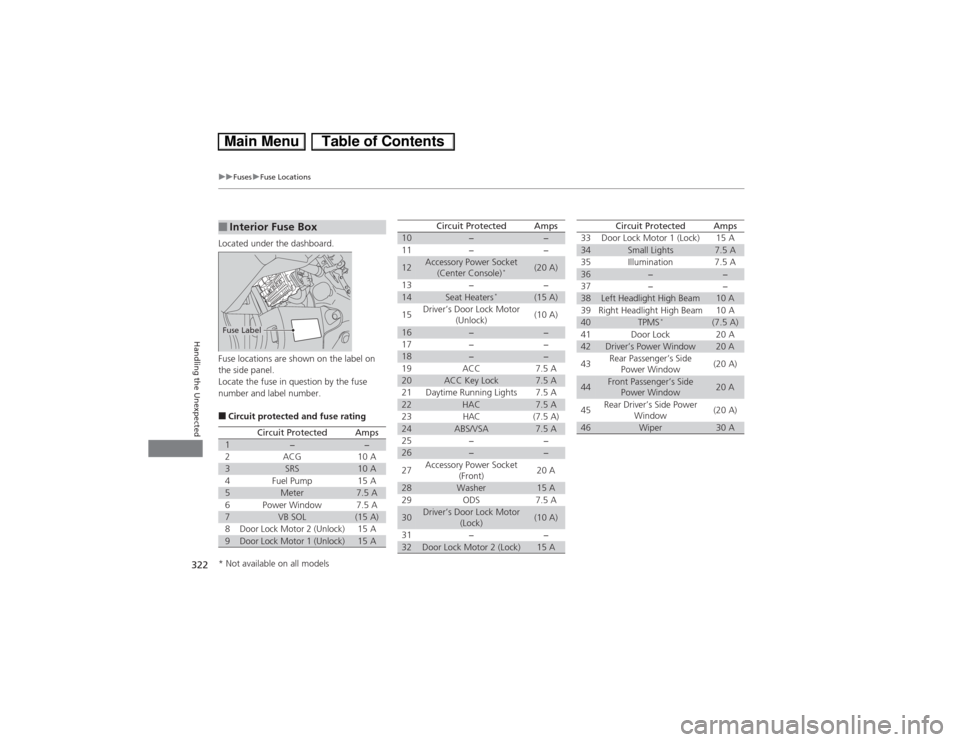
Located under the dashboard.
Fuse locations are shown on the label on
the side panel.
Locate the fuse in question by the fuse
number and label number.■Circuit protected and fuse rating■Interior Fuse BoxFuse Label
Circuit Protected
Amps
1
−
−
2
ACG
10 A
3
SRS
10 A
4
Fuel Pump
15 A
5
Meter
7.5 A
6
Power Window
7.5 A
7
VB SOL
(15 A)
8
Door Lock Motor 2 (Unlock)
15 A
9
Door Lock Motor 1 (Unlock)
15 A
10
−
−
11 − −
12
Accessory Power Socket
(Center Console)
*
(20 A)
13 − −
14
Seat Heaters
*
(15 A)
15Driver’s Door Lock Motor
(Unlock)(10 A)
16
−
−
17 − −
18
−
−
19 ACC 7.5 A
20
ACC Key Lock
7.5 A
21 Daytime Running Lights 7.5 A
22
HAC
7.5 A
23 HAC (7.5 A)
24
ABS/VSA
7.5 A
25 − −
26
−
−
27Accessory Power Socket
(Front)20 A
28
Washer
15 A
29 ODS 7.5 A
30
Driver’s Door Lock Motor
(Lock)
(10 A)
31 − −
32
Door Lock Motor 2 (Lock)
15 A
Circuit Protected
Amps
33 Door Lock Motor 1 (Lock) 15 A34
Small Lights
7.5 A
35 Illumination 7.5 A
36
−
−
37 − −
38
Left Headlight High Beam
10 A
39 Right Headlight High Beam 10 A
40
TPMS
*
(7.5 A)
41 Door Lock 20 A
42
Driver’s Power Window
20 A
43Rear Passenger’s Side
Power Window(20 A)
44
Front Passenger’s Side
Power Window
20 A
45Rear Driver’s Side Power
Window(20 A)
46
Wiper
30 A
Circuit Protected
Amps
* Not available on all models
Page 324 of 346
323
uuFusesuInspecting and Changing Fuses
Handling the Unexpected
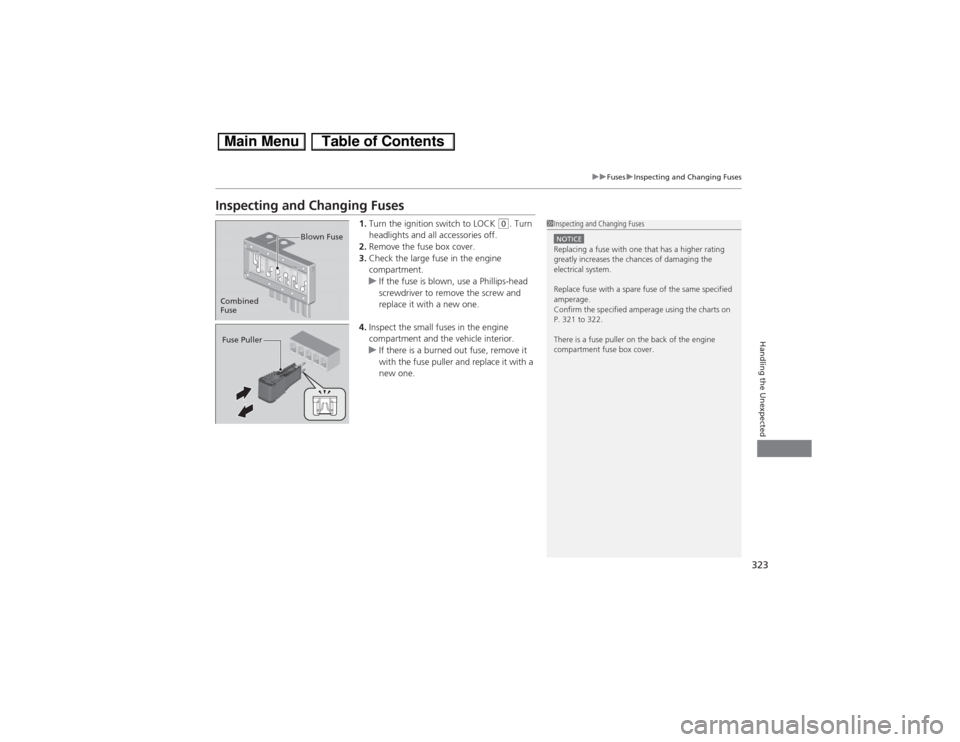
Inspecting and Changing Fuses
1.Turn the ignition switch to LOCK
(0. Turn
headlights and all accessories off.
2.Remove the fuse box cover.
3.Check the large fuse in the engine
compartment.
uIf the fuse is blown, use a Phillips-head
screwdriver to remove the screw and
replace it with a new one.
4.Inspect the small fuses in the engine
compartment and the vehicle interior.
uIf there is a burned out fuse, remove it
with the fuse puller and replace it with a
new one.
1Inspecting and Changing FusesNOTICEReplacing a fuse with one that has a higher rating
greatly increases the chances of damaging the
electrical system.
Replace fuse with a spare fuse of the same specified
amperage.
Confirm the specified amperage using the charts on
P. 321 to 322.
There is a fuse puller on the back of the engine
compartment fuse box cover.
Combined
FuseBlown FuseFuse Puller