navigation system HONDA CIVIC HYBRID 2013 9.G Owners Manual
[x] Cancel search | Manufacturer: HONDA, Model Year: 2013, Model line: CIVIC HYBRID, Model: HONDA CIVIC HYBRID 2013 9.GPages: 346, PDF Size: 6.95 MB
Page 3 of 346
2Quick Reference Guide
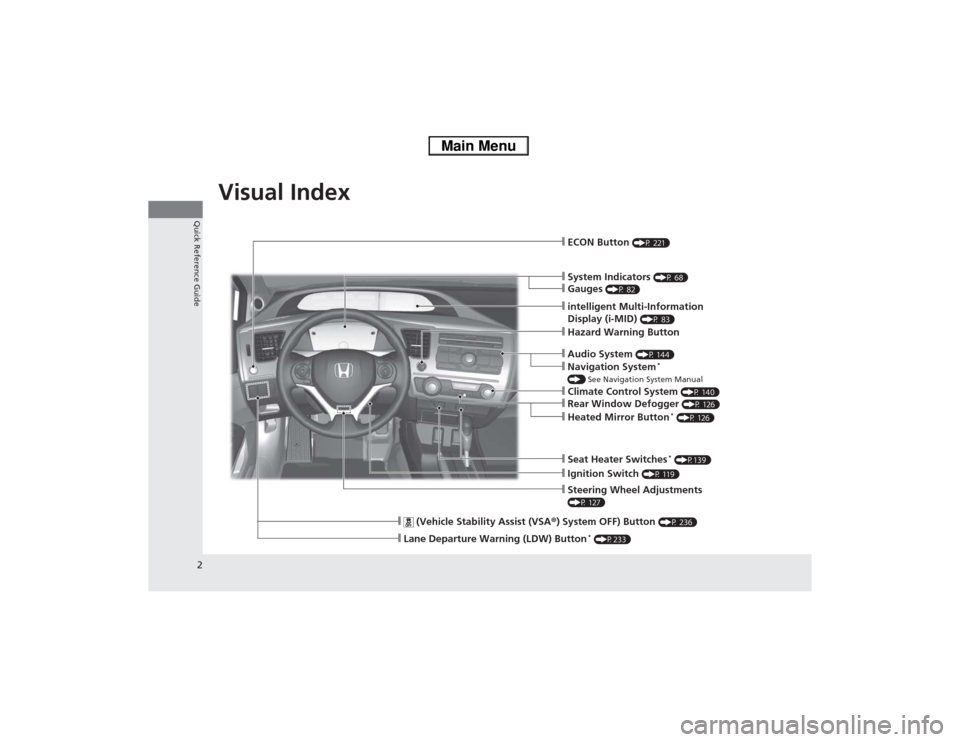
Quick Reference GuideVisual Index
❙Ignition Switch
(P 119)
❙Steering Wheel Adjustments (P 127)❙System Indicators
(P 68)
❙ECON Button
(P 221)
❙Hazard Warning Button
❙Lane Departure Warning (LDW) Button
* (P233)
❙
(Vehicle Stability Assist (VSA®) System OFF) Button
(P 236)
❙Gauges
(P 82)
❙intelligent Multi-Information
Display (i-MID)
(P 83)
❙Audio System
(P 144)
❙Navigation System
*
() See Navigation System Manual❙Heated Mirror Button
* (P 126)
❙Rear Window Defogger
(P 126)
❙Seat Heater Switches
* (P139)
❙Climate Control System
(P 140)
Page 4 of 346
3Quick Reference Guide
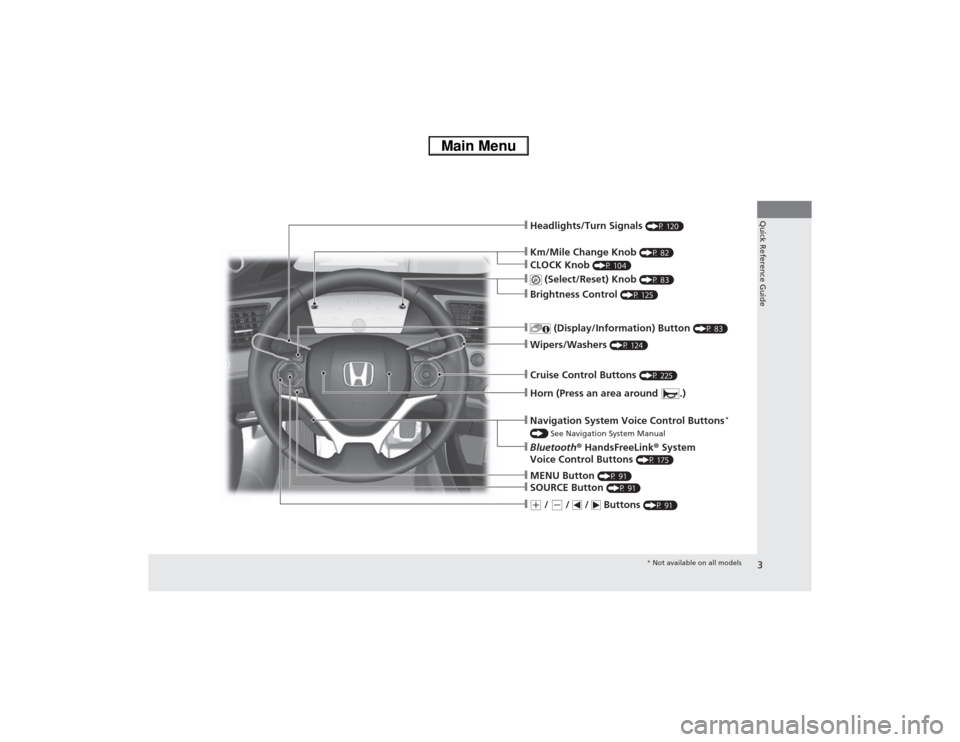
❙Km/Mile Change Knob
(P 82)
❙Headlights/Turn Signals
(P 120)
❙
(Select/Reset) Knob
(P 83)
❙
(Display/Information) Button
(P 83)
❙Wipers/Washers
(P 124)
❙Cruise Control Buttons
(P 225)
❙MENU Button
(P 91)
❙SOURCE Button
(P 91)
❙(+ / (- / / Buttons
(P 91)
❙Navigation System Voice Control Buttons
*
() See Navigation System Manual❙Bluetooth® HandsFreeLink® System
Voice Control Buttons
(P 175)
❙Horn (Press an area around .)❙Brightness Control
(P 125)
❙CLOCK Knob
(P 104)
* Not available on all models
Page 15 of 346
14Quick Reference Guide
Controls
(P103)
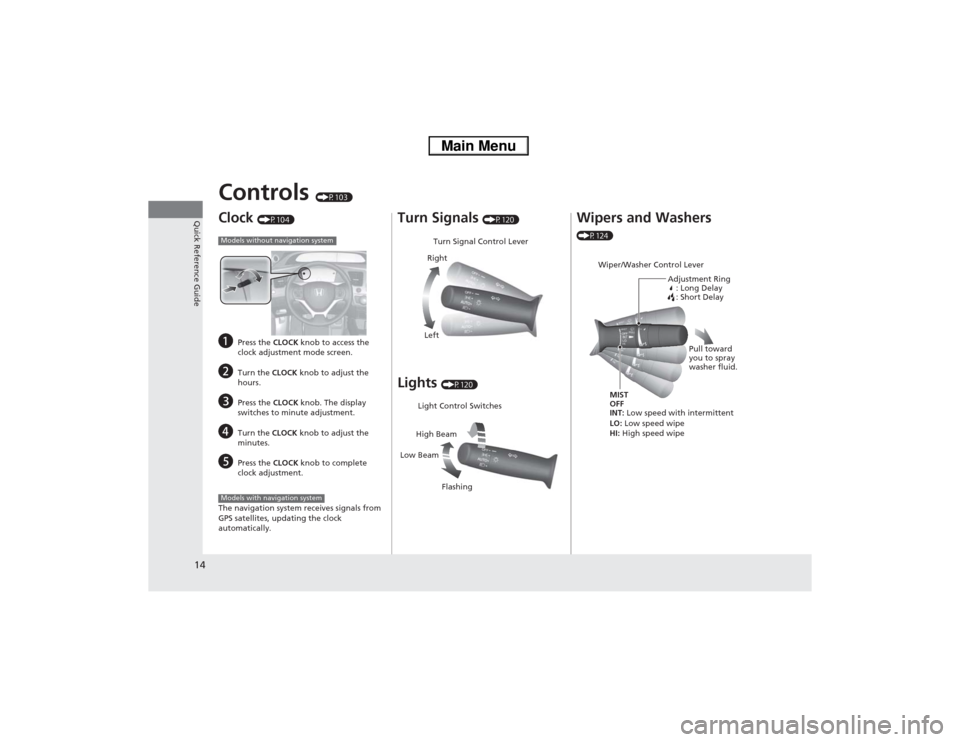
Clock
(P104)
a
Press the CLOCK knob to access the
clock adjustment mode screen.
b
Turn the CLOCK knob to adjust the
hours.
c
Press the CLOCK knob. The display
switches to minute adjustment.
d
Turn the CLOCK knob to adjust the
minutes.
e
Press the CLOCK knob to complete
clock adjustment.
The navigation system receives signals from
GPS satellites, updating the clock
automatically.
Models without navigation systemModels with navigation system
Turn Signals
(P120)
Lights
(P120)Turn Signal Control Lever
Right
Left
Light Control Switches
Low BeamHigh Beam
Flashing
Wipers and Washers (P124)
Wiper/Washer Control Lever
Adjustment Ring
: Long Delay
: Short DelayMIST
OFF
INT: Low speed with intermittent
LO: Low speed wipe
HI: High speed wipePull toward
you to spray
washer fluid.
Page 17 of 346
16Quick Reference Guide
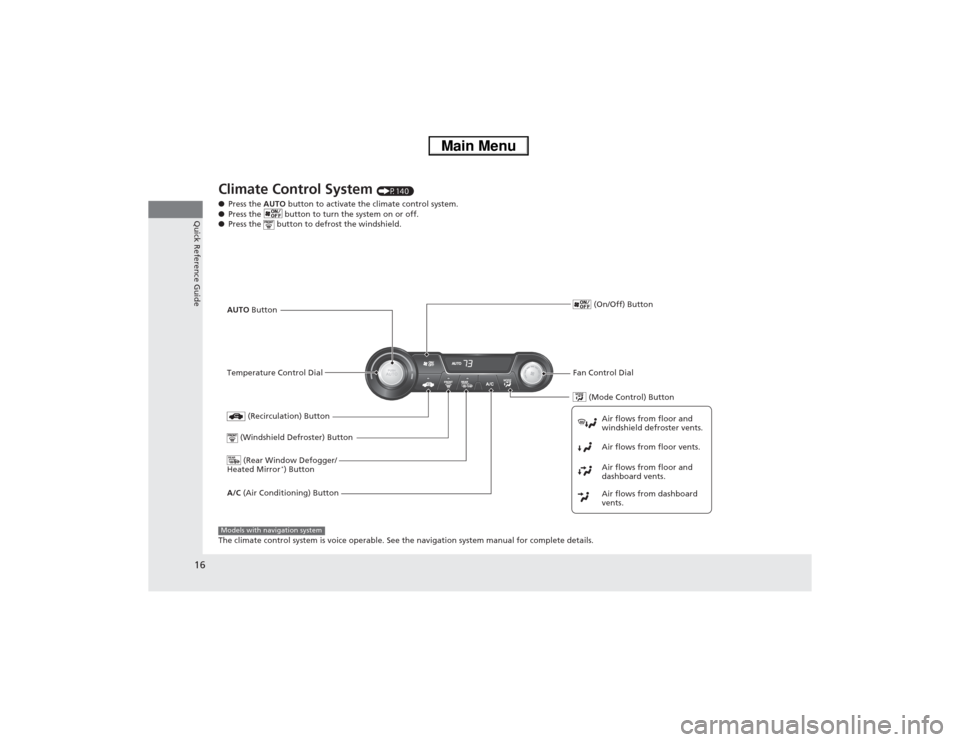
Climate Control System
(P140)
●Press the AUTO button to activate the climate control system.
●Press the button to turn the system on or off.
●Press the button to defrost the windshield.
The climate control system is voice operable. See the navigation system manual for complete details.
(Mode Control) Button
(Rear Window Defogger/
Heated Mirror
*) Button
(Windshield Defroster) ButtonA/C (Air Conditioning) ButtonAir flows from floor and
windshield defroster vents.
Air flows from floor vents.
Air flows from floor and
dashboard vents.
Air flows from dashboard
vents.
(Recirculation) Button
Temperature Control DialAUTO Button (On/Off) Button
Fan Control Dial
Models with navigation system
Page 18 of 346
17Quick Reference Guide
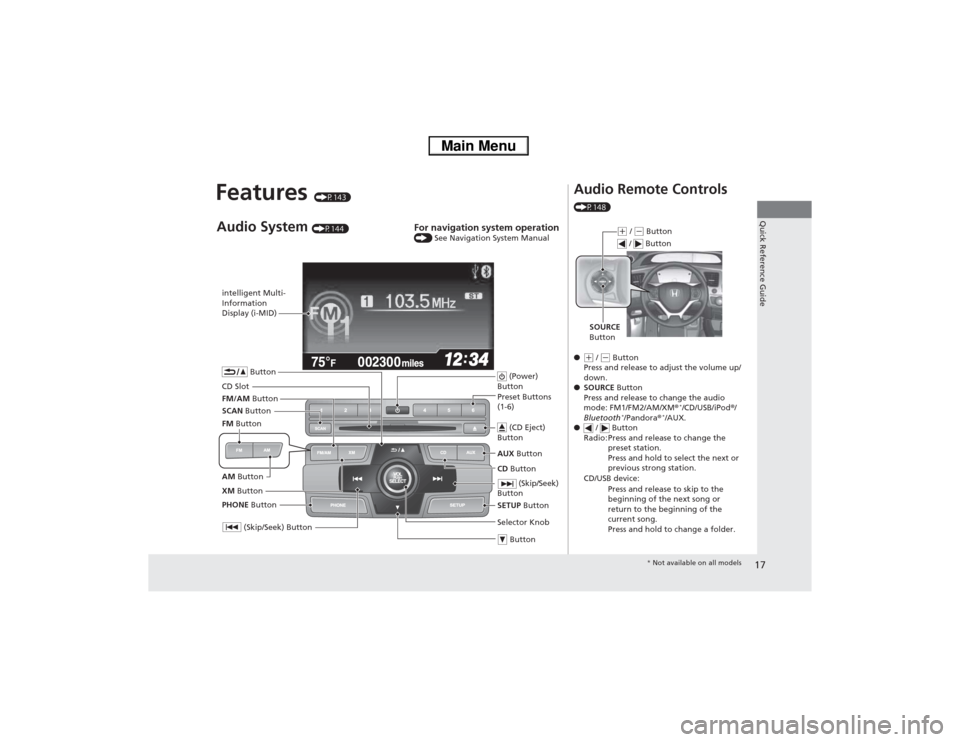
Features
(P143)
intelligent Multi-
Information
Display (i-MID)
SCAN Button
(Skip/Seek) Button
Selector Knob Button (Power)
ButtonCD Button AUX Button (CD Eject)
ButtonPreset Buttons
(1-6)
ButtonSETUP Button (Skip/Seek)
Button
PHONE ButtonAudio System
(P144)
For navigation system operation () See Navigation System Manual
CD SlotXM Button FM/AM ButtonAM Button FM Button
Audio Remote Controls (P148)
●(+ / (- Button
Press and release to adjust the volume up/
down.
●SOURCE Button
Press and release to change the audio
mode: FM1/FM2/AM/XM®
*/CD/USB/iPod®/
Bluetooth
*/Pandora®
*/AUX.
● / Button
Radio: Press and release to change the
preset station.
Press and hold to select the next or
previous strong station.
CD/USB device:
Press and release to skip to the
beginning of the next song or
return to the beginning of the
current song.
Press and hold to change a folder.
(+ / (- Button
SOURCE
Button / Button* Not available on all models
Page 88 of 346
Continued
87
uuGauges and intelligent Multi-Information Display (i-MID)uintelligent Multi-Information Display (i-MID)
Instrument Panel
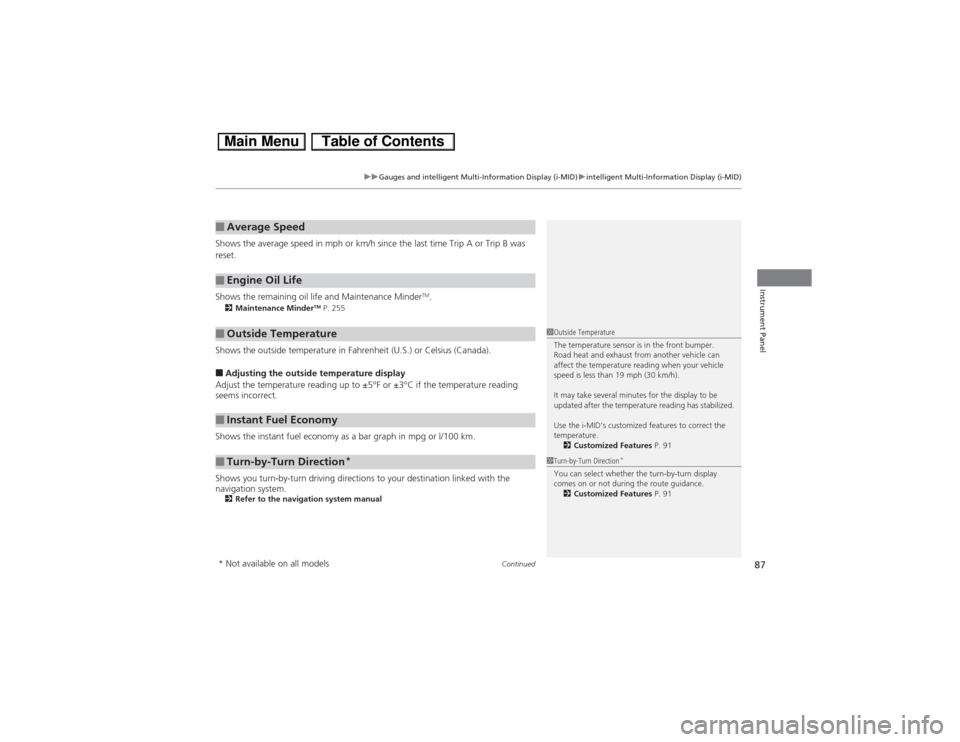
Shows the average speed in mph or km/h since the last time Trip A or Trip B was
reset.
Shows the remaining oil life and Maintenance Minder
TM.
2Maintenance Minder
TM P. 255
Shows the outside temperature in Fahrenheit (U.S.) or Celsius (Canada).■Adjusting the outside temperature display
Adjust the temperature reading up to ±5°F or ±3°C if the temperature reading
seems incorrect.
Shows the instant fuel economy as a bar graph in mpg or l/100 km.
Shows you turn-by-turn driving directions to your destination linked with the
navigation system.2Refer to the navigation system manual■Average Speed■Engine Oil Life■Outside Temperature■Instant Fuel Economy■Turn-by-Turn Direction
*
1Outside Temperature
The temperature sensor is in the front bumper.
Road heat and exhaust from another vehicle can
affect the temperature reading when your vehicle
speed is less than 19 mph (30 km/h).
It may take several minutes for the display to be
updated after the temperature reading has stabilized.
Use the i-MID’s customized features to correct the
temperature.
2Customized Features P. 911Turn-by-Turn Direction
*
You can select whether the turn-by-turn display
comes on or not during the route guidance.
2Customized Features P. 91
* Not available on all models
Page 96 of 346
95
uuGauges and intelligent Multi-Information Display (i-MID)uintelligent Multi-Information Display (i-MID)
Continued
Instrument Panel
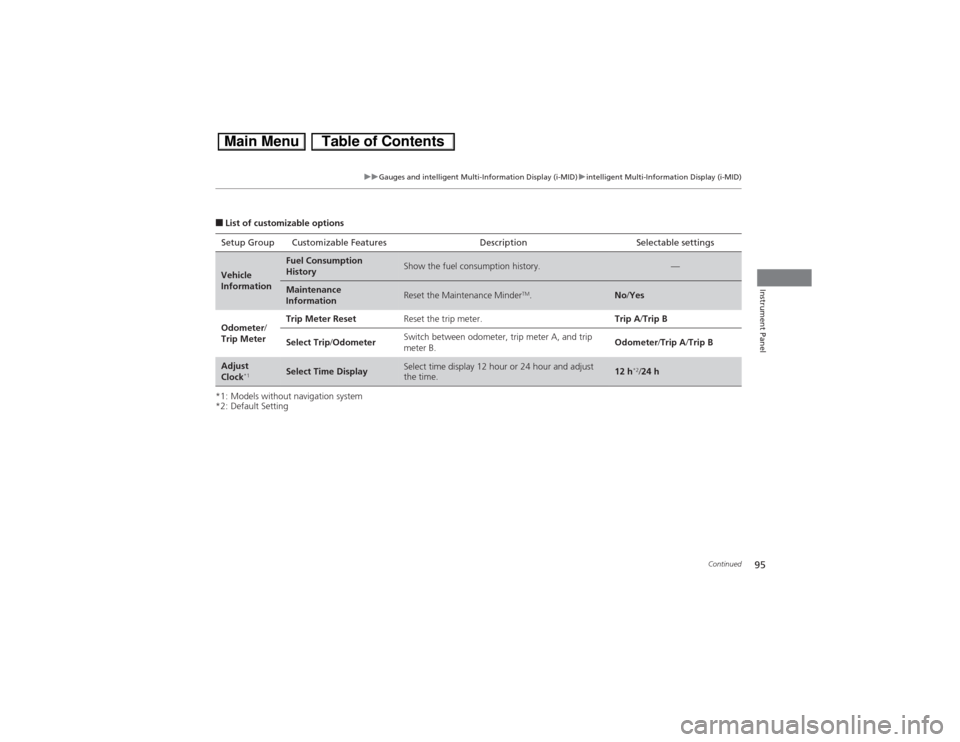
■List of customizable options
*1: Models without navigation system
*2: Default SettingSetup Group Customizable Features Description Selectable settingsVehicle
Information
Fuel Consumption
History
Show the fuel consumption history.
—
Maintenance
Information
Reset the Maintenance Minder
TM.
No/Yes
Odometer/
Trip MeterTrip Meter ResetReset the trip meter.Trip A/Trip B
Select Trip/OdometerSwitch between odometer, trip meter A, and trip
meter B.Odometer/Trip A/Trip B
Adjust
Clock
*1
Select Time Display
Select time display 12 hour or 24 hour and adjust
the time.
12 h
*2/24 h
Page 97 of 346
96
uuGauges and intelligent Multi-Information Display (i-MID)uintelligent Multi-Information Display (i-MID)
Instrument Panel
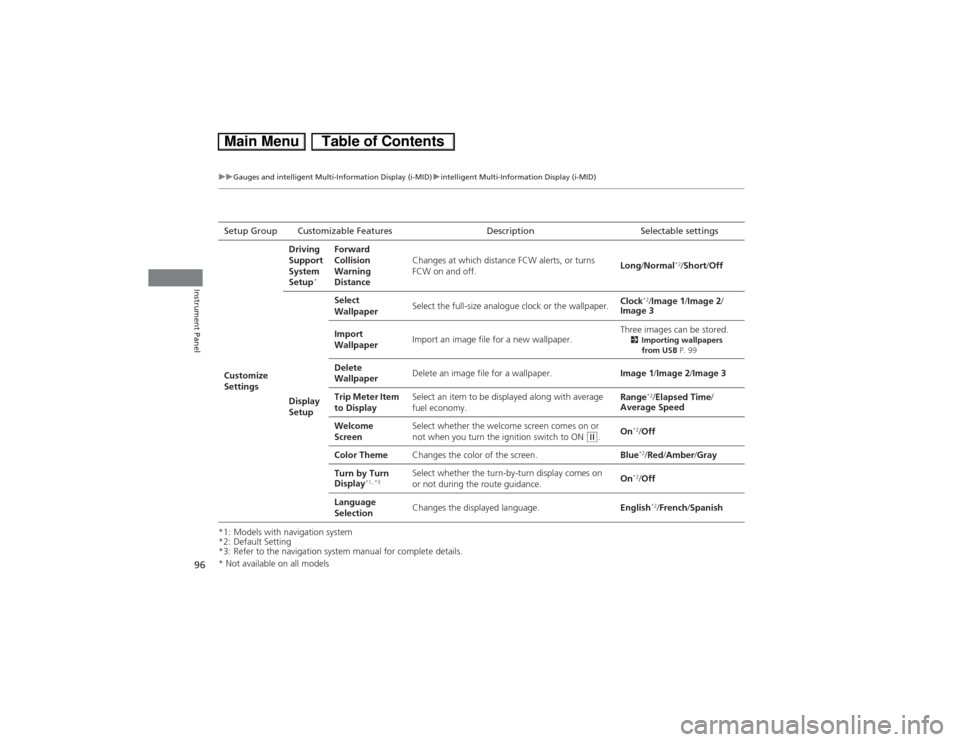
*1: Models with navigation system
*2: Default Setting
*3: Refer to the navigation system manual for complete details.Setup Group Customizable Features Description Selectable settings
Customize
SettingsDriving
Support
System
Setup
*
Forward
Collision
Warning
DistanceChanges at which distance FCW alerts, or turns
FCW on and off.Long/Normal
*2/Short/Off
Display
SetupSelect
WallpaperSelect the full-size analogue clock or the wallpaper.Clock
*2/Image 1/Image 2/
Image 3
Import
WallpaperImport an image file for a new wallpaper.Three images can be stored.
2Importing wallpapers
from USB P. 99
Delete
WallpaperDelete an image file for a wallpaper.Image 1/Image 2/Image 3
Trip Meter Item
to DisplaySelect an item to be displayed along with average
fuel economy.Range
*2/Elapsed Time/
Average Speed
Welcome
ScreenSelect whether the welcome screen comes on or
not when you turn the ignition switch to ON
(w.On
*2/Off
Color ThemeChanges the color of the screen.Blue*2/Red/Amber/Gray
Turn by Turn
Display
*1, *3
Select whether the turn-by-turn display comes on
or not during the route guidance.On
*2/Off
Language
SelectionChanges the displayed language.English*2/French/Spanish
* Not available on all models
Page 105 of 346
104Controls
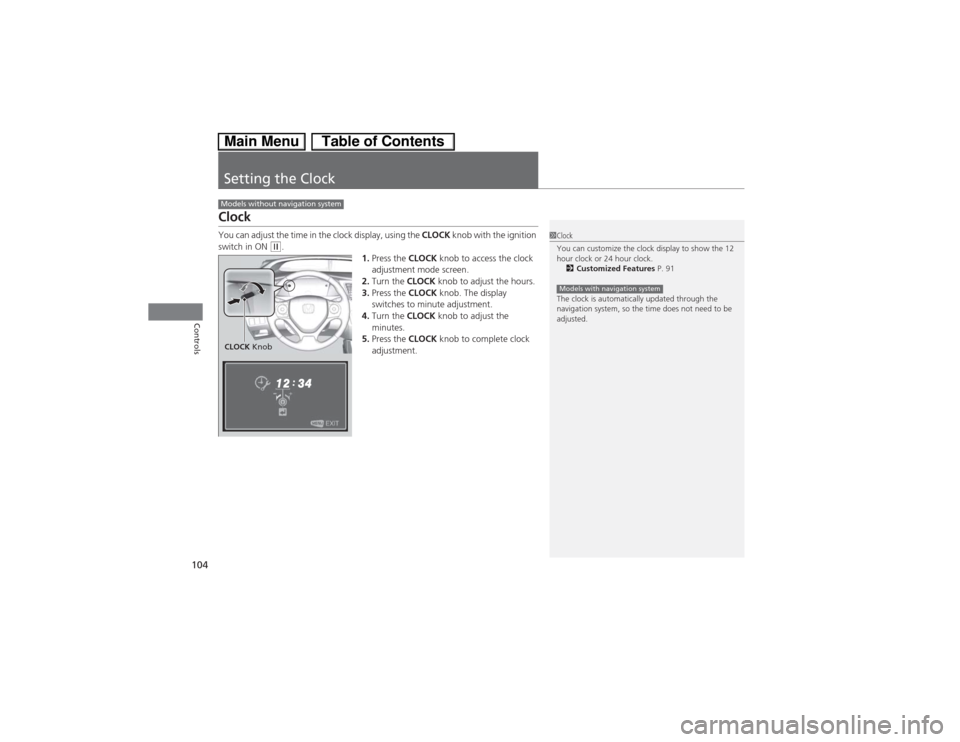
Setting the ClockClockYou can adjust the time in the clock display, using the CLOCK knob with the ignition
switch in ON
(w.
1.Press the CLOCK knob to access the clock
adjustment mode screen.
2.Turn the CLOCK knob to adjust the hours.
3.Press the CLOCK knob. The display
switches to minute adjustment.
4.Turn the CLOCK knob to adjust the
minutes.
5.Press the CLOCK knob to complete clock
adjustment.
Models without navigation system
1Clock
You can customize the clock display to show the 12
hour clock or 24 hour clock.
2Customized Features P. 91
The clock is automatically updated through the
navigation system, so the time does not need to be
adjusted.Models with navigation system
CLOCK Knob
Page 145 of 346
144Features
Audio SystemAbout Your Audio SystemOn models with navigation system, see the Navigation System Manual for operation
of the audio system, Bluetooth® HandsFreeLink®, and voice commands for these
features.
The audio system features AM/FM radio and the XM® Radio service
*. It can also play
audio CDs, WMA/MP3/AAC files, iPod®, iPhone®, USB flash drives, and Bluetooth®
devices.
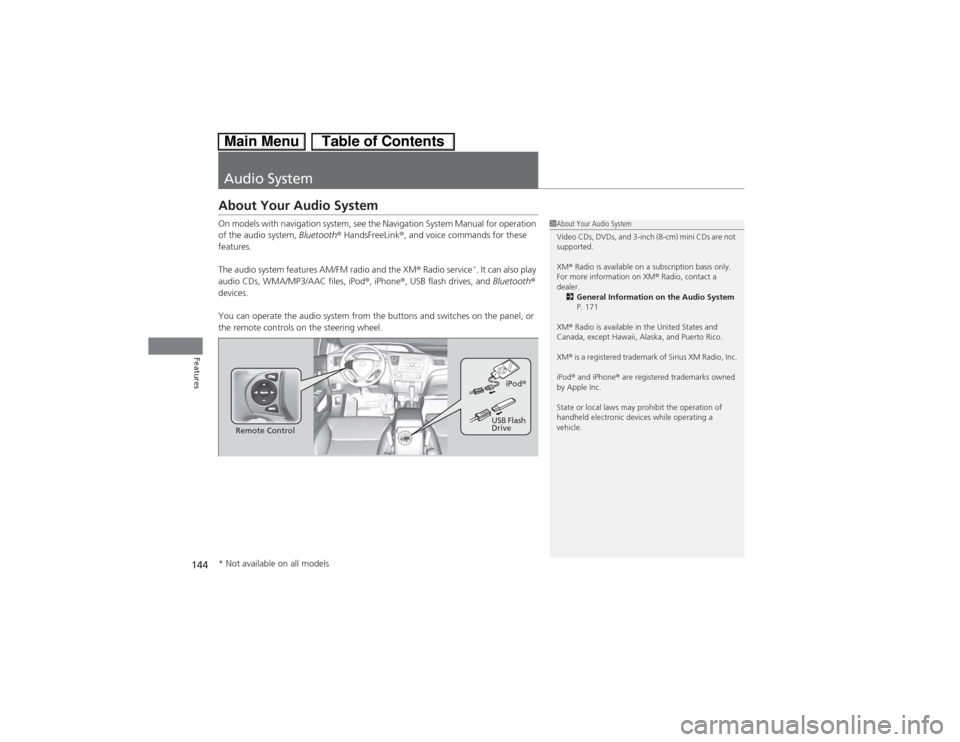
You can operate the audio system from the buttons and switches on the panel, or
the remote controls on the steering wheel.
1About Your Audio System
Video CDs, DVDs, and 3-inch (8-cm) mini CDs are not
supported.
XM® Radio is available on a subscription basis only.
For more information on XM® Radio, contact a
dealer.
2General Information on the Audio System
P. 171
XM® Radio is available in the United States and
Canada, except Hawaii, Alaska, and Puerto Rico.
XM® is a registered trademark of Sirius XM Radio, Inc.
iPod® and iPhone® are registered trademarks owned
by Apple Inc.
State or local laws may prohibit the operation of
handheld electronic devices while operating a
vehicle.
Remote ControliPod®
USB Flash
Drive
* Not available on all models