tow HONDA CIVIC HYBRID 2013 9.G Owners Manual
[x] Cancel search | Manufacturer: HONDA, Model Year: 2013, Model line: CIVIC HYBRID, Model: HONDA CIVIC HYBRID 2013 9.GPages: 346, PDF Size: 6.95 MB
Page 1 of 346

ContentsThis owner’s manual should be considered a permanent part of the
vehicle and should remain with the vehicle when it is sold.
This owner’s manual covers all models of your vehicle. You may find
descriptions of equipment and features that are not on your
particular model.
Images throughout this owner’s manual (including the front cover)
represent features and equipment that are available on some, but
not all, models. Your particular model may not have some of these
features.
This owner’s manual is for vehicles sold in the United States and
Canada.
The information and specifications included in this publication were
in effect at the time of approval for printing. Honda Motor Co., Ltd.
reserves the right, however, to discontinue or change specifications
or design at any time without notice and without incurring any
obligation.
2Safe Driving P. 27For Safe Driving P. 28 Seat Belts P. 32 Airbags P. 392Instrument Panel P. 67Indicators P. 68
Gauges and intelligent Multi-Information Display (i-MID) P. 82
2Controls P. 103Setting the Clock P. 104 Locking and Unlocking the Doors P. 105
Operating the Switches Around the Steering Wheel P. 119
Interior Lights/Interior Convenience Items P. 1342Features P. 143Audio System P. 144 Audio System Basic Operation P. 147
Bluetooth® HandsFreeLink® P. 1752Driving P. 207Before Driving P. 208 Towing a Trailer P. 213
Rearview Camera P. 245 Refueling P. 246 Fuel Economy P. 2492Maintenance P. 251Before Performing Maintenance P. 252 Maintenance Minder
TM P. 255
Checking and Maintaining Wiper Blades P. 277
Climate Control System Maintenance P. 290
2Handling the Unexpected P. 295Tools P. 296 If a Tire Goes Flat P. 297
Overheating P. 315 Indicator, Coming On/Blinking P. 3172Information P. 325Specifications P. 326 Identification Numbers P. 328
Emissions Testing P. 331 Warranty Coverages P. 333
Page 2 of 346
Contents
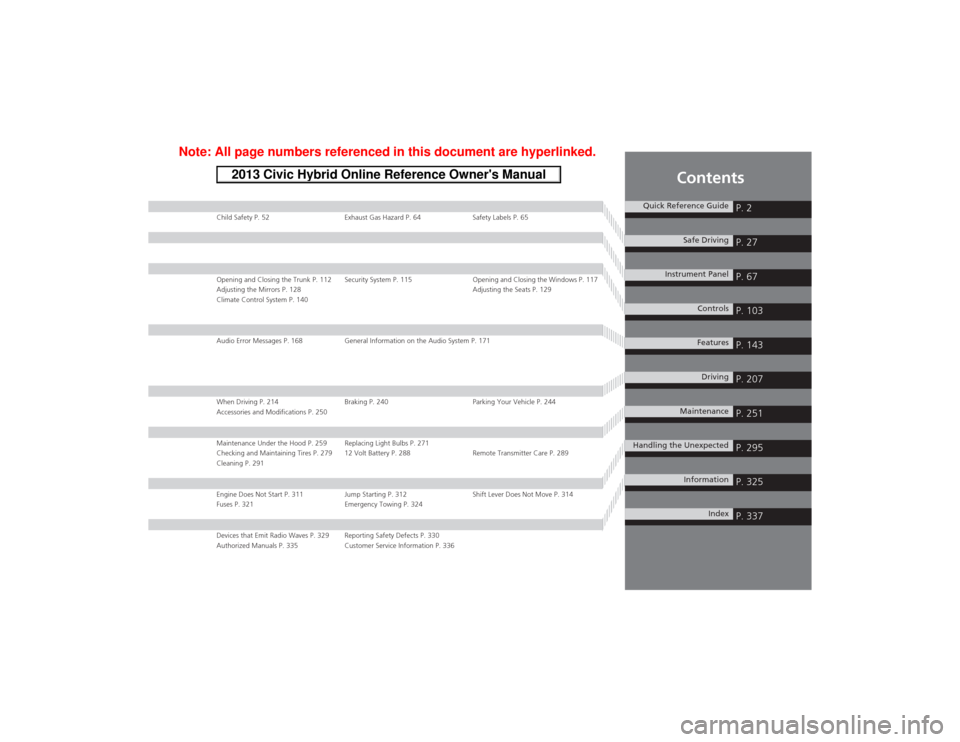
Child Safety P. 52 Exhaust Gas Hazard P. 64 Safety Labels P. 65Opening and Closing the Trunk P. 112 Security System P. 115 Opening and Closing the Windows P. 117
Adjusting the Mirrors P. 128 Adjusting the Seats P. 129
Climate Control System P. 140Audio Error Messages P. 168 General Information on the Audio System P. 171When Driving P. 214 Braking P. 240 Parking Your Vehicle P. 244
Accessories and Modifications P. 250Maintenance Under the Hood P. 259 Replacing Light Bulbs P. 271
Checking and Maintaining Tires P. 279 12 Volt Battery P. 288 Remote Transmitter Care P. 289
Cleaning P. 291Engine Does Not Start P. 311 Jump Starting P. 312 Shift Lever Does Not Move P. 314
Fuses P. 321 Emergency Towing P. 324Devices that Emit Radio Waves P. 329 Reporting Safety Defects P. 330
Authorized Manuals P. 335 Customer Service Information P. 336
Quick Reference Guide
P. 2
Safe Driving
P. 27
Instrument Panel
P. 67
Controls
P. 103
Features
P. 143
Driving
P. 207
Maintenance
P. 251
Handling the Unexpected
P. 295
Information
P. 325
Index
P. 337
Page 15 of 346
14Quick Reference Guide
Controls
(P103)
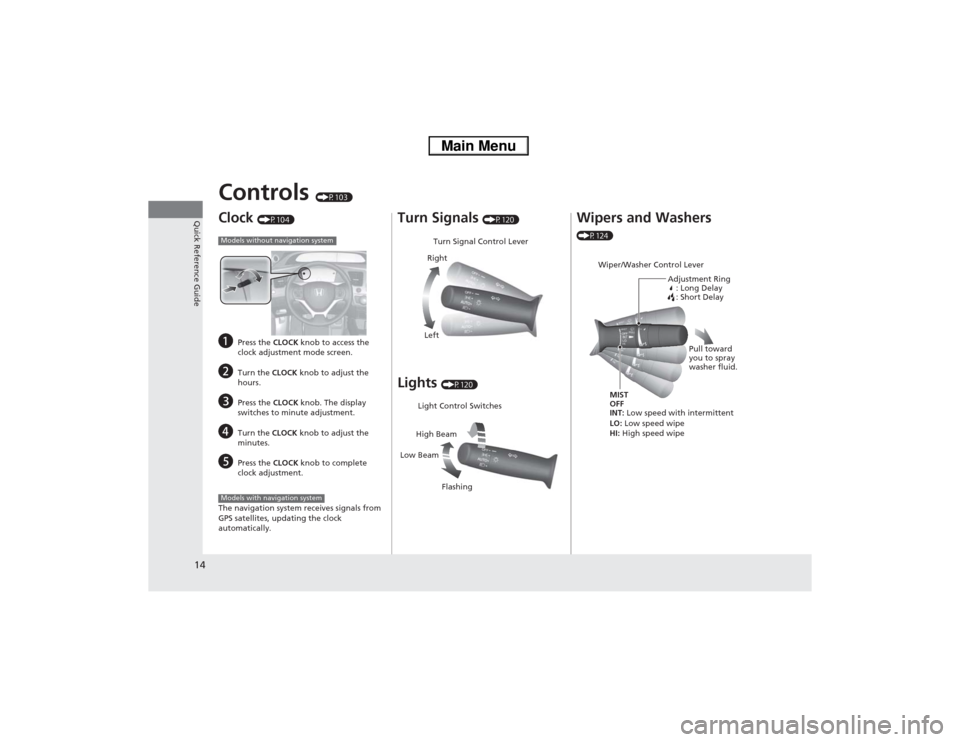
Clock
(P104)
a
Press the CLOCK knob to access the
clock adjustment mode screen.
b
Turn the CLOCK knob to adjust the
hours.
c
Press the CLOCK knob. The display
switches to minute adjustment.
d
Turn the CLOCK knob to adjust the
minutes.
e
Press the CLOCK knob to complete
clock adjustment.
The navigation system receives signals from
GPS satellites, updating the clock
automatically.
Models without navigation systemModels with navigation system
Turn Signals
(P120)
Lights
(P120)Turn Signal Control Lever
Right
Left
Light Control Switches
Low BeamHigh Beam
Flashing
Wipers and Washers (P124)
Wiper/Washer Control Lever
Adjustment Ring
: Long Delay
: Short DelayMIST
OFF
INT: Low speed with intermittent
LO: Low speed wipe
HI: High speed wipePull toward
you to spray
washer fluid.
Page 16 of 346
15Quick Reference Guide
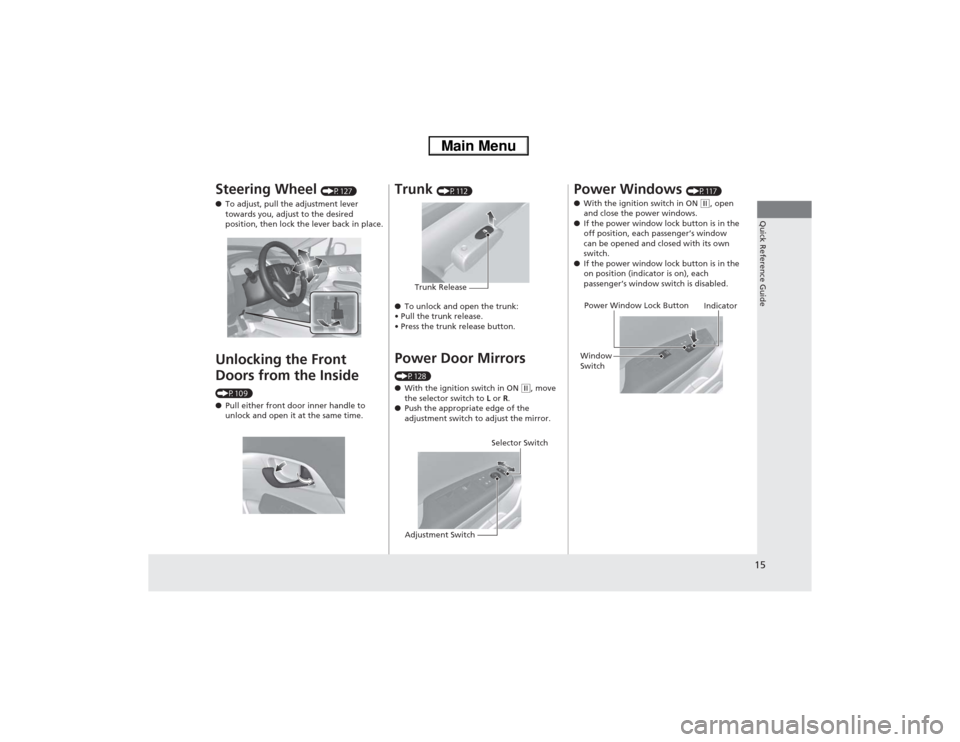
Steering Wheel
(P127)
●To adjust, pull the adjustment lever
towards you, adjust to the desired
position, then lock the lever back in place.
Unlocking the Front
Doors from the Inside (P109)
●Pull either front door inner handle to
unlock and open it at the same time.
Trunk
(P112)
●To unlock and open the trunk:
• Pull the trunk release.
• Press the trunk release button.
Power Door Mirrors (P128)
●With the ignition switch in ON
(w, move
the selector switch to L or R.
●Push the appropriate edge of the
adjustment switch to adjust the mirror.
Trunk Release
Selector Switch
Adjustment Switch
Power Windows
(P117)
●With the ignition switch in ON
(w, open
and close the power windows.
●If the power window lock button is in the
off position, each passenger’s window
can be opened and closed with its own
switch.
●If the power window lock button is in the
on position (indicator is on), each
passenger’s window switch is disabled.
Power Window Lock Button
Window
SwitchIndicator
Page 22 of 346
Quick Reference Guide21
Handling the Unexpected
(P295)
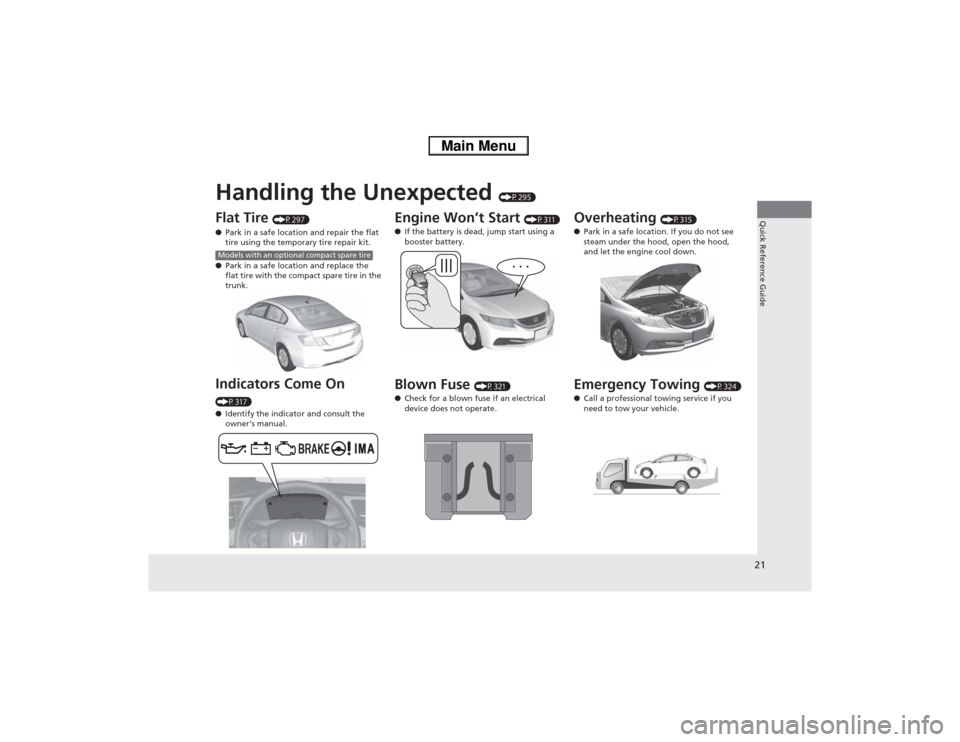
Flat Tire
(P297)
●Park in a safe location and repair the flat
tire using the temporary tire repair kit.
●Park in a safe location and replace the
flat tire with the compact spare tire in the
trunk.
Indicators Come On (P317)
●Identify the indicator and consult the
owner’s manual.Models with an optional compact spare tire
Engine Won’t Start
(P311)
●If the battery is dead, jump start using a
booster battery.
Blown Fuse
(P321)
●Check for a blown fuse if an electrical
device does not operate.
Overheating
(P315)
●Park in a safe location. If you do not see
steam under the hood, open the hood,
and let the engine cool down.
Emergency Towing
(P324)
●Call a professional towing service if you
need to tow your vehicle.
Page 45 of 346

44
uuAirbagsuFront Airbags (SRS)
Safe Driving
■When front airbags should not deploy
Minor frontal crashes: Front airbags were designed to supplement seat belts and
help save lives, not to prevent minor scrapes, or even broken bones that might occur
during a less than moderate-to-severe frontal crash.
Side impacts: Front airbags can provide protection when a sudden deceleration
causes a driver or front passenger to move towards the front of the vehicle. Side
airbags and side curtain airbags have been specifically designed to help reduce the
severity of injuries that can occur during a moderate-to-severe side impact which
can cause the driver or passenger to move towards the side of the vehicle.
Rear impacts: Head restraints and seat belts are your best protection during a rear
impact. Front airbags cannot provide any significant protection and are not designed
to deploy in such collisions.
Rollovers: Seat belts and, in vehicles equipped with a rollover sensor, side airbags
and side curtain airbags offer the best protection in a rollover. Because front airbags
could provide little if any protection, they are not designed to deploy during a
rollover.■When front airbags deploy with little or no visible damage
Because the airbag system senses sudden deceleration, a strong impact to the
vehicle framework or suspension might cause one or more of the airbags to deploy.
Examples include running into a curb, the edge of a hole, or other low fixed object
that causes a sudden deceleration in the vehicle chassis. Since the impact is
underneath the vehicle, damage may not be readily apparent.■When front airbags may not deploy, even though exterior damage
appears severe
Since crushable body parts absorb crash energy during an impact, the amount of
visible damage does not always indicate proper airbag operation. In fact, some
collisions can result in severe damage but no airbag deployment because the airbags
would not have been needed or would not have provided protection even if they
had deployed.
Page 48 of 346

47
uuAirbagsuSide Airbags
Safe Driving
■When a side airbag deploys with little or no visible damage
Because the airbag system senses sudden acceleration, a strong impact to the side
of the vehicle’s framework can cause a side airbag to deploy. In such cases, there
may be little or no damage, but the side impact sensors detected a severe enough
impact to deploy the airbag.■When a side airbag may not deploy, even though visible damage appears
severe
It is possible for a side airbag to not deploy during an impact that results in
apparently severe damage. This can occur when the point of impact was towards
the far front or rear of the vehicle, or when the vehicle’s crushable body parts
absorbed most of the crash energy. In either case, the side airbag would not have
been needed nor provided protection even if it had deployed.
Page 125 of 346
124
uuOperating the Switches Around the Steering WheeluWipers and Washers
Controls
Wipers and Washers
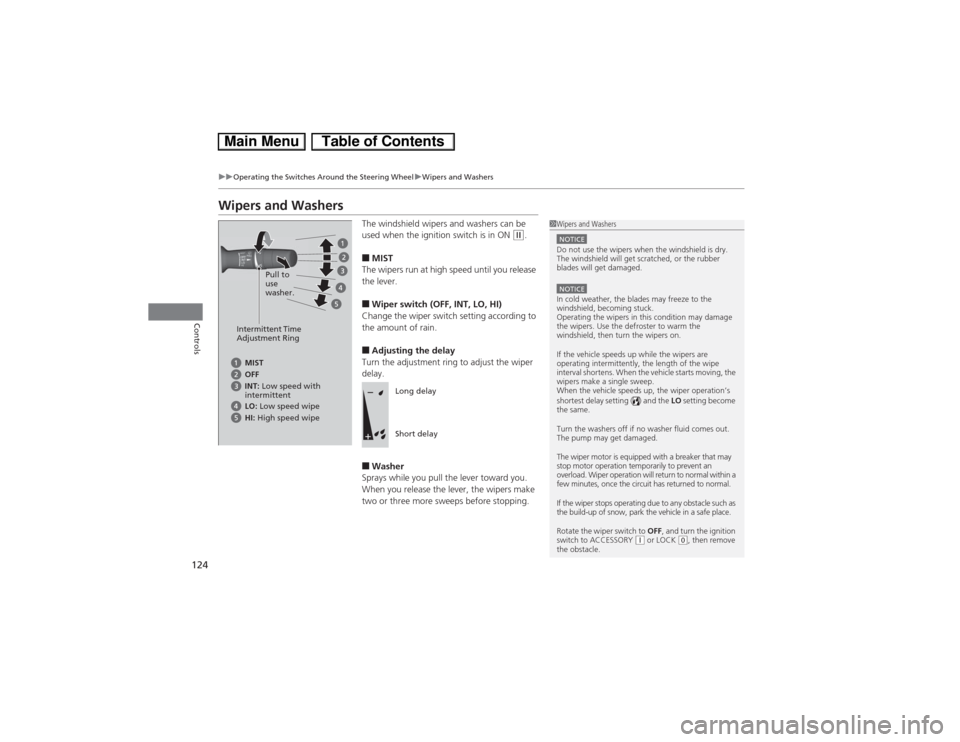
The windshield wipers and washers can be
used when the ignition switch is in ON
(w.
■MIST
The wipers run at high speed until you release
the lever.■Wiper switch (OFF, INT, LO, HI)
Change the wiper switch setting according to
the amount of rain.■Adjusting the delay
Turn the adjustment ring to adjust the wiper
delay.■Washer
Sprays while you pull the lever toward you.
When you release the lever, the wipers make
two or three more sweeps before stopping.
1Wipers and WashersNOTICEDo not use the wipers when the windshield is dry.
The windshield will get scratched, or the rubber
blades will get damaged.NOTICEIn cold weather, the blades may freeze to the
windshield, becoming stuck.
Operating the wipers in this condition may damage
the wipers. Use the defroster to warm the
windshield, then turn the wipers on.
If the vehicle speeds up while the wipers are
operating intermittently, the length of the wipe
interval shortens. When the vehicle starts moving, the
wipers make a single sweep.
When the vehicle speeds up, the wiper operation’s
shortest delay setting ( ) and the LO setting become
the same.
Turn the washers off if no washer fluid comes out.
The pump may get damaged.
The wiper motor is equipped with a breaker that may
stop motor operation temporarily to prevent an
overload. Wiper operation will return to normal within a
few minutes, once the circuit has returned to normal.
If the wiper stops operating due to any obstacle such as
the build-up of snow, park the vehicle in a safe place.
Rotate the wiper switch to OFF, and turn the ignition
switch to ACCESSORY
(q or LOCK
(0, then remove
the obstacle.
Intermittent Time
Adjustment Ring
MIST
INT: Low speed with
intermittent OFF
LO: Low speed wipe
HI: High speed wipePull to
use
washer.
Long delay
Short delay
Page 208 of 346
207
Driving
This chapter discusses driving, refueling, and information on items such as accessories.
Before Driving
Driving Preparation .......................... 208
Maximum Load Limit........................ 211
Towing a Trailer
Towing Your Vehicle ........................ 213
When Driving
Starting the Engine .......................... 214
Precautions While Driving................. 217
Automatic Transmission (CVT) .......... 218
Shifting ............................................ 219
ECON Button ................................... 221
Auto Idle Stop.................................. 222Cruise Control ................................. 225
Forward Collision Warning (FCW)
*.. 228
Lane Departure Warning (LDW)
*..... 232
Vehicle Stability Assist (VSA®), aka Electronic
Stability Control (ESC), System ............. 235Tire Pressure Monitoring System (TPMS) ... 237
Tire Pressure Monitoring System (TPMS) -
Required Federal Explanation ......... 238
Braking
Brake System ................................... 240
Anti-lock Brake System (ABS) ........... 242
Brake Assist System.......................... 243Parking Your Vehicle
When Stopped ................................ 244
Rearview Camera............................. 245
Refueling
Fuel Information .............................. 246
How to Refuel ................................. 247
Fuel Economy
Improving Fuel Economy .................. 249
Accessories and Modifications
Accessories ...................................... 250
Modifications................................... 250
* Not available on all models
Page 212 of 346
211
uuBefore DrivinguMaximum Load Limit
Continued
Driving
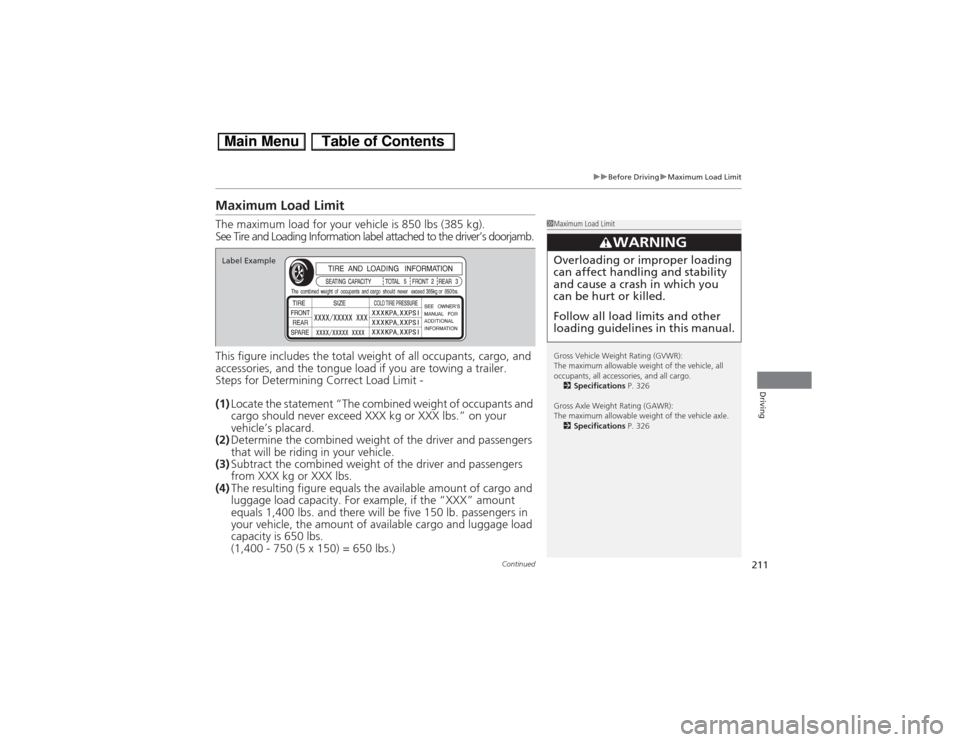
Maximum Load LimitThe maximum load for your vehicle is 850 lbs (385 kg).
See Tire and Loading Information label attached to the driver’s doorjamb.
This figure includes the total weight of all occupants, cargo, and
accessories, and the tongue load if you are towing a trailer.
Steps for Determining Correct Load Limit -
(1)Locate the statement “The combined weight of occupants and
cargo should never exceed XXX kg or XXX lbs.” on your
vehicle’s placard.
(2)Determine the combined weight of the driver and passengers
that will be riding in your vehicle.
(3)Subtract the combined weight of the driver and passengers
from XXX kg or XXX lbs.
(4)The resulting figure equals the available amount of cargo and
luggage load capacity. For example, if the “XXX” amount
equals 1,400 lbs. and there will be five 150 lb. passengers in
your vehicle, the amount of available cargo and luggage load
capacity is 650 lbs.
(1,400 - 750 (5 x 150) = 650 lbs.)
1Maximum Load Limit
Gross Vehicle Weight Rating (GVWR):
The maximum allowable weight of the vehicle, all
occupants, all accessories, and all cargo.
2Specifications P. 326
Gross Axle Weight Rating (GAWR):
The maximum allowable weight of the vehicle axle.
2Specifications P. 326
3
WARNING
Overloading or improper loading
can affect handling and stability
and cause a crash in which you
can be hurt or killed.
Follow all load limits and other
loading guidelines in this manual.
Label Example