engine oil HONDA CIVIC HYBRID 2014 9.G User Guide
[x] Cancel search | Manufacturer: HONDA, Model Year: 2014, Model line: CIVIC HYBRID, Model: HONDA CIVIC HYBRID 2014 9.GPages: 377, PDF Size: 17.8 MB
Page 286 of 377

285
uuMaintenance MinderTMuTo Use Maintenance MinderTM
Continued
Maintenance
The system message indicator ( ) comes on along with the Maintenance Minder message.
■Maintenance Minder Messages on the i-MID
Maintenance MessageOil Life DisplayExplanationInformation
SERVICE DUE SOON15%The remaining engine oil life is 15 to
6 percent. Once you switch the
display by pressing the
(display/information) button, this
message will go off.The engine oil is approaching the end
of its service life, and the maintenance
items should be inspected and serviced
soon.
SERVICE DUE NOW5%The remaining engine oil life is 5 to 1
percent. Press the button to
switch to another display.The engine oil has almost reached the
end of its service life, and the
maintenance items should be inspected
and serviced as soon as possible.
SERVICE PAST DUENegative DistanceThe remaining engine oil life has
passed its service life, and a negative
distance appears after driving over
10 miles (U.S. models) or 10 km
(Canadian models). Press the
button to switch to another display.The engine oil life has passed.
The maintenance items must be
inspected and serviced immediately.
2345
15
Engine oil
Air filters
2345
2345
5
Engine oil
Air filters
2345
23452345
-30
14 CIVIC IMA-31TR26200.book 285 ページ 2013年12月23日 月曜日 午後4時9分
Page 287 of 377
286
uuMaintenance MinderTMuTo Use Maintenance MinderTM
Maintenance
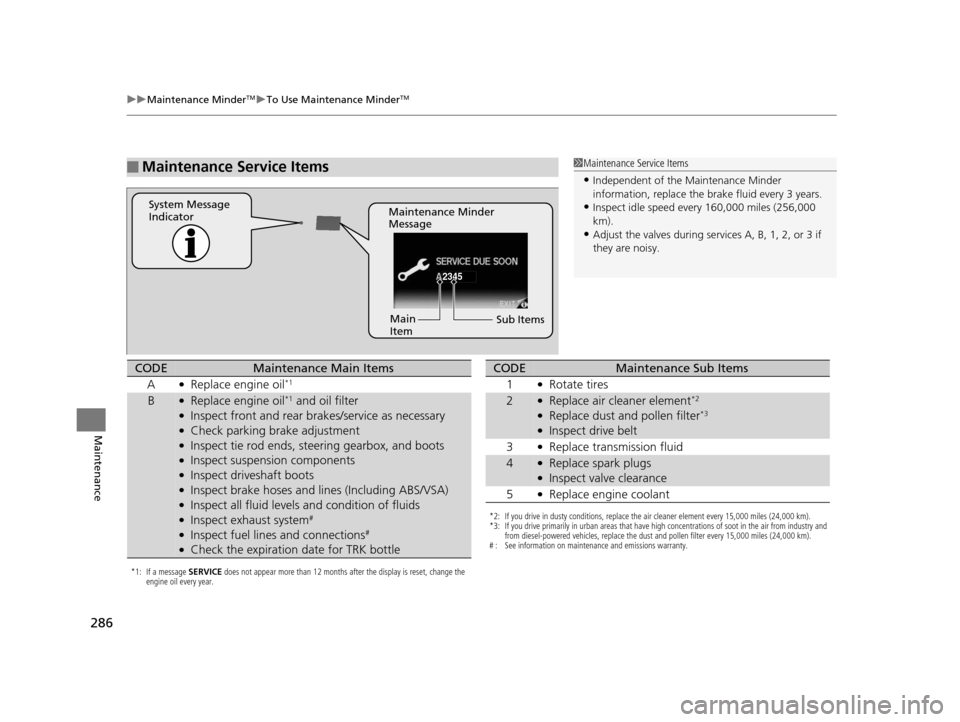
■Maintenance Service Items1Maintenance Service Items
•Independent of the Maintenance Minder
information, replace the brake fluid every 3 years.
•Inspect idle speed every 160,000 miles (256,000
km).
•Adjust the valves during services A, B, 1, 2, or 3 if
they are noisy.
2345
Maintenance Minder
Message
System Message
Indicator
Sub Items
Main
Item
*1: If a message
SERVICE does not appear more than 12 months after the display is reset, change the
engine oil every year.
CODEMaintenance Main Items
A
●Replace engine oil*1
B●Replace engine oil*1 and oil filter●Inspect front and rear bra kes/service as necessary●Check parking brake adjustment●Inspect tie rod ends, steering gearbox, and boots●Inspect suspension components●Inspect driveshaft boots●Inspect brake hoses and li nes (Including ABS/VSA)●Inspect all fluid levels and condition of fluids●Inspect exhaust system#
●Inspect fuel lines and connections#
●Check the expiration date for TRK bottle
*2: If you drive in dusty conditions, replace the air cleaner element every 15,000 miles (24,000 km).
*3: If you drive primarily in urban areas that have high concentrations of soot in the air from industry and
from diesel-powered vehicles, replace the dust and pollen filter every 15,000 miles (24,000 km).
# : See information on maintenance and emissions warranty.
CODEMaintenance Sub Items
1
●Rotate tires
2●Replace air cleaner element*2
●Replace dust and pollen filter*3
●Inspect drive belt
3
●Replace transmission fluid
4●Replace spark plugs●Inspect valve clearance
5
●Replace engine coolant
14 CIVIC IMA-31TR26200.book 286 ページ 2013年12月23日 月曜日 午後4時9分
Page 288 of 377

287
uuMaintenance MinderTMuTo Use Maintenance MinderTM
Maintenance
Reset the engine oil life display if you have performed the maintenance service.
1. Set the power mode to ON.
2. Go to the Maintenance info screen.
2Displaying the Engine Oil Life and Maintenance Items P. 284
3.Press the SOURCE button.
u The oil life reset mode is displayed on the i-MID.
4. Select YES with the
(- button, then press the SOURCE button.
u The displayed maintenance items disappear, and the engine oil life display
returns to 100%.
u Any maintenance items that are necessary for your vehicle at the next
maintenance service will appear.
To cancel the oil life reset mode, select No, then press the SOURCE button.
■Resetting the Display1Resetting the Display
NOTICE
Failure to reset the engine oil life after a maintenance
service results in the sy stem showing incorrect
maintenance intervals, which can lead to serious
mechanical problems.
The dealer will reset the en gine oil life display after
completing the required ma intenance service. If
someone other than a deal er performs maintenance
service, reset the engine oil life display yourself.
Engine Oil Life
SOURCE
Button
( - Button
Maintenance
Item Codes
14 CIVIC IMA-31TR26200.book 287 ページ 2013年12月23日 月曜日 午後4時9分
Page 289 of 377
288
Maintenance
Maintenance Under the Hood
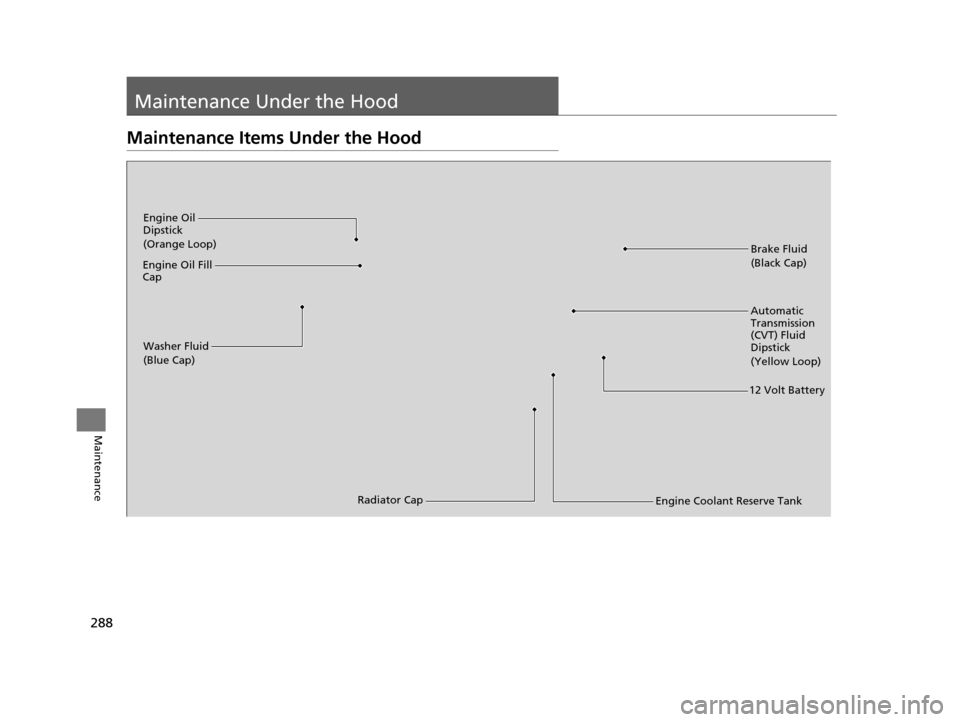
Maintenance Items Under the Hood
Brake Fluid
(Black Cap)
Washer Fluid
(Blue Cap)
Engine Oil
Dipstick
(Orange Loop)
Radiator Cap
Engine Oil Fill
Cap
Automatic
Transmission
(CVT) Fluid
Dipstick
(Yellow Loop)
Engine Coolant Reserve Tank
12 Volt Battery
14 CIVIC IMA-31TR26200.book 288 ページ 2013年12月23日 月曜日 午後4時9分
Page 291 of 377
290
uuMaintenance Under the Hood uRecommended Engine Oil
Maintenance
Recommended Engine Oil
Oil is a major contributor to your engine’s
performance and longevity. If you drive the
vehicle with insufficient or deteriorated oil,
the engine may fail or be damaged.
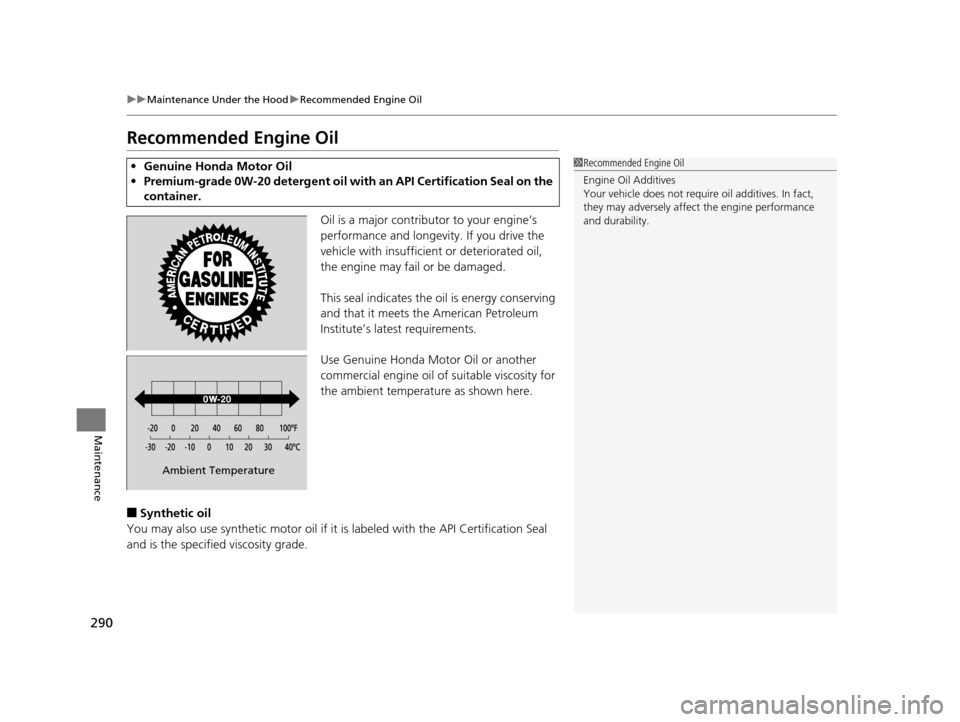
This seal indicates the oil is energy conserving
and that it meets the American Petroleum
Institute’s latest requirements.
Use Genuine Honda Motor Oil or another
commercial engine oil of suitable viscosity for
the ambient temperature as shown here.
■Synthetic oil
You may also use synthetic motor oil if it is labeled with the API Certification Seal
and is the specified viscosity grade.
• Genuine Honda Motor Oil
• Premium-grade 0W-20 deterg ent oil with an API Certification Seal on the
container.1 Recommended Engine Oil
Engine Oil Additives
Your vehicle does not require oil additives. In fact,
they may adversely affect the engine performance
and durability.
Ambient Temperature
14 CIVIC IMA-31TR26200.book 290 ページ 2013年12月23日 月曜日 午後4時9分
Page 292 of 377
291
uuMaintenance Under the Hood uOil Check
Maintenance
Oil Check
We recommend that you check the engine oil level every time you refuel.
Park the vehicle on level ground.
Wait approximately three minutes after turn ing the engine off before you check the
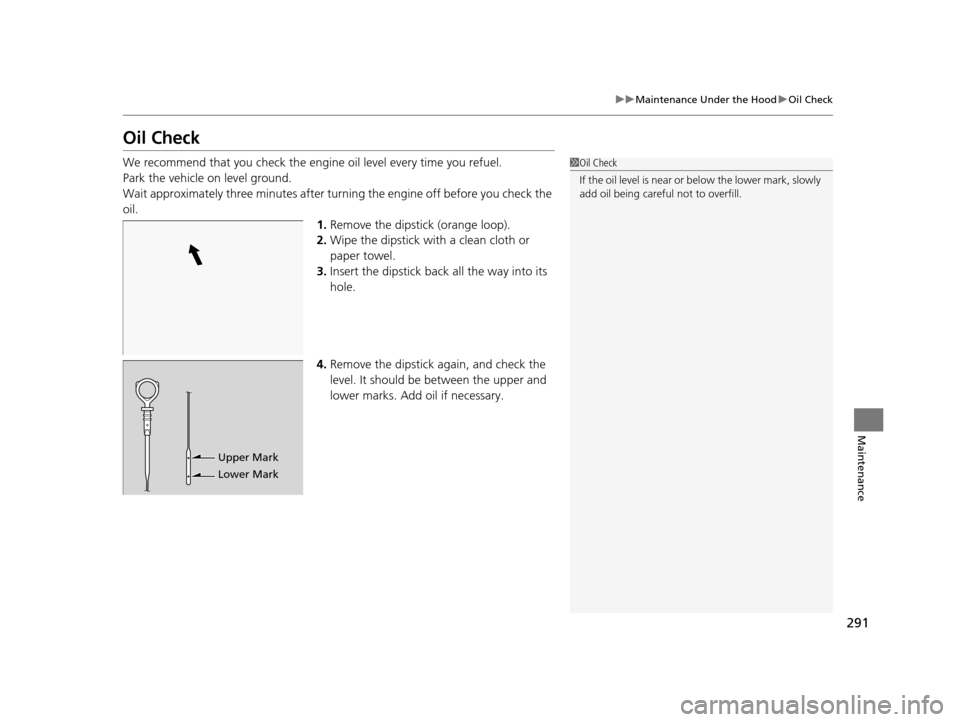
oil. 1.Remove the dipstick (orange loop).
2. Wipe the dipstick with a clean cloth or
paper towel.
3. Insert the dipstick back all the way into its
hole.
4. Remove the dipstick again, and check the
level. It should be between the upper and
lower marks. Add oil if necessary.1Oil Check
If the oil level is near or below the lower mark, slowly
add oil being careful not to overfill.
Upper Mark
Lower Mark
14 CIVIC IMA-31TR26200.book 291 ページ 2013年12月23日 月曜日 午後4時9分
Page 293 of 377
292
uuMaintenance Under the Hood uAdding Engine Oil
Maintenance
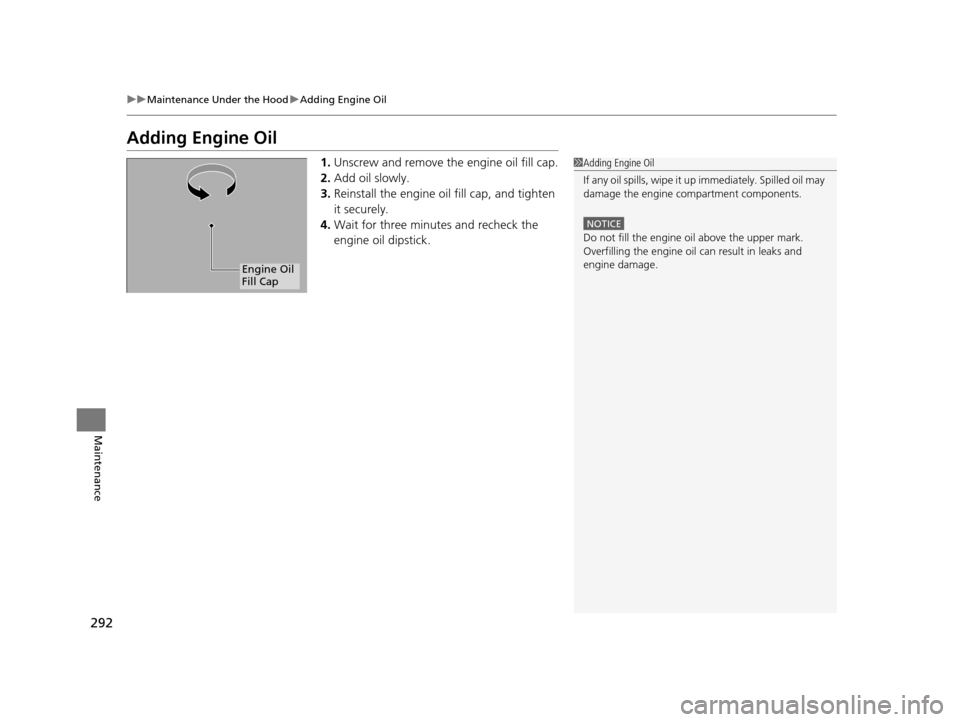
Adding Engine Oil
1. Unscrew and remove the engine oil fill cap.
2. Add oil slowly.
3. Reinstall the engine oil fill cap, and tighten
it securely.
4. Wait for three minutes and recheck the
engine oil dipstick.1Adding Engine Oil
If any oil spills, wipe it up immediately. Spilled oil may
damage the engine compartment components.
NOTICE
Do not fill the engine oil above the upper mark.
Overfilling the engine oil can result in leaks and
engine damage.
Engine Oil
Fill Cap
14 CIVIC IMA-31TR26200.book 292 ページ 2013年12月23日 月曜日 午後4時9分
Page 294 of 377
293
uuMaintenance Under the Hood uChanging the Engine Oil and Oil Filter
Continued
Maintenance
Changing the Engine Oil and Oil Filter
You must change the engine oil and oil fi lter regularly in order to maintain the
engine’s lubrication. The engine may be damaged if they are not changed regularly.
Change the oil and filter in accordance with the maintenance message on the i-MID.
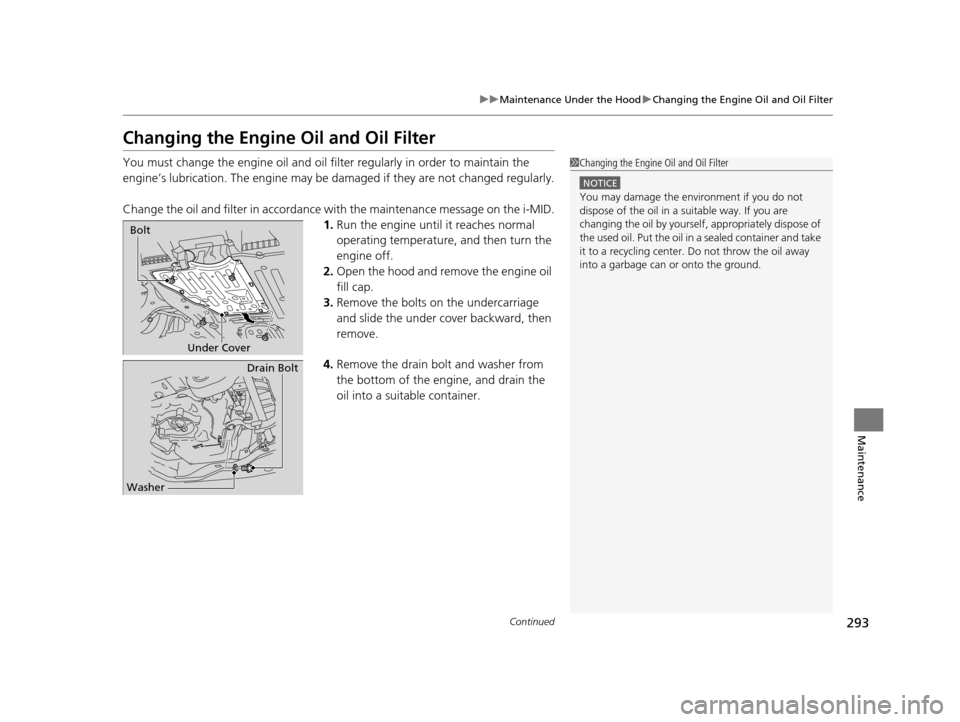
1. Run the engine until it reaches normal
operating temperature, and then turn the
engine off.
2. Open the hood and remove the engine oil
fill cap.
3. Remove the bolts on the undercarriage
and slide the under cover backward, then
remove.
4. Remove the drain bolt and washer from
the bottom of the engine, and drain the
oil into a suitable container.1Changing the Engine Oil and Oil Filter
NOTICE
You may damage the environment if you do not
dispose of the oil in a suitable way. If you are
changing the oil by yourself , appropriately dispose of
the used oil. Put the oil in a sealed container and take
it to a recycling center. Do not throw the oil away
into a garbage can or onto the ground.
Under Cover
Bolt
Drain Bolt
Washer
14 CIVIC IMA-31TR26200.book 293 ページ 2013年12月23日 月曜日 午後4時9分
Page 295 of 377
uuMaintenance Under the Hood uChanging the Engine Oil and Oil Filter
294
Maintenance
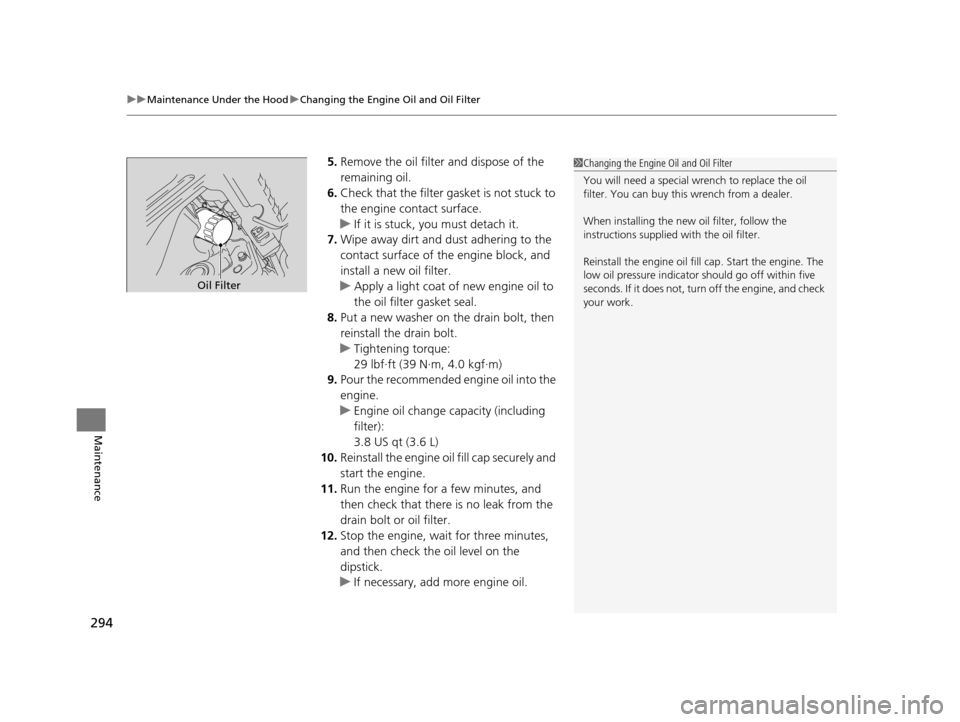
5. Remove the oil filter and dispose of the
remaining oil.
6. Check that the filter ga sket is not stuck to
the engine contact surface.
u If it is stuck, you must detach it.
7. Wipe away dirt and dust adhering to the
contact surface of the engine block, and
install a new oil filter.
u Apply a light coat of new engine oil to
the oil filter gasket seal.
8. Put a new washer on the drain bolt, then
reinstall the drain bolt.
u Tightening torque:
29 lbf∙ft (39 N∙m, 4.0 kgf∙m)
9. Pour the recommended engine oil into the
engine.
u Engine oil change capacity (including
filter):
3.8 US qt (3.6 L)
10. Reinstall the engine oil fill cap securely and
start the engine.
11. Run the engine for a few minutes, and
then check that there is no leak from the
drain bolt or oil filter.
12. Stop the engine, wait for three minutes,
and then check the oil level on the
dipstick.
u If necessary, add more engine oil.1Changing the Engine Oil and Oil Filter
You will need a special wrench to replace the oil
filter. You can buy this wrench from a dealer.
When installing the new oil filter, follow the
instructions supplied with the oil filter.
Reinstall the engine oil fill cap. Start the engine. The
low oil pressure indicator should go off within five
seconds. If it does not, turn off the engine, and check
your work.
Oil Filter
14 CIVIC IMA-31TR26200.book 294 ページ 2013年12月23日 月曜日 午後4時9分
Page 324 of 377
Continued323
uuCleaning uExterior Care
Maintenance
A good coat of automotive body wax helps protect your vehicle’s paint from the
elements. Wax will wear off over time and expose your vehicle’s paint to the
elements, so reapply as necessary.
If you get gasoline, oil, engine coolant, or battery fluid on resi n coated parts, they
may be stained or the coating may peel. Prom ptly wipe it away using a soft cloth and
clean water.
Wipe using a glass cleaner.
■Applying Wax
■Maintaining the Bumpers and Other Resin Coated Parts
■Cleaning the Window
1 Applying Wax
NOTICE
Chemical solvents and st rong cleaners can damage
the paint, metal, and plasti c on your vehicle. Wipe up
spills immediately.
1 Maintaining the Bumpers an d Other Resin Coated Parts
Ask a dealer about the corr ect coating material when
you want to repair the painted surface of the parts
made of resin.
1 Cleaning the Window
Wires are mounted to the in side of the rear window.
Wipe along the same direct ion as the wires with a
soft cloth so as not to damage them.
14 CIVIC IMA-31TR26200.book 323 ページ 2013年12月23日 月曜日 午後4時9分