light HONDA CIVIC HYBRID 2014 9.G User Guide
[x] Cancel search | Manufacturer: HONDA, Model Year: 2014, Model line: CIVIC HYBRID, Model: HONDA CIVIC HYBRID 2014 9.GPages: 377, PDF Size: 17.8 MB
Page 24 of 377
23
Quick Reference Guide
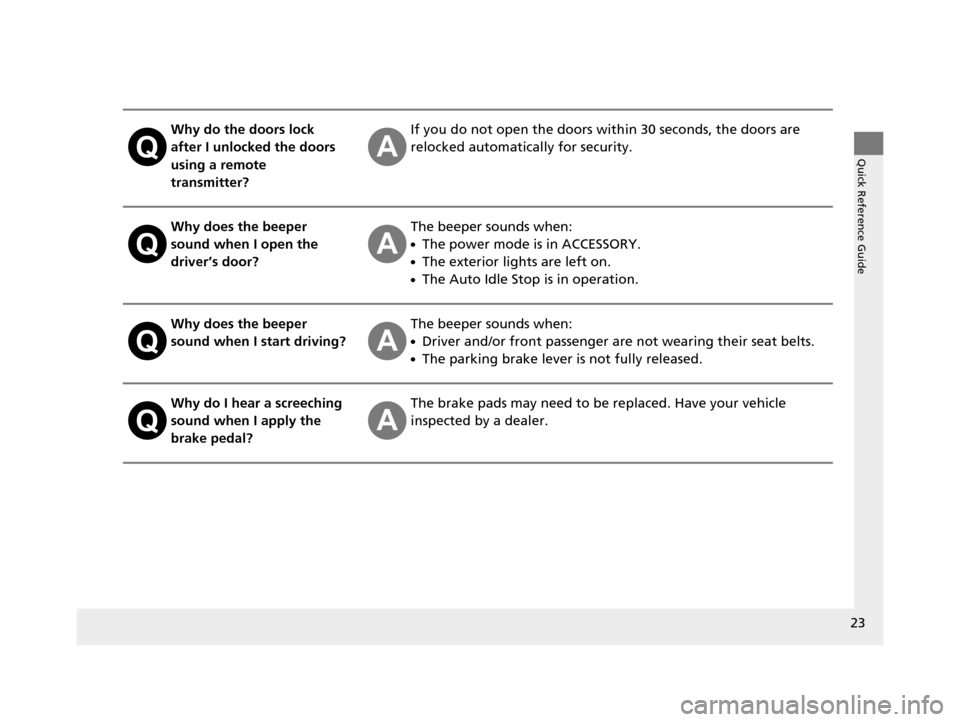
Why do the doors lock
after I unlocked the doors
using a remote
transmitter?If you do not open the doors within 30 seconds, the doors are
relocked automatically for security.
Why does the beeper
sound when I open the
driver’s door?The beeper sounds when:
●The power mode is in ACCESSORY.
●The exterior lights are left on.
●The Auto Idle Stop is in operation.
Why does the beeper
sound when I start driving?The beeper sounds when:
●Driver and/or front passenger are not wearing their seat belts.
●The parking brake lever is not fully released.
Why do I hear a screeching
sound when I apply the
brake pedal?The brake pads may need to be replaced. Have your vehicle
inspected by a dealer.
14 CIVIC IMA-31TR26200.book 23 ページ 2013年12月23日 月曜日 午後4時9分
Page 50 of 377
Continued49
uuAirbags uAirbag System Indicators
Safe Driving
■When side curtain airbags deploy in a frontal collision
One or both side curtain airb ags may inflate in a moderate-to-severe angled frontal
collision.
In this case, the side curtain airbags will deploy slightly after the front airbags.
Airbag System Indicators
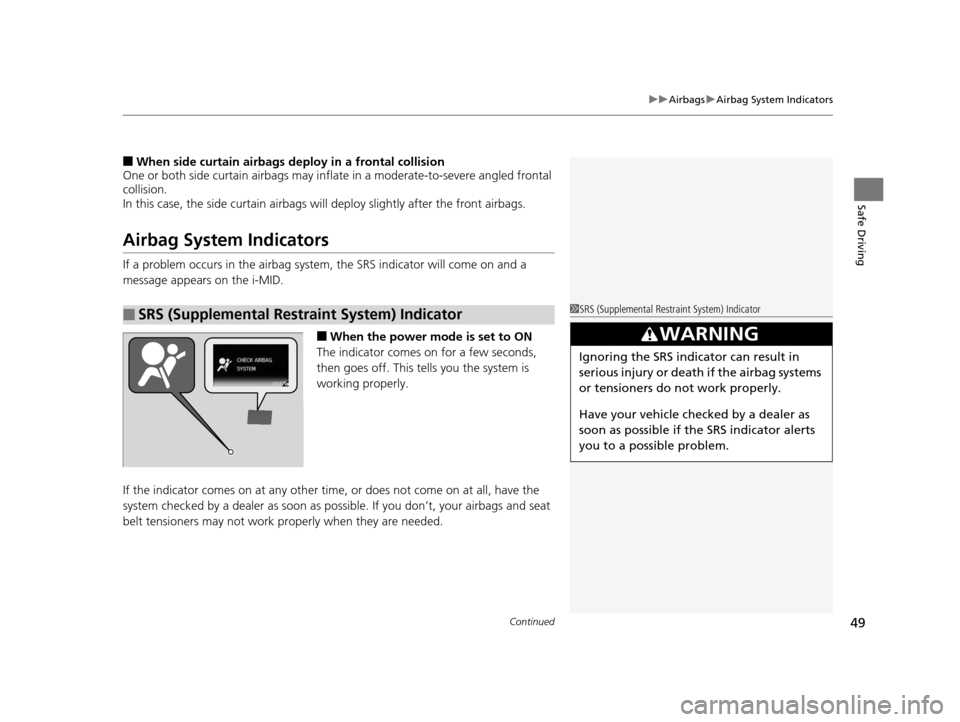
If a problem occurs in the airbag system , the SRS indicator will come on and a
message appears on the i-MID.
■When the power mode is set to ON
The indicator comes on for a few seconds,
then goes off. This tells you the system is
working properly.
If the indicator comes on at any other time , or does not come on at all, have the
system checked by a dealer as soon as po ssible. If you don’t, your airbags and seat
belt tensioners may not work properly when they are needed.
■SRS (Supplemental Restraint System) Indicator1SRS (Supplemental Restraint System) Indicator
3WARNING
Ignoring the SRS indicator can result in
serious injury or death if the airbag systems
or tensioners do not work properly.
Have your vehicle checked by a dealer as
soon as possible if th e SRS indicator alerts
you to a possible problem.
14 CIVIC IMA-31TR26200.book 49 ページ 2013年12月23日 月曜日 午後4時9分
Page 75 of 377
74
uuIndicators u
Instrument Panel
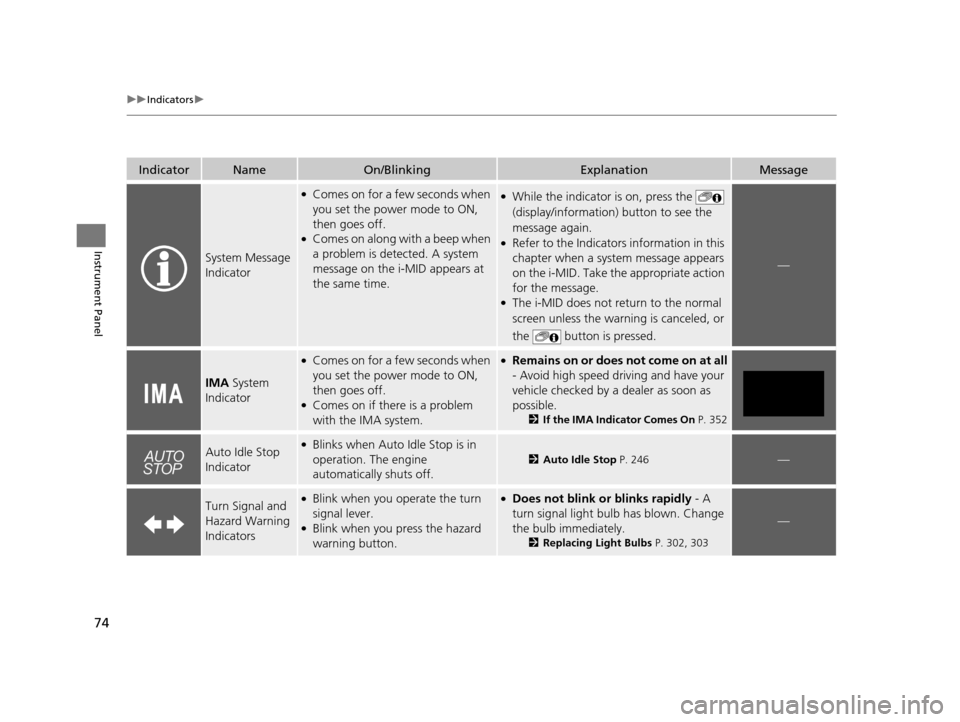
IndicatorNameOn/BlinkingExplanationMessage
System Message
Indicator
●Comes on for a few seconds when
you set the power mode to ON,
then goes off.
●Comes on along with a beep when
a problem is detected. A system
message on the i-MID appears at
the same time.
●While the indicator is on, press the
(display/information ) button to see the
message again.
●Refer to the Indicators information in this
chapter when a system message appears
on the i-MID. Take the appropriate action
for the message.
●The i-MID does not return to the normal
screen unless the warn ing is canceled, or
the button is pressed.
—
IMA System
Indicator
●Comes on for a few seconds when
you set the power mode to ON,
then goes off.
●Comes on if there is a problem
with the IMA system.
●Remains on or does not come on at all
- Avoid high speed driving and have your
vehicle checked by a dealer as soon as
possible.
2 If the IMA Indicator Comes On P. 352
Auto Idle Stop
Indicator●Blinks when Auto Idle Stop is in
operation. The engine
automatically shuts off.
2Auto Idle Stop P. 246—
Turn Signal and
Hazard Warning
Indicators●Blink when you operate the turn
signal lever.
●Blink when you press the hazard
warning button.
●Does not blink or blinks rapidly - A
turn signal light bulb has blown. Change
the bulb immediately.
2 Replacing Light Bulbs P. 302, 303
—
14 CIVIC IMA-31TR26200.book 74 ページ 2013年12月23日 月曜日 午後4時9分
Page 76 of 377
75
uuIndicators u
Continued
Instrument Panel
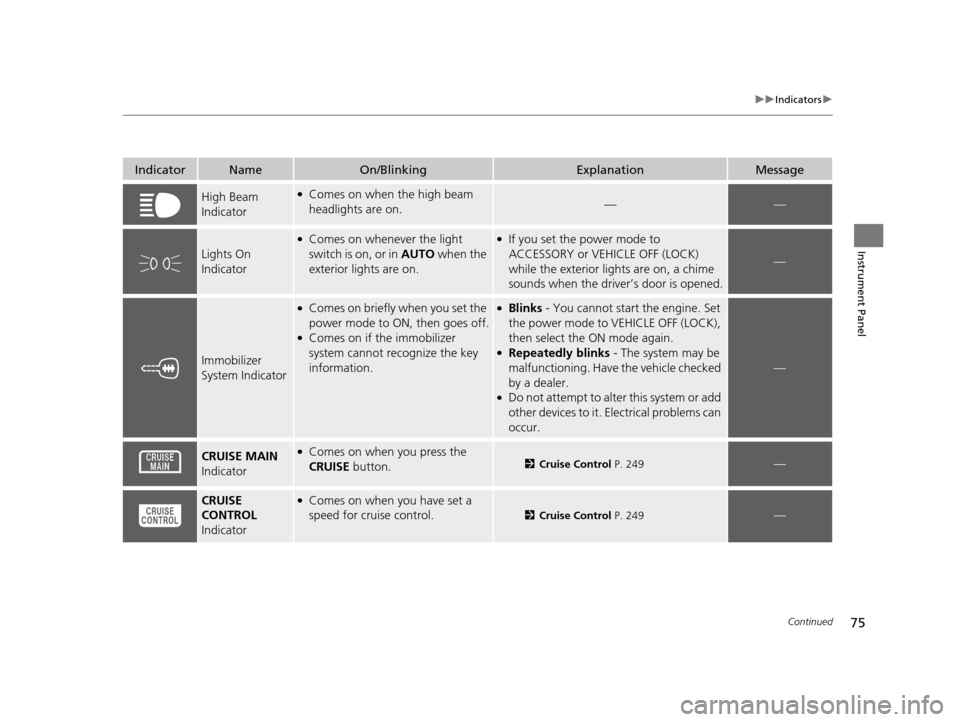
IndicatorNameOn/BlinkingExplanationMessage
High Beam
Indicator●Comes on when the high beam
headlights are on.——
Lights On
Indicator
●Comes on whenever the light
switch is on, or in AUTO when the
exterior lights are on.●If you set the power mode to
ACCESSORY or VEHICLE OFF (LOCK)
while the exterior lights are on, a chime
sounds when the driver’s door is opened.
—
Immobilizer
System Indicator
●Comes on briefly when you set the
power mode to ON, then goes off.
●Comes on if the immobilizer
system cannot re cognize the key
information.
●Blinks - You cannot start the engine. Set
the power mode to VEHICLE OFF (LOCK),
then select the ON mode again.
●Repeatedly blinks - The system may be
malfunctioning. Have the vehicle checked
by a dealer.
●Do not attempt to alter this system or add
other devices to it. Electrical problems can
occur.
—
CRUISE MAIN
Indicator●Comes on when you press the
CRUISE button.2Cruise Control P. 249—
CRUISE
CONTROL
Indicator●Comes on when you have set a
speed for cruise control.
2 Cruise Control P. 249—
14 CIVIC IMA-31TR26200.book 75 ページ 2013年12月23日 月曜日 午後4時9分
Page 81 of 377
80
uuIndicators uintelligent Multi-Informat ion Display (i-MID) Warning and Information Messages
Instrument Panel
intelligent Multi-Information Display (i-MID) Warning and Information Messages
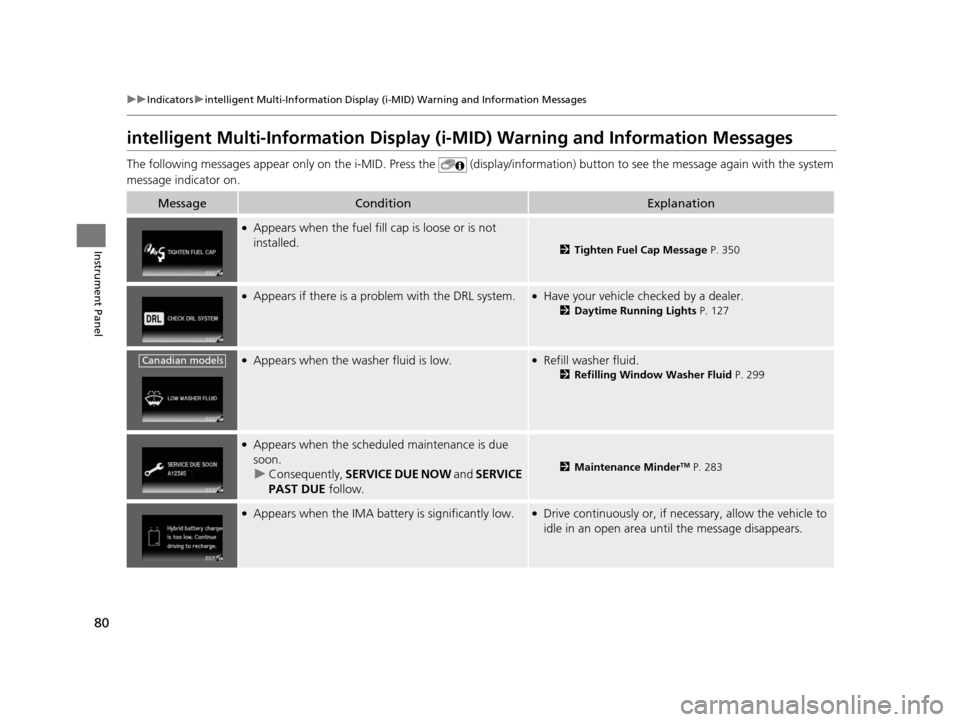
The following messages appear only on the i- MID. Press the (display/information) button to see the message again with the syst em
message indicator on.
MessageConditionExplanation
●Appears when the fuel fill cap is loose or is not
installed.
2 Tighten Fuel Cap Message P. 350
●Appears if there is a problem with the DRL system.●Have your vehicle checked by a dealer.
2Daytime Running Lights P. 127
●Appears when the washer fluid is low.●Refill washer fluid.
2Refilling Window Washer Fluid P. 299
●Appears when the scheduled maintenance is due
soon. u Consequently, SERVICE DUE NOW and SERVICE
PAST DUE follow.
2Maintenance MinderTM P. 283
●Appears when the IMA batte ry is significantly low.●Drive continuously or, if necessary, allow the vehicle to
idle in an open area un til the message disappears.
Canadian models
14 CIVIC IMA-31TR26200.book 80 ページ 2013年12月23日 月曜日 午後4時9分
Page 91 of 377
90
uuGauges and intelligent Multi- Information Display (i-MID)uintelligent Multi-Information Display (i-MID)
Instrument Panel
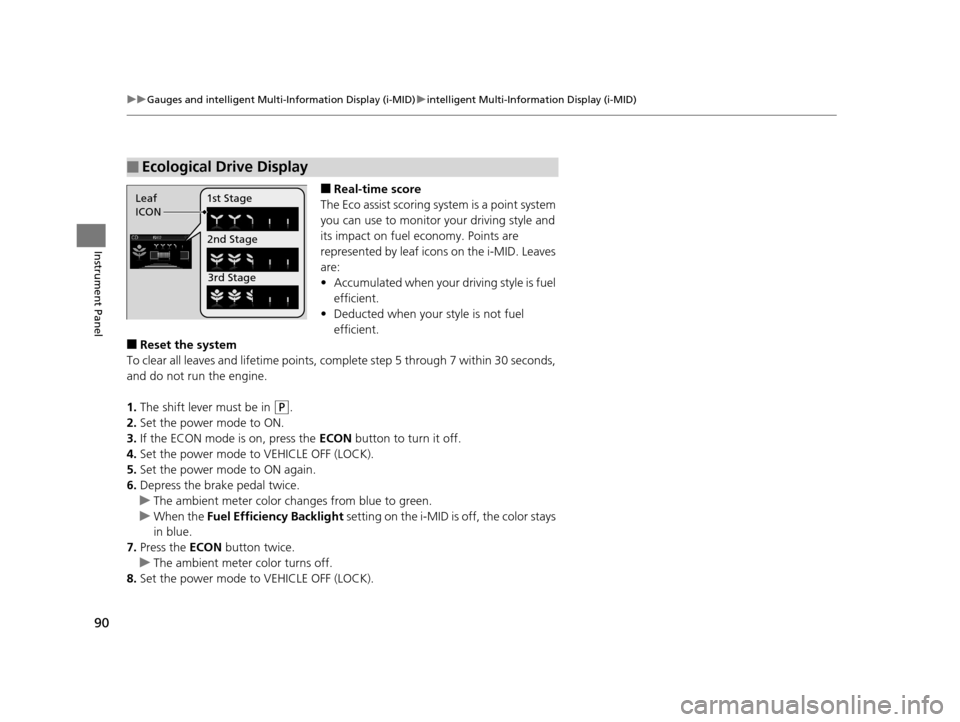
■Real-time score
The Eco assist scoring system is a point system
you can use to monitor your driving style and
its impact on fuel economy. Points are
represented by leaf icons on the i-MID. Leaves
are:
• Accumulated when your driving style is fuel
efficient.
• Deducted when your style is not fuel
efficient.
■Reset the system
To clear all leaves and lifetime points, comp lete step 5 through 7 within 30 seconds,
and do not run the engine.
1. The shift lever must be in
(P.
2. Set the power mode to ON.
3. If the ECON mode is on, press the ECON button to turn it off.
4. Set the power mode to VEHICLE OFF (LOCK).
5. Set the power mode to ON again.
6. Depress the brake pedal twice.
u The ambient meter color ch anges from blue to green.
u When the Fuel Efficiency Backlight setting on the i-MID is off, the color stays
in blue.
7. Press the ECON button twice.
u The ambient meter color turns off.
8. Set the power mode to VEHICLE OFF (LOCK).
■Ecological Drive Display
Leaf
ICON 1st Stage
2nd Stage3rd Stage
14 CIVIC IMA-31TR26200.book 90 ページ 2013年12月23日 月曜日 午後4時9分
Page 96 of 377
95
uuGauges and intelligent Multi- Information Display (i-MID)uintelligent Multi-Information Display (i-MID)
Continued
Instrument Panel
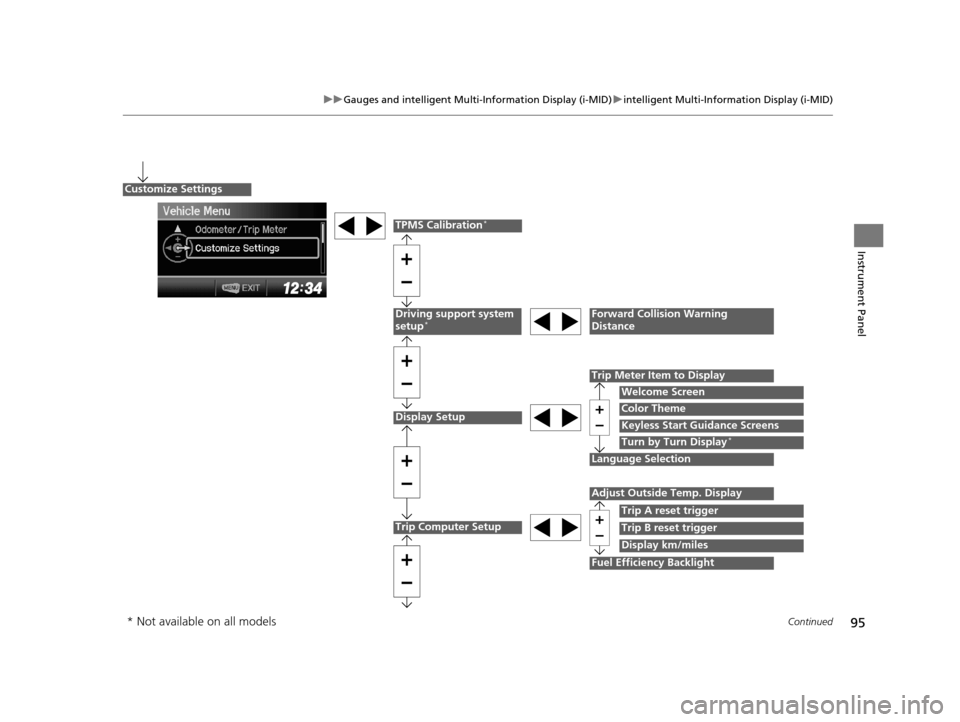
Display Setup
Language Selection
Trip Meter Item to Display
Welcome Screen
Color Theme
Customize Settings
Turn by Turn Display*
Driving support system
setup*Forward Collision Warning
Distance
Trip Computer Setup
Adjust Outside Temp. Display
Trip A reset trigger
Display km/miles
Fuel Efficiency Backlight
Trip B reset trigger
TPMS Calibration*
Keyless Start Guidance Screens
* Not available on all models
14 CIVIC IMA-31TR26200.book 95 ページ 2013年12月23日 月曜日 午後4時9分
Page 97 of 377
96
uuGauges and intelligent Multi- Information Display (i-MID)uintelligent Multi-Information Display (i-MID)
Instrument Panel
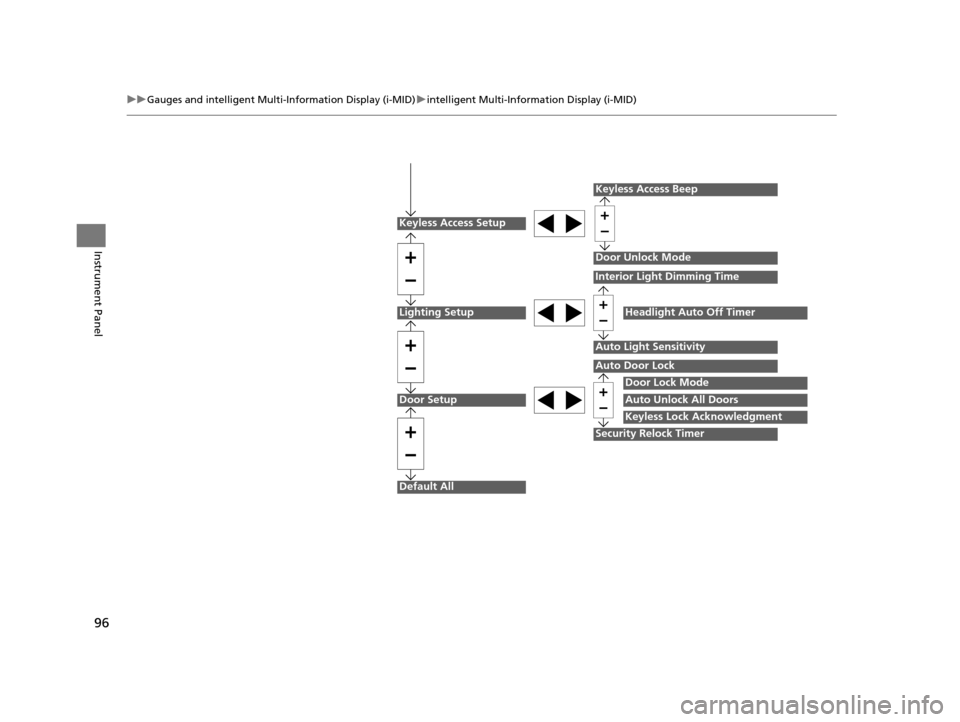
Lighting Setup
Door Setup
Default All
Auto Light Sensitivity
Door Lock Mode
Auto Unlock All Doors
Keyless Lock Acknowledgment
Auto Door Lock
Security Relock Timer
Interior Light Dimming Time
Headlight Auto Off Timer
Keyless Access Setup
Keyless Access Beep
Door Unlock Mode
14 CIVIC IMA-31TR26200.book 96 ページ 2013年12月23日 月曜日 午後4時9分
Page 100 of 377
99
uuGauges and intelligent Multi- Information Display (i-MID)uintelligent Multi-Information Display (i-MID)
Continued
Instrument Panel
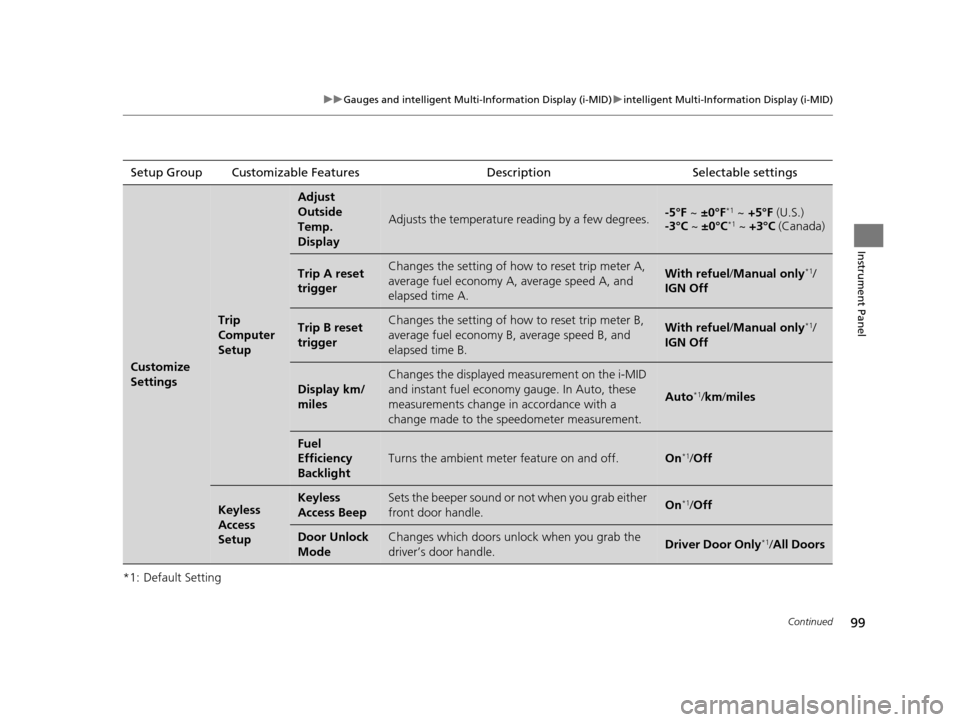
*1: Default SettingSetup Group Customizable Features
Description Selectable settings
Customize
Settings
Trip
Computer
Setup
Adjust
Outside
Temp.
Display
Adjusts the temperature reading by a few degrees.-5°F ~ ±0°F*1 ~ +5°F (U.S.)
-3°C ~ ±0°C*1 ~ +3°C (Canada)
Trip A reset
triggerChanges the setting of how to reset trip meter A,
average fuel economy A, average speed A, and
elapsed time A.With refuel /Manual only*1/
IGN Off
Trip B reset
triggerChanges the setting of how to reset trip meter B,
average fuel economy B, average speed B, and
elapsed time B.With refuel /Manual only*1/
IGN Off
Display km/
miles
Changes the displayed measurement on the i-MID
and instant fuel economy gauge. In Auto, these
measurements change in accordance with a
change made to the speedometer measurement.
Auto*1/ km/ miles
Fuel
Efficiency
Backlight
Turns the ambient meter feature on and off.On*1/Off
Keyless
Access
SetupKeyless
Access BeepSets the beeper sound or not when you grab either
front door handle.On*1/Off
Door Unlock
ModeChanges which doors unlock when you grab the
driver’s door handle.Driver Door Only*1/All Doors
14 CIVIC IMA-31TR26200.book 99 ページ 2013年12月23日 月曜日 午後4時9分
Page 101 of 377
100
uuGauges and intelligent Multi- Information Display (i-MID)uintelligent Multi-Information Display (i-MID)
Instrument Panel
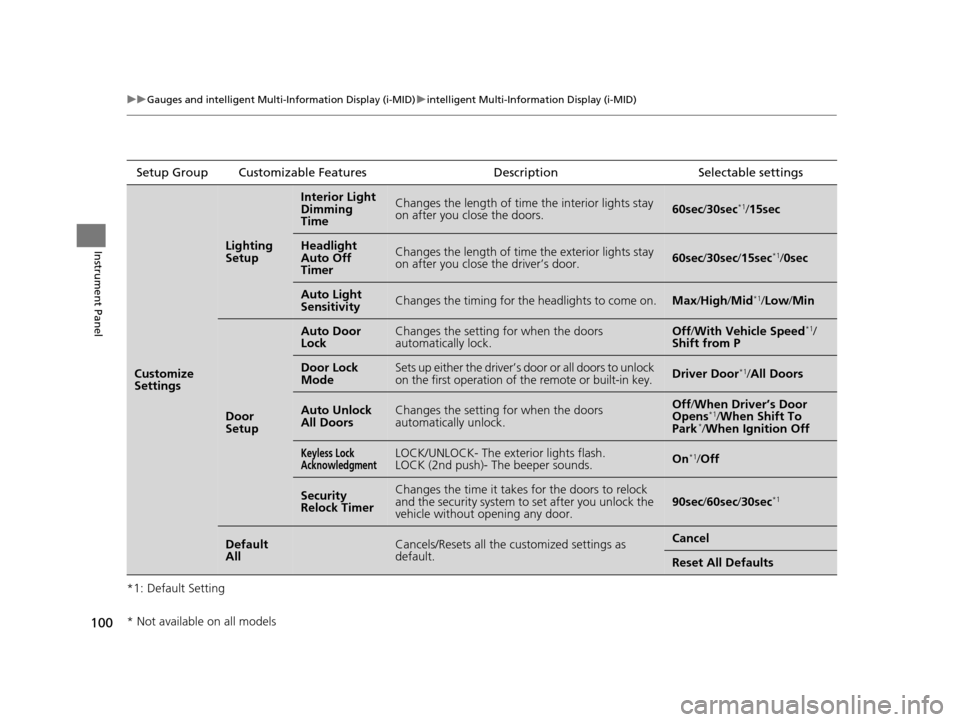
*1: Default SettingSetup Group Customizable Features
Description Selectable settings
Customize
Settings
Lighting
Setup
Interior Light
Dimming
TimeChanges the length of time the interior lights stay
on after you close the doors.60sec/30sec*1/15sec
Headlight
Auto Off
TimerChanges the length of time the exterior lights stay
on after you close the driver’s door.60sec /30sec /15sec*1/0sec
Auto Light
SensitivityChanges the timing for th e headlights to come on.Max/High /Mid*1/Low/ Min
Door
Setup
Auto Door
LockChanges the setting for when the doors
automatically lock.Off/With Vehicle Speed*1/
Shift from P
Door Lock
ModeSets up either the driver’s door or all doors to unlock
on the first operation of the remote or built-in key.Driver Door*1/ All Doors
Auto Unlock
All DoorsChanges the setting for when the doors
automatically unlock.Off /When Driver’s Door
Opens*1/ When Shift To
Park*/ When Ignition Off
Keyless Lock
AcknowledgmentLOCK/UNLOCK- The exterior lights flash.
LOCK (2nd push)- The beeper sounds.On*1/Off
Security
Relock TimerChanges the time it takes for the doors to relock
and the security system to set after you unlock the
vehicle without opening any door.90sec /60sec /30sec*1
Default
AllCancels/Resets all the customized settings as
default.Cancel
Reset All Defaults
* Not available on all models
14 CIVIC IMA-31TR26200.book 100 ページ 2013年12月23日 月曜日 午後4時9分