engine HONDA CIVIC HYBRID 2014 9.G Owner's Manual
[x] Cancel search | Manufacturer: HONDA, Model Year: 2014, Model line: CIVIC HYBRID, Model: HONDA CIVIC HYBRID 2014 9.GPages: 377, PDF Size: 17.8 MB
Page 90 of 377
Continued89
uuGauges and intelligent Multi- Information Display (i-MID)uintelligent Multi-Information Display (i-MID)
Instrument Panel
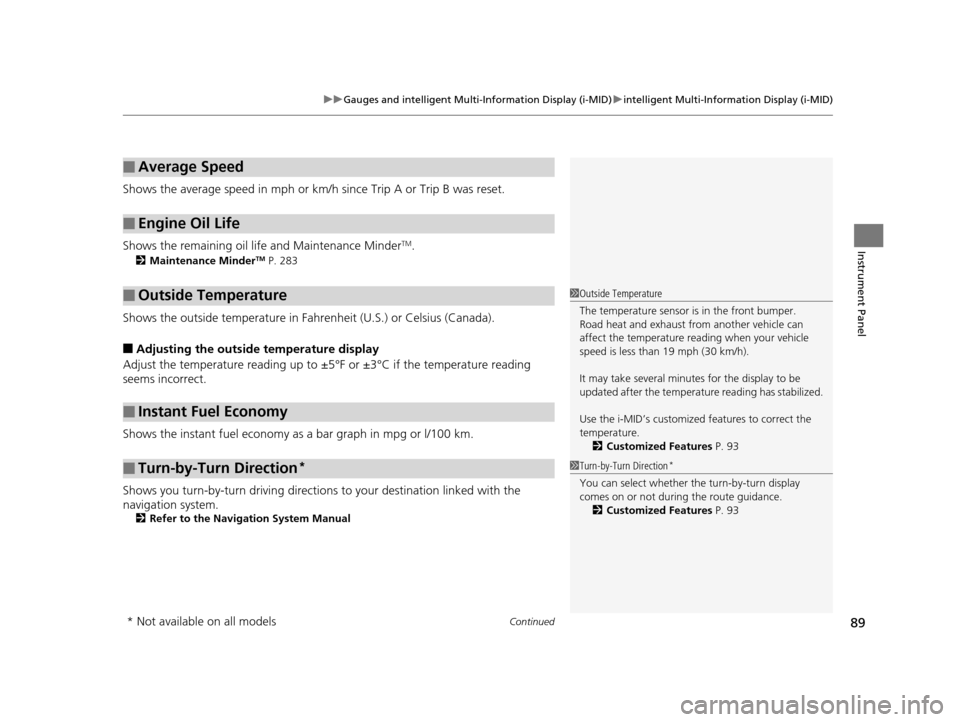
Shows the average speed in mph or km/h since Trip A or Trip B was reset.
Shows the remaining oil life and Maintenance Minder
TM.
2 Maintenance MinderTM P. 283
Shows the outside temperature in Fahr enheit (U.S.) or Celsius (Canada).
■Adjusting the outside temperature display
Adjust the temperature reading up to ±5°F or ±3°C if the temperature reading
seems incorrect.
Shows the instant fuel economy as a bar graph in mpg or l/100 km.
Shows you turn-by-turn driv ing directions to your destination linked with the
navigation system.
2 Refer to the Navigation System Manual
■Average Speed
■Engine Oil Life
■Outside Temperature
■Instant Fuel Economy
■Turn-by-Turn Direction*
1Outside Temperature
The temperature sensor is in the front bumper.
Road heat and exhaust from another vehicle can
affect the temperature reading when your vehicle
speed is less than 19 mph (30 km/h).
It may take several minutes for the display to be
updated after the temperature reading has stabilized.
Use the i-MID’s customized features to correct the
temperature.
2 Customized Features P. 93
1Turn-by-Turn Direction*
You can select whether th e turn-by-turn display
comes on or not during the route guidance. 2 Customized Features P. 93
* Not available on all models
14 CIVIC IMA-31TR26200.book 89 ページ 2013年12月23日 月曜日 午後4時9分
Page 91 of 377
90
uuGauges and intelligent Multi- Information Display (i-MID)uintelligent Multi-Information Display (i-MID)
Instrument Panel
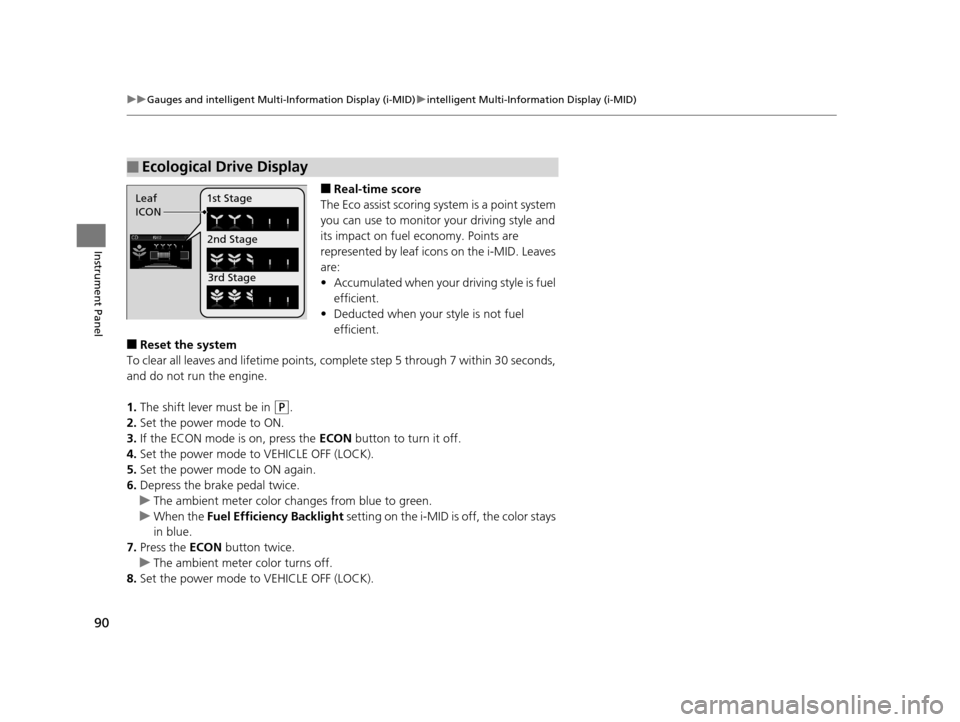
■Real-time score
The Eco assist scoring system is a point system
you can use to monitor your driving style and
its impact on fuel economy. Points are
represented by leaf icons on the i-MID. Leaves
are:
• Accumulated when your driving style is fuel
efficient.
• Deducted when your style is not fuel
efficient.
■Reset the system
To clear all leaves and lifetime points, comp lete step 5 through 7 within 30 seconds,
and do not run the engine.
1. The shift lever must be in
(P.
2. Set the power mode to ON.
3. If the ECON mode is on, press the ECON button to turn it off.
4. Set the power mode to VEHICLE OFF (LOCK).
5. Set the power mode to ON again.
6. Depress the brake pedal twice.
u The ambient meter color ch anges from blue to green.
u When the Fuel Efficiency Backlight setting on the i-MID is off, the color stays
in blue.
7. Press the ECON button twice.
u The ambient meter color turns off.
8. Set the power mode to VEHICLE OFF (LOCK).
■Ecological Drive Display
Leaf
ICON 1st Stage
2nd Stage3rd Stage
14 CIVIC IMA-31TR26200.book 90 ページ 2013年12月23日 月曜日 午後4時9分
Page 93 of 377
uuGauges and intelligent Multi- Information Display (i-MID)uintelligent Multi-Information Display (i-MID)
92
Instrument Panel
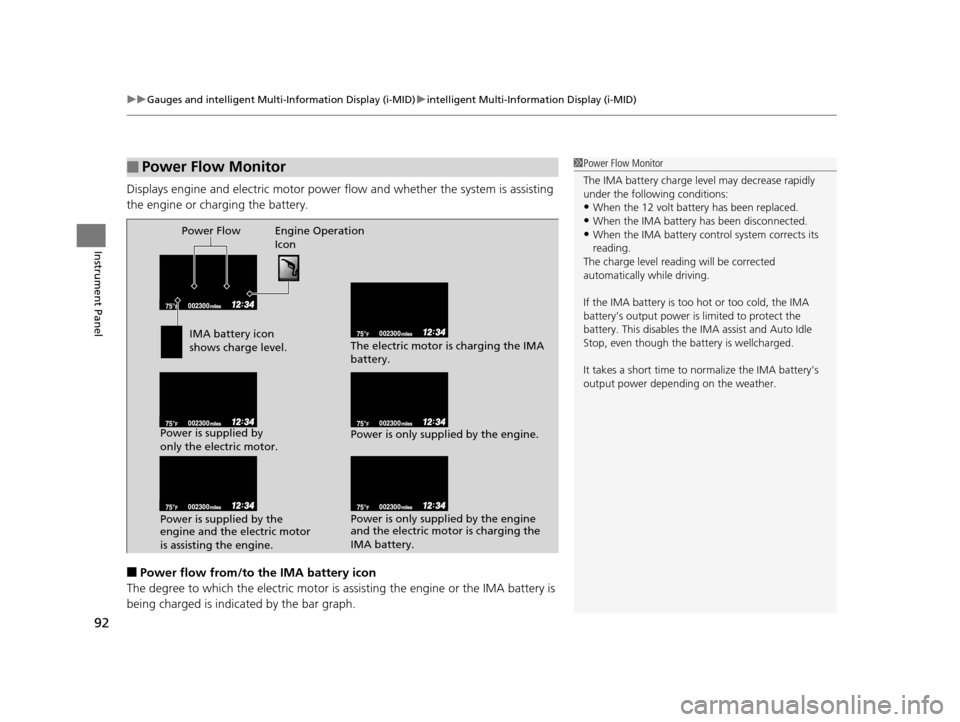
Displays engine and electric motor power fl ow and whether the system is assisting
the engine or charging the battery.
■Power flow from/to the IMA battery icon
The degree to which the electri c motor is assisting the engine or the IMA battery is
being charged is indicated by the bar graph.
■Power Flow Monitor1 Power Flow Monitor
The IMA battery charge le vel may decrease rapidly
under the following conditions:
•When the 12 volt battery has been replaced.
•When the IMA battery has been disconnected.•When the IMA battery control system corrects its
reading.
The charge level reading will be corrected
automatically while driving.
If the IMA batter y is too hot or too cold, the IMA
battery’s output power is limited to protect the
battery. This disables the IMA assist and Auto Idle
Stop, even though the battery is wellcharged.
It takes a short time to normalize the IMA battery’s
output power depending on the weather.Power Flow Engine Operation
Icon
IMA battery icon
shows charge level.
Power is supplied by
only the electric motor.
Power is supplied by the
engine and the electric motor
is assisting the engine. The electric motor is charging the IMA
battery.
Power is only supplied by the engine.
Power is only supplied by the engine
and the electric motor is charging the
IMA battery.
14 CIVIC IMA-31TR26200.book 92 ページ 2013年12月23日 月曜日 午後4時9分
Page 102 of 377
101
Controls
This chapter explains how to operate the various controls necessary for driving.
Clock.................................................. 102
Locking and Unlocking the Doors Key Types and Functions .................. 103
Locking/Unlocking the Doors from the Outside .......................................... 106
Locking/Unlocking the Doors from the
Inside ............................................. 110
Childproof Door Locks ..................... 112
Auto Door Locking/Unlocking .......... 113
Opening and Closing the Trunk ....... 114
Security System Immobilizer System .......................... 117
Security System Alarm ...................... 117 Opening and Closing the Windows
... 119
Operating the Switches Around the Steering Wheel
ENGINE START/STOP Button............. 121
Turn Signals ..................................... 124
Light Switches.................................. 124
Daytime Running Lights ................... 127
Wipers and Washers ........................ 128
Brightness Control ........................... 129
Rear Defogger/Heat ed Door Mirror
*
Button ........................................... 130
Adjusting the Steering Wheel........... 131 Adjusting the Mirrors
Interior Rearview Mirror ................... 132
Power Door Mirrors ......................... 132
Adjusting the Seats Adjusting the Seat Positions ............. 134
Interior Lights/Interior Convenience
ItemsInterior Lights .................................. 139
Interior Convenience Items .............. 140
Climate Control System Using Automatic Climate Control .... 144
Automatic Climate Control Sensors ... 146
* Not available on all models
14 CIVIC IMA-31TR26200.book 101 ページ 2013年12月23日 月曜日 午後4時9分
Page 104 of 377
103Continued
Controls
Locking and Unlocking the Doors
Key Types and Functions
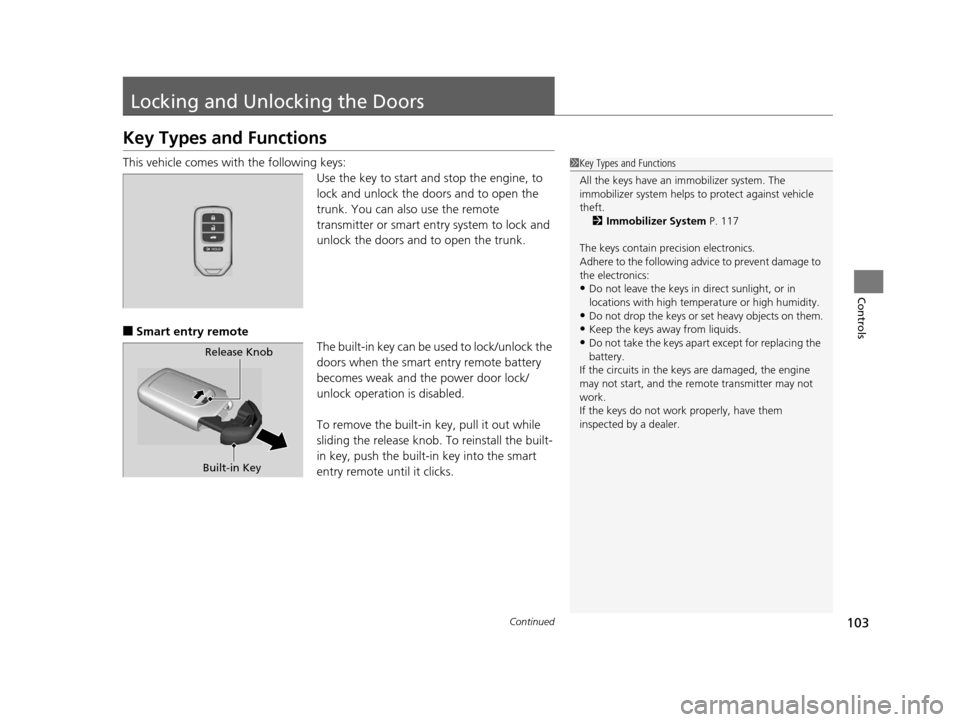
This vehicle comes with the following keys:
Use the key to start and stop the engine, to
lock and unlock the doors and to open the
trunk. You can also use the remote
transmitter or smart entry system to lock and
unlock the doors and to open the trunk.
■Smart entry remote
The built-in key can be used to lock/unlock the
doors when the smart entry remote battery
becomes weak and the power door lock/
unlock operation is disabled.
To remove the built-in key, pull it out while
sliding the release knob. To reinstall the built-
in key, push the built-i n key into the smart
entry remote until it clicks.
1 Key Types and Functions
All the keys have an immobilizer system. The
immobilizer system helps to protect against vehicle
theft. 2 Immobilizer System P. 117
The keys contain precision electronics.
Adhere to the following advi ce to prevent damage to
the electronics:
•Do not leave the keys in direct sunlight, or in
locations with high temperature or high humidity.
•Do not drop the keys or set heavy objects on them.
•Keep the keys away from liquids.
•Do not take the keys apart except for replacing the
battery.
If the circuits in the keys are damaged, the engine
may not start, and the remote transmitter may not
work.
If the keys do not work properly, have them
inspected by a dealer.Release Knob
Built-in Key
14 CIVIC IMA-31TR26200.book 103 ページ 2013年12月23日 月曜日 午後4時9分
Page 105 of 377
uuLocking and Unlocking the Doors uKey Types and Functions
104
Controls
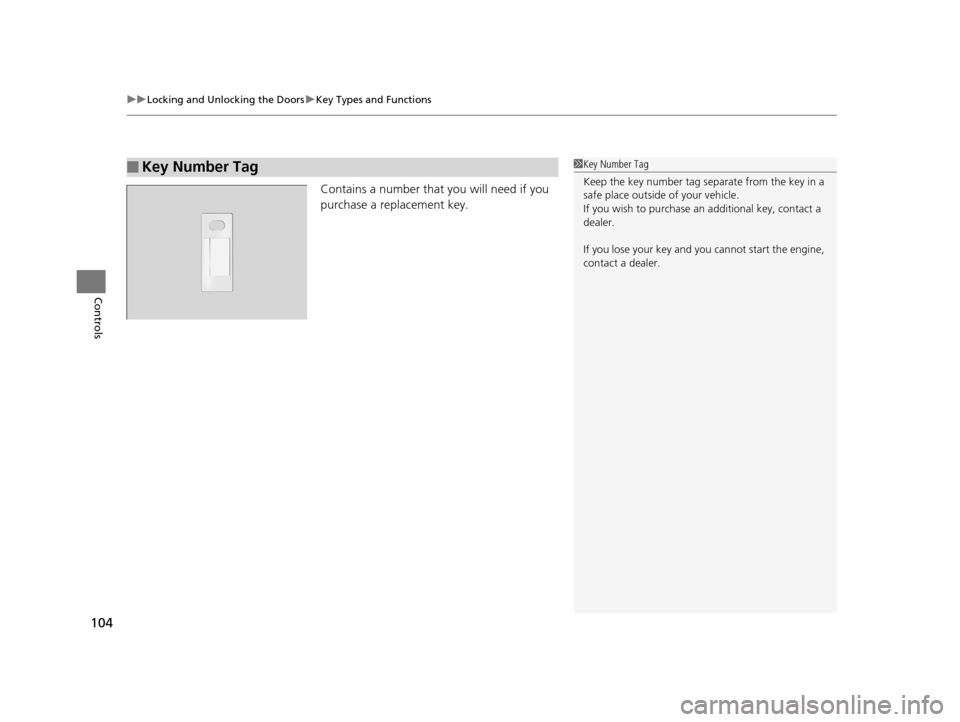
Contains a number that you will need if you
purchase a replacement key.
■Key Number Tag1Key Number Tag
Keep the key number tag separate from the key in a
safe place outside of your vehicle.
If you wish to purchase an additional key, contact a
dealer.
If you lose your key and you cannot start the engine,
contact a dealer.
14 CIVIC IMA-31TR26200.book 104 ページ 2013年12月23日 月曜日 午後4時9分
Page 106 of 377
105
uuLocking and Unlocking the Doors uLow Smart Entry Remote Signal Strength
Controls
Low Smart Entry Remote Signal Strength
The vehicle transmits radio waves to loca te the smart entry remote when locking/
unlocking the doors, opening the trunk, or to start the engine.
In the following cases, locking/unlocking the doors, opening the trunk, or starting
the engine may be inhibited or operation may be unstable:
• Strong radio waves are being transmitted by nearby equipment.
• You are carrying the smart entry remo te together with telecommunications
equipment, laptop computers, ce ll phones, or wireless devices.
• A metallic object is touching or covering the smart entry remote.1Low Smart Entry Remote Signal Strength
Communication between the smart entry remote and
the vehicle consumes the smart entry remote’s
battery.
Battery life is about two years, but this varies
depending on re gularity of use.
The battery is consumed whenever the smart entry
remote is receivi ng strong radio wave s. Avoid placing
it near electrical appliances such as televisions and
personal computers.
14 CIVIC IMA-31TR26200.book 105 ページ 2013年12月23日 月曜日 午後4時9分
Page 118 of 377
117Continued
Controls
Security System
Immobilizer System
The immobilizer system prevents a key that has not been pre-registered from
starting the engine. Each key contains electronic transmitters that use electronic
signals to verify the key.
Pay attention to the follo wing when pressing the ENGINE START/STOP button:
• Do not allow objects that emit strong radio waves near the ENGINE START/
STOP button.
• Make sure the key is not covered by or touching a metal object.
• Do not bring a key from another vehicle’s immobilizer system near the smart entry
remote.
Security System Alarm
The security system alarm activates when the trunk, hood or doors are forcibly
opened. The alarm does not go off if the trunk or doors are opened with the key,
remote transmitter or smart entry system.
However, the alarm goes off when a door is opened with the key, then the shift
lever is moved out of
( P or the hood is opened before the power mode is set to ON.
■When the security system alarm activates
The horn sounds intermittently and all the exterior lights flash.
■To deactivate the security system alarm
Unlock the vehicle using the remote transmi tter or smart entry system. The system,
along with the horn and flashing lights, is deactivated.
1 Immobilizer System
NOTICE
Leaving the smart entry remote in the vehicle can
result in theft or accidental movement of the vehicle.
Always take the key with you whenever you leave the
vehicle unattended.
Do not alter the system or add other devices to it.
Doing so may damage the system and make your
vehicle inoperable.
1 Security System Alarm
The security alarm continues for a maximum of two
minutes until the security system deactivates.
14 CIVIC IMA-31TR26200.book 117 ページ 2013年12月23日 月曜日 午後4時9分
Page 122 of 377
121Continued
Controls
Operating the Switches Around the Steering Wheel
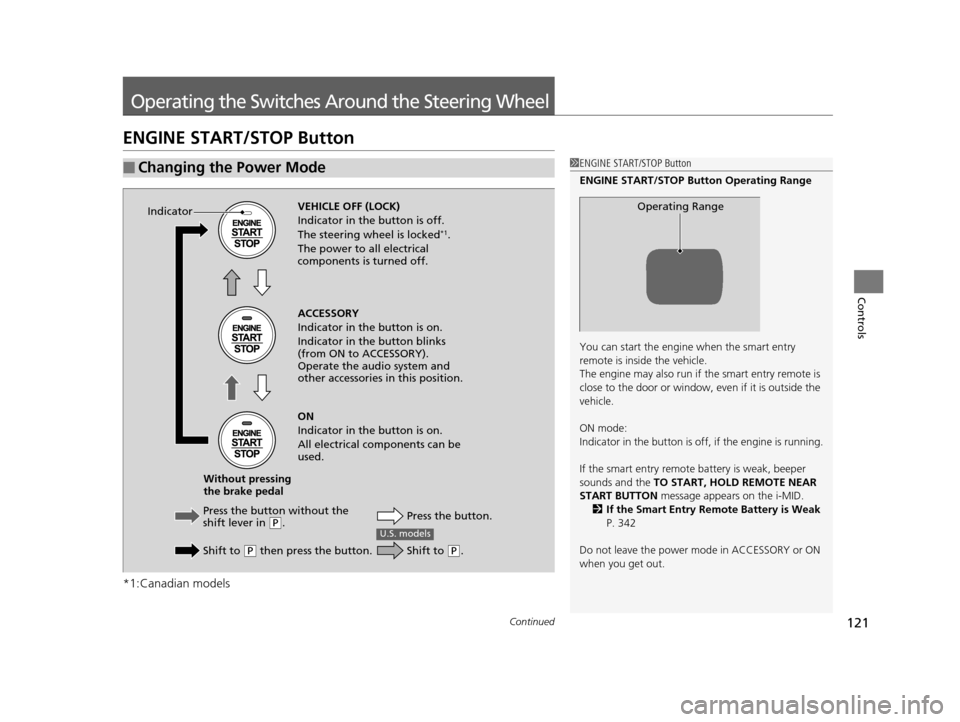
ENGINE START/STOP Button
*1:Canadian models
■Changing the Power Mode1ENGINE START/STOP Button
ENGINE START/STOP Button Operating Range
You can start the engine when the smart entry
remote is inside the vehicle.
The engine may also run if the smart entry remote is
close to the door or window, ev en if it is outside the
vehicle.
ON mode:
Indicator in the button is of f, if the engine is running.
If the smart entry remote battery is weak, beeper
sounds and the TO START, HOLD REMOTE NEAR
START BUTTON message appears on the i-MID.
2 If the Smart Entry Remote Battery is Weak
P. 342
Do not leave the power mode in ACCESSORY or ON
when you get out.
Operating RangeVEHICLE OFF (LOCK)
Indicator in th e button is off.
The steering wheel is locked
*1.
The power to all electrical
components is turned off.
Press the butto n without the
shift lever in
( P.
Shift to
( P then press the button. Press the button.
Without pressing
the brake pedal ACCESSORY
Indicator in the button is on.
Indicator in th
e button blinks
(from ON to ACCESSORY).
Operate the audio system and
other accessories in this position.
ON
Indicator in the button is on.
All electrical components can be
used.
Indicator
U.S. models
Shift to (
P.
14 CIVIC IMA-31TR26200.book 121 ページ 2013年12月23日 月曜日 午後4時9分
Page 123 of 377
122
uuOperating the Switches Around the Steering Wheel uENGINE START/STOP Button
Controls
If you leave the vehicle for 30 to 60 minutes with the shift lever in (P and the power
mode in ACCESSORY, the vehicle automati cally goes into the mode similar to
VEHICLE OFF (LOCK) to avoid the battery drain.
When in this mode:
The steering wheel does not lock.
You cannot lock or unlock doors with th e remote transmitter or the smart entry
system.
Press the ENGINE START/STOP button three times to swit ch the mode to VEHICLE
OFF (LOCK).
■Automatic Power Off
Canadian models
14 CIVIC IMA-31TR26200.book 122 ページ 2013年12月23日 月曜日 午後4時9分