warning light HONDA CIVIC HYBRID 2015 9.G Quick Guide
[x] Cancel search | Manufacturer: HONDA, Model Year: 2015, Model line: CIVIC HYBRID, Model: HONDA CIVIC HYBRID 2015 9.GPages: 65, PDF Size: 3.32 MB
Page 46 of 65

84 || 85
HANDLING THE UNEXPECTED
HANDLING THE UNEXPECTED
Overheating
If the temperature gauge needle is at the H mark, the engine suddenly lo\
ses power,
or steam or spray comes out from under the hood, your engine is overheat\
ing.
1. Immediately park the vehicle in a safe place. Turn
off all accessories and turn on the hazard warning
lights.
2. If steam or spray is not present: Keep the engine
running and open the hood.
If steam or spray is present: Turn off the engine and wait until it subsides. Then, open the hood.
3. Check that the cooling fan is operating and stop the engine once the tem\
perature gauge needle comes down. If the cooling fan is not operating, immediatel\
y stop
the engine.
4. Once the engine has cooled down, inspect the coolant level and check the\
cooling system components for leaks. If the coolant level in the reserve\
tank
is low, add coolant until it reaches the MAX mark. If there is no coolant in t\
he
reserve tank, make sure the radiator is cool, then cover the radiator ca\
p with a
heavy cloth and open the cap. If necessary, add coolant up to the base of the
fi ller neck, and put the cap back on.
Once the engine has cooled suffi ciently, restart it and check the temperature gauge.
If the temperature needle has gone down, resume driving. If it has not g\
one down,
contact a dealer for repairs.
Steam and spray from an overheated engine can seriously scald you.
Do not open the hood if steam is coming out.
WARNING
Removing the radiator cap while the engine is hot can cause the coolant \
to
spray out, seriously scalding you.
Always let the engine and radiator cool down before removing the radiato\
r cap.
WARNING
Continuing to drive with the temperature gauge needle at the H mark may \
damage
the engine.
NOTICE
Reserve
tank
MAX
MIN
Emergency Engine Stop
The ENGINE START/STOP button may be used to stop the engine due to an
emergency situation even while driving. If you must stop the engine, cho\
ose one of
the following operations:
• Press and hold the ENGINE START/STOP button for two seconds, or
• Firmly press the ENGINE START/STOP button two times.
The steering wheel will not lock. The power mode changes to ACCESSORY, unless
the shift lever is in Park (P), in which case the power mode changes t\
o VEHICLE OFF.
Because turning off the engine also disables the power assist the engine\
provides
to the steering and braking systems, it will require signifi cantly more physical effort
and time to steer and slow the vehicle. Downshift gears and use both fee\
t on the
brake pedal, if necessary, to slow the vehicle and stop immediately in a safe place
Do not press the button while driving unless it is absolutely necessary \
for the engine
to be switched off.
Emergency Towing
Call a professional towing service if you need to tow your vehicle.
Flat bed equipment: The operator loads your vehicle on the back of a tru\
ck. This is
the best way to transport your vehicle.
Wheel lift equipment: The tow truck uses two pivoting arms that go under\
the front
tires and lift them off the ground. The rear tires remain on the ground.\
This is an
acceptable way to tow your vehicle.
Trying to lift or tow your vehicle by the bumpers will cause serious dama\
ge. The
bumpers are not designed to support the vehicle’s weight.
Improper towing such as towing behind a motorhome or other motor vehicle\
can
damage the transmission.
NOTICE
Page 47 of 65
86 || 87
HANDLING THE UNEXPECTED
HANDLING THE UNEXPECTED
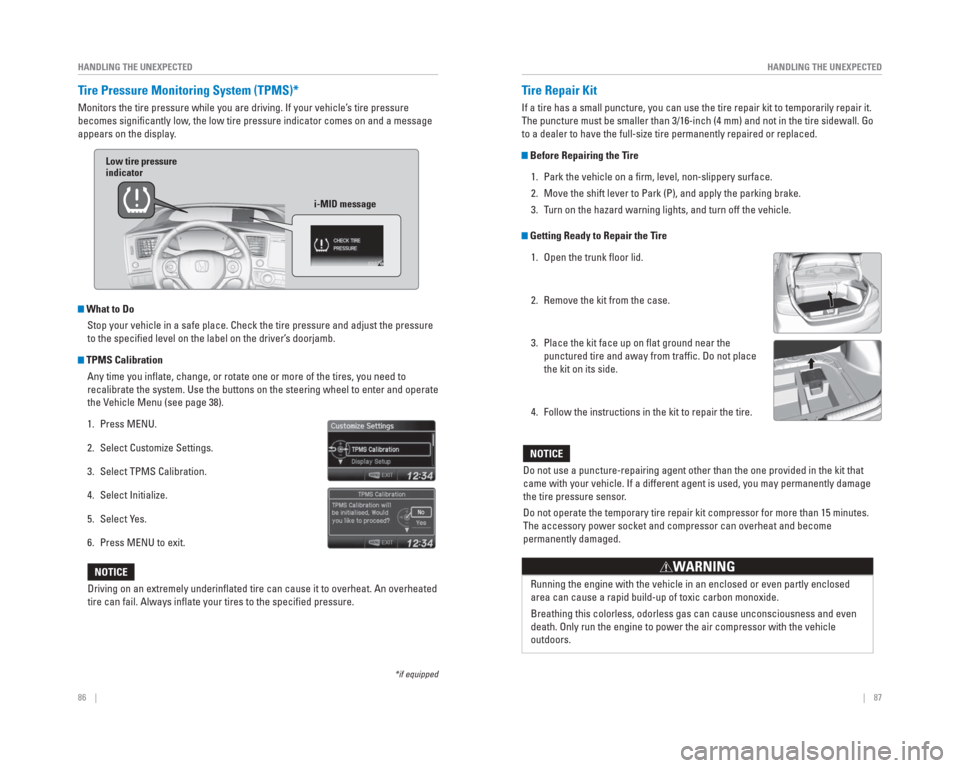
Tire Pressure Monitoring System ( TPMS)*
Monitors the tire pressure while you are driving. If your vehicle’s tire pressure
becomes signifi cantly low, the low tire pressure indicator comes on and a message
appears on the display.
What to Do
Stop your vehicle in a safe place. Check the tire pressure and adjust th\
e pressure
to the specifi ed level on the label on the driver’s doorjamb.
TPMS CalibrationAny time you infl ate, change, or rotate one or more of the tires, you need to
recalibrate the system. Use the buttons on the steering wheel to enter a\
nd operate
the Vehicle Menu (see page 38).
1. Press MENU.
2. Select Customize Settings.
3. Select TPMS Calibration.
4. Select Initialize.
5. Select Yes.
6. Press MENU to exit.
Driving on an extremely underinfl ated tire can cause it to overheat. An overheated
tire can fail. Always infl ate your tires to the specifi ed pressure.
NOTICE
*if equipped
Low tire pressure
indicator
i-MID message
Tire Repair Kit
If a tire has a small puncture, you can use the tire repair kit to tempo\
rarily repair it.
The puncture must be smaller than 3/16-inch (4 mm) and not in the tire\
sidewall. Go
to a dealer to have the full-size tire permanently repaired or replaced.\
Before Repairing the Tire1. Park the vehicle on a fi rm, level, non-slippery surface.
2. Move the shift lever to Park (P), and apply the parking brake.
3. Turn on the hazard warning lights, and turn off the vehicle.
Getting Ready to Repair the Tire1. Open the trunk fl oor lid.
2. Remove the kit from the case.
3. Place the kit face up on fl at ground near the punctured tire and away from traffi c. Do not place
the kit on its side.
4. Follow the instructions in the kit to repair the tire.
Do not use a puncture-repairing agent other than the one provided in the\
kit that
came with your vehicle. If a different agent is used, you may permanentl\
y damage
the tire pressure sensor.
Do not operate the temporary tire repair kit compressor for more than 15\
minutes.
The accessory power socket and compressor can overheat and become
permanently damaged.
NOTICE
Running the engine with the vehicle in an enclosed or even partly enclos\
ed
area can cause a rapid build-up of toxic carbon monoxide.
Breathing this colorless, odorless gas can cause unconsciousness and eve\
n
death. Only run the engine to power the air compressor with the vehicle \
outdoors.
WARNING
Page 48 of 65
88 || 89
HANDLING THE UNEXPECTED
HANDLING THE UNEXPECTED
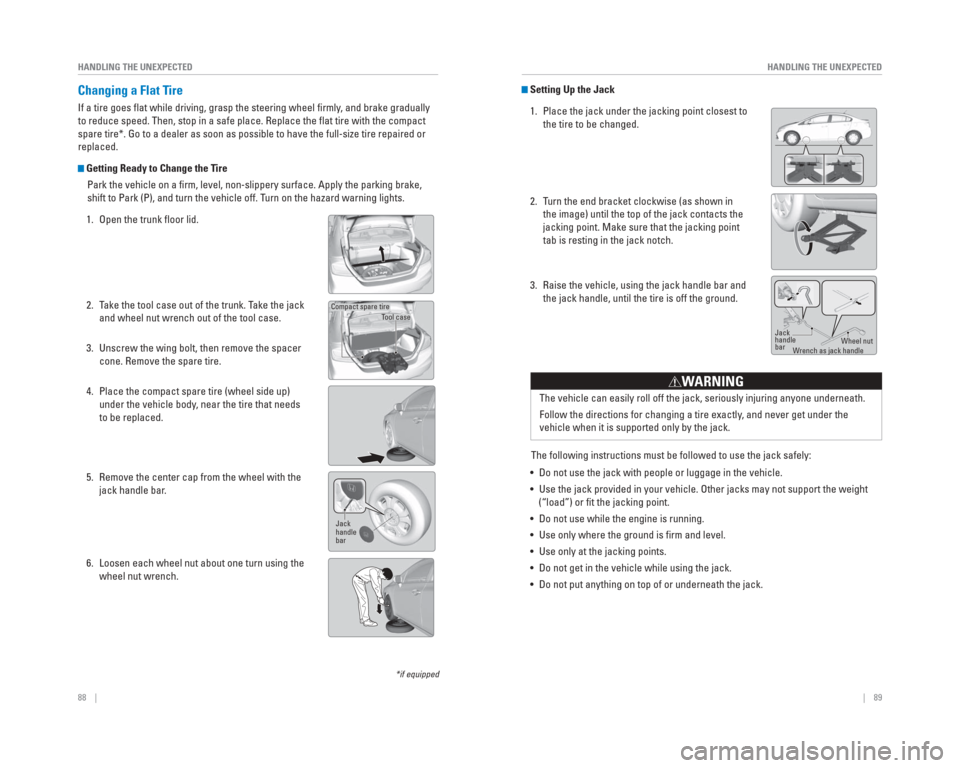
Setting Up the Jack
1. Place the jack under the jacking point closest to the tire to be changed.
2. Turn the end bracket clockwise (as shown in the image) until the top of the jack contacts the
jacking point. Make sure that the jacking point
tab is resting in the jack notch.
3. Raise the vehicle, using the jack handle bar and the jack handle, until the tire is off the ground.
The following instructions must be followed to use the jack safely:
• Do not use the jack with people or luggage in the vehicle.
• Use the jack provided in your vehicle. Other jacks may not support the w\
eight (“load”) or fi t the jacking point.
• Do not use while the engine is running.
• Use only where the ground is fi rm and level.
• Use only at the jacking points.
• Do not get in the vehicle while using the jack.
• Do not put anything on top of or underneath the jack. The vehicle can easily roll off the jack, seriously injuring anyone unde\
rneath.
Follow the directions for changing a tire exactly, and never get under the
vehicle when it is supported only by the jack.
WARNING
Jack
handle
bar
Wheel nut
W rench as jack handle
*if equipped
Changing a Flat Tire
If a tire goes fl at while driving, grasp the steering wheel fi rmly , and brake gradually
to reduce speed. Then, stop in a safe place. Replace the fl at tire with the compact
spare tire*. Go to a dealer as soon as possible to have the full-size ti\
re repaired or
replaced.
Getting Ready to Change the Tire
Park the vehicle on a fi rm, level, non-slippery surface. Apply the parking brake,
shift to Park (P), and turn the vehicle off. Turn on the hazard warning lights.
1. Open the trunk fl oor lid.
2. Take the tool case out of the trunk. Take the jack and wheel nut wrench out of the tool case.
3. Unscrew the wing bolt, then remove the spacer cone. Remove the spare tire.
4. Place the compact spare tire (wheel side up) under the vehicle body, near the tire that needs
to be replaced.
5. Remove the center cap from the wheel with the jack handle bar.
6. Loosen each wheel nut about one turn using the wheel nut wrench.
Tool case
Compact spare tire
Jack
handle
bar
Page 64 of 65
120 || 121
INDEX
INDEX
INDEX
ABS .........................................................23
Accessory Power Socket ...........................40
Airbags ...........................................................8
System Components ................................12
System Indicators ....................................10
Ambient Meter........................................25, 73
Anti-lock Brake System (ABS) .............23, 72
Audio Operation ...........................................40 Audio Commands ...................................118
Bluetooth
® Audio .....................................49
Compact Disc (CD) ...................................46
FM/AM Radio ............................................44
HDMI Port ..................................................40
HDMI Video ...............................................51
iPod
® .........................................................47
Pandora® ...................................................50
SiriusXM® Radio .......................................45
Sound .........................................................41
Steering Wheel Controls .........................41
Touchscreen Operation ..........................42
USB Flash Drive ........................................48
USB Port ....................................................40
Auto idle stop ..........................................25, 74
AUX Commands..........................................119
Battery .......................................................101
Bluetooth
® Audio .........................................49
Bluetooth® Audio Commands ..................119
Bluetooth® HandsFreeLink® (HFL) .............52
Dialing a Number .....................................55
E-Mail .........................................................57
HFL Controls ..............................................52
HondaLink™ Assist ..................................58
Pairing a Phone ........................................54
Phonebook ................................................55
Siri Eyes Free ............................................58
SMS Text Messaging ..............................57
Speed Dial .................................................56
Talk Button Tips ........................................53
Brake Assist System....................................72
Brake system ..........................................22, 23
Braking .........................................................72
Brightness Control .......................................31
Built-in key ....................................................27
Calibration .....................................................86
Carbon Monoxide Gas...................................4
Changing a Flat Tire .....................................88
Changing Settings ........................................38
Charging system...........................................22
Childproof Door Locks .................................29
Child Safety ...................................................14
Child Seat ......................................................16 Adding Security with a Tether ...............19 LATCH-Compatible Child Seat ................17
Climate Control Commands ......................117
Climate Control System ...............................37
Clock .........................................................39
Compact Disc (CD) .......................................46
Condition Indicators ....................................24
Contact Us ...................................................113
Cruise Control .........................................25, 75
Customer Information................................112
Customized Features ...................................38
Dashboard, Ceiling, and Other Controls .....2
Destination ....................................................62
Detour .........................................................65
Dialing a Number .........................................55
Disc Commands..........................................118
Door Mirrors .................................................36
Door open ......................................................24
Door Operation .............................................29
DOT Tire Quality Grading ..........................107
Driving .........................................................66 Braking .......................................................72
Cruise Control ...........................................75
Eco Assist System ....................................73
ENGINE START/STOP button .................70
Forward Collision Warning (FCW) .........76
Lane Departure Warning (LDW) ............77
LaneWatch™ ............................................78
Maximum Load Limit ................................68
Power Mode .............................................70
Refueling ....................................................81
Shifting .......................................................71
Vehicle Stability Assist (VSA
®) ..............71
Eco Assist System........................................73
Ecological Drive Display .............................74
ECON Button .................................................73
ECON mode ...................................................25
Electric Power Steering (EPS) ...................23
Electronic Stability Control (ESC) ..............71
E-Mail .........................................................57
Emergency Engine Stop ..............................85
Emergency Towing ......................................85
Engine and Fuel ..........................................111
Engine Coolant............................................100
Engine Oil.......................................................98
ENGINE START/STOP button .....................70
Exterior lights ..........................................25, 31
Fastening a Seat Belt ....................................7
FCW ...................................................25, 76
Find Nearest Place ......................................63
Find Place Commands ...............................116
Flat Tire .........................................................88
Floor Mats .....................................................34 Fluids .......................................................111
FM/AM Radio ................................................44
FM/AM Radio Commands .........................118
Foot Brake .....................................................72
Forward Collision Warning (FCW) .......23, 76
Frequently Asked Questions ....................112
Front Airbags (SRS) .......................................8
Front Door Inner Handle .............................29
Fuel gauge .....................................................25
Fuel Information ...........................................81
Fuse Locations..............................................91
Gauges .........................................................25
HDMI Port......................................................40
HDMI Video ...................................................51
Headlight-Wiper Integration ......................32
Head Restraints ............................................35
High temperature .........................................23
Home Address ..............................................62
HondaLink™ ..................................................43
HondaLink™ Assist ......................................58
Honda Roadside Assistance ....................113
Hood .........................................................97
IMA .........................................................23
i-MID .........................................................26
Immobilizer ....................................................25
Info Commands...........................................117
Instant fuel economy gauge.......................25
Instrument Panel ..........................................22
Integrated Motor Assist (IMA)...................23
Intelligent Multi-Information Display
(i-MID) ............................................26
Interior Lights................................................31
Intermittent Wipers......................................32
iPod
® .........................................................47
iPod® Commands .......................................119
Jump Starting ...............................................83
Lane Departure Warning (LDW) ..........23, 77
LaneWatch™ ................................................78
Lap/Shoulder Seat Belts ...............................5
LATCH-Compatible Child Seat ....................17
LDW ...................................................23, 77
Light Bulbs...................................................111
Lights ...................................................25, 31
Lock Tab .........................................................29
Low fuel .........................................................24
Low oil pressure ...........................................22
Low temperature ..........................................23
Low tire pressure .........................................24
Maintenance.................................................94 Battery .....................................................101
Engine Coolant ........................................100
Engine Oil ...................................................98
Maintenance Minder™ ...........................95
Service Codes ...........................................96
Under the Hood ........................................97 Window Washer Fluid ...........................101
Wiper blades ...........................................102
Malfunction indicator lamp ........................23
Malfunction Indicators................................22
Map Display Commands ...........................115
Map Legend ..................................................64
Map Lights.....................................................31
Master Door Lock Switch ...........................29
Maximum Load Limit....................................68
Mirrors .........................................................36
Multi-View Rear Camera ............................80
Navigation .....................................................59 Detour ........................................................65
Display and Controls ................................60
Entering a Destination .............................62
Find Nearest Place ..................................63
Home Address ..........................................62
Map Legend ..............................................64
Navigation Commands ..........................115
Place Category .........................................63
Routing .......................................................64
Steering Wheel Controls .........................59
Street Address ..........................................62
Talk Button Tips ........................................61
Traffi c .........................................................65
Turn-by-Turn Directions ..........................64
Voice Prompt.............................................61
One-Touch Turn Signal ................................32
On/Off Indicators ..........................................25
On-screen Commands...............................117
Opening the Hood ........................................97
Overheating...................................................84
Pairing a Phone ............................................54
Pandora
® .......................................................50
Pandora® Commands ................................119
Parking brake..........................................24, 72
Passenger Airbag Off Indicator .................11
Phone .........................................................54
Phonebook ....................................................55
Phone Commands ......................................117
Place Category .............................................63
Power Door Mirrors.....................................36
Power Flow Monitor ....................................73
Power Mode .................................................70
Power Window Operation ..........................30
Readiness Codes........................................110
Rear Camera .................................................80
Rearview Camera.........................................79
Rearview Mirror ...........................................36
Refueling........................................................81
Remote Battery Strength ............................82
Remote Transmitter .....................................27
Reporting Safety Defects............................21
Roadside Assistance .................................113
Route Commands .......................................115