wheel HONDA CIVIC HYBRID 2015 9.G Quick Guide
[x] Cancel search | Manufacturer: HONDA, Model Year: 2015, Model line: CIVIC HYBRID, Model: HONDA CIVIC HYBRID 2015 9.GPages: 65, PDF Size: 3.32 MB
Page 37 of 65
66 || 67
DRIVING
DRIVING
Learn about preparation for driving, as well as other features.
Before Driving
Check the following items before you begin driving.
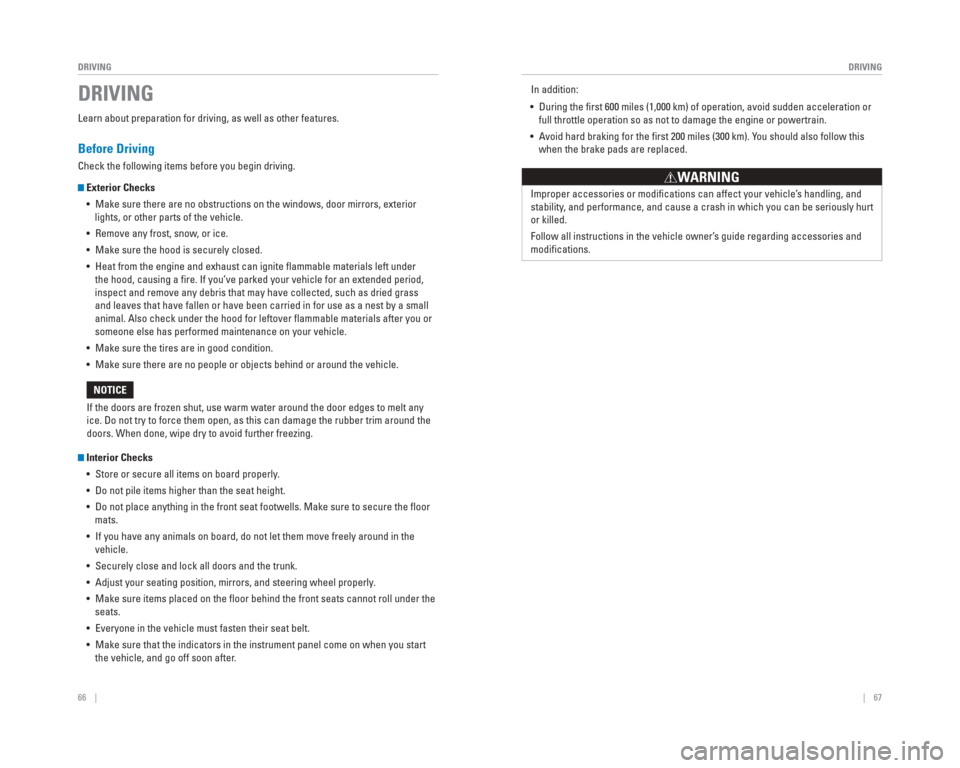
Exterior Checks
• Make sure there are no obstructions on the windows, door mirrors, exteri\
or lights, or other parts of the vehicle.
• Remove any frost, snow, or ice.
• Make sure the hood is securely closed.
• Heat from the engine and exhaust can ignite fl ammable materials left under the hood, causing a fi re. If you’ve parked your vehicle for an extended period,
inspect and remove any debris that may have collected, such as dried gra\
ss
and leaves that have fallen or have been carried in for use as a nest by\
a small
animal. Also check under the hood for leftover fl ammable materials after you or
someone else has performed maintenance on your vehicle.
• Make sure the tires are in good condition.
• Make sure there are no people or objects behind or around the vehicle.
Interior Checks • Store or secure all items on board properly.
• Do not pile items higher than the seat height.
• Do not place anything in the front seat footwells. Make sure to secure t\
he fl oor mats.
• If you have any animals on board, do not let them move freely around in \
the vehicle.
• Securely close and lock all doors and the trunk.
• Adjust your seating position, mirrors, and steering wheel properly.
• Make sure items placed on the fl oor behind the front seats cannot roll under the seats.
• Everyone in the vehicle must fasten their seat belt.
• Make sure that the indicators in the instrument panel come on when you s\
tart the vehicle, and go off soon after.
If the doors are frozen shut, use warm water around the door edges to me\
lt any
ice. Do not try to force them open, as this can damage the rubber trim a\
round the
doors. When done, wipe dry to avoid further freezing.
NOTICE
DRIVINGIn addition:
• During the fi rst 600 miles (1,000 km) of operation, avoid sudden acceleration or full throttle operation so as not to damage the engine or powertrain.
• Avoid hard braking for the fi rst 200 miles (300 km). You should also follow this when the brake pads are replaced.
Improper accessories or modifi cations can affect your vehicle’s handling, and
stability, and performance, and cause a crash in which you can be seriously hurt \
or killed.
Follow all instructions in the vehicle owner’s guide regarding accessories and
modifi cations.
WARNING
Page 40 of 65
72 || 73
DRIVING
DRIVING
Braking
Slow down or stop your vehicle, and keep it from moving when parked.
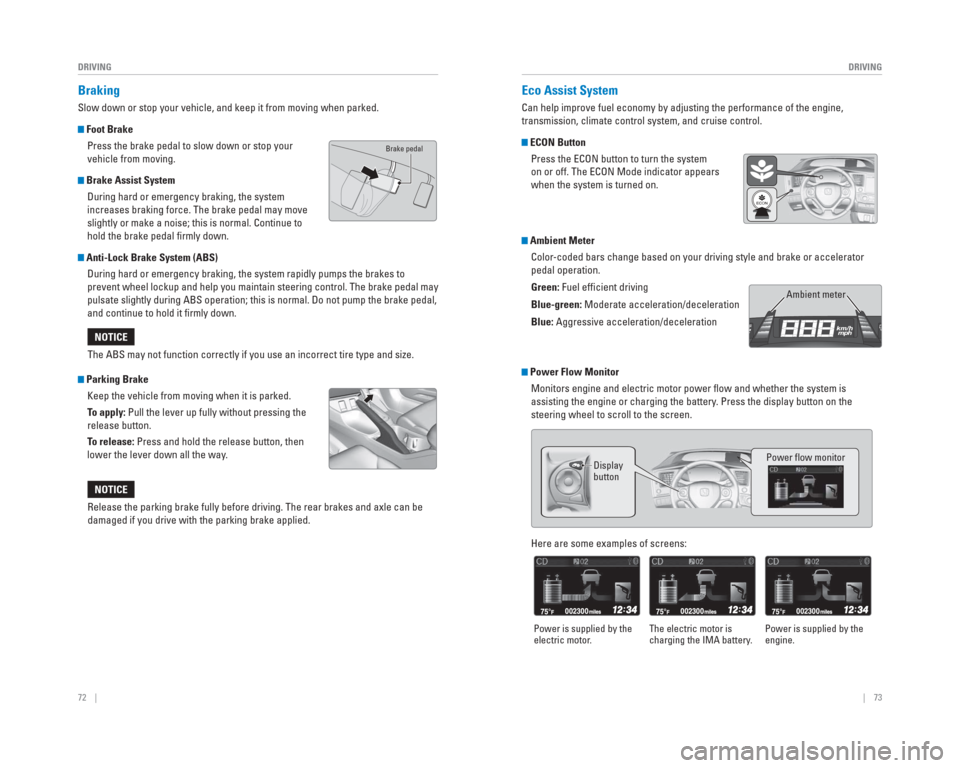
Foot Brake
Press the brake pedal to slow down or stop your
vehicle from moving.
Brake Assist System During hard or emergency braking, the system
increases braking force. The brake pedal may move
slightly or make a noise; this is normal. Continue to
hold the brake pedal fi rmly down.
Anti-Lock Brake System (ABS) During hard or emergency braking, the system rapidly pumps the brakes to\
prevent wheel lockup and help you maintain steering control. The brake p\
edal may
pulsate slightly during ABS operation; this is normal. Do not pump the b\
rake pedal,
and continue to hold it fi rmly down.
Parking BrakeKeep the vehicle from moving when it is parked.
To apply: Pull the lever up fully without pressing the
release button.
To release: Press and hold the release button, then
lower the lever down all the way.The ABS may not function correctly if you use an incorrect tire type and\
size.
NOTICE
Release the parking brake fully before driving. The rear brakes and axle\
can be
damaged if you drive with the parking brake applied.
NOTICE
Eco
Assist System
Can help improve fuel economy by adjusting the performance of the engine\
,
transmission, climate control system, and cruise control.
ECON Button
Press the ECON button to turn the system
on or off. The ECON Mode indicator appears
when the system is turned on.
Ambient MeterColor-coded bars change based on your driving style and brake or accelerator \
pedal operation.
Green: Fuel effi cient driving
Blue-green: Moderate acceleration/deceleration
Blue: Aggressive acceleration/deceleration
Ambient meter
Power Flow MonitorMonitors engine and electric motor power fl ow and whether the system is
assisting the engine or charging the battery. Press the display button on the
steering wheel to scroll to the screen.
Display
button Power fl ow monitor
Here are some examples of screens:
Power is supplied by the
electric motor.
The electric motor is
charging the IMA battery. Power is supplied by the
engine.
Brake pedal
Page 41 of 65
74 || 75
DRIVING
DRIVING
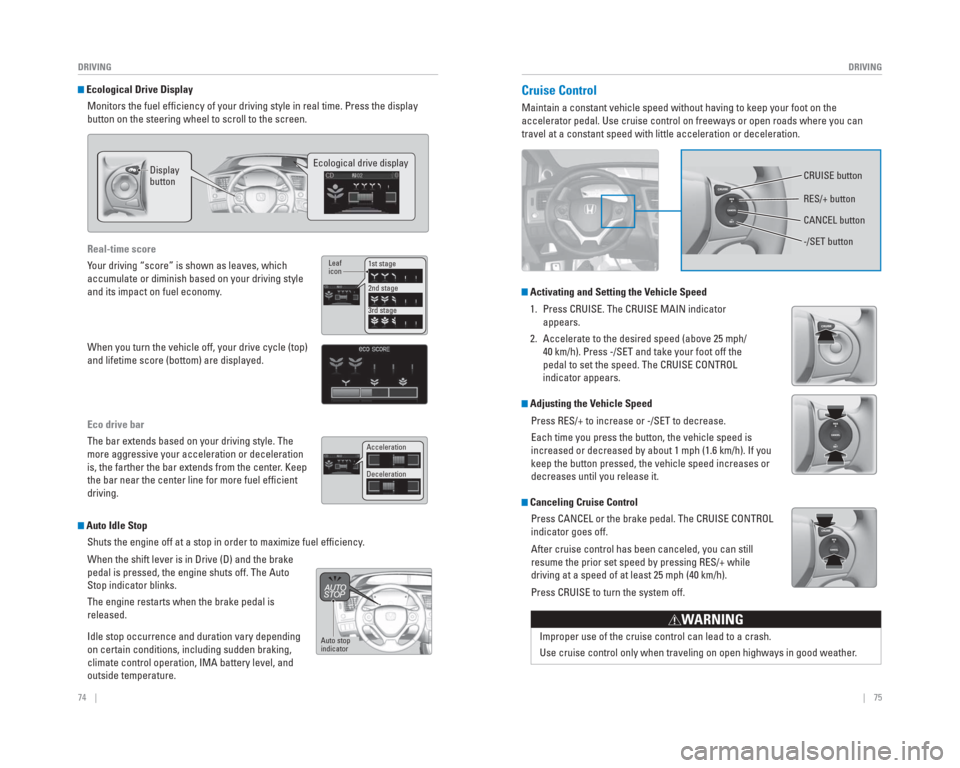
Ecological Drive Display
Monitors the fuel effi ciency of your driving style in real time. Press the display
button on the steering wheel to scroll to the screen.
Display
button Ecological drive display
Real-time score
Your driving “score” is shown as leaves, which
accumulate or diminish based on your driving style
and its impact on fuel economy.
When you turn the vehicle off, your drive cycle (top)
and lifetime score (bottom) are displayed.
Eco drive bar
The bar extends based on your driving style. The
more aggressive your acceleration or deceleration
is, the farther the bar extends from the center. Keep
the bar near the center line for more fuel effi cient
driving.
1st stage
2nd stage
3rd stage
Leaf
icon
Acceleration
Deceleration
Auto Idle Stop
Shuts the engine off at a stop in order to maximize fuel effi ciency.
When the shift lever is in Drive (D) and the brake
pedal is pressed, the engine shuts off. The Auto
Stop indicator blinks.
The engine restarts when the brake pedal is
released.
Idle stop occurrence and duration vary depending
on certain conditions, including sudden braking,
climate control operation, IMA battery level, and
outside temperature.
Auto stop
indicator
Cruise Control
Maintain a constant vehicle speed without having to keep your foot on th\
e
accelerator pedal. Use cruise control on freeways or open roads where yo\
u can
travel at a constant speed with little acceleration or deceleration.
Activating and Setting the Vehicle Speed
1. Press CRUISE. The CRUISE MAIN indicator appears.
2. Accelerate to the desired speed (above 25 mph/ 40 km/h). Press -/SET and take your foot off the
pedal to set the speed. The CRUISE CONTROL
indicator appears.
Adjusting the Vehicle Speed
Press RES/+ to increase or -/SET to decrease.
Each time you press the button, the vehicle speed is
increased or decreased by about 1 mph (1.6 km/h). If you
keep the button pressed, the vehicle speed increases or
decreases until you release it.
Canceling Cruise ControlPress CANCEL or the brake pedal. The CRUISE CONTROL
indicator goes off.
After cruise control has been canceled, you can still
resume the prior set speed by pressing RES/+ while
driving at a speed of at least 25 mph (40 km/h).
Press CRUISE to turn the system off.
Improper use of the cruise control can lead to a crash.
Use cruise control only when traveling on open highways in good weather .
WARNING
CRUISE button
RES/+ button
-/SET button CANCEL button
Page 42 of 65
*
If the camera mounted between the windshield and the rearview mirror det\
ects a
vehicle in front of you when your vehicle sp")
76 || 77
DRIVING
DRIVING
Forward Collision Warning ( FCW)*
If the camera mounted between the windshield and the rearview mirror det\
ects a
vehicle in front of you when your vehicle speed is 10 mph (15 km/h) or\
higher—and it
determines there is a likelihood of a frontal collision—the system pr\
ovides you with
visual and audible warnings.
If you do not brake in time or take preventive
action, BRAKE appears in the display and a
beep sounds continuously.
Changing Settings
Determine the alert timing or turn the system off using Customize Settin\
gs menu in
the Vehicle Menu in the i-MID. Use the steering wheel controls to make and en\
ter
selections (see page 38).
1. Press the MENU button on the steering wheel.
2. Select Customize Settings.
3. Select Driving Support System Setup.
4. Select Forward Collision Warning Distance.
5. Select Long, Normal, Short, or Off.
6. Press MENU to exit the menu.
Important Safety Reminder
FCW cannot detect all objects ahead and may not detect a given object; a\
ccuracy
of the system will vary based on weather, speed, extreme interior heat, and other
factors. FCW does not include a braking function. It is always your resp\
onsibility to
safely operate the vehicle and avoid collisions.
*if equipped
Beep
Lane Departure Warning ( LDW)*
A camera mounted between the windshield and the rearview mirror determin\
es if
your vehicle begins to move away from the center of a detected lane whil\
e driving
between 40–90 mph (64–145 km/h).
If you cross a detected lane line without
using your turn signal, a LANE DEP ARTURE
message appears on the display and a
beep sounds.
Turning LDW On or Off
Press LDW to turn the system on or off. A green
indicator light appears on the button when the
system is on.
Important Safety Reminder
Like all assistance systems, LDW has limitations. Over-reliance on LDW may result
in a collision. It is always your responsibility to keep the vehicle wit\
hin your lane.
LDW only alerts you when lane drift is detected without a turn signal in\
use. LDW
may not detect all lane markings or lane departures; accuracy will vary \
based on
weather, speed, and lane marker condition. It is always your responsibility to \
safely
operate the vehicle and avoid collisions.
*if equipped
LDW button
Beep
Indicator
Page 43 of 65
78 || 79
DRIVING
DRIVING
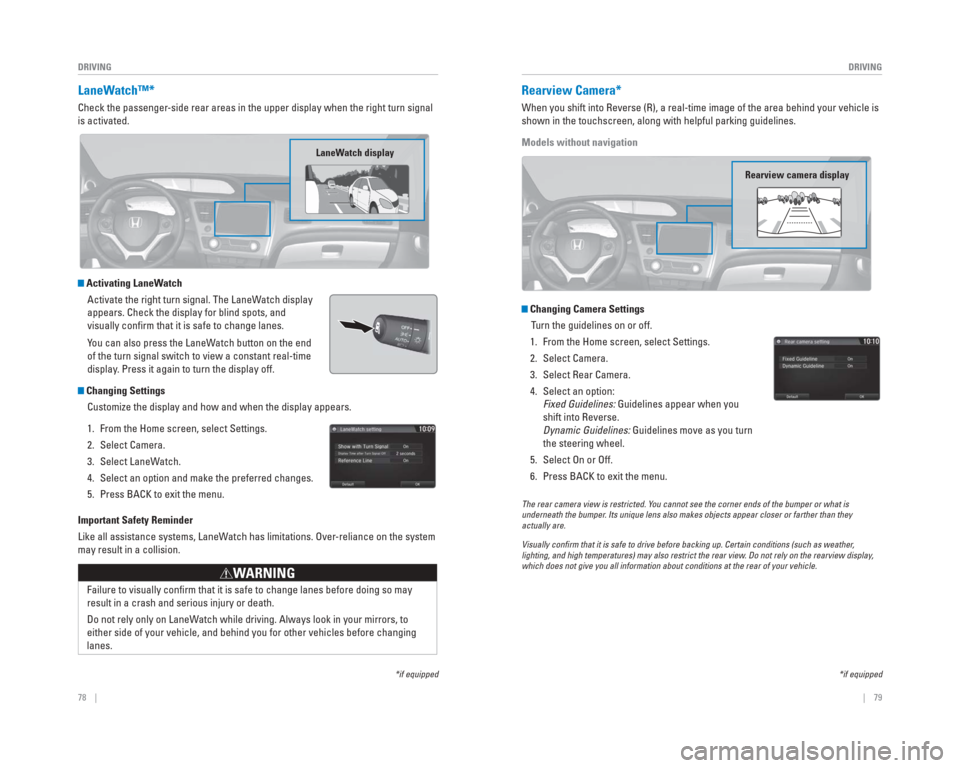
LaneWatch™*
Check the passenger-side rear areas in the upper display when the right turn signal
is activated.
Activating LaneWatch
Activate the right turn signal. The LaneWatch display
appears. Check the display for blind spots, and
visually confi rm that it is safe to change lanes.
You can also press the LaneWatch button on the end
of the turn signal switch to view a constant real-time
display. Press it again to turn the display off.
Changing SettingsCustomize the display and how and when the display appears.
1. From the Home screen, select Settings.
2. Select Camera.
3. Select LaneWatch.
4. Select an option and make the preferred changes.
5. Press BACK to exit the menu.
Important Safety Reminder
Like all assistance systems, LaneWatch has limitations. Over-reliance on the system
may result in a collision.
Failure to visually confi rm that it is safe to change lanes before doing so may
result in a crash and serious injury or death.
Do not rely only on LaneWatch while driving. Always look in your mirrors, to
either side of your vehicle, and behind you for other vehicles before ch\
anging
lanes.
WARNING
*if equipped
LaneWatch display
Rearview Camera*
When you shift into Reverse (R), a real-time image of the area behind \
your vehicle is
shown in the touchscreen, along with helpful parking guidelines.
Models without navigation
Changing Camera Settings
Turn the guidelines on or off.
1. From the Home screen, select Settings.
2. Select Camera.
3. Select Rear Camera.
4. Select an option: Fixed Guidelines: Guidelines appear when you
shift into Reverse.
Dynamic Guidelines: Guidelines move as you turn
the steering wheel.
5. Select On or Off.
6. Press BACK to exit the menu.
The rear camera view is restricted. Y ou cannot see the corner ends of the bumper or what is
underneath the bumper . Its unique lens also makes objects appear closer or farther than they \
actually are.
Visually con rm that it is safe to drive before backing up. Certain conditions (such\
as weather ,
lighting, and high temperatures) may also restrict the rear view . Do not rely on the rearview display,
which does not give you all information about conditions at the rear of \
your vehicle.
*if equipped
Rearview camera display
Page 44 of 65
, a real-time image of the area behind \
your vehicle is
shown in the display, along with helpful park")
80 || 81
DRIVING
DRIVING
Multi-View Rear Camera*
When you shift into Reverse (R), a real-time image of the area behind \
your vehicle is
shown in the display, along with helpful parking guidelines.
Models with navigation
Changing Camera Settings
Turn the guidelines on or off.
1. From the Home screen, select Settings.
2. Select Camera.
3. Select an option: Fixed Guidelines: Guidelines appear when you
shift into Reverse.
Dynamic Guidelines: Guidelines move as you turn
the steering wheel.
4. Select On or Off.
5. Press BACK to exit the menu.
The rear camera view is restricted. You cannot see the corner ends of the bumper or what is
underneath the bumper. Its unique lens also makes objects appear closer or farther than they \
actually are.
Visually con rm that it is safe to drive before backing up. Certain conditions (such\
as weather,
lighting, and high temperatures) may also restrict the rear view. Do not rely on the rearview display,
which does not give you all information about conditions at the rear of \
your vehicle.
*if equipped
Wide view
Press icons on the screen to change views.
Normal viewTop down view
Refueling
Use the proper fuel and refueling procedure to ensure the best performan\
ce and
safety of your vehicle.
Fuel Information
Use of unleaded gasoline of 87 octane or higher is recommended.
• Honda recommends TOP TIER Detergent Gasoline where available.
• Do NOT use gasoline containing more than 15% ethanol.
• Do NOT use gasoline containing methanol.
• Do NOT use gasoline containing MMT.
How to Refuel
1. The fuel fi ll door is located at the left rear of the vehicle. Park next to the service pump that is
most accessible.
2. Turn off the engine.
3. Push the fuel fi ll door release handle near the bottom of the driver’s seat. The fuel fi ll door
opens.
4. Turn the fuel fi ll cap slowly to open. Place the fuel fi ll cap in the holder.
5. Insert the fi ller nozzle fully. When the tank is full, the fuel nozzle clicks off automatically.
6. Replace the fuel fi ll cap. Tighten it until you hear at least one click. Close the fuel fi ll door.
We recommend quality gasoline containing detergent additives that help
prevent fuel system and engine deposits. In addition, in order to mainta\
in good
performance, fuel economy, and emissions control, we strongly recommend the
use of gasoline that does NOT contain harmful manganese-based fuel addit\
ives
such as MMT, if such gasoline is available.
NOTICE
Gasoline is highly fl ammable and explosive. You can be burned or seriously
injured when handling fuel.
• Stop the engine, and keep heat, sparks, and fl ame away.
• Handle fuel only outdoors.
• Wipe up spills immediately.
WARNING
Push Cap
Holder
Page 46 of 65

84 || 85
HANDLING THE UNEXPECTED
HANDLING THE UNEXPECTED
Overheating
If the temperature gauge needle is at the H mark, the engine suddenly lo\
ses power,
or steam or spray comes out from under the hood, your engine is overheat\
ing.
1. Immediately park the vehicle in a safe place. Turn
off all accessories and turn on the hazard warning
lights.
2. If steam or spray is not present: Keep the engine
running and open the hood.
If steam or spray is present: Turn off the engine and wait until it subsides. Then, open the hood.
3. Check that the cooling fan is operating and stop the engine once the tem\
perature gauge needle comes down. If the cooling fan is not operating, immediatel\
y stop
the engine.
4. Once the engine has cooled down, inspect the coolant level and check the\
cooling system components for leaks. If the coolant level in the reserve\
tank
is low, add coolant until it reaches the MAX mark. If there is no coolant in t\
he
reserve tank, make sure the radiator is cool, then cover the radiator ca\
p with a
heavy cloth and open the cap. If necessary, add coolant up to the base of the
fi ller neck, and put the cap back on.
Once the engine has cooled suffi ciently, restart it and check the temperature gauge.
If the temperature needle has gone down, resume driving. If it has not g\
one down,
contact a dealer for repairs.
Steam and spray from an overheated engine can seriously scald you.
Do not open the hood if steam is coming out.
WARNING
Removing the radiator cap while the engine is hot can cause the coolant \
to
spray out, seriously scalding you.
Always let the engine and radiator cool down before removing the radiato\
r cap.
WARNING
Continuing to drive with the temperature gauge needle at the H mark may \
damage
the engine.
NOTICE
Reserve
tank
MAX
MIN
Emergency Engine Stop
The ENGINE START/STOP button may be used to stop the engine due to an
emergency situation even while driving. If you must stop the engine, cho\
ose one of
the following operations:
• Press and hold the ENGINE START/STOP button for two seconds, or
• Firmly press the ENGINE START/STOP button two times.
The steering wheel will not lock. The power mode changes to ACCESSORY, unless
the shift lever is in Park (P), in which case the power mode changes t\
o VEHICLE OFF.
Because turning off the engine also disables the power assist the engine\
provides
to the steering and braking systems, it will require signifi cantly more physical effort
and time to steer and slow the vehicle. Downshift gears and use both fee\
t on the
brake pedal, if necessary, to slow the vehicle and stop immediately in a safe place
Do not press the button while driving unless it is absolutely necessary \
for the engine
to be switched off.
Emergency Towing
Call a professional towing service if you need to tow your vehicle.
Flat bed equipment: The operator loads your vehicle on the back of a tru\
ck. This is
the best way to transport your vehicle.
Wheel lift equipment: The tow truck uses two pivoting arms that go under\
the front
tires and lift them off the ground. The rear tires remain on the ground.\
This is an
acceptable way to tow your vehicle.
Trying to lift or tow your vehicle by the bumpers will cause serious dama\
ge. The
bumpers are not designed to support the vehicle’s weight.
Improper towing such as towing behind a motorhome or other motor vehicle\
can
damage the transmission.
NOTICE
Page 47 of 65
86 || 87
HANDLING THE UNEXPECTED
HANDLING THE UNEXPECTED
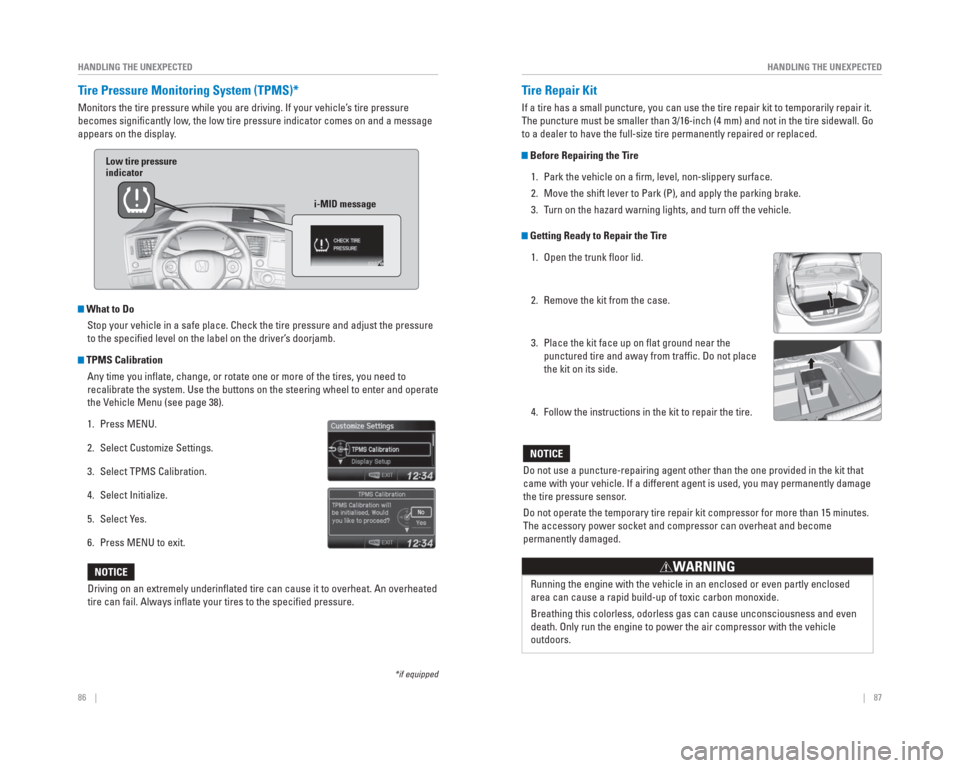
Tire Pressure Monitoring System ( TPMS)*
Monitors the tire pressure while you are driving. If your vehicle’s tire pressure
becomes signifi cantly low, the low tire pressure indicator comes on and a message
appears on the display.
What to Do
Stop your vehicle in a safe place. Check the tire pressure and adjust th\
e pressure
to the specifi ed level on the label on the driver’s doorjamb.
TPMS CalibrationAny time you infl ate, change, or rotate one or more of the tires, you need to
recalibrate the system. Use the buttons on the steering wheel to enter a\
nd operate
the Vehicle Menu (see page 38).
1. Press MENU.
2. Select Customize Settings.
3. Select TPMS Calibration.
4. Select Initialize.
5. Select Yes.
6. Press MENU to exit.
Driving on an extremely underinfl ated tire can cause it to overheat. An overheated
tire can fail. Always infl ate your tires to the specifi ed pressure.
NOTICE
*if equipped
Low tire pressure
indicator
i-MID message
Tire Repair Kit
If a tire has a small puncture, you can use the tire repair kit to tempo\
rarily repair it.
The puncture must be smaller than 3/16-inch (4 mm) and not in the tire\
sidewall. Go
to a dealer to have the full-size tire permanently repaired or replaced.\
Before Repairing the Tire1. Park the vehicle on a fi rm, level, non-slippery surface.
2. Move the shift lever to Park (P), and apply the parking brake.
3. Turn on the hazard warning lights, and turn off the vehicle.
Getting Ready to Repair the Tire1. Open the trunk fl oor lid.
2. Remove the kit from the case.
3. Place the kit face up on fl at ground near the punctured tire and away from traffi c. Do not place
the kit on its side.
4. Follow the instructions in the kit to repair the tire.
Do not use a puncture-repairing agent other than the one provided in the\
kit that
came with your vehicle. If a different agent is used, you may permanentl\
y damage
the tire pressure sensor.
Do not operate the temporary tire repair kit compressor for more than 15\
minutes.
The accessory power socket and compressor can overheat and become
permanently damaged.
NOTICE
Running the engine with the vehicle in an enclosed or even partly enclos\
ed
area can cause a rapid build-up of toxic carbon monoxide.
Breathing this colorless, odorless gas can cause unconsciousness and eve\
n
death. Only run the engine to power the air compressor with the vehicle \
outdoors.
WARNING
Page 48 of 65
88 || 89
HANDLING THE UNEXPECTED
HANDLING THE UNEXPECTED
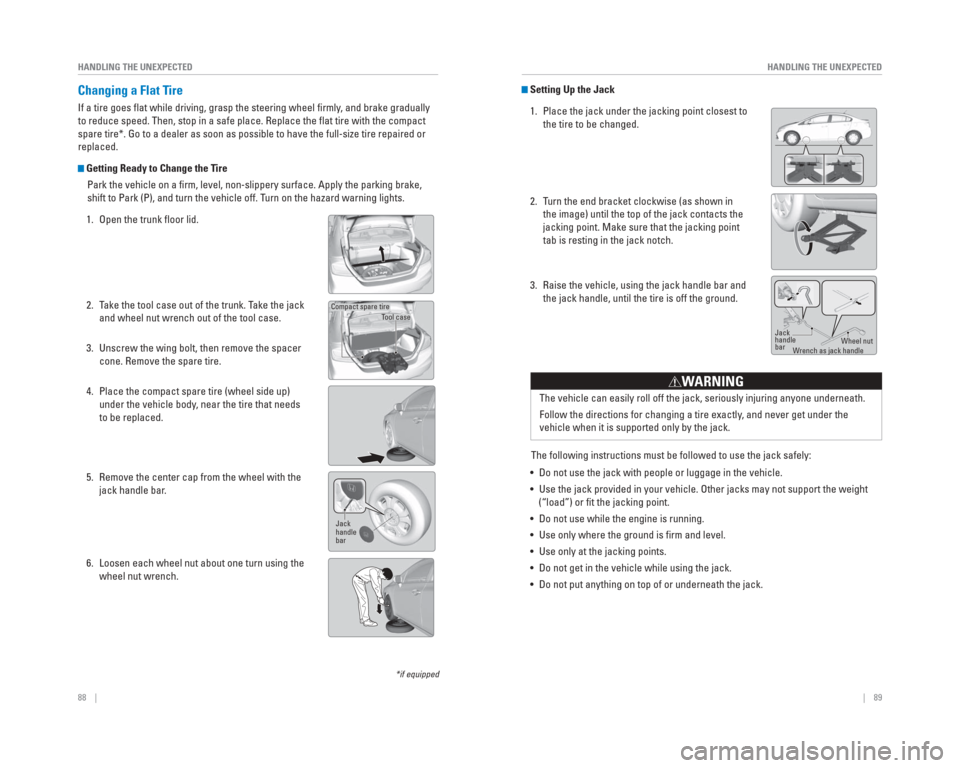
Setting Up the Jack
1. Place the jack under the jacking point closest to the tire to be changed.
2. Turn the end bracket clockwise (as shown in the image) until the top of the jack contacts the
jacking point. Make sure that the jacking point
tab is resting in the jack notch.
3. Raise the vehicle, using the jack handle bar and the jack handle, until the tire is off the ground.
The following instructions must be followed to use the jack safely:
• Do not use the jack with people or luggage in the vehicle.
• Use the jack provided in your vehicle. Other jacks may not support the w\
eight (“load”) or fi t the jacking point.
• Do not use while the engine is running.
• Use only where the ground is fi rm and level.
• Use only at the jacking points.
• Do not get in the vehicle while using the jack.
• Do not put anything on top of or underneath the jack. The vehicle can easily roll off the jack, seriously injuring anyone unde\
rneath.
Follow the directions for changing a tire exactly, and never get under the
vehicle when it is supported only by the jack.
WARNING
Jack
handle
bar
Wheel nut
W rench as jack handle
*if equipped
Changing a Flat Tire
If a tire goes fl at while driving, grasp the steering wheel fi rmly , and brake gradually
to reduce speed. Then, stop in a safe place. Replace the fl at tire with the compact
spare tire*. Go to a dealer as soon as possible to have the full-size ti\
re repaired or
replaced.
Getting Ready to Change the Tire
Park the vehicle on a fi rm, level, non-slippery surface. Apply the parking brake,
shift to Park (P), and turn the vehicle off. Turn on the hazard warning lights.
1. Open the trunk fl oor lid.
2. Take the tool case out of the trunk. Take the jack and wheel nut wrench out of the tool case.
3. Unscrew the wing bolt, then remove the spacer cone. Remove the spare tire.
4. Place the compact spare tire (wheel side up) under the vehicle body, near the tire that needs
to be replaced.
5. Remove the center cap from the wheel with the jack handle bar.
6. Loosen each wheel nut about one turn using the wheel nut wrench.
Tool case
Compact spare tire
Jack
handle
bar
Page 49 of 65

90 || 91
HANDLING THE UNEXPECTED
HANDLING THE UNEXPECTED
Fuse Locations
If any electrical devices are not working, turn the vehicle off and chec\
k to see if any
applicable fuse is blown. Fuse locations are shown on the fuse box cover\
. Locate the
fuse in question by the fuse number and box cover number.
Engine Compartment Fuse Box
Located under the hood near the brake fl uid reservoir. Push the tabs to open the
box.
11Oil Level7.5 A
12 LED Daytime Running
Lights 10 A
13IMA 17.5 A
14 Hazard 10 A
15FI Sub15 A
16 IG Coil 20 A
17Stop15 A
18 Horn 10 A
19IMA 210 A
20 Right Headlight Low Beam 15 A
21IGP15 A
22 DBW 15 A
23Left Headlight Low Beam15 A
24 Booster SOL 15 A
25MG Clutch7.5 A
26 Washer 15 A
27SMALL20 A
28 Interior Lights 7.5 A
29Backup10 A
Circuit ProtectedAmps
Circuit ProtectedAmps
1
EPS70 ABooster Motor40 AABS/VSA Motor30 AABS/VSA FSR30 AWiper Motor30 AMain Fuse100 A
2
IG Main30 A
Fuse Box Main 60 A
Fuse Box Main 260 A
Headlight Main 30 A
ST MG30 A
Rear Defogger 30 A −−
Blower 40 A
−−
Sub Fan Motor 20 A
Main Fan Motor 20 A
3−−
4 IG Coil 2 15 A
5Starter DIAG, ST MG7.5 A
6 IG Coil 1 15 A
7−−
8− −
9−−
10 − −
Replacing the Flat Tire
1. Remove the wheel nuts and fl at tire.
2. Mount the compact spare tire. Replace the wheel nuts, and lightly tighten them.
3. Lower the vehicle and remove the jack. Tighten the wheel nuts in the order indicated in the
image. Go around, tightening the nuts, two to
three times in this order. Do not overtighten the
wheel nuts.
If you drive with the spare tire installed, the
low tire pressure/TPMS indicator appears. The
indicator stays on until a regular tire is installed.
Storing the Flat Tire 1. Remove the center cap.
2. Open the trunk. Place the fl at tire face down in the spare tire well.
3. Remove the spacer cone from the wing bolt, fl ip it over, and insert it back on the bolt. Secure the
fl at tire with the wing bolt.
4. Securely put the jack and wheel nut wrench back in the tool case. Store the case in the trunk.
Loose items can fl y around the interior in a crash and can seriously injure the
occupants.
Store the wheel, jack, and tools securely before driving.
W ARNING
For normal
tire
For compact spare tire
Wing bolt
Spacer
cone