ECU HONDA CIVIC SEDAN 2012 (in English) Owner's Guide
[x] Cancel search | Manufacturer: HONDA, Model Year: 2012, Model line: CIVIC SEDAN, Model: HONDA CIVIC SEDAN 2012Pages: 345, PDF Size: 53.95 MB
Page 113 of 345
112
Controls
Security System
Immobilizer System
The immobilizer system prevents a key that has not been pre-registered from
starting the engine. Each key contains el ectronic transmitters that use electronic
signals to verify the key.
Pay attention to the following when inserting the key into th e ignition switch:
• Do not allow objects that emit strong radio waves near the ignition switch.
• Make sure the key is not covered by or touching a metal object.
• Do not bring a key from anot her vehicle's immobilizer system near the ignition
switch.
Security System Alarm*
The security system alarm activates when the doors, trunk, or hood are opened
without the key, or remote transmitter.
■When the security sy stem alarm activates
The horn sounds intermittently and all of the exterior lights flash.
■To deactivate the security system alarm
Unlock the vehicle using the key, or remote transmitter. The system, along with the
horn and flashing lights, is deactivated.
1 Immobilizer System
NOTICE
Leaving the ignition key in the vehicle can result in
theft or accidental move ment of the vehicle.
Always take the ignition key with you whenever you
leave the vehicle unattended.
Do not alter the system or add other devices to it.
Doing so may damage the system and make your
vehicle inoperable.
1 Security System Alarm
The security alarm continues for a maximum of two
minutes until the security system deactivates.
* Not available on all models
CIVIC 4D-31TR3600.book 112 ページ 2011年2月14日 月曜日 午後2時51分
TOC
Home
QRG
Index
Page 114 of 345
113
uuSecurity System uSecurity System Alarm*
Controls
■Setting the security system alarm
The security system alarm automatically sets when the following conditions have
been met:
• The ignition switch is in LOCK
(0, and the key has been removed from the
ignition switch.
• The hood and trunk are closed.
• All doors are locked with the key or the remote transmitter.
■When the security system alarm sets
The security system indicator in the in strument panel blinks. When the blinking
interval changes after about 15 seconds, the security system is set.
■To cancel the security system alarm
The security system is canceled when the ve hicle is unlocked using the key or remote
transmitter, or the ignition switch is turned to ON
(w. The security system indicator
goes off at the same time.
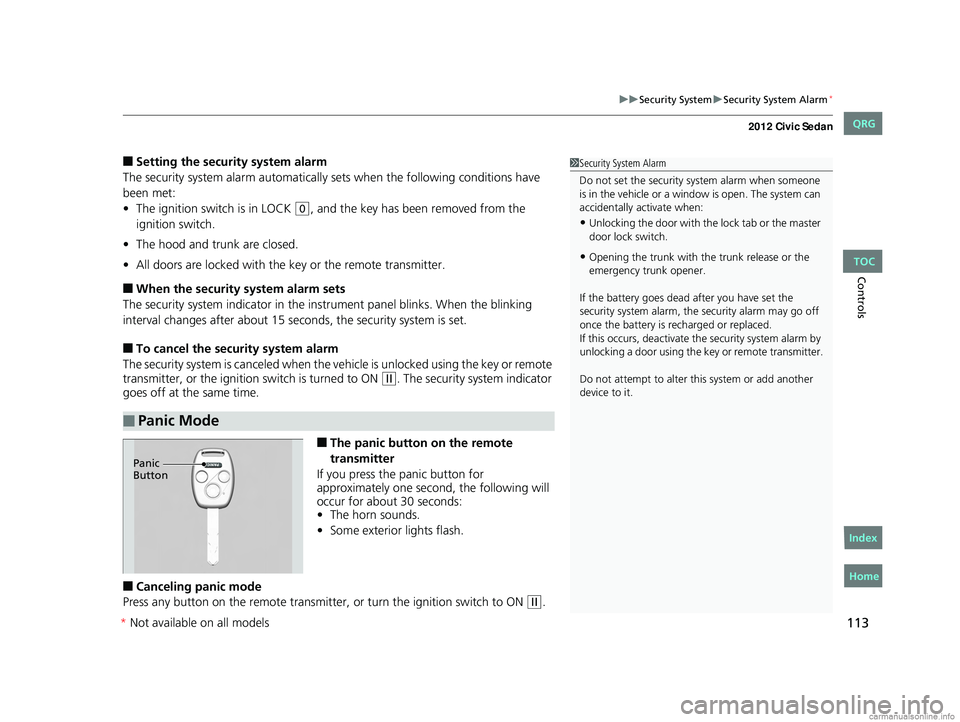
■The panic button on the remote
transmitter
If you press the panic button for
approximately one second, the following will
occur for about 30 seconds:
• The horn sounds.
• Some exterior lights flash.
■Canceling panic mode
Press any button on the remote transmitter, or turn the ignition switch to ON
(w.
■Panic Mode
1 Security System Alarm
Do not set the security system alarm when someone
is in the vehicle or a window is open. The system can
accidentally activate when:
•Unlocking the door with th e lock tab or the master
door lock switch.
•Opening the trunk with the trunk release or the
emergency trunk opener.
If the battery goes dead after you have set the
security system alarm, the security alarm may go off
once the battery is re charged or replaced.
If this occurs, deactivate the security system alarm by
unlocking a door using the ke y or remote transmitter.
Do not attempt to alter th is system or add another
device to it.
Panic
Button
CIVIC 4D-31TR3600.book 113 ページ 2011年2月14日 月曜日 午後2時51分
TOC
Home
QRG
Index
* Not av ailable on all mo dels
Page 125 of 345
124
uuOperating the Switches Around the Steering Wheel uAdjusting the Steering Wheel
Controls
Adjusting the Steering Wheel
The steering wheel height and distance from your body can be adjusted so that you
can comfortably grip the steering wheel in an appropriate driving posture.
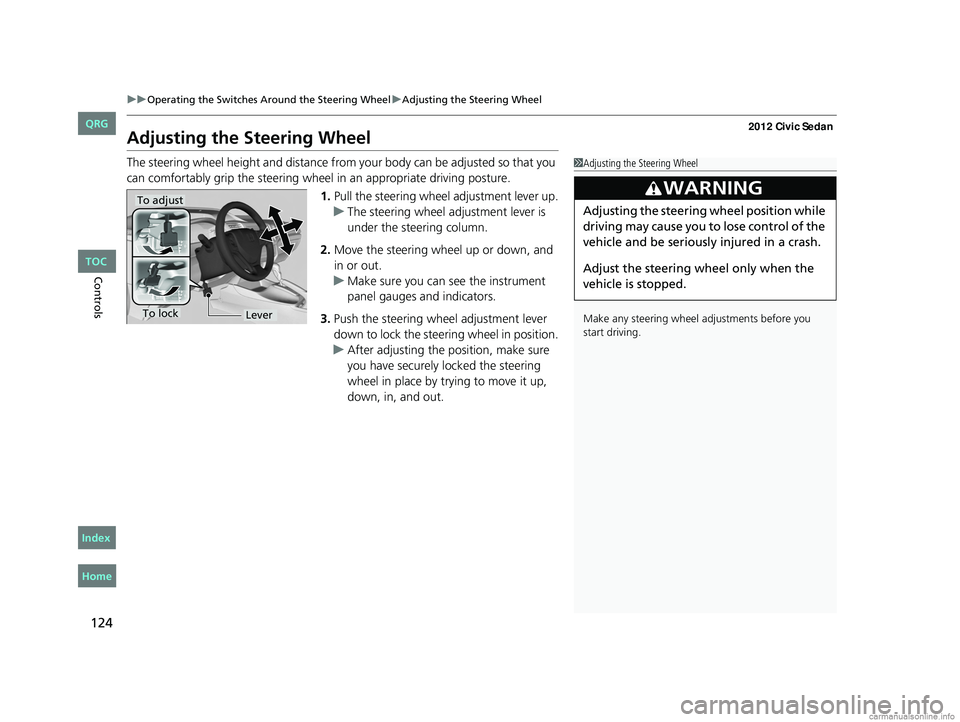
1.Pull the steering wheel adjustment lever up.
u The steering wheel adjustment lever is
under the steering column.
2. Move the steering wheel up or down, and
in or out.
u Make sure you can see the instrument
panel gauges and indicators.
3. Push the steering wheel adjustment lever
down to lock the steering wheel in position.
u After adjusting the position, make sure
you have securely locked the steering
wheel in place by trying to move it up,
down, in, and out.1Adjusting the Steering Wheel
Make any steering wheel adjustments before you
start driving.
3WARNING
Adjusting the steering wheel position while
driving may cause you to lose control of the
vehicle and be seriously injured in a crash.
Adjust the steering wheel only when the
vehicle is stopped.To adjust
To lockLever
CIVIC 4D-31TR3600.book 124 ページ 2011年2月14日 月曜日 午後2時51分
TOC
Home
QRG
Index
Page 133 of 345
132
uuAdjusting the Seats uRear Seats
Controls
Rear Seats
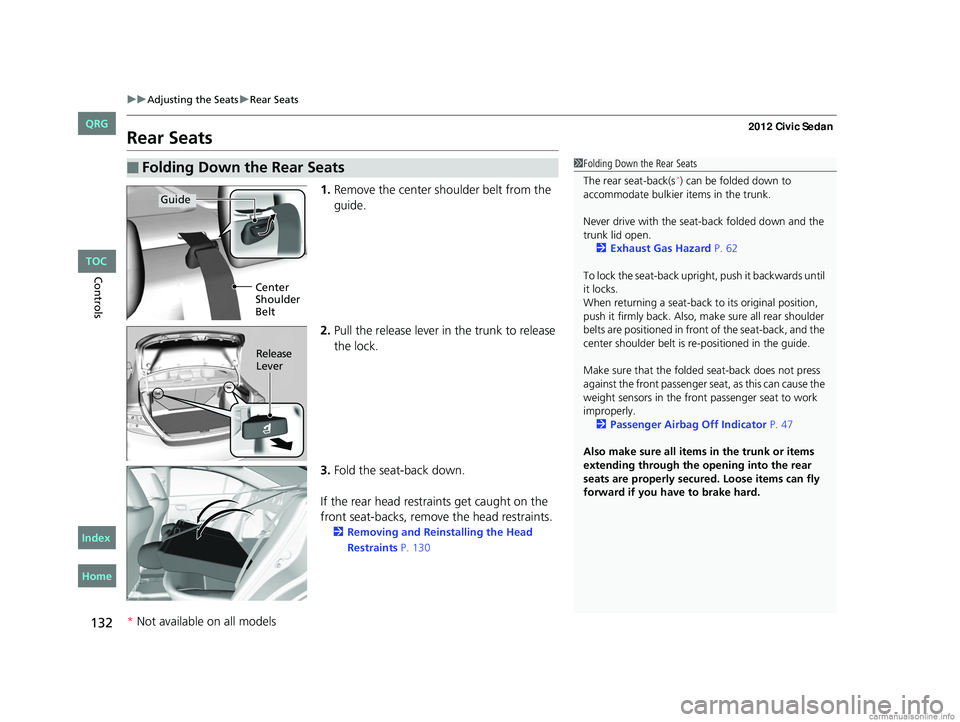
1. Remove the center shoulder belt from the
guide.
2. Pull the release lever in the trunk to release
the lock.
3. Fold the seat-back down.
If the rear head restraints get caught on the
front seat-backs, remove the head restraints.
2 Removing and Reinstalling the Head
Restraints P. 130
■Folding Down the Rear Seats1Folding Down the Rear Seats
The rear seat-back(s
*) can be folded down to
accommodate bulkier items in the trunk.
Never drive with the seat-back folded down and the
trunk lid open. 2 Exhaust Gas Hazard P. 62
To lock the seat-back upri ght, push it backwards until
it locks.
When returning a seat-back to its original position,
push it firmly back. Also, m ake sure all rear shoulder
belts are positioned in front of the seat-back, and the
center shoulder belt is re -positioned in the guide.
Make sure that the folded seat-back does not press
against the front passenger seat, as this can cause the
weight sensors in the front passenger seat to work
improperly.
2 Passenger Airbag Off Indicator P. 47
Also make sure all items in the trunk or items
extending through the opening into the rear
seats are properly secured. Loose items can fly
forward if you have to brake hard.
Guide
Center
Shoulder
Belt
Release
Lever
* Not available on all models
CIVIC 4D-31TR3600.book 132 ページ 2011年2月14日 月曜日 午後2時51分
TOC
Home
QRG
Index
Page 147 of 345
146
uuAudio System*uAudio System Theft Protection*
Features
Audio System Theft Protection*
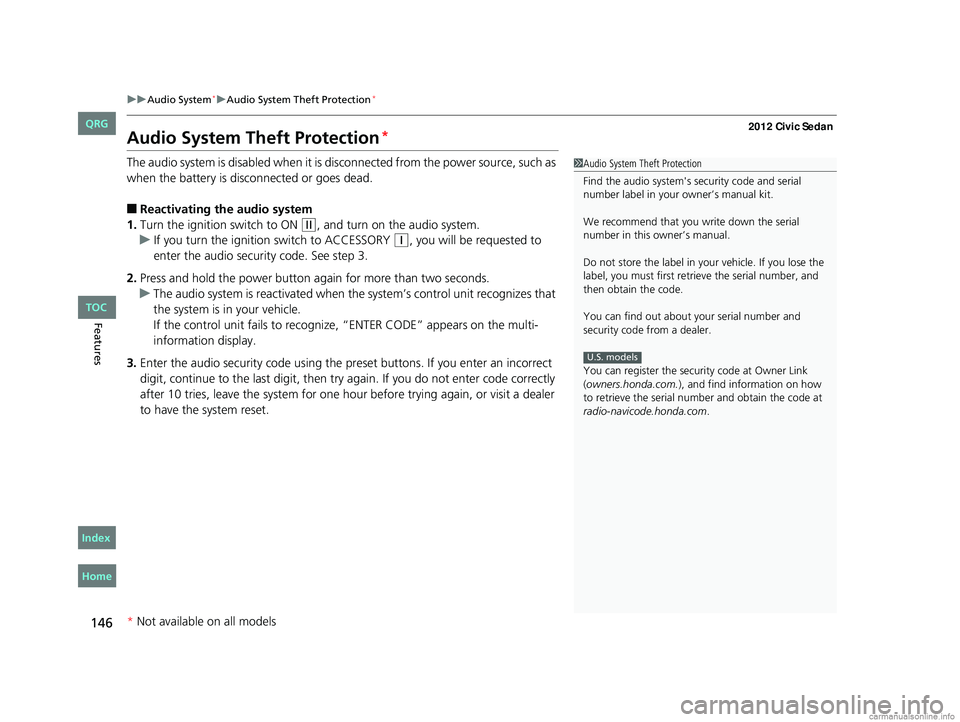
The audio system is disabled when it is di sconnected from the power source, such as
when the battery is disconnected or goes dead.
■Reactivating th e audio system
1. Turn the ignition switch to ON
(w, and turn on the audio system.
u If you turn the ignition switch to ACCESSORY
(q, you will be requested to
enter the audio security code. See step 3.
2. Press and hold the power button ag ain for more than two seconds.
u The audio system is reactivated when the system’s control unit recognizes that
the system is in your vehicle.
If the control unit fails to recogniz e, “ENTER CODE” appears on the multi-
information display.
3. Enter the audio security code using the pr eset buttons. If you enter an incorrect
digit, continue to the last digit, then try again. If you do not enter code correctly
after 10 tries, leave the system for one ho ur before trying again, or visit a dealer
to have the system reset.
1 Audio System Theft Protection
Find the audio system's se curity code and serial
number label in your owner’s manual kit.
We recommend that you write down the serial
number in this owner’s manual.
Do not store the label in your vehicle. If you lose the
label, you must first retrie ve the serial number, and
then obtain the code.
You can find out about your serial number and
security code from a dealer.
You can register the securi ty code at Owner Link
(owners.honda.com. ), and find information on how
to retrieve the serial num ber and obtain the code at
radio-navicode.honda.com .
U.S. models
* Not available on all models
CIVIC 4D-31TR3600.book 146 ページ 2011年2月14日 月曜日 午後2時51分
TOC
Home
QRG
Index
Page 177 of 345
176
uuGeneral Information on the Audio System*uCompatible iPod® and USB Flash Drives
Features
Compatible iPod® and USB Flash Drives
• Use a recommended USB flash drive of 256 MB or higher.
• Some digital audio players may not be compatible.
• Some USB flash drives (e.g., a device with security lockout) may not work.
• Some software files may not allow for audio play or text data display.
• Some versions of MP3, WMA, or AAC formats may be unsupported.
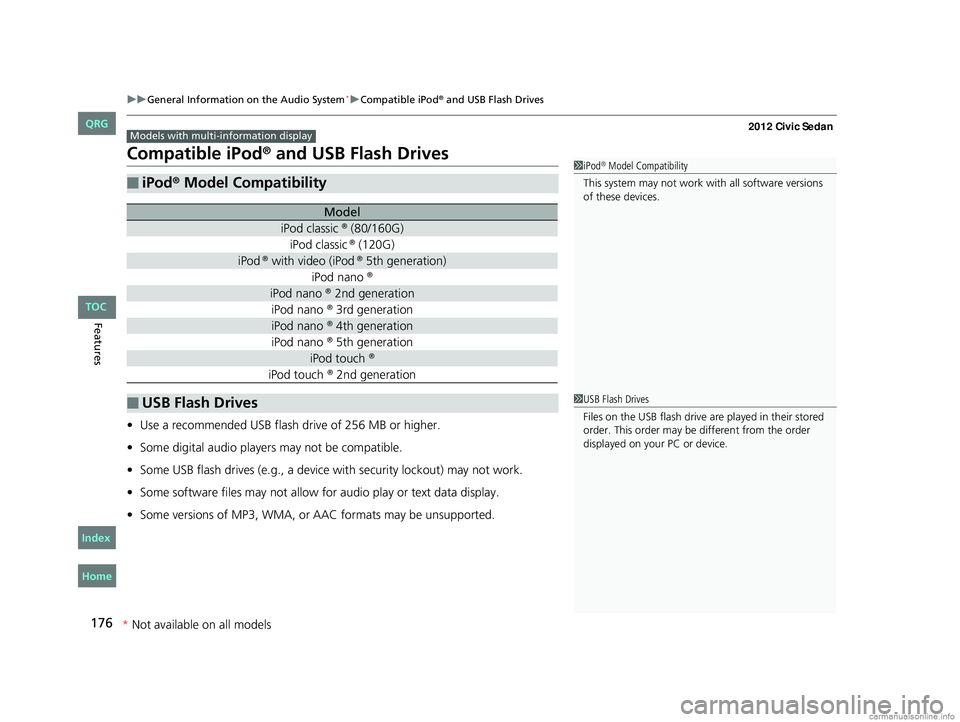
■iPod® Model Compatibility
Model
iPod classic ® (80/160G)
iPod classic ® (120G)
iPod ® with video (iPod ® 5th generation)
iPod nano ®
iPod nano ® 2nd generation
iPod nano ® 3rd generation
iPod nano ® 4th generation
iPod nano ® 5th generation
iPod touch ®
iPod touch ® 2nd generation
■USB Flash Drives
Models with multi- information display
1iPod® Model Compatibility
This system may not work with all software versions
of these devices.
1 USB Flash Drives
Files on the USB flash drive are played in their stored
order. This order may be different from the order
displayed on your PC or device.
CIVIC 4D-31TR3600.book 176 ページ 2011年2月14日 月曜日 午後2時51分
* Not available on all models
TOC
Home
QRG
Index
Page 183 of 345
182
uuBluetooth® HandsFreeLink®*uHFL Menus
Features
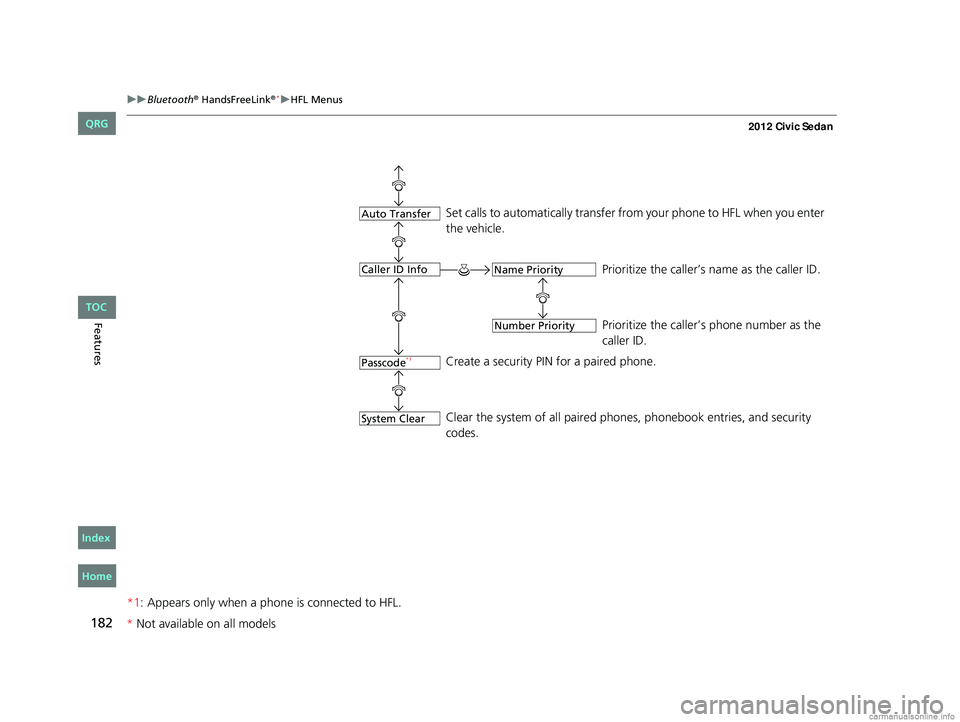
*1: Appears only when a phone is connected to HFL.
Set calls to automatically transfer from your phone to HFL when you enter
the vehicle.
Prioritize the caller’s name as the caller ID.
Prioritize the caller’s phone number as the
caller ID.
Create a security PIN for a paired phone.
Clear the system of all paired phones, phonebook entries, and security
codes.
Passcode*1
Auto Transfer
Caller ID Info
System Clear
Name Priority
Number Priority
CIVIC 4D-31TR3600.book 182 ページ 2011年2月14日 月曜日 午後2時51分
* Not available on all models
TOC
Home
QRG
Index
Page 189 of 345
uuBluetooth® HandsFreeLink®*uHFL Menus
188
Features
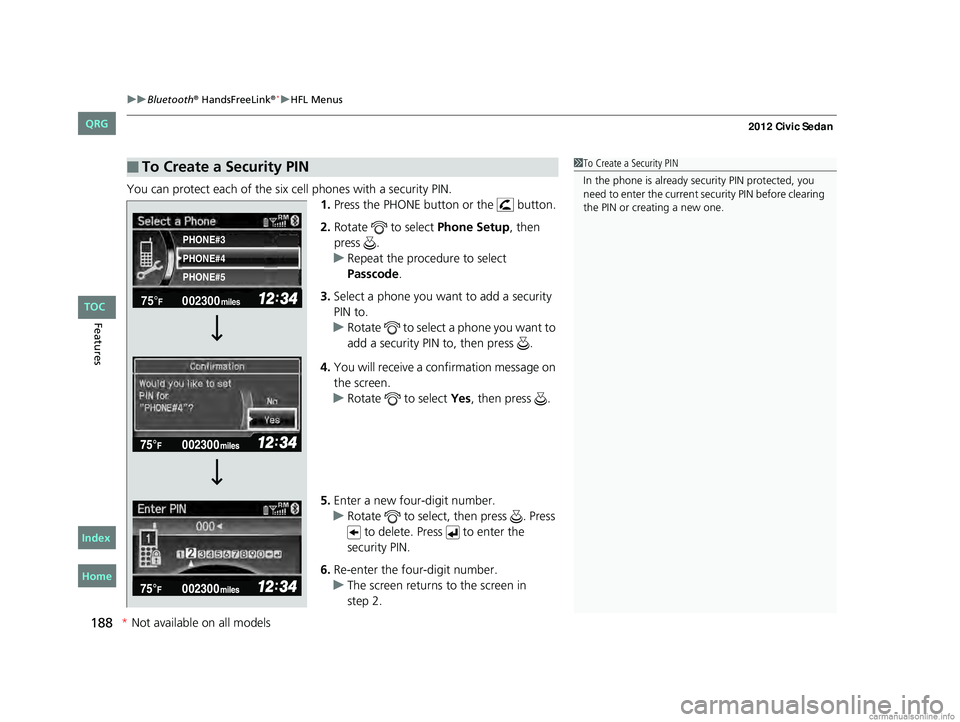
You can protect each of the six cell phones with a security PIN.
1.Press the PHONE button or the button.
2. Rotate to select Phone Setup, then
press .
u Repeat the procedure to select
Passcode .
3. Select a phone you want to add a security
PIN to.
u Rotate to select a phone you want to
add a security PIN to, then press .
4. You will receive a confirmation message on
the screen.
u Rotate to select Yes, then press .
5. Enter a new four-digit number.
u Rotate to select, then press . Press
to delete. Press to enter the
security PIN.
6. Re-enter the four-digit number.
u The screen returns to the screen in
■To Create a Security PIN1To Create a Security PIN
In the phone is already security PIN protected, you
need to enter the current security PIN before clearing
the PIN or creating a new one.
002300
75°F miles
PHONE#4 PHONE#3
PHONE#5
CIVIC 4D-31TR3600.book 188 ページ 2011年2月14日 月曜日 午後2時51分
*Not available on all models
TOC
Home
QRG
Index
step 2.
Page 191 of 345
190
uuBluetooth® HandsFreeLink®*uHFL Menus
Features
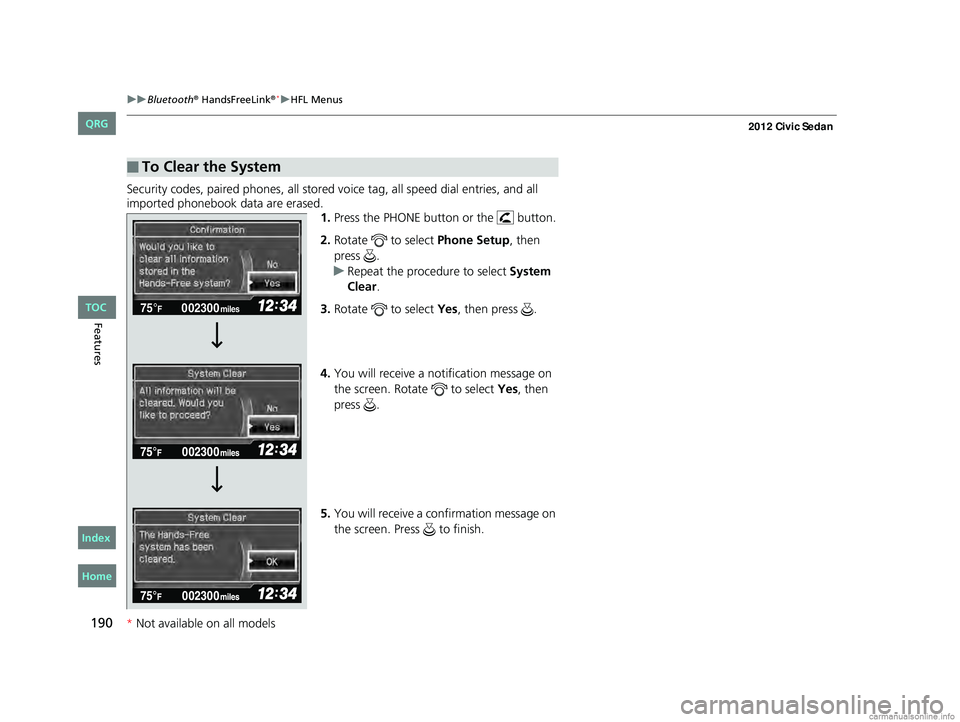
Security codes, paired phones, all stored vo ice tag, all speed dial entries, and all
imported phonebook data are erased. 1.Press the PHONE button or the button.
2. Rotate to select Phone Setup, then
press .
u Repeat the procedure to select System
Clear .
3. Rotate to select Yes, then press .
4. You will receive a notification message on
the screen. Rotate to select Yes, then
press .
5. You will receive a confirmation message on
the screen. Press to finish.
■To Clear the System
002300
75°F miles
CIVIC 4D-31TR3600.book 190 ページ 2011年2月14日 月曜日 午後2時51分
*Not available on all models
TOC
Home
QRG
Index
Page 203 of 345
202
Driving
Before Driving
Driving Preparation
Check the following items before you start driving.
• Make sure there are no obstructions on the windows, door mirrors, exterior
lights, or other parts of the vehicle.
u Remove any frost, snow, or ice.
u Remove any snow on the roof, as this can slip down and obstruct your field of
vision while driving. If frozen solid , remove ice once it has softened.
u When removing ice from around the wheels, be sure not to damage the wheel
or wheel components.
• Make sure the hood is securely closed.
u If the hood opens while driving, your front view will be blocked.
• Make sure the tires are in good condition.
u Check air pressure, check for damage and excessive wear.
2 Checking and Maintaining Tires P. 280
•Make sure there are no people or ob jects behind or around the vehicle.
u There are blind spots from the inside.
■Exterior Checks1Exterior Checks
NOTICE
When doors are frozen s hut, use warm water around
the door edges to melt any ice. Do not try to force
them open, as this can damage the rubber trim
around the doors. When done, wipe dry to avoid
further freezing.
Do not pour warm water into the key cylinder.
You will be unable to insert key if the water freezes in
the hole.
CIVIC 4D-31TR3600.book 202 ページ 2011年2月14日 月曜日 午後2時51分
TOC
Home
QRG
Index