wheel HONDA CIVIC SEDAN 2012 (in English) Owner's Guide
[x] Cancel search | Manufacturer: HONDA, Model Year: 2012, Model line: CIVIC SEDAN, Model: HONDA CIVIC SEDAN 2012Pages: 345, PDF Size: 53.95 MB
Page 145 of 345
144
Features
Audio System*
About Your Audio System
On models with navigation system, see the Navigation System Manual for operation
of the audio system, Bluetooth®HandsFreeLink®, and voice commands for these
features.
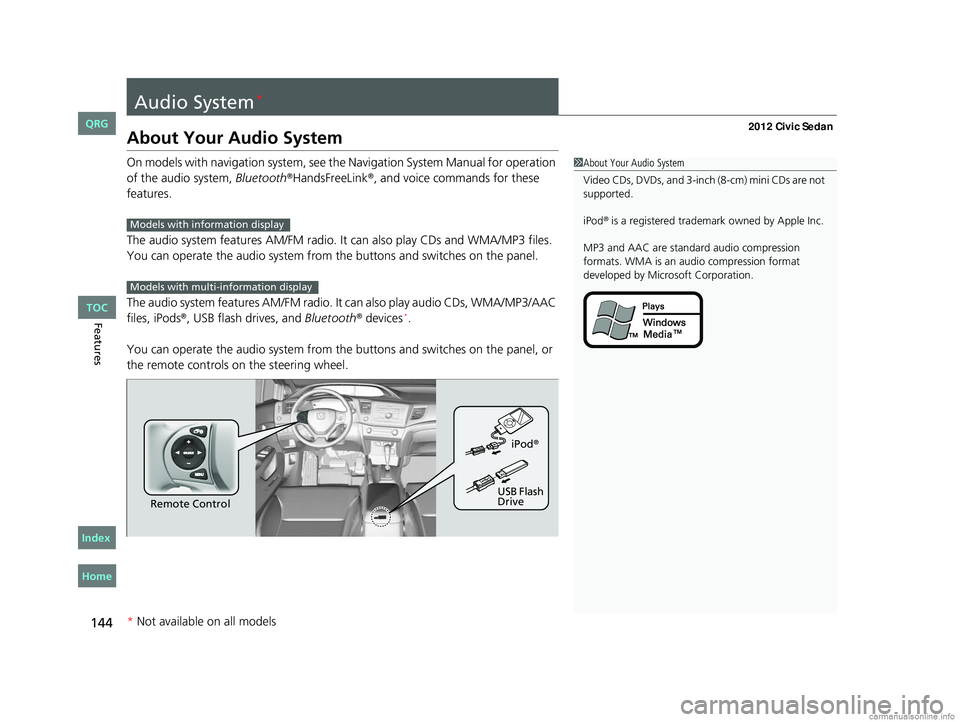
The audio system features AM /FM radio. It can also play CDs and WMA/MP3 files.
You can operate the audio system from the buttons and switches on the panel.
The audio system features AM/FM radio. It can also play audio CDs, WMA/MP3/AAC
files, iPods
®, USB flash drives, and Bluetooth® devices*.
You can operate the audio system from the buttons and switches on the panel, or
the remote controls on the steering wheel.
1About Your Audio System
Video CDs, DVDs, and 3-inch (8-cm) mini CDs are not
supported.
iPod
® is a registered trademark owned by Apple Inc.
MP3 and AAC are standard audio compression
formats. WMA is an audio compression format
developed by Micr osoft Corporation.Models with info rmation display
Models with multi- information display
Remote Control iPod
®
USB Flash
Drive
* Not available on all models
CIVIC 4D-31TR3600.book 144 ページ 2011年2月14日 月曜日 午後2時51分
TOC
Home
QRG
Index
Page 156 of 345
155
Features
Audio System Basic Operation*
To use the audio system function, the ignition swit ch must be in ACCESSORY (q or
ON
(w.
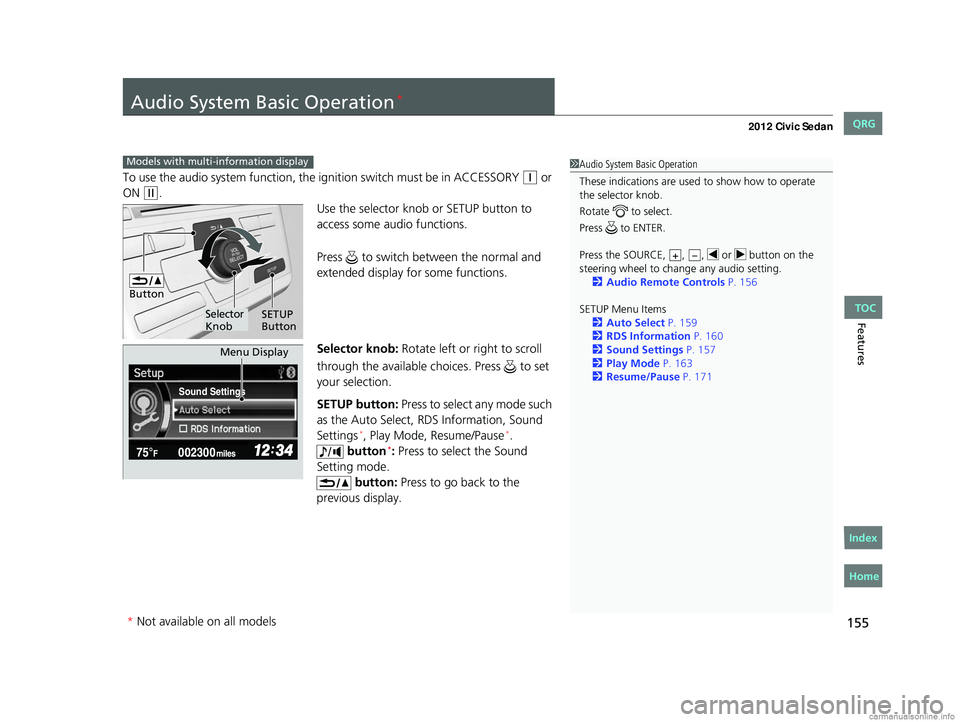
Use the selector knob or SETUP button to
access some audio functions.
Press to switch between the normal and
extended display fo r some functions.
Selector knob: Rotate left or right to scroll
through the available choices. Press to set
your selection.
SETUP button: Press to select any mode such
as the Auto Select, RDS Information, Sound
Settings
*, Play Mode, Resume/Pause*.
button*: Press to select the Sound
Setting mode. button: Press to go back to the
previous display.
Models with multi- information display1Audio System Basic Operation
These indications are used to show how to operate
the selector knob.
Rotate to select.
Press to ENTER.
Press the SOURCE, , , or button on the
steering wheel to cha nge any audio setting.
2 Audio Remote Controls P. 156
SETUP Menu Items 2 Auto Select P. 159
2 RDS Information P. 160
2 Sound Settings P. 157
2 Play Mode P. 163
2 Resume/Pause P. 171
+–
Button
Selector
Knob SETUP
Button
Sound Settings
Menu Display
* Not available on all models
CIVIC 4D-31TR3600.book 155 ページ 2011年2月14日 月曜日 午後2時51分
TOC
Home
QRG
Index
Page 160 of 345
Continued159
uuAudio System Basic Operation*uPlaying the AM/FM Radio
Features
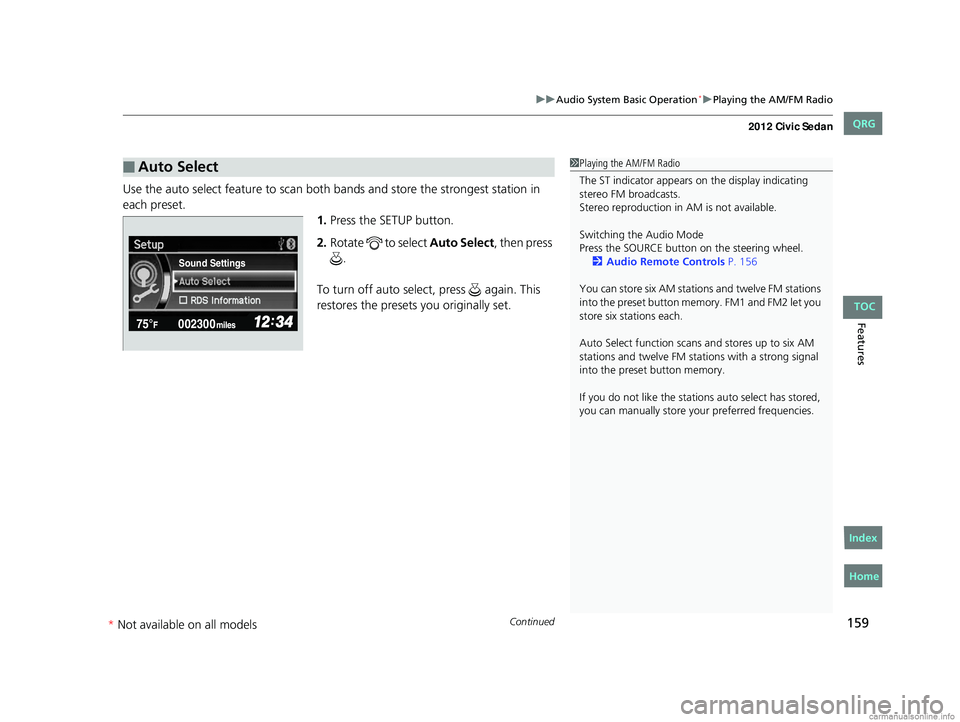
Use the auto select feature to scan both bands and store the strongest station in
each preset. 1.Press the SETUP button.
2. Rotate to select Auto Select, then press
.
To turn off auto select , press again. This
restores the presets you originally set.
■Auto Select1 Playing the AM/FM Radio
The ST indicator appears on the display indicating
stereo FM broadcasts.
Stereo reproduction in AM is not available.
Switching the Audio Mode
Press the SOURCE butt on on the steering wheel.
2 Audio Remote Controls P. 156
You can store six AM stations and twelve FM stations
into the preset button me mory. FM1 and FM2 let you
store six stations each.
Auto Select function scans and stores up to six AM
stations and twelve FM stat ions with a strong signal
into the preset button memory.
If you do not like the stati ons auto select has stored,
you can manually store your preferred frequencies.
Sound Settings
CIVIC 4D-31TR3600.book 159 ページ 2011年2月14日 月曜日 午後2時51分
TOC
* Not av ailable on all mo dels
Home
QRG
Index
Page 172 of 345
171
uuAudio System Basic Operation*uPlaying Bluetooth® Audio
Features
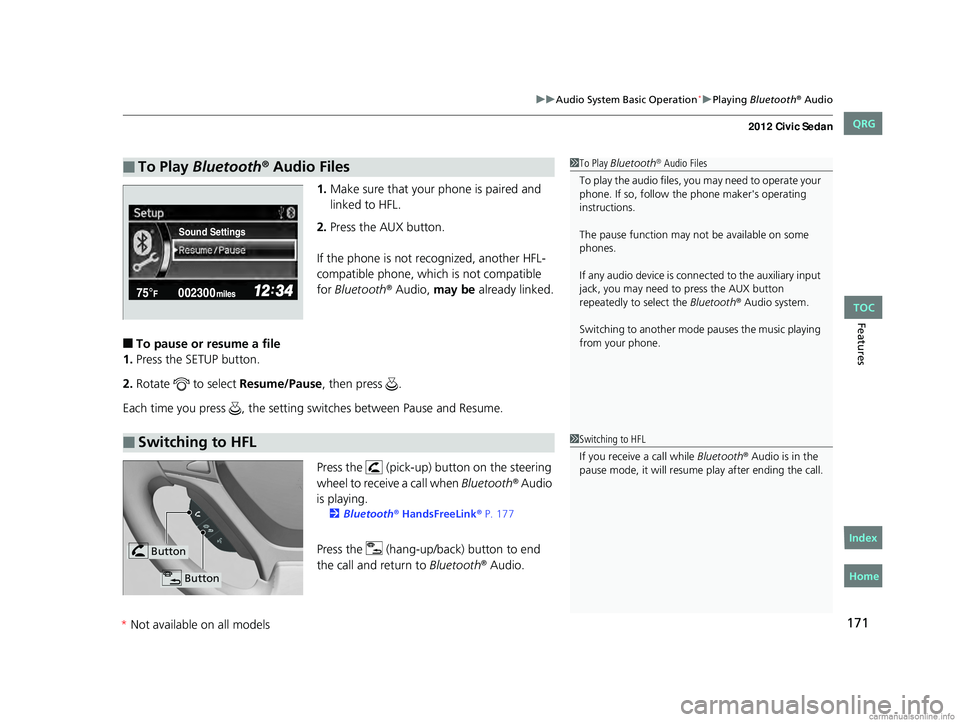
1.Make sure that your phone is paired and
linked to HFL.
2. Press the AUX button.
If the phone is not recognized, another HFL-
compatible phone, which is not compatible
for Bluetooth
® Audio, may be already linked.
■To pause or resume a file
1. Press the SETUP button.
2. Rotate to select Resume/Pause, then press .
Each time you press , the setting switches between Pause and Resume.
Press the (pick-up) button on the steering
wheel to receive a call when Bluetooth
® Audio
is playing.
2 Bluetooth® HandsFreeLink® P. 177
Press the (hang-up/b ack) button to end
the call and return to Bluetooth® Audio.
■To Play Bluetooth® Audio Files1To Play Bluetooth® Audio Files
To play the audio files, y ou may need to operate your
phone. If so, follow the phone maker's operating
instructions.
The pause function may no t be available on some
phones.
If any audio device is conne cted to the auxiliary input
jack, you may need to press the AUX button
repeatedly to select the Bluetooth
® Audio system.
Switching to another mode pauses the music playing
from your phone.
Sound Settings
■Switching to HFL1 Switching to HFL
If you receive a call while Bluetooth
® Audio is in the
pause mode, it will resume play after ending the call.
Button
Button
CIVIC 4D-31TR3600.book 171 ページ 2011年2月14日 月曜日 午後2時51分
*Not available on all models
TOC
Home
QRG
Index
Page 178 of 345
177Continued
Features
Bluetooth® HandsFreeLink®*
For models with the navigation system, see Navigation System Manual for how to
operate the Bluetooth® HandsFreeLink®.
Bluetooth
® HandsFreeLink® (HFL) allows you to place and receive phone calls using
your vehicle's audio system, without handling your cell phone.
Using HFL
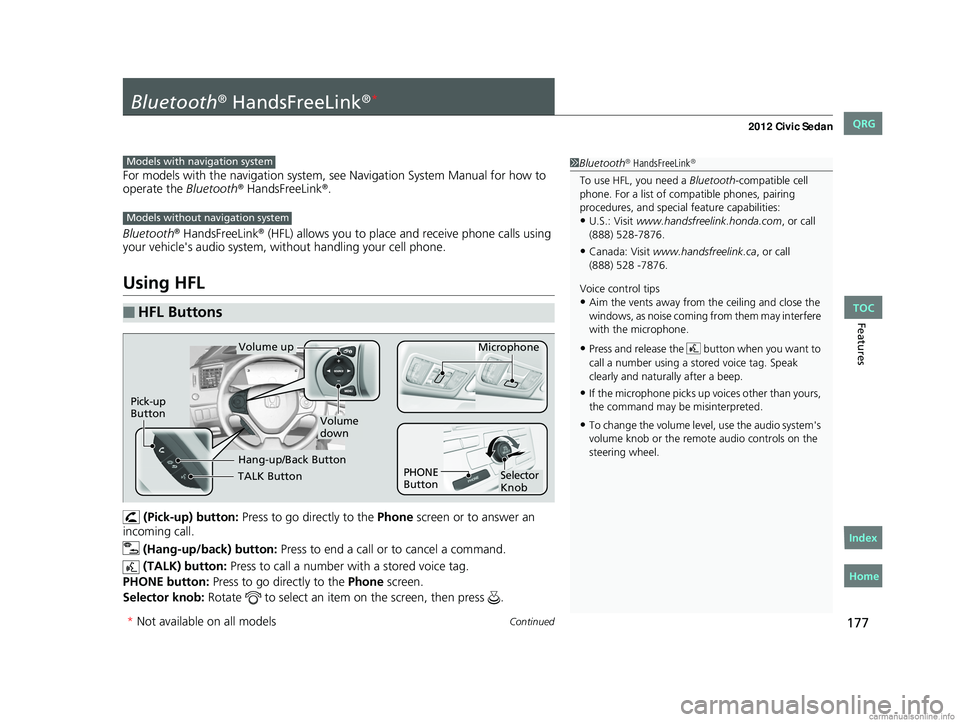
(Pick-up) button: Press to go directly to the Phone screen or to answer an
incoming call.
(Hang-up/back) button: Press to end a call or to cancel a command.
(TALK) button: Press to call a number with a stored voice tag.
PHONE button: Press to go directly to the Phone screen.
Selector knob: Rotate to select an item on the screen, then press .
■HFL Buttons
1Bluetooth® HandsFreeLink®
To use HFL, you need a Bluetooth-compatible cell
phone. For a list of compatible phones, pairing
procedures, and special feature capabilities:
•U.S.: Visit www.handsfreelink.honda.com , or call
(888) 528-7876.
•Canada: Visit www.handsfreelink.ca , or call
Voice control tips
•Aim the vents away from the ceiling and close the
windows, as noise coming fr om them may interfere
with the microphone.
•Press and release the button when you want to
call a number using a st ored voice tag. Speak
clearly and naturally after a beep.
•If the microphone picks up vo ices other than yours,
the command may be misinterpreted.
•To change the volume level, use the audio system's
volume knob or the remote audio controls on the
steering wheel.
Models with navigation system
Models without navigation system
TALK Button
Volume up Microphone
Hang-up/Back Button
Pick-up
Button
Volume
down
Selector
Knob
PHONE
Button
* Not available on all models
CIVIC 4D-31TR3600.book 177 ページ 2011年2月14日 月曜日 午後2時51分
TOC
Home
QRG
Index
(888) 528 -7876.
Page 203 of 345
202
Driving
Before Driving
Driving Preparation
Check the following items before you start driving.
• Make sure there are no obstructions on the windows, door mirrors, exterior
lights, or other parts of the vehicle.
u Remove any frost, snow, or ice.
u Remove any snow on the roof, as this can slip down and obstruct your field of
vision while driving. If frozen solid , remove ice once it has softened.
u When removing ice from around the wheels, be sure not to damage the wheel
or wheel components.
• Make sure the hood is securely closed.
u If the hood opens while driving, your front view will be blocked.
• Make sure the tires are in good condition.
u Check air pressure, check for damage and excessive wear.
2 Checking and Maintaining Tires P. 280
•Make sure there are no people or ob jects behind or around the vehicle.
u There are blind spots from the inside.
■Exterior Checks1Exterior Checks
NOTICE
When doors are frozen s hut, use warm water around
the door edges to melt any ice. Do not try to force
them open, as this can damage the rubber trim
around the doors. When done, wipe dry to avoid
further freezing.
Do not pour warm water into the key cylinder.
You will be unable to insert key if the water freezes in
the hole.
CIVIC 4D-31TR3600.book 202 ページ 2011年2月14日 月曜日 午後2時51分
TOC
Home
QRG
Index
Page 204 of 345
Continued203
uuBefore Driving uDriving Preparation
Driving
• Store or secure all items on board properly.
u Carrying too much cargo, or improperly storing it, can affect your vehicle's
handling, stability, sto pping distance, and tires, and make it unsafe.
2Maximum Load Limit P. 205
•Do not pile items higher than the seat height.
u They can block your view and may be thrown forward in the event of sudden
braking.
• Do not place anything in the front seat footwells. Make sure to secure the floor
mat
*.
u An object or unsecured floor mat can in terfere with your brake and accelerator
pedal operation while driving.
• If you have any animals on board, do not let them move around in the vehicle.
u They may interfere with driving and a crash could occur.
• Securely close and lock all doors and the trunk.
2 Locking/Unlocking the Doors from the Inside P. 103
•Adjust your seating position properly.
u Adjust the head restraint, too.
2Adjusting the Seats P. 126
2 Adjusting the Head Restraints P. 129
•Adjust the mirrors and steering wh eel properly for your driving.
u Adjust them while sitting in the proper driving position.
2 Adjusting the Mirrors P. 125
2 Adjusting the Steering Wheel P. 124
■Interior Checks1Interior Checks
The headlight aim is set by the factory, and does not
need to be adjusted. Howeve r, if you regularly carry
heavy items in the trunk or tow a trailer, have the
aiming readjusted at a de aler or by a qualified
technician.
* Not available on all models
CIVIC 4D-31TR3600.book 203 ページ 2011年2月14日 月曜日 午後2時51分
TOC
Home
QRG
Index
Page 210 of 345
209
uuTowing a Trailer uDriving Safely with a Trailer
Continued
Driving
Driving Safely with a Trailer
• Have the trailer properly servic ed and keep it in good condition.
• Make sure that all the weights and load in the vehicle and trailer are within limits.
2Towing Load Limits P. 207
•Securely attach the hitch, safety chains, and other necessary parts to the trailer.
• Securely store all the items in and on the tra iler so that they do not shift while
driving.
• Check if the lights and brakes on the trailer are working properly.
• Check the pressures of the traile r tires, including the spare.
• Drive slower than normal.
• Obey posted speed limits fo r vehicles with trailers.
• Use the
(D position when towing a trailer on level roads.
• Turn more slowly and with a wider turning arc than normal.
• Allow more time and distance for braking.
• Do not brake or turn suddenly.
■Things You Need To Know Before Towing a Trailer
■Towing Speeds and Gears
■Turning and Braking
1Driving Safely with a Trailer
Parking
In addition to the normal precautions, place wheel
chocks at each of the trailer's tires.
Automatic transmission models
CIVIC 4D-31TR3600.book 209 ページ 2011年2月14日 月曜日 午後2時51分
TOC
Home
QRG
Index
Page 221 of 345
220
uuWhen Driving uCruise Control*
Driving
Cruise Control*
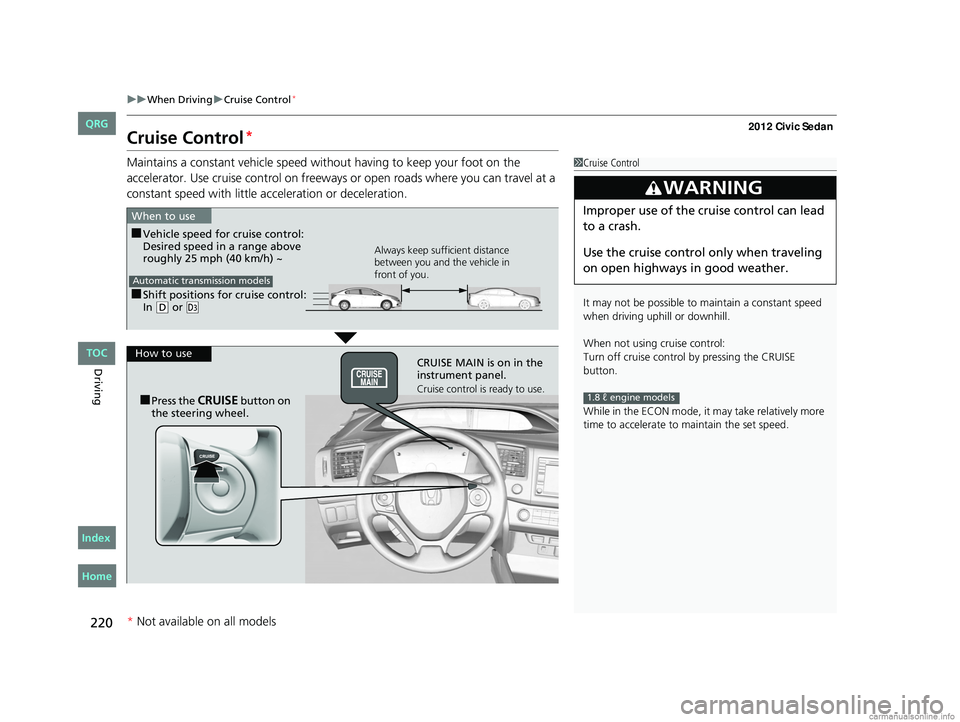
Maintains a constant vehicle speed without having to keep your foot on the
accelerator. Use cruise control on freeways or open roads where you can travel at a
constant speed with little acceleration or deceleration.1Cruise Control
It may not be possible to maintain a constant speed
when driving uphill or downhill.
When not using cruise control:
Turn off cruise control by pressing the CRUISE
button.
While in the ECON mode, it may take relatively more
time to accelerate to maintain the set speed.
3WARNING
Improper use of the cruise control can lead
to a crash.
Use the cruise control only when traveling
on open highways in good weather.
1.8 ℓ engine models
■Shift positions fo r cruise control:
In ( D or (d
When to use
Always keep sufficient distance
between you and the vehicle in
front of you.
Automatic transmission models
■Vehicle speed for cruise control:
Desired speed in a range above
roughly 25 mph (40 km/h) ~
How to use CRUISE MAIN is on in the
instrument panel.
Cruise control is ready to use.■Press the CRUISE button on
the steering wheel.
* Not available on all models
CIVIC 4D-31TR3600.book 220 ページ 2011年2月14日 月曜日 午後2時51分
TOC
Home
QRG
Index
Page 223 of 345
uuWhen Driving uCruise Control*
222
Driving
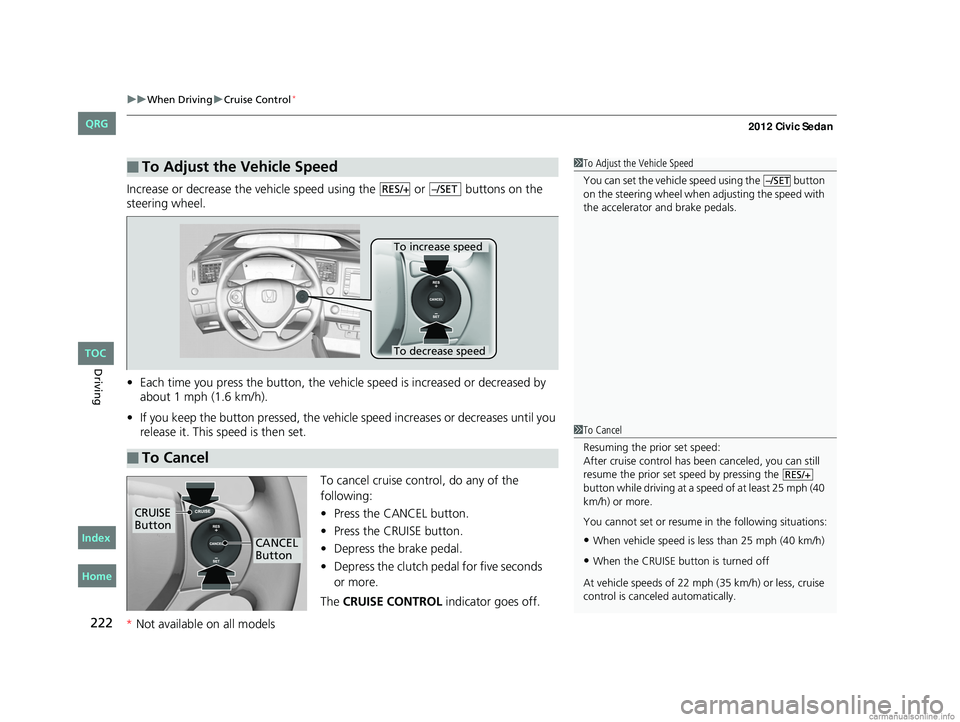
Increase or decrease the vehicle speed using the or buttons on the
steering wheel.
• Each time you press the button, the vehicl e speed is increased or decreased by
about 1 mph (1.6 km/h).
• If you keep the button pressed, the vehicl e speed increases or decreases until you
release it. This speed is then set.
To cancel cruise control, do any of the
following:
•Press the CANCEL button.
• Press the CRUISE button.
• Depress the brake pedal.
• Depress the clutch pedal for five seconds
The CRUISE CONTROL indicator goes off.
■To Adjust the Vehicle Speed1To Adjust the Vehicle Speed
You can set the vehicle speed using the button
on the steering wheel when adjusting the speed with
the accelerator and brake pedals.
–/SETRES/+–/SET
■To Cancel
To decrease speed
To increase speed
1To Cancel
Resuming the prior set speed:
After cruise control has be en canceled, you can still
resume the prior set speed by pressing the
button while driving at a speed of at least 25 mph (40
km/h) or more.
You cannot set or resume in the following situations:
•When vehicle speed is less than 25 mph (40 km/h)
•When the CRUISE button is turned off
At vehicle speeds of 22 m ph (35 km/h) or less, cruise
control is canceled automatically.
RES/+
CRUISE
Button
CANCEL
Button
CIVIC 4D-31TR3600.book 222 ページ 2011年2月14日 月曜日 午後2時51分
TOC
Home
QRG
Index
* Not available on all models
or more.