USB HONDA CIVIC SEDAN 2012 Owner's Manual (in English)
[x] Cancel search | Manufacturer: HONDA, Model Year: 2012, Model line: CIVIC SEDAN, Model: HONDA CIVIC SEDAN 2012Pages: 345, PDF Size: 53.95 MB
Page 6 of 345
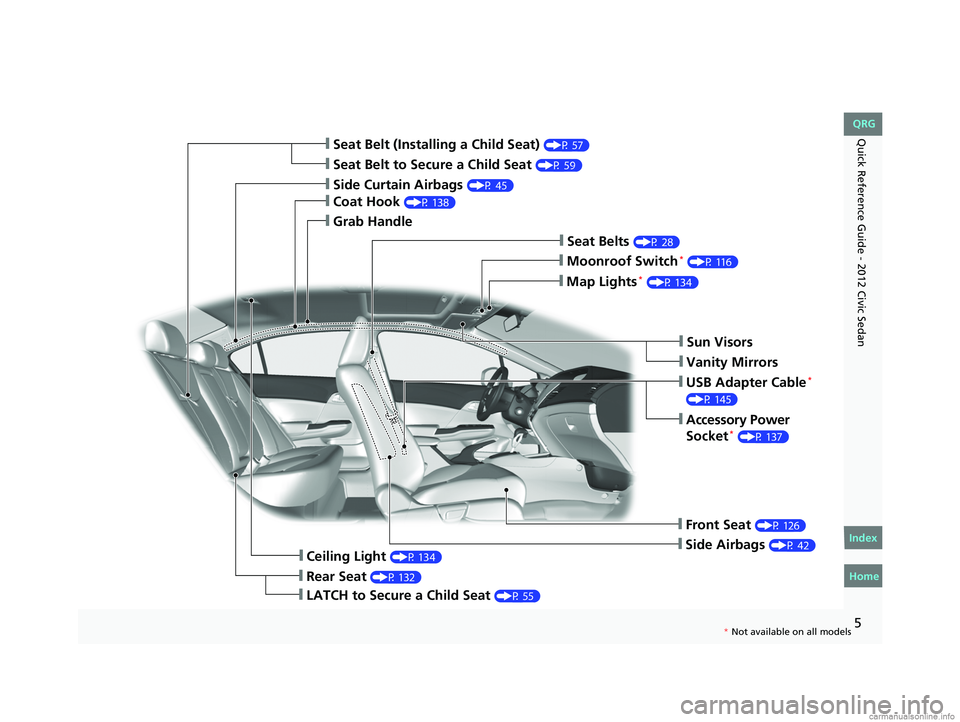
Quick Reference Guide - 2012 Civic Sedan
❙Seat Belt to Secure a Child Seat (P 59)
❙Seat Belt (Installing a Child Seat) (P 57)
❙Sun Visors
❙Vanity Mirrors
❙Moonroof Switch* (P 116)
❙Map Lights* (P 134)
❙USB Adapter Cable*
(P 145)
❙Accessory Power
Socket* (P 137)
❙Front Seat (P 126)
❙Seat Belts (P 28)
❙Side Airbags (P 42)
❙Rear Seat (P 132)
❙LATCH to Secure a Child Seat (P 55)
❙Ceiling Light (P 134)
❙Side Curtain Airbags (P 45)
❙Coat Hook (P 138)
❙Grab Handle
CIVIC 4D-31TR3600.book 5 ページ 2011年2月14日 月曜日 午後2時51分
Home
QRG
Index
5* No t avai lable on all m odel s
Page 15 of 345
14
Quick Reference Guide - 2012 Civic Sedan
002300
75°F miles
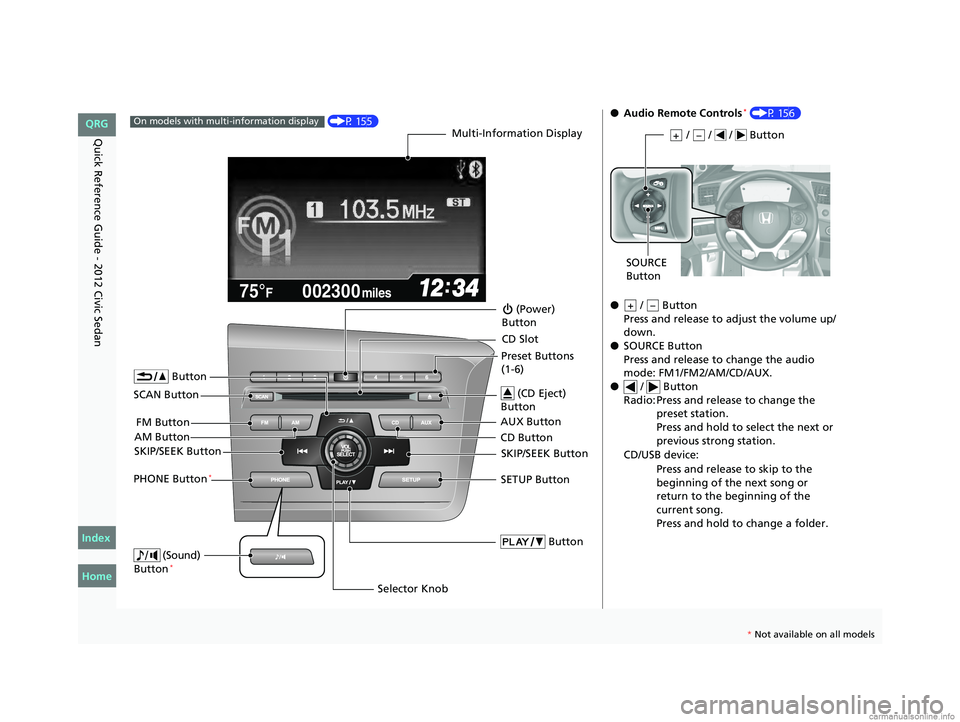
(P 155)On models with multi-information displayMulti-Information Display
AM Button FM Button
SCAN Button
SKIP/SEEK Button
Selector Knob
Button
(Sound)
Button*
(Power)
Button
CD Button AUX Button CD Slot
(CD Eject)
Button
Preset Buttons
(1-6)
Button
SETUP ButtonSKIP/SEEK ButtonPHONE Button*
●
Audio Remote Controls* (P 156)
● / Button
Press and release to adjust the volume up/
down.
● SOURCE Button
Press and release to change the audio
mode: FM1/FM2/AM/CD/AUX.
● / Button
Radio: Press and release to change the preset station.
Press and hold to select the next or
previous strong station.
CD/USB device: Press and release to skip to the
beginning of the next song or
return to the beginning of the
current song.
Press and hold to change a folder.
/ / / Button+–
SOURCE
Button
+–
CIVIC 4D-31TR3600.book 14 ページ 2011年2月14日 月曜日 午後2時51分
Home
QRG
Index
* No t avai lable on all m odel s
Page 91 of 345
90
uuGauges and Displays uMulti-Information Display*
Instrument Panel
*1: Not available on all models
*2: Default Setting
*3: Default Setting for 1.8 ℓ engine models
*4: Default Setting for 2.4 ℓ engine models
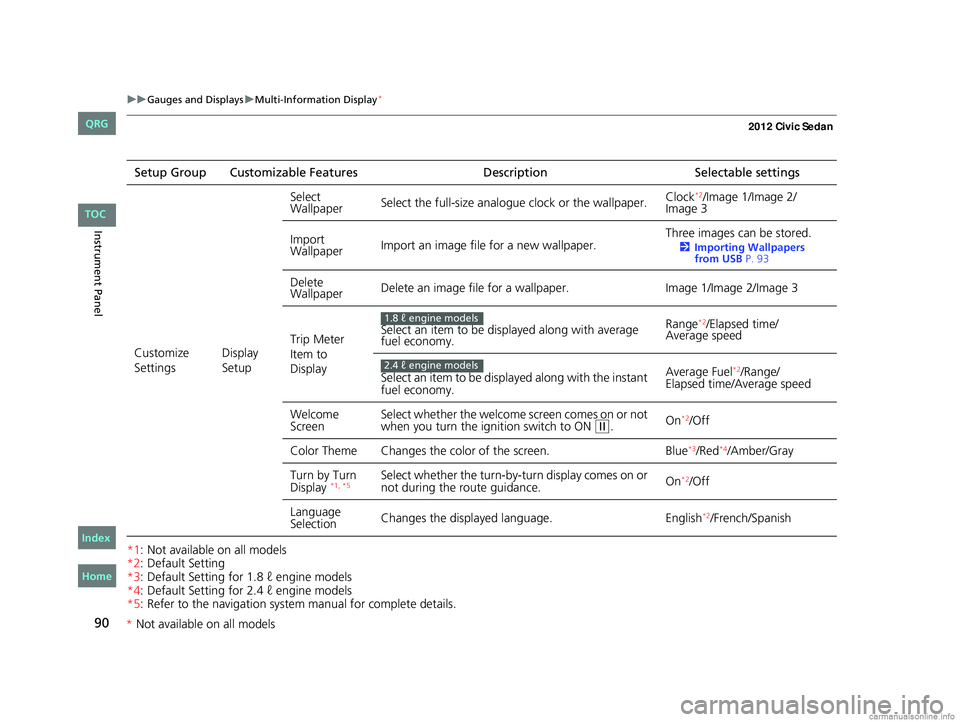
*5: Refer to the navigation system manual for complete details.Setup Group Customizable Features
DescriptionSelectable settings
Customize
Settings Display
SetupSelect
Wallpaper
Select the full-size analogue clock or the wallpaper. Clock
*2/Image 1/Image 2/
Image 3
Import
Wallpaper Import an image file for a new wallpaper. Three images can be stored.
2
Importing Wallpapers
from USB P. 93
Delete
Wallpaper Delete an image file for a wallpaper.
Image 1/Image 2/Image 3
Trip Meter
Item to
Display Select an item to be displayed along with average
fuel economy.
Range
*2/Elapsed time/
Average speed
Select an item to be displayed along with the instant
fuel economy. Average Fuel
*2/Range/
Elapsed time/Average speed
Welcome
Screen Select whether the welcome screen comes on or not
when you turn the ignition switch to ON
(w.
On*2/Off
Color Theme Changes the co lor of the screen. Blue
*3/Red*4/Amber/Gray
Turn by Turn
Display
*1, *5Select whether the turn-by-tu rn display comes on or
not during the route guidance. On*2/Off
Language
Selection Changes the displayed language.
English
*2/French/Spanish
1.8 ℓ engine models
2.4 ℓ engine models
CIVIC 4D-31TR3600.book 90 ページ 2011年2月14日 月曜日 午後2時51分
TOC
Home
QRG
Index
* Not av ailable on all mo dels
Page 94 of 345
Continued93
uuGauges and Displays uMulti-Information Display*
Instrument Panel
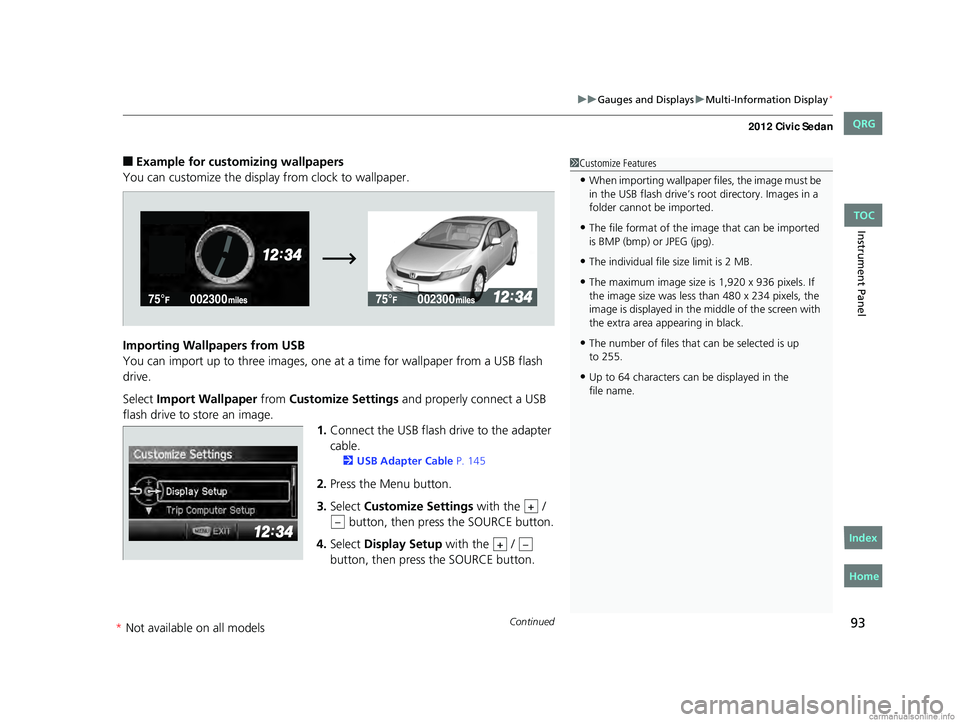
■Example for customizing wallpapers
You can customize the display from clock to wallpaper.
Importing Wallpapers from USB
You can import up to three images, one at a time for wallpaper from a USB flash
drive.
Select Import Wallpaper from Customize Settings and properly connect a USB
flash drive to store an image. 1.Connect the USB flash drive to the adapter
cable.
2 USB Adapter Cable P. 145
2.Press the Menu button.
3. Select Customize Settings with the /
button, then pres s the SOURCE button.
4. Select Display Setup with the /
button, then press the SOURCE button.
1 Customize Features
•When importing wallpaper files, the image must be
in the USB flash drive’s root directory. Images in a
folder cannot be imported.
•The file format of the im age that can be imported
is BMP (bmp) or JPEG (jpg).
•The individual file size limit is 2 MB.
•The maximum image size is 1,920 x 936 pixels. If
the image size was less than 480 x 234 pixels, the
image is displayed in the middle of the screen with
the extra area appearing in black.
•The number of files that can be selected is up
•Up to 64 characters can be displayed in the
+
–
+–
CIVIC 4D-31TR3600.book 93 ページ 2011年2月14日 月曜日 午後2時51分
TOC
Home
QRG
Index
to 255.
file name.
* Not availabl eon allmo dels
Page 144 of 345
143
Features
This chapter describes how to operate technology features on models without the navigation system.
Audio System*
About Your Audio System ................144
USB Adapter Cable*........................ 145
Auxiliary Input Jack .......................... 145
Audio System Theft Protection
*....... 146
Audio System Basic Operation
*..... 147
Adjusting the Sound ........................ 148
Playing the AM/FM Radio ................. 149
Playing a CD .................................... 151
Models with information display
Audio System Basic Operation*..... 155
Audio Remote Controls*.................. 156
Adjusting the Sound ........................ 157
Playing the AM/FM Radio ................. 158
Playing a CD .................................... 161
Playing an iPod
®............................... 164
Playing a USB Flash Drive ................. 167
Playing Bluetooth
® Audio................. 170
Models with multi-information displayAudio Error Messages*
CD Player......................................... 172
iPod®/USB Flash Drive ...................... 173
General Information on the Audio System
*
Recommended CDs ......................... 174Compatible iPod® and USB Flash Drives ....176Bluetooth® HandsFreeLink®*
Using HFL ........................................ 177
HFL Menus ...................................... 179
* Not available on all models
CIVIC 4D-31TR3600.book 143 ページ 2011年2月14日 月曜日 午後2時51分
Home
QRG
Index 2012 Civic Sedan
Page 145 of 345
144
Features
Audio System*
About Your Audio System
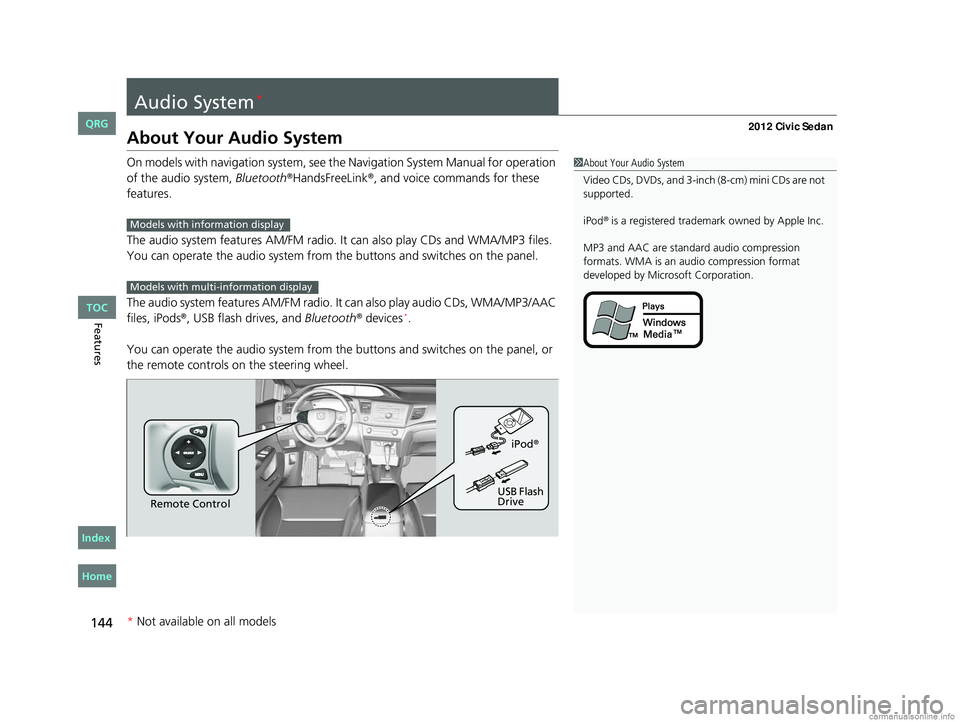
On models with navigation system, see the Navigation System Manual for operation
of the audio system, Bluetooth®HandsFreeLink®, and voice commands for these
features.
The audio system features AM /FM radio. It can also play CDs and WMA/MP3 files.
You can operate the audio system from the buttons and switches on the panel.
The audio system features AM/FM radio. It can also play audio CDs, WMA/MP3/AAC
files, iPods
®, USB flash drives, and Bluetooth® devices*.
You can operate the audio system from the buttons and switches on the panel, or
the remote controls on the steering wheel.
1About Your Audio System
Video CDs, DVDs, and 3-inch (8-cm) mini CDs are not
supported.
iPod
® is a registered trademark owned by Apple Inc.
MP3 and AAC are standard audio compression
formats. WMA is an audio compression format
developed by Micr osoft Corporation.Models with info rmation display
Models with multi- information display
Remote Control iPod
®
USB Flash
Drive
* Not available on all models
CIVIC 4D-31TR3600.book 144 ページ 2011年2月14日 月曜日 午後2時51分
TOC
Home
QRG
Index
Page 146 of 345
145
uuAudio System*uUSB Adapter Cable*
Features
USB Adapter Cable*
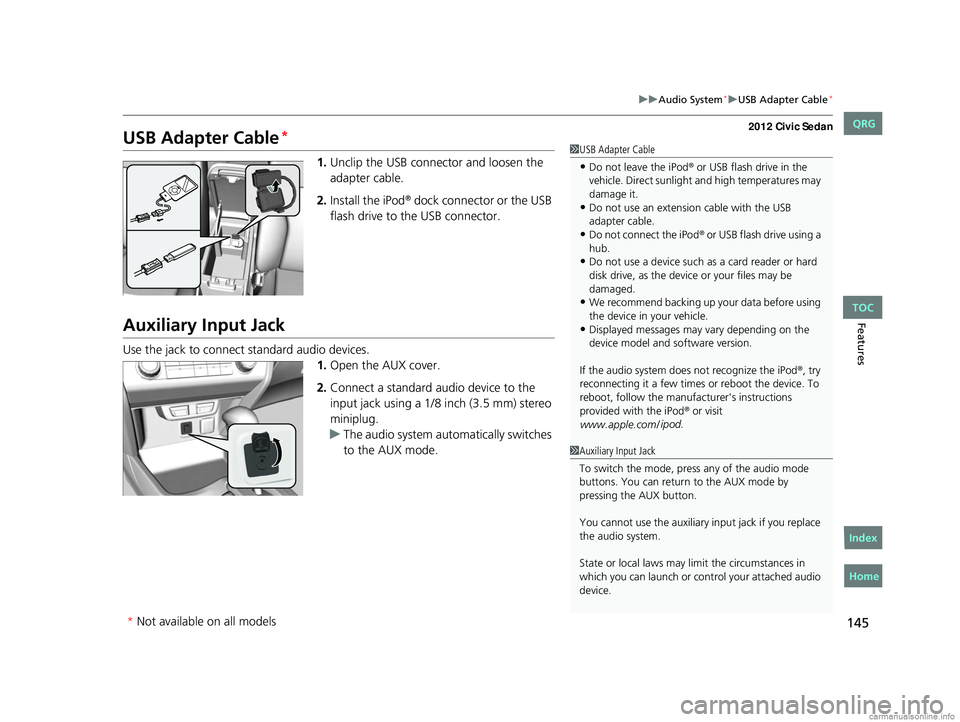
1. Unclip the USB connec tor and loosen the
adapter cable.
2. Install the iPod
® dock connector or the USB
flash drive to the USB connector.
Auxiliary Input Jack
Use the jack to connect standard audio devices. 1.Open the AUX cover.
2. Connect a standard audio device to the
input jack using a 1/8 inch (3.5 mm) stereo
miniplug.
u The audio system auto matically switches
to the AUX mode.
1 USB Adapter Cable
•Do not leave the iPod® or USB flash drive in the
vehicle. Direct sunlight and high temperatures may
damage it.
•Do not use an extension cable with the USB
adapter cable.
•Do not connect the iPod® or USB flash drive using a
hub.
•Do not use a device such as a card reader or hard
disk drive, as the device or your files may be
damaged.
•We recommend backing up yo ur data before using
the device in your vehicle.
•Displayed messages may vary depending on the
device model and software version.
If the audio system doe s not recognize the iPod
®, try
reconnecting it a few times or reboot the device. To
reboot, follow the manufac turer's instructions
provided with the iPod
® or visit
www.apple.com/ ipod
.
1Auxiliary Input Jack
To switch the mode, pres s any of the audio mode
buttons. You can return to the AUX mode by
pressing the AUX button.
You cannot use the auxiliary input jack if you replace
the audio system.
State or local laws may li mit the circumstances in
which you can launch or cont rol your attached audio
device.
* Not available on all models
CIVIC 4D-31TR3600.book 145 ページ 2011年2月14日 月曜日 午後2時51分
TOC
Home
QRG
Index
Page 157 of 345
156
uuAudio System Basic Operation*uAudio Remote Controls*
Features
Audio Remote Controls*
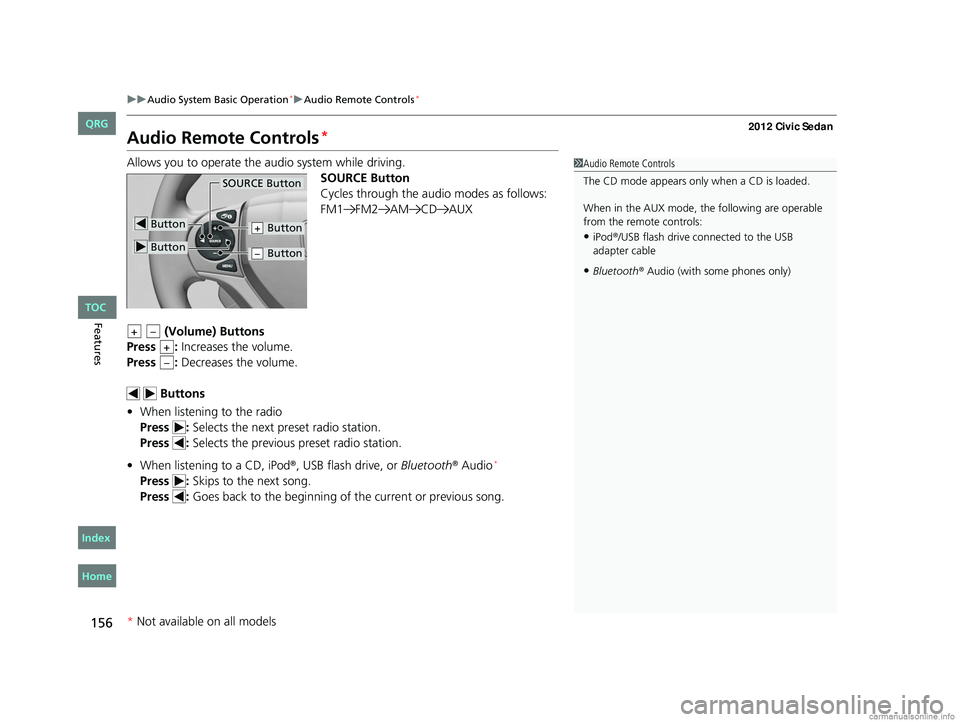
Allows you to operate the audio system while driving.
SOURCE Button
Cycles through the audio modes as follows:
FM1 FM2 AM CD AUX
(Volume) Buttons
Press : Increases the volume.
Press : Decreases the volume.
Buttons
• When listening to the radio
Press : Selects the next preset radio station.
Press : Selects the previous preset radio station.
• When listening to a CD, iPod
®, USB flash drive, or Bluetooth® Audio*
Press : Skips to the next song.
Press : Goes back to the beginning of the current or previous song.
1Audio Remote Controls
The CD mode appears only when a CD is loaded.
When in the AUX mode, the following are operable
from the remote controls:
•iPod®/USB flash drive connected to the USB
adapter cable
•Bluetooth® Audio (with some phones only)
Button
SOURCE Button
Button
Button+
Button–
+–
+
–
* Not available on all models
CIVIC 4D-31TR3600.book 156 ページ 2011年2月14日 月曜日 午後2時51分
TOC
Home
QRG
Index
Page 165 of 345
164
uuAudio System Basic Operation*uPlaying an iPod®
Features
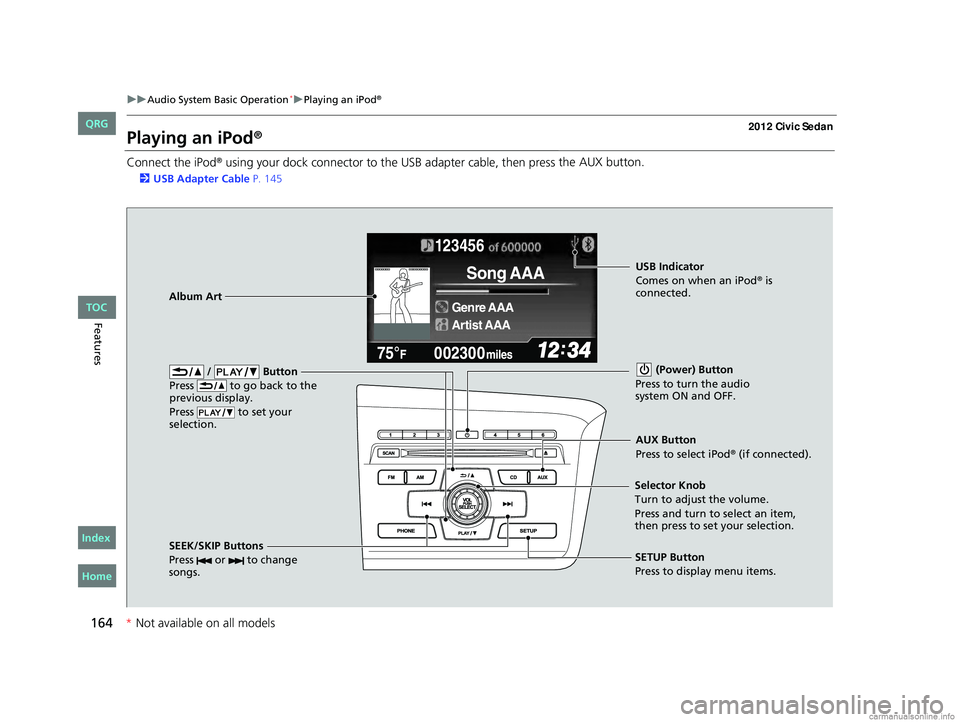
Playing an iPod®
Connect the iPod® using your dock connector to the USB adapter cable, then press the AUX button.
2
USB Adapter Cable P. 145
123456
Genre AAA
Song AAA
Artist AAA
/ Button
Press to go back to the
previous display.
Press to set your
selection. (Power) Button
Press to turn the audio
system ON and OFF.
SEEK/SKIP Buttons
Press or to change
songs.SETUP Button
Press to display menu items.
Selector Knob
Turn to adjust the volume.
Press and turn to select an item,
then press to set your selection.
AUX Button
Press to select iPod® (if connected).
Album Art
USB Indicator
Comes on when an iPod® is
connected.
CIVIC 4D-31TR3600.book 164 ページ 2011年2月14日 月曜日 午後2時51分
TOC
* Not availabl eon allmo dels
Home
QRG
Index
Page 166 of 345
Continued165
uuAudio System Basic Operation*uPlaying an iPod®
Features
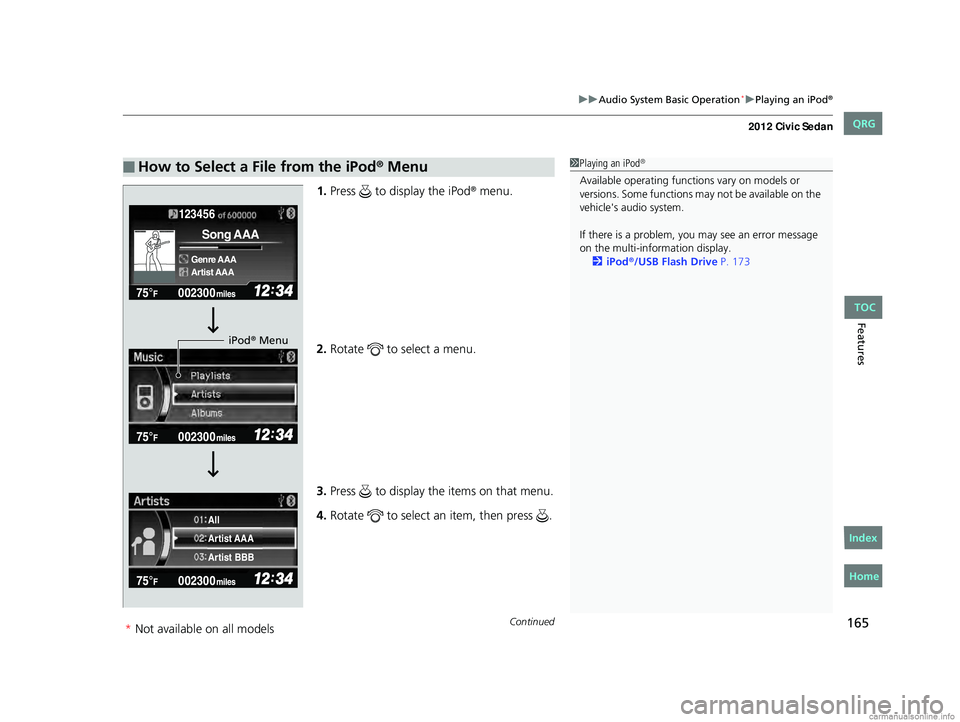
1. Press to display the iPod® menu.
2. Rotate to select a menu.
3. Press to display the items on that menu.
4. Rotate to select an item, then press .
■How to Select a File from the iPod® Menu1Playing an iPod®
Available operating functi ons vary on models or
versions. Some functions ma y not be available on the
vehicle's audio system.
If there is a problem, you may see an error message
on the multi-information display. 2 iPod
®/USB Flash Drive P. 173
123456
Genre AAA
Song AAA
Artist AAA
Artist AAA
Artist BBB All
iPod® Menu
CIVIC 4D-31TR3600.book 165 ページ 2011年2月14日 月曜日 午後2時51分
TOC
*Not availabl eon allmo dels
Home
QRG
Index