navigation system HONDA CIVIC SEDAN 2012 Owner's Manual (in English)
[x] Cancel search | Manufacturer: HONDA, Model Year: 2012, Model line: CIVIC SEDAN, Model: HONDA CIVIC SEDAN 2012Pages: 345, PDF Size: 53.95 MB
Page 1 of 345
Contents
This owner’s manual should be considered a permanent part of
the vehicle and should remain with the vehicle when it is sold.
This owner’s manual covers all models of the Civic 4-Door. You
may find descriptions of equipment and features that are not on
your particular model.
Images throughout this owner’s manual (including the front
cover) represent features and equipment that are available on
some, but not all, models. Your particular model may not have
some of these features.
This owner’s manual is for vehicles sold in the United States
The information and specifications included in this publication
were in effect at the time of approval for printing. Honda Motor
Co., Ltd. reserves the right, however, to discontinue or change
specifications or design at any time without notice and without
incurring any obligation.
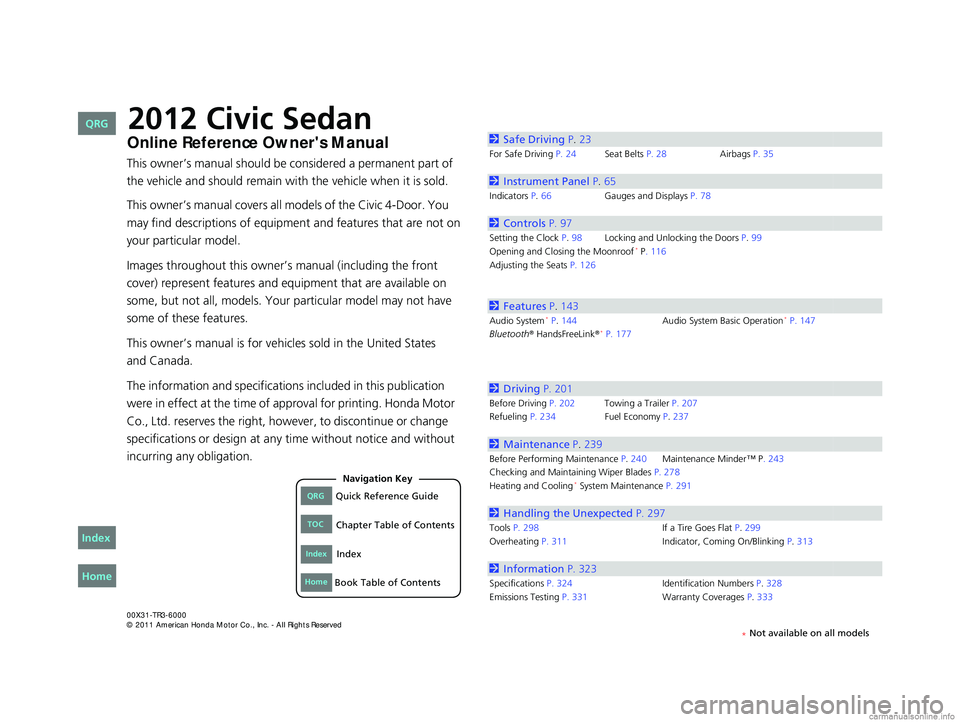
2Safe Driving P.23
For Safe Driving P. 24 Seat Belts P. 28Airbags P. 35
2Instrument Panel P. 65
Indicators P.66 Gauges and Displays P. 78
2Controls P. 97
Setting the Clock P. 98Locking and Unlocking the Doors P. 99
Opening and Closing the Moonroof* P. 116
Adjusting the Seats P. 126
2Features P. 143
Audio System* P. 144 Audio System Basic Operation* P. 147
Bluetooth® HandsFreeLink®* P. 177
2 Driving P. 201
Before Driving P. 202 Towing a Trailer P. 207
Refueling P. 234 Fuel Economy P.237
2Maintenance P. 239
Before Performing Maintenance P. 240Maintenance Minder™ P. 243
Checking and Maintaining Wiper Blades P. 278
Heating and Cooling
* System Maintenance P. 291
2 Handling the Unexpected P. 297
Tools P. 298 If a Tire Goes Flat P.299
Overheating P. 311 Indicator, Coming On/Blinking P.313
2Information P. 323
Specifications P. 324 Identification Numbers P. 328
Emissions Testing P. 331 Warranty Coverages P.333
CIVIC 4D-31TR3600.book 0 ページ 2011年2月14日 月曜日 午後2時51分
QRGQuick Reference Guide
IndexIndex
HomeBook Table of Contents
TOCChapter Table of Contents
Navigation Key
2012 Civic Sedan
* Not available on all models
Home
QRG
Index
and Canada.Online Reference Owner's Manual
Page 3 of 345
2
Quick Reference Guide - 2012 Civic Sedan
Quick Reference Guide
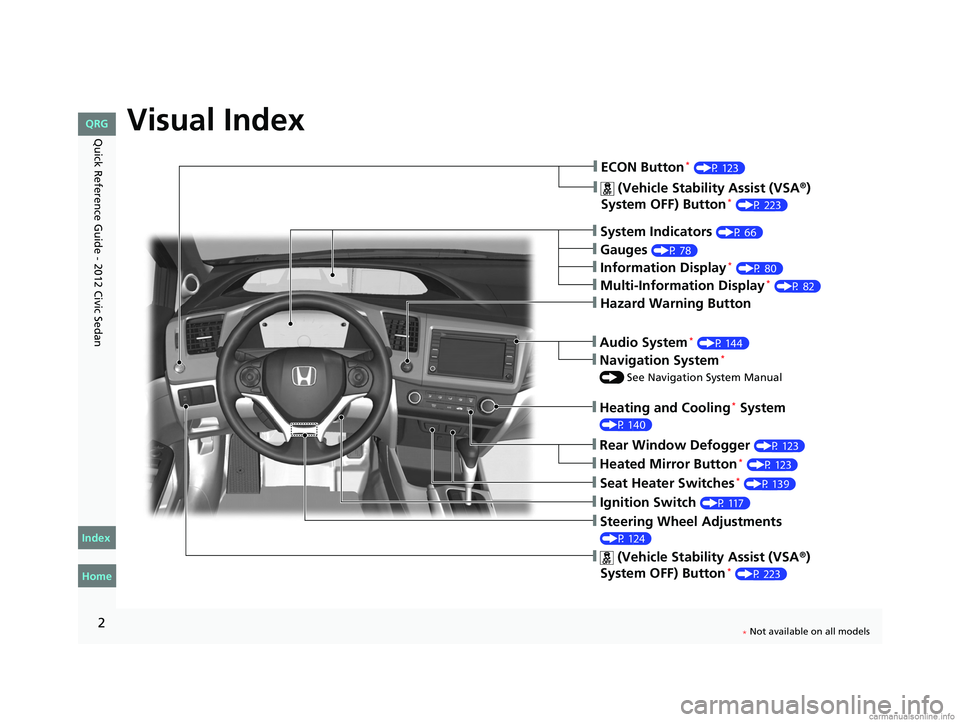
Visual Index
❙System Indicators (P 66)
❙Gauges (P 78)
❙Information Display* (P 80)
❙Navigation System*
() See Navigation System Manual
❙Audio System* (P 144)
❙Hazard Warning Button
❙Heating and Cooling* System
(P 140)
❙Rear Window Defogger (P 123)
❙Seat Heater Switches* (P 139)
❙Ignition Switch (P 117)
❙Steering Wheel Adjustments
(P 124)
❙ (Vehicle Stability Assist (VSA®)
System OFF) Button* (P 223)
❙ECON Button* (P 123)
❙Multi-Information Display* (P 82)
❙Heated Mirror Button* (P 123)
❙ (Vehicle Stability Assist (VSA®)
System OFF) Button* (P 223)
CIVIC 4D-31TR3600.book 2 ページ 2011年2月14日 月曜日 午後2時51分
Home
QRG
Index
* Not available on all models
Page 4 of 345
3
Quick Reference Guide - 2012 Civic Sedan
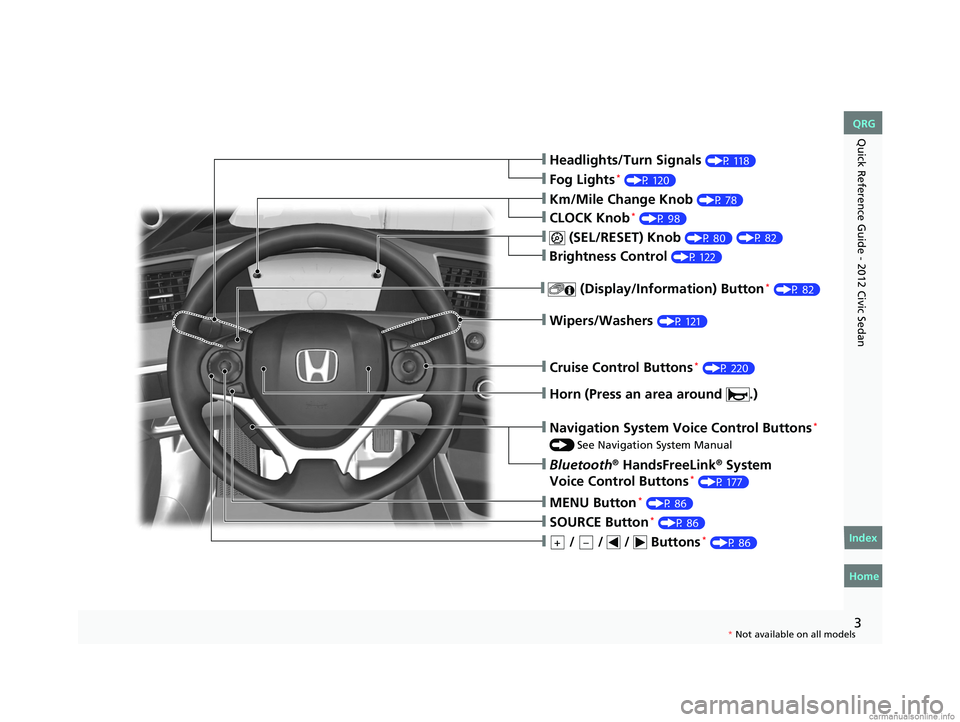
❙Headlights/Turn Signals (P 118)
❙Fog Lights* (P 120)
❙Wipers/Washers (P 121)
❙Cruise Control Buttons* (P 220)
❙Km/Mile Change Knob (P 78)
❙CLOCK Knob* (P 98)
❙MENU Button* (P 86)
❙ / / / Buttons* (P 86)+–
❙Navigation System Voice Control Buttons*
() See Navigation System Manual
❙Bluetooth® HandsFreeLink® System
Voice Control Buttons* (P 177)
❙ (SEL/RESET) Knob (P 80)
❙SOURCE Button* (P 86)
❙ (Display/Information) Button* (P 82)
❙Horn (Press an area around .)
❙Brightness Control (P 122)
CIVIC 4D-31TR3600.book 3 ページ 2011年2月14日 月曜日 午後2時51分
Home
QRG
Index
( P 8 2)
* No t avai lable on all m odel s
Page 13 of 345
12
Quick Reference Guide - 2012 Civic Sedan
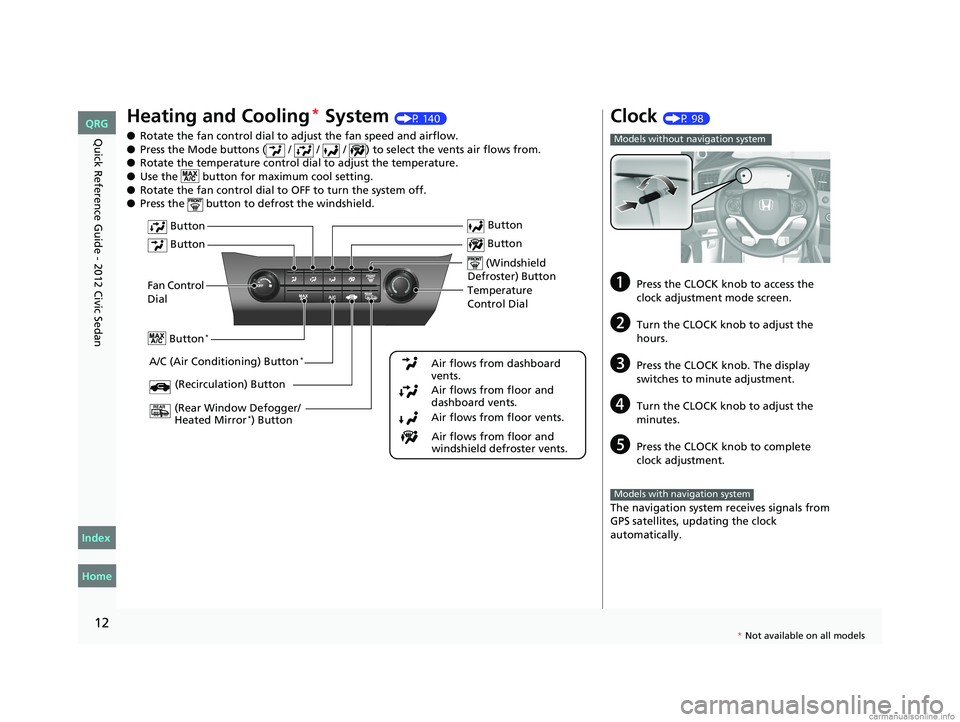
Heating and Cooling* System (P 140)
● Rotate the fan control dial to adjust the fan speed and airflow.
● Press the Mode buttons ( / / / ) to select the vents air flows from.
● Rotate the temperature control dial to adjust the temperature.
● Use the button for ma ximum cool setting.
● Rotate the fan control dial to OFF to turn the system off.
● Press the button to de frost the windshield.
Fan Control
Dial
(Rear Window Defogger/
Heated Mirror
*) Button
(Windshield
Defroster) Button
A/C (Air Conditioning) Button*
Air flows from floor and
windshield defroster vents.
Air flows from floor vents. Air flows from floor and
dashboard vents. Air flows from dashboard
vents.
Button
Button
Button*
(Recirculation) Button
Temperature
Control Dial Button
Button
Clock (P 98)
aPress the CLOCK knob to access the
clock adjustment mode screen.
bTurn the CLOCK knob to adjust the
hours.
cPress the CLOCK knob. The display
switches to minute adjustment.
dTurn the CLOCK knob to adjust the
minutes.
ePress the CLOCK knob to complete
clock adjustment.
The navigation system receives signals from
GPS satellites, updating the clock
automatically.
Models without navigation system
Models with navigation system
CIVIC 4D-31TR3600.book 12 ページ 2011年2月14日 月曜日 午後2時51分
Home
QRG
Index
* No t avai lable on all m odel s
Page 14 of 345
13
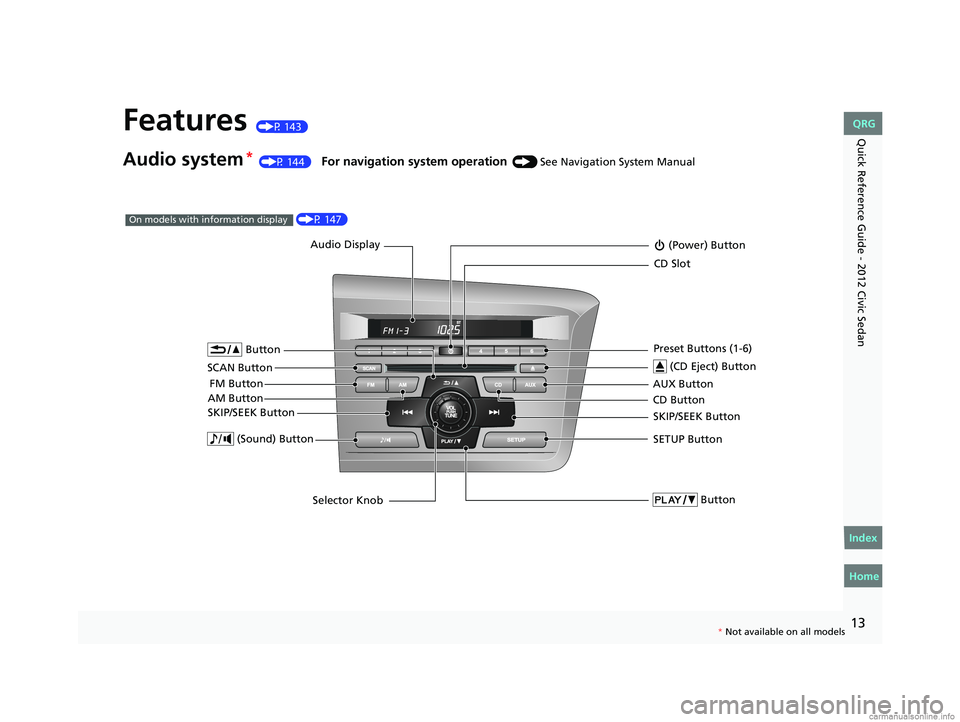
Quick Reference Guide - 2012 Civic SedanFeatures (P 143)
Audio system* (P 144) For navigation system operation () See Navigation System Manual
Audio Display
AM Button FM Button (Power) Button
CD Button AUX Button
CD Slot
(CD Eject) Button
SCAN Button Preset Buttons (1-6)
SKIP/SEEK Button
Button
SETUP Button
Selector Knob
Button (Sound) Button
SKIP/SEEK Button
(P 147)On models with information display
*
Not available on all models
CIVIC 4D-31TR3600.book 13 ページ 2011年2月14日 月曜日 午後2時51分
Home
QRG
Index
Page 86 of 345

Continued85
uuGauges and Displays uMulti-Information Display*
Instrument Panel
Shows the outside temperature in Fahr enheit (U.S.) or Celsius (Canada).
■Adjusting the outside temperature display
Adjust the temperature reading up to ±5°F or ±3°C if the temperature reading
seems incorrect.
Use the multi-information display's customiz ed features to correct the temperature.
2Customized Features P. 86
Shows the instant fuel economy as a bar graph in mpg or l/100 km.
Engine horsepower usage while driving is
displayed in the power monitor.
“100%” indicates that horsepower is at its
maximum.
Shows you turn-by-turn driv ing directions to your destination linked with the
navigation system.
2 Refer to the navigation system manual
■Outside Temperature*
■Instant Fuel Economy*
■Power Monitor*
1Outside Temperature
The temperature sensor is in the front bumper.
Road heat and exhaust from another vehicle can
affect the temperature reading when your vehicle
speed is less than 19 mph (30 km/h).
It may take several minutes for the display to be
updated after the temperature reading has stabilized.
1Power Monitor
Engine horsepower is affected by external conditions
such as driving conditions, or vehicle condition. The
power monitor can compensate for some of these
variables, but different re adings may be displayed.
■Turn-by-Turn Directions*1Turn-by-Turn Directions
You can select whether th e turn-by-turn display
comes on or not during the route guidance. 2 Customized Features P. 86
* Not available on all models
CIVIC 4D-31TR3600.book 85 ページ 2011年2月14日 月曜日 午後2時51分
TOC
Home
QRG
Index
Page 91 of 345
90
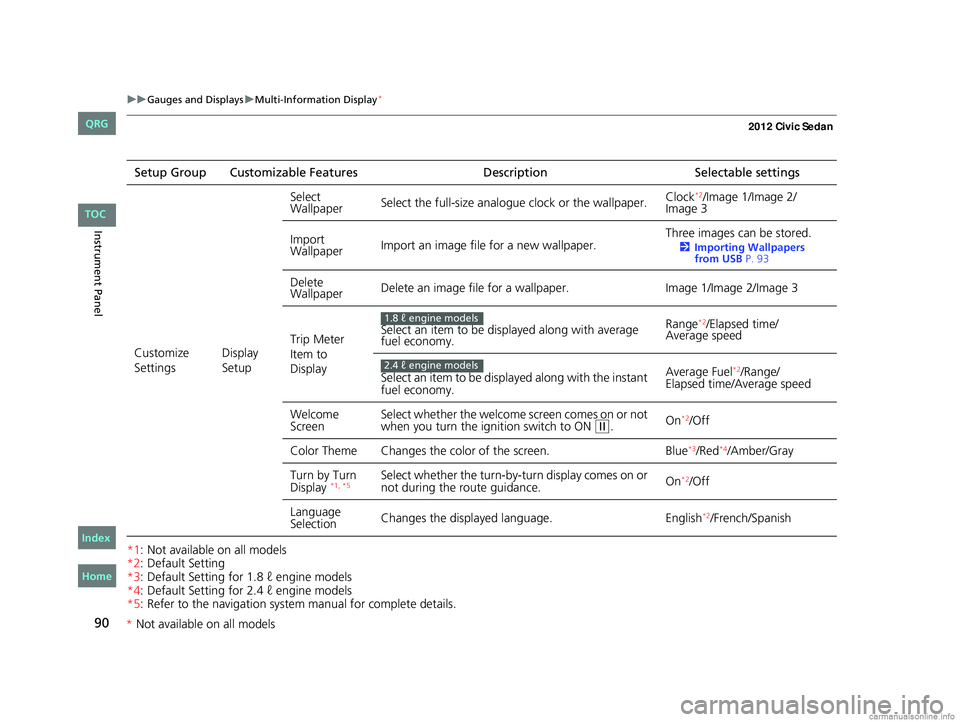
uuGauges and Displays uMulti-Information Display*
Instrument Panel
*1: Not available on all models
*2: Default Setting
*3: Default Setting for 1.8 ℓ engine models
*4: Default Setting for 2.4 ℓ engine models
*5: Refer to the navigation system manual for complete details.Setup Group Customizable Features
DescriptionSelectable settings
Customize
Settings Display
SetupSelect
Wallpaper
Select the full-size analogue clock or the wallpaper. Clock
*2/Image 1/Image 2/
Image 3
Import
Wallpaper Import an image file for a new wallpaper. Three images can be stored.
2
Importing Wallpapers
from USB P. 93
Delete
Wallpaper Delete an image file for a wallpaper.
Image 1/Image 2/Image 3
Trip Meter
Item to
Display Select an item to be displayed along with average
fuel economy.
Range
*2/Elapsed time/
Average speed
Select an item to be displayed along with the instant
fuel economy. Average Fuel
*2/Range/
Elapsed time/Average speed
Welcome
Screen Select whether the welcome screen comes on or not
when you turn the ignition switch to ON
(w.
On*2/Off
Color Theme Changes the co lor of the screen. Blue
*3/Red*4/Amber/Gray
Turn by Turn
Display
*1, *5Select whether the turn-by-tu rn display comes on or
not during the route guidance. On*2/Off
Language
Selection Changes the displayed language.
English
*2/French/Spanish
1.8 ℓ engine models
2.4 ℓ engine models
CIVIC 4D-31TR3600.book 90 ページ 2011年2月14日 月曜日 午後2時51分
TOC
Home
QRG
Index
* Not av ailable on all mo dels
Page 99 of 345
98
Controls
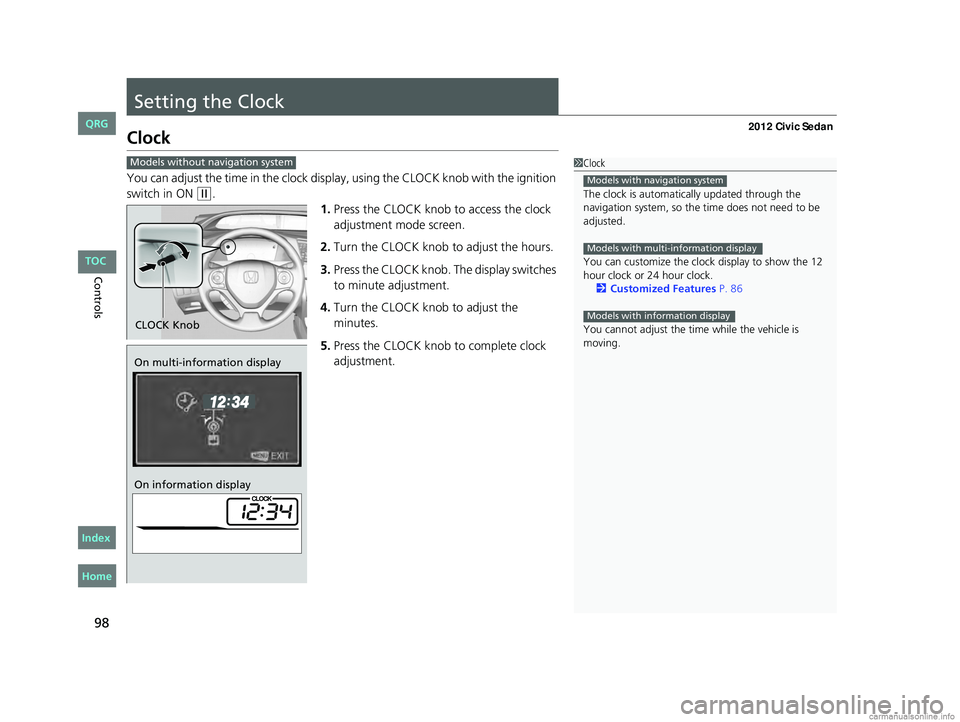
Setting the Clock
Clock
You can adjust the time in the clock display, using the CLOCK knob with the ignition
switch in ON
(w.
1.Press the CLOCK knob to access the clock
adjustment mode screen.
2. Turn the CLOCK knob to adjust the hours.
3. Press the CLOCK knob. The display switches
to minute adjustment.
4. Turn the CLOCK knob to adjust the
minutes.
5. Press the CLOCK knob to complete clock
adjustment.
1Clock
The clock is automatica lly updated through the
navigation system, so the ti me does not need to be
adjusted.
You can customize the clock display to show the 12
hour clock or 24 hour clock. 2 Customized Features P. 86
You cannot adjust the time while the vehicle is
moving.
Models with navigation system
Models with multi-information display
Models with information display
Models without navigation system
CLOCK Knob
On multi-information display
On information display
CIVIC 4D-31TR3600.book 98 ページ 2011年2月14日 月曜日 午後2時51分
Home
QRG
Index TOC
Page 144 of 345
143
Features
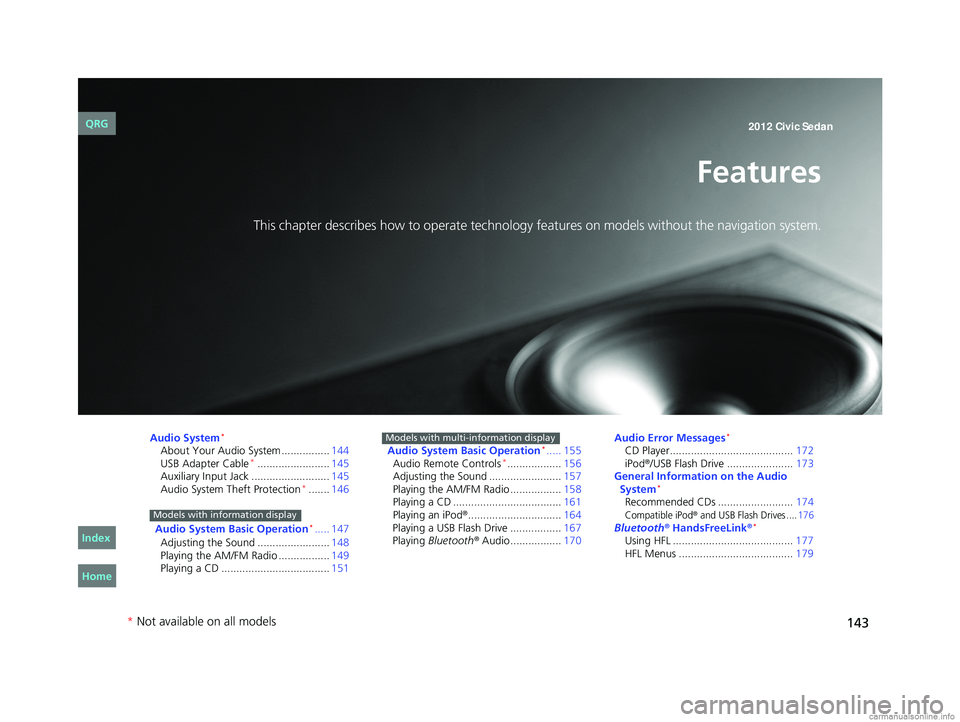
This chapter describes how to operate technology features on models without the navigation system.
Audio System*
About Your Audio System ................144
USB Adapter Cable*........................ 145
Auxiliary Input Jack .......................... 145
Audio System Theft Protection
*....... 146
Audio System Basic Operation
*..... 147
Adjusting the Sound ........................ 148
Playing the AM/FM Radio ................. 149
Playing a CD .................................... 151
Models with information display
Audio System Basic Operation*..... 155
Audio Remote Controls*.................. 156
Adjusting the Sound ........................ 157
Playing the AM/FM Radio ................. 158
Playing a CD .................................... 161
Playing an iPod
®............................... 164
Playing a USB Flash Drive ................. 167
Playing Bluetooth
® Audio................. 170
Models with multi-information displayAudio Error Messages*
CD Player......................................... 172
iPod®/USB Flash Drive ...................... 173
General Information on the Audio System
*
Recommended CDs ......................... 174Compatible iPod® and USB Flash Drives ....176Bluetooth® HandsFreeLink®*
Using HFL ........................................ 177
HFL Menus ...................................... 179
* Not available on all models
CIVIC 4D-31TR3600.book 143 ページ 2011年2月14日 月曜日 午後2時51分
Home
QRG
Index 2012 Civic Sedan
Page 145 of 345
144
Features
Audio System*
About Your Audio System
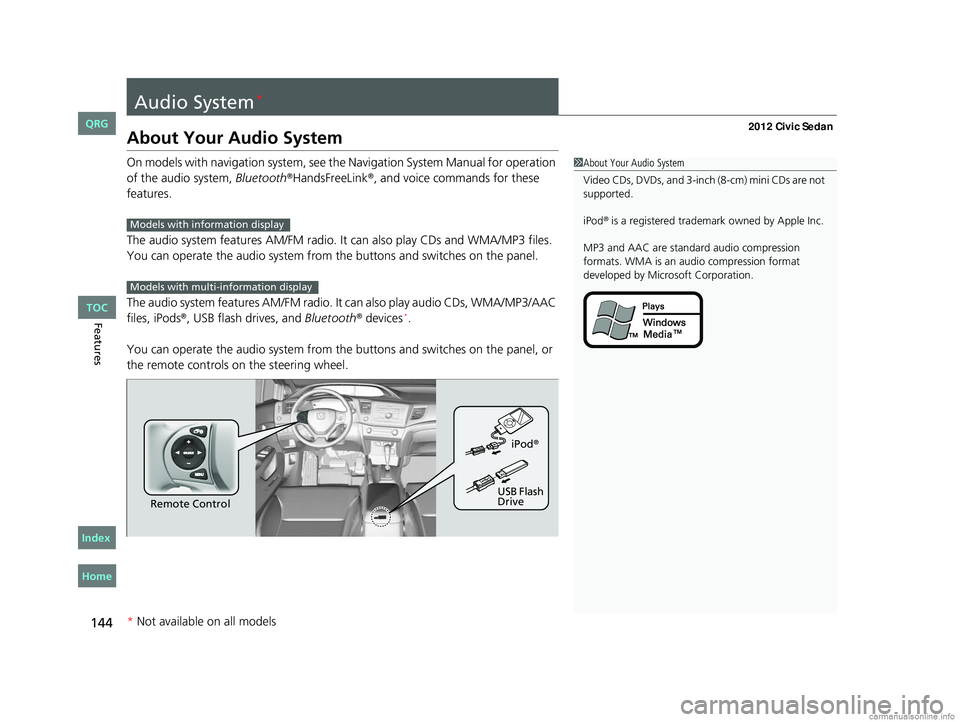
On models with navigation system, see the Navigation System Manual for operation
of the audio system, Bluetooth®HandsFreeLink®, and voice commands for these
features.
The audio system features AM /FM radio. It can also play CDs and WMA/MP3 files.
You can operate the audio system from the buttons and switches on the panel.
The audio system features AM/FM radio. It can also play audio CDs, WMA/MP3/AAC
files, iPods
®, USB flash drives, and Bluetooth® devices*.
You can operate the audio system from the buttons and switches on the panel, or
the remote controls on the steering wheel.
1About Your Audio System
Video CDs, DVDs, and 3-inch (8-cm) mini CDs are not
supported.
iPod
® is a registered trademark owned by Apple Inc.
MP3 and AAC are standard audio compression
formats. WMA is an audio compression format
developed by Micr osoft Corporation.Models with info rmation display
Models with multi- information display
Remote Control iPod
®
USB Flash
Drive
* Not available on all models
CIVIC 4D-31TR3600.book 144 ページ 2011年2月14日 月曜日 午後2時51分
TOC
Home
QRG
Index