parking brake HONDA CIVIC SEDAN 2012 Owner's Manual (in English)
[x] Cancel search | Manufacturer: HONDA, Model Year: 2012, Model line: CIVIC SEDAN, Model: HONDA CIVIC SEDAN 2012Pages: 345, PDF Size: 53.95 MB
Page 5 of 345
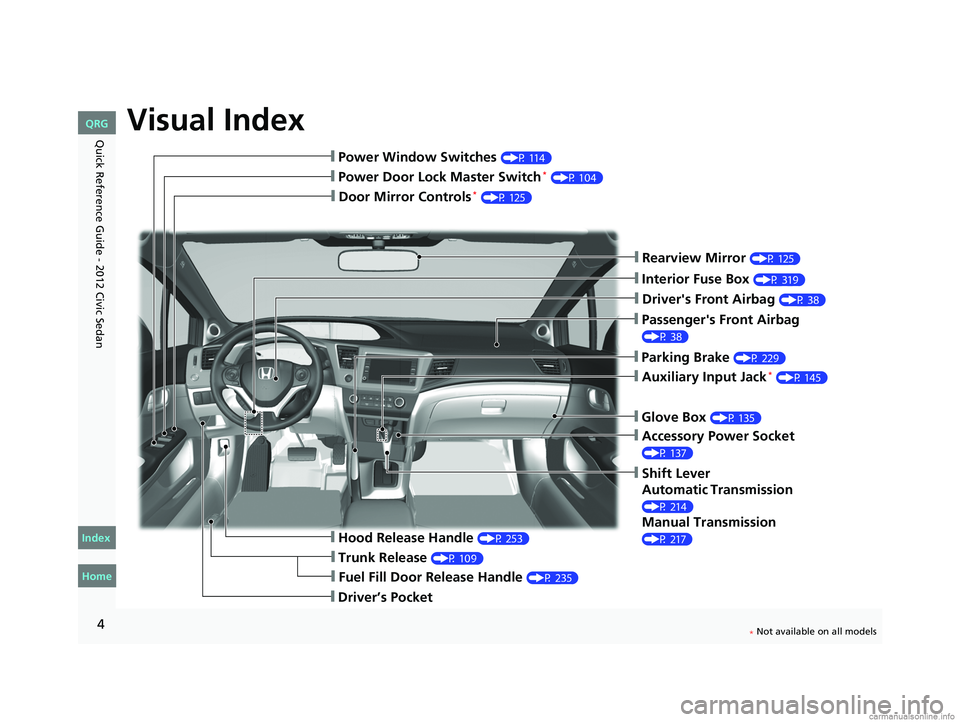
Visual Index
4
❙Door Mirror Controls* (P 125)
❙Passenger's Front Airbag
(P 38)
❙Parking Brake (P 229)
❙Glove Box (P 135)
❙Rearview Mirror (P 125)
❙Accessory Power Socket
(P 137)
❙Shift Lever
Automatic Transmission
(P 214)
Manual Transmission
(P 217)❙Hood Release Handle (P 253)
❙Fuel Fill Door Release Handle (P 235)
❙Driver’s Pocket
❙Trunk Release (P 109)
❙Power Door Lock Master Switch* (P 104)
❙Power Window Switches (P 114)
❙Auxiliary Input Jack* (P 145)
❙Interior Fuse Box (P 319)
❙Driver's Front Airbag (P 38)
CIVIC 4D-31TR3600.book 4 ページ 2011年2月14日 月曜日 午後2時51分
Home
QRG
Index
* No
t avai lable on all m odel s
Quic k R ef ere n ce G uid e - 2012 Civic Sedan
4
Page 7 of 345
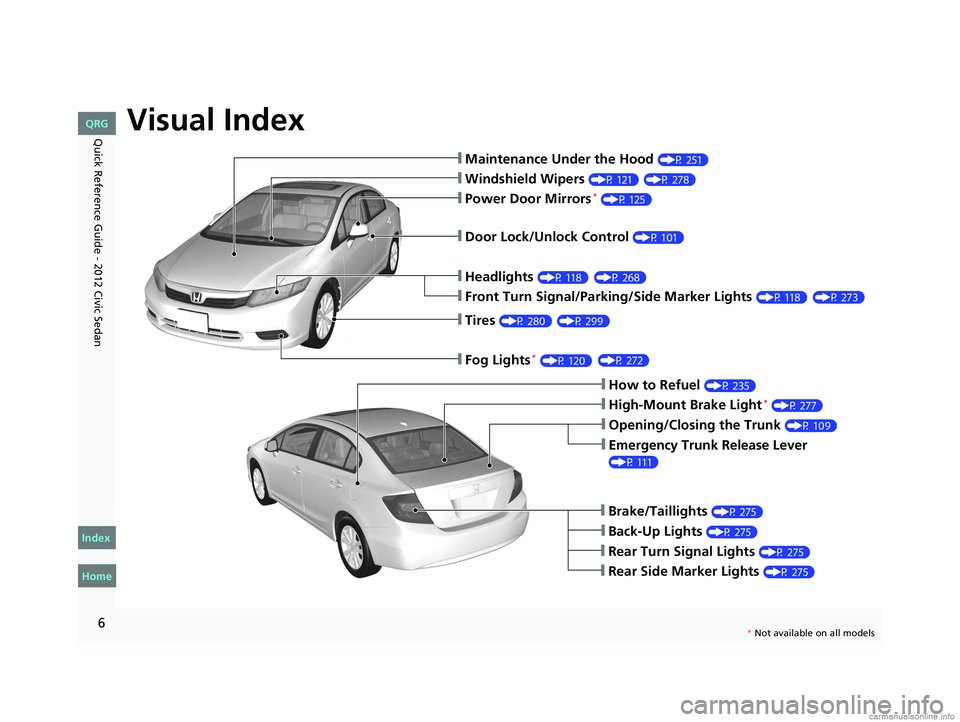
Visual Index
6
Quick Reference Guide - 2012 Civic Sedan
❙Maintenance Under the Hood (P 251)
❙Windshield Wipers (P 121)
❙Tires (P 280)
❙Fog Lights *(P 120)
❙Door Lock/Unlock Control (P 101)
❙Power Door Mirrors* (P 125)
❙Headlights (P 118)
❙Front Turn Signal/Parking/Side Marker Lights (P 118)
❙How to Refuel (P 235)
❙High-Mount Brake Light* (P 277)
❙Emergency Trunk Release Lever
(P 111)
❙Opening/Closing the Trunk (P 109)
❙Back-Up Lights (P 275)
❙Brake/Taillights (P 275)
❙Rear Turn Signal Lights (P 275)
❙Rear Side Marker Lights (P 275)
CIVIC 4D-31TR3600.book 6 ページ 2011年2月14日 月曜日 午後2時51分
Home
QRG
Index
(P 27 8 )
(P 27 3)
( P 29 9)
( P 27 2)
(
P 268)
* No t avai lable on all m odel s
Page 10 of 345
9
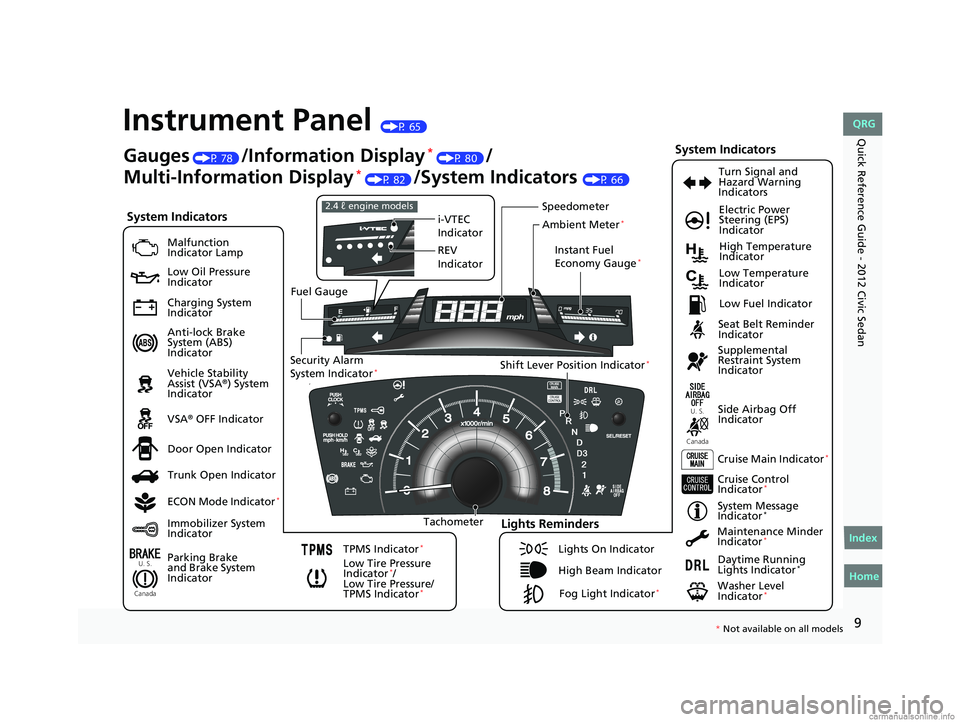
Quick Reference Guide - 2012 Civic SedanInstrument Panel (P 65)
U. S.
Canada
U. S.
Canada
Syste m In di ca tor s
Malfu nction
In dica to r Lam p
Low Oil Pressure
In dica to r
Ch argi ng S yst em
In dica to r
A nti-lo ck Brak e
S ystem (ABS)
In dica to r
Veh icle Stability
A ssist (VSA
®) Syst em
In dica to r
VSA
® OFF In dicator
Low Tire Pressure
Indicator
*/
Low Tire Pressure/
TPMS Ind icator
*
Elec tr ic Power
Steering (EPS)
In dicato r
Ligh ts R emi nd ers
Ligh ts On In dicator
Hig h B eam In dicato r
F o g L igh t In dicato r
*
Imm ob ilizer Sys tem
Ind icator Seat Belt R
eminder
In dicato r
System Indicat ors
Cru ise Con trol
Ind icator*
Sy stem Message
Ind icator*
Parking Brake
and Brake Syst em
Ind icator S
upp lemental
Re straint Syst em
Ind icator
Side Ai rb ag Off
Ind icator
Doo r Op en In dicato r
Cruise M ain Indic ator
*
T acho meter Instant Fuel
Econ
omy G aug e
*
Speed om et er
Fu el Gau ge
S e curity Alarm
S y stem Indica to r
*Shi ft Lever Position Indicator*
Lo w Fu el In dicat or
Gauges (P 78 )/Information Display* (P 80)/
Multi-Information Display
* (P 82 )/System Indicators (P 66)
Trunk Open In dicator
ECO N M ode Indicato r
*
TPMS Ind icator*
T u rn Sign al and
H aza rd Warning
In dic ators
H ig h Te mperat ur e
In dicato r
Low Te mperatu re
In dicato r
M aintena nce Minder
Ind icator
*
Dayti me Ru nnin g
Lights Indicator*
Wash er Level
Ind icator*
i- VTEC
I ndic ator
RE V
I ndic ator
2. 4 ℓ engi ne mod els
A m bient Meter*
* No t avai lable on all m odel s
CIVI C 4D-31TR3600.book 9 ペー ジ 20 11年2月14日 月曜日 午後2時51分
Home
QRG
Index
Page 21 of 345
20
Quick Reference Guide - 2012 Civic SedanWhy do the doors lock
after I unlocked the doors
using a remote
transmitter?If you do not open the doors within 30 seconds, the doors are
relocked automatically for security.
Why does the beeper
sound when I open the
driver's door? The beeper sounds when:
●The key is left in the ignition switch.
●The exterior lights are left on.
Why does the beeper
sound when I start driving? The beeper sounds when:
●Driver and/or front passenger are not wearing their seat belts.
●The parking brake lever is not fully released.
Why do I hear a screeching
sound when I apply the
brake pedal? The brake pads may need to be replaced. Have your vehicle
inspected by a dealer.
Is it possible to use
unleaded gasoline with a
Pump Octane Number
(PON) of 87 or higher on
this vehicle? Unleaded gasoline with a PON of
91 or higher is recommended.
If premium unleaded gasoline with a PON of 91 or higher is not
available, you can temporarily use the gasoline with a PON of
87 or higher.
This will result in decreased engine performance, and can cause
occasional metallic knocking noise in the engine.
Models with remote transmitter
2.4 ℓ engine models
CIVIC 4D-31TR3600.book 20 ページ 2011年2月14日 月曜日 午後2時51分
Home
QRG
Index
Page 67 of 345
66
Instrument Panel
Indicators
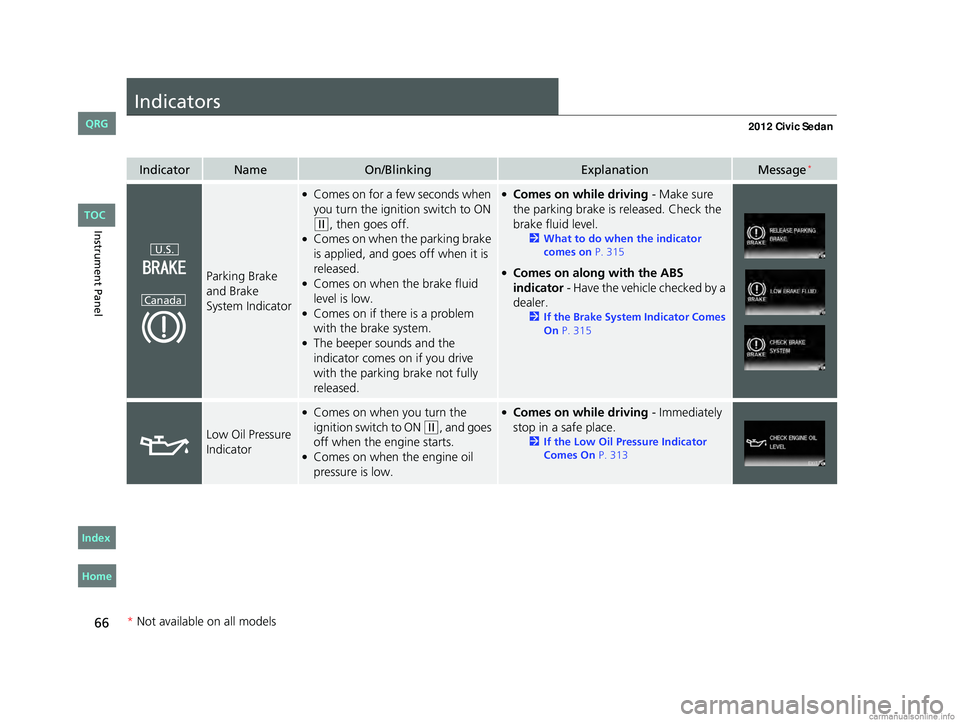
IndicatorNameOn/BlinkingExplanationMessage*
Parking Brake
and Brake
System Indicator
●Comes on for a few seconds when
you turn the igniti on switch to ON
(w, then goes off.●Comes on when the parking brake
is applied, and goes off when it is
released.
●Comes on when the brake fluid
level is low.
●Comes on if there is a problem
with the brake system.
●The beeper sounds and the
indicator comes on if you drive
with the parking brake not fully
released.
●Comes on while driving - Make sure
the parking brake is released. Check the
brake fluid level.
2 What to do when the indicator
comes on P. 315
●Comes on along with the ABS
indicator - Have the vehicle checked by a
dealer.
2 If the Brake System Indicator Comes
On P. 315
Low Oil Pressure
Indicator
●Comes on when you turn the
ignition switch to ON
(w, and goes
off when the engine starts.
●Comes on when the engine oil
pressure is low.
●Comes on while driving - Immediately
stop in a safe place.
2 If the Low Oil Pressure Indicator
Comes On P. 313
U.S.
Canada
* Not available on all models
CIVIC 4D-31TR3600.book 66 ページ 2011年2月14日 月曜日 午後2時51分
Home
QRG
Index TOC
Page 108 of 345
107
uuLocking and Unlocking the Doors uCustomizing the Auto Door Locking/Unlocking Setting*
Continued
Controls
*1: Default setting
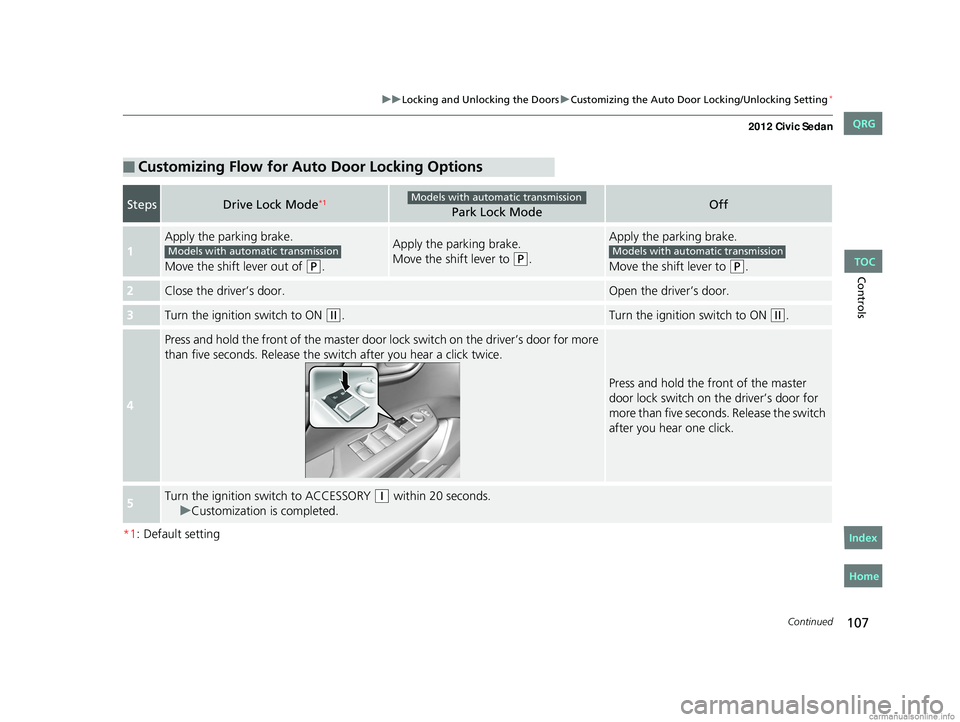
■Customizing Flow for Auto Door Locking Options
StepsDrive Lock Mode*1Park Lock ModeOff
1
Apply the parking brake.
Move the shift lever out of
(P.
Apply the parking brake.
Move the shift lever to
(P.
Apply the parking brake.
Move the shift lever to
(P.
2Close the driver’s door.Open the driver’s door.
3Turn the ignition switch to ON (w.Turn the ignition switch to ON (w.
4
Press and hold the front of the master door lo ck switch on the driver’s door for more
than five seconds. Release the switch after you hear a click twice.
Press and hold the front of the master
door lock switch on the driver’s door for
more than five seconds. Release the switch
after you hear one click.
5Turn the ignition sw itch to ACCESSORY (q within 20 seconds.
u Customization is completed.
Models with automatic transmission
Models with automatic transmissionModels with automatic transmission
CIVIC 4D-31TR3600.book 107 ページ 2011年2月14日 月曜日 午後2時51分
TOC
Home
QRG
Index
Page 109 of 345
108
uuLocking and Unlocking the Doors uCustomizing the Auto Door Locking/Unlocking Setting*
Controls
*1: Default setting for manual transmission models
*2: Default setting for automatic transmission models
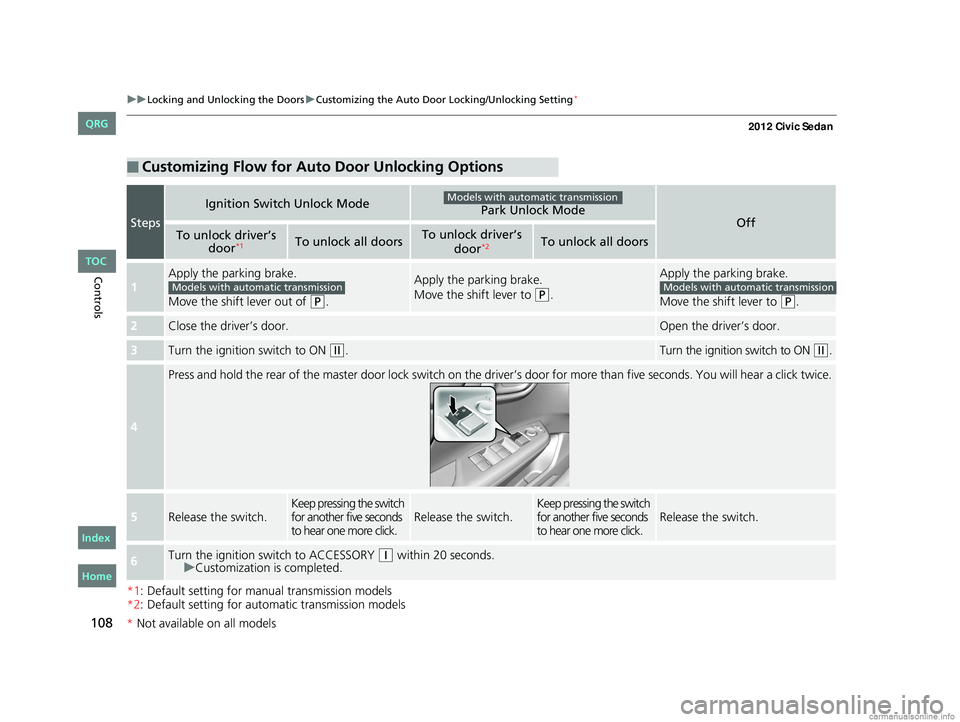
■Customizing Flow for Auto Door Unlocking Options
Steps
Ignition Switch Unlock ModePark Unlock ModeOffTo unlock driver’s
door*1To unlock all doorsTo unlock driver’s
door*2To unlock all doors
1
Apply the parking brake.
Move the shift lever out of
(P.
Apply the parking brake.
Move the shift lever to
(P.
Apply the parking brake.
Move the shift lever to
(P.
2Close the driver’s door.Open the driver’s door.
3Turn the ignition switch to ON (w.Turn the ignition switch to ON (w.
4
Press and hold the rear of the master door lock switch on the dr iver’s door for more than five seconds. You will hear a click t wice.
5Release the switch.Keep pressing the switch
for another five seconds
to hear one more click.Release the switch.Keep pressing the switch
for another five seconds
to hear one more click.Release the switch.
6Turn the ignition switch to ACCESSORY (q within 20 seconds.
u Customization is completed.
Models with automatic transmission
Models with automatic transmissionModels with automatic transmission
CIVIC 4D-31TR3600.book 108 ページ 2011年2月14日 月曜日 午後2時51分
*Not available on all models
TOC
Home
QRG
Index
Page 121 of 345
120
uuOperating the Switches Around the Steering Wheel uFog Lights*
Controls
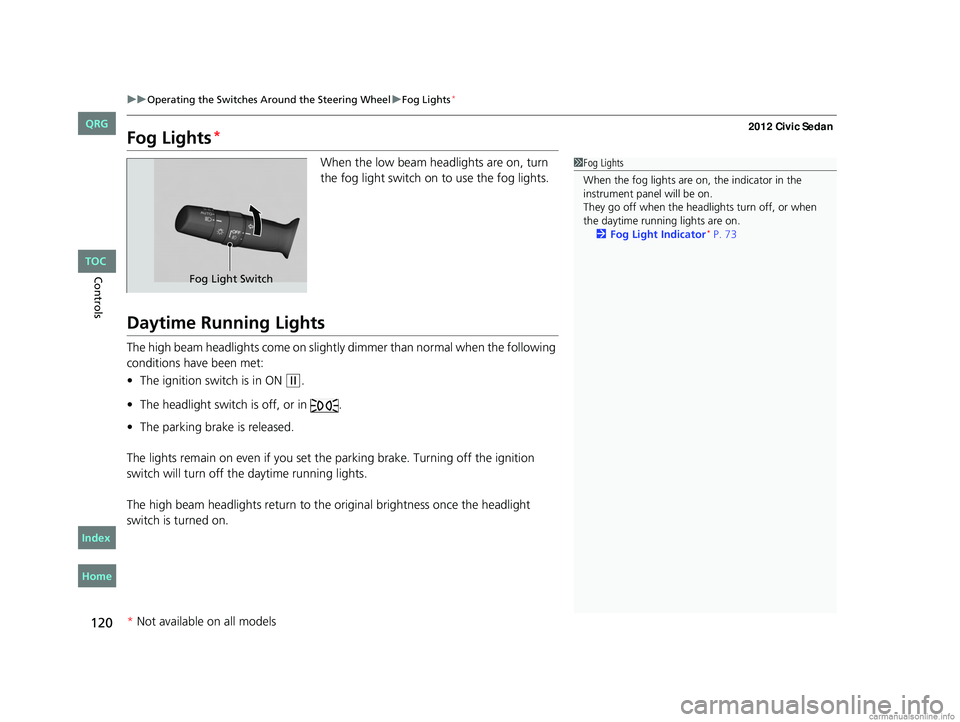
Fog Lights*
When the low beam headlights are on, turn
the fog light switch on to use the fog lights.
Daytime Running Lights
The high beam headlights come on slightly dimmer than normal when the following
conditions have been met:
• The ignition switch is in ON
(w.
• The headlight switch is off, or in .
• The parking brake is released.
The lights remain on even if you set th e parking brake. Turning off the ignition
switch will turn off the daytime running lights.
The high beam headlights re turn to the original brightness once the headlight
switch is turned on.
1 Fog Lights
When the fog lights are on, the indicator in the
instrument pane l will be on.
They go off when the headlights turn off, or when
the daytime running lights are on. 2 Fog Light Indicator
* P. 73
Fog Light Switch
* Not available on all models
CIVIC 4D-31TR3600.book 120 ページ 2011年2月14日 月曜日 午後2時51分
TOC
Home
QRG
Index
Page 202 of 345
201
Driving
This chapter discusses driving, refueling, and information on items such as accessories.
Before Driving
Driving Preparation .......................... 202
Maximum Load Limit........................ 205
Towing a Trailer Towing Preparation .......................... 207
Driving Safely with a Trailer .............. 209
Towing Your Vehicle ........................ 210
When Driving
Starting the Engine .......................... 211
Precautions While Driving................. 213
Automatic Transmission ................... 214Shifting ..........................................
215
Shifting .......................................... 217
Cruise Control
*............................... 220
VSA® (Vehicle Stability Assist), aka ESC
(Electronic Stability Control), System ...... 223
TPMS (Tire Pressure Monitoring System) ... 225
Tire Pressure Monitoring System (TPMS) -
Required Federal Explanation ......... 226
Braking
Brake System ................................... 229
ABS (Anti-lock Brake System) ........... 231
Automatic transmission models
Manual transmission models
Brake Assist System ......................... 232
Parking Your Vehicle When Stopped ................................ 233
Parking ............................................ 233
Refueling Fuel Information .............................. 234
How to Refuel ................................. 235
Fuel Economy .................................... 237
Improving Fuel Economy .................. 237
Accessories and Modifications
Accessories ...................................... 238
Modifications................................... 238
* Not available on all models
CIVIC 4D-31TR3600.book 201 ページ 2011年2月14日 月曜日 午後2時51分
Home
QRG
Index 2012 Civic Sedan
Page 210 of 345
209
uuTowing a Trailer uDriving Safely with a Trailer
Continued
Driving
Driving Safely with a Trailer
• Have the trailer properly servic ed and keep it in good condition.
• Make sure that all the weights and load in the vehicle and trailer are within limits.
2Towing Load Limits P. 207
•Securely attach the hitch, safety chains, and other necessary parts to the trailer.
• Securely store all the items in and on the tra iler so that they do not shift while
driving.
• Check if the lights and brakes on the trailer are working properly.
• Check the pressures of the traile r tires, including the spare.
• Drive slower than normal.
• Obey posted speed limits fo r vehicles with trailers.
• Use the
(D position when towing a trailer on level roads.
• Turn more slowly and with a wider turning arc than normal.
• Allow more time and distance for braking.
• Do not brake or turn suddenly.
■Things You Need To Know Before Towing a Trailer
■Towing Speeds and Gears
■Turning and Braking
1Driving Safely with a Trailer
Parking
In addition to the normal precautions, place wheel
chocks at each of the trailer's tires.
Automatic transmission models
CIVIC 4D-31TR3600.book 209 ページ 2011年2月14日 月曜日 午後2時51分
TOC
Home
QRG
Index