reset HONDA CIVIC SEDAN 2012 Owner's Manual (in English)
[x] Cancel search | Manufacturer: HONDA, Model Year: 2012, Model line: CIVIC SEDAN, Model: HONDA CIVIC SEDAN 2012Pages: 345, PDF Size: 53.95 MB
Page 4 of 345
3
Quick Reference Guide - 2012 Civic Sedan
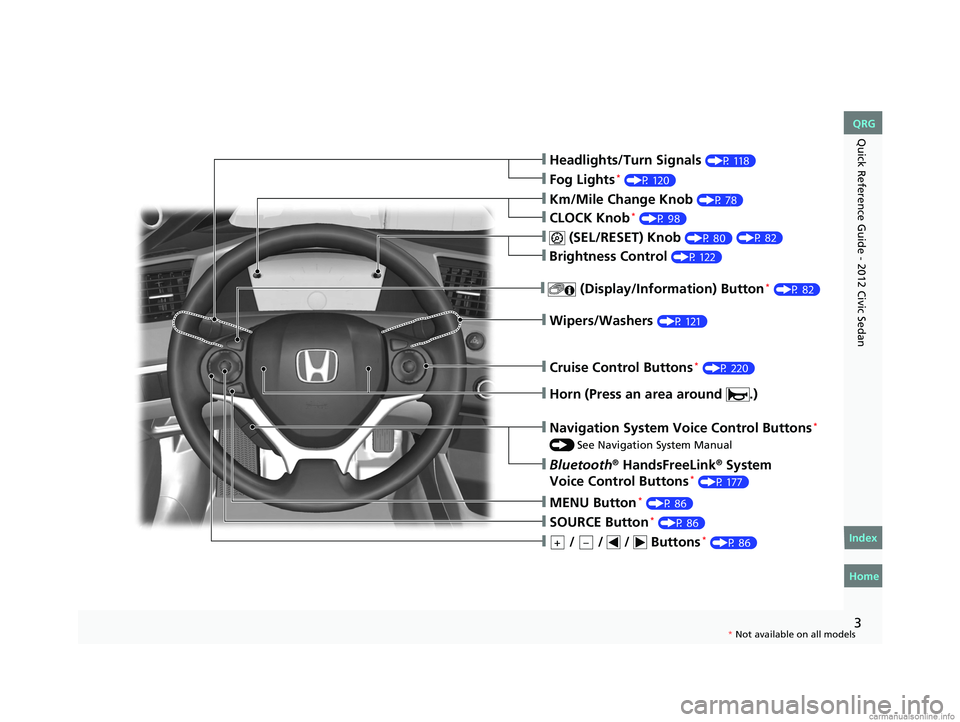
❙Headlights/Turn Signals (P 118)
❙Fog Lights* (P 120)
❙Wipers/Washers (P 121)
❙Cruise Control Buttons* (P 220)
❙Km/Mile Change Knob (P 78)
❙CLOCK Knob* (P 98)
❙MENU Button* (P 86)
❙ / / / Buttons* (P 86)+–
❙Navigation System Voice Control Buttons*
() See Navigation System Manual
❙Bluetooth® HandsFreeLink® System
Voice Control Buttons* (P 177)
❙ (SEL/RESET) Knob (P 80)
❙SOURCE Button* (P 86)
❙ (Display/Information) Button* (P 82)
❙Horn (Press an area around .)
❙Brightness Control (P 122)
CIVIC 4D-31TR3600.book 3 ページ 2011年2月14日 月曜日 午後2時51分
Home
QRG
Index
( P 8 2)
* No t avai lable on all m odel s
Page 14 of 345
13
Quick Reference Guide - 2012 Civic SedanFeatures (P 143)
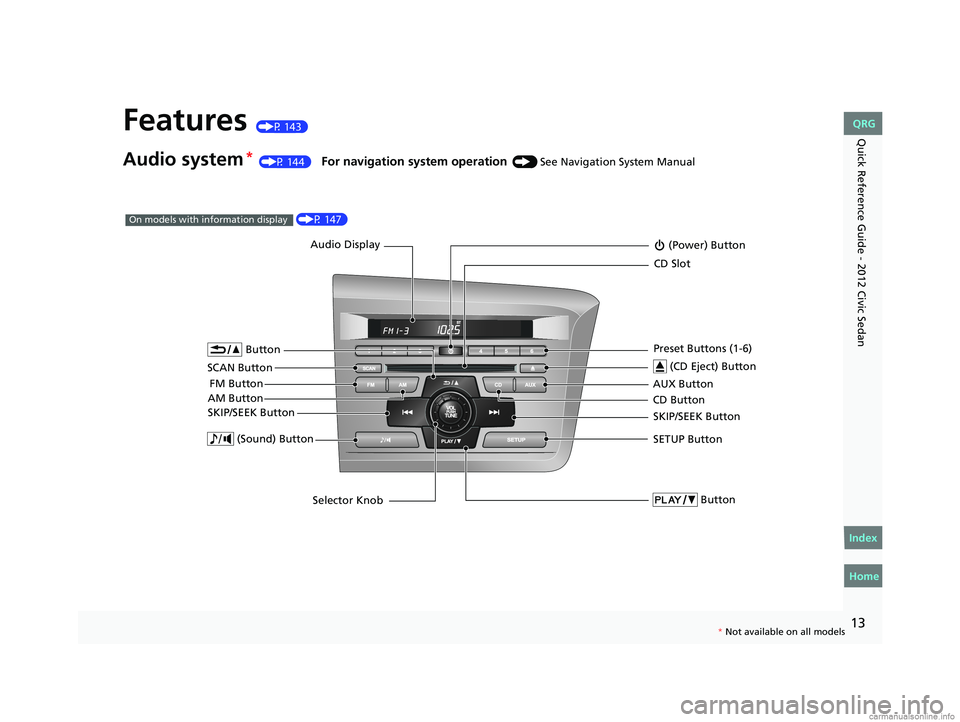
Audio system* (P 144) For navigation system operation () See Navigation System Manual
Audio Display
AM Button FM Button (Power) Button
CD Button AUX Button
CD Slot
(CD Eject) Button
SCAN Button Preset Buttons (1-6)
SKIP/SEEK Button
Button
SETUP Button
Selector Knob
Button (Sound) Button
SKIP/SEEK Button
(P 147)On models with information display
*
Not available on all models
CIVIC 4D-31TR3600.book 13 ページ 2011年2月14日 月曜日 午後2時51分
Home
QRG
Index
Page 15 of 345
14
Quick Reference Guide - 2012 Civic Sedan
002300
75°F miles
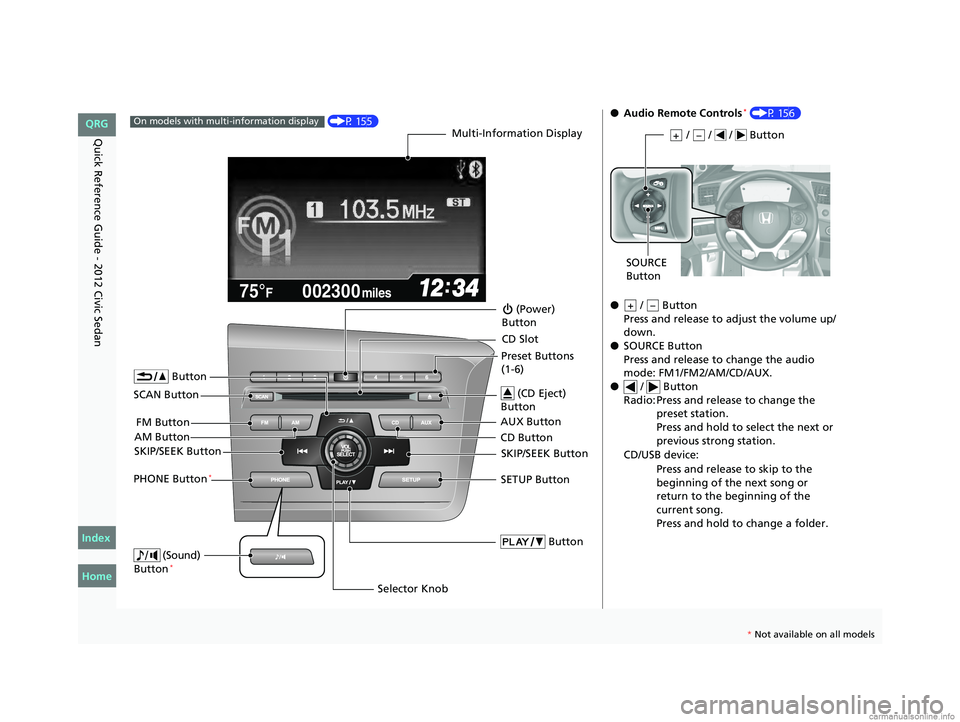
(P 155)On models with multi-information displayMulti-Information Display
AM Button FM Button
SCAN Button
SKIP/SEEK Button
Selector Knob
Button
(Sound)
Button*
(Power)
Button
CD Button AUX Button CD Slot
(CD Eject)
Button
Preset Buttons
(1-6)
Button
SETUP ButtonSKIP/SEEK ButtonPHONE Button*
●
Audio Remote Controls* (P 156)
● / Button
Press and release to adjust the volume up/
down.
● SOURCE Button
Press and release to change the audio
mode: FM1/FM2/AM/CD/AUX.
● / Button
Radio: Press and release to change the preset station.
Press and hold to select the next or
previous strong station.
CD/USB device: Press and release to skip to the
beginning of the next song or
return to the beginning of the
current song.
Press and hold to change a folder.
/ / / Button+–
SOURCE
Button
+–
CIVIC 4D-31TR3600.book 14 ページ 2011年2月14日 月曜日 午後2時51分
Home
QRG
Index
* No t avai lable on all m odel s
Page 81 of 345
80
uuGauges and Displays uInformation Display*
Instrument Panel
Information Display*
The information display shows the odome ter, trip meter, engine oil life and
maintenance service item codes, and other gauges.
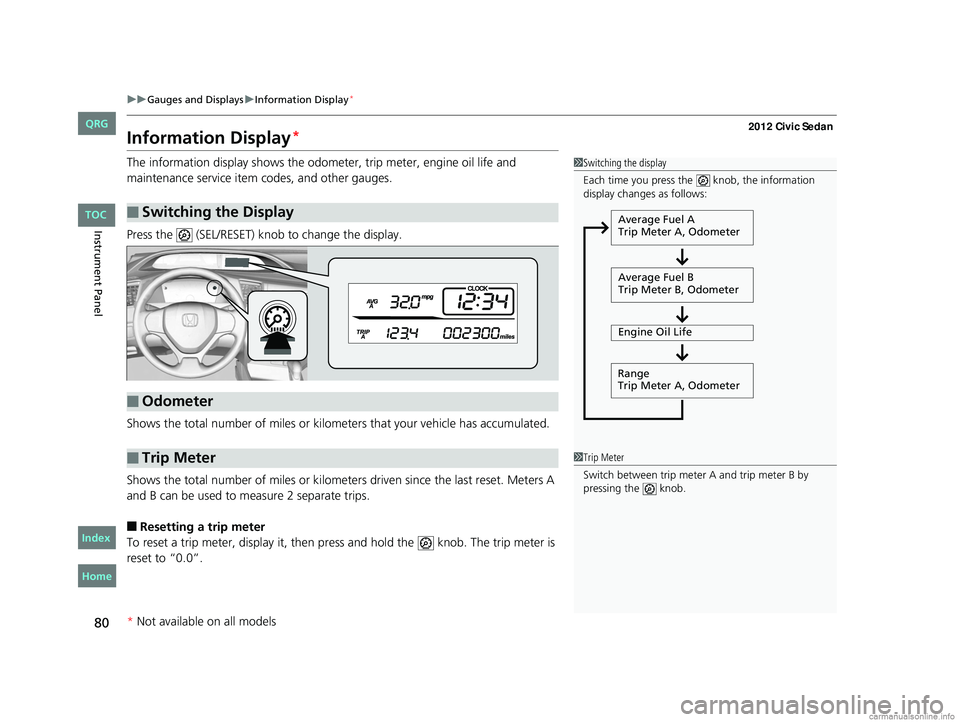
Press the (SEL/RESET) knob to change the display.
Shows the total number of miles or kilome ters that your vehicle has accumulated.
Shows the total number of miles or kilomete rs driven since the last reset. Meters A
and B can be used to measure 2 separate trips.
■Resetting a trip meter
To reset a trip meter, display it, then pr ess and hold the knob. The trip meter is
reset to “0.0”.
■Switching the Display
1 Switching the display
Each time you press the knob, the information
display changes as follows:
Average Fuel A
Trip Meter A, Odometer
Average Fuel B
Trip Meter B, Odometer
Engine Oil Life
Range
Trip Meter A, Odometer
■Odometer
■Trip Meter1 Trip Meter
Switch between trip meter A and trip meter B by
pressing the knob.
* Not available on all models
CIVIC 4D-31TR3600.book 80 ページ 2011年2月14日 月曜日 午後2時51分
TOC
Home
QRG
Index
Page 82 of 345

81
uuGauges and Displays uInformation Display*
Instrument Panel
Shows the estimated average fuel economy of each trip meter in mpg or l/100 km.
The display is updated at set intervals. Wh en a trip meter is reset, the average fuel
economy is also reset.
Shows the remaining oil life and Maintenance Minder
TM.
2 Maintenance Minder™ P. 243
Shows the estimated distance you can travel on the remaining fuel. This distance is
estimated from the fuel economy of your trips in the past.
Appears when the fuel fill cap is loose or is not installed.
2Check/Tighten Fuel Cap Message P. 314
■Average Fuel Economy
■Engine Oil Life
■Range
■Check Fuel Cap
CIVIC 4D-31TR3600.book 81 ページ 2011年2月14日 月曜日 午後2時51分
Home
QRG
IndexTOC
*
Not av ailable on all mo dels
Page 83 of 345
82
uuGauges and Displays uMulti-Information Display*
Instrument Panel
Multi-Information Display*
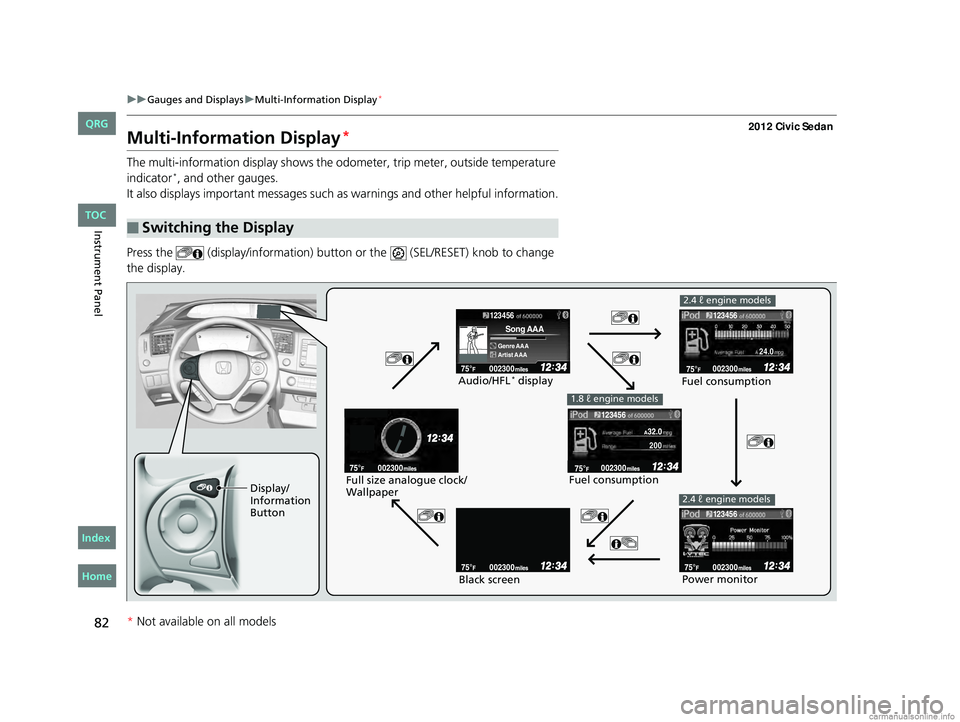
The multi-information display shows the odometer, trip meter, outside temperature
indicator*, and other gauges.
It also displays important messages such as warnings and other helpful information.
Press the (display/information) butto n or the (SEL/RESET) knob to change
the display.
■Switching the Display
123456
Genre AAA
Song AAA
Artist AAA
200
24.0
123456
123456
123456
Display/
Information
Button Fuel consumption
Audio/HFL
* display
Fuel consumption
Black screen
Full size analogue clock/
Wallpaper
2.4 ℓ engine models
Power monitor
1.8 ℓ engine models
2.4 ℓ engine models
* Not available on all models
CIVIC 4D-31TR3600.book 82 ページ 2011年2月14日 月曜日 午後2時51分
Home
QRG
Index TOC
Page 84 of 345
Continued83
uuGauges and Displays uMulti-Information Display*
Instrument Panel
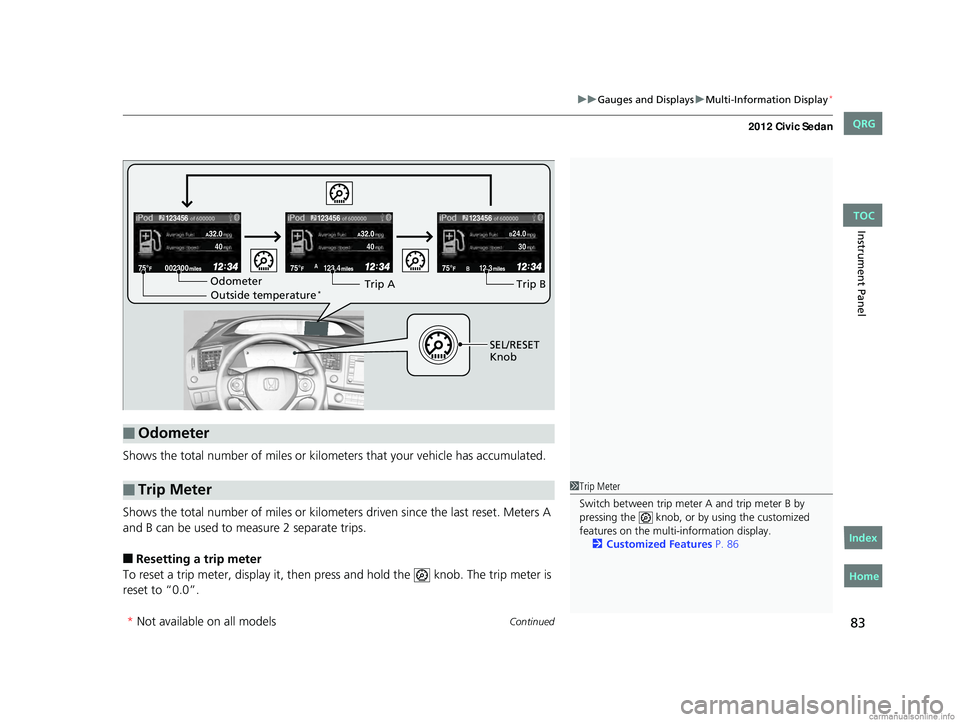
Shows the total number of miles or kilome ters that your vehicle has accumulated.
Shows the total number of miles or kilomete rs driven since the last reset. Meters A
and B can be used to measure 2 separate trips.
■Resetting a trip meter
To reset a trip meter, display it, then pr ess and hold the knob. The trip meter is
reset to “0.0”.
■Odometer
■Trip Meter
123.4A12.3B
123456123456123456
B24.0304040
Odometer Outside temperature*Trip ATrip B
SEL/RESET
Knob
1 Trip Meter
Switch between trip meter A and trip meter B by
pressing the knob, or by using the customized
features on the multi-information display.
2 Customized Features P. 86
* Not available on all models
CIVIC 4D-31TR3600.book 83 ページ 2011年2月14日 月曜日 午後2時51分
Home
QRG
IndexTOC
Page 85 of 345
uuGauges and Displays uMulti-Information Display*
84
Instrument Panel
Shows the estimated average fuel economy of each trip meter in mpg or l/100 km.
The display is updated at set intervals. When a trip meter is reset, the average fuel
economy is also reset.
Shows the estimated distance you can travel on the remaining fuel. This distance is
estimated from the fuel econom y of your trips in the past.
Shows the time elapsed since the last time Trip A or Trip B was reset.
Shows the average speed in mph or km/h si nce the last time Trip A or Trip B was
reset.
Shows the remaining oil life and Maintenance Minder
TM.
2 Maintenance Minder™ P. 243
■Average Fuel Economy
■Range
■Elapsed Time
■Average Speed
■Engine Oil Life
1Average Fuel Economy
You can choose to reset either Trip A or average fuel
economy A when you refuel.
2 Customized Features P. 86
You can choose an item to be displayed in the fuel
consumption screen. Averag e fuel economy, range,
elapsed time, or average speed can be selected.
2 Customized Features P. 86
2.4 ℓ engine models
1Range
You can choose an item to be displayed in the fuel
consumption screen. Range, elapsed time, or average
speed can be selected. 2 Customized Features P. 86
1.8 ℓ engine models
CIVIC 4D-31TR3600.book 84 ページ 2011年2月14日 月曜日 午後2時51分
* Not available on all models
Home
QRG
IndexTOC
Page 88 of 345

87
uuGauges and Displays uMulti-Information Display*
Continued
Instrument Panel
■Customization flow
Press the MENU button.1 Customized Features
You can exit the customizing screen at any time by
pressing the MENU button.
Vehicle Menu
Vehicle Information
Odometer/Trip Meter
Adjust Clock
Maintenance info
Trip Meter Reset
Select Trip/Odometer
CIVIC 4D-31TR3600.book 87 ページ 2011年2月14日 月曜日 午後2時51分
TOC
Home
QRG
Index
*Not availabl eon allmo dels
Page 89 of 345
88
uuGauges and Displays uMulti-Information Display*
Instrument Panel
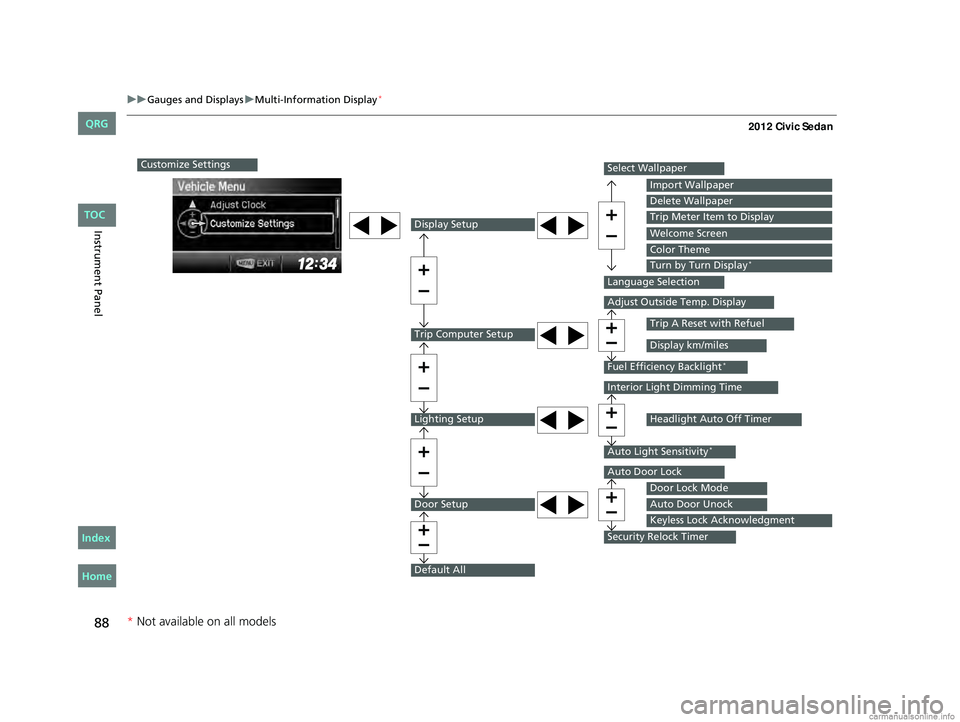
Customize Settings
Display Setup
Trip Computer Setup
Lighting Setup
Door Setup
Default All
Select Wallpaper
Language Selection
Adjust Outside Temp. Display
Fuel Efficiency Backlight*
Interior Light Dimming Time
Auto Light Sensitivity*
Auto Door Lock
Security Relock Timer
Import Wallpaper
Delete Wallpaper
Trip Meter Item to Display
Welcome Screen
Color Theme
Turn by Turn Display*
Trip A Reset with Refuel
Display km/miles
Headlight Auto Off Timer
Door Lock Mode
Auto Door Unock
Keyless Lock Acknowledgment
* Not available on all models
CIVIC 4D-31TR3600.book 88 ページ 2011年2月14日 月曜日 午後2時51分
TOC
Home
QRG
Index