lights HONDA CIVIC SEDAN 2013 Owner's Manual (in English)
[x] Cancel search | Manufacturer: HONDA, Model Year: 2013, Model line: CIVIC SEDAN, Model: HONDA CIVIC SEDAN 2013Pages: 368, PDF Size: 43.54 MB
Page 3 of 368
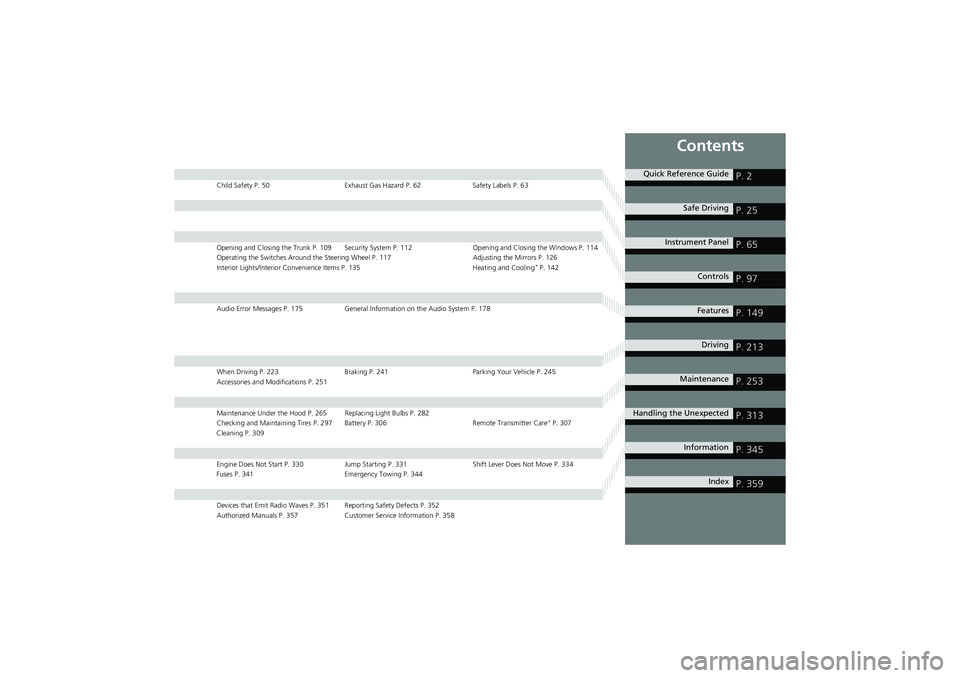
Contents
Child Safety P. 50Exhaust Gas Hazard P. 62 Safety Labels P. 63
Opening and Closing the Trunk P. 109 Security Sy stem P. 112 Opening and Closing the Windows P. 114
Operating the Switches Around the Steering Wheel P. 117 Adjusting the Mirrors P. 126
Interior Lights/Interior Convenience Items P. 135 Heating and Cooling
* P. 142
Audio Error Messages P. 175 General Information on the Audio System P. 178
When Driving P. 223Braking P. 241 Parking Your Vehicle P. 245
Accessories and Modifications P. 251
Maintenance Under the Hood P. 265 Replacing Light Bulbs P. 282
Checking and Maintaining Tires P. 297 Battery P. 306 Remote Transmitter Care* P. 307
Cleaning P. 309
Engine Does Not Start P. 330 Jump Starting P. 331 Shift Lever Does Not Move P. 334
Fuses P. 341 Emergency Towing P. 344
Devices that Emit Radio Waves P. 351 Reporting Safety Defects P. 352
Authorized Manuals P. 357 Customer Service Information P. 358
Quick Reference GuideP. 2
Safe DrivingP. 25
Instrument PanelP. 65
ControlsP. 97
FeaturesP. 149
DrivingP. 213
MaintenanceP. 253
Handling the UnexpectedP. 313
InformationP. 345
IndexP. 359
Page 5 of 368
3
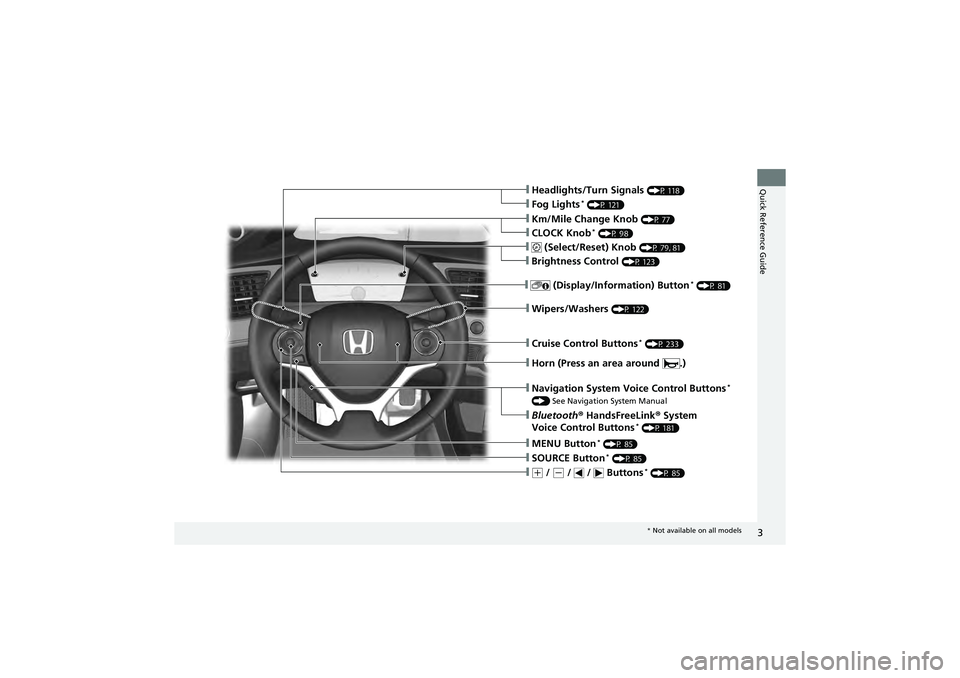
Quick Reference Guide❙Headlights/Turn Signals (P 118)
❙Fog Lights* (P 121)
❙Wipers/Washers (P 122)
❙Cruise Control Buttons* (P 233)
❙Km/Mile Change Knob (P 77)
❙CLOCK Knob* (P 98)
❙MENU Button* (P 85)
❙(+ / (- / / Buttons* (P 85)
❙Navigation System Voice Control Buttons*
() See Navigation System Manual
❙Bluetooth ® HandsFreeLink ® System
Voice Control Buttons* (P 181)
❙ (Select/Reset) Knob (P 79, 81)
❙SOURCE Button* (P 85)
❙ (Display/Information) Button* (P 81)
❙Brightness Control (P 123)
❙Horn (Press an area around .)
* Not available on all models
Page 7 of 368
5
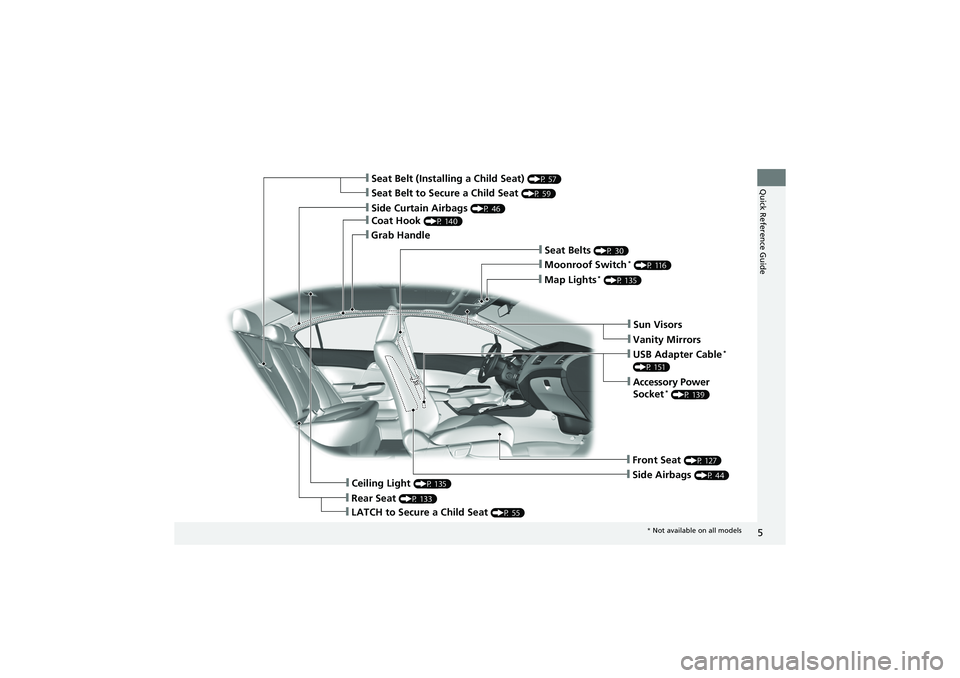
Quick Reference Guide❙Seat Belt to Secure a Child Seat (P 59)
❙Seat Belt (Installing a Child Seat) (P 57)
❙Sun Visors
❙Vanity Mirrors
❙Moonroof Switch* (P 116)
❙Map Lights* (P 135)
❙USB Adapter Cable*
(P 151)
❙Accessory Power
Socket* (P 139)
❙Front Seat (P 127)
❙Seat Belts (P 30)
❙Side Airbags (P 44)
❙Rear Seat (P 133)
❙LATCH to Secure a Child Seat (P 55)
❙Ceiling Light (P 135)
❙Side Curtain Airbags (P 46)
❙Coat Hook (P 140)
❙Grab Handle
* Not available on all models
Page 8 of 368
Visual Index
6
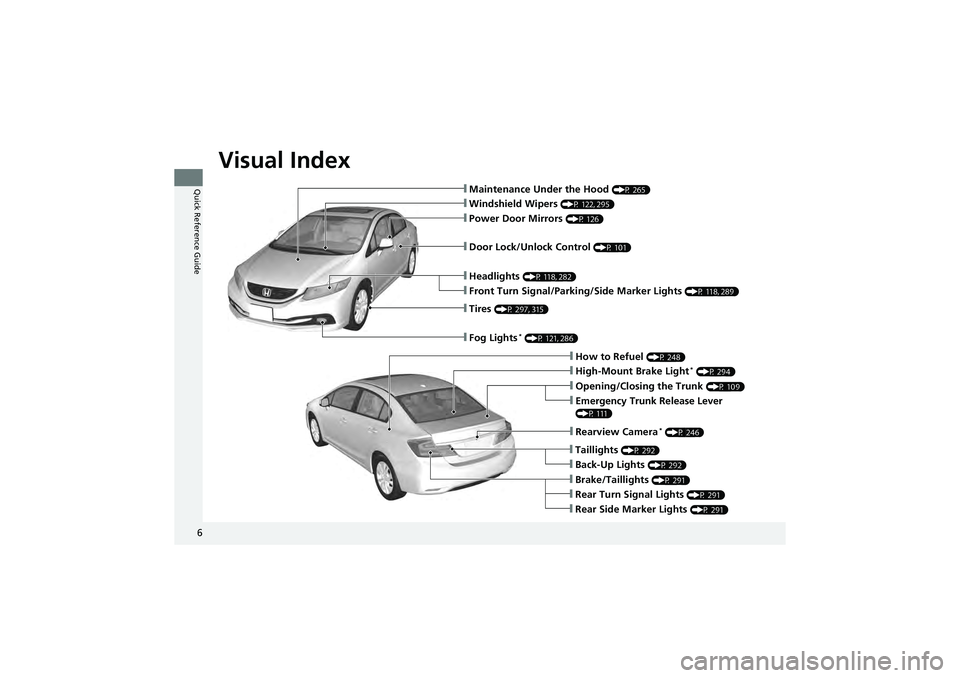
Quick Reference Guide❙Maintenance Under the Hood (P 265)
❙Windshield Wipers (P 122, 295)
❙Tires (P 297, 315)
❙Fog Lights* (P 121, 286)
❙Door Lock/Unlock Control (P 101)
❙Power Door Mirrors (P 126)
❙Headlights (P 118, 282)
❙Front Turn Signal/Parking/Side Marker Lights (P 118, 289)
❙How to Refuel (P 248)
❙High-Mount Brake Light* (P 294)
❙Emergency Trunk Release Lever
(P 111)
❙Opening/Closing the Trunk (P 109)
❙Rearview Camera* (P 246)
❙Back-Up Lights (P 292)
❙Taillights (P 292)
❙Brake/Taillights (P 291)
❙Rear Turn Signal Lights (P 291)
❙Rear Side Marker Lights (P 291)
Page 11 of 368
9
Quick Reference Guide
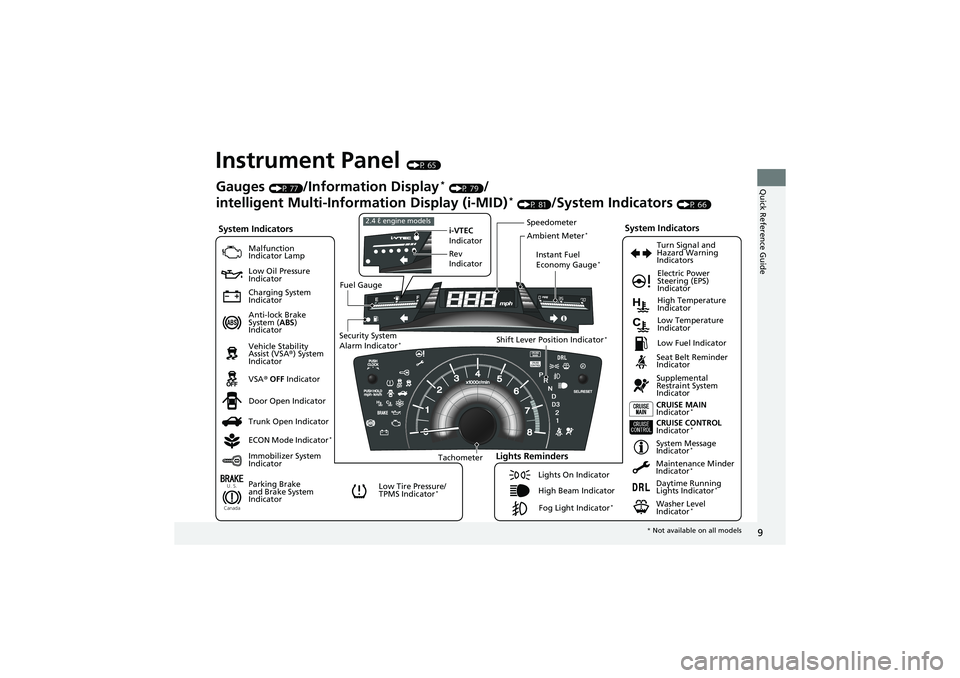
Instrument Panel (P 65)
U. S.
Canada
System Indicators
Malfunction
Indicator Lamp
Low Oil Pressure
Indicator
Charging System
Indicator
Anti-lock Brake
System (ABS)
Indicator
Vehicle Stability
Assist (VSA ®) System
Indicator
VSA ® OFF Indicator
Low Tire Pressure/
TPMS Indicator
*
Electric Power
Steering (EPS)
Indicator
Lights Reminders
Lights On Indicator
High Beam IndicatorFog Light Indicator
*
Immobilizer System
Indicator Seat Belt Reminder
Indicator
System Indicators
CRUISE CONTROL
Indicator*
System Message
Indicator*
Parking Brake
and Brake System
IndicatorSupplemental
Restraint System
Indicator
Door Open Indicator CRUISE MAIN
Indicator
*
Tachometer Instant Fuel
Economy Gauge
*
Speedometer
Fuel Gauge
Security System
Alarm Indicator
*Shift Lever Position Indicator*Low Fuel Indicator
Gauges (P 77)/Information Display* (P 79)/
intelligent Multi-Inform ation Display (i-MID)
* (P 81)/System Indicators (P 66)
Trunk Open Indicator
ECON Mode Indicator
*
Turn Signal and
Hazard Warning
Indicators
High Temperature
Indicator
Low Temperature
Indicator
Maintenance Minder
Indicator
*
Daytime Running
Lights Indicator*
Washer Level
Indicator*
i-VTEC
Indicator
Rev
Indicator2.4 ℓ engine models
Ambient Meter*
* Not available on all models
Page 12 of 368
10
Quick Reference Guide
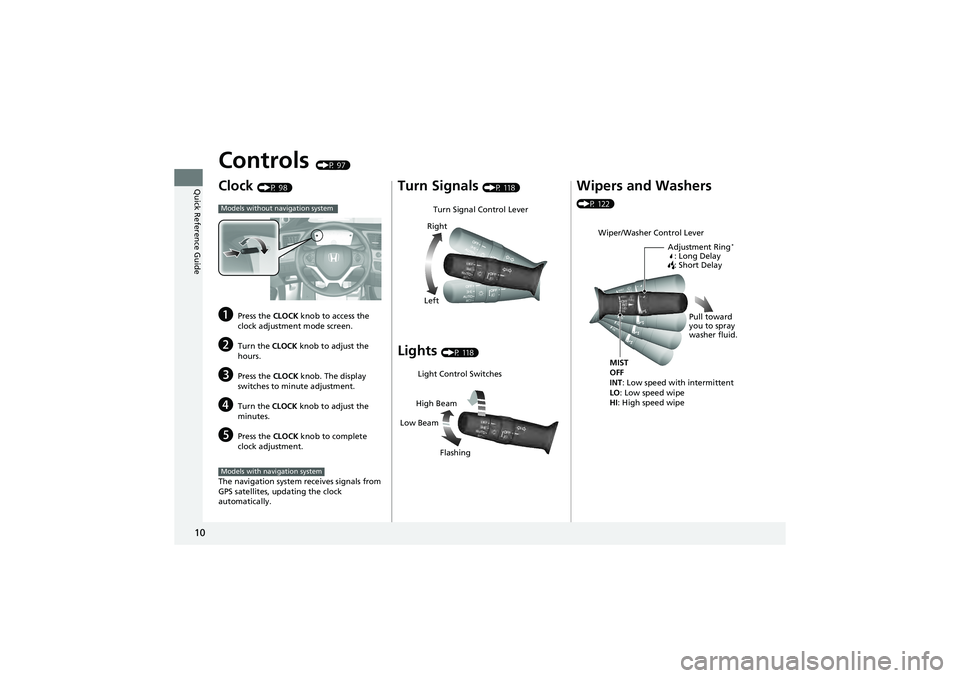
Controls (P 97)
Clock (P 98)
aPress the CLOCK knob to access the
clock adjustment mode screen.
bTurn the CLOCK knob to adjust the
hours.
cPress the CLOCK knob. The display
switches to minute adjustment.
dTurn the CLOCK knob to adjust the
minutes.
ePress the CLOCK knob to complete
clock adjustment.
The navigation system receives signals from
GPS satellites, updating the clock
automatically.
Models without navigation system
Models with navigation system
Turn Signals (P 118)
Lights (P 118)
Turn Signal Control Lever
Right
Left
Light Control Switches
Low Beam High Beam
Flashing
Wipers and Washers
(P 122)
Wiper/Washer Control Lever Adjustment Ring
*
: Long Delay
: Short Delay
MIST
OFF
INT: Low speed with intermittent
LO : Low speed wipe
HI : High speed wipe Pull toward
you to spray
washer fluid.
Page 20 of 368
18
Quick Reference Guide
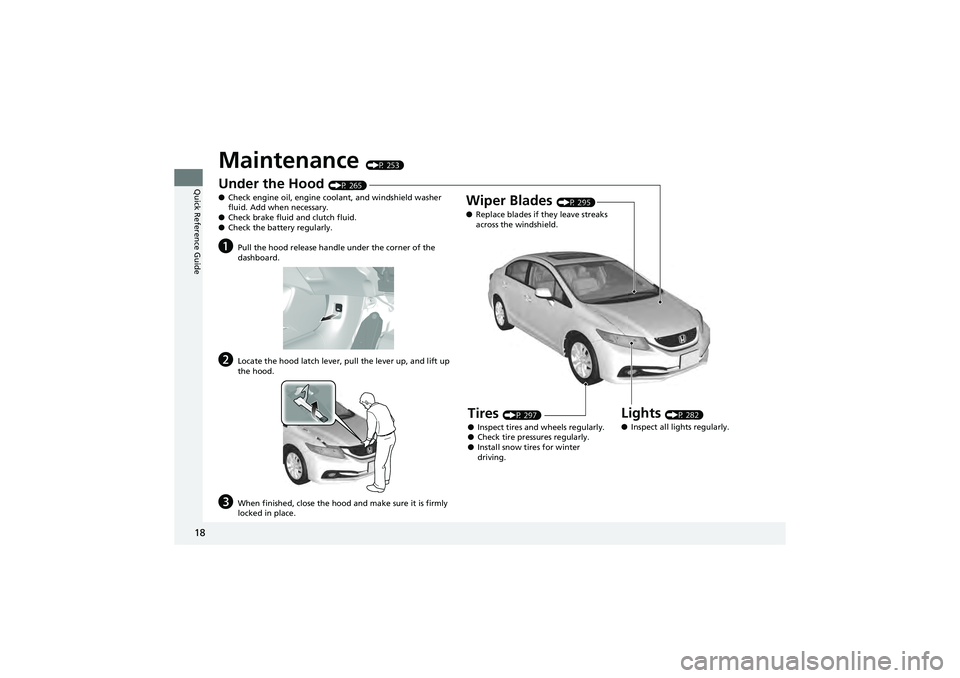
Maintenance (P 253)
Under the Hood (P 265)
● Check engine oil, engine coolant, and windshield washer
fluid. Add when necessary.
● Check brake fluid and clutch fluid.
● Check the battery regularly.
aPull the hood release handle under the corner of the
dashboard.
bLocate the hood latch lever, pull the lever up, and lift up
the hood.
cWhen finished, clos e the hood and make su re it is firmly
locked in place.
Lights (P 282)
● Inspect all lights regularly.
Wiper Blades (P 295)
● Replace blades if they leave streaks
across the windshield.
Tires (P 297)
● Inspect tires and wheels regularly.
● Check tire pre ssures regularly.
● Install snow tires for winter
driving.
Page 23 of 368
21
Quick Reference GuideWhy do the doors lock
after I unlocked the doors
using a remote
transmitter?
If you do not open the doors within 30 seconds, the doors are
relocked automatica lly for security.
Why does the beeper
sound when I open the
driver's door?The beeper sounds when:
●The key is left in the ignition switch.
●The exterior lights are left on.
Why does the beeper
sound when I start driving?The beeper sounds when:
●Driver and/or front passenger ar e not wearing their seat belts.
●The parking brake lever is not fully released.
Why do I hear a screeching
sound when I apply the
brake pedal?The brake pads may need to be replaced. Have your vehicle
inspected by a dealer.
Is it possible to use
unleaded gasoline with a
Pump Octane Number
(PON) of 87 or higher on
this vehicle?
Unleaded gasoline with a pump octane number of 91 or higher
is recommended.
If premium unleaded gasoline with a PON of 91 or higher is not
available, you can temporarily us e the gasoline with a PON of
87 or higher.
This will result in decreased engine performance, and can cause
occasional metallic knocki ng noise in the engine.
Models with remote transmitter
2.4 ℓ engine models
Page 73 of 368
71
uuIndicators u
Continued
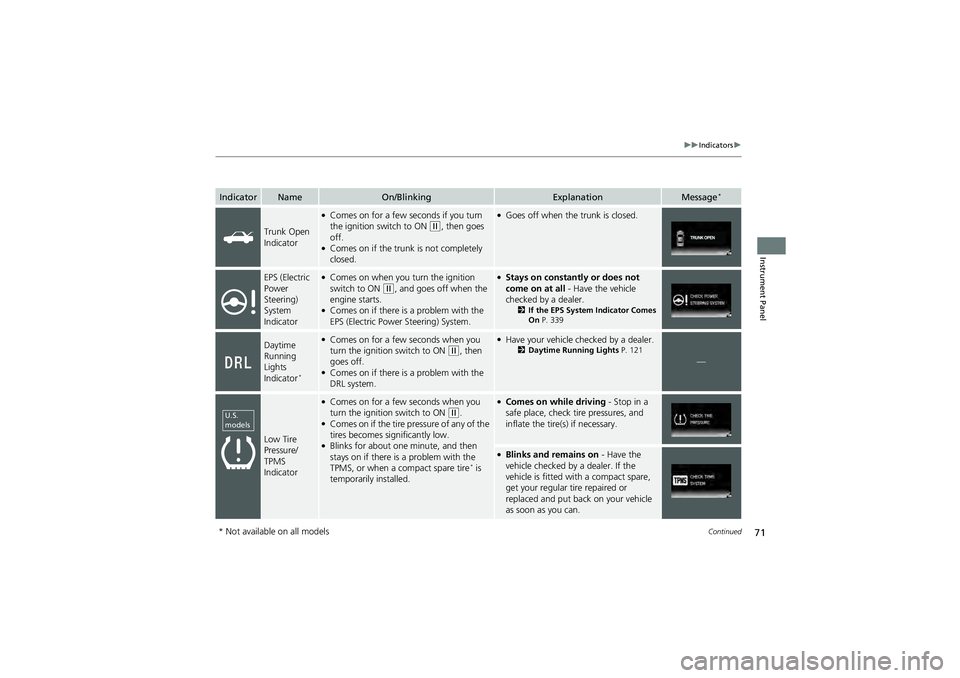
Instrument Panel
IndicatorNameOn/BlinkingExplanationMessage*
Trunk Open
Indicator
●Comes on for a few se conds if you turn
the ignition sw itch to ON (w, then goes
off.
●Comes on if the trunk is not completely
closed.
●Goes off when the trunk is closed.
EPS (Electric
Power
Steering)
System
Indicator●Comes on when you turn the ignition
switch to ON (w, and goes off when the
engine starts.
●Comes on if there is a problem with the
EPS (Electric Power Steering) System.
●Stays on constantly or does not
come on at all - Have the vehicle
checked by a dealer.
2 If the EPS System Indicator Comes
On P. 339
Daytime
Running
Lights
Indicator
*
●Comes on for a few seconds when you
turn the ignition switch to ON (w, then
goes off.
●Comes on if there is a problem with the
DRL system.
●Have your vehicle ch ecked by a dealer.2Daytime Running Lights P. 121
—
Low Tire
Pressure/
TPMS
Indicator
●Comes on for a few seconds when you
turn the ignition switch to ON (w.●Comes on if the tire pressure of any of the
tires becomes significantly low.
●Blinks for about on e minute, and then
stays on if there is a problem with the
TPMS, or when a compact spare tire
* is
temporarily installed.
●Comes on while driving - Stop in a
safe place, check tire pressures, and
inflate the tire(s) if necessary.
●Blinks and remains on - Have the
vehicle checked by a dealer. If the
vehicle is fitted with a compact spare,
get your regular tire repaired or
replaced and put back on your vehicle
as soon as you can.
U.S.
models
* Not available on all models
Page 74 of 368
72
uuIndicators u
Instrument Panel
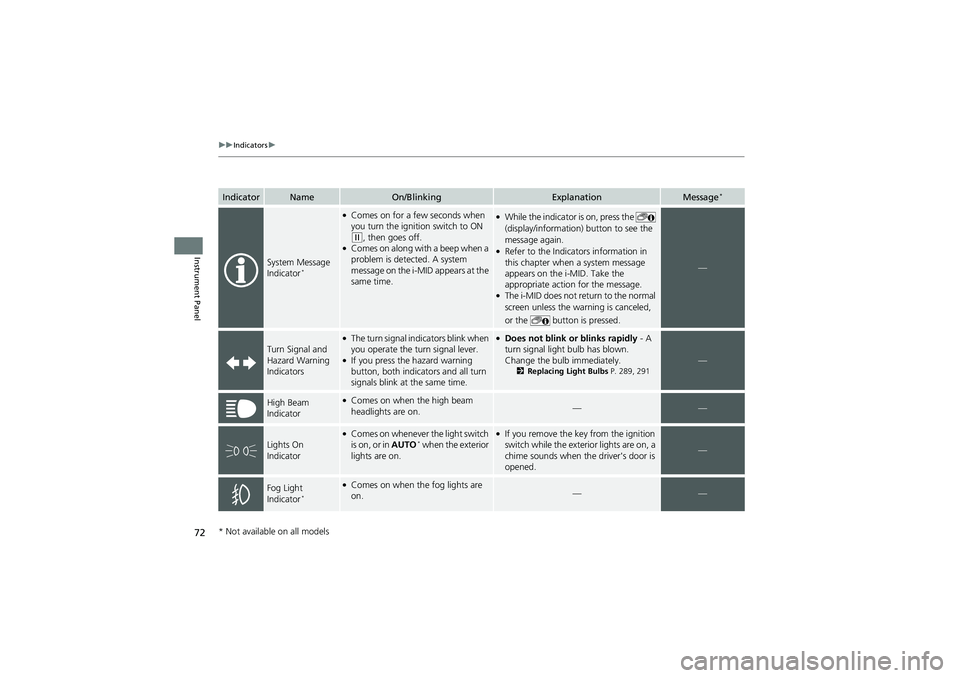
IndicatorNameOn/BlinkingExplanationMessage*
System Message
Indicator*
●Comes on for a few seconds when
you turn the ignition switch to ON
(w, then goes off.●Comes on along with a beep when a
problem is detected. A system
message on the i-MID appears at the
same time.
●While the indicator is on, press the
(display/information) button to see the
message again.
●Refer to the Indicators information in
this chapter when a system message
appears on the i-MID. Take the
appropriate action for the message.
●The i-MID does not re turn to the normal
screen unless the wa rning is canceled,
or the button is pressed.
—
Turn Signal and
Hazard Warning
Indicators
●The turn signal indicators blink when
you operate the turn signal lever.
●If you press the hazard warning
button, both indica tors and all turn
signals blink at the same time.
●Does not blink or blinks rapidly - A
turn signal light bulb has blown.
Change the bulb immediately.
2 Replacing Light Bulbs P. 289, 291 —
High Beam
Indicator●Comes on when the high beam
headlights are on.——
Lights On
Indicator
●Comes on whenever the light switch
is on, or in AUTO* when the exterior
lights are on.
●If you remove the key from the ignition
switch while the exterior lights are on, a
chime sounds when the driver's door is
opened.
—
Fog Light
Indicator*
●Comes on when the fog lights are
on.——
* Not available on all models