automatic transmission HONDA CIVIC SEDAN 2014 Owner's Manual (in English)
[x] Cancel search | Manufacturer: HONDA, Model Year: 2014, Model line: CIVIC SEDAN, Model: HONDA CIVIC SEDAN 2014Pages: 469, PDF Size: 21.06 MB
Page 5 of 469
Visual Index
4
Quick Reference Guide
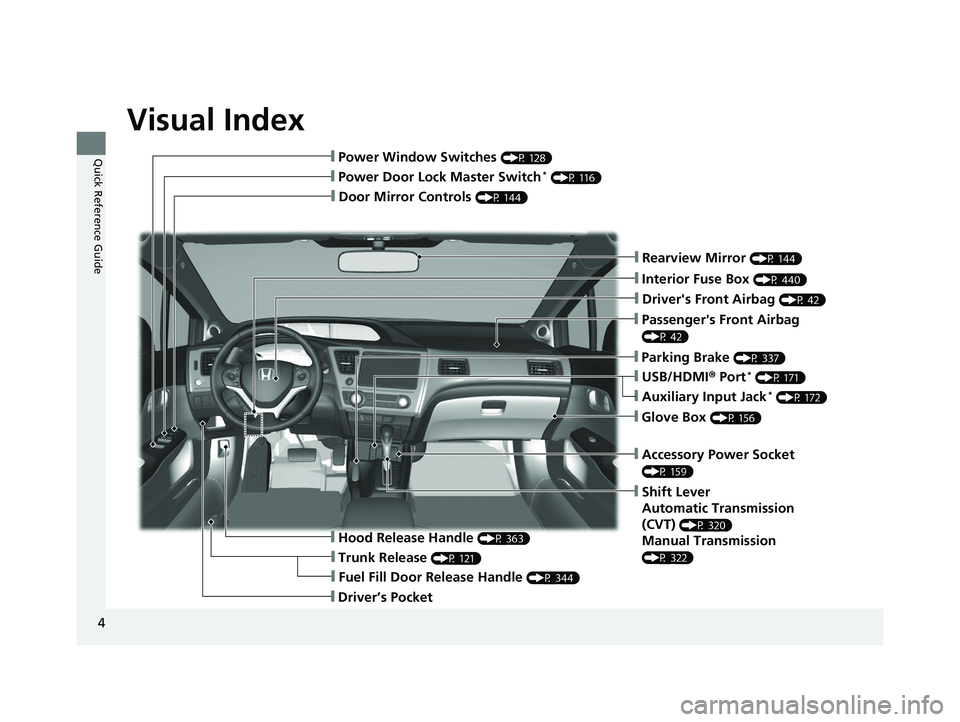
❙Door Mirror Controls (P 144)
❙Passenger's Front Airbag
(P 42)
❙Parking Brake (P 337)
❙Glove Box (P 156)
❙Rearview Mirror (P 144)
❙Accessory Power Socket
(P 159)
❙Shift Lever
Automatic Transmission
(CVT)
(P 320)
Manual Transmission
(P 322)
❙Hood Release Handle (P 363)
❙Fuel Fill Door Release Handle (P 344)
❙Driver’s Pocket
❙Trunk Release (P 121)
❙Power Door Lock Master Switch* (P 116)
❙Power Window Switches (P 128)
❙USB/HDMI® Port* (P 171)
❙Interior Fuse Box (P 440)
❙Driver's Front Airbag (P 42)
❙Auxiliary Input Jack* (P 172)
14 CIVIC 4D_SI-31TR36210.book 4 ページ 2014年1月30日 木曜日 午後12時18分
Page 18 of 469
17
Quick Reference Guide
Driving (P 303)
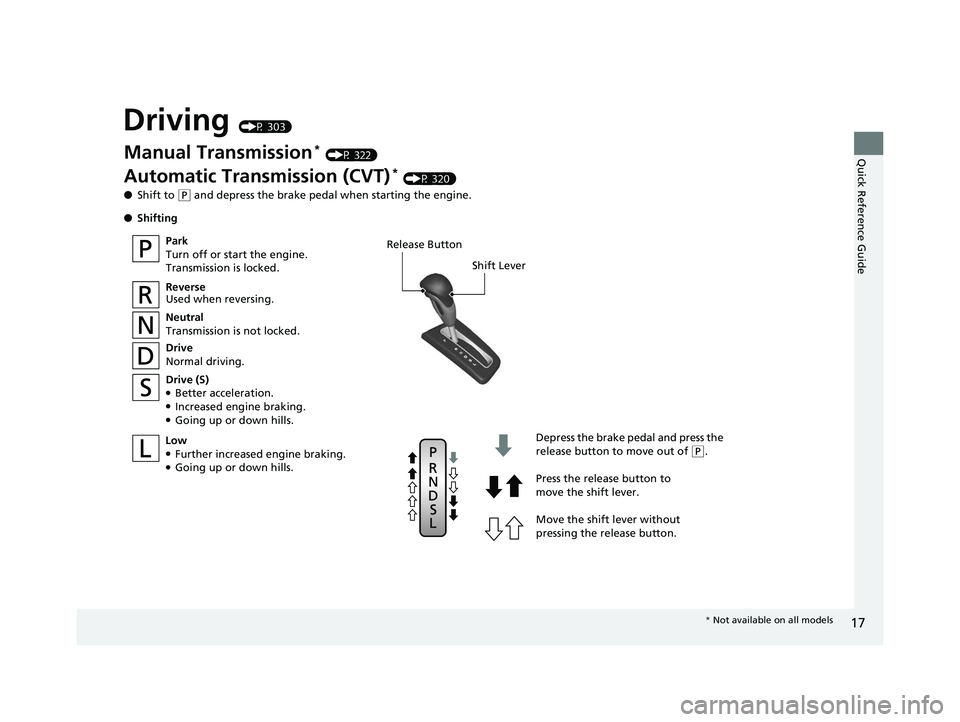
Release ButtonShift Lever
Depress the brake pedal and press the
release button to move out of
(P.
Move the shift lever without
pressing the release button. Press the release button to
move the shift lever.
Manual Transmission* (P 322)
Automatic Transmission (CVT)* (P 320)
● Shift to
(P and depress the brake pedal when starting the engine.
● Shifting
Park
Turn off or start the engine.
Transmission is locked.
Reverse
Used when reversing.
Neutral
Transmission is not locked.
Drive
Normal driving.
Drive (S)
●Better acceleration.●Increased engine braking.●Going up or down hills.
Low
●Further increased engine braking.●Going up or down hills.
* Not available on all models
14 CIVIC 4D_SI-31TR36210.book 17 ページ 2014年1月30日 木曜日 午後12時18分
Page 22 of 469
21
Quick Reference Guide
What to Do If
*1:Models with the smart entry system have an ENGINE START/STOP button instead of an ignition switch.*2:Except U.S. models with automatic transmission (CVT)
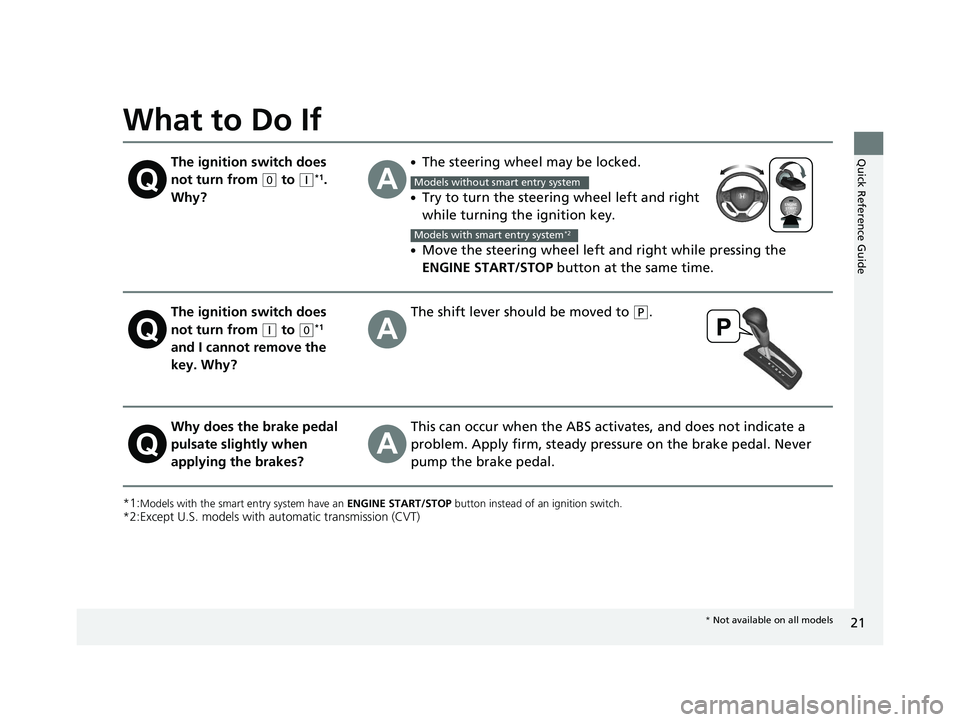
The ignition switch does
not turn from
(0 to (q*1.
Why?
●The steering wheel may be locked.
●Try to turn the steering wheel left and right
while turning the ignition key.
●Move the steering wheel left and right while pressing the
ENGINE START/STOP button at the same time.
The ignition switch does
not turn from
(q to (0*1
and I cannot remove the
key. Why?
The shift lever should be moved to (P.
Why does the brake pedal
pulsate slightly when
applying the brakes?This can occur when the ABS activates, and does not indicate a
problem. Apply firm, steady pressure on the brake pedal. Never
pump the brake pedal.
Models without smart entry system
Models with smart entry system*2
* Not available on all models
14 CIVIC 4D_SI-31TR36210.book 21 ページ 2014年1月30日 木曜日 午後12時18分
Page 80 of 469
79
uuIndicators uintelligent Multi-Information Display (i -MID) Warning and Information Messages*
Continued
Instrument Panel
MessageConditionExplanation
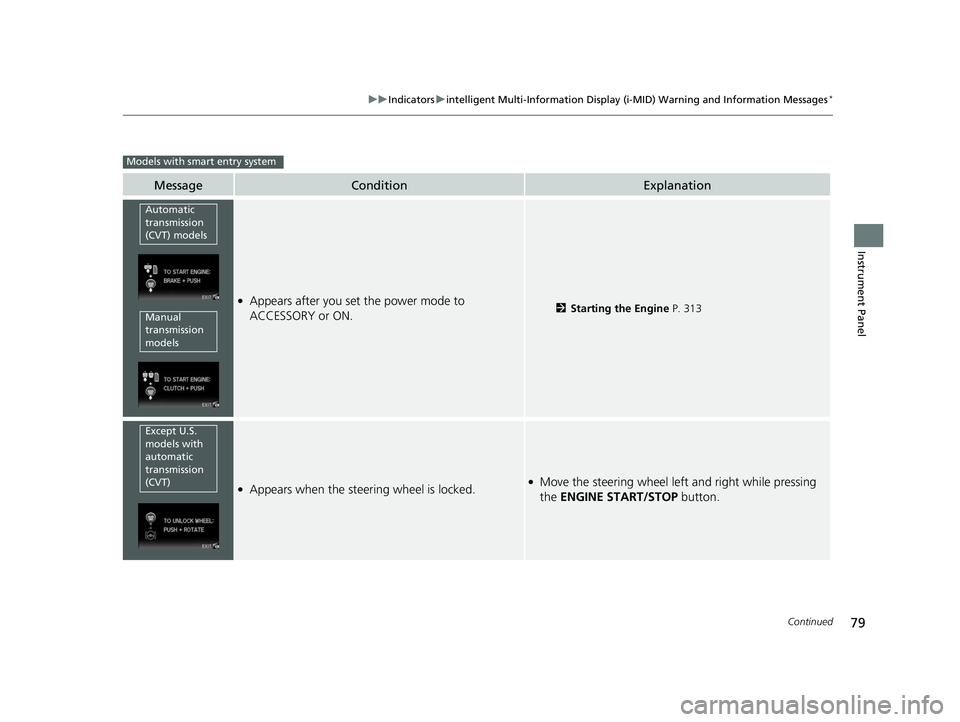
●Appears after you set the power mode to
ACCESSORY or ON.2Starting the Engine P. 313
●Appears when the steering wheel is locked.●Move the steering wheel left and right while pressing
the ENGINE START/STOP button.
Models with smart entry system
Automatic
transmission
(CVT) models
Manual
transmission
models
Except U.S.
models with
automatic
transmission
(CVT)
14 CIVIC 4D_SI-31TR36210.book 79 ページ 2014年1月30日 木曜日 午後12時18分
Page 81 of 469
80
uuIndicators uintelligent Multi-Informat ion Display (i-MID) Warning and Information Messages*
Instrument Panel
MessageConditionExplanation
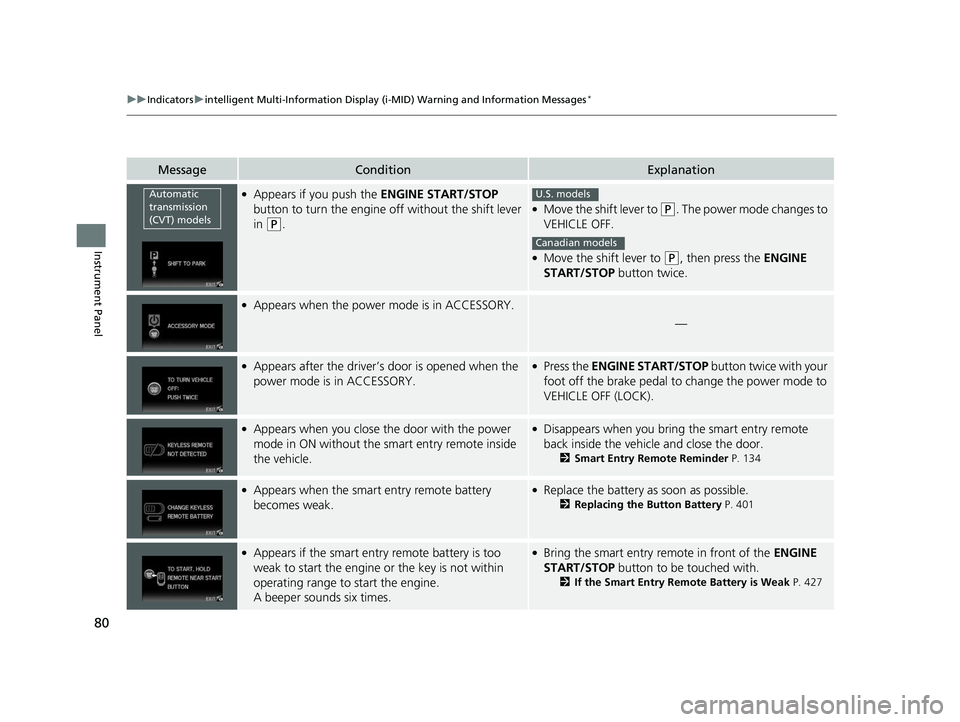
●Appears if you push the ENGINE START/STOP
button to turn the engine off without the shift lever
in
(P.
●Move the shift lever to (P. The power mode changes to
VEHICLE OFF.
●Move the shift lever to ( P, then press the ENGINE
START/STOP button twice.
●Appears when the power mode is in ACCESSORY.
—
●Appears after the driver’s door is opened when the
power mode is in ACCESSORY.●Press the ENGINE START/STOP button twice with your
foot off the brake pedal to change the power mode to
VEHICLE OFF (LOCK).
●Appears when you close the door with the power
mode in ON without the smart entry remote inside
the vehicle.●Disappears when you bring the smart entry remote
back inside the vehicle and close the door.
2 Smart Entry Remote Reminder P. 134
●Appears when the smart entry remote battery
becomes weak.●Replace the battery as soon as possible.
2Replacing the Button Battery P. 401
●Appears if the smart entry remote battery is too
weak to start the engine or the key is not within
operating range to start the engine.
A beeper sounds six times.●Bring the smart entry remote in front of the ENGINE
START/STOP button to be touched with.
2If the Smart Entry Remote Battery is Weak P. 427
Automatic
transmission
(CVT) modelsU.S. models
Canadian models
14 CIVIC 4D_SI-31TR36210.book 80 ページ 2014年1月30日 木曜日 午後12時18分
Page 119 of 469
118
uuLocking and Unlocking the Doors uCustomizing the Auto Door Locking/Unlocking Setting*
Controls
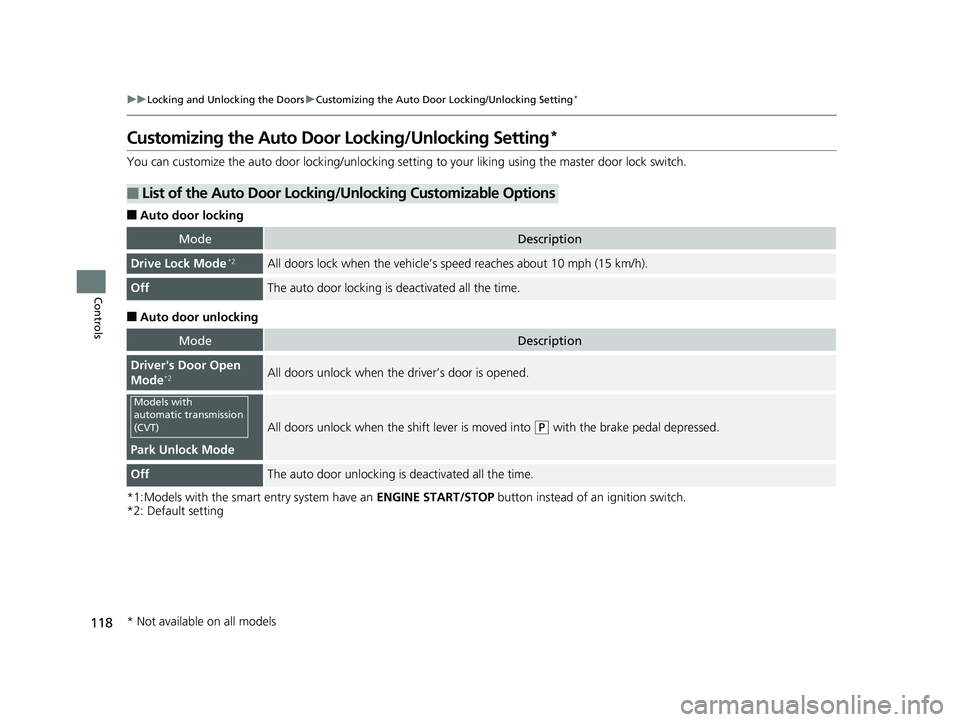
Customizing the Auto Door Locking/Unlocking Setting*
You can customize the auto door locking/unlocking setting to your liking using the master door lock switch.
■Auto door locking
■Auto door unlocking
*1:Models with the smart entry system have an ENGINE START/STOP button instead of an ignition switch.
*2: Default setting
■List of the Auto Door Locking/Unlocking Customizable Options
ModeDescription
Drive Lock Mode*2All doors lock when the vehicle’s sp eed reaches about 10 mph (15 km/h).
OffThe auto door locking is deactivated all the time.
ModeDescription
Driver's Door Open
Mode*2All doors unlock when the driver’s door is opened.
Park Unlock Mode
All doors unlock when the shift lever is moved into (P with the brake pedal depressed.
OffThe auto door unlocking is deactivated all the time.
Models with
automatic transmission
(CVT)
* Not available on all models
14 CIVIC 4D_SI-31TR36210.book 118 ページ 2014年1月30日 木曜日 午後12時18分
Page 120 of 469
119
uuLocking and Unlocking the Doors uCustomizing the Auto Door Locking/Unlocking Setting*
Continued
Controls
*1:Models with the smart entry system have an ENGINE START/STOP button instead of an ignition switch.
*2: Default setting
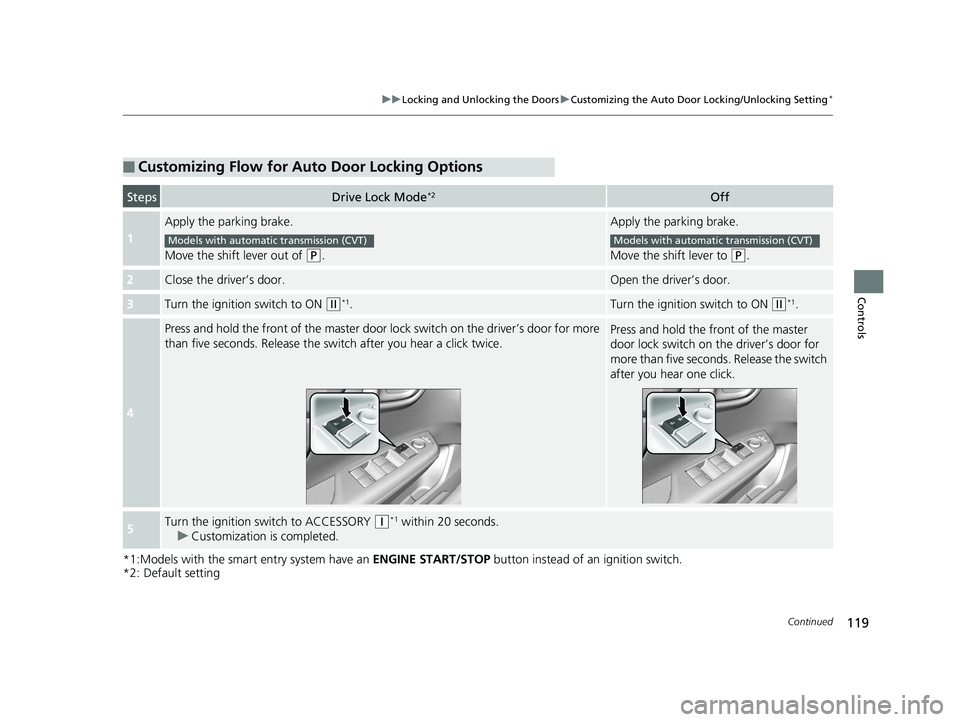
■Customizing Flow for Auto Door Locking Options
StepsDrive Lock Mode*2Off
1
Apply the parking brake.
Move the shift lever out of
(P.
Apply the parking brake.
Move the shift lever to
(P.
2Close the driver’s door.Open the driver’s door.
3Turn the ignition switch to ON (w*1.Turn the ignition switch to ON (w*1.
4
Press and hold the front of the master door lo ck switch on the driver’s door for more
than five seconds. Release the switch after you hear a click twice.Press and hold the front of the master
door lock switch on the driver’s door for
more than five seconds. Release the switch
after you hear one click.
5Turn the ignition sw itch to ACCESSORY (q*1 within 20 seconds.
u Customization is completed.
Models with automatic transmission (CVT)Models with automatic transmission (CVT)
14 CIVIC 4D_SI-31TR36210.book 119 ページ 2014年1月30日 木曜日 午後12時18分
Page 121 of 469
120
uuLocking and Unlocking the Doors uCustomizing the Auto Door Locking/Unlocking Setting*
Controls
*1:Models with the smart entry system have an ENGINE START/STOP button instead of an ignition switch.
*2: Default setting
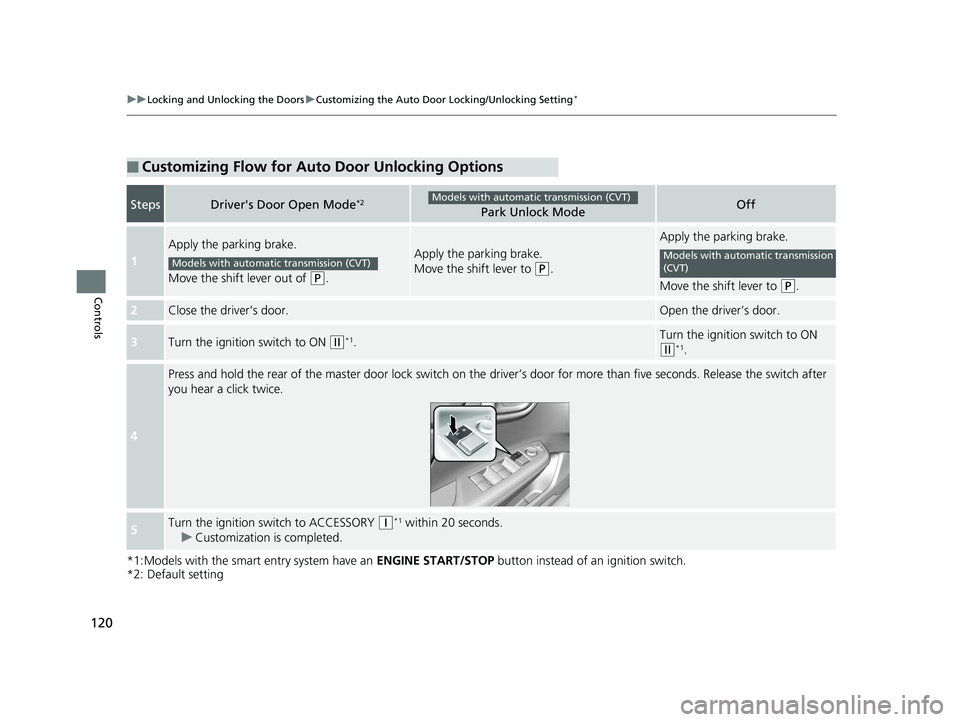
■Customizing Flow for Auto Door Unlocking Options
StepsDriver's Door Open Mode*2Park Unlock ModeOff
1
Apply the parking brake.
Move the shift lever out of
(P.
Apply the parking brake.
Move the shift lever to
(P.
Apply the parking brake.
Move the shift lever to
(P.
2Close the driver’s door.Open the driver’s door.
3Turn the ignition switch to ON (w*1.Turn the ignition switch to ON
(w*1.
4
Press and hold the rear of the ma ster door lock switch on the driver’s door for more than five seconds. Release the switch afte r
you hear a click twice.
5Turn the ignition switch to ACCESSORY (q*1 within 20 seconds.
u Customization is completed.
Models with automatic transmission (CVT)
Models with automatic transmission (CVT)Models with automatic transmission
(CVT)
14 CIVIC 4D_SI-31TR36210.book 120 ページ 2014年1月30日 木曜日 午後12時18分
Page 126 of 469
125Continued
Controls
Security System
Immobilizer System
The immobilizer system prevents a key that has not been pre-registered from
starting the engine. Each key contains electronic transmitters that use electronic
signals to verify the key.
Pay attention to the following when insert ing the key into the ignition switch or
pressing the ENGINE START/STOP button:
• Do not allow objects that emit strong ra dio waves near the ignition switch or the
ENGINE START/STOP button.
• Make sure the key is not covered by or touching a metal object.
• Do not bring a key from another vehicle's immobilizer system near the ignition
switch.
Security System Alarm*
The security system alarm activates when the trunk, hood or doors are forcibly
opened. The alarm does not go off if the trunk or doors are opened with the key,
remote transmitter or smart entry system.
However, the alarm goes off when a door is opened with the key, then the shift
lever is moved out of
(P (automatic transmission/CVT models) or the hood is
opened before the ignition switch is turned to ON
(w*1.
■When the security system alarm activates
The horn sounds intermittently and all the exterior lights flash.
■To deactivate the security system alarm
Unlock the vehicle using remote transmitte r, or smart entry system. The system,
along with the horn and flashing lights, is deactivated.
*1: Models with the smart entry system have an ENGINE START/STOP button instead of an
ignition switch.
1 Immobilizer System
NOTICE
Leaving the ignition key in the vehicle can result in
theft or accidental move ment of the vehicle.
Always take the ignition key with you whenever you
leave the vehicle unattended.
Do not alter the system or add other devices to it.
Doing so may damage the system and make your
vehicle inoperable.
1 Security System Alarm*
The security alarm continues for a maximum of two
minutes until the security system deactivates.
* Not available on all models
14 CIVIC 4D_SI-31TR36210.book 125 ページ 2014年1月30日 木曜日 午後12時18分
Page 127 of 469
uuSecurity System uSecurity System Alarm*
126
Controls
■Setting the security system alarm
The security system alarm automatically sets when the following conditions have
been met:
• The ignition switch is in LOCK
(0*1, and the key has been removed from the
ignition switch.
• The hood and trunk are closed.
• All doors are locked with the key, the re mote transmitter, or smart entry system.
■When the security system alarm sets
The security system indicator in the in strument panel blinks. When the blinking
interval changes after about 15 seconds, the security system is set.
■To cancel the security system alarm
The security system is canceled when th e vehicle is unlocked using the remote
transmitter, smart entry system, or the ignition switch is turned to ON
(w*1. The
security system indicator goes off at the same time.
*1: Models with the smart entry system have an ENGINE START/STOP button instead of an
ignition switch.
1 Security System Alarm*
Do not set the security system alarm when someone
is in the vehicle or a window is open. The system can
accidentally activate when:
•Unlocking the door with the lock tab.•Opening the trunk with the trunk release or the
emergency trunk opener.
•Opening the hood with the hood release.
•Moving the shift lever out of ( P.
If the battery goes dead after you have set the
security system alarm, the security alarm may go off
once the battery is re charged or replaced.
If this occurs, deactivate the security system alarm by
unlocking a door using the remote transmitter.
Do not attempt to alter th is system or add another
device to it.
Automatic transmission/CVT models
* Not available on all models
14 CIVIC 4D_SI-31TR36210.book 126 ページ 2014年1月30日 木曜日 午後12時18分