brake light HONDA CIVIC SEDAN 2016 (in English) User Guide
[x] Cancel search | Manufacturer: HONDA, Model Year: 2016, Model line: CIVIC SEDAN, Model: HONDA CIVIC SEDAN 2016Pages: 595, PDF Size: 33.34 MB
Page 400 of 595
398
uuWhen Driving uStarting the Engine
Driving
Starting the Engine
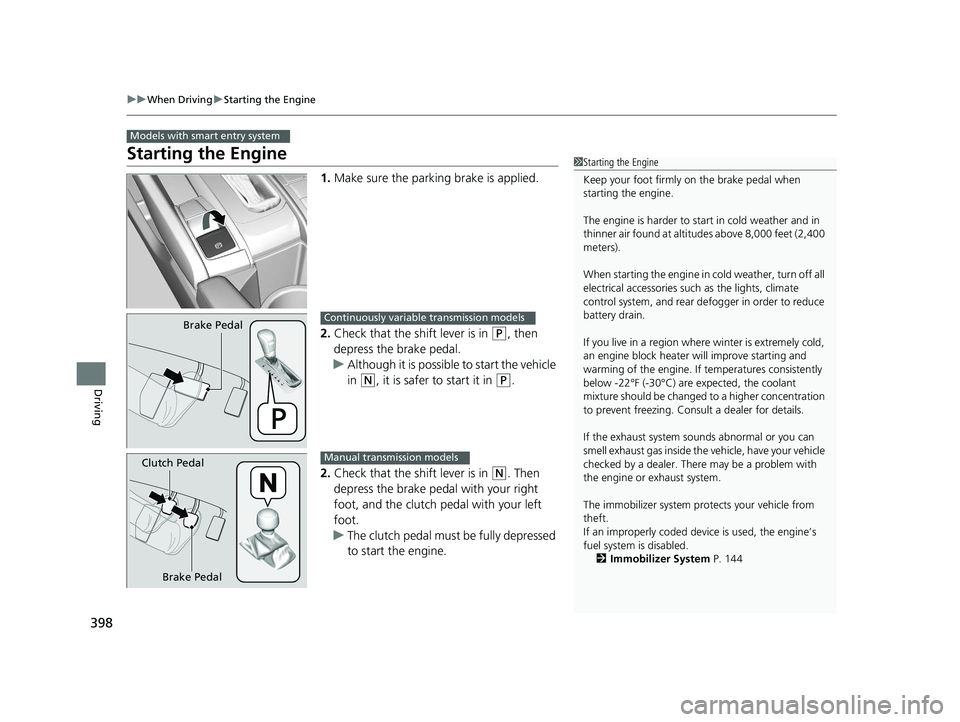
1. Make sure the parking brake is applied.
2. Check that the shift lever is in
(P, then
depress the brake pedal.
u Although it is possible to start the vehicle
in
(N, it is safer to start it in (P.
2. Check that the shift lever is in
(N. Then
depress the brake pedal with your right
foot, and the clutch pedal with your left
foot.
u The clutch pedal must be fully depressed
to start the engine.
Models with smart entry system
1Starting the Engine
Keep your foot firmly on the brake pedal when
starting the engine.
The engine is harder to st art in cold weather and in
thinner air found at altitudes above 8,000 feet (2,400
meters).
When starting the engine in cold weather, turn off all
electrical accessories such as the lights, climate
control system, and rear de fogger in order to reduce
battery drain.
If you live in a region where winter is extremely cold,
an engine block heater will improve starting and
warming of the engine. If temperatures consistently
below -22°F (-30°C) are expected, the coolant
mixture should be changed to a higher concentration
to prevent freezing. Cons ult a dealer for details.
If the exhaust system sounds abnormal or you can
smell exhaust gas inside the vehicle, have your vehicle
checked by a dealer. There may be a problem with
the engine or exhaust system.
The immobilizer system pr otects your vehicle from
theft.
If an improperly c oded device is used, the engine’s
fuel system is disabled. 2 Immobilizer System P. 144
Brake PedalContinuously variable transmission models
Brake Pedal
Clutch Pedal
Manual transmission models
16 CIVIC 4D-31TBA6011.book 398 ページ 2018年10月26日 金曜日 午前11時51分
Page 402 of 595
uuWhen Driving uStarting the Engine
400
Driving
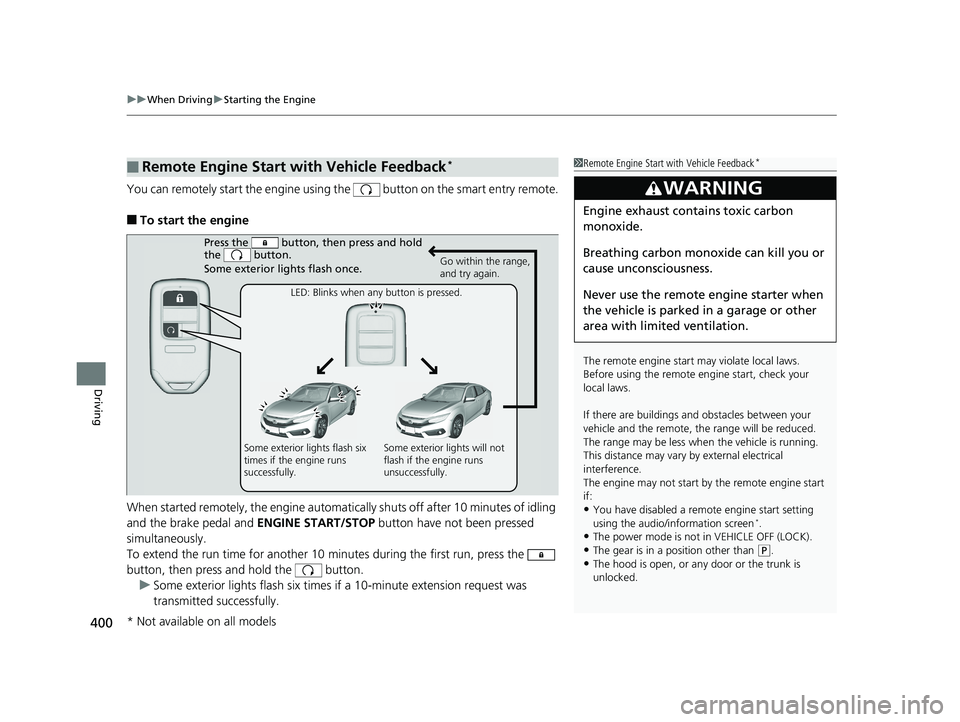
You can remotely start the engine using the button on the smart entry remote.
■To start the engine
When started remotely, the engine automati cally shuts off after 10 minutes of idling
and the brake pedal and ENGINE START/STOP button have not been pressed
simultaneously.
To extend the run time for another 10 minutes during the first run, press the
button, then press and hold the button. u Some exterior lights flash six times if a 10-minute extension request was
transmitted successfully.
■Remote Engine Start with Vehicle Feedback*1Remote Engine Start with Vehicle Feedback*
The remote engine start may violate local laws.
Before using the remote e ngine start, check your
local laws.
If there are buildings an d obstacles between your
vehicle and the remote, th e range will be reduced.
The range may be less when the vehicle is running.
This distance may vary by external electrical
interference.
The engine may not start by the remote engine start
if:
•You have disabled a remo te engine start setting
using the audio/information screen*.
•The power mode is not in VEHICLE OFF (LOCK).•The gear is in a position other than ( P.
•The hood is open, or any door or the trunk is
unlocked.
3WARNING
Engine exhaust contains toxic carbon
monoxide.
Breathing carbon monoxide can kill you or
cause unconsciousness.
Never use the remote engine starter when
the vehicle is parked in a garage or other
area with limited ventilation.
Press the button, th en press and hold
the button.
Some exterior lights flash once.
Go within the range,
and try again.
LED: Blinks when any button is pressed.
Some exterior lights flash six
times if the engine runs
successfully. Some exterior lights will not
flash if the engine runs
unsuccessfully.
* Not available on all models
16 CIVIC 4D-31TBA6011.book 400 ページ 2018年10月26日 金曜日 午前11時51分
Page 407 of 595
405
uuWhen Driving uShifting
Continued
Driving
Shifting
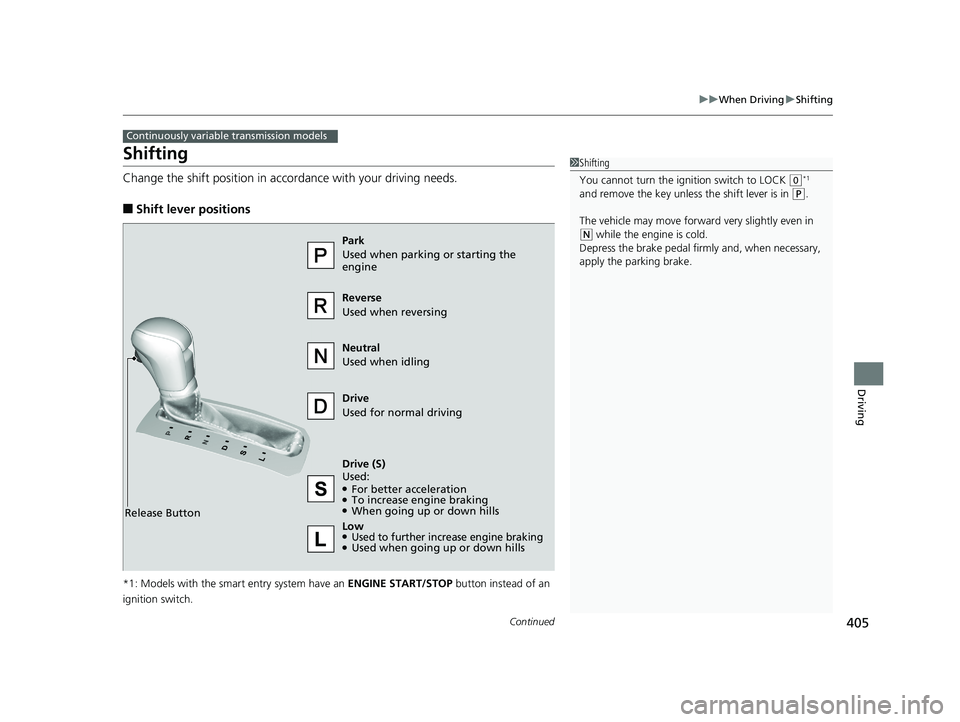
Change the shift position in accordance with your driving needs.
■Shift lever positions
*1: Models with the smart entry system have an ENGINE START/STOP button instead of an
ignition switch.
Continuously variable transmission models
1 Shifting
You cannot turn the ignition switch to LOCK
(0*1
and remove the key unless the shift lever is in
( P.
The vehicle may move forwar d very slightly even in
(N while the engine is cold.
Depress the brake pedal firm ly and, when necessary,
apply the parking brake.
Reverse
Used when reversing
Drive
Used for normal driving
Park
Used when parking or starting the
engine
Neutral
Used when idling
Release Button
Drive (S)
Used:
●For better acceleration●To increase engine braking●When going up or down hills
Low
●Used to further increase engine braking●Used when going up or down hills
16 CIVIC 4D-31TBA6011.book 405 ページ 2018年10月26日 金曜日 午前11時51分
Page 408 of 595
uuWhen Driving uShifting
406
Driving
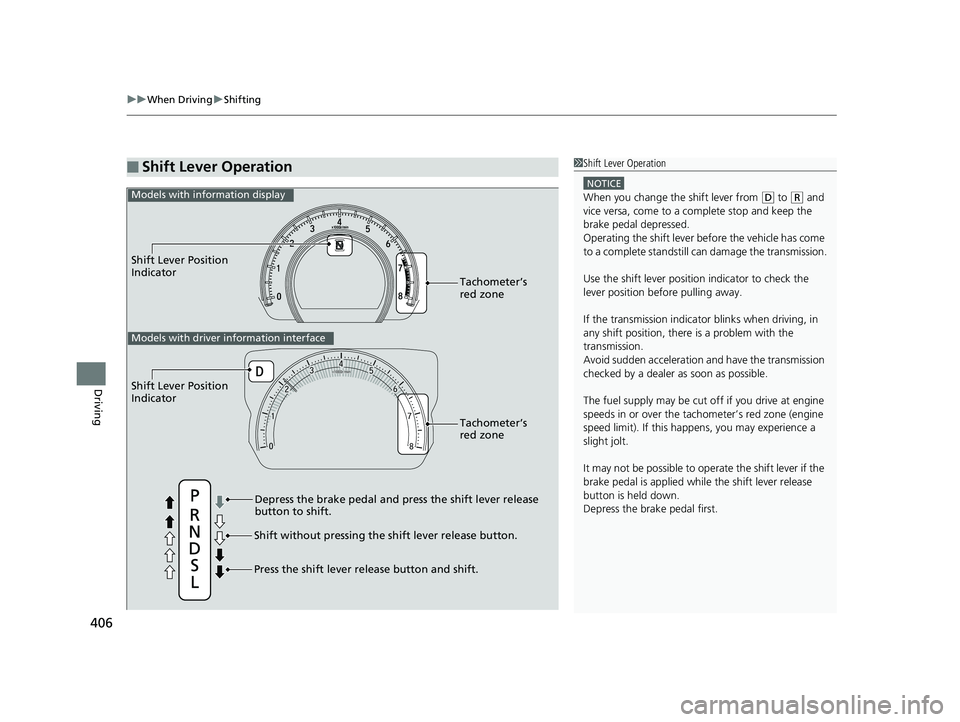
■Shift Lever Operation1Shift Lever Operation
NOTICE
When you change the shift lever from (D to (R and
vice versa, come to a complete stop and keep the
brake pedal depressed.
Operating the shift lever be fore the vehicle has come
to a complete standstill can damage the transmission.
Use the shift lever position indicator to check the
lever position befo re pulling away.
If the transmission indicator blinks when driving, in
any shift position, there is a problem with the
transmission.
Avoid sudden acceleration and have the transmission
checked by a dealer as soon as possible.
The fuel supply may be cut of f if you drive at engine
speeds in or over the tachometer’s red zone (engine
speed limit). If this happens, you may experience a
slight jolt.
It may not be possible to operate the shift lever if the
brake pedal is applied while the shift lever release
button is held down.
Depress the brake pedal first.
Shift Lever Position
Indicator
Depress the brake pedal and press the shift lever release
button to shift.
Shift without pressing the shift lever release button.
Press the shift lever re lease button and shift.Tachometer’s
red zone
Models with info
rmation display
Shift Lever Position
Indicator
Tachometer’s
red zone
Models with driver information interface
16 CIVIC 4D-31TBA6011.book 406 ページ 2018年10月26日 金曜日 午前11時51分
Page 418 of 595
416
uuWhen Driving uAdaptive Cruise Control (ACC) with Low Speed Follow (LSF)*
Driving
Adaptive Cruise Control (ACC) with Low Speed Follow (LSF)*
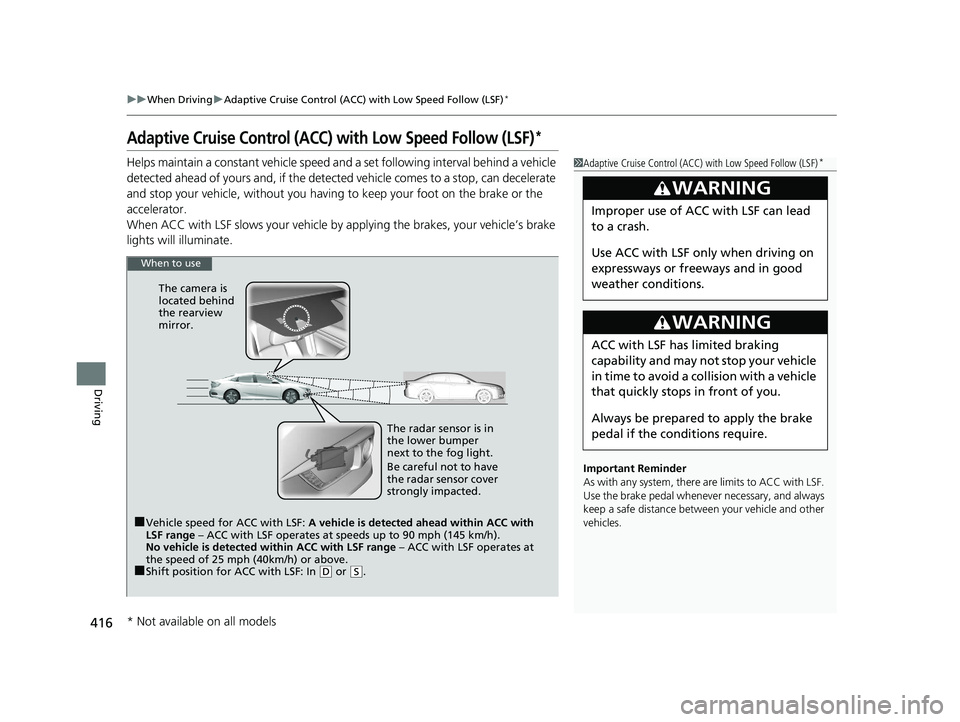
Helps maintain a constant vehicle speed an d a set following interval behind a vehicle
detected ahead of yours and, if the detect ed vehicle comes to a stop, can decelerate
and stop your vehicle, without you having to keep your foot on the brake or the
accelerator.
When ACC with LSF slows your vehicle by applying the brakes, your vehicle’s brake
lights will illuminate.1 Adaptive Cruise Control (ACC) with Low Speed Follow (LSF)*
Important Reminder
As with any system, there are limits to ACC with LSF.
Use the brake pedal whenever necessary, and always
keep a safe distance between your vehicle and other
vehicles.
3WARNING
Improper use of ACC with LSF can lead
to a crash.
Use ACC with LSF only when driving on
expressways or freeways and in good
weather conditions.
3WARNING
ACC with LSF has limited braking
capability and may not stop your vehicle
in time to avoid a collision with a vehicle
that quickly stops in front of you.
Always be prepared to apply the brake
pedal if the cond itions require.
When to use
■Vehicle speed for ACC with LSF: A vehicle is detected ahead within ACC with
LSF range – ACC with LSF operates at speeds up to 90 mph (145 km/h).
No vehicle is detected within ACC with LSF range – ACC with LSF operates at
the speed of 25 mph (40km/h) or above.
■Shift position for ACC with LSF: In ( D or (S. The radar sensor is in
the lower bumper
next to the fog light.
Be careful not to have
the radar sensor cover
strongly impacted.
The camera is
located behind
the rearview
mirror.
* Not available on all models
16 CIVIC 4D-31TBA6011.book 416 ページ 2018年10月26日 金曜日 午前11時51分
Page 423 of 595
Continued421
uuWhen Driving uAdaptive Cruise Control (ACC) with Low Speed Follow (LSF)*
Driving
The system may automatically shut off and the ACC indicator will come on under
certain conditions. Some examples of these conditions are listed below. Other
conditions may reduce some of the ACC functions.
2 Front Sensor Camera* P. 414
■Environmental conditions
• Driving in bad weather (rain, fog, snow, etc.).
■Roadway conditions
• Driving on a snowy or wet roadway (obs cured lane marking, vehicle tracks,
reflected lights, road spray, high contrast).
■Vehicle conditions
• The outside of the windshield is blocked by dirt, mud, leaves, wet snow, etc.
• An abnormal tire or wheel condition (Wrong size, varied size or construction,
improperly inflated, co mpact spare tire, etc.).
• The camera temperature gets too high.
• The parking brake is applied.
• When the lower bumper next to the fog light is dirty.
• When the front of the vehicle tilts up due to heavy cargo in the trunk or rear seats.
• When tire chains are installed.
■ACC with LSF Conditions and Limitations1ACC with LSF Conditions and Limitations
The radar sensor for ACC with LSF is shared with the
collision mitigation braking system
TM (CMBSTM).
2 Collision Mitigation Braking SystemTM
(CMBSTM)* P. 459
You can read about handling information for the
camera equipped with this system. 2 Front Sensor Camera
* P. 414
Do not put a sticker on the radar sensor cover or
replace the radar sensor cover.
Have your vehicle checked by a dealer if you find any
unusual behavior of the system (e.g., the warning
message appears too frequently).
If the front of the vehicle is impacted in any of the
following situations, the ra dar sensor may not work
properly. Have your vehi cle checked by a dealer:
•The vehicle mounted onto a bump, curb, chock,
embankment, etc.
•You drive the vehicle where the water is deep.
•Your vehicle has a frontal collision.
* Not available on all models
16 CIVIC 4D-31TBA6011.book 421 ページ 2018年10月26日 金曜日 午前11時51分
Page 429 of 595
Continued427
uuWhen Driving uAdaptive Cruise Control (ACC) with Low Speed Follow (LSF)*
Driving
■Automatic ca ncellation
The beeper sounds and a message appears on the driver information interface when
ACC with LSF is automatically canceled. Any of these conditions may cause the ACC
with LSF to automatically cancel:
• Bad weather (rain, fog, snow, etc.)
• When the radar sensor in the lower bum per next to the fog light gets dirty.
• The vehicle ahead of yo u cannot be detected.
• An abnormal tire condition is detected, or the tires are skidding.
• Driving on a mountainous road, or driving off road for extended periods.
• Abrupt steering wheel movement.
• When the ABS, VSA ® or CMBS
TM is activated.
• When the ABS or VSA ® system indicator comes on.
• When the vehicle is stopped on a very steep slope.
• When you manually apply the parking brake.
• When the detected vehicle within the AC C with LSF range is too close to your
vehicle.
• The camera behind the rearview mirror, or the area around the camera, including
the windshield, gets dirty.
The ACC with LSF automatic cancellation ca n be also triggered by the following
causes. In these cases, the parking brake will be automatically applied.
• The driver’s seat belt is unfastene d when the vehicle is stationary.
• The vehicle stops for more than 10 minutes.
• The engine is turned off.
1Automatic cancellation
Even though ACC with LSF has been automatically
canceled, you can still resu me the prior set speed.
Wait until the condition that caused ACC with LSF to
cancel improves, then press the –/SET button.
16 CIVIC 4D-31TBA6011.book 427 ページ 2018年10月26日 金曜日 午前11時51分
Page 433 of 595
Continued431
uuWhen Driving uRoad Departure Mitigation (RDM) System*
Driving
The system becomes ready to start sear ching for lane markings when all the
following conditions are met:
• The vehicle is traveling between about 45 and 90 mph (72 and 145 km/h).
• The vehicle is on a straight or slightly curved road.
• The turn signals are off.
• The brake pedal is not depressed.
• The wipers are not in continuous operation.
• The system makes a determination that th e driver is not actively accelerating,
braking or steering.
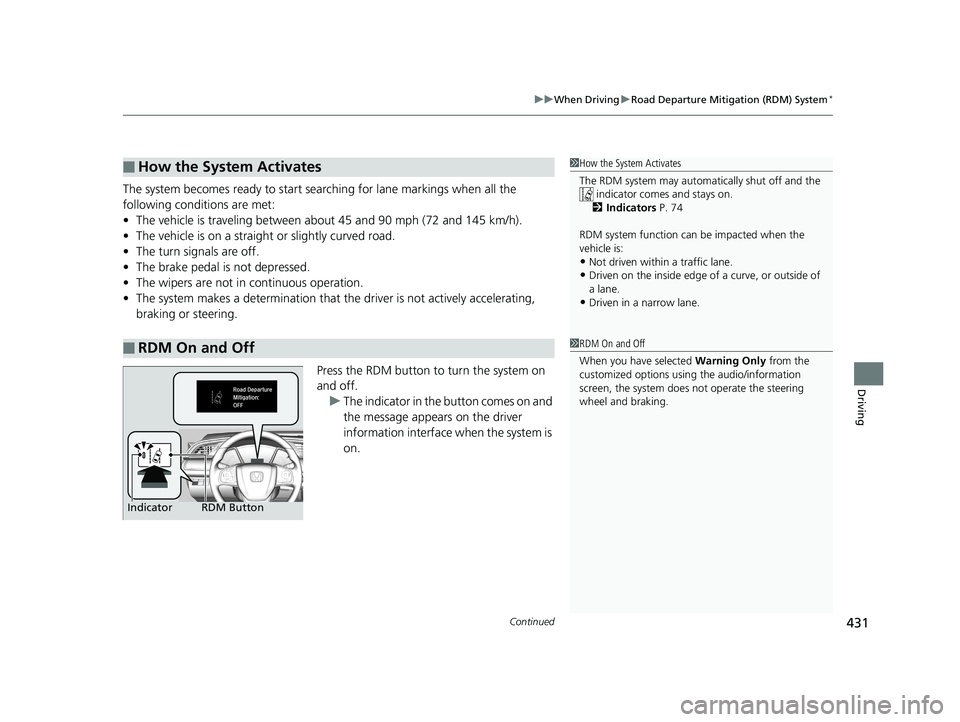
Press the RDM button to turn the system on
and off.u The indicator in the button comes on and
the message appears on the driver
information interface when the system is
on.
■How the System Activates
■RDM On and Off
1 How the System Activates
The RDM system may automa tically shut off and the
indicator comes and stays on.
2 Indicators P. 74
RDM system function can be impacted when the
vehicle is:
•Not driven within a traffic lane.•Driven on the inside edge of a curve, or outside of
a lane.
•Driven in a narrow lane.
1 RDM On and Off
When you have selected Warning Only from the
customized options using the audio/information
screen, the system does not operate the steering
wheel and braking.
RDM Button
Indicator
16 CIVIC 4D-31TBA6011.book 431 ページ 2018年10月26日 金曜日 午前11時51分
Page 438 of 595
uuWhen Driving uLane Keeping Assist System (LKAS)*
436
Driving
The system can be used when the following conditions are met.
• The lane in which you are driving has dete ctable lane markers on both sides, and
your vehicle is in the center of the lane.
• The vehicle speed is between 45 and 90 mph (72 and 145 km/h).
• You are driving on a straight or slightly curved road.
• The turn signals are off.
• The brake pedal is not depressed.
• The wipers are not in continuous operation.
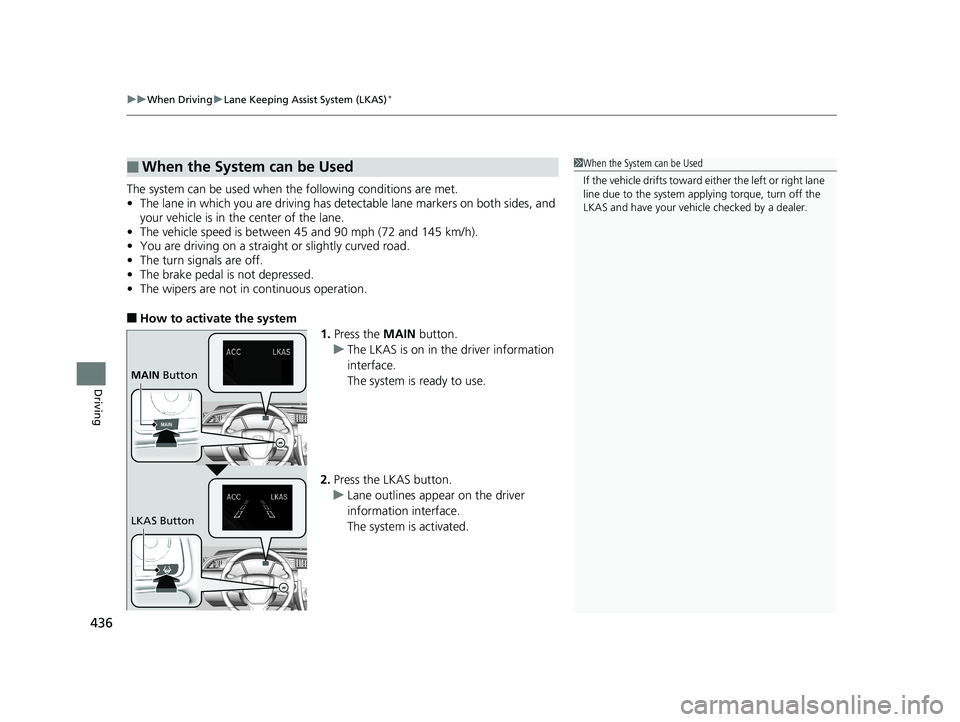
■How to activate the system
1.Press the MAIN button.
u The LKAS is on in the driver information
interface.
The system is ready to use.
2. Press the LKAS button.
u Lane outlines appear on the driver
information interface.
The system is activated.
■When the System can be Used1When the System can be Used
If the vehicle drifts toward either the left or right lane
line due to the system appl ying torque, turn off the
LKAS and have your vehi cle checked by a dealer.
MAIN Button
LKAS Button
16 CIVIC 4D-31TBA6011.book 436 ページ 2018年10月26日 金曜日 午前11時51分
Page 445 of 595
443
uuWhen Driving uAgile Handling Assist System
Driving
Agile Handling Assist System
Lightly brakes selective wheels, as needed , when you turn the steering wheel, and
helps support the vehicle’s stability and performance during cornering.1 Agile Handling Assist System
The agile handling assist system cannot enhance
stability in all driving situat ions. You still need to drive
and corner at speeds appr opriate for the conditions
and always leave a sufficient margin of safety.
When the VSA® indicator comes on and stays on
while driving, the agile handling assist system does
not activate.
You may hear a sound coming from the engine
compartment while the system is activated. This is
normal.
16 CIVIC 4D-31TBA6011.book 443 ページ 2018年10月26日 金曜日 午前11時51分