display HONDA CIVIC SEDAN 2016 Owner's Manual (in English)
[x] Cancel search | Manufacturer: HONDA, Model Year: 2016, Model line: CIVIC SEDAN, Model: HONDA CIVIC SEDAN 2016Pages: 595, PDF Size: 33.34 MB
Page 4 of 595
Contents
This owner’s manual should be considered a permanent part of the
vehicle and should remain with the vehicle when it is sold.
This owner’s manual covers all models of your vehicle. You may find
descriptions of equipment and features that are not on your
particular model.
Images throughout this owner’s manual (including the front cover)
represent features and equipment that are available on some, but
not all, models. Your particular mo del may not have some of these
features.
This owner’s manual is for vehicles sold in the United States and
Canada.
The information and specifications in cluded in this publication were
in effect at the time of approval for printing. Honda Motor Co., Ltd.
reserves the right, however, to discontinue or change specifications
or design at any time without notice and without incurring any
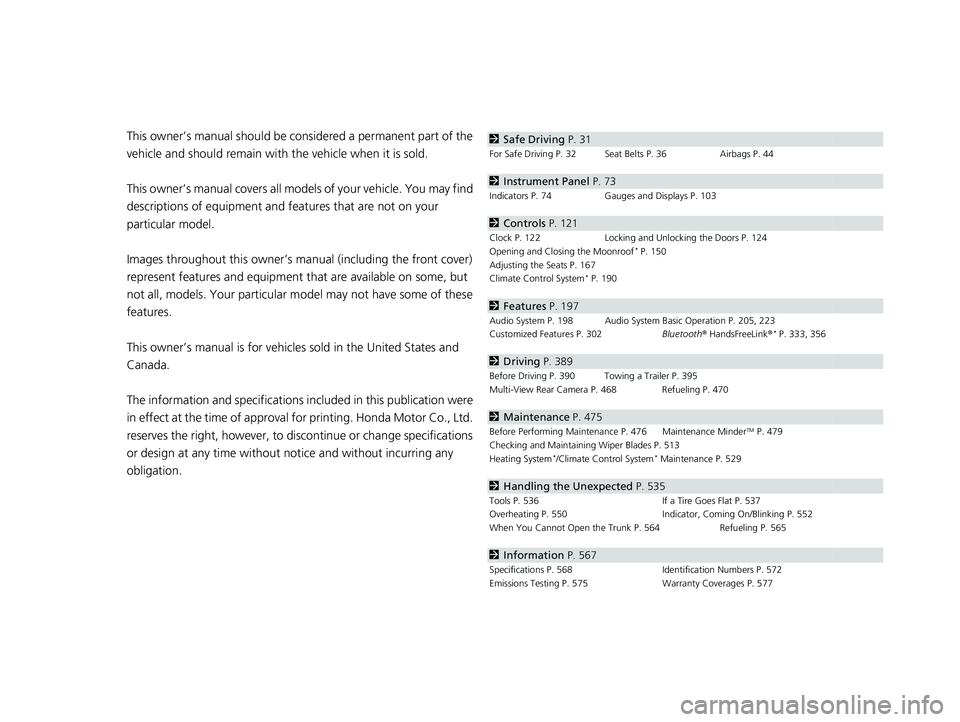
obligation.2 Safe Driving P. 31
For Safe Driving P. 32 Seat Belts P. 36 Airbags P. 44
2Instrument Panel P. 73
Indicators P. 74 Gauges and Displays P. 103
2Controls P. 121
Clock P. 122 Locking and Unlocking the Doors P. 124
Opening and Closing the Moonroof* P. 150
Adjusting the Seats P. 167
Climate Control System
* P. 190
2 Features P. 197
Audio System P. 198 Audio System Basic Operation P. 205, 223
Customized Features P. 302 Bluetooth® HandsFreeLink ®* P. 333, 356
2Driving P. 389
Before Driving P. 390 Towing a Trailer P. 395
Multi-View Rear Camera P. 468 Refueling P. 470
2Maintenance P. 475
Before Performing Maintenance P. 476 Maintenance MinderTM P. 479
Checking and Maintaining Wiper Blades P. 513
Heating System
*/Climate Control System* Maintenance P. 529
2 Handling the Unexpected P. 535
Tools P. 536 If a Tire Goes Flat P. 537
Overheating P. 550 Indicator, Coming On/Blinking P. 552
When You Cannot Open the Trunk P. 564 Refueling P. 565
2Information P. 567
Specifications P. 568 Identification Numbers P. 572
Emissions Testing P. 575 Warranty Coverages P. 577
16 CIVIC 4D-31TBA6011.book 2 ページ 2018年10月26日 金曜日 午前11時51分
Page 6 of 595
4
Quick Reference Guide
Quick Reference Guide
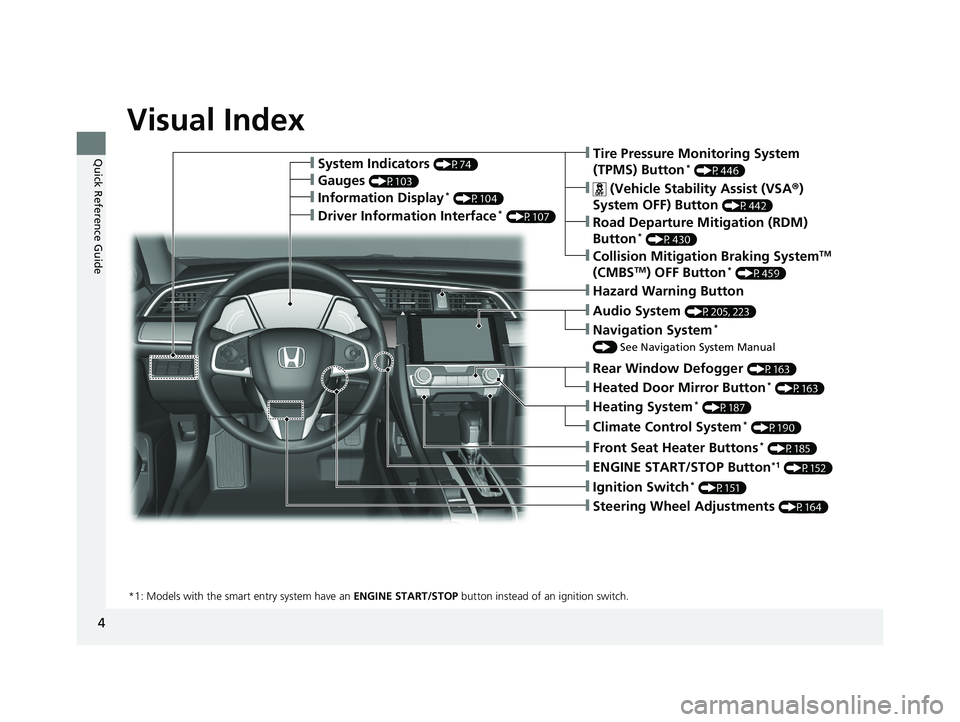
Visual Index
❙Ignition Switch* (P151)
❙ENGINE START/STOP Button*1 (P152)
*1: Models with the smart entry system have an ENGINE START/STOP button instead of an ignition switch.
❙Tire Pressure Monitoring System
(TPMS) Button* (P446)
❙Information Display* (P104)
❙System Indicators (P74)
❙Gauges (P103)
❙Collision Mitigation Braking SystemTM
(CMBSTM) OFF Button* (P459)
❙ (Vehicle Stability Assist (VSA ®)
System OFF) Button
(P442)
❙Road Departure Mitigation (RDM)
Button* (P430)
❙Navigation System*
() See Navigation System Manual
❙Audio System (P205, 223)
❙Hazard Warning Button
❙Rear Window Defogger (P163)
❙Heated Door Mirror Button* (P163)
❙Heating System* (P187)
❙Climate Control System* (P190)
❙Front Seat Heater Buttons* (P185)
❙Steering Wheel Adjustments (P164)
❙Driver Information Interface* (P107)
16 CIVIC 4D-31TBA6011.book 4 ページ 2018年10月26日 金曜日 午前11時51分
Page 7 of 595
5
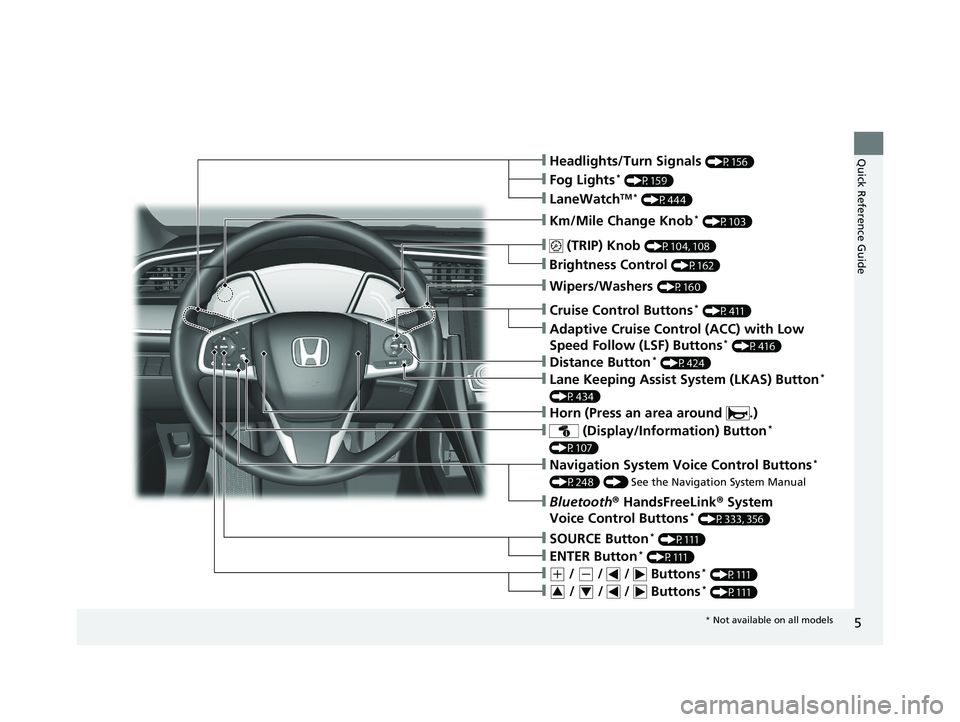
Quick Reference Guide❙Headlights/Turn Signals (P156)
❙Km/Mile Change Knob* (P103)
❙ (TRIP) Knob (P104, 108)
❙SOURCE Button* (P111)
❙Brightness Control (P162)
❙LaneWatchTM * (P444)
❙Fog Lights* (P159)
❙Wipers/Washers (P160)
❙Cruise Control Buttons* (P411)
❙Adaptive Cruise Control (ACC) with Low
Speed Follow (LSF) Buttons* (P416)
❙Lane Keeping Assist System (LKAS) Button*
(P434)
❙ (Display/Information) Button*
(P107)
❙Navigation System Voice Control Buttons*
(P248) () See the Navigation System Manual
❙Bluetooth® HandsFreeLink ® System
Voice Control Buttons* (P333, 356)
❙ENTER Button* (P111)
❙(+ / (- / / Buttons* (P111)
❙ / / / Buttons* (P111)34
❙Distance Button* (P424)
❙Horn (Press an area around .)
* Not available on all models
16 CIVIC 4D-31TBA6011.book 5 ページ 2018年10月26日 金曜日 午前11時51分
Page 11 of 595
9
Quick Reference Guide
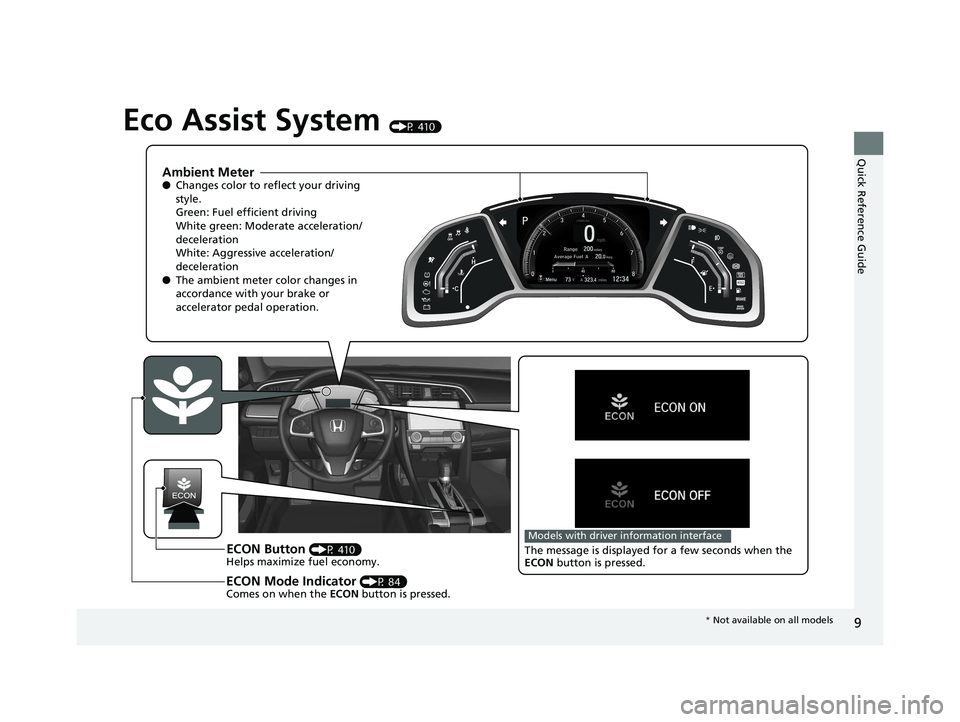
Eco Assist System (P 410)
Ambient Meter●Changes color to reflect your driving
style.
Green: Fuel efficient driving
White green: Moderate acceleration/
deceleration
White: Aggressive acceleration/
deceleration
● The ambient meter color changes in
accordance with your brake or
accelerator pedal operation.
ECON Button (P 410)
Helps maximize fuel economy.
ECON Mode Indicator (P 84)
Comes on when the ECON button is pressed.
Models with driver information interface
The message is displayed for a few seconds when the
ECON button is pressed.
* Not available on all models
16 CIVIC 4D-31TBA6011.book 9 ページ 2018年10月26日 金曜日 午前11時51分
Page 13 of 595
11
Quick Reference Guide
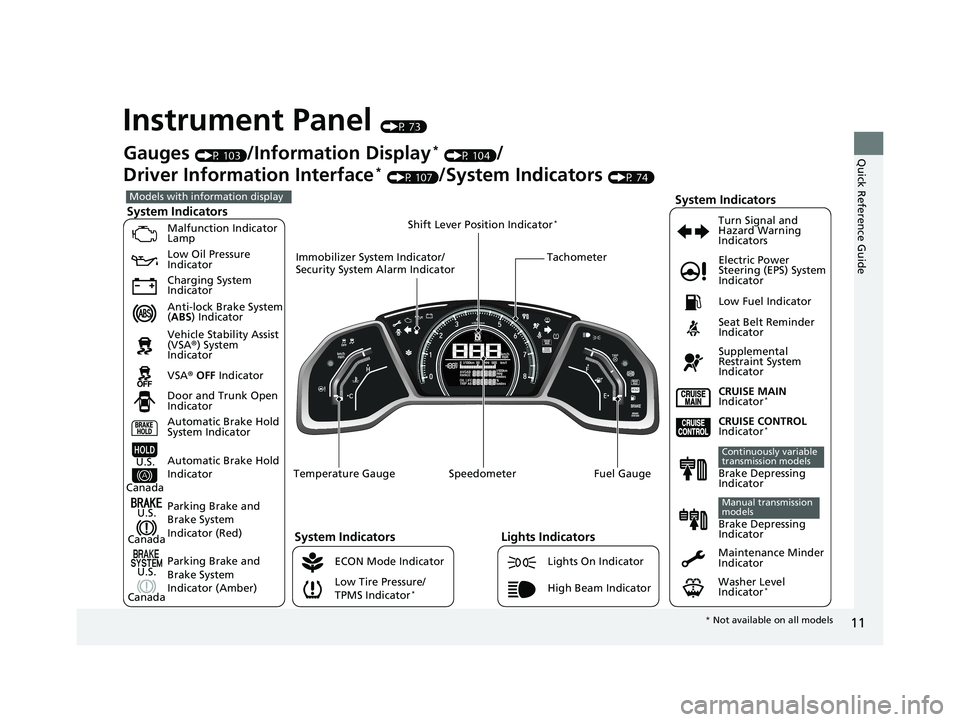
Instrument Panel (P 73)
System Indicators
Malfunction Indicator
Lamp
Low Oil Pressure
Indicator
Charging System
Indicator
Anti-lock Brake System
(ABS ) Indicator
Vehicle Stability Assist
(VSA ®) System
Indicator
VSA ® OFF Indicator
Low Tire Pressure/
TPMS Indicator
*
Electric Power
Steering (EPS) System
Indicator
Lights Indicators
Lights On Indicator
High Beam Indicator Seat Belt Reminder
Indicator
System Indicators
CRUISE CONTROL
Indicator*
Parking Brake and
Brake System
Indicator (Red) Supplemental
Restraint System
Indicator
Door and Trunk Open
Indicator CRUISE MAIN
Indicator
*
Tachometer
Speedometer Fuel Gauge
Immobilizer System Indicator/
Security System Alarm Indicator
Shift Lever Position Indicator
*
Low Fuel Indicator
Gauges (P 103)/Information Display* (P 104)/
Driver Information Interface
* (P 107)/System Indicators (P 74)
ECON Mode Indicator Turn Signal and
Hazard Warning
Indicators
Maintenance Minder
Indicator
Washer Level
Indicator
*
Models with info
rmation display
Parking Brake and
Brake System
Indicator (Amber)
System Indicators
U.S.
Canada
U.S.
Canada Automatic Brake Hold
System Indicator
Automatic Brake Hold
IndicatorU.S.
Canada Temperature GaugeBrake Depressing
Indicator
Continuously variable
transmission models
Brake Depressing
Indicator
Manual transmission
models
*
Not available on all models
16 CIVIC 4D-31TBA6011.book 11 ページ 2018年10月26日 金曜日 午前11時51分
Page 15 of 595
13
Quick Reference Guide
Controls (P 121)
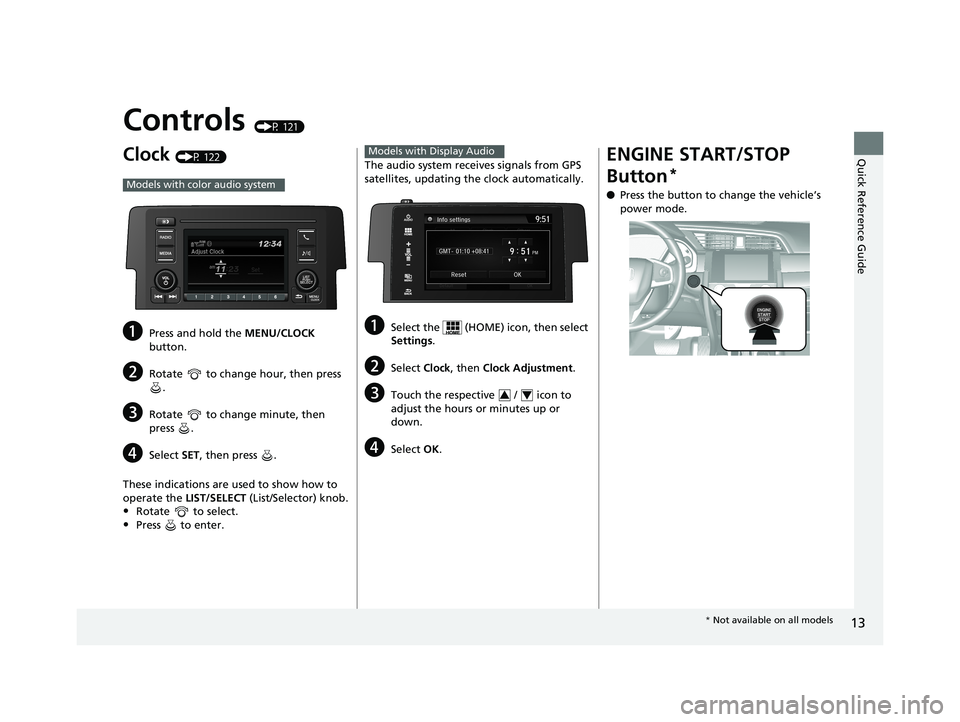
Clock (P 122)
aPress and hold the MENU/CLOCK
button.
bRotate to change hour, then press .
cRotate to change minute, then
press .
dSelect SET, then press .
These indications are used to show how to
operate the LIST/SELECT (List/Selector) knob.
•Rotate to select.
•Press to enter.
Models with color audio system
The audio system receives signals from GPS
satellites, updating the clock automatically.
aSelect the (HOME) icon, then select
Settings.
bSelect Clock, then Clock Adjustment .
cTouch the respective / icon to
adjust the hours or minutes up or
down.
dSelect OK.
Models with Display Audio
34
ENGINE START/STOP
Button
*
●Press the button to change the vehicle’s
power mode.
* Not available on all models
16 CIVIC 4D-31TBA6011.book 13 ページ 2018年10月26日 金曜日 午前11時51分
Page 20 of 595
18
Quick Reference Guide
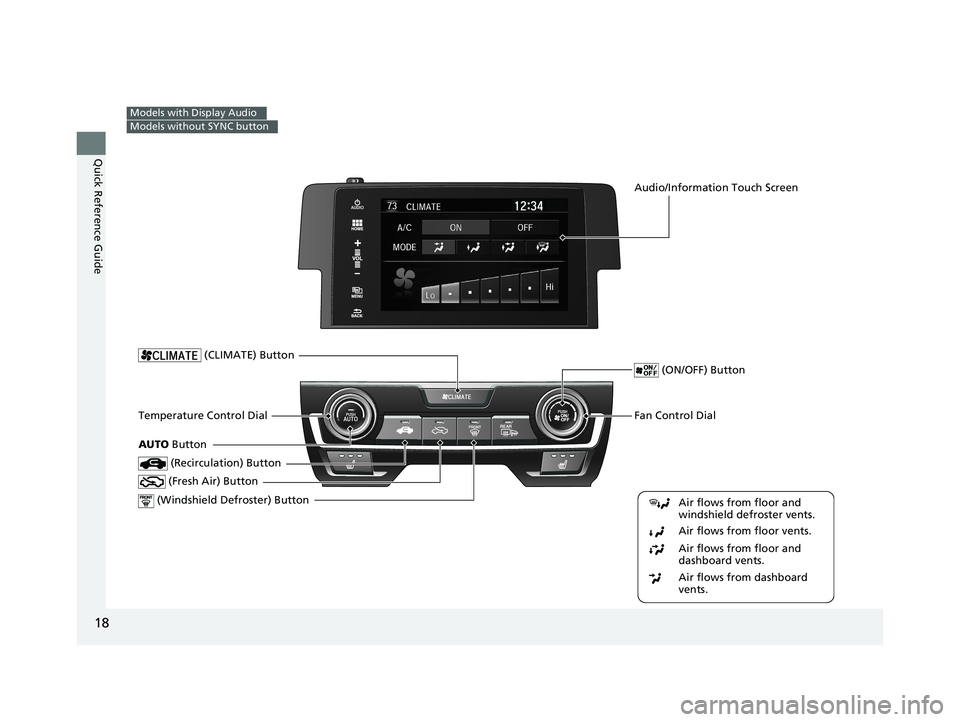
Models with Display Audio
Models without SYNC button
Fan Control Dial
(Windshield Defroster) ButtonTemperature Control Dial
Air flows from floor and
windshield defroster vents.
Air flows from floor vents.
Air flows from floor and
dashboard vents.
Air flows from dashboard
vents.
(Recirculation) Button
(CLIMATE) Button
(Fresh Air) Button
(ON/OFF) Button
AUTO Button
Audio/Information Touch Screen
16 CIVIC 4D-31TBA6011.book 18 ページ 2018年10月26日 金曜日 午前11時51分
Page 21 of 595
19
Quick Reference Guide
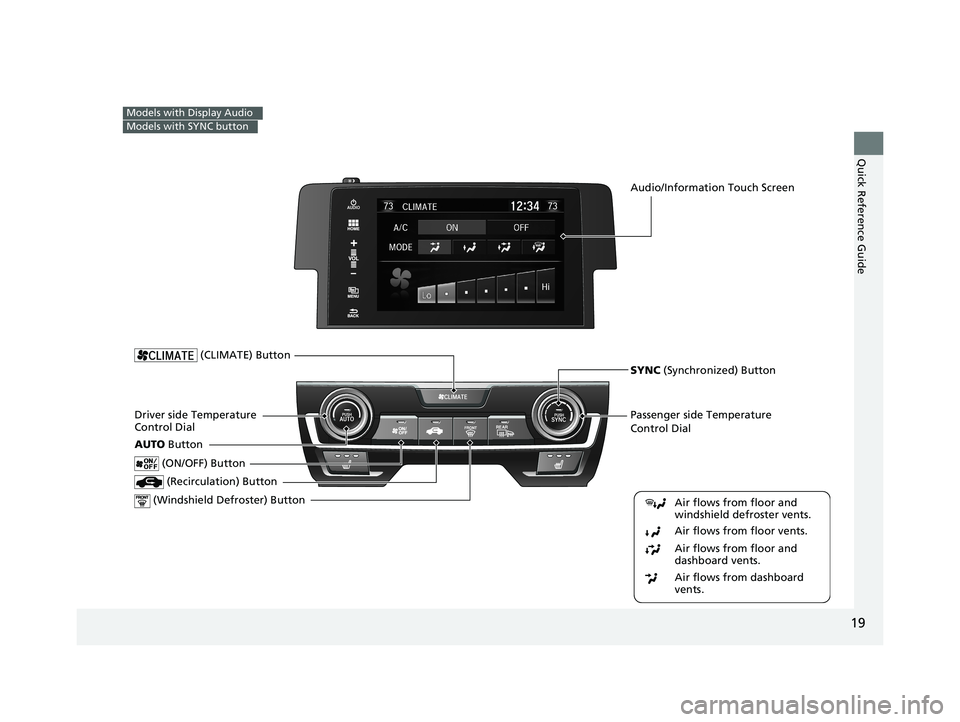
Models with Display Audio
Models with SYNC button
Passenger side Temperature
Control Dial
(Windshield Defroster) ButtonDriver side Temperature
Control Dial (Recirculation) Button
(CLIMATE) Button
(ON/OFF) Button
AUTO Button
Audio/Information Touch Screen
SYNC (Synchronized) Button
Air flows from floor and
windshield defroster vents.
Air flows from floor vents.
Air flows from floor and
dashboard vents.
Air flows from dashboard
vents.
16 CIVIC 4D-31TBA6011.book 19 ページ 2018年10月26日 金曜日 午前11時51分
Page 22 of 595
20
Quick Reference Guide
Features (P 197)
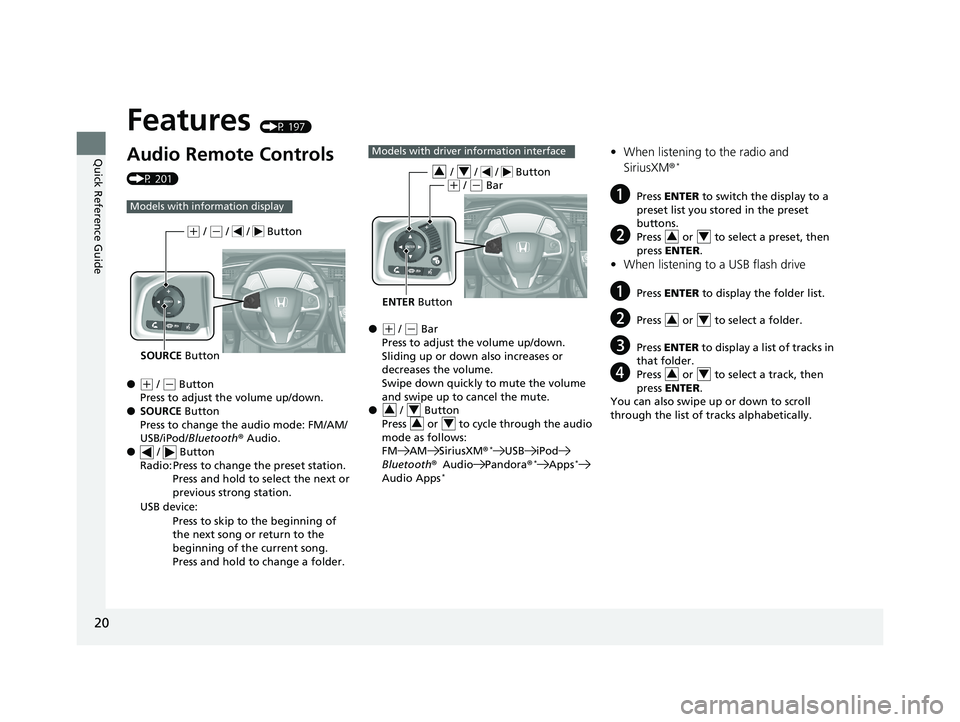
Audio Remote Controls
(P 201)
●
(+ / ( - Button
Press to adjust the volume up/down.
● SOURCE Button
Press to change the audio mode: FM/AM/
USB/iPod/ Bluetooth ®Audio.
● / Button
Radio: Press to change the preset station.
Press and hold to select the next or
previous strong station.
USB device: Press to skip to the beginning of
the next song or return to the
beginning of the current song.
Press and hold to change a folder.
Models with info rmation display
SOURCE Button
(+ / (- / / Button
●(+ / (- Bar
Press to adjust the volume up/down.
Sliding up or down also increases or
decreases the volume.
Swipe down quickly to mute the volume
and swipe up to cancel the mute.
● / Button
Press or to cycle through the audio
mode as follows:
FM AM SiriusXM ®
*USB iPod
Bluetooth ®Audio Pandora ®*Apps*
Audio Apps*
Models with driver information interface
ENTER Button
/ / / Button34(+ / (- Bar
34
34
• When listening to the radio and
SiriusXM ®*
aPress ENTER to switch the display to a
preset list you stored in the preset
buttons.
bPress or to select a preset, then
press ENTER .
•When listening to a USB flash drive
aPress ENTER to display the folder list.
bPress or to select a folder.
cPress ENTER to display a list of tracks in
that folder.
dPress or to select a track, then
press ENTER .
You can also swipe up or down to scroll
through the list of tra cks alphabetically.
34
34
34
16 CIVIC 4D-31TBA6011.book 20 ページ 2018年10月26日 金曜日 午前11時51分
Page 23 of 595
21
Quick Reference Guide
•When listening to an iPod
aPress ENTER to display the iPod music
list.
bPress or to select a category.
cPress ENTER to display a list of items in
the category.
dPress or to select an item, then
press ENTER .
uPress ENTER and press or
repeatedly until a desired item you
want to listen is displayed.
You can also swipe up or down to scroll
through the list of tracks alphabetically.
• When listening to Internet Radio*
aPress ENTER to display the station list.
bPress or to select an item, then
press ENTER .
•When listening to Bluetooth ®Audio
aPress ENTER to display the track list.
bPress or to select a track, then
press ENTER .
34
34
34
34
34
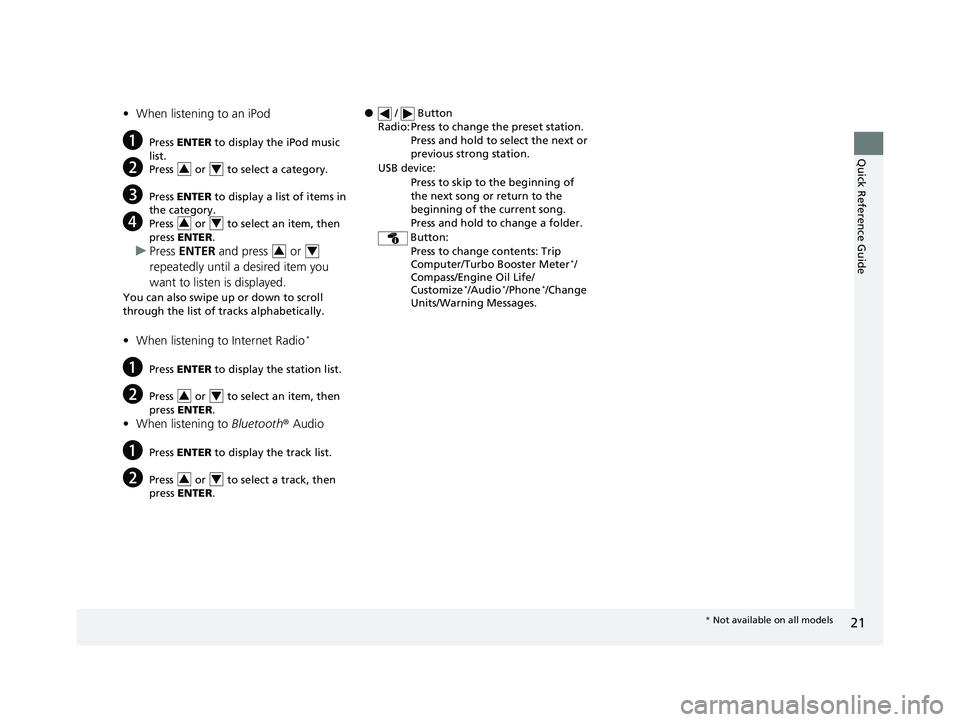
● / Button
Radio: Press to change the preset station. Press and hold to select the next or
previous strong station.
USB device: Press to skip to the beginning of
the next song or return to the
beginning of the current song.
Press and hold to change a folder.
Button: Press to change contents: Trip
Computer/Turbo Booster Meter
*/
Compass/Engine Oil Life/
Customize
*/Audio*/Phone*/Change
Units/Warning Messages.
* Not available on all models
16 CIVIC 4D-31TBA6011.book 21 ページ 2018年10月26日 金曜日 午前11時51分