fuel HONDA CIVIC SEDAN 2018 (in English) User Guide
[x] Cancel search | Manufacturer: HONDA, Model Year: 2018, Model line: CIVIC SEDAN, Model: HONDA CIVIC SEDAN 2018Pages: 643, PDF Size: 38.26 MB
Page 112 of 643
110
uuGauges and Displays uInformation Display*
Instrument Panel
Information Display*
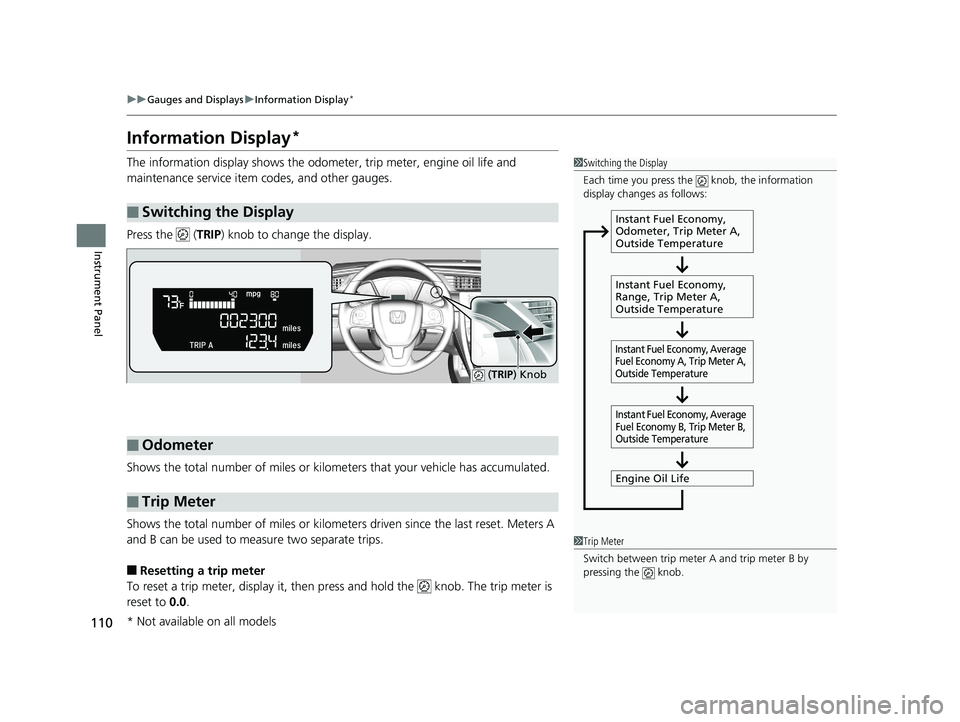
The information display sh ows the odometer, trip meter, engine oil life and
maintenance service item codes, and other gauges.
Press the ( TRIP) knob to change the display.
Shows the total number of miles or kilome ters that your vehicle has accumulated.
Shows the total number of miles or kilomete rs driven since the last reset. Meters A
and B can be used to measure two separate trips.
■Resetting a trip meter
To reset a trip meter, display it, then pr ess and hold the knob. The trip meter is
reset to 0.0 .
■Switching the Display
1Switching the Display
Each time you press the knob, the information
display changes as follows:
Instant Fuel Economy,
Odometer, Trip Meter A,
Outside Temperature
Instant Fuel Economy,
Range, Trip Meter A,
Outside Temperature
Engine Oil Life
Instant Fuel Economy, Average
Fuel Economy A, Trip Meter A,
Outside Temperature Instant Fuel Economy, Average
Fuel Economy B, Trip Meter B,
Outside Temperature
■Odometer
■Trip Meter
( TRIP ) Knob
1Trip Meter
Switch between trip meter A and trip meter B by
pressing the knob.
* Not available on all models
18 CIVIC 4D HCM (KA KC KL)-31TBA6201.book 110 ページ 2018年10月30日 火曜日 午前7時28分
Page 113 of 643
Continued111
uuGauges and Displays uInformation Display*
Instrument Panel
Shows the estimated average fuel economy of each trip meter in mpg or l/100 km.
The display is updated at set intervals. Wh en a trip meter is reset, the average fuel
economy is also reset.
Shows the instant fuel economy as a bar graph in mpg or l/100km.
Shows the remaining oil life and Maintenance Minder
TM.
2 Maintenance MinderTM P. 513
Shows the estimated distance you can trave l on the remaining fuel. This estimated
distance is based on the vehicle’s current fuel economy.
■Average Fuel Economy
■Instant Fuel Economy Gauge
■Engine Oil Life
■Range
1 Average Fuel Economy
Press and hold the km/mile change knob to switch
the measurement.
1 Instant Fuel Economy Gauge
Press and hold the km/mile change knob to switch
the measurement.
1 Range
Press and hold the km/mile change knob to switch
the measurement.
18 CIVIC 4D HCM (KA KC KL)-31TBA6201.book 111 ページ 2018年10月30日 火曜日 午前7時28分
Page 116 of 643
114
uuGauges and Displays uDriver Information Interface*
Instrument Panel
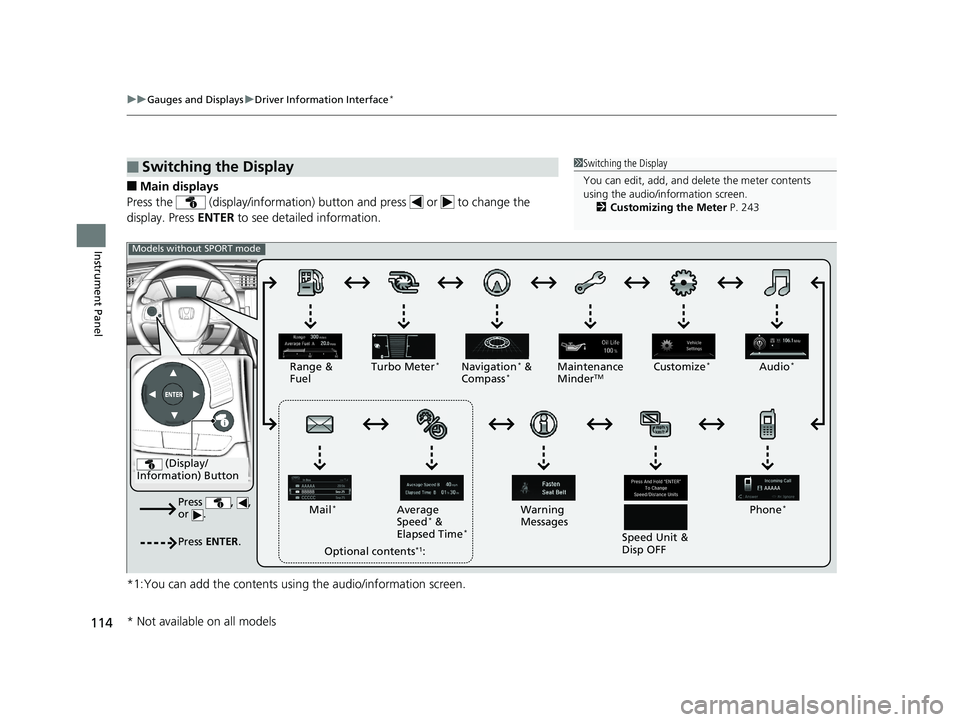
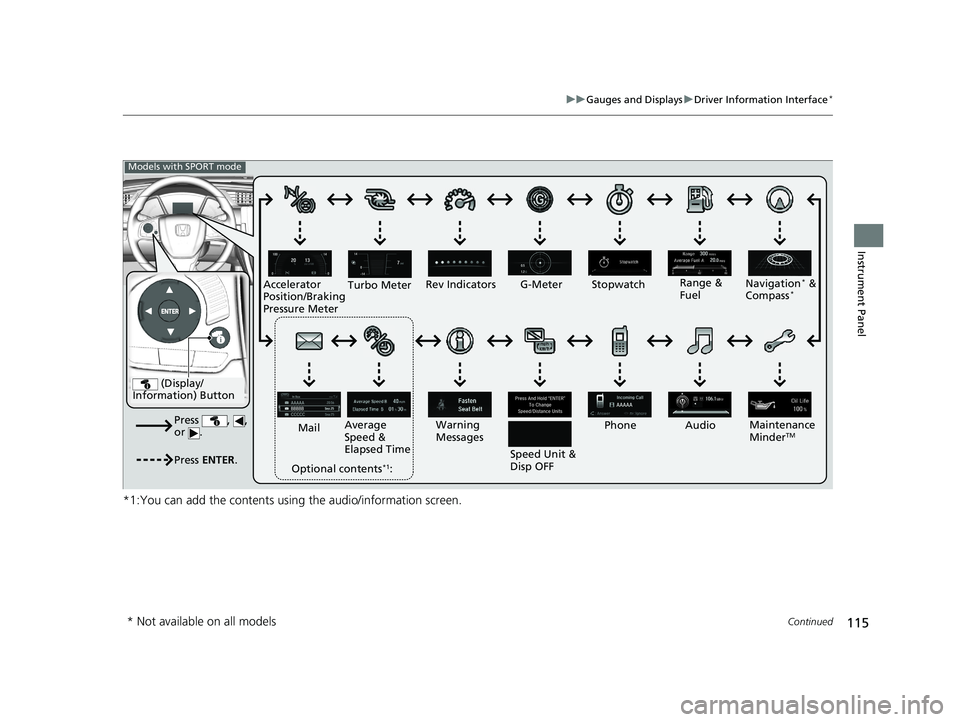
■Main displays
Press the (display/information) butto n and press or to change the
display. Press ENTER to see detailed information.
*1:You can add the contents usin g the audio/information screen.
■Switching the Display1Switching the Display
You can edit, add, and de lete the meter contents
using the audio/information screen.
2 Customizing the Meter P. 243
(Display/
Information) Button
Press , ,
or .
Press ENTER .
Range &
Fuel Turbo Meter*Navigation* &
Compass*Maintenance
MinderTMCustomize*Audio*
Phone*
Speed Unit &
Disp OFF
Warning
Messages
Average
Speed
* &
Elapsed Time*
Mail*
Optional contents*1:
Models without SPORT mode
* Not available on all models
18 CIVIC 4D HCM (KA KC KL)-31TBA6201.book 114 ページ 2018年10月30日 火曜日 午前7時28分
Page 117 of 643
115
uuGauges and Displays uDriver Information Interface*
Continued
Instrument Panel
*1:You can add the contents using the audio/information screen.
(Display/
Information) Button
Press , ,
or .
Press ENTER .
Range &
Fuel
Turbo Meter
Navigation* &
Compass*
Maintenance
MinderTM
Rev Indicators
Audio
Phone
Speed Unit &
Disp OFF
Warning
Messages
Average
Speed &
Elapsed Time
Mail
Optional contents
*1:
Models with SPORT mode
G-Meter Stopwatch
Accelerator
Position/Braking
Pressure Meter
* Not available on all models
18 CIVIC 4D HCM (KA KC KL)-31TBA6201.book 115 ページ 2018年10月30日 火曜日 午前7時28分
Page 119 of 643
Continued117
uuGauges and Displays uDriver Information Interface*
Instrument Panel
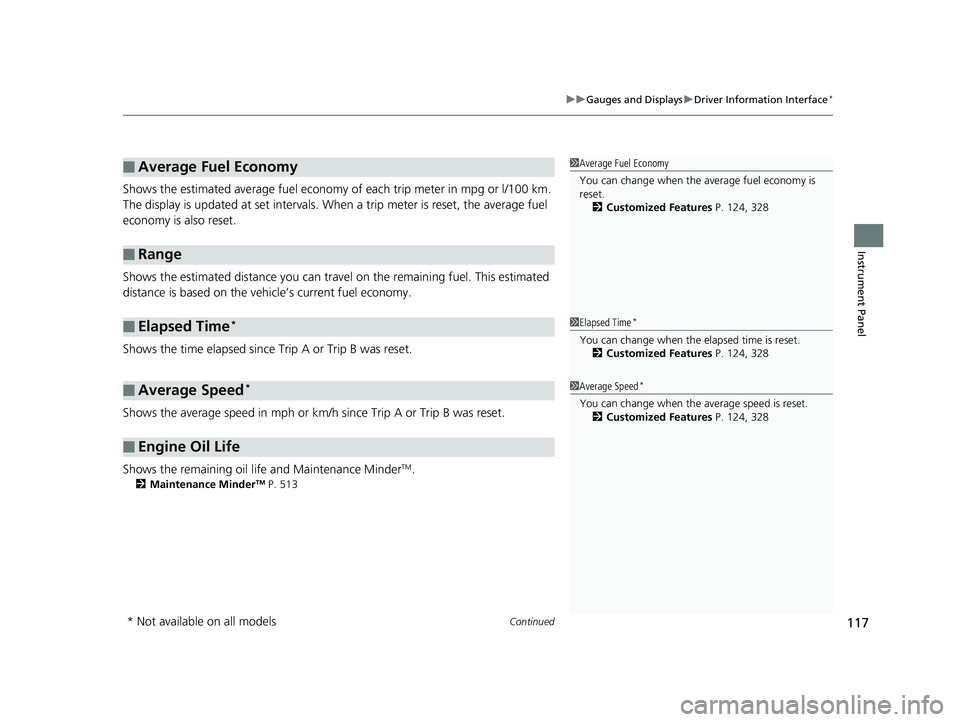
Shows the estimated average fuel economy of each trip meter in mpg or l/100 km.
The display is updated at set intervals. Wh en a trip meter is reset, the average fuel
economy is also reset.
Shows the estimated distance you can trave l on the remaining fuel. This estimated
distance is based on the vehicle’s current fuel economy.
Shows the time elapsed since Trip A or Trip B was reset.
Shows the average speed in mph or km/h since Trip A or Trip B was reset.
Shows the remaining oil life and Maintenance Minder
TM.
2 Maintenance MinderTM P. 513
■Average Fuel Economy
■Range
■Elapsed Time*
■Average Speed*
■Engine Oil Life
1Average Fuel Economy
You can change when the average fuel economy is
reset.
2 Customized Features P. 124, 328
1Elapsed Time*
You can change when the elapsed time is reset.
2 Customized Features P. 124, 328
1Average Speed*
You can change when the average speed is reset.
2 Customized Features P. 124, 328
* Not available on all models
18 CIVIC 4D HCM (KA KC KL)-31TBA6201.book 117 ページ 2018年10月30日 火曜日 午前7時28分
Page 120 of 643
uuGauges and Displays uDriver Information Interface*
118
Instrument Panel
Shows the outside temperature in Fahr enheit (U.S.) or Celsius (Canada).
■Adjusting the outside temperature display
Adjust the temperature readi ng by up to ±5°F or ±3°C if the temperature reading
seems incorrect.
Use the customized features in the driver information interface or audio/information
screen to correct the temperature.
2 Customized Features P. 124, 328
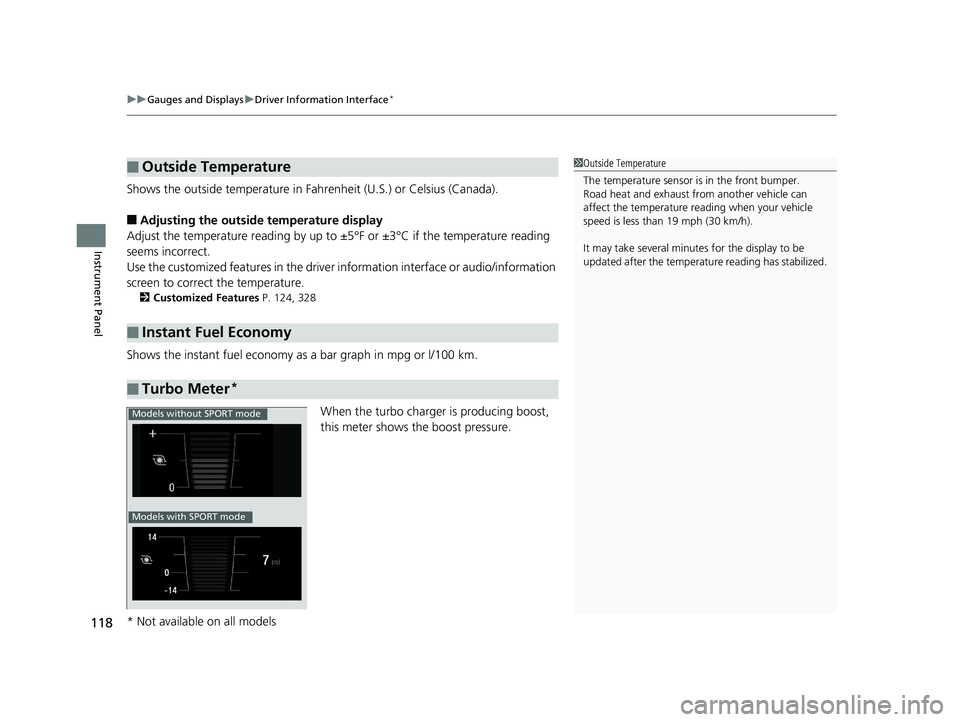
Shows the instant fuel economy as a bar graph in mpg or l/100 km.
When the turbo charger is producing boost,
this meter shows th e boost pressure.
■Outside Temperature
■Instant Fuel Economy
■Turbo Meter*
1Outside Temperature
The temperature sensor is in the front bumper.
Road heat and exhaust fr om another vehicle can
affect the temperature reading when your vehicle
speed is less than 19 mph (30 km/h).
It may take several minutes for the display to be
updated after the temperature reading has stabilized.
Models without SPORT mode
Models with SPORT mode
* Not available on all models
18 CIVIC 4D HCM (KA KC KL)-31TBA6201.book 118 ページ 2018年10月30日 火曜日 午前7時28分
Page 127 of 643
125
uuGauges and Displays uDriver Information Interface*
Continued
Instrument Panel
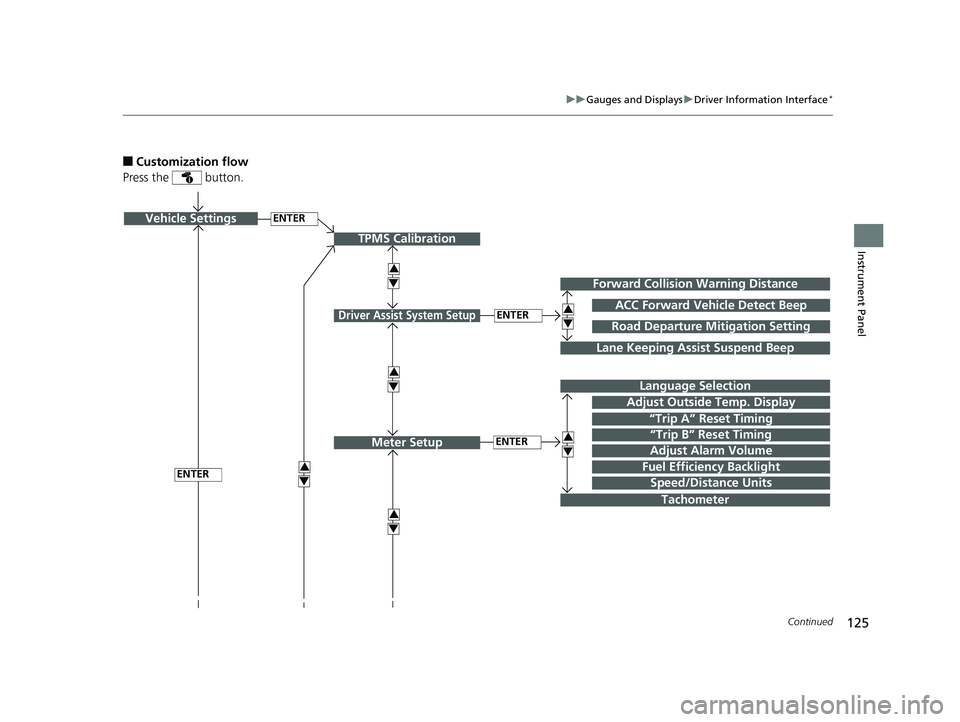
■Customization flow
Press the button.
ENTERVehicle Settings
“Trip A” Reset Timing
Language Selection
Adjust Outside Temp. Display
3
4
TPMS Calibration
ENTER
“Trip B” Reset Timing
Fuel Efficiency Backlight3
4
ACC Forward Vehicle Detect Beep
3
4
Tachometer
ENTER
Forward Collision Warning Distance
3
4
3
4
Lane Keeping Assist Suspend Beep
Road Departure Mi tigation Setting
Adjust Alarm Volume
Speed/Distance Units
3
4
ENTER
Driver Assist System Setup
Meter Setup
18 CIVIC 4D HCM (KA KC KL)-31TBA6201.book 125 ページ 2018年10月30日 火曜日 午前7時28分
Page 130 of 643
128
uuGauges and Displays uDriver Information Interface*
Instrument Panel
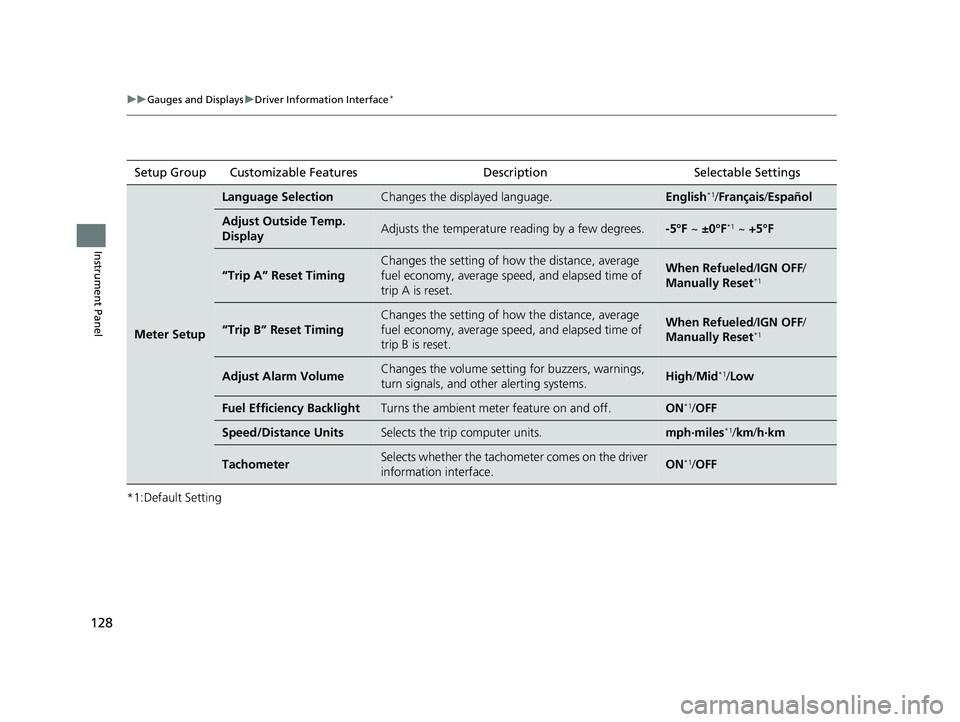
*1:Default SettingSetup Group Customizable Features Description Selectable Settings
Meter Setup
Language SelectionChanges the displayed language.English*1/
Français /Español
Adjust Outside Temp.
DisplayAdjusts the temperature reading by a few degrees.-5°F ~ ±0°F*1 ~ +5°F
“Trip A” Reset Timing
Changes the setting of how the distance, average
fuel economy, average speed, and elapsed time of
trip A is reset.When Refueled /IGN OFF /
Manually Reset*1
“Trip B” Reset Timing
Changes the setting of how the distance, average
fuel economy, average speed, and elapsed time of
trip B is reset.When Refueled /IGN OFF /
Manually Reset*1
Adjust Alarm VolumeChanges the volume setting for buzzers, warnings,
turn signals, and other alerting systems.High /Mid*1/Low
Fuel Efficiency BacklightTurns the ambient meter feature on and off.ON*1/OFF
Speed/Distance UnitsSelects the trip computer units.mph∙miles*1/km/ h∙km
TachometerSelects whether the tachometer comes on the driver
information interface.ON*1/OFF
18 CIVIC 4D HCM (KA KC KL)-31TBA6201.book 128 ページ 2018年10月30日 火曜日 午前7時28分
Page 133 of 643
131
uuGauges and Displays uDriver Information Interface*
Continued
Instrument Panel
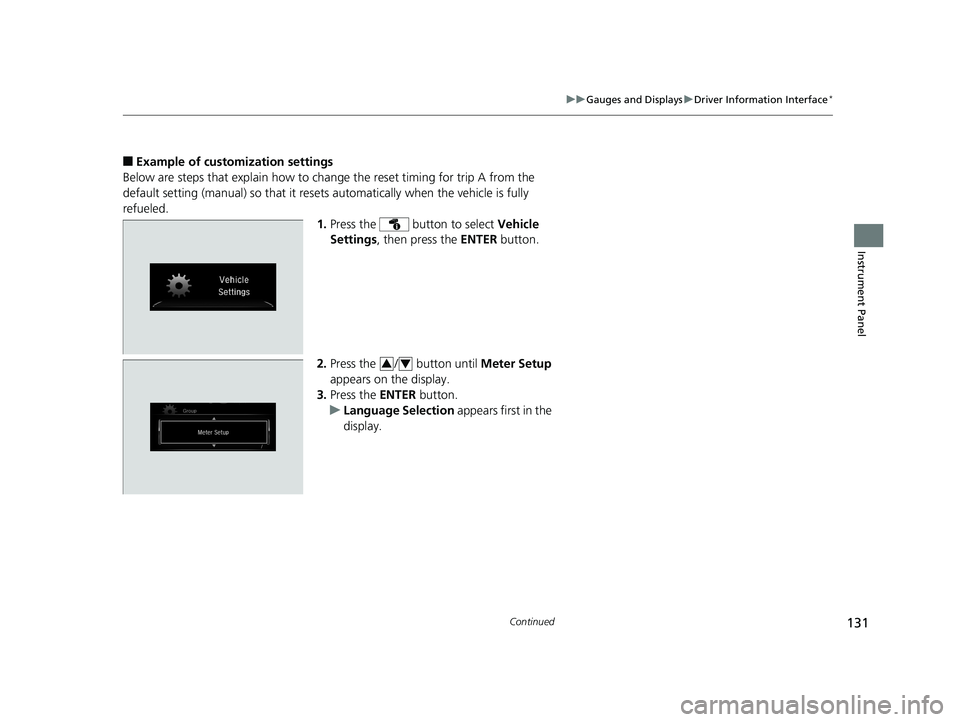
■Example of customization settings
Below are steps that explain how to ch ange the reset timing for trip A from the
default setting (manual) so that it resets automatically when the vehicle is fully
refueled. 1.Press the button to select Vehicle
Settings , then press the ENTER button.
2. Press the / button until Meter Setup
appears on the display.
3. Press the ENTER button.
u Language Selection appears first in the
display.
34
18 CIVIC 4D HCM (KA KC KL)-31TBA6201.book 131 ページ 2018年10月30日 火曜日 午前7時28分
Page 134 of 643
132
uuGauges and Displays uDriver Information Interface*
Instrument Panel
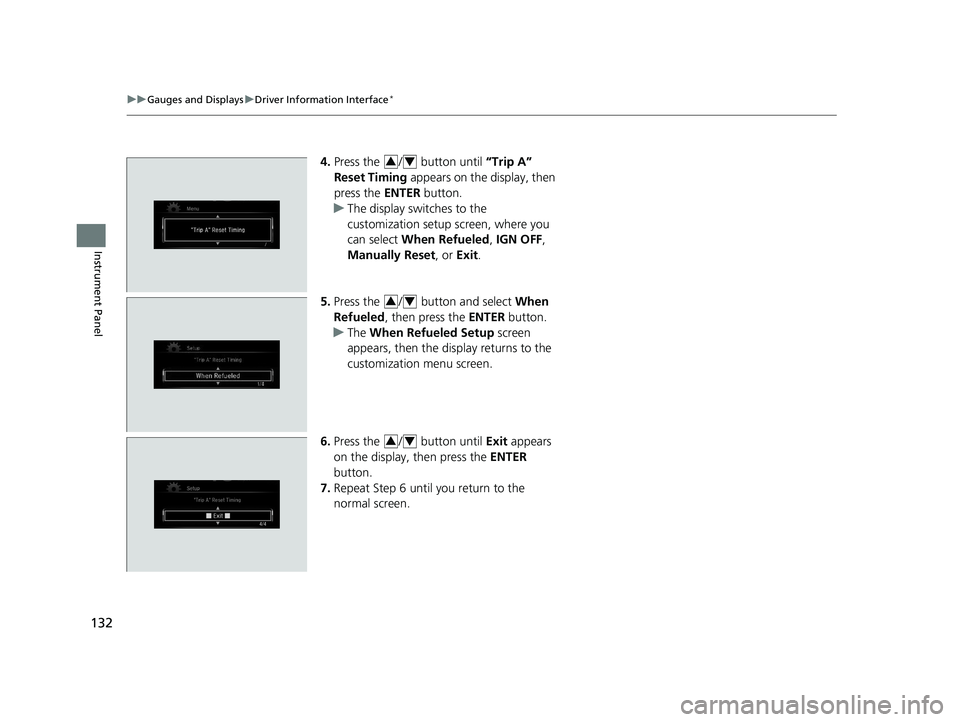
4. Press the / button until “Trip A”
Reset Timing appears on the display, then
press the ENTER button.
u The display switches to the
customization setup screen, where you
can select When Refueled , IGN OFF,
Manually Reset , or Exit .
5. Press the / button and select When
Refueled , then press the ENTER button.
u The When Refueled Setup screen
appears, then the di splay returns to the
customization menu screen.
6. Press the / button until Exit appears
on the display, then press the ENTER
button.
7. Repeat Step 6 until you return to the
normal screen.34
34
34
18 CIVIC 4D HCM (KA KC KL)-31TBA6201.book 132 ページ 2018年10月30日 火曜日 午前7時28分