window HONDA CIVIC SEDAN 2018 (in English) User Guide
[x] Cancel search | Manufacturer: HONDA, Model Year: 2018, Model line: CIVIC SEDAN, Model: HONDA CIVIC SEDAN 2018Pages: 643, PDF Size: 38.26 MB
Page 98 of 643
96
uuIndicators uDriver Information Interface Wa rning and Information Messages*
Instrument Panel
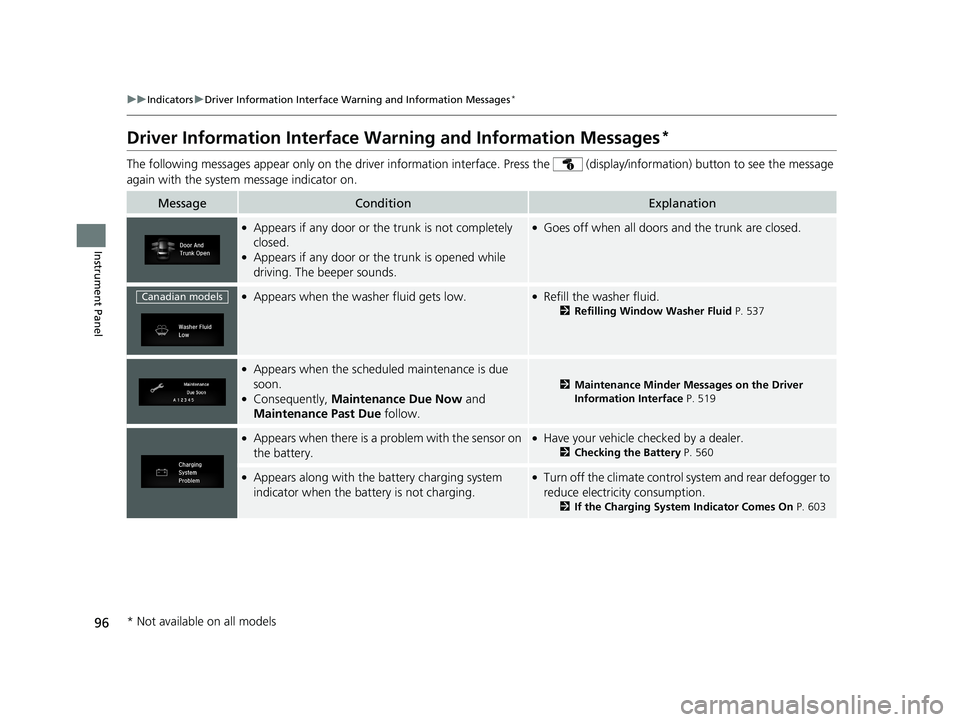
Driver Information Interface Warning and Information Messages*
The following messages appear only on the driver information interface. Press the (display/information) button to see the mess age
again with the system message indicator on.
MessageConditionExplanation
●Appears if any door or the trunk is not completely
closed.
●Appears if any door or the trunk is opened while
driving. The beeper sounds.
●Goes off when all doors and the trunk are closed.
●Appears when the washer fluid gets low.●Refill the washer fluid.
2Refilling Window Washer Fluid P. 537
●Appears when the scheduled maintenance is due
soon.
●Consequently, Maintenance Due Now and
Maintenance Past Due follow.
2Maintenance Minder Messages on the Driver
Information Interface P. 519
●Appears when there is a pr oblem with the sensor on
the battery.●Have your vehicle ch ecked by a dealer.
2Checking the Battery P. 560
●Appears along with the battery charging system
indicator when the batte ry is not charging.●Turn off the climate control sy stem and rear defogger to
reduce electricity consumption.
2 If the Charging System Indicator Comes On P. 603
Canadian models
* Not available on all models
18 CIVIC 4D HCM (KA KC KL)-31TBA6201.book 96 ページ 2018年10月30日 火曜日 午前7時28分
Page 135 of 643
133
Controls
This chapter explains how to operate the various controls necessary for driving.
Clock.................................................. 134
Locking and Unlocking the Doors Key Types and Functions .................. 136
Low Smart Entry Remote Signal Strength*... 138Locking/Unlocking the Doors from the Outside .......................................... 139
Locking/Unlocking the Doors from the Inside ............................................. 146
Childproof Door Locks ..................... 148
Auto Door Locking/Unlocking .......... 149
Opening and Closing the Trunk ....... 153
Security System Immobilizer System .......................... 156
Security System Alarm ...................... 156
Opening and Closing the Windows ..... 159Opening and Closing the Moonroof*..... 162
Operating the Switches Around the
Steering Wheel
Ignition Switch
*............................... 163
ENGINE START/STOP Button*........... 164
Ignition Switch and Power Mode Comparison ................................... 167
Turn Signals ..................................... 168
Light Switches.................................. 168
Fog Lights
*...................................... 171
Daytime Running Lights ................... 171
Wipers and Washers ........................ 172
Brightness Control ........................... 174
Rear Defogger/Heat ed Door Mirror
*
Button ........................................... 175
Adjusting the Steering Wheel........... 176 Adjusting the Mirrors
Interior Rearview Mirror ................... 177
Power Door Mirrors ......................... 178
Adjusting the Seats .......................... 179
Interior Lights/Interior Convenience Items ................................................ 187
Heating System
*
Using Automatic Heating ................. 199
Automatic Heating Sensors .............. 201
Climate Control System
*
Using Automatic Climate Control .... 202
Automatic Climate Control Sensors......209
* Not available on all models
18 CIVIC 4D HCM (KA KC KL)-31TBA6201.book 133 ページ 2018年10月30日 火曜日 午前7時28分
Page 143 of 643
Continued141
uuLocking and Unlocking the Doors uLocking/Unlocking the Doors from the Outside
Controls
To temporarily deactivate the function:
1. Set the power mode to OFF.
2. Open the driv er’s door.
3. Using the master door lock switch, operate
the lock as follows:
Lock Unlock Lock Unlock.
u The beeper sounds and the function is
deactivated.
To restore the function:
• Set the power mode to ON.
• Lock the vehicle withou t using the auto lock
function.
• Walk away at least more than about 5 feet
(1.5 m) away from the vehicle while
carrying the smart entry remote.
• Open any door.1Locking the doors and trunk (Walk away auto lock)
The auto lock function does not operate when any of
the following conditions are met.
•The smart entry remote is inside the vehicle.
•A door or the hood is not closed.•The power mode is set to any mode other than
OFF.
•The smart entry remote is not located within a
radius of about 5 feet (1 .5 m) from the vehicle
when you get out of the vehicle and close the
doors.
Auto lock function operation stop beeper
After the auto lock function has been activated, the
auto lock operation stop beeper sounds for
approximately two seconds in the following cases.
•The smart entry remote is put inside the vehicle
through a window.
•You are located too close to the vehicle.
•The smart entry remote is put inside the trunk.
If the warning beeper sounds, check that you are
carrying the smart entry remote. Then, open/close a
door and confirm the auto lock activation beeper
sounds once.
18 CIVIC 4D HCM (KA KC KL)-31TBA6201.book 141 ページ 2018年10月30日 火曜日 午前7時28分
Page 150 of 643
uuLocking and Unlocking the Doors uChildproof Door Locks
148
Controls
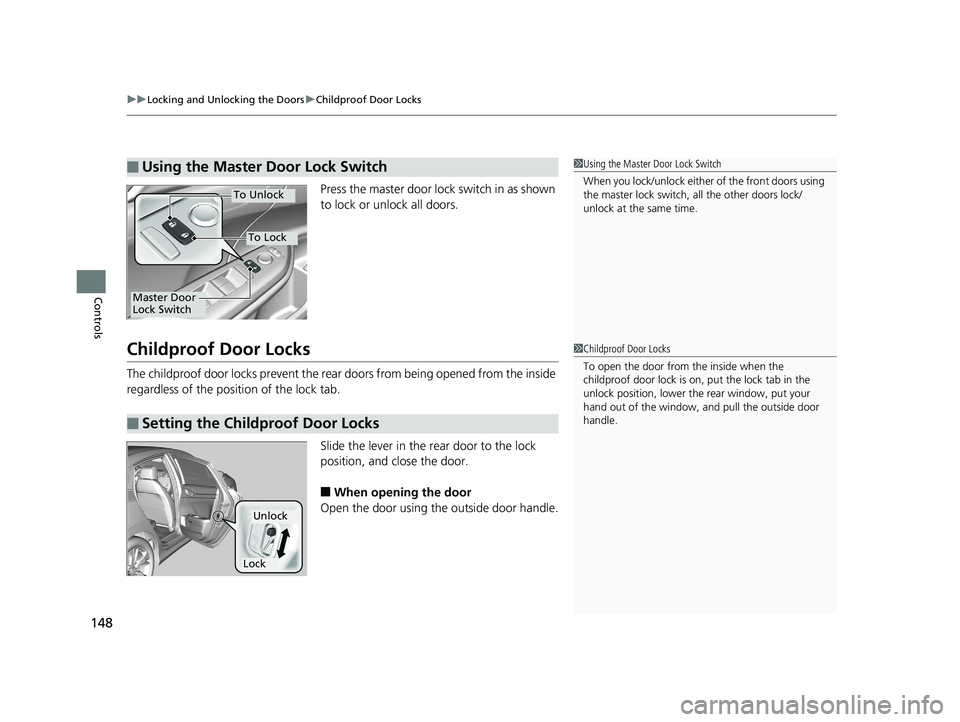
Press the master door lock switch in as shown
to lock or unlock all doors.
Childproof Door Locks
The childproof door locks prevent the rear doors from being opened from the inside
regardless of the position of the lock tab.
Slide the lever in the rear door to the lock
position, and close the door.
■When opening the door
Open the door using the outside door handle.
■Using the Master Door Lock Switch1 Using the Master Door Lock Switch
When you lock/unlock either of the front doors using
the master lock switch, all the other doors lock/
unlock at the same time.
To Unlock
Master Door
Lock Switch
To Lock
■Setting the Childproof Door Locks
1 Childproof Door Locks
To open the door from the inside when the
childproof door lock is on, put the lock tab in the
unlock position, lower the rear window, put your
hand out of the window, and pull the outside door
handle.
Lock
Unlock
18 CIVIC 4D HCM (KA KC KL)-31TBA6201.book 148 ページ 2018年10月30日 火曜日 午前7時28分
Page 159 of 643
Continued157
uuSecurity System uSecurity System Alarm
Controls
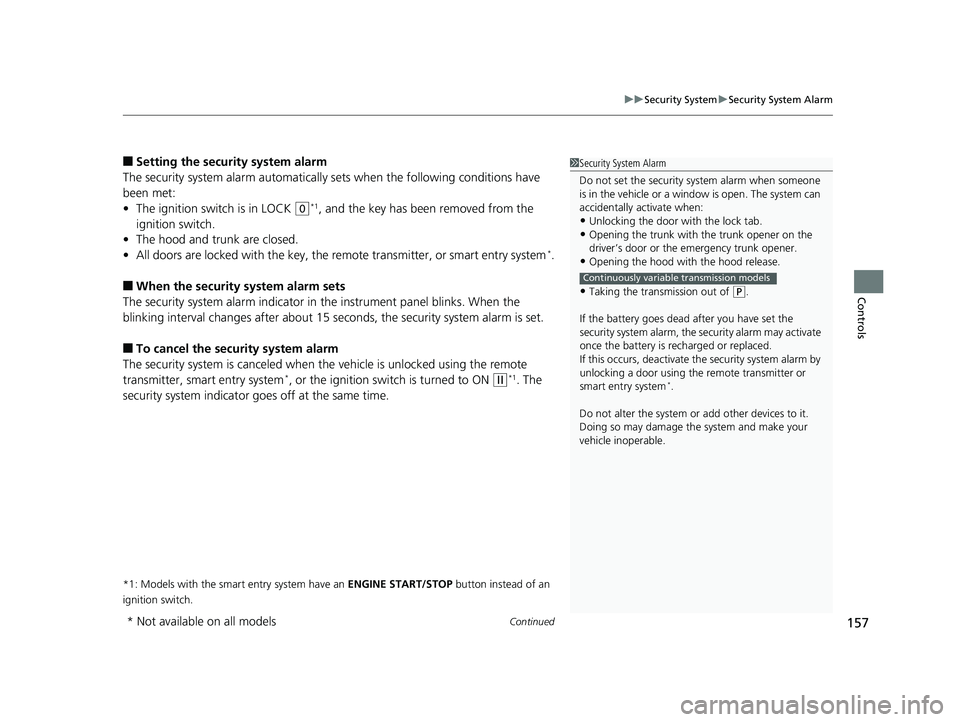
■Setting the security system alarm
The security system alarm automatically sets when the following conditions have
been met:
• The ignition switch is in LOCK
(0*1, and the key has been removed from the
ignition switch.
• The hood and trunk are closed.
• All doors are locked with the key, the remote transmitter, or smart entry system
*.
■When the security system alarm sets
The security system alarm indicator in the instrument panel blinks. When the
blinking interval changes after about 15 se conds, the security system alarm is set.
■To cancel the security system alarm
The security system is canc eled when the vehicle is unlocked using the remote
transmitter, smart entry system
*, or the ignition swit ch is turned to ON (w*1. The
security system indicator go es off at the same time.
*1: Models with the smart entry system have an ENGINE START/STOP button instead of an
ignition switch.
1 Security System Alarm
Do not set the security system alarm when someone
is in the vehicle or a window is open. The system can
accidentally activate when:
•Unlocking the door with the lock tab.•Opening the trunk with the trunk opener on the
driver’s door or the emergency trunk opener.
•Opening the hood with the hood release.
•Taking the transmission out of ( P.
If the battery goes dead after you have set the
security system alarm, the security alarm may activate
once the battery is re charged or replaced.
If this occurs, deactivate the security system alarm by
unlocking a door using the remote transmitter or
smart entry system
*.
Do not alter the system or add other devices to it.
Doing so may damage the system and make your
vehicle inoperable.
Continuously variable transmission models
* Not available on all models
18 CIVIC 4D HCM (KA KC KL)-31TBA6201.book 157 ページ 2018年10月30日 火曜日 午前7時28分
Page 161 of 643
159Continued
Controls
Opening and Closing the Windows
Opening/Closing the Power Windows
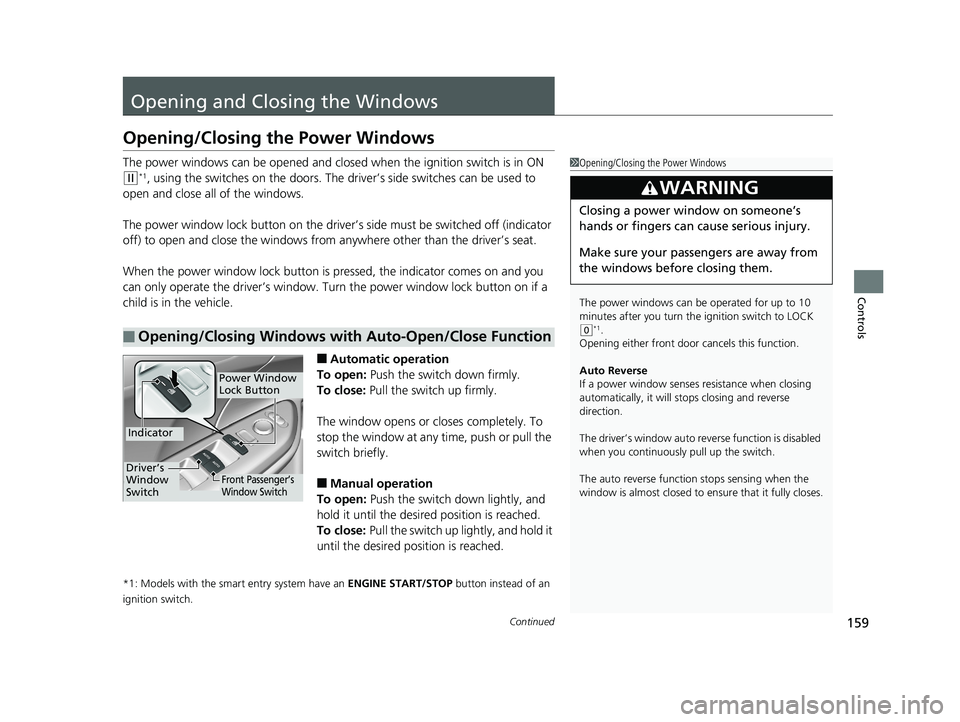
The power windows can be opened and closed when the ignition switch is in ON
(w*1, using the switches on the doors. The driver’s side switches can be used to
open and close all of the windows.
The power window lock button on the driver’s side must be switched off (indicator
off) to open and close the windows from anywhere other than the driver’s seat.
When the power window lock button is pressed, the indicator comes on and you
can only operate the driver’s window. Turn the power window lock button on if a
child is in the vehicle.
■Automatic operation
To open: Push the switch down firmly.
To close: Pull the switch up firmly.
The window opens or closes completely. To
stop the window at any time, push or pull the
switch briefly.
■Manual operation
To open: Push the switch down lightly, and
hold it until the desired position is reached.
To close: Pull the switch up lightly, and hold it
until the desired position is reached.
*1: Models with the smart entry system have an ENGINE START/STOP button instead of an
ignition switch.
■Opening/Closing Windows with Auto-Open/Close Function
1 Opening/Closing the Power Windows
The power windows can be operated for up to 10
minutes after you turn the ignition switch to LOCK
(0*1.
Opening either front door cancels this function.
Auto Reverse
If a power window senses resistance when closing
automatically, it will st ops closing and reverse
direction.
The driver’s window auto re verse function is disabled
when you continuously pull up the switch.
The auto reverse function stops sensing when the
window is almost closed to en sure that it fully closes.
3WARNING
Closing a power window on someone’s
hands or fingers can cause serious injury.
Make sure your passengers are away from
the windows before closing them.
Power Window
Lock Button
Indicator
Driver’s
Window
SwitchFront Passenger’s
Window Switch
18 CIVIC 4D HCM (KA KC KL)-31TBA6201.book 159 ページ 2018年10月30日 火曜日 午前7時28分
Page 162 of 643
160
uuOpening and Closing the Windows uOpening/Closing th e Power Windows
Controls
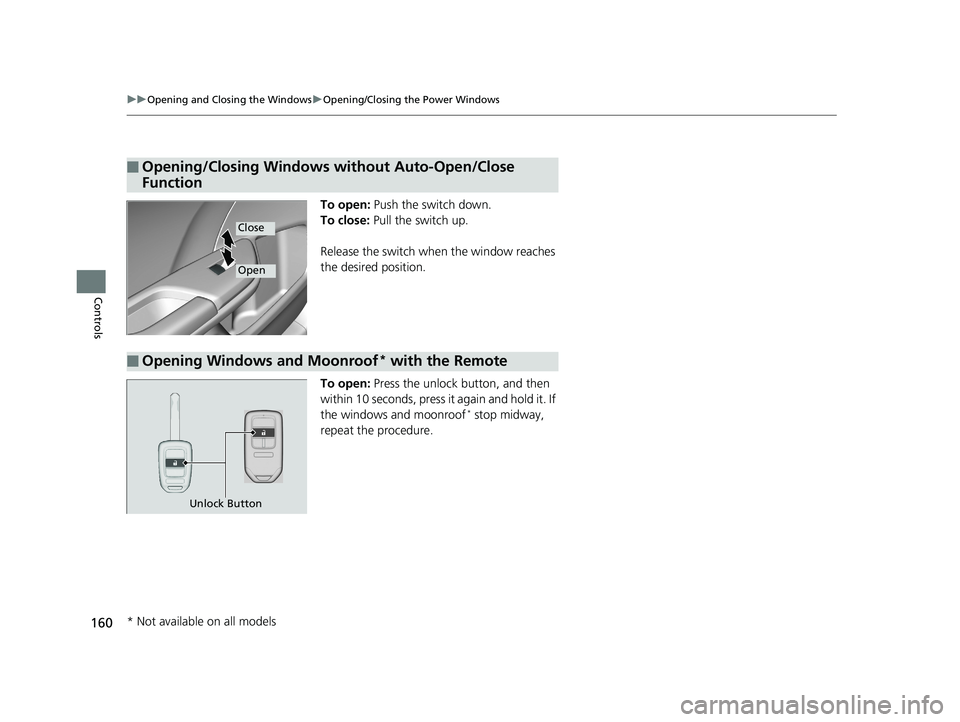
To open: Push the switch down.
To close: Pull the switch up.
Release the switch when the window reaches
the desired position.
To open: Press the unlock button, and then
within 10 seconds, press it again and hold it. If
the windows and moonroof
* stop midway,
repeat the procedure.
■Opening/Closing Windows without Auto-Open/Close
Function
Close
Open
■Opening Windows and Moonroof* with the Remote
Unlock Button
* Not available on all models
18 CIVIC 4D HCM (KA KC KL)-31TBA6201.book 160 ページ 2018年10月30日 火曜日 午前7時28分
Page 163 of 643
161
uuOpening and Closing the Windows uOpening/Closing the Power Windows
Controls
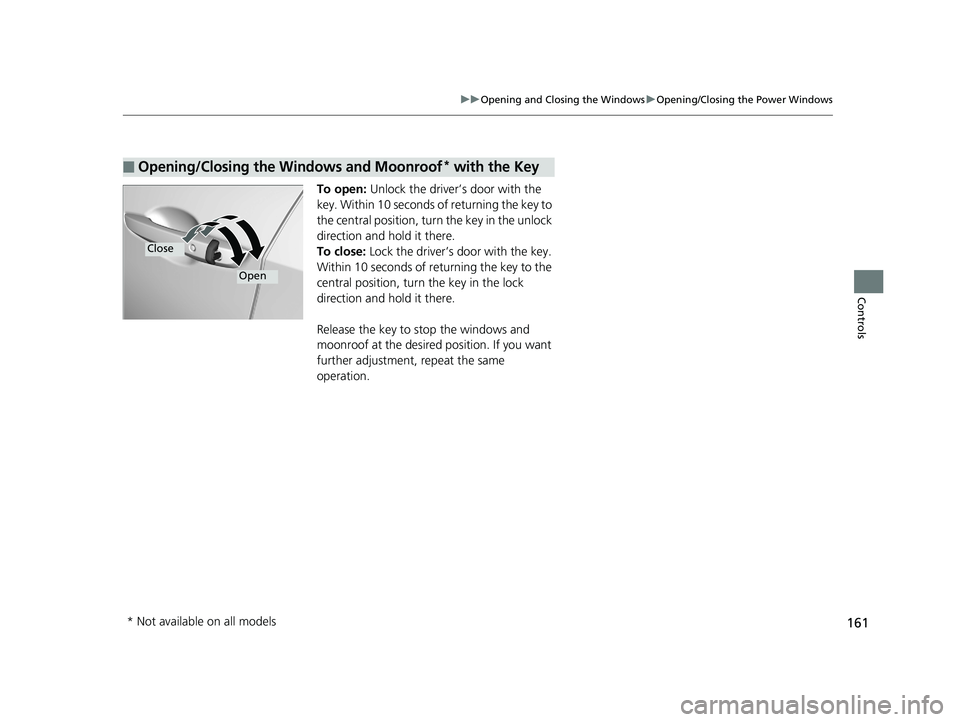
To open: Unlock the driver’s door with the
key. Within 10 seconds of returning the key to
the central position, turn the key in the unlock
direction and hold it there.
To close: Lock the driver’s door with the key.
Within 10 seconds of re turning the key to the
central position, turn the key in the lock
direction and hold it there.
Release the key to stop the windows and
moonroof at the desired position. If you want
further adjustment, repeat the same
operation.
■Opening/Closing the Windows and Moonroof* with the Key
Close
Open
* Not available on all models
18 CIVIC 4D HCM (KA KC KL)-31TBA6201.book 161 ページ 2018年10月30日 火曜日 午前7時28分
Page 164 of 643
162
Controls
Opening and Closing the Moonroof*
You can only operate the moonroof when the power mode is in ON. Use the switch
in the front of the ceiling to open and close the moonroof.
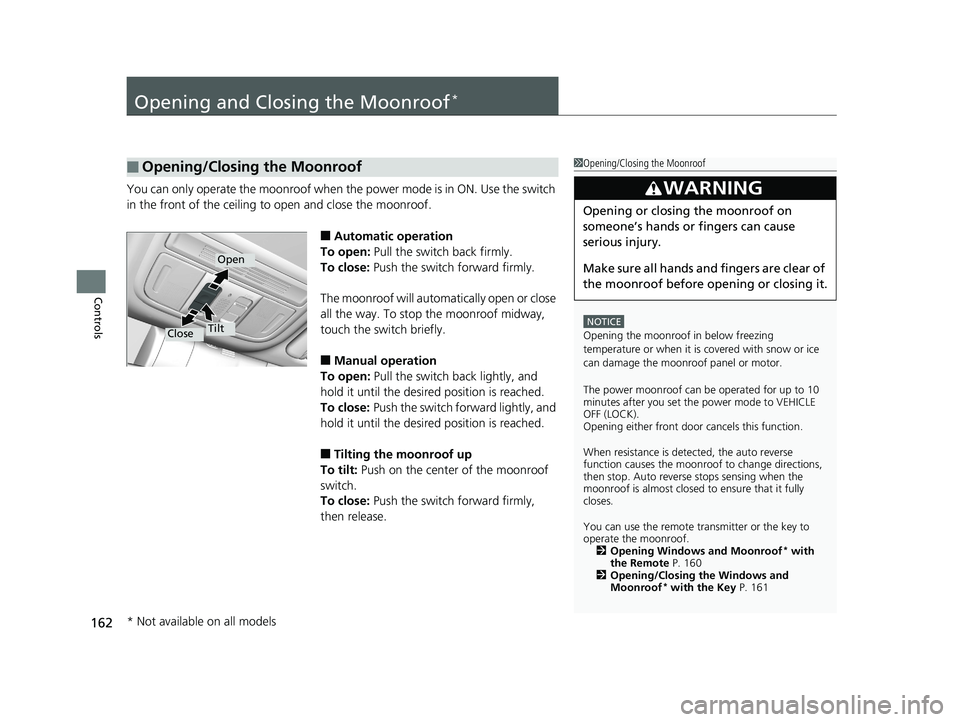
■Automatic operation
To open: Pull the switch back firmly.
To close: Push the switch forward firmly.
The moonroof will automa tically open or close
all the way. To stop the moonroof midway,
touch the switch briefly.
■Manual operation
To open: Pull the switch back lightly, and
hold it until the desired position is reached.
To close: Push the switch fo rward lightly, and
hold it until the desired position is reached.
■Tilting the moonroof up
To tilt: Push on the center of the moonroof
switch.
To close: Push the switch forward firmly,
then release.
■Opening/Closing the Moonroof1 Opening/Closing the Moonroof
NOTICE
Opening the moonroof in below freezing
temperature or when it is covered with snow or ice
can damage the moonroof panel or motor.
The power moonroof can be operated for up to 10
minutes after you set the power mode to VEHICLE
OFF (LOCK).
Opening either front door cancels this function.
When resistance is detected, the auto reverse
function causes the moonroof to change directions,
then stop. Auto reverse stops sensing when the
moonroof is almost closed to ensure that it fully
closes.
You can use the remote transmitter or the key to
operate the moonroof. 2 Opening Windows and Moonroof
* with
the Remote P. 160
2 Opening/Closing the Windows and
Moonroof
* with the Key P. 161
3WARNING
Opening or closing the moonroof on
someone’s hands or fingers can cause
serious injury.
Make sure all hands and fingers are clear of
the moonroof before opening or closing it.
Open
CloseTilt
* Not available on all models
18 CIVIC 4D HCM (KA KC KL)-31TBA6201.book 162 ページ 2018年10月30日 火曜日 午前7時28分
Page 166 of 643
164
uuOperating the Switches Around the Steering Wheel uENGINE START/STOP Button*
Controls
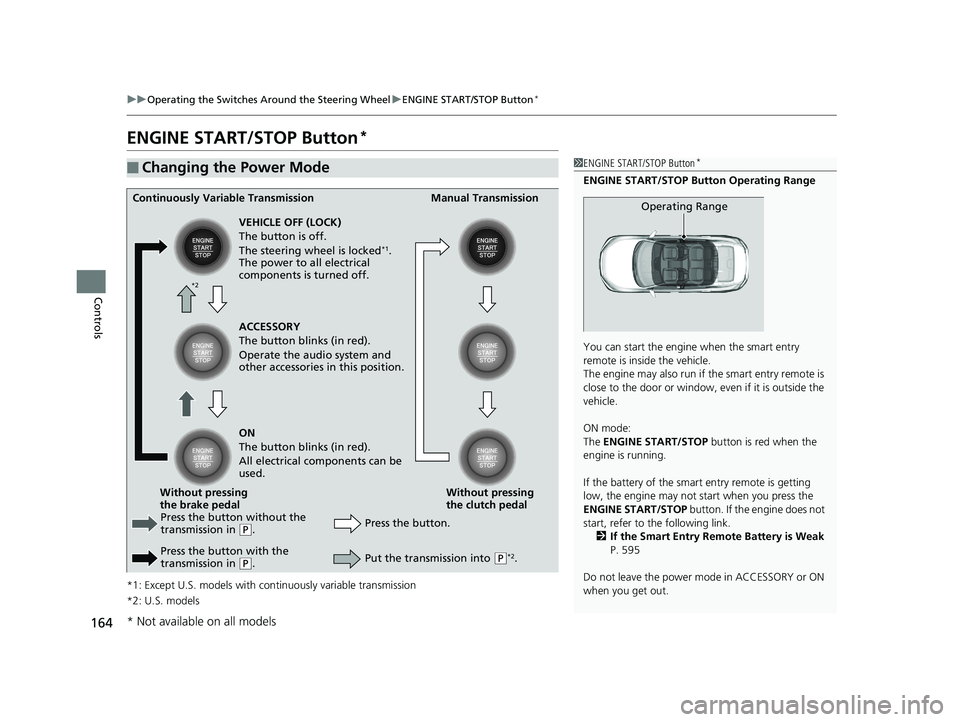
ENGINE START/STOP Button*
*1: Except U.S. models with c ontinuously variable transmission
*2: U.S. models
■Changing the Power Mode1 ENGINE START/STOP Button*
ENGINE START/STOP Button Operating Range
You can start the engine when the smart entry
remote is inside the vehicle.
The engine may also run if the smart entry remote is
close to the door or window, ev en if it is outside the
vehicle.
ON mode:
The ENGINE START/STOP button is red when the
engine is running.
If the battery of the smar t entry remote is getting
low, the engine may not start when you press the
ENGINE START/STOP button. If the engine does not
start, refer to the following link. 2 If the Smart Entry Remote Battery is Weak
P. 595
Do not leave the power mode in ACCESSORY or ON
when you get out.
Operating RangeContinuously Variable Transmission Manual Transmission
VEHICLE OFF (LOCK)
The button is off.
The steering wheel is locked
*1.
The power to all electrical
components is turned off.
Press the button without the
transmission in
( P.
Press the button with the
transmission in
( P. Press the button.
Without pressing
the clutch pedal
Without pressing
the brake pedal ACCESSORY
The button blinks (in red).
Operate the audio system and
other accessories in this position.
ON
The button blinks (in red).
All electrical components can be
used.
Put the transmission into (P*2.
*2
* Not available on all models
18 CIVIC 4D HCM (KA KC KL)-31TBA6201.book 164 ページ 2018年10月30日 火曜日 午前7時28分