engine change HONDA CIVIC SEDAN 2018 (in English) Owner's Guide
[x] Cancel search | Manufacturer: HONDA, Model Year: 2018, Model line: CIVIC SEDAN, Model: HONDA CIVIC SEDAN 2018Pages: 643, PDF Size: 38.26 MB
Page 189 of 643
187Continued
Controls
Interior Lights/Interior Convenience Items
Interior Lights
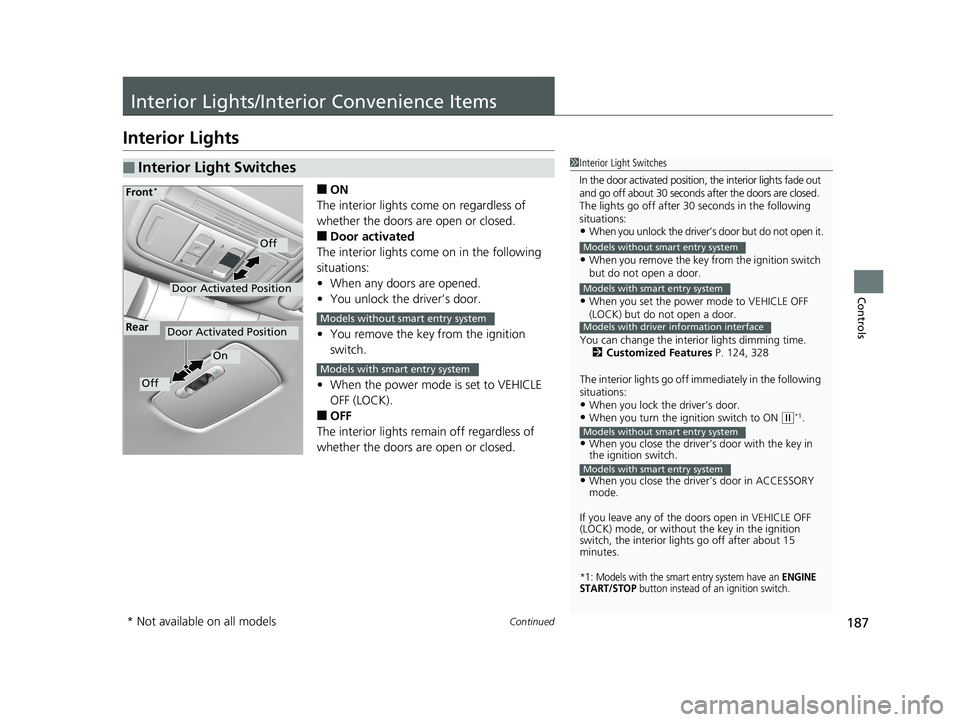
■ON
The interior lights come on regardless of
whether the doors are open or closed.
■Door activated
The interior lights come on in the following
situations:
• When any doors are opened.
• You unlock the driver’s door.
• You remove the key from the ignition
switch.
• When the power mode is set to VEHICLE
OFF (LOCK).
■OFF
The interior lights remain off regardless of
whether the doors are open or closed.
■Interior Light Switches1 Interior Light Switches
In the door activated position, the interior lights fade out
and go off about 30 seconds after the doors are closed.
The lights go off after 30 seconds in the following
situations:
•When you unlock the driver’s door but do not open it.
•When you remove the key from the ignition switch
but do not open a door.
•When you set the power mode to VEHICLE OFF
(LOCK) but do not open a door.
You can change the interi or lights dimming time.
2 Customized Features P. 124, 328
The interior lights go off i mmediately in the following
situations:
•When you lock the driver’s door.•When you turn the ignition switch to ON ( w*1.
•When you close the driver’s door with the key in
the ignition switch.
•When you close the driver’s door in ACCESSORY
mode.
If you leave any of the doors open in VEHICLE OFF
(LOCK) mode, or without the key in the ignition
switch, the interior li ghts go off after about 15
minutes.
*1: Models with the smart entry system have an ENGINE
START/STOP button instead of an ignition switch.
Models without smart entry system
Models with smart entry system
Models with driver information interface
Models without smart entry system
Models with smart entry system
Door Activated Position
Off
Front*
Door Activated Position
On
Off
RearModels without smart entry system
Models with smart entry system
* Not available on all models
18 CIVIC 4D HCM (KA KC KL)-31TBA6201.book 187 ページ 2018年10月30日 火曜日 午前7時28分
Page 204 of 643
202
Controls
Climate Control System*
Using Automatic Climate Control
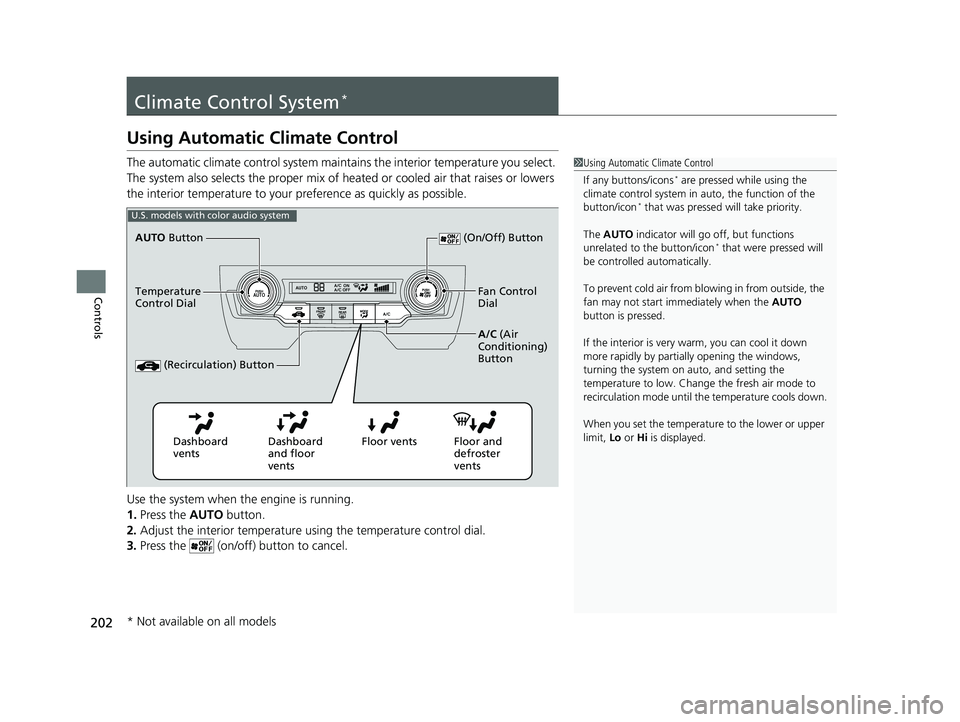
The automatic climate control system maintains the interior temperature you select.
The system also selects the proper mix of heated or cooled air that raises or lowers
the interior temperature to your pr eference as quickly as possible.
Use the system when the engine is running.
1. Press the AUTO button.
2. Adjust the interior temperature us ing the temperature control dial.
3. Press the (on/off) button to cancel.1Using Automatic Climate Control
If any buttons/icons
* are pressed while using the
climate control system in auto, the function of the
button/icon
* that was pressed will take priority.
The AUTO indicator will go off, but functions
unrelated to the button/icon
* that were pressed will
be controlled automatically.
To prevent cold air from bl owing in from outside, the
fan may not start i mmediately when the AUTO
button is pressed.
If the interior is very warm, you can cool it down
more rapidly by partial ly opening the windows,
turning the system on auto, and setting the
temperature to low. Change the fresh air mode to
recirculation mode until the temperature cools down.
When you set the temperat ure to the lower or upper
limit, Lo or Hi is displayed.
U.S. models with color audio system
Dashboard
vents Dashboard
and floor
ventsFloor vents Floor and
defroster
vents
AUTO
Button
Temperature
Control Dial A/C (Air
Conditioning)
Button
(Recirculation) Button
(On/Off) Button
Fan Control
Dial
* Not available on all models
18 CIVIC 4D HCM (KA KC KL)-31TBA6201.book 202 ページ 2018年10月30日 火曜日 午前7時28分
Page 205 of 643
Continued203
uuClimate Control System*uUsing Automatic Climate Control
Controls
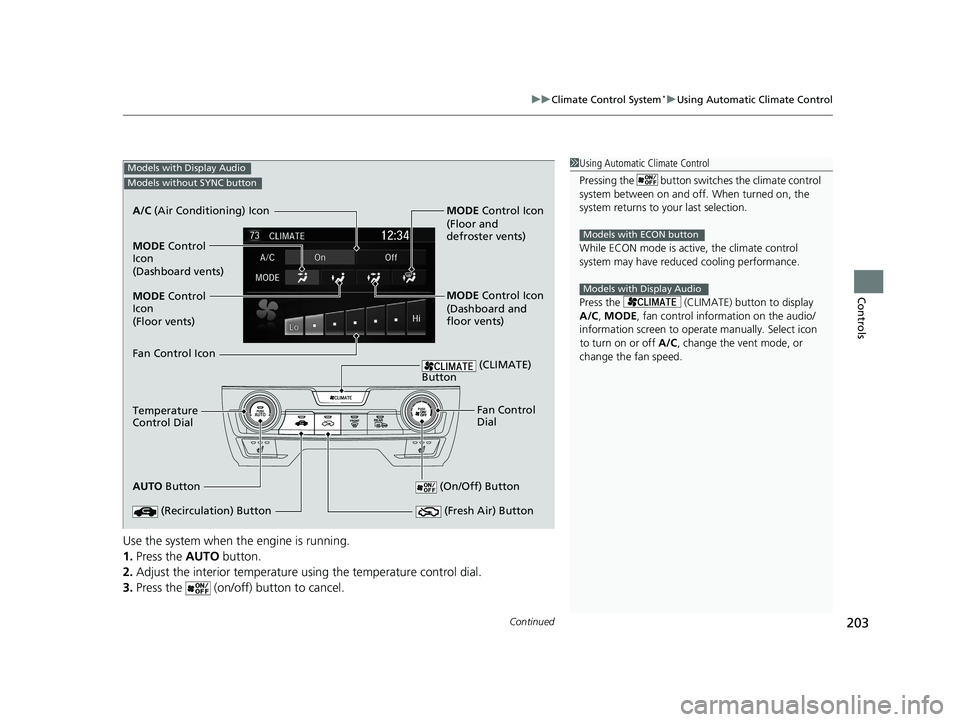
Use the system when the engine is running.
1. Press the AUTO button.
2. Adjust the interior temperature us ing the temperature control dial.
3. Press the (on/off) button to cancel.
1Using Automatic Climate Control
Pressing the button switches the climate control
system between on and off. When turned on, the
system returns to your last selection.
While ECON mode is active, the climate control
system may have reduced cooling performance.
Press the (CLIMATE) button to display
A/C , MODE, fan control information on the audio/
information screen to ope rate manually. Select icon
to turn on or off A/C, change the vent mode, or
change the fan speed.
Models with ECON button
Models with Display Audio
Models with Display Audio
Models without SYNC button
AUTO Button
Temperature
Control Dial A/C
(Air Conditioning) Icon
(Recirculation) Button (On/Off) Button
Fan Control
Dial
(Fresh Air) Button
Fan Control Icon MODE Control
Icon
(Dashboard vents)
(Floor vents) MODE Control
Icon MODE
Control Icon
MODE Control Icon
(Floor and
defroster vents)
(Dashboard and
floor vents)
(CLIMATE)
Button
18 CIVIC 4D HCM (KA KC KL)-31TBA6201.book 203 ページ 2018年10月30日 火曜日 午前7時28分
Page 239 of 643
237
Features
Audio System Basic Operation
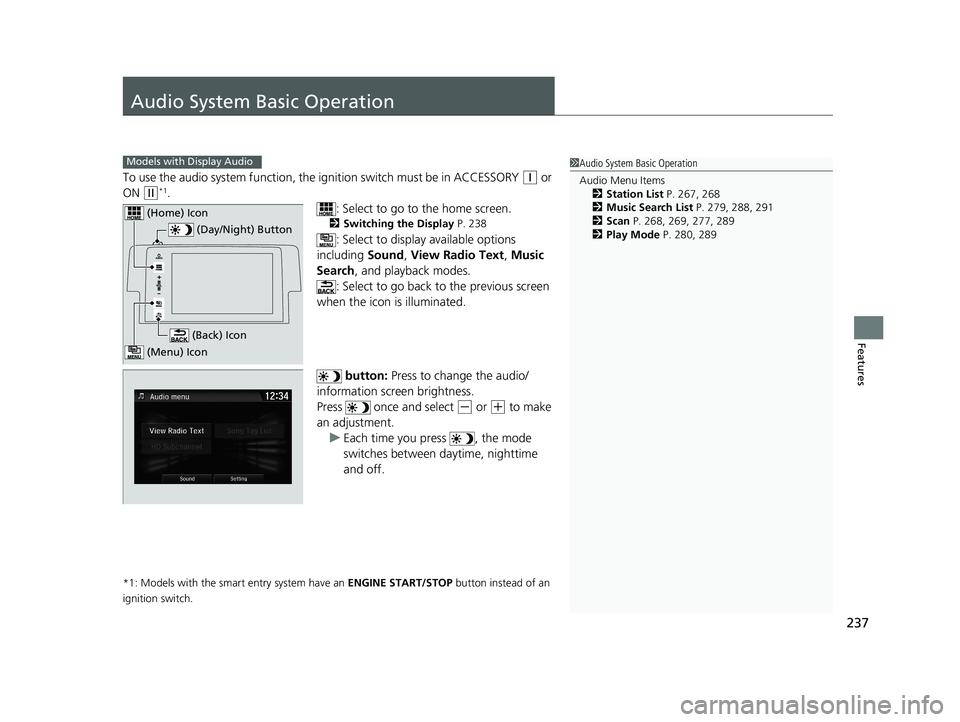
To use the audio system function, the ignition swit ch must be in ACCESSORY (q or
ON
(w*1.
: Select to go to the home screen.
2Switching the Display P. 238
: Select to display available options
including Sound, View Radio Text , Music
Search , and playback modes.
: Select to go back to the previous screen
when the icon is illuminated.
button: Press to change the audio/
information screen brightness.
Press once and select
(- or (+ to make
an adjustment. u Each time you press , the mode
switches between da ytime, nighttime
and off.
*1: Models with the smart entry system have an ENGINE START/STOP button instead of an
ignition switch.
1 Audio System Basic Operation
Audio Menu Items
2 Station List P. 267, 268
2 Music Search List P. 279, 288, 291
2 Scan P. 268, 269, 277, 289
2 Play Mode P. 280, 289Models with Display Audio
(Day/Night) Button
(Home) Icon
(Back) Icon
(Menu) Icon
18 CIVIC 4D HCM (KA KC KL)-31TBA6201.book 237 ページ 2018年10月30日 火曜日 午前7時28分
Page 356 of 643
354
uuCustomized Features u
Features
*1:Default Setting
*2:Models with the smart entry system have an ENGINE START/STOP button instead of an ignition switch.
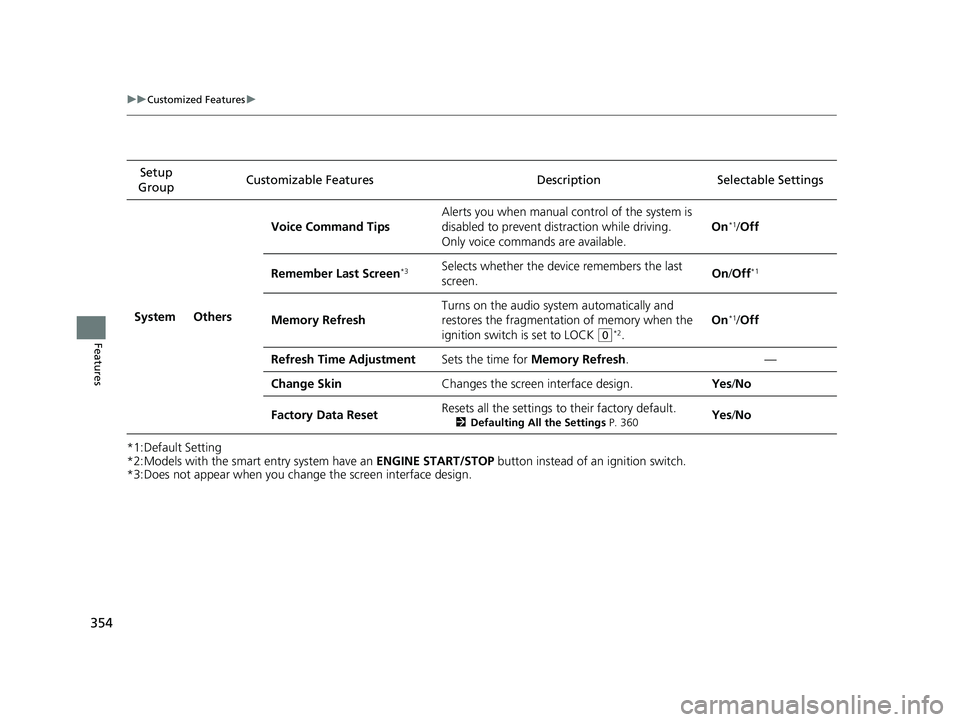
*3:Does not appear when you change the screen interface design. Setup
Group Customizable Features Description Selectable Settings
System Others Voice Command Tips
Alerts you when manual c
ontrol of the system is
disabled to prevent distraction while driving.
Only voice commands are available. On
*1/
Off
Remember Last Screen
*3Selects whether the device remembers the last
screen. On
/Off*1
Memory Refresh Turns on the audio syst
em automatically and
restores the fragmentation of memory when the
ignition switch is set to LOCK
(0*2. On
*1/
Off
Refresh Time Adjustment Sets the time for Memory Refresh . —
Change Skin Changes the screen interface design. Yes/No
Factory Data Reset Resets all the settings to their factory default.
2
Defaulting All the Settings P. 360Yes/No
18 CIVIC 4D HCM (KA KC KL)-31TBA6201.book 354 ページ 2018年10月30日 火曜日 午前7時28分
Page 359 of 643
357
uuCustomized Features u
Continued
Features
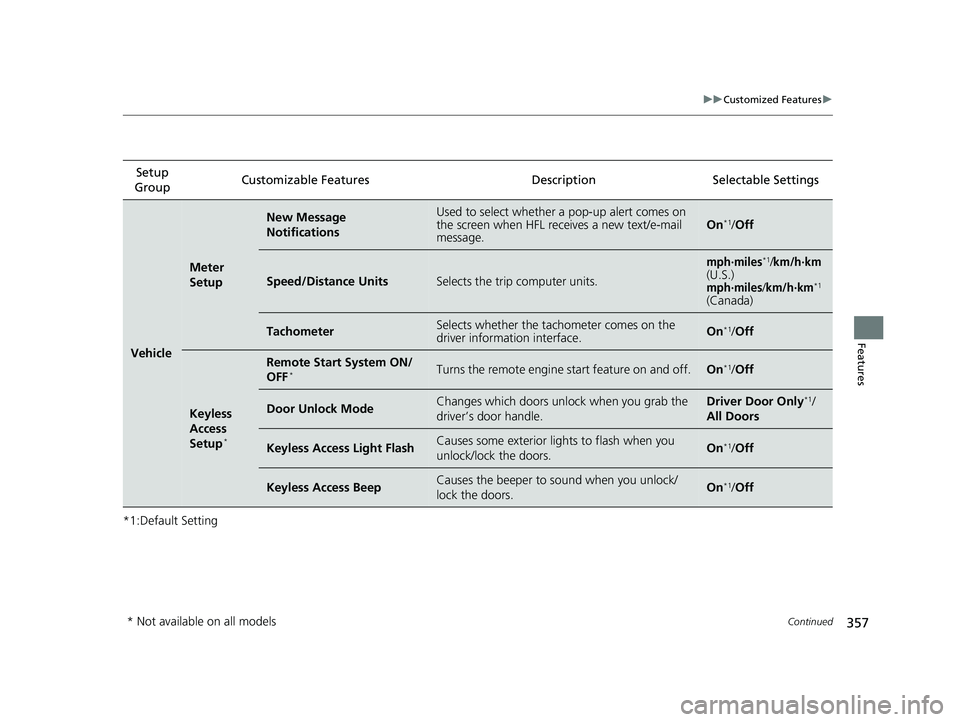
*1:Default SettingSetup
Group Customizable Features Description Selectable Settings
Vehicle
Meter
Setup
New Message
NotificationsUsed to select whether a pop-up alert comes on
the screen when HFL receives a new text/e-mail
message.On*1/
Off
Speed/Distance UnitsSelects the trip computer units.
mph∙miles*1/km/h∙km(U.S.)mph∙miles/km/h∙km*1
(Canada)
TachometerSelects whether the tachometer comes on the
driver information interface.On*1/Off
Keyless
Access
Setup
*
Remote Start System ON/
OFF*Turns the remote engine start feature on and off.On*1/Off
Door Unlock ModeChanges which doors unlock when you grab the
driver’s door handle.Driver Door Only*1/
All Doors
Keyless Access Light FlashCauses some exterior li ghts to flash when you
unlock/lock the doors.On*1/ Off
Keyless Access BeepCauses the beeper to sound when you unlock/
lock the doors.On*1/Off
* Not available on all models
18 CIVIC 4D HCM (KA KC KL)-31TBA6201.book 357 ページ 2018年10月30日 火曜日 午前7時28分
Page 361 of 643
359
uuCustomized Features u
Features
*1:Default Setting
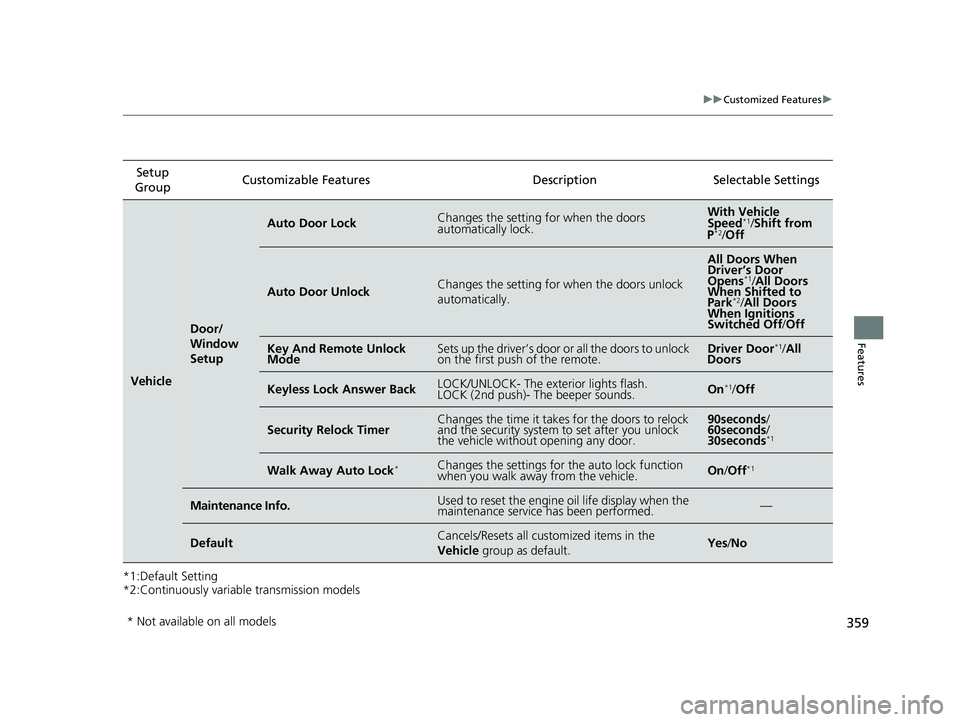
*2:Continuously variable transmission modelsSetup
Group Customizable Features Desc
ription Selectable Settings
Vehicle
Door/
Window
Setup
Auto Door LockChanges the setting for when the doors
automatically lock.With Vehicle
Speed*1/ Shift from
P*2/ Off
Auto Door UnlockChanges the setting for when the doors unlock
automatically.
All Doors When
Driver’s Door
Opens
*1/ All Doors
When Shifted to
Park
*2/ All Doors
When Ignitions
Switched Off/ Off
Key And Remote Unlock
ModeSets up the driver’s door or all the doors to unlock
on the first push of the remote.Driver Door*1/All
Doors
Keyless Lock Answer BackLOCK/UNLOCK- The exterior lights flash.
LOCK (2nd push)- The beeper sounds.On*1/ Off
Security Relock TimerChanges the time it takes for the doors to relock
and the security system to set after you unlock
the vehicle withou t opening any door.90seconds/
60seconds /
30seconds
*1
Walk Away Auto Lock*Changes the settings for the auto lock function
when you walk away from the vehicle.On /Off*1
Maintenance Info.Used to reset the engine oil life display when the
maintenance service has been performed.—
DefaultCancels/Resets all customized items in the
Vehicle group as default.Yes/No
* Not available on all models
18 CIVIC 4D HCM (KA KC KL)-31TBA6201.book 359 ページ 2018年10月30日 火曜日 午前7時28分
Page 438 of 643
436
uuWhen Driving uShifting
Driving
Shifting
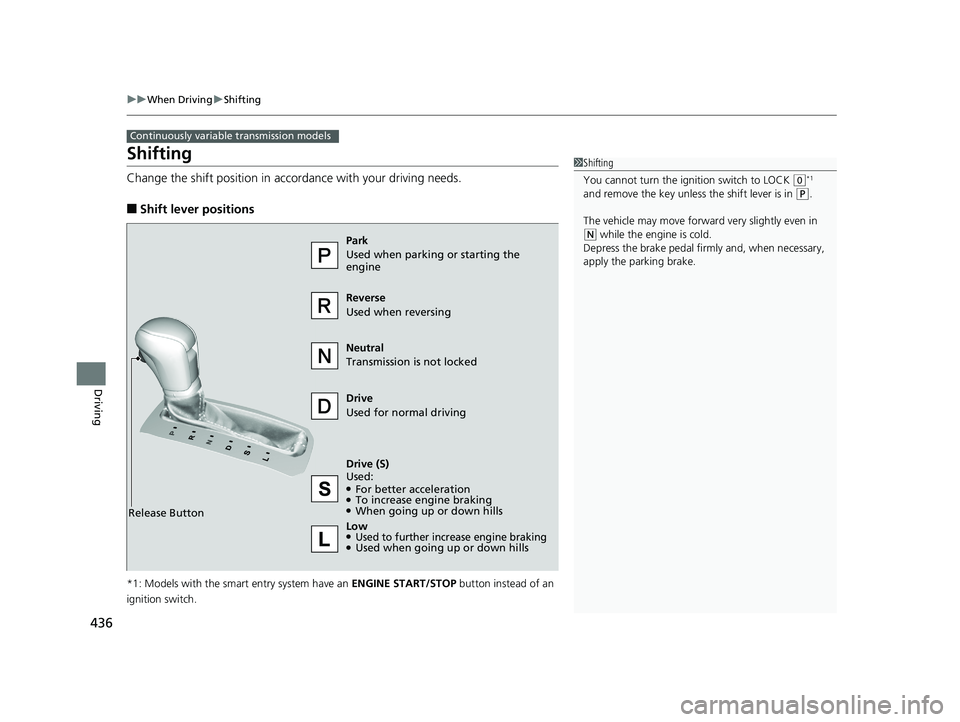
Change the shift position in accordance with your driving needs.
■Shift lever positions
*1: Models with the smart entry system have an ENGINE START/STOP button instead of an
ignition switch.
Continuously variable transmission models
1 Shifting
You cannot turn the ignition switch to LOCK
(0*1
and remove the key unless the shift lever is in
( P.
The vehicle may move forward very slightly even in
(N while the engine is cold.
Depress the brake pe dal firmly and, when necessary,
apply the parking brake.
Reverse
Used when reversing
Drive
Used for normal driving
Park
Used when parking or starting the
engine
Neutral
Transmission is not locked
Release Button
Drive (S)
Used:
●For better acceleration●To increase engine braking●When going up or down hills
Low
●Used to further increase engine braking●Used when going up or down hills
18 CIVIC 4D HCM (KA KC KL)-31TBA6201.book 436 ページ 2018年10月30日 火曜日 午前7時28分
Page 439 of 643
437
uuWhen Driving uShifting
Driving
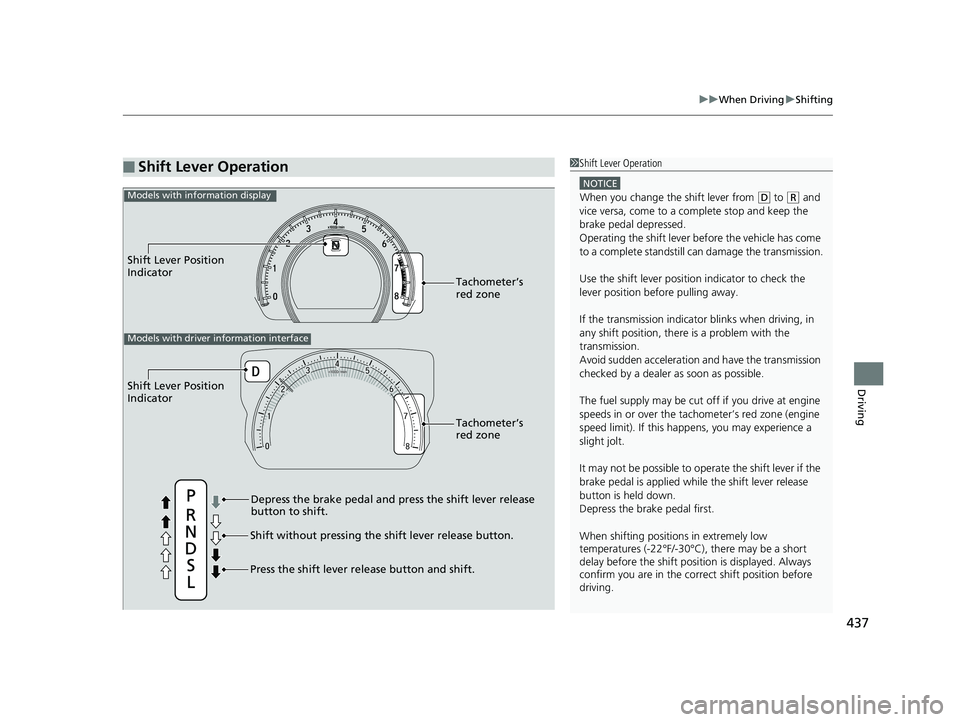
■Shift Lever Operation1Shift Lever Operation
NOTICE
When you change the shift lever from (D to ( R and
vice versa, come to a complete stop and keep the
brake pedal depressed.
Operating the shift lever be fore the vehicle has come
to a complete standstill can damage the transmission.
Use the shift lever position indicator to check the
lever position befo re pulling away.
If the transmission indicator blinks when driving, in
any shift position, there is a problem with the
transmission.
Avoid sudden acceleration and have the transmission
checked by a dealer as soon as possible.
The fuel supply may be cut of f if you drive at engine
speeds in or over the tac hometer’s red zone (engine
speed limit). If this happe ns, you may experience a
slight jolt.
It may not be possible to operate the shift lever if the
brake pedal is applied while the shift lever release
button is held down.
Depress the brake pedal first.
When shifting positions in extremely low
temperatures (-22°F/-30°C), there may be a short
delay before the shift posit ion is displayed. Always
confirm you are in the corr ect shift position before
driving.
Shift Lever Position
Indicator
Depress the brake pedal and press the shift lever release
button to shift.
Shift without pressing the shift lever release button.
Press the shift lever re lease button and shift.Tachometer’s
red zone
Shift Lever Position
Indicator
Tachometer’s
red zone
Models with driver information interface
Models with information display
18 CIVIC 4D HCM (KA KC KL)-31TBA6201.book 437 ページ 2018年10月30日 火曜日 午前7時28分
Page 440 of 643
438
uuWhen Driving uShifting
Driving
Shifting
Fully depress the clutch pedal to operate the shift lever and change gears, then
slowly release the pedal.
Depress the clutch pedal, and pause for a few seconds before shifting into
(R, or
shift into one of the forward gears for a moment. This stop s the gears so they do not
“grind.”
■Shift Lever Operation
Manual transmission models
1 Shifting
NOTICE
Do not shift to (R before the vehicle comes to a
complete stop.
Shifting to
( R before stopping can damage the
transmission.
NOTICE
Before downshifting, make su re the engine will not
go into the tachometer's red zone. Should this occur,
it can severely da mage your engine.
There is a metallic part on the shift lever. If you leave
the vehicle parked outside for a long time on a hot
day, be careful before movi ng the shift lever. Because
of heat, the shift lever may be extremely hot. If the
outside temperature is low, the shift lever may feel
cold.
18 CIVIC 4D HCM (KA KC KL)-31TBA6201.book 438 ページ 2018年10月30日 火曜日 午前7時28分