warning HONDA CIVIC SEDAN 2019 (in English) Owner's Guide
[x] Cancel search | Manufacturer: HONDA, Model Year: 2019, Model line: CIVIC SEDAN, Model: HONDA CIVIC SEDAN 2019Pages: 679, PDF Size: 40.24 MB
Page 97 of 679
95
uuIndicators uDriver Information Interface Wa rning and Information Messages
Continued
Instrument Panel
Driver Information Interface Warning and Information Messages
The following messages appear only on the driver information interface. Press the (d isplay/information) button to see the message
again with the system message indicator on.
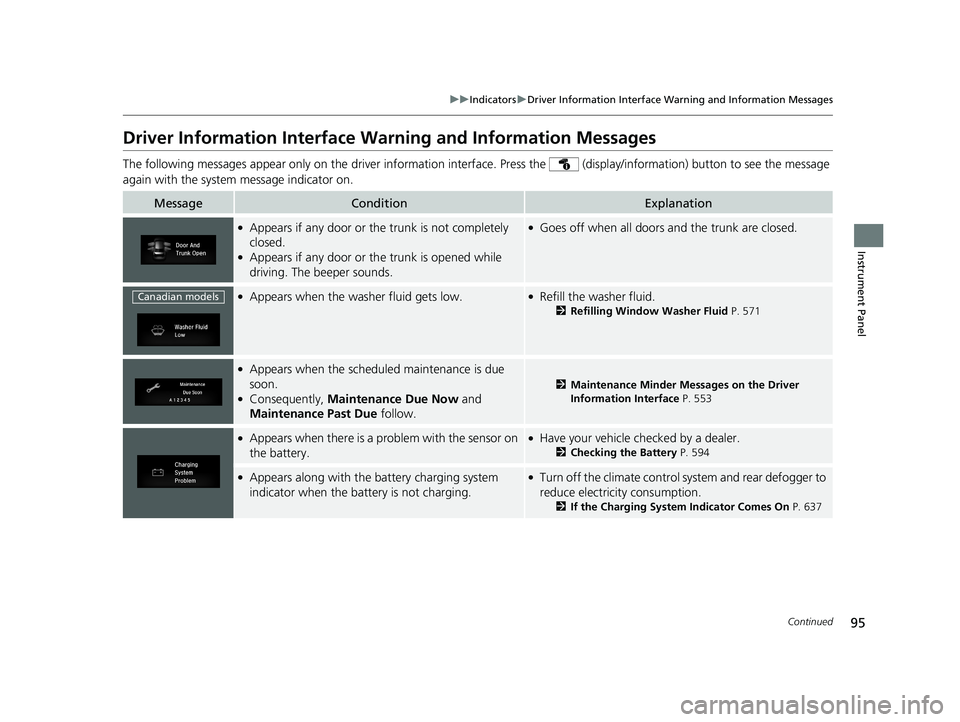
MessageConditionExplanation
●Appears if any door or the trunk is not completely
closed.
●Appears if any door or th e trunk is opened while
driving. The beeper sounds.
●Goes off when all doors and the trunk are closed.
●Appears when the washer fluid gets low.●Refill the washer fluid.
2 Refilling Window Washer Fluid P. 571
●Appears when the scheduled maintenance is due
soon.
●Consequently, Maintenance Due Now and
Maintenance Past Due follow.
2Maintenance Minder Messages on the Driver
Information Interface P. 553
●Appears when there is a problem with the sensor on
the battery.●Have your vehicle checked by a dealer.
2Checking the Battery P. 594
●Appears along with the ba ttery charging system
indicator when the battery is not charging.●Turn off the climate control sy stem and rear defogger to
reduce electricity consumption.
2 If the Charging System Indicator Comes On P. 637
Canadian models
19 CIVIC 4D HCM_HMIN_J (KA KL KC)-31TBA6301.book 95 ページ 2018年10月26日 金曜日 午前7時42分
Page 110 of 679
108
uuIndicators uDriver Information Interface Wa rning and Information Messages
Instrument Panel
MessageConditionExplanation
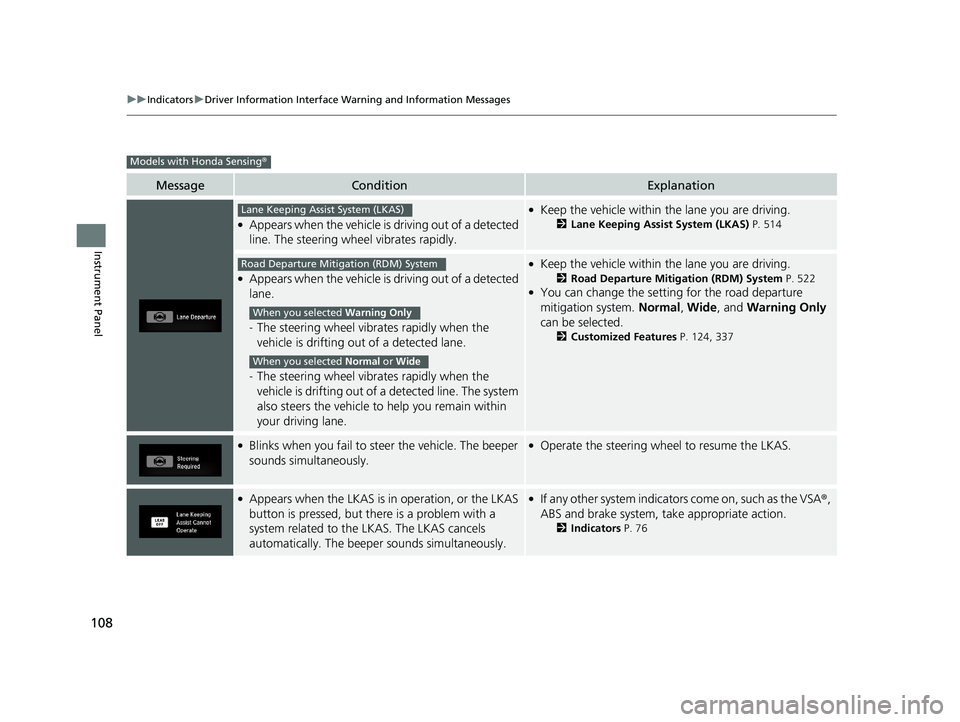
●Appears when the vehicle is driving out of a detected
line. The steering wheel vibrates rapidly.
●Keep the vehicle within the lane you are driving.
2Lane Keeping Assist System (LKAS) P. 514
●Appears when the vehicle is driving out of a detected
lane.
-The steering wheel vibrates rapidly when the
vehicle is drifting out of a detected lane.
- The steering wheel vibrates rapidly when the
vehicle is drifting out of a detected line. The system
also steers the vehicle to help you remain within
your driving lane.
●Keep the vehicle within the lane you are driving.
2 Road Departure Mitigation (RDM) System P. 522●You can change the setting for the road departure
mitigation system. Normal, Wide , and Warning Only
can be selected.
2 Customized Features P. 124, 337
●Blinks when you fail to st eer the vehicle. The beeper
sounds simultaneously.●Operate the steering whee l to resume the LKAS.
●Appears when the LKAS is in operation, or the LKAS
button is pressed, but there is a problem with a
system related to the LKAS. The LKAS cancels
automatically. The beeper sounds simultaneously.●If any other system indicators come on, such as the VSA®,
ABS and brake system, take appropriate action.
2 Indicators P. 76
Models with Honda Sensing ®
Lane Keeping Assist System (LKAS)
Road Departure Mitigation (RDM) System
When you selected Warning Only
When you selected Normal or Wide
19 CIVIC 4D HCM_HMIN_J (KA KL KC)-31TBA6301.book 108 ページ 2018年10月26日 金曜日 午前7時42分
Page 115 of 679
113
uuGauges and Driver Information Interface uDriver Information Interface
Continued
Instrument Panel
Driver Information Interface
The driver information interface displa ys the odometer, trip meter, outside
temperature, and other gauges.
It also displays important messages such as warnings and other helpful information.
19 CIVIC 4D HCM_HMIN_J (KA KL KC)-31TBA6301.book 113 ページ 2018年10月26日 金曜日 午前7時42分
Page 116 of 679
114
uuGauges and Driver Information Interface uDriver Information Interface
Instrument Panel
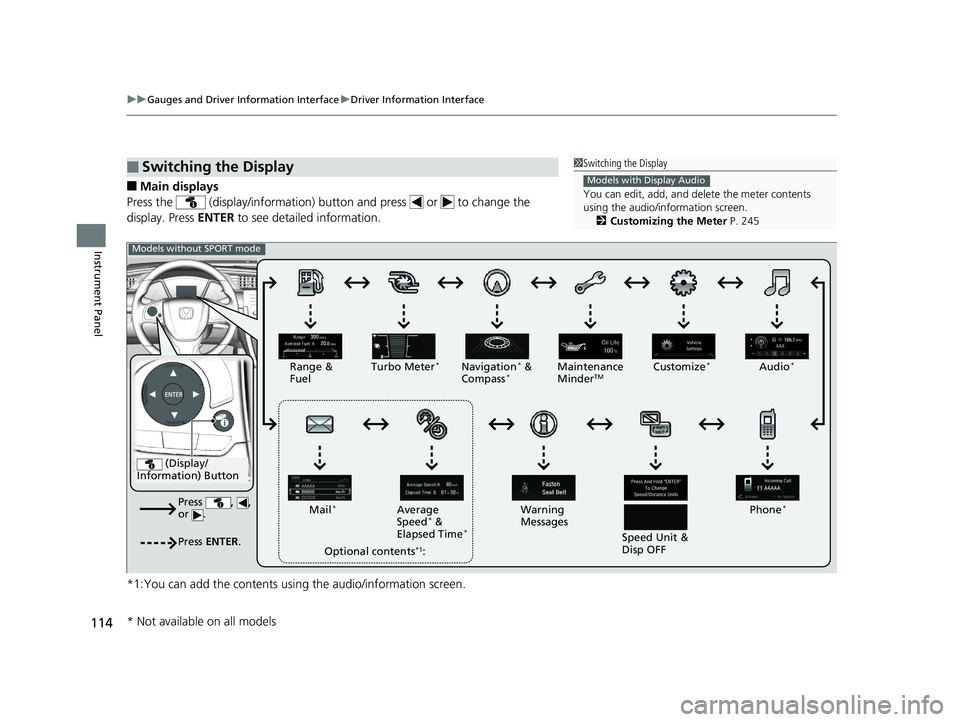
■Main displays
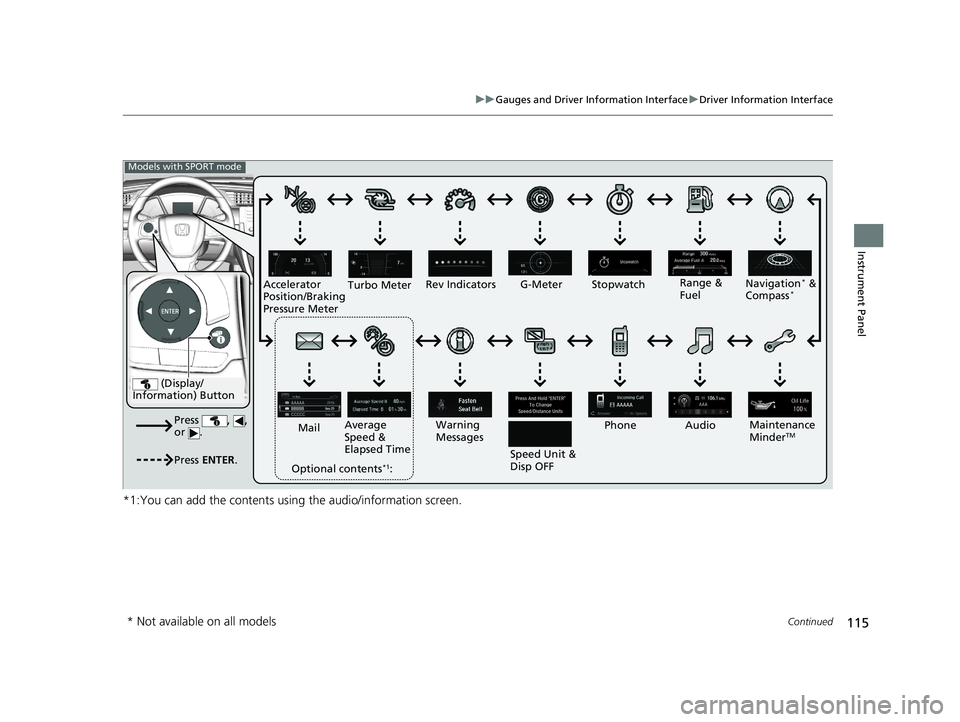
Press the (display/information) butto n and press or to change the
display. Press ENTER to see detailed information.
*1:You can add the contents usin g the audio/information screen.
■Switching the Display1Switching the Display
You can edit, add, and de lete the meter contents
using the audio/information screen. 2 Customizing the Meter P. 245
Models with Display Audio
(Display/
Information) Button
Press , ,
or .
Press ENTER .
Range &
Fuel Turbo Meter*Navigation* &
Compass*Maintenance
MinderTMCustomize*Audio*
Phone*
Speed Unit &
Disp OFF
Warning
Messages
Average
Speed
* &
Elapsed Time*
Mail*
Optional contents*1:
Models without SPORT mode
* Not available on all models
19 CIVIC 4D HCM_HMIN_J (KA KL KC)-31TBA6301.book 114 ページ 2018年10月26日 金曜日 午前7時42分
Page 117 of 679
115
uuGauges and Driver Information Interface uDriver Information Interface
Continued
Instrument Panel
*1:You can add the contents using the audio/information screen.
(Display/
Information) Button
Press , ,
or .
Press ENTER .
Range &
Fuel
Turbo Meter
Navigation* &
Compass*
Maintenance
MinderTM
Rev Indicators
Audio
Phone
Speed Unit &
Disp OFF
Warning
Messages
Average
Speed &
Elapsed Time
Mail
Optional contents
*1:
Models with SPORT mode
G-Meter Stopwatch
Accelerator
Position/Braking
Pressure Meter
* Not available on all models
19 CIVIC 4D HCM_HMIN_J (KA KL KC)-31TBA6301.book 115 ページ 2018年10月26日 金曜日 午前7時42分
Page 127 of 679
125
uuGauges and Driver Information Interface uDriver Information Interface
Continued
Instrument Panel
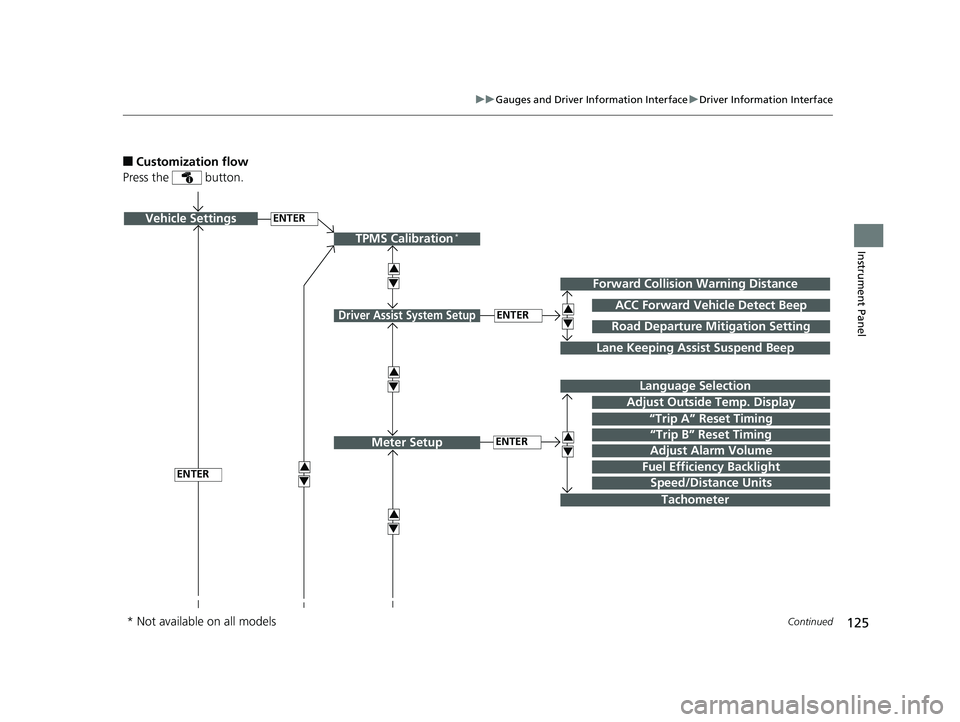
■Customization flow
Press the button.
ENTERVehicle Settings
“Trip A” Reset Timing
Language Selection
Adjust Outside Temp. Display
3
4
TPMS Calibration*
ENTER
“Trip B” Reset Timing
Fuel Efficiency Backlight3
4
ACC Forward Vehicle Detect Beep
3
4
Tachometer
ENTER
Forward Collision Warning Distance
3
4
3
4
Lane Keeping Assist Suspend Beep
Road Departure Mi tigation Setting
Adjust Alarm Volume
Speed/Distance Units
3
4
ENTER
Driver Assist System Setup
Meter Setup
* Not available on all models
19 CIVIC 4D HCM_HMIN_J (KA KL KC)-31TBA6301.book 125 ページ 2018年10月26日 金曜日 午前7時42分
Page 129 of 679
127
uuGauges and Driver Information Interface uDriver Information Interface
Continued
Instrument Panel
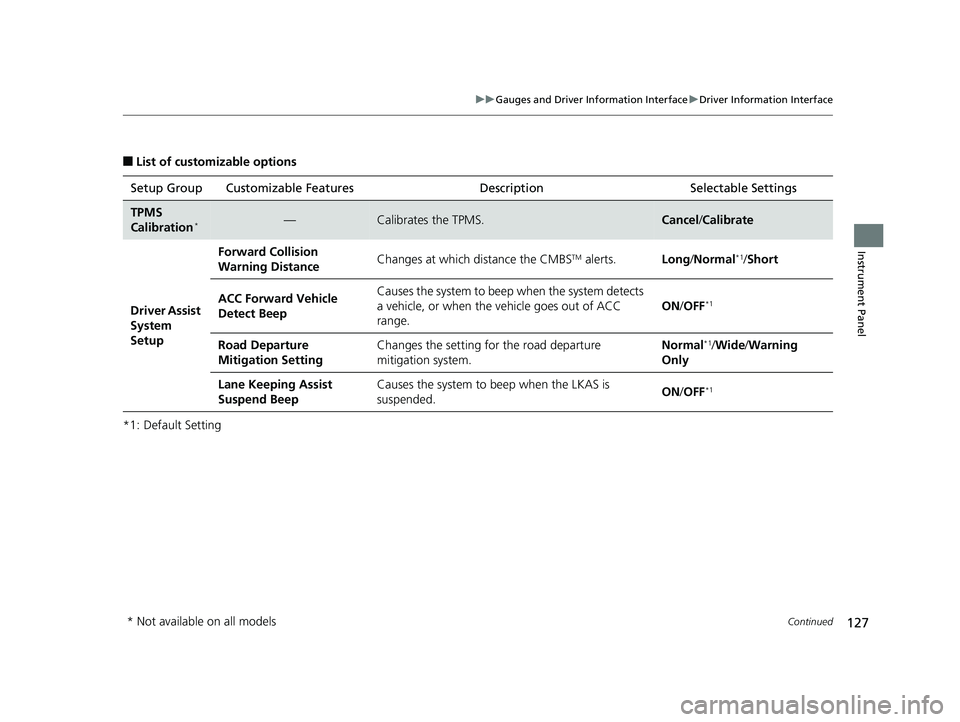
■List of customizable options
*1: Default Setting Setup Group Customizable Features
Description Selectable Settings
TPMS
Calibration*—Calibrates the TPMS.Cancel/Calibrate
Driver Assist
System
Setup Forward Collision
Warning Distance
Changes at which distance the CMBS
TM alerts.
Long/Normal*1/ Short
ACC Forward Vehicle
Detect Beep Causes the system to beep
when the system detects
a vehicle, or when the vehicle goes out of ACC
range. ON
/OFF
*1
Road Departure
Mitigation Setting Changes the setting fo
r the road departure
mitigation system. Normal*1/
Wide /Warning
Only
Lane Keeping Assist
Suspend Beep Causes the system to b
eep when the LKAS is
suspended. ON
/OFF
*1
* Not available on all models
19 CIVIC 4D HCM_HMIN_J (KA KL KC)-31TBA6301.book 127 ページ 2018年10月26日 金曜日 午前7時42分
Page 130 of 679
128
uuGauges and Driver Information Interface uDriver Information Interface
Instrument Panel
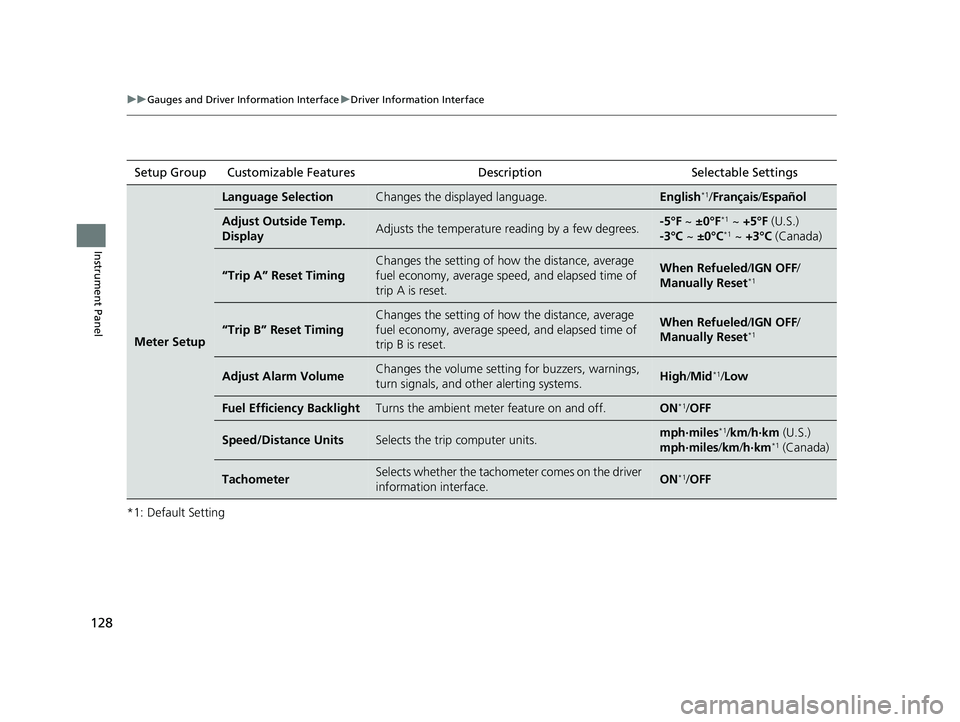
*1: Default SettingSetup Group Customizable Features
Description Selectable Settings
Meter Setup
Language SelectionChanges the displayed language.English*1/Français /Español
Adjust Outside Temp.
DisplayAdjusts the temperature reading by a few degrees.-5°F ~ ±0°F*1 ~ +5°F (U.S.)
-3°C ~ ±0°C*1 ~ +3°C (Canada)
“Trip A” Reset Timing
Changes the setting of how the distance, average
fuel economy, average sp eed, and elapsed time of
trip A is reset.When Refueled /IGN OFF /
Manually Reset*1
“Trip B” Reset Timing
Changes the setting of how the distance, average
fuel economy, average sp eed, and elapsed time of
trip B is reset.When Refueled /IGN OFF /
Manually Reset*1
Adjust Alarm VolumeChanges the volume setti ng for buzzers, warnings,
turn signals, and other alerting systems.High /Mid*1/Low
Fuel Efficiency BacklightTurns the ambient meter feature on and off.ON*1/ OFF
Speed/Distance UnitsSelects the trip computer units.mph∙miles*1/km /h∙km (U.S.)
mph∙miles /km/ h∙km*1 (Canada)
TachometerSelects whether the tachometer comes on the driver
information interface.ON*1/OFF
19 CIVIC 4D HCM_HMIN_J (KA KL KC)-31TBA6301.book 128 ページ 2018年10月26日 金曜日 午前7時42分
Page 144 of 679
uuLocking and Unlocking the Doors uLocking/Unlocking the Doors from the Outside
142
Controls
To temporarily deactivate the function:
1. Set the power mode to OFF.
2. Open the driver’s door.
3. Using the master door lock switch, operate
the lock as follows:
Lock Unlock Lock Unlock.
u The beeper sounds and the function is
deactivated.
To restore the function:
• Set the power mode to ON.
• Lock the vehicle without using the auto lock
function.
• With the smart entry re mote on you, move
out of the auto lock function operation
range.
• Open any door.1Locking the doors and trunk (Walk away auto lock ®)
The auto lock function does not operate when any of
the following conditions are met.
•The smart entry remote is inside the vehicle.
•A door or the hood is not closed.•The power mode is set to any mode other than
OFF.
•The smart entry remote is not located within a
radius of about 5 feet (1 .5 m) from the vehicle
when you get out of the vehicle and close the
doors.
Auto lock function operation stop beeper
After the auto lock function has been activated, the
auto lock operation stop beeper sounds for
approximately two seconds in the following cases.
•The smart entry remote is put inside the vehicle
through a window.
•You are located too close to the vehicle.
•The smart entry remote is put inside the trunk.
If the warning beeper sounds, check that you are
carrying the smart entry remote. Then, open/close a
door and confirm the auto lock activation beeper
sounds once.
In the case that the smart entry remote is out of
operating range when you cl ose a door or the trunk,
a beeper will sound to indi cate that the auto lock
function has been canceled.
19 CIVIC 4D HCM_HMIN_J (KA KL KC)-31TBA6301.book 142 ページ 2018年10月26日 金曜日 午前7時42分
Page 158 of 679
156
Controls
Opening and Closing the Windows
Opening/Closing the Power Windows
The power windows can be opened and closed when the ignition switch is in ON
(w*1, using the switches on the doors. The driver’s side switches can be used to
open and close all the windows.
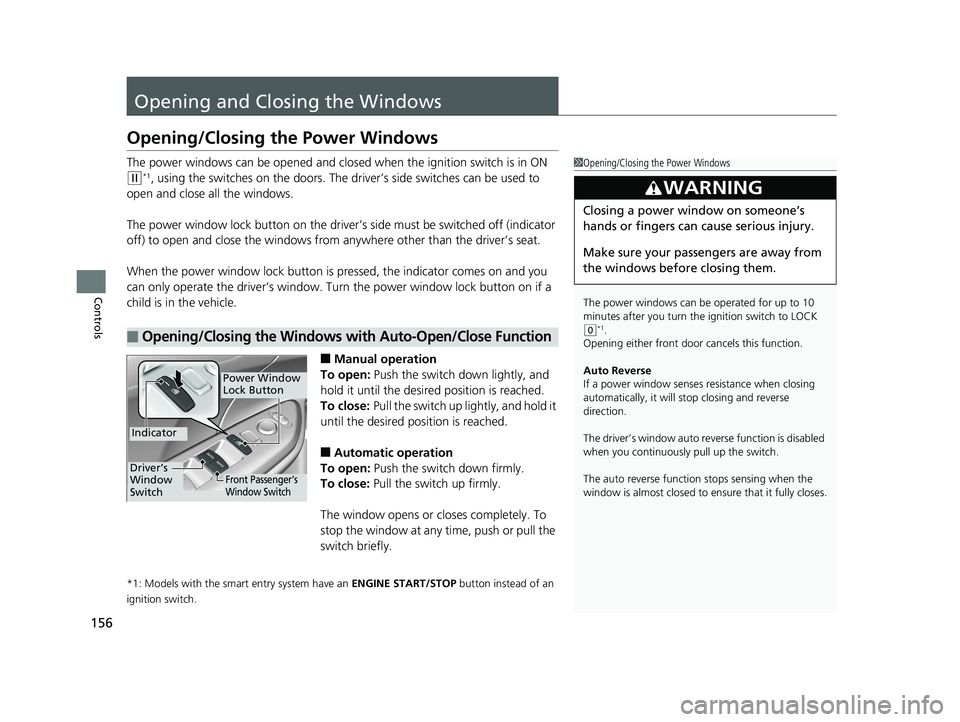
The power window lock button on the driver’s side must be switched off (indicator
off) to open and close the windows from anywhere other than the driver’s seat.
When the power window lock button is pressed, the indicator comes on and you
can only operate the driver’s window. Turn the power window lock button on if a
child is in the vehicle.
■Manual operation
To open: Push the switch down lightly, and
hold it until the desired position is reached.
To close: Pull the switch up lightly, and hold it
until the desired position is reached.
■Automatic operation
To open: Push the switch down firmly.
To close: Pull the switch up firmly.
The window opens or cl oses completely. To
stop the window at any time, push or pull the
switch briefly.
*1: Models with the smart entry system have an ENGINE START/STOP button instead of an
ignition switch.
■Opening/Closing the Windows with Auto-Open/Close Function
1 Opening/Closing the Power Windows
The power windows can be operated for up to 10
minutes after you turn the ignition switch to LOCK
( 0*1.
Opening either front door cancels this function.
Auto Reverse
If a power window senses resistance when closing
automatically, it will stop closing and reverse
direction.
The driver’s window auto re verse function is disabled
when you continuously pull up the switch.
The auto reverse function stops sensing when the
window is almost closed to en sure that it fully closes.
3WARNING
Closing a power window on someone’s
hands or fingers can cause serious injury.
Make sure your passengers are away from
the windows before closing them.
Power Window
Lock Button
Indicator
Driver’s
Window
SwitchFront Passenger’s
Window Switch
19 CIVIC 4D HCM_HMIN_J (KA KL KC)-31TBA6301.book 156 ページ 2018年10月26日 金曜日 午前7時42分