key battery HONDA CIVIC SEDAN 2019 Owner's Manual (in English)
[x] Cancel search | Manufacturer: HONDA, Model Year: 2019, Model line: CIVIC SEDAN, Model: HONDA CIVIC SEDAN 2019Pages: 679, PDF Size: 40.24 MB
Page 102 of 679
100
uuIndicators uDriver Information Interface Wa rning and Information Messages
Instrument Panel
MessageConditionExplanation
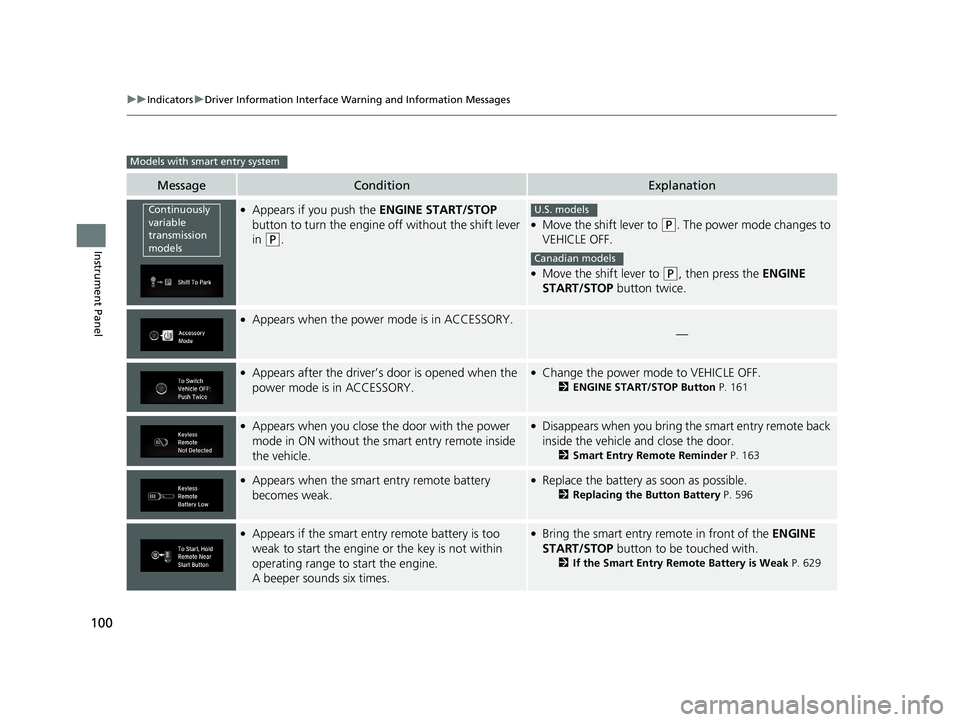
●Appears if you push the ENGINE START/STOP
button to turn the engine off without the shift lever
in
(P.
●Move the shift lever to (P. The power mode changes to
VEHICLE OFF.
●Move the shift lever to (P, then press the ENGINE
START/STOP button twice.
●Appears when the power mode is in ACCESSORY.
—
●Appears after the driver’s door is opened when the
power mode is in ACCESSORY.●Change the power mode to VEHICLE OFF.
2 ENGINE START/STOP Button P. 161
●Appears when you close the door with the power
mode in ON without the smart entry remote inside
the vehicle.●Disappears when you bring the smart entry remote back
inside the vehicle and close the door.
2Smart Entry Remote Reminder P. 163
●Appears when the smart entry remote battery
becomes weak.●Replace the battery as soon as possible.
2Replacing the Button Battery P. 596
●Appears if the smart entry remote battery is too
weak to start the engine or the key is not within
operating range to start the engine.
A beeper sounds six times.●Bring the smart entry remote in front of the ENGINE
START/STOP button to be touched with.
2If the Smart Entry Remote Battery is Weak P. 629
Models with smart entry system
Continuously
variable
transmission
modelsU.S. models
Canadian models
19 CIVIC 4D HCM_HMIN_J (KA KL KC)-31TBA6301.book 100 ページ 2018年10月26日 金曜日 午前7時42分
Page 138 of 679
136
Controls
Locking and Unlocking the Doors
Key Types and Functions
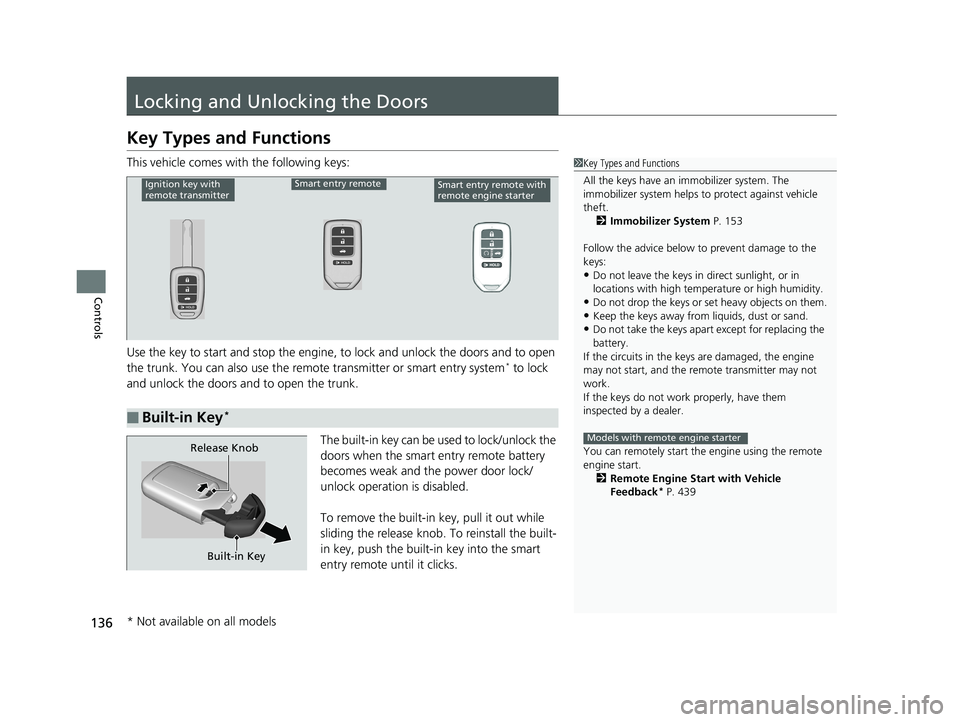
This vehicle comes with the following keys:
Use the key to start and stop the engine, to lock and unlock the doors and to open
the trunk. You can also use the remote transmitter or smart entry system
* to lock
and unlock the doors and to open the trunk.
The built-in key can be used to lock/unlock the
doors when the smart entry remote battery
becomes weak and th e power door lock/
unlock operation is disabled.
To remove the built-in key, pull it out while
sliding the release knob. To reinstall the built-
in key, push the built-in key into the smart
entry remote until it clicks.
1 Key Types and Functions
All the keys have an immobilizer system. The
immobilizer system helps to protect against vehicle
theft. 2 Immobilizer System P. 153
Follow the advice below to prevent damage to the
keys:
•Do not leave the keys in direct sunlight, or in
locations with high temperature or high humidity.
•Do not drop the keys or set heavy objects on them.•Keep the keys away from liquids, dust or sand.
•Do not take the keys apart except for replacing the
battery.
If the circuits in the keys are damaged, the engine
may not start, and the remote transmitter may not
work.
If the keys do not work properly, have them
inspected by a dealer.
You can remotely start the engine using the remote
engine start. 2 Remote Engine Start with Vehicle
Feedback
* P. 439
Models with remote engine starter
■Built-in Key*
Ignition key with
remote transmitterSmart entry remoteSmart entry remote with
remote engine starter
Built-in Key
Release Knob
* Not available on all models
19 CIVIC 4D HCM_HMIN_J (KA KL KC)-31TBA6301.book 136 ページ 2018年10月26日 金曜日 午前7時42分
Page 146 of 679
uuLocking and Unlocking the Doors uLocking/Unlocking the Doors from the Outside
144
Controls
■Unlocking the doors
Press the unlock button.
Once: u Some exterior lights flash twice, and the driver’s door and fuel fill door unlock.
Twice: u The remaining doors unlock.
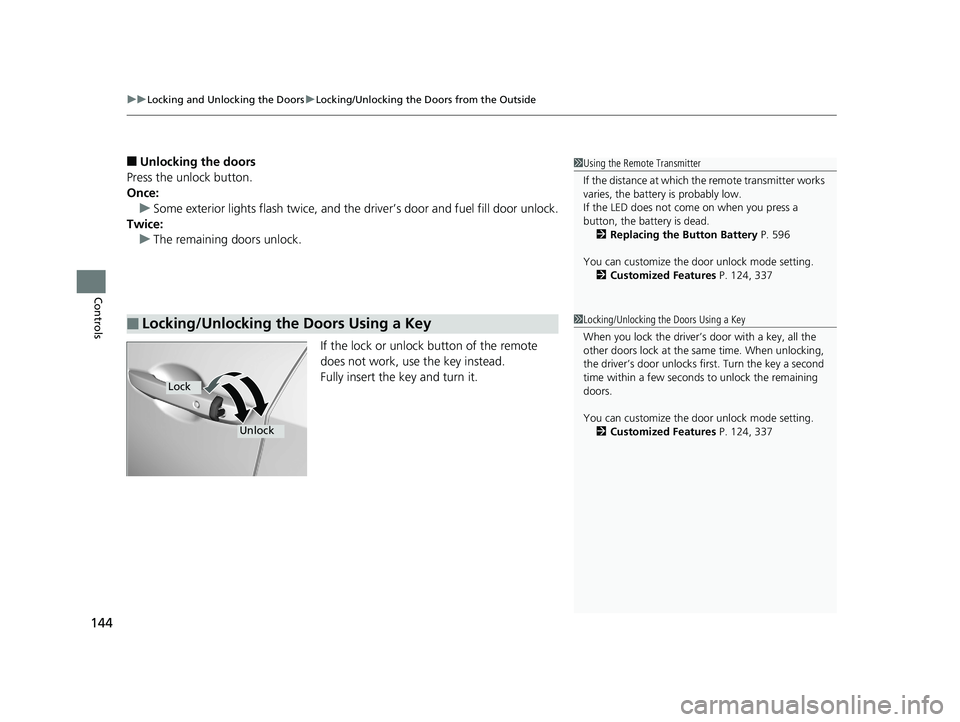
If the lock or unlock button of the remote
does not work, use the key instead.
Fully insert the key and turn it.
■Locking/Unlocking the Doors Using a Key
1Using the Remote Transmitter
If the distance at which the remote transmitter works
varies, the batter y is probably low.
If the LED does not come on when you press a
button, the battery is dead. 2 Replacing the Button Battery P. 596
You can customize the door unlock mode setting. 2 Customized Features P. 124, 337
1Locking/Unlocking the Doors Using a Key
When you lock the driver’s door with a key, all the
other doors lock at the sa me time. When unlocking,
the driver’s door unlocks first. Turn the key a second
time within a few seconds to unlock the remaining
doors.
You can customize the door unlock mode setting. 2 Customized Features P. 124, 337
Lock
Unlock
19 CIVIC 4D HCM_HMIN_J (KA KL KC)-31TBA6301.book 144 ページ 2018年10月26日 金曜日 午前7時42分
Page 155 of 679
153Continued
Controls
Security System
Immobilizer System
The immobilizer system prevents a key that has not been pre-registered from
starting the engine. Each key contains electronic transmitters that use electronic
signals to verify the key.
Pay attention to the following when insert ing the key into the ignition switch or
pressing the ENGINE START/STOP button:
• Do not allow objects that emit strong ra dio waves near the ignition switch or the
ENGINE START/STOP button.
• Make sure the key is not covered by or touching a metal object.
• Do not bring a key from another vehicle’s immobilizer system near the ignition
switch or the ENGINE START/STOP button.
• Do not put the key near magnetic items. Electronic devices, such as televisions
and audio systems emit strong magnetic fields. Note that even a key chain can
become magnetic.
Security System Alarm
The security system alarm activates when the trunk, hood or doors are forcibly
opened. The alarm does not activate if the trunk or doors are opened with the key,
remote transmitter or smart entry system
*.
However, the alarm activates if a door is opened with the key and then the
transmission is taken out of
(P (continuously variable transmission models) or the
hood is opened before the ignition switch is turned to ON
(w*1.
*1: Models with the smart entry system have an ENGINE START/STOP button instead of an
ignition switch.
1 Immobilizer System
NOTICE
Leaving the key in the vehicl e can result in theft or
accidental movement of the vehicle.
Always take the key with you whenever you leave the
vehicle unattended.
Do not alter the system or add other devices to it.
Doing so may damage the system and make your
vehicle inoperable.
Canadian models only: Apply and hold the brake
pedal before turning the vehicle on the first time after
the battery has been disconnected.
1 Security System Alarm
Do not alter the system or add other devices to it.
Doing so may damage the system and make your
vehicle inoperable.
The security alarm continues for a maximum of two
minutes until the security system alarm deactivates.
* Not available on all models
19 CIVIC 4D HCM_HMIN_J (KA KL KC)-31TBA6301.book 153 ページ 2018年10月26日 金曜日 午前7時42分
Page 156 of 679
uuSecurity System uSecurity System Alarm
154
Controls
■When the security sy stem alarm activates
The horn sounds intermittently, and some exterior lights flash.
■To deactivate the security system alarm
Unlock the vehicle using remote transmitter or smart entry system*, or turn the
ignition switch to ON
(w*1. The system, along with the horn and flashing lights, is
deactivated.
■Setting the security system alarm
The security system alarm automatically sets when the following conditions have
been met:
• The ignition switch is in LOCK
(0*1, and the key has been removed from the
ignition switch.
• The hood and trunk are closed.
• All doors are locked with the key, the remote transmitter, or smart entry system
*.
■When the security system alarm sets
The security system alarm indi cator in the instrument panel and the blinki ng interval
changes after about 15 seconds.
■To cancel the security system alarm
The security system is canceled when th e vehicle is unlocked using the remote
transmitter or smart entry system
*, or when the ignition sw itch is turned to ON (w*1.
The security system indicator goes off at the same time.
*1: Models with the smart entry system have an ENGINE START/STOP button instead of an
ignition switch.
1 Security System Alarm
Do not set the security system alarm when someone
is in the vehicle or a window is open. The system can
accidentally activate when:
•Unlocking the door with the lock tab.•Opening the trunk with the trunk opener on the
driver’s door or the emergency trunk opener.
•Opening the hood with the hood release.
•Taking the transmission out of ( P.
If the battery goes dead after you have set the
security system alarm, the security alarm may activate
once the battery is re charged or replaced.
If this occurs, deactivate the security system alarm by
unlocking a door using the remote transmitter or
smart entry system
*.
Continuously variable transmission models
* Not available on all models
19 CIVIC 4D HCM_HMIN_J (KA KL KC)-31TBA6301.book 154 ページ 2018年10月26日 金曜日 午前7時42分
Page 168 of 679
166
uuOperating the Switches Around the Steering Wheel uLight Switches
Controls
Light Switches
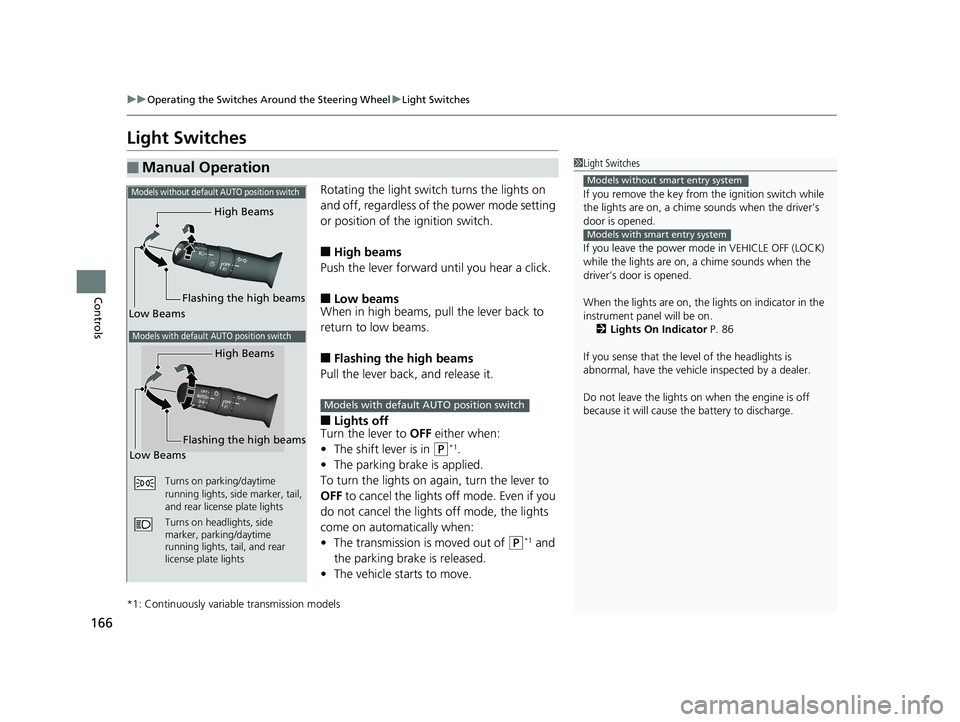
Rotating the light switch turns the lights on
and off, regardless of the power mode setting
or position of the ignition switch.
■High beams
Push the lever forward until you hear a click.
■Low beams
When in high beams, pull the lever back to
return to low beams.
■Flashing the high beams
Pull the lever back, and release it.
■Lights off
Turn the lever to OFF either when:
• The shift lever is in
(P*1.
• The parking brake is applied.
To turn the lights on ag ain, turn the lever to
OFF to cancel the lights off mode. Even if you
do not cancel the lights off mode, the lights
come on automatically when:
• The transmission is moved out of
(P*1 and
the parking brake is released.
• The vehicle starts to move.
*1: Continuously variable transmission models
■Manual Operation1Light Switches
If you remove the key from the ignition switch while
the lights are on, a chime sounds when the driver’s
door is opened.
If you leave the power mode in VEHICLE OFF (LOCK)
while the lights are on, a chime sounds when the
driver’s door is opened.
When the lights are on, the lights on indicator in the
instrument pane l will be on.
2 Lights On Indicator P. 86
If you sense that the le vel of the headlights is
abnormal, have the vehicl e inspected by a dealer.
Do not leave the lights on when the engine is off
because it will cause the battery to discharge.
Models without smart entry system
Models with smart entry system
High Beams
Flashing the high beams
Low Beams
Turns on parking/daytime
running lights, side marker, tail,
and rear license plate lights
Turns on headlights, side
marker, parking/daytime
running lights, tail, and rear
license plate lights
Models without default AUTO position switch
Models with default AUTO position switch
High Beams
Flashing the high beams
Low Beams
Models with default AUTO position switch
19 CIVIC 4D HCM_HMIN_J (KA KL KC)-31TBA6301.book 166 ページ 2018年10月26日 金曜日 午前7時42分
Page 598 of 679
596
Maintenance
Remote Transmitter Care
Replacing the Button Battery
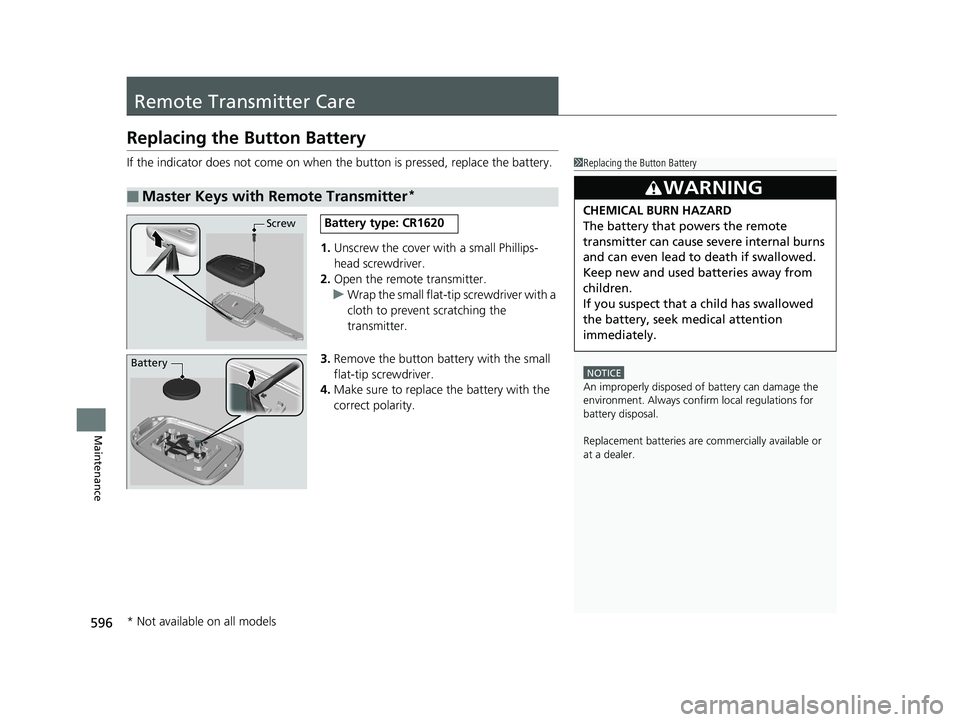
If the indicator does not come on when the button is pressed, replace the battery.
1. Unscrew the cover with a small Phillips-
head screwdriver.
2. Open the remote transmitter.
u Wrap the small flat-tip screwdriver with a
cloth to prevent scratching the
transmitter.
3. Remove the button battery with the small
flat-tip screwdriver.
4. Make sure to replace the battery with the
correct polarity.
■Master Keys with Remote Transmitter*
1 Replacing the Button Battery
NOTICE
An improperly disposed of battery can damage the
environment. Always conf irm local regulations for
battery disposal.
Replacement batteries are commercially available or
at a dealer.
3WARNING
CHEMICAL BURN HAZARD
The battery that powers the remote
transmitter can cause severe internal burns
and can even lead to death if swallowed.
Keep new and used batteries away from
children.
If you suspect that a child has swallowed
the battery, seek medical attention
immediately.ScrewBattery type: CR1620
Battery
* Not available on all models
19 CIVIC 4D HCM_HMIN_J (KA KL KC)-31TBA6301.book 596 ページ 2018年10月26日 金曜日 午前7時42分
Page 599 of 679
597
uuRemote Transmitter Care uReplacing the Button Battery
Maintenance
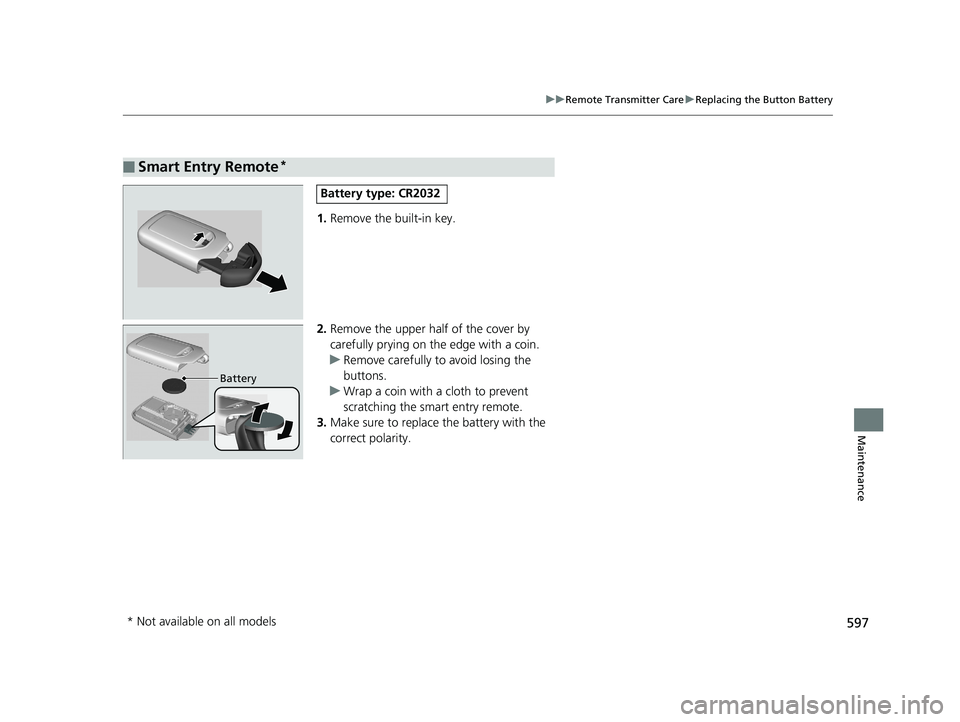
1. Remove the built-in key.
2. Remove the upper half of the cover by
carefully prying on the edge with a coin.
u Remove carefully to avoid losing the
buttons.
u Wrap a coin with a cloth to prevent
scratching the smart entry remote.
3. Make sure to replace the battery with the
correct polarity.
■Smart Entry Remote*
Battery type: CR2032
Battery
* Not available on all models
19 CIVIC 4D HCM_HMIN_J (KA KL KC)-31TBA6301.book 597 ページ 2018年10月26日 金曜日 午前7時42分
Page 670 of 679
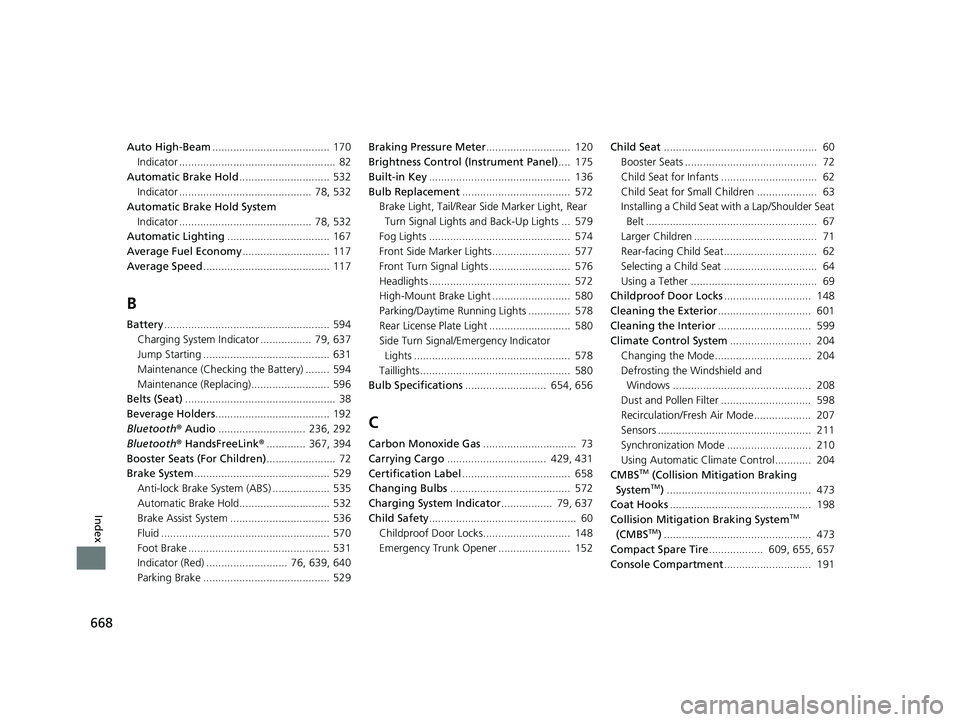
668
Index
Auto High-Beam....................................... 170
Indicator .................................................... 82
Automatic Brake Hold .............................. 532
Indicator ............................................ 78, 532
Automatic Brake Hold System
Indicator ............................................ 78, 532
Automatic Lighting .................................. 167
Average Fuel Economy ............................. 117
Average Speed .......................................... 117
B
Battery....................................................... 594
Charging System Indicator ................. 79, 637
Jump Starting .......................................... 631
Maintenance (Checking the Battery) ........ 594
Maintenance (Replacing).......................... 596
Belts (Seat) .................................................. 38
Beverage Holders ...................................... 192
Bluetooth ® Audio ............................. 236, 292
Bluetooth ® HandsFreeLink ®............. 367, 394
Booster Seats (For Children) ....................... 72
Brake System ............................................. 529
Anti-lock Brake System (ABS) ................... 535
Automatic Brake Hold.............................. 532
Brake Assist System ................................. 536
Fluid ........................................................ 570
Foot Brake ............................................... 531
Indicator (Red) ........................... 76, 639, 640
Parking Brake .......................................... 529 Braking Pressure Meter
............................ 120
Brightness Control (Instrument Panel).... 175
Built-in Key ............................................... 136
Bulb Replacement .................................... 572
Brake Light, Tail/Rear Side Marker Light, Rear
Turn Signal Lights and Back-Up Lights ... 579
Fog Lights ............................................... 574
Front Side Marker Lights.......................... 577
Front Turn Signal Lights ........................... 576
Headlights ............................................... 572
High-Mount Brake Light .......................... 580
Parking/Daytime Running Lights .............. 578
Rear License Plate Light ........................... 580
Side Turn Signal/Emergency Indicator
Lights .................................................... 578
Taillights.................................................. 580
Bulb Specifications ........................... 654, 656
C
Carbon Monoxide Gas ............................... 73
Carrying Cargo ................................. 429, 431
Certification Label .................................... 658
Changing Bulbs ........................................ 572
Charging System Indicator ................. 79, 637
Child Safety ................................................. 60
Childproof Door Locks............................. 148
Emergency Trunk Opener ........................ 152 Child Seat
................................................... 60
Booster Seats ............................................ 72
Child Seat for Infants ................................ 62
Child Seat for Small Children .................... 63
Installing a Child Seat wi th a Lap/Shoulder Seat
Belt ......................................................... 67
Larger Children ......................................... 71
Rear-facing Child Seat............................... 62
Selecting a Child Seat ............................... 64
Using a Tether .......................................... 69
Childproof Door Locks ............................. 148
Cleaning the Exterior ............................... 601
Cleaning the Interior ............................... 599
Climate Control System ........................... 204
Changing the Mode................................ 204
Defrosting the Windshield and Windows .............................................. 208
Dust and Pollen Filter .............................. 598
Recirculation/Fresh Air Mode................... 207
Sensors ................................................... 211
Synchronization Mode ............................ 210
Using Automatic Climate Control............ 204
CMBS
TM (Collision Mitigation Braking
SystemTM) ................................................ 473
Coat Hooks ............................................... 198
Collision Mitigation Braking System
TM
(CMBSTM) ................................................. 473
Compact Spare Tire .................. 609, 655, 657
Console Compartment ............................. 191
19 CIVIC 4D HCM_HMIN_J (KA KL KC)-31TBA6301.book 668 ページ 2018年10月26日 金曜日 午前7時42分
Page 671 of 679
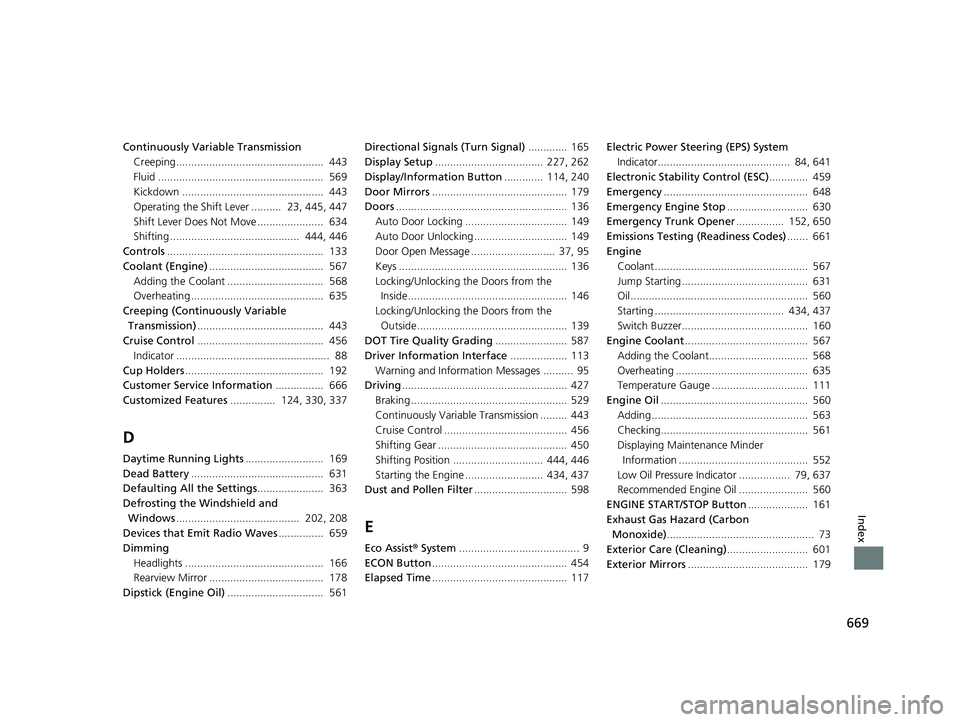
669
Index
Continuously Variable TransmissionCreeping................................................. 443
Fluid ....................................................... 569
Kickdown ............................................... 443
Operating the Shift Lever .......... 23, 445, 447
Shift Lever Does Not Move ...................... 634
Shifting ........................................... 444, 446
Controls .................................................... 133
Coolant (Engine) ...................................... 567
Adding the Coolant ................................ 568
Overheating ............................................ 635
Creeping (Continuously Variable Transmission) .......................................... 443
Cruise Control .......................................... 456
Indicator ................................................... 88
Cup Holders .............................................. 192
Customer Service Information ................ 666
Customized Features ............... 124, 330, 337
D
Daytime Running Lights .......................... 169
Dead Battery ............................................ 631
Defaulting All the Settings ...................... 363
Defrosting the Windshield and Windows ......................................... 202, 208
Devices that Emit Radio Waves ............... 659
Dimming Headlights .............................................. 166
Rearview Mirror ...................................... 178
Dipstick (Engine Oil) ................................ 561 Directional Signals (Turn Signal)
............. 165
Display Setup .................................... 227, 262
Display/Information Button ............. 114, 240
Door Mirrors ............................................. 179
Doors ......................................................... 136
Auto Door Locking .................................. 149
Auto Door Unlocking ............................... 149
Door Open Message ............................ 37, 95
Keys ........................................................ 136
Locking/Unlocking the Doors from the Inside..................................................... 146
Locking/Unlocking the Doors from the Outside.................................................. 139
DOT Tire Quality Grading ........................ 587
Driver Information Interface ................... 113
Warning and Information Messages .......... 95
Driving ....................................................... 427
Braking .................................................... 529
Continuously Variable Transmission ......... 443
Cruise Control ......................................... 456
Shifting Gear ........................................... 450
Shifting Position .............................. 444, 446
Starting the Engine .......................... 434, 437
Dust and Pollen Filter ............................... 598
E
Eco Assist® System ........................................ 9
ECON Button ............................................. 454
Elapsed Time ............................................. 117 Electric Power Steering (EPS) System
Indicator............................................ 84, 641
Electronic Stability Control (ESC) ............. 459
Emergency ................................................ 648
Emergency Engine Stop ........................... 630
Emergency Trunk Opener ................ 152, 650
Emissions Testing (Readiness Codes) ....... 661
Engine
Coolant ................................................... 567
Jump Starting .......................................... 631
Oil ........................................................... 560
Starting ........................................... 434, 437
Switch Buzzer.......................................... 160
Engine Coolant ......................................... 567
Adding the Coolant................................. 568
Overheating ............................................ 635
Temperature Gauge ................................ 111
Engine Oil ................................................. 560
Adding .................................................... 563
Checking................................................. 561
Displaying Maintenance Minder Information ........................................... 552
Low Oil Pressure Indicator ................. 79, 637
Recommended Engine Oil ....................... 560
ENGINE START/STOP Button .................... 161
Exhaust Gas Hazard (Carbon Monoxide) ................................................. 73
Exterior Care (Cleaning) ........................... 601
Exterior Mirrors ........................................ 179
19 CIVIC 4D HCM_HMIN_J (KA KL KC)-31TBA6301.book 669 ページ 2018年10月26日 金曜日 午前7時42分