mirror HONDA CIVIC SEDAN 2021 (in English) User Guide
[x] Cancel search | Manufacturer: HONDA, Model Year: 2021, Model line: CIVIC SEDAN, Model: HONDA CIVIC SEDAN 2021Pages: 632, PDF Size: 33.83 MB
Page 169 of 632
167
uuOperating the Switches Around the Steering Wheel uRear Defogger/Heated Door Mirror* Button
Controls
Rear Defogger/Heated Door Mirror* Button
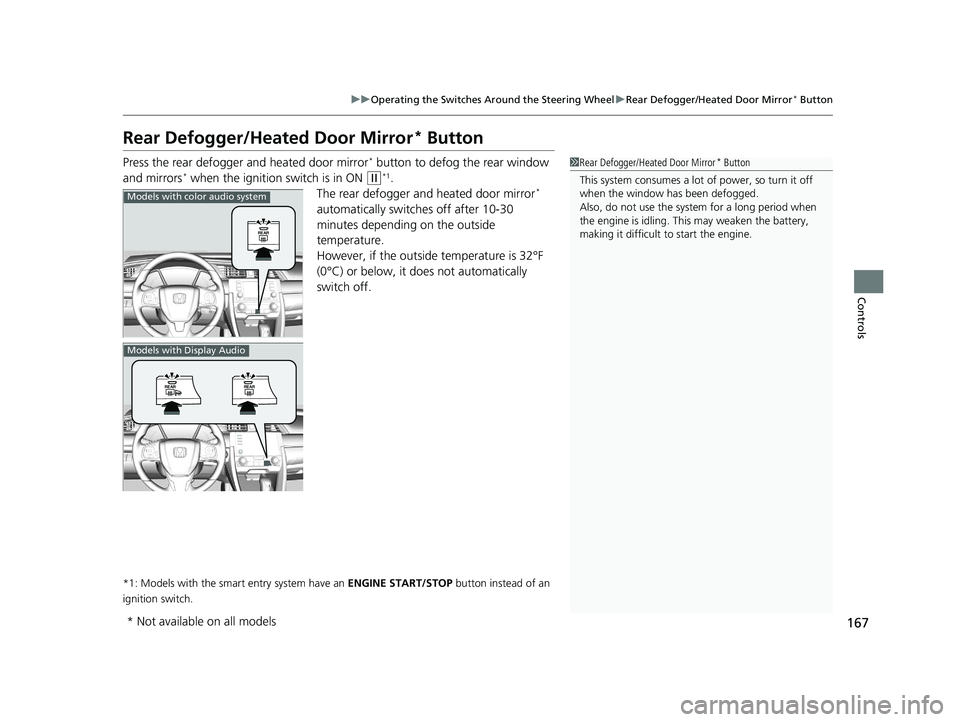
Press the rear defogger and heated door mirror* button to defog the rear window
and mirrors* when the ignition switch is in ON (w*1.
The rear defogger and heated door mirror*
automatically switch es off after 10-30
minutes depending on the outside
temperature.
However, if the outside temperature is 32°F
(0°C) or below, it does not automatically
switch off.
*1: Models with the smart entry system have an ENGINE START/STOP button instead of an
ignition switch.
1 Rear Defogger/Heated Door Mirror* Button
This system consumes a lot of power, so turn it off
when the window has been defogged.
Also, do not use the system for a long period when
the engine is idling. This may weaken the battery,
making it difficult to start the engine.
Models with color audio system
Models with Display Audio
* Not available on all models
21 CIVIC 4D HCM_HMIN_J (KA KL KC)-31TBA6500.book 167 ページ 2020年8月25日 火曜日 午後2時6分
Page 172 of 632
170
Controls
Adjusting the Mirrors
Interior Rearview Mirror
Adjust the angle of the rearview mirror when you are sitting in the correct driving
position.
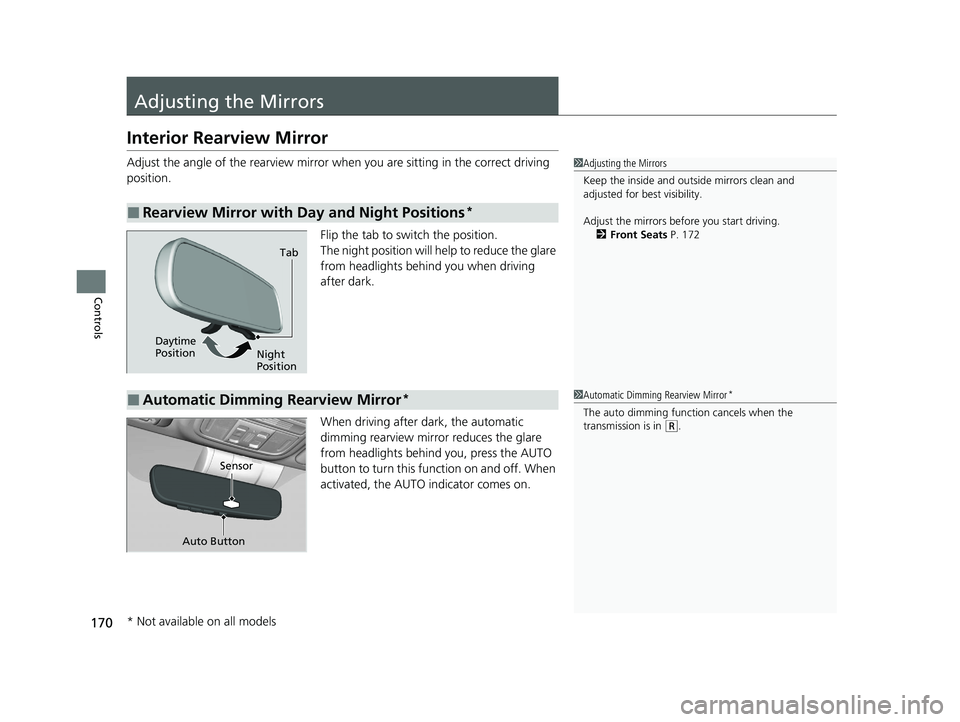
Flip the tab to switch the position.
The night position will help to reduce the glare
from headlights behind you when driving
after dark.
When driving after dark, the automatic
dimming rearview mirror reduces the glare
from headlights behind you, press the AUTO
button to turn this function on and off. When
activated, the AUTO indicator comes on.
■Rearview Mirror with Day and Night Positions*
1 Adjusting the Mirrors
Keep the inside and out side mirrors clean and
adjusted for best visibility.
Adjust the mirrors befo re you start driving.
2 Front Seats P. 172
Tab
Daytime
Position Night
Position
■Automatic Dimming Rearview Mirror*1Automatic Dimming Rearview Mirror*
The auto dimming function cancels when the
transmission is in (R.
Sensor
Auto Button
* Not available on all models
21 CIVIC 4D HCM_HMIN_J (KA KL KC)-31TBA6500.book 170 ページ 2020年8月25日 火曜日 午後2時6分
Page 173 of 632
171
uuAdjusting the Mirrors uPower Door Mirrors
Controls
Power Door Mirrors
You can adjust the door mirrors when the
ignition switch is in ON
(w*1.
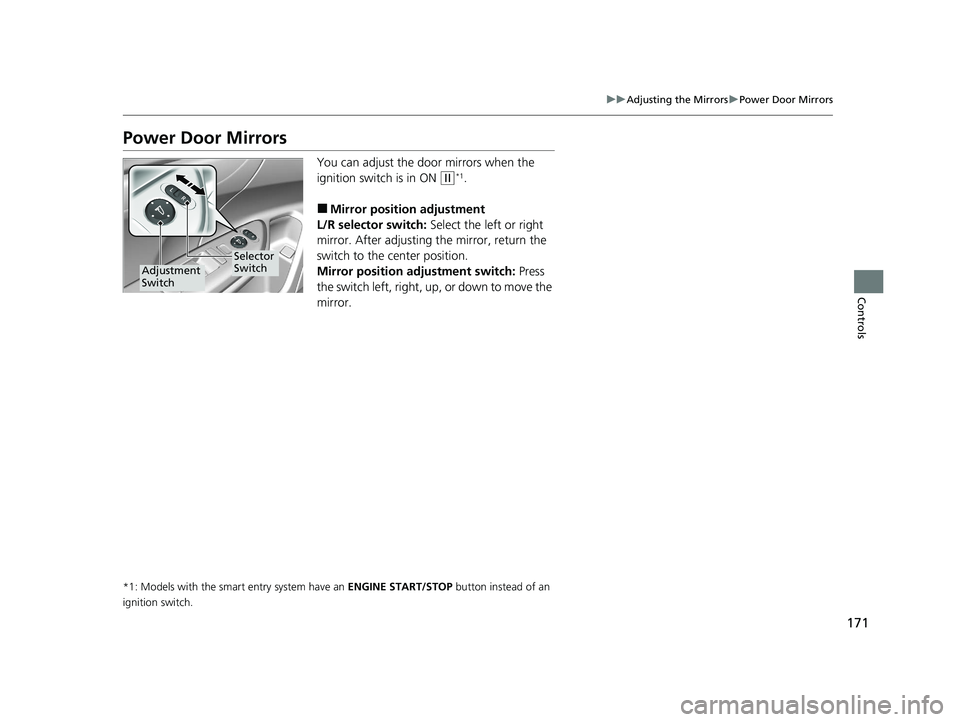
■Mirror position adjustment
L/R selector switch: Select the left or right
mirror. After adjusting the mirror, return the
switch to the center position.
Mirror positi on adjustment switch: Press
the switch left, right, up, or down to move the
mirror.
*1: Models with the smart entry system have an ENGINE START/STOP button instead of an
ignition switch.
Selector
Switch
Adjustment
Switch
21 CIVIC 4D HCM_HMIN_J (KA KL KC)-31TBA6500.book 171 ページ 2020年8月25日 火曜日 午後2時6分
Page 418 of 632
416
Driving
Before Driving
Driving Preparation
Check the following items before you start driving.
• Make sure there are no obstructions on th e windows, door mirrors, exterior
lights, or other parts of the vehicle.
u Remove any frost, snow, or ice.
u Remove any snow on the roof, as this can slip down and obstruct your field of
vision while driving. If frozen solid , remove ice once it has softened.
u When removing ice from around the wheel s, be sure not to damage the wheel
or wheel components.
• Make sure the hood is securely closed.
u If the hood opens while driving, your front view will be blocked.
• Make sure the tires are in good condition.
u Check air pressures, check for damage and excessive wear.
2 Checking and Maintaining Tires P. 548
•Make sure there are no people or ob jects behind or around the vehicle.
u There are blind spots from the inside.
■Exterior Checks1Exterior Checks
NOTICE
When doors are frozen s hut, use warm water around
the door edges to melt any ice. Do not try to force
them open, as this can damage the rubber trim
around the doors. When done, wipe dry to avoid
further freezing.
Do not pour warm water into the key cylinder.
You will be unable to insert the key if the water
freezes in the hole.
Heat from the engine and exhaust can ignite
flammable material s left under the hood, causing a
fire. If you've parked y our vehicle for an extended
period, inspect and remove any debris that may have
collected, such as dried grass and leaves that have
fallen or have been carried in for use as a nest by a
small animal. Also check under the hood for leftover
flammable materials after you or someone else has
performed maintenance on your vehicle.
21 CIVIC 4D HCM_HMIN_J (KA KL KC)-31TBA6500.book 416 ページ 2020年8月25日 火曜日 午後2時6分
Page 419 of 632
Continued417
uuBefore Driving uDriving Preparation
Driving
• Store or secure all items on board properly.
u Carrying too much cargo, or improperly storing it, can affect your vehicle’s
handling, stability, sto pping distance, and tires, and make it unsafe.
2Maximum Load Limit P. 419
•Do not pile items higher than the seat height.
u They can block your view and may be thrown forward in the event of sudden
braking.
• Do not place anything in the front seat footwells. Make sure to secure the floor
mat.
u An object or unsecured floor mat can in terfere with your brake and accelerator
pedal operation while driving.
• If you have any animals on board, do not let them move around in the vehicle.
u They may interfere with driv ing and a crash could occur.
• Securely close and lock all doors and the trunk.
2 Locking/Unlocking the Doors from the Inside P. 138
•Adjust your seating position properly.
u Adjust the front h ead restraint, too.
2Adjusting the Seats P. 172
2 Adjusting the Front Head Restraints P. 177
•Adjust the mirrors and steering wheel properly.
u Adjust them while sitting in the proper driving position.
2 Adjusting the Mirrors P. 170
2 Adjusting the Steering Wheel P. 169
■Interior Checks1Interior Checks
The headlight aim is set by the factory, and does not
need to be adjusted. Howeve r, if you regularly carry
heavy items in the trunk, have the aiming readjusted
at a dealer or by a qualified technician.
21 CIVIC 4D HCM_HMIN_J (KA KL KC)-31TBA6500.book 417 ページ 2020年8月25日 火曜日 午後2時6分
Page 430 of 632
uuWhen Driving uStarting the Engine
428
Driving
■To stop the engine1Remote Engine Start with Vehicle Feedback*
•You have already used the remote twice to start
the engine.
•Another registered smart entry remote is in the
vehicle.
•There is an antenna failure.
•The door is unlocked with the built-in key.
•The engine oil pressure is low.•The engine coolant temper ature is extremely high.
•The security system alarm is not set.
While the engine is running, the vehicle will
automatically preconditi on inside the vehicle.
When it is warm outside:
•The air conditioning is acti vated in recirculation
mode.
When it is cold outside:
•The defroster is activated at a moderately warm
temperature.
•The rear defogger, door mirror heaters*, and seat
heaters* are activated.
2 Front Seat Heaters* P. 191
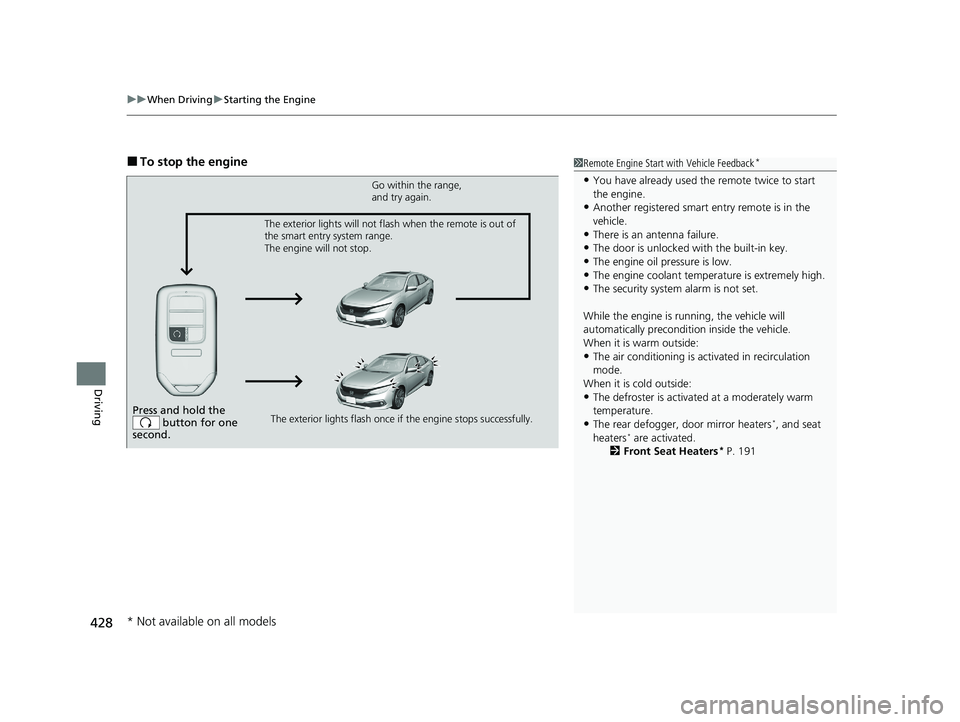
Press and hold the
button for one
second.
Go within the range,
and try again.
The exterior lights flash once if the engine stops successfully.
The exterior lights will not flash when the remote is out of
the smart entry system range.
The engine will not stop.
* Not available on all models
21 CIVIC 4D HCM_HMIN_J (KA KL KC)-31TBA6500.book 428 ページ 2020年8月25日 火曜日 午後2時6分
Page 450 of 632
448
uuWhen Driving uLaneWatchTM*
Driving
LaneWatchTM*
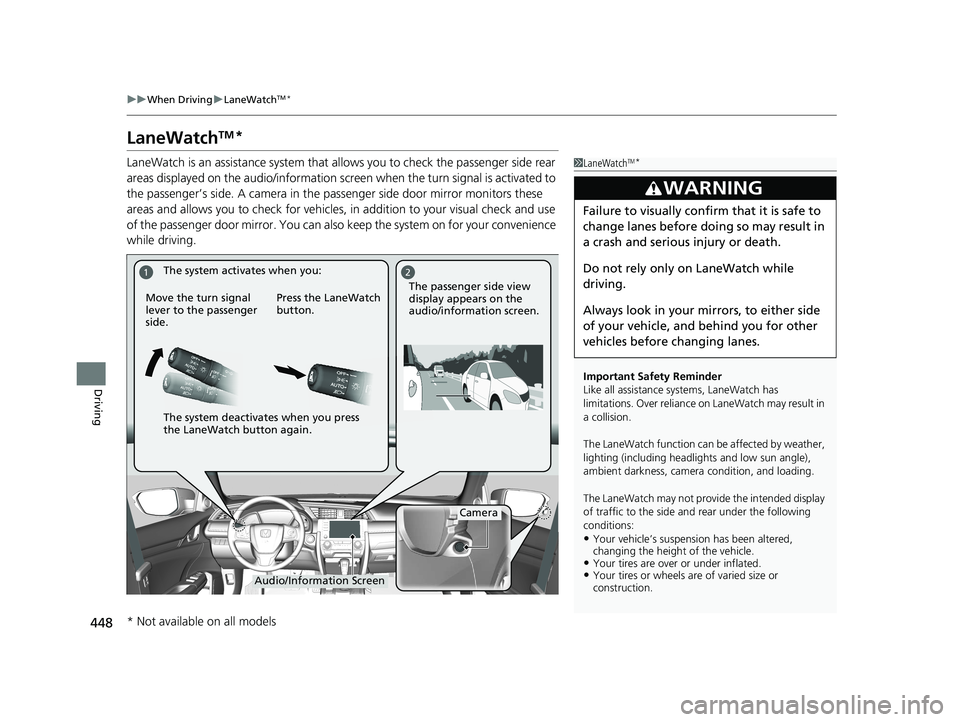
LaneWatch is an assistance system that allows you to check the passenger side rear
areas displayed on the audio/in formation screen when the turn signal is activated to
the passenger’s side. A camera in the passenger side door mirror monitors these
areas and allows you to check for vehicles, in addition to your visual check and use
of the passenger door mirror. You can also keep the system on for your convenience
while driving.1 LaneWatchTM*
Important Safety Reminder
Like all assistance systems, LaneWatch has
limitations. Over reliance on LaneWatch may result in
a collision.
The LaneWatch func tion can be affected by weather,
lighting (including headli ghts and low sun angle),
ambient darkness, camera condition, and loading.
The LaneWatch may not prov ide the intended display
of traffic to the side and rear under the following
conditions:
•Your vehicle’s suspension has been altered,
changing the height of the vehicle.
•Your tires are over or under inflated.•Your tires or wheels are of varied size or
construction.
3WARNING
Failure to visually confirm that it is safe to
change lanes before doing so may result in
a crash and serious injury or death.
Do not rely only on LaneWatch while
driving.
Always look in your mi rrors, to either side
of your vehicle, and behind you for other
vehicles before changing lanes.
21
Camera
Audio/Information Screen
Move the turn signal
lever to the passenger
side.
Press the LaneWatch
button.
The passenger side view
display appears on the
audio/information screen.
The system activates when you:
The system deactivates when you press
the LaneWatch button again.
* Not available on all models
21 CIVIC 4D HCM_HMIN_J (KA KL KC)-31TBA6500.book 448 ページ 2020年8月25日 火曜日 午後2時6分
Page 451 of 632
449
uuWhen Driving uLaneWatchTM*
Driving
■Customizing the La neWatch settings
You can customize the following items using the audio/information screen.
• Show with Turn Signal : Selects whether LaneWatch monitor comes on when
you operate the tu rn signal lever.
• Display Time after Turn Signal Off: Changes the remaining LaneWatch display
time after you pull the turn signal lever back.
• Reference Line : Selects whether the reference lines appear on the LaneWatch
monitor.
• Display : Adjusts display settings.
2Customized Features P. 325
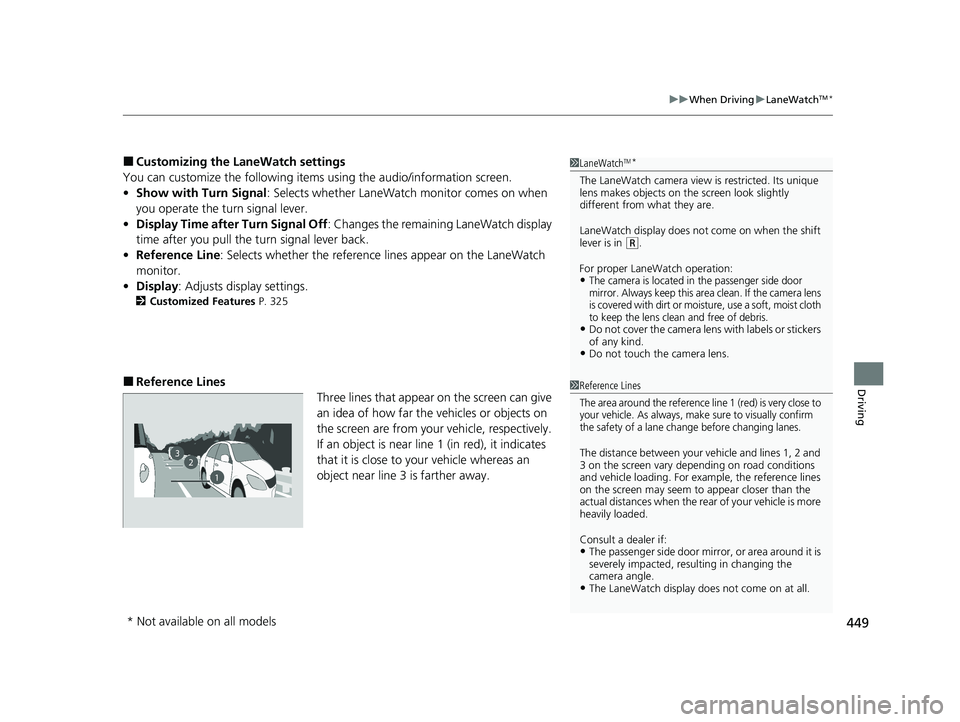
■Reference Lines
Three lines that appear on the screen can give
an idea of how far the vehicles or objects on
the screen are from your vehicle, respectively.
If an object is near line 1 (in red), it indicates
that it is close to your vehicle whereas an
object near line 3 is farther away.
1LaneWatchTM*
The LaneWatch camera view is restricted. Its unique
lens makes objects on the screen look slightly
different from what they are.
LaneWatch display does not come on when the shift
lever is in
( R.
For proper LaneWatch operation:
•The camera is located in the passenger side door
mirror. Always keep this area clean. If the camera lens
is covered with dirt or moisture, use a soft, moist cloth
to keep the lens clean and free of debris.
•Do not cover the camera lens with labels or stickers
of any kind.
•Do not touch the camera lens.
1 Reference Lines
The area around the reference line 1 (red) is very close to
your vehicle. As always, make sure to visually confirm
the safety of a lane change before changing lanes.
The distance betwee n your vehicle and lines 1, 2 and
3 on the screen vary depending on road conditions
and vehicle loading. For ex ample, the reference lines
on the screen may seem to appear closer than the
actual distances when the rear of your vehicle is more
heavily loaded.
Consult a dealer if:
•The passenger side door mirr or, or area around it is
severely impacted, resulting in changing the
camera angle.
•The LaneWatch display doe s not come on at all.
23
1
* Not available on all models
21 CIVIC 4D HCM_HMIN_J (KA KL KC)-31TBA6500.book 449 ページ 2020年8月25日 火曜日 午後2時6分
Page 452 of 632
450
Driving
Honda Sensing®
Honda Sensing® is a driver support system which employs the use of two distinctly
different kinds of sensors: a radar sensor located in the lower bumper and a front
sensor camera mounted to th e interior side of the windshield, behind the rearview
mirror.
Honda Sensing® has following functions.
■The functions whic h do not require switch operations to activate
• Collision Mitigation Braking SystemTM (CMBSTM) 2 P. 453
• Road Departure Mitigation (RDM) System 2 P. 487
■The functions wh ich require switch op erations to activate
• Adaptive Cruise Control (ACC) with Low Speed Follow
2 P. 463
• Lane Keeping Assist System (LKAS) 2 P. 479
21 CIVIC 4D HCM_HMIN_J (KA KL KC)-31TBA6500.book 450 ページ 2020年8月25日 火曜日 午後2時6分
Page 456 of 632
uuHonda Sensing ®u Collision Mitigation Braking SystemTM (CMBSTM)
454
Driving
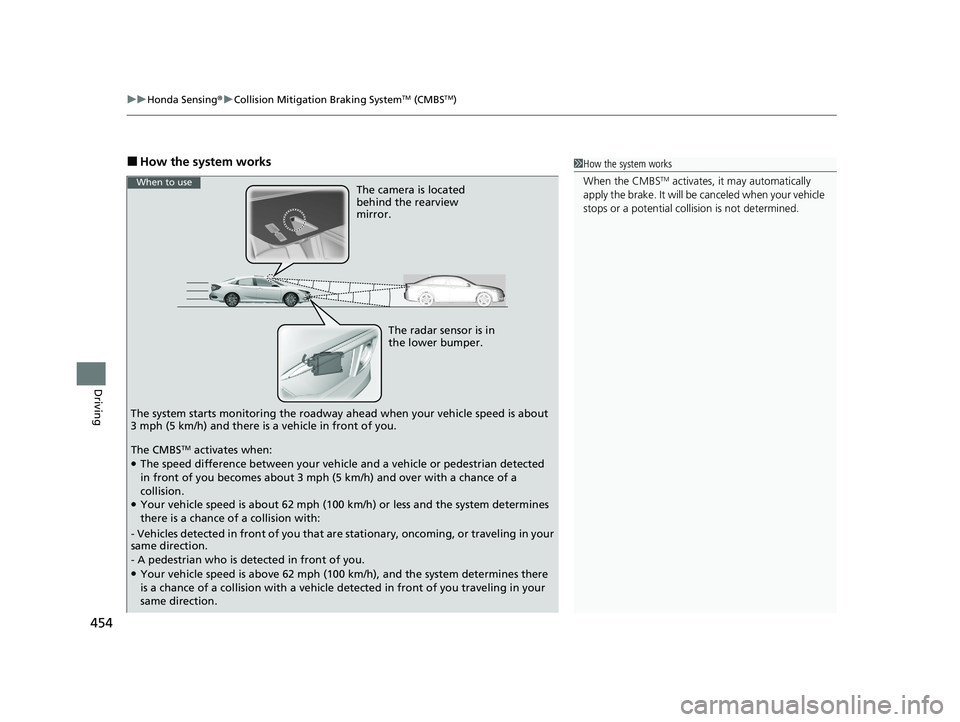
■How the system works1How the system works
When the CMBS
TM activates, it may automatically
apply the brake. It will be canceled when your vehicle
stops or a potential coll ision is not determined.
The radar sensor is in
the lower bumper.
The camera is located
behind the rearview
mirror.
The system starts monitoring the roadway ah ead when your vehicle speed is about
3 mph (5 km/h) and there is a vehicle in front of you.
When to use
The CMBSTM activates when:●The speed difference between your vehicle and a vehicle or pedestrian detected
in front of you becomes about 3 mph (5 km/h) and over with a chance of a
collision.
●Your vehicle speed is about 62 mph (100 km/h) or less and the system determines
there is a chance of a collision with:
- Vehicles detected in front of you that ar e stationary, oncoming, or traveling in your
same direction.
- A pedestrian who is detected in front of you.
●Your vehicle speed is above 62 mph (100 km/h), and the system determines there
is a chance of a collision with a vehicle detected in front of you traveling in your
same direction.
21 CIVIC 4D HCM_HMIN_J (KA KL KC)-31TBA6500.book 454 ページ 2020年8月25日 火曜日 午後2時6分