ECU HONDA CIVIC SEDAN 2021 (in English) Owner's Guide
[x] Cancel search | Manufacturer: HONDA, Model Year: 2021, Model line: CIVIC SEDAN, Model: HONDA CIVIC SEDAN 2021Pages: 632, PDF Size: 33.83 MB
Page 123 of 632
121
uuGauges and Driver Information Interface uDriver Information Interface
Continued
Instrument Panel
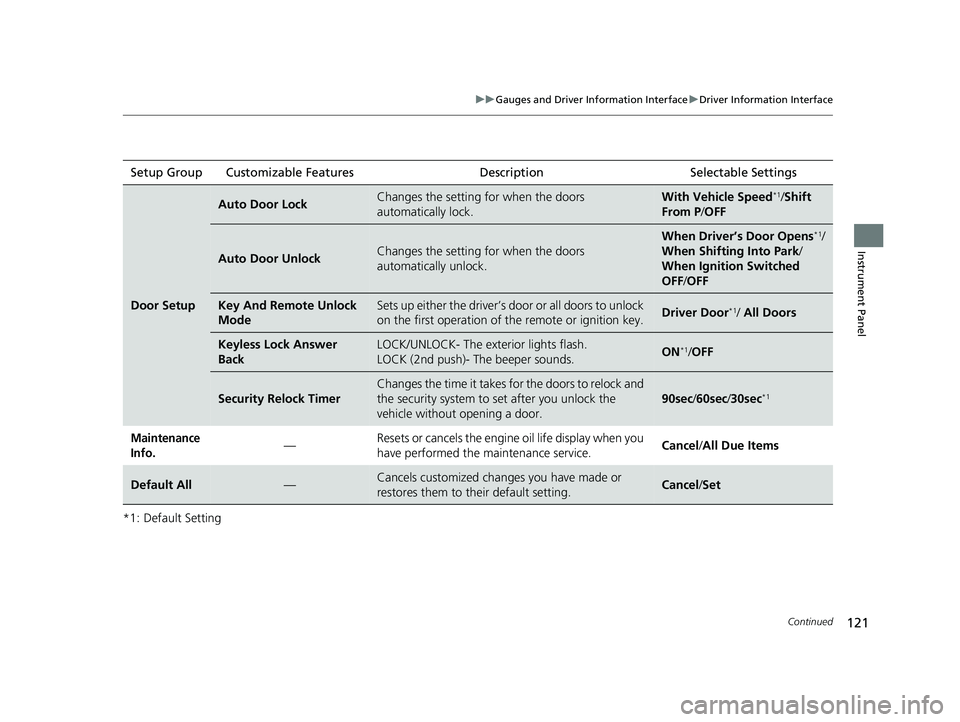
*1: Default SettingSetup Group Customizable Features
Description Selectable Settings
Door Setup
Auto Door LockChanges the setting for when the doors
automatically lock.With Vehicle Speed*1/Shift
From P /OFF
Auto Door UnlockChanges the setting for when the doors
automatically unlock.
When Driver’s Door Opens*1/
When Shifting Into Park /
When Ignition Switched
OFF /OFF
Key And Remote Unlock
ModeSets up either the driver’s door or all doors to unlock
on the first operation of the remote or ignition key.Driver Door*1/ All Doors
Keyless Lock Answer
BackLOCK/UNLOCK- The exterior lights flash.
LOCK (2nd push)- The beeper sounds.ON*1/OFF
Security Relock Timer
Changes the time it takes for the doors to relock and
the security system to set after you unlock the
vehicle without opening a door.
90sec /60sec /30sec*1
Maintenance
Info.— Resets or cancels the engine oil life display when you
have performed the maintenance service.
Cancel
/All Due Items
Default All—Cancels customized changes you have made or
restores them to their default setting.Cancel /Set
21 CIVIC 4D HCM_HMIN_J (KA KL KC)-31TBA6500.book 121 ページ 2020年8月25日 火曜日 午後2時6分
Page 127 of 632
125
Controls
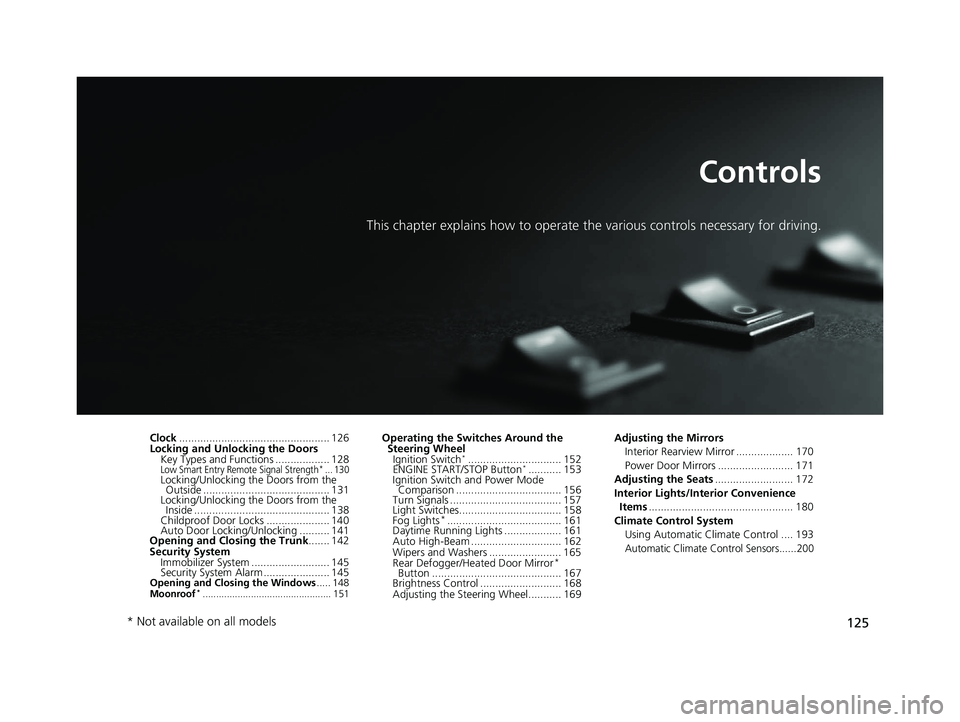
This chapter explains how to operate the various controls necessary for driving.
Clock.................................................. 126
Locking and Unlocking the Doors Key Types and Functions .................. 128
Low Smart Entry Remote Signal Strength*... 130Locking/Unlocking the Doors from the Outside .......................................... 131
Locking/Unlocking the Doors from the Inside ............................................. 138
Childproof Door Locks ..................... 140
Auto Door Locking/Unlocking .......... 141
Opening and Closing the Trunk ....... 142
Security System Immobilizer System .......................... 145
Security System Alarm ...................... 145
Opening and Closing the Windows ..... 148Moonroof*................................................ 151
Operating the Switches Around the
Steering Wheel Ignition Switch
*............................... 152
ENGINE START/STOP Button*........... 153
Ignition Switch and Power Mode Comparison ................................... 156
Turn Signals ..................................... 157
Light Switches.................................. 158
Fog Lights
*...................................... 161
Daytime Running Lights ................... 161
Auto High-Beam .............................. 162
Wipers and Washers ........................ 165
Rear Defogger/Heat ed Door Mirror
*
Button ........................................... 167
Brightness Control ........................... 168
Adjusting the Steering Wheel........... 169 Adjusting the Mirrors
Interior Rearview Mirror ................... 170
Power Door Mirrors ......................... 171
Adjusting the Seats .......................... 172
Interior Lights/Interior Convenience Items ................................................ 180
Climate Control System Using Automatic Climate Control .... 193
Automatic Climate Control Sensors......200
* Not available on all models
21 CIVIC 4D HCM_HMIN_J (KA KL KC)-31TBA6500.book 125 ページ 2020年8月25日 火曜日 午後2時6分
Page 133 of 632
131
uuLocking and Unlocking the Doors uLocking/Unlocking the Doors from the Outside
Continued
Controls
Locking/Unlocking the Doors from the Outside
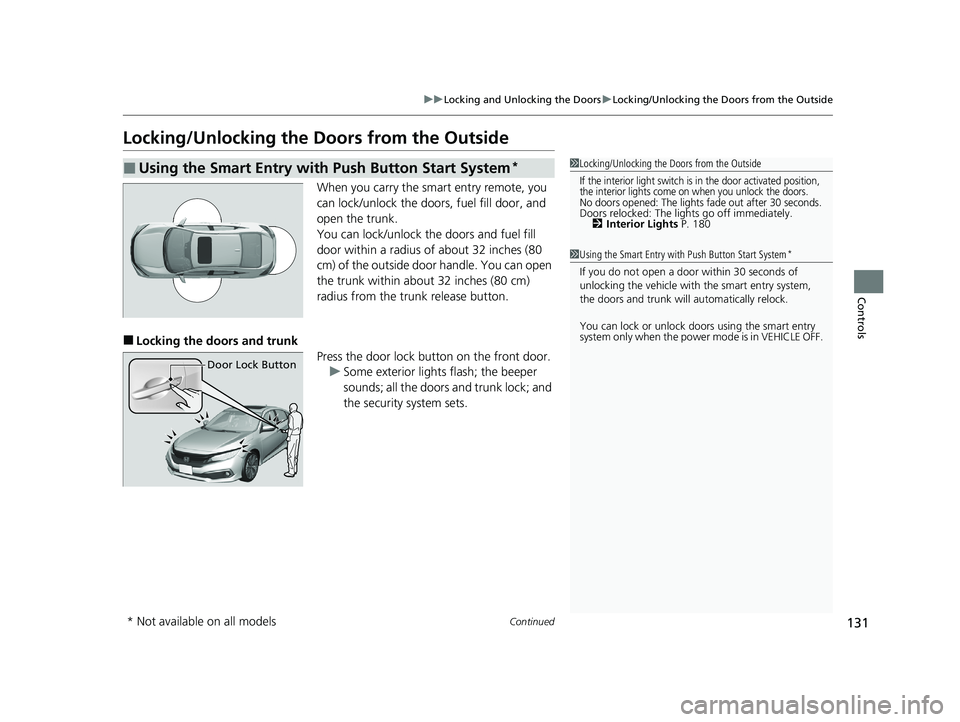
When you carry the smart entry remote, you
can lock/unlock the doors, fuel fill door, and
open the trunk.
You can lock/unlock the doors and fuel fill
door within a radius of about 32 inches (80
cm) of the outside door handle. You can open
the trunk within about 32 inches (80 cm)
radius from the trunk release button.
■Locking the doors and trunk
Press the door lock button on the front door.u Some exterior lights flash; the beeper
sounds; all the doors and trunk lock; and
the security system sets.
■Using the Smart Entry with Push Button Start System*1Locking/Unlocking the Doors from the Outside
If the interior light switch is in the door activated position,
the interior lights come on when you unlock the doors.
No doors opened: The lights fade out after 30 seconds.Doors relocked: The li ghts go off immediately.
2 Interior Lights P. 180
1Using the Smart Entry with Push Button Start System*
If you do not open a door within 30 seconds of
unlocking the vehicle with the smart entry system,
the doors and trunk will automatically relock.
You can lock or unlock doors using the smart entry
system only when the power mode is in VEHICLE OFF.
Door Lock Button
* Not available on all models
21 CIVIC 4D HCM_HMIN_J (KA KL KC)-31TBA6500.book 131 ページ 2020年8月25日 火曜日 午後2時6分
Page 137 of 632
Continued135
uuLocking and Unlocking the Doors uLocking/Unlocking the Doors from the Outside
Controls
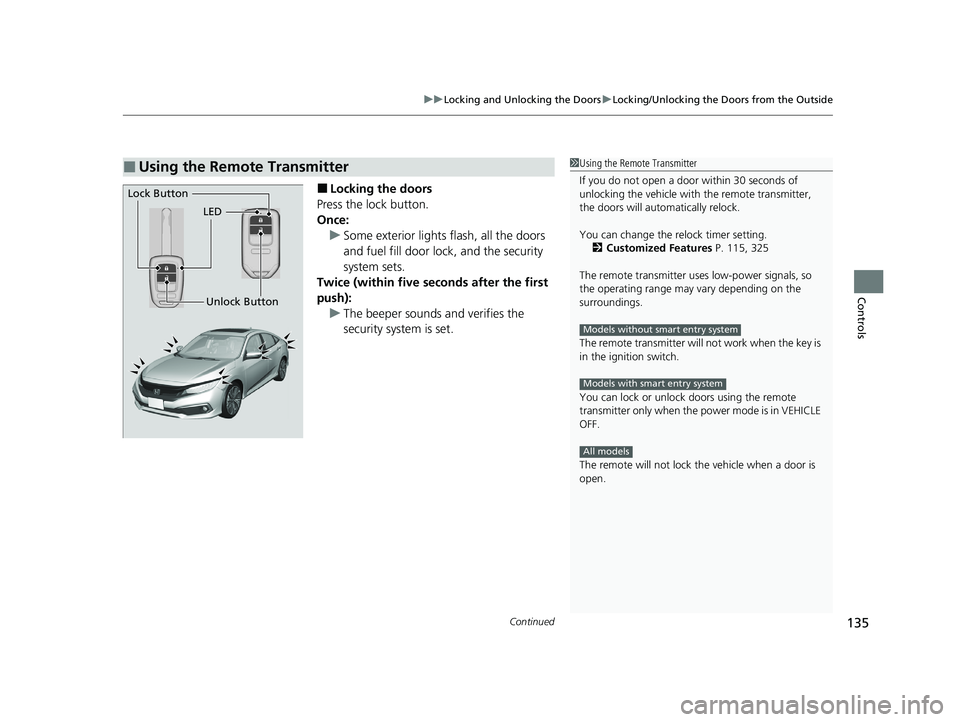
■Locking the doors
Press the lock button.
Once: u Some exterior lights flash, all the doors
and fuel fill door lock , and the security
system sets.
Twice (within five se conds after the first
push): u The beeper sounds and verifies the
security system is set.
■Using the Remote Transmitter1Using the Remote Transmitter
If you do not open a door within 30 seconds of
unlocking the vehicle with the remote transmitter,
the doors will auto matically relock.
You can change the relock timer setting. 2 Customized Features P. 115, 325
The remote transmitter us es low-power signals, so
the operating range may vary depending on the
surroundings.
The remote transmitter will not work when the key is
in the ignition switch.
You can lock or unlock doors using the remote
transmitter only when the power mode is in VEHICLE
OFF.
The remote will not lock th e vehicle when a door is
open.
Models without smart entry system
Models with smart entry system
All models
LED
Unlock Button
Lock Button
21 CIVIC 4D HCM_HMIN_J (KA KL KC)-31TBA6500.book 135 ページ 2020年8月25日 火曜日 午後2時6分
Page 147 of 632
145Continued
Controls
Security System
Immobilizer System
The immobilizer system prevents a key that has not been pre-registered from
starting the engine. Each key contains electronic transmitters that use electronic
signals to verify the key.
Pay attention to the following when insert ing the key into the ignition switch or
pressing the ENGINE START/STOP button:
• Do not allow objects that emit strong ra dio waves near the ignition switch or the
ENGINE START/STOP button.
• Make sure the key is not covered by or touching a metal object.
• Do not bring a key from another vehicle’s immobilizer system near the ignition
switch or the ENGINE START/STOP button.
• Do not put the key near magnetic items. Electronic devices, such as televisions
and audio systems emit strong magnetic fields. Note that even a key chain can
become magnetic.
Security System Alarm
The security system alarm activates when the trunk, hood or doors are forcibly
opened. The alarm does not activate if the trunk or doors are opened with the key,
remote transmitter or smart entry system
*.
However, the alarm activates if a door is opened with the key and then the
transmission is taken out of
(P or the hood is opened before the ignition switch is
turned to ON
(w*1.
*1: Models with the smart entry system have an ENGINE START/STOP button instead of an
ignition switch.
1 Immobilizer System
NOTICE
Leaving the key in the vehicl e can result in theft or
accidental movement of the vehicle.
Always take the key with you whenever you leave the
vehicle unattended.
Do not alter the system or add other devices to it.
Doing so may damage the system and make your
vehicle inoperable.
Canadian models only: Apply and hold the brake
pedal before turning the vehicle on the first time after
the battery has been disconnected.
1 Security System Alarm
Do not alter the system or add other devices to it.
Doing so may damage the system and make your
vehicle inoperable.
The security alarm continues for a maximum of two
minutes until the security system alarm deactivates.
* Not available on all models
21 CIVIC 4D HCM_HMIN_J (KA KL KC)-31TBA6500.book 145 ページ 2020年8月25日 火曜日 午後2時6分
Page 148 of 632
uuSecurity System uSecurity System Alarm
146
Controls
■When the security sy stem alarm activates
The horn sounds intermittently, and some exterior lights flash.
■To deactivate the security system alarm
Unlock the vehicle using remote transmitter or smart entry system*, or turn the
ignition switch to ON
(w*1. The system, along with the horn and flashing lights, is
deactivated.
■Setting the security system alarm
The security system alarm automatically sets when the following conditions have
been met:
• The ignition switch is in LOCK
(0*1.
• The hood and trunk are closed.
• All doors are locked with the key, remo te transmitter, or smart entry system
*.
• The key has been removed from the ignition switch.
■When the security system alarm sets
The security system alarm indi cator in the instrument panel and the blinki ng interval
changes after about 15 seconds.
■To cancel the security system alarm
The security system is canceled when th e vehicle is unlocked using the remote
transmitter or smart entry system
*, or when the ignition switch is turned to ON (w*1.
The security system alarm indica tor goes off at the same time.
*1: Models with the smart entry system have an ENGINE START/STOP button instead of an
ignition switch.
1 Security System Alarm
Do not set the security system alarm when someone
is in the vehicle or a window is open. The system can
accidentally activate when:
•Unlocking the door with the lock tab.•Opening the trunk with the trunk opener on the
driver’s door or the emergency trunk opener.
•Opening the hood with the hood release.•Taking the transmission out of ( P.
If the battery goes dead after you have set the
security system alarm, the security alarm may activate
once the battery is re charged or replaced.
If this occurs, deactivate the security system alarm by
unlocking a door using the remote transmitter or
smart entry system
*.Models without smart entry system
* Not available on all models
21 CIVIC 4D HCM_HMIN_J (KA KL KC)-31TBA6500.book 146 ページ 2020年8月25日 火曜日 午後2時6分
Page 149 of 632
147
uuSecurity System uSecurity System Alarm
Controls
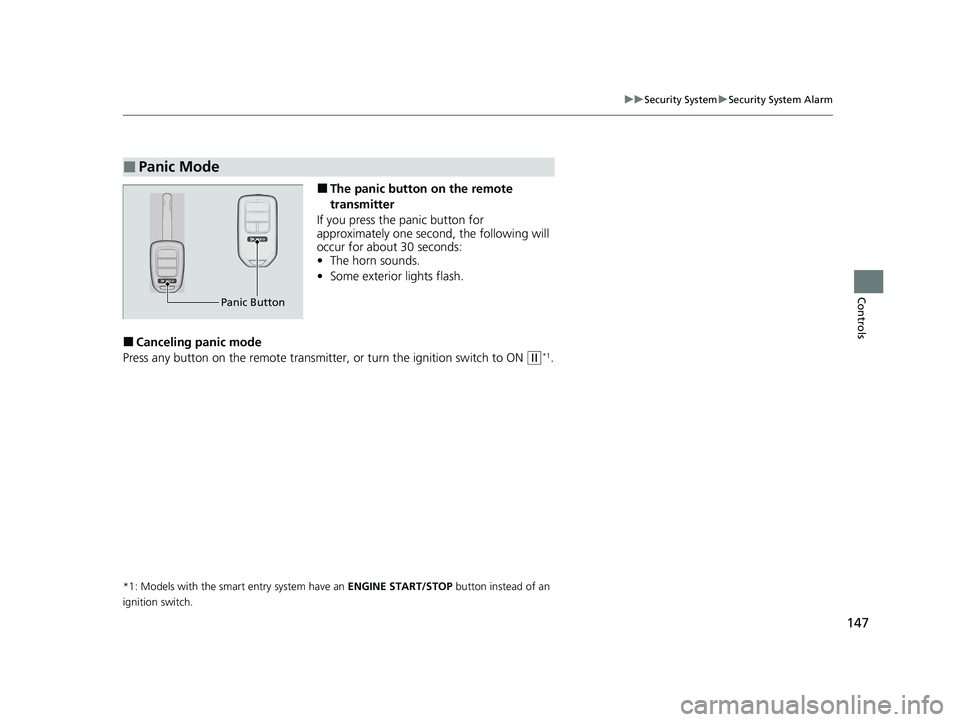
■The panic button on the remote
transmitter
If you press the panic button for
approximately one second, the following will
occur for about 30 seconds:
• The horn sounds.
• Some exterior lights flash.
■Canceling panic mode
Press any button on the remote transmitter, or turn the ignition switch to ON
(w*1.
*1: Models with the smart entry system have an ENGINE START/STOP button instead of an
ignition switch.
■Panic Mode
Panic Button
21 CIVIC 4D HCM_HMIN_J (KA KL KC)-31TBA6500.book 147 ページ 2020年8月25日 火曜日 午後2時6分
Page 171 of 632
169
uuOperating the Switches Around the Steering Wheel uAdjusting the Steering Wheel
Controls
Adjusting the Steering Wheel
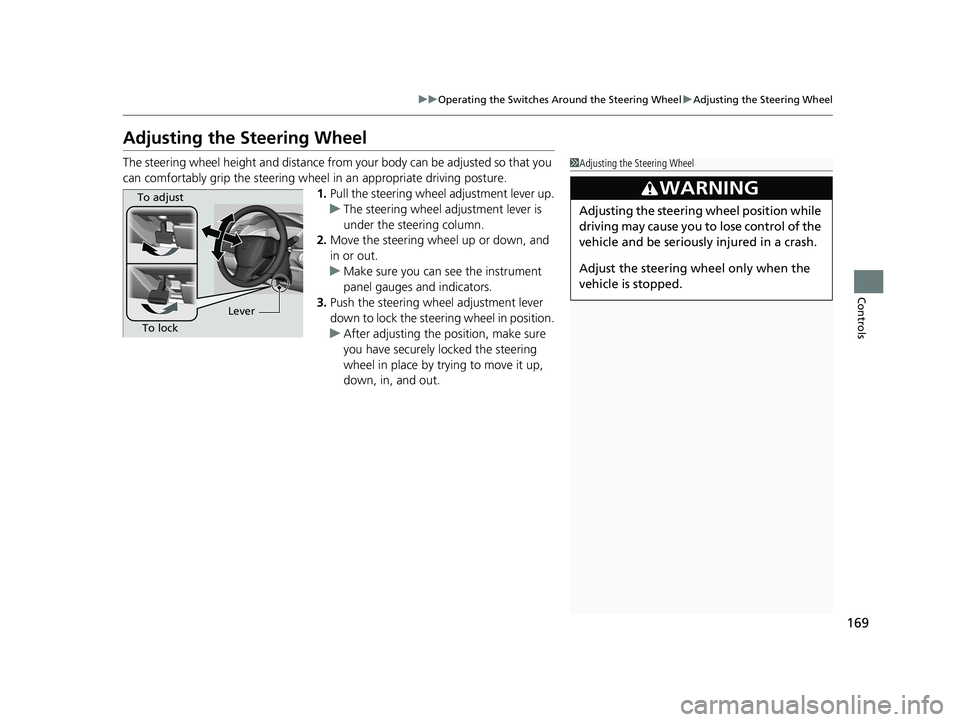
The steering wheel height and distance from your body can be adjusted so that you
can comfortably grip the steering wheel in an appropriate driving posture.
1. Pull the steering wheel adjustment lever up.
u The steering wheel adjustment lever is
under the steering column.
2. Move the steering wheel up or down, and
in or out.
u Make sure you can see the instrument
panel gauges and indicators.
3. Push the steering wheel adjustment lever
down to lock the steering wheel in position.
u After adjusting the position, make sure
you have securely locked the steering
wheel in place by trying to move it up,
down, in, and out.1Adjusting the Steering Wheel
3WARNING
Adjusting the steering wheel position while
driving may cause you to lose control of the
vehicle and be seriously injured in a crash.
Adjust the steering wh eel only when the
vehicle is stopped.
To adjust
To lock Lever
21 CIVIC 4D HCM_HMIN_J (KA KL KC)-31TBA6500.book 169 ページ 2020年8月25日 火曜日 午後2時6分
Page 177 of 632
175
uuAdjusting the Seats uRear Seats
Controls
Rear Seats
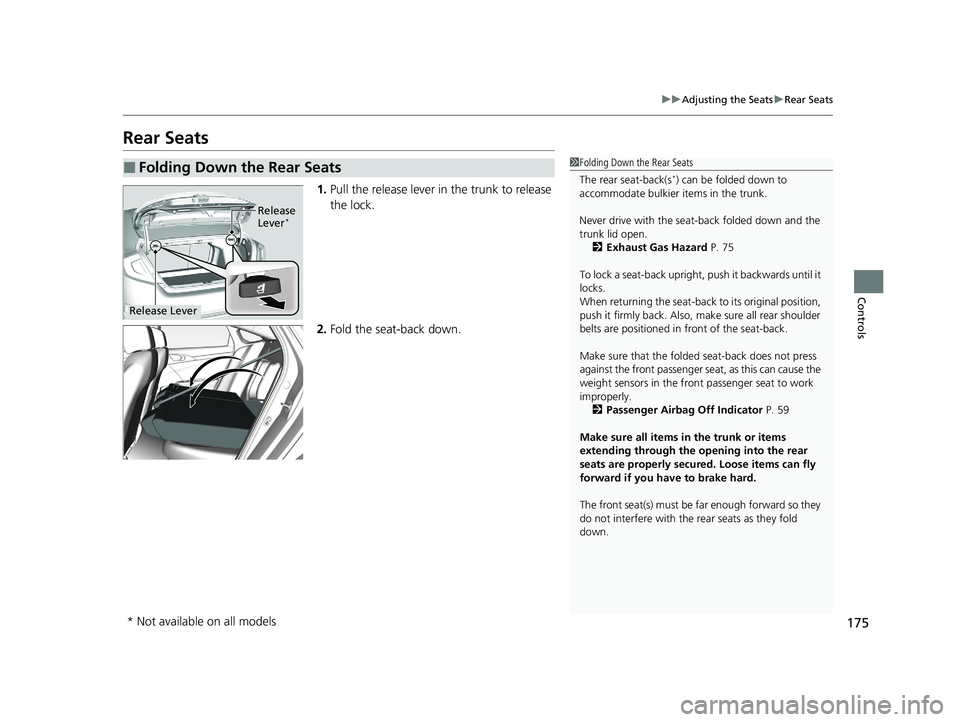
1. Pull the release lever in the trunk to release
the lock.
2. Fold the seat-back down.
■Folding Down the Rear Seats1Folding Down the Rear Seats
The rear seat-back(s
*) can be folded down to
accommodate bulkier items in the trunk.
Never drive with the seat-back folded down and the
trunk lid open. 2 Exhaust Gas Hazard P. 75
To lock a seat-back upright, push it backwards until it
locks.
When returning the seat-back to its original position,
push it firmly back. Also, m ake sure all rear shoulder
belts are positioned in front of the seat-back.
Make sure that the folded seat-back does not press
against the front passenger seat, as this can cause the
weight sensors in the front passenger seat to work
improperly. 2 Passenger Airbag Off Indicator P. 59
Make sure all items in the trunk or items
extending through the opening into the rear
seats are properly secured. Loose items can fly
forward if you have to brake hard.
The front seat(s) must be far enough forward so they
do not interfere with the rear seats as they fold
down.
Release
Lever*
Release Lever
* Not available on all models
21 CIVIC 4D HCM_HMIN_J (KA KL KC)-31TBA6500.book 175 ページ 2020年8月25日 火曜日 午後2時6分
Page 303 of 632
301
uuGeneral Information on the Audio System uCompatible iPod, iPhone, and USB Flash Drives
Features
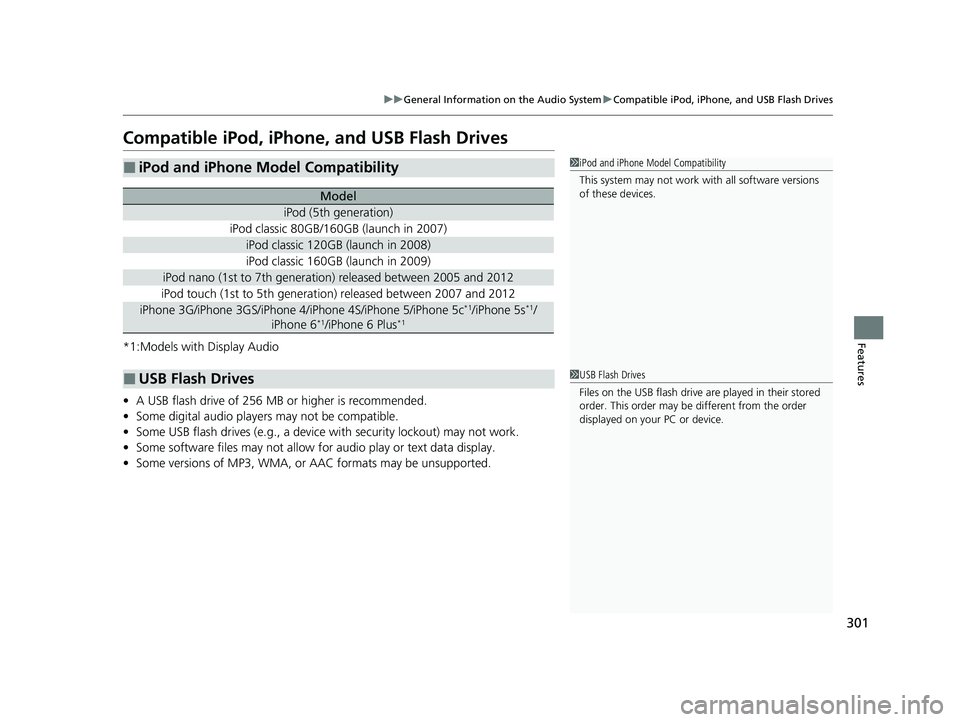
Compatible iPod, iPhone , and USB Flash Drives
*1:Models with Display Audio
•A USB flash drive of 256 MB or higher is recommended.
• Some digital audio players may not be compatible.
• Some USB flash drives (e.g., a device with security lockout) may not work.
• Some software files may not allow for audio play or text data display.
• Some versions of MP3, WMA, or AAC formats may be unsupported.
■iPod and iPhone Model Compatibility
Model
iPod (5th generation)
iPod classic 80GB/160GB (launch in 2007)
iPod classic 120GB (launch in 2008)
iPod classic 160GB (launch in 2009)
iPod nano (1st to 7th generation) released between 2005 and 2012
iPod touch (1st to 5th generation) released between 2007 and 2012
iPhone 3G/iPhone 3GS/iPhone 4/iPhone 4S/iPhone 5/iPhone 5c*1/iPhone 5s*1/
iPhone 6*1/iPhone 6 Plus*1
■USB Flash Drives
1 iPod and iPhone Model Compatibility
This system may not work with all software versions
of these devices.
1USB Flash Drives
Files on the USB flash drive are played in their stored
order. This order may be different from the order
displayed on your PC or device.
21 CIVIC 4D HCM_HMIN_J (KA KL KC)-31TBA6500.book 301 ページ 2020年8月25日 火曜日 午後2時6分