automatic transmission HONDA CIVIC SEDAN 2021 Owner's Manual (in English)
[x] Cancel search | Manufacturer: HONDA, Model Year: 2021, Model line: CIVIC SEDAN, Model: HONDA CIVIC SEDAN 2021Pages: 632, PDF Size: 33.83 MB
Page 10 of 632
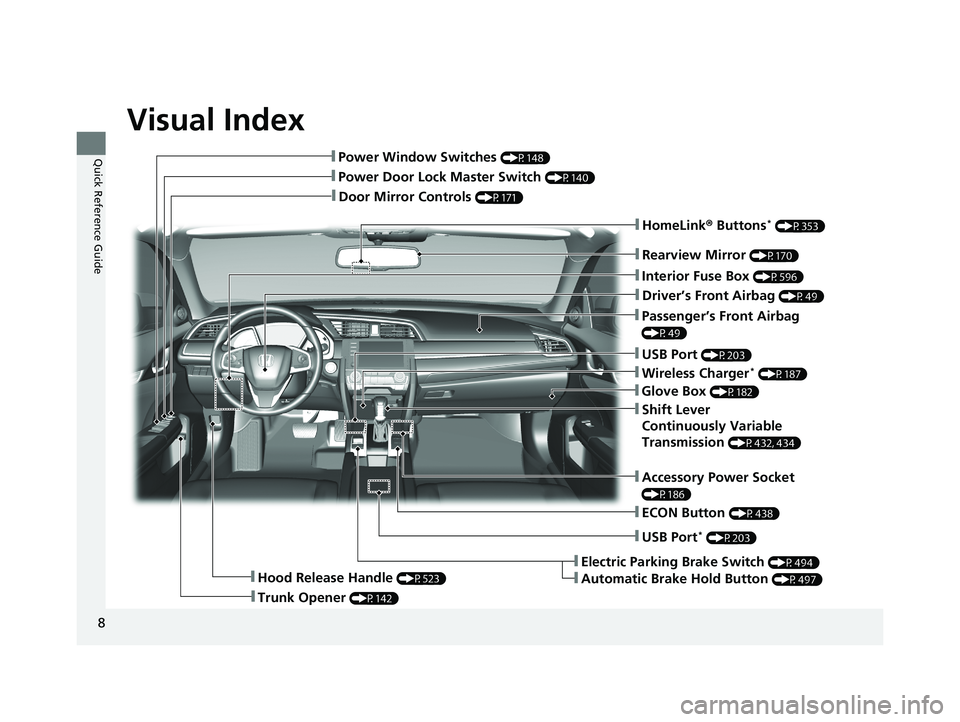
Visual Index
8
Quick Reference Guide
❚Door Mirror Controls (P171)
❚Passenger’s Front Airbag
(P49)
❚Rearview Mirror (P170)
❚Accessory Power Socket
(P186)
❚Hood Release Handle (P523)
❚Trunk Opener (P142)
❚Power Door Lock Master Switch (P140)
❚Power Window Switches (P148)
❚Interior Fuse Box (P596)
❚Driver’s Front Airbag (P49)
❚USB Port (P203)
❚Shift Lever
Continuously Variable
Transmission
(P432, 434)
❚ECON Button (P438)
❚Electric Parking Brake Switch (P494)
❚Automatic Brake Hold Button (P497)
❚USB Port* (P203)
❚Wireless Charger* (P187)
❚Glove Box (P182)
❚HomeLink® Buttons* (P353)
21 CIVIC 4D HCM_HMIN_J (KA KL KC)-31TBA6500.book 8 ページ 2020年8月25日 火曜日 午後2時6分
Page 15 of 632
13
Quick Reference Guide
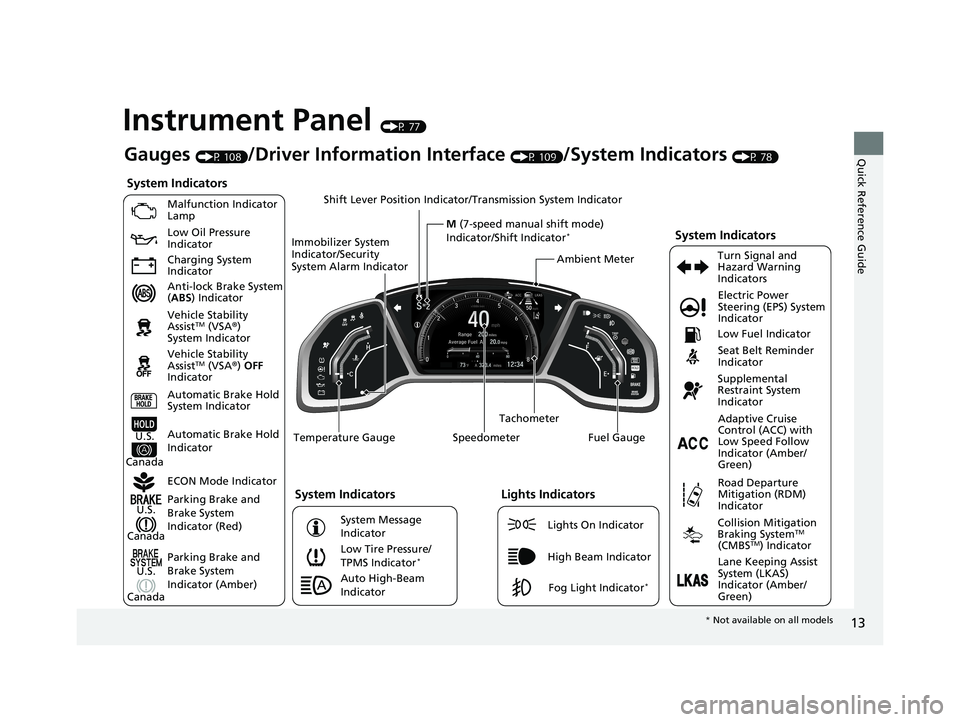
Instrument Panel (P 77)
System Indicators
Malfunction Indicator
Lamp
Low Oil Pressure
Indicator
Charging System
Indicator
Anti-lock Brake System
(ABS ) Indicator
Vehicle Stability
Assist
TM (VSA ®)
System Indicator
Vehicle Stability
Assist
TM (VSA ®) OFF
Indicator
Low Tire Pressure/
TPMS Indicator
*
Electric Power
Steering (EPS) System
Indicator
Seat Belt Reminder
Indicator
System Indicators
Parking Brake and
Brake System
Indicator (Red) Supplemental
Restraint System
Indicator
Tachometer
Speedometer Fuel Gauge
Immobilizer System
Indicator/Security
System Alarm Indicator
Shift Lever Position Indicator/
Transmission System Indicator
Low Fuel Indicator
ECON Mode Indicator Turn Signal and
Hazard Warning
Indicators
Parking Brake and
Brake System
Indicator (Amber)
System Indicators
U.S.
Canada
U.S.
Canada Automatic Brake Hold
System Indicator
Automatic Brake Hold
IndicatorU.S.
Canada Temperature Gauge
Lights Indicators
Lights On Indicator
High Beam Indicator
Fog Light Indicator*
Adaptive Cruise
Control (ACC) with
Low Speed Follow
Indicator (Amber/
Green)
System Message
Indicator
Collision Mitigation
Braking SystemTM
(CMBSTM) Indicator
Road Departure
Mitigation (RDM)
Indicator
Lane Keeping Assist
System (LKAS)
Indicator (Amber/
Green)
Ambient Meter
Gauges (P 108)/Driver Information Interface (P 109)/System Indicators (P 78)
M (7-speed manual shift mode)
Indicator/Shift Indicator
*
Auto High-Beam
Indicator
* Not available on all models
21 CIVIC 4D HCM_HMIN_J (KA KL KC)-31TBA6500.book 13 ページ 2020年8月25日 火曜日 午後2時6分
Page 34 of 632
32
Quick Reference Guide
Why does the beeper
sound when I start driving?The beeper sounds when the driver and/or front passenger are
not wearing their seat belts.
Why do I hear a screeching
sound when I apply the
brake pedal?The brake pads may need to be replaced. Have your vehicle
inspected by a dealer.
I’m seeing an amber
indicator of a tire with an
exclamation point. What is
that?
The Tire Pressure Monitoring System (TPMS) needs attention. If
you recently inflated or changed a tire, you have to recalibrate
the system.
2 Tire Pressure Monitoring System (TPMS) (P 442)
Pressing the electric
parking brake switch does
not release the parking
brake. Why?Press the electric parking brake switch with the brake pedal
depressed.
Depressing the accelerator
pedal does not release the
parking brake
automatically. Why?●Fasten the driver’s seat belt.
●Check if the transmission is in (P or (N. If so, select any other
position.
U.S. models
21 CIVIC 4D HCM_HMIN_J (KA KL KC)-31TBA6500.book 32 ページ 2020年8月25日 火曜日 午後2時6分
Page 148 of 632
uuSecurity System uSecurity System Alarm
146
Controls
■When the security sy stem alarm activates
The horn sounds intermittently, and some exterior lights flash.
■To deactivate the security system alarm
Unlock the vehicle using remote transmitter or smart entry system*, or turn the
ignition switch to ON
(w*1. The system, along with the horn and flashing lights, is
deactivated.
■Setting the security system alarm
The security system alarm automatically sets when the following conditions have
been met:
• The ignition switch is in LOCK
(0*1.
• The hood and trunk are closed.
• All doors are locked with the key, remo te transmitter, or smart entry system
*.
• The key has been removed from the ignition switch.
■When the security system alarm sets
The security system alarm indi cator in the instrument panel and the blinki ng interval
changes after about 15 seconds.
■To cancel the security system alarm
The security system is canceled when th e vehicle is unlocked using the remote
transmitter or smart entry system
*, or when the ignition switch is turned to ON (w*1.
The security system alarm indica tor goes off at the same time.
*1: Models with the smart entry system have an ENGINE START/STOP button instead of an
ignition switch.
1 Security System Alarm
Do not set the security system alarm when someone
is in the vehicle or a window is open. The system can
accidentally activate when:
•Unlocking the door with the lock tab.•Opening the trunk with the trunk opener on the
driver’s door or the emergency trunk opener.
•Opening the hood with the hood release.•Taking the transmission out of ( P.
If the battery goes dead after you have set the
security system alarm, the security alarm may activate
once the battery is re charged or replaced.
If this occurs, deactivate the security system alarm by
unlocking a door using the remote transmitter or
smart entry system
*.Models without smart entry system
* Not available on all models
21 CIVIC 4D HCM_HMIN_J (KA KL KC)-31TBA6500.book 146 ページ 2020年8月25日 火曜日 午後2時6分
Page 156 of 632
uuOperating the Switches Around the Steering Wheel uENGINE START/STOP Button
154
Controls
If you leave the vehicle for 30 to 60 minutes with the transmission in (P and the
power mode in ACCESSORY, the vehicle automatically goes into the mode similar to
VEHICLE OFF (LOCK) to avoid draining the battery.
When in this mode:
The steering wheel does not lock.
You cannot lock or unlock doors with th e remote transmitter or the smart entry
system.
Press the ENGINE START/STOP button to switch the mode to VEHICLE OFF (LOCK).
2Changing the Power Mode P. 153
■Automatic Power Off1Changing the Power Mode
If the power mode does not change from VEHICLE
OFF to ACCESSORY, press the ENGINE START/STOP
button while moving the st eering wheel left and
right. The steering wheel will unlock, allowing the
mode to change.
Canadian models
Canadian models
21 CIVIC 4D HCM_HMIN_J (KA KL KC)-31TBA6500.book 154 ページ 2020年8月25日 火曜日 午後2時6分
Page 160 of 632
158
uuOperating the Switches Around the Steering Wheel uLight Switches
Controls
Light Switches
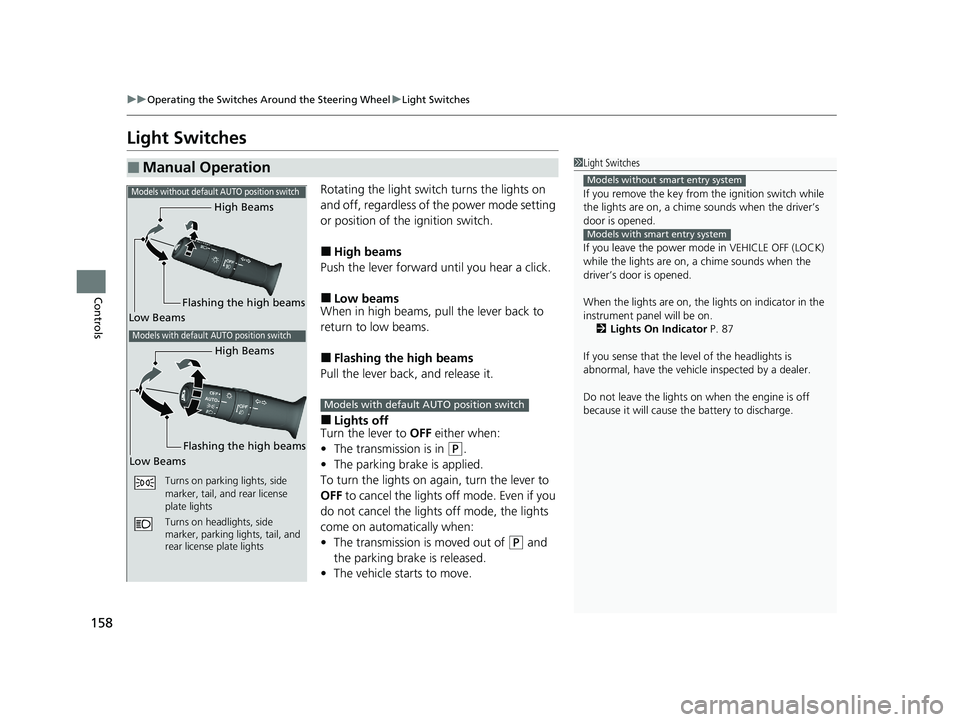
Rotating the light switch turns the lights on
and off, regardless of the power mode setting
or position of the ignition switch.
■High beams
Push the lever forward until you hear a click.
■Low beams
When in high beams, pull the lever back to
return to low beams.
■Flashing the high beams
Pull the lever back, and release it.
■Lights off
Turn the lever to OFF either when:
• The transmission is in
(P.
• The parking brake is applied.
To turn the lights on ag ain, turn the lever to
OFF to cancel the lights off mode. Even if you
do not cancel the lights off mode, the lights
come on automatically when:
• The transmission is moved out of
(P and
the parking brake is released.
• The vehicle starts to move.
■Manual Operation1Light Switches
If you remove the key from the ignition switch while
the lights are on, a chime sounds when the driver’s
door is opened.
If you leave the power mode in VEHICLE OFF (LOCK)
while the lights are on, a chime sounds when the
driver’s door is opened.
When the lights are on, the lights on indicator in the
instrument pane l will be on.
2 Lights On Indicator P. 87
If you sense that the le vel of the headlights is
abnormal, have the vehicl e inspected by a dealer.
Do not leave the lights on when the engine is off
because it will cause the battery to discharge.
Models without smart entry system
Models with smart entry system
High Beams
Flashing the high beams
Low Beams
Turns on parking lights, side
marker, tail, and rear license
plate lights
Turns on headlights, side
marker, parking lights, tail, and
rear license plate lights
Models without default AUTO position switch
Models with default AUTO position switch
High Beams
Flashing the high beams
Low Beams
Models with default AUTO position switch
21 CIVIC 4D HCM_HMIN_J (KA KL KC)-31TBA6500.book 158 ページ 2020年8月25日 火曜日 午後2時6分
Page 172 of 632
170
Controls
Adjusting the Mirrors
Interior Rearview Mirror
Adjust the angle of the rearview mirror when you are sitting in the correct driving
position.
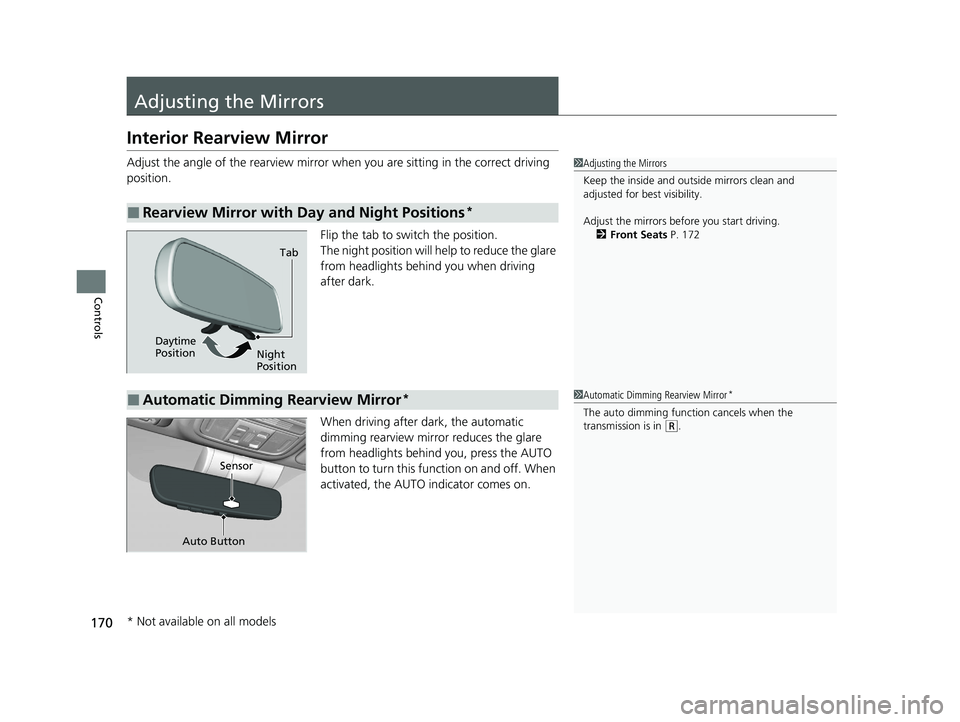
Flip the tab to switch the position.
The night position will help to reduce the glare
from headlights behind you when driving
after dark.
When driving after dark, the automatic
dimming rearview mirror reduces the glare
from headlights behind you, press the AUTO
button to turn this function on and off. When
activated, the AUTO indicator comes on.
■Rearview Mirror with Day and Night Positions*
1 Adjusting the Mirrors
Keep the inside and out side mirrors clean and
adjusted for best visibility.
Adjust the mirrors befo re you start driving.
2 Front Seats P. 172
Tab
Daytime
Position Night
Position
■Automatic Dimming Rearview Mirror*1Automatic Dimming Rearview Mirror*
The auto dimming function cancels when the
transmission is in (R.
Sensor
Auto Button
* Not available on all models
21 CIVIC 4D HCM_HMIN_J (KA KL KC)-31TBA6500.book 170 ページ 2020年8月25日 火曜日 午後2時6分
Page 310 of 632
308
uuGeneral Information on the Audio System uHonda App License Agreement
Features
E. Information Collection and Storage
1. Information Collection , Use, Transmission and Storage of Data. Consent to Use of Data:
You agree that HONDA and PROVIDERS may
collect and use your information gathered in any manner as part of product support services related to the SOFTWARE or related services.
HONDA may share such information with third parties, including, without limitation, PROV IDERS, third party software and service s
suppliers, their affiliates and/or their design ated agents, solely to improve their products or to provide services or technologies to you.
HONDA, third party software and systems supp liers, their affiliates and/or their designated agent may disclose this information to others,
but not in a form that pe rsonally identifies you.
2. Information Storage.
Depending on the type of multimedia system you have in your VEHICLE, certain information may be stored for ease
of use of the SOFTWARE including, without limitation, search hi story, location history in certain applications, previous and saved
destinations, map locations within certain applications, and device numbers and contact information.
(a) Vehicle Health Information.
Your VEHICLE may remotely trans mit information regarding the status and health of your VEHICLE
(“VEHICLE INFORMATION”) to HONDA without notification to you. VEHICLE INFORMATION may contain VEHICLE maintenance and
malfunction status that is derived from VEHICLE diagnostic data and includes, but is not limited to, status of powered doors and windows,
battery life data, battery charging data, VEHICLE speed, coolant temperat ure, air compressor revolution, output power, warning codes,
diagnostic trouble codes, fuel injection volu me, and engine rotations per minute. VEHICL E HEALTH INFORMATION may be used by HON DA
for research and development, to deliver HO NDA SERVICES and information to you, and to contact you, and is retained only for a period
of time necessary to fulfill these goals.
(b) VEHICLE Geolocation Data (non-navigation/map based).
If you opt-in to geolocation-based SERVICES, your vehicle’s geolocation data
(latitude and longitude) will be automatically sent from your VEHICLE to HONDA and PROVIDERS.
(c) You understand that the inputting or uploading of information to your VEHICLE’s multimedia system or the SOFTWARE or SERVICES is
at your own risk and that HONDA is not resp onsible for unauthorized access to or use of any personal or other information. All information
uploaded to the SOFTWARE and SERVICES may be stored on your VEHI CLES’s multimedia system and you understand that the security and
safety of your VEHICLE’s multimedia system is your sole responsibility.
21 CIVIC 4D HCM_HMIN_J (KA KL KC)-31TBA6500.book 308 ページ 2020年8月25日 火曜日 午後2時6分
Page 313 of 632
311
uuGeneral Information on the Audio System uHonda App License Agreement
Continued
Features
I. Availability/Interruption. The SOFTWARE and certain SERVICES are made availa ble through your VEHICLE’s compatible multimedia
system when the VEHICLE is turned on. Certain SERVICES may be available only through your compatible mobile device when it is within
the operating range of the VEHICLE and a wireless carrier. The av ailability of the SOFTWARE and SERVICES may be subject to transmission
limitation or interruption, including but not limited to technical obsolesce or sunsetting of the hardware, software or firmware, inside of
or external to the Vehicle, required for data transmission or receipt. HONDA does not guarantee that the SOFTWARE, SERVICES, or any
portion thereof will be available at all times or in all areas. You acknowledge and agree that HONDA is not responsible for per formance
degradation, interruption or dela ys. You acknowledge that HONDA shall not be liable to you if the SOFTWARE or SERVICES in a given
location are not available. If the SOFTWARE or SERVICES are not available within your intended location, you agree that your so le remedy
shall be to cease using the SOFTWARE and SERVICES.
J. PRODUCT SUPPORT: Product support for the SOFTWARE is provided by HONDA. For product support, please refer to HONDA
instructions provided in the DOCUMENTATION. Should you have any questions concerning this AGREEMENT, or if you desire to contact
HONDA for any other reason, please refer to the HONDA contact information provided in the DOCUMENTATION.
K. Termination and Transfer.
1. Termination. This AGREEMENT is effective until term inated by you or US. WE may terminate this AGREEMENT for any or no reason,
and with or without notice to you. Your rights under this AGR EEMENT will terminate automatically without notice from US if you fail to
comply with any term of this AGREEMENT. Upon termination of this AGREEMENT, you sh all cease all use of the SOFTWARE and SERVICE S.
2. Transfer: You may permanently transfer your rights under this AGREEMENT only as part of a sale or transfer of the VEHICLE, provided
you retain no copies, y ou transfer all of the SOFTWARE and HONDA SERVICES (inc luding all component parts, the media and printed
materials, and any upgrades), and the recipi ent agrees to the terms of this AGREEMENT. You agree to notify HONDA upon the sale or
transfer of the VEHICLE. To contact HO NDA, please refer to the HONDA contact info rmation provided in the DOCUMENTATION.
21 CIVIC 4D HCM_HMIN_J (KA KL KC)-31TBA6500.book 311 ページ 2020年8月25日 火曜日 午後2時6分
Page 438 of 632
uuWhen Driving uShifting
436
Driving
Use the paddle shifters to change betw een 1st and 7th speeds without releasing
your hands from the steering wheel. The transmission switches to the 7-speed
manual shift mode when you pull a paddle shi fter while driving. This mode is useful
when engine braking is needed.
■When the shift lever is in (D:
The shift mode goes into the 7-speed ma nual shift mode temporarily, and the
number is displayed in the shift indicator.
The 7-speed manual shift mode is canceled automatically if you drive at constant
speed or accelerate, and the number in the shift indicator goes off.
You can cancel this mode by pulling the
(+ paddle shifter for a few seconds.
The 7-speed manual shift mode is especially useful when reducing the vehicle speed
temporarily before making a turn.
■When the shift lever is in (S:
The shift mode goes into the 7- speed manual shift mode. The M indicator and the
speed number are displayed in the shift indicator. As the vehicle speed slows down,
the transmission automatically shifts down accordingly. When the vehicle comes to
a stop, it automatically shifts down into 1st.
If the vehicle speed increases and the engi ne speed reaches near the tachometer’s
red zone, the transmission automatically shifts up.
You can only pull away in 1st speed.
When canceling the 7-speed manual sh ift mode, move the shift lever from
(S to
(D. When the 7-speed manual shift mode is canceled, the M indicator and shift
indicator will turn off.
■7-Speed Manual Shift Mode1 7-Speed Manual Shift Mode
In the 7-speed manual shif t mode, the transmission
shifts up or down by operating either paddle shifter
under the following conditions:
Shift Up: The engine sp eed reaches the lowest
threshold of the hi gher speed position.
Shift Down: The engine sp eed reaches the highest
threshold of the lower speed position.
When the engine speed reaches near the
tachometer’s red zone, the transmission shifts up
automatically.
When the engine speed reaches the lowest threshold
of the selected speed positi on, the transmission shifts
down automatically.
Operating the paddle shifters on slippery surfaces
may cause the tires to lock up. In this case, the 7-
speed manual shift mode is canceled and goes back
to the normal
( D driving mode.
21 CIVIC 4D HCM_HMIN_J (KA KL KC)-31TBA6500.book 436 ページ 2020年8月25日 火曜日 午後2時6分