light HONDA CLARITY ELECTRIC 2018 (in English) Service Manual
[x] Cancel search | Manufacturer: HONDA, Model Year: 2018, Model line: CLARITY ELECTRIC, Model: HONDA CLARITY ELECTRIC 2018Pages: 559, PDF Size: 27.8 MB
Page 183 of 559
181
uuInterior Lights/Interior Convenience Items uInterior Convenience Items
Continued
Controls
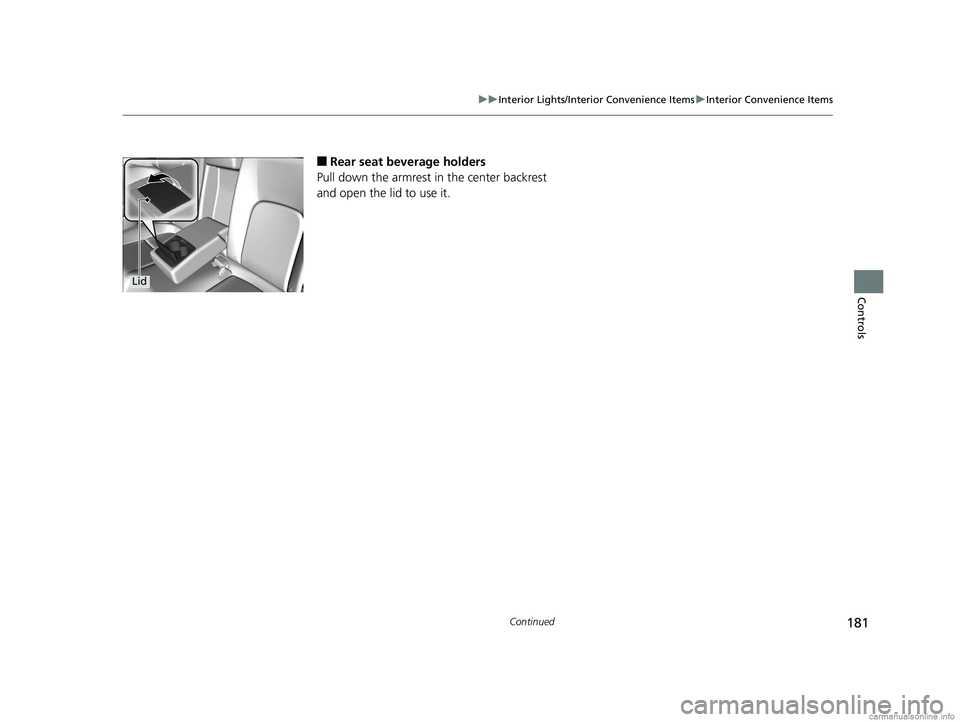
■Rear seat beverage holders
Pull down the armrest in the center backrest
and open the lid to use it.
Lid
18 CLARITY ELECTRIC CSS-31TRV6100.book 181 ページ 2018年2月5日 月曜日 午後12時0分
Page 184 of 559
uuInterior Lights/Interior Convenience Items uInterior Convenience Items
182
Controls
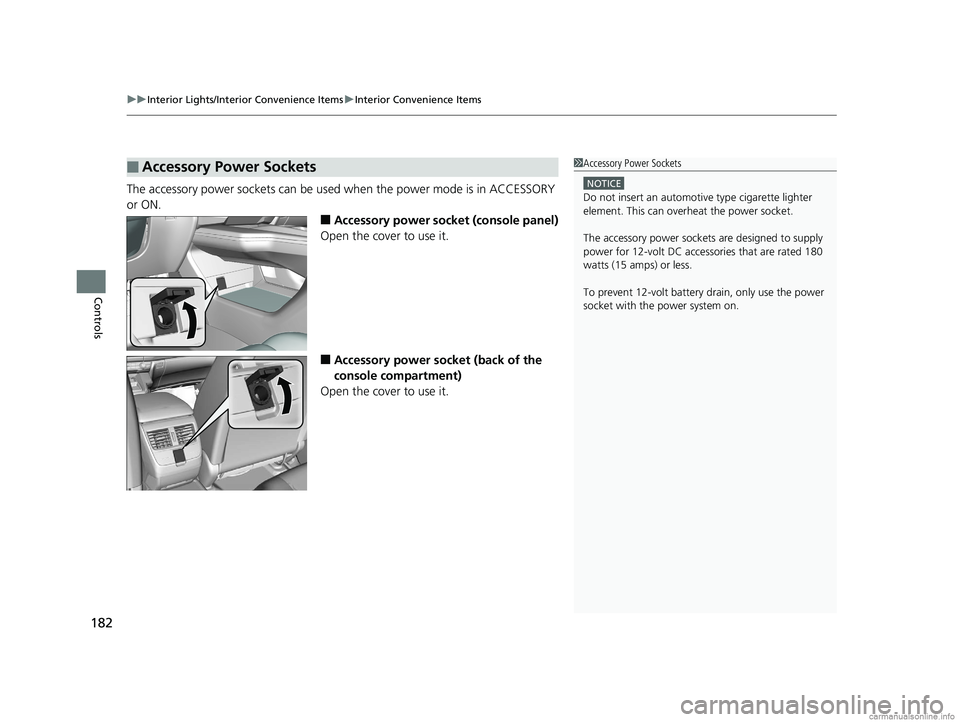
The accessory power sockets can be used when the power mode is in ACCESSORY
or ON.
■Accessory power socket (console panel)
Open the cover to use it.
■Accessory power socket (back of the
console compartment)
Open the cover to use it.
■Accessory Power Sockets1 Accessory Power Sockets
NOTICE
Do not insert an automotive type cigarette lighter
element. This can overheat the power socket.
The accessory power socket s are designed to supply
power for 12-volt DC accessories that are rated 180
watts (15 amps) or less.
To prevent 12-volt battery drain, only use the power
socket with the power system on.
18 CLARITY ELECTRIC CSS-31TRV6100.book 182 ページ 2018年2月5日 月曜日 午後12時0分
Page 185 of 559
Continued183
uuInterior Lights/Interior Convenience Items uInterior Convenience Items
Controls
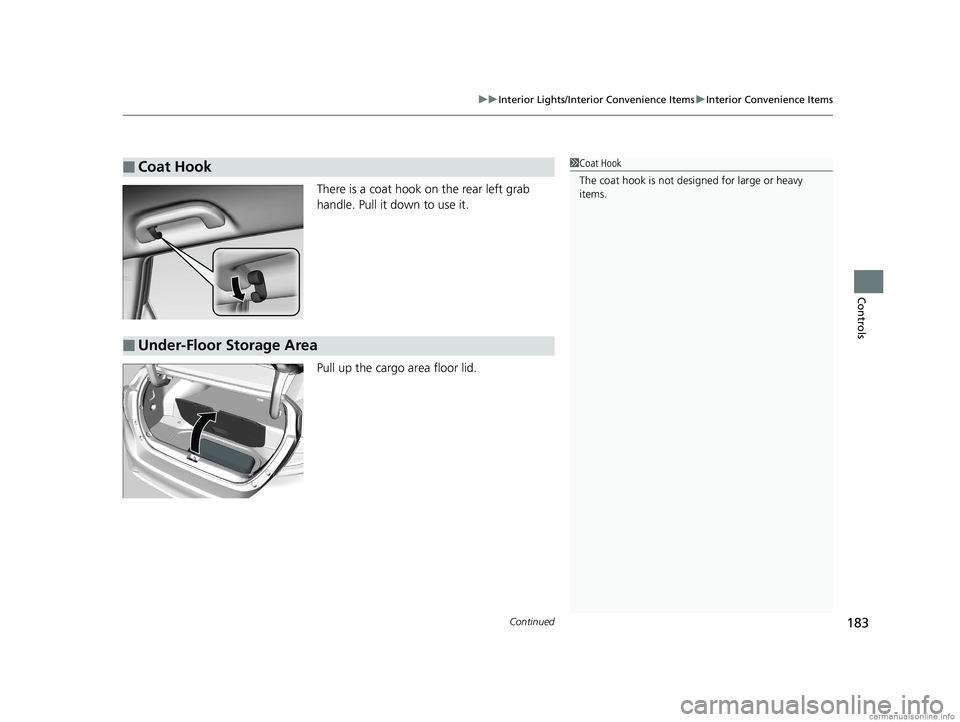
There is a coat hook on the rear left grab
handle. Pull it down to use it.
Pull up the cargo area floor lid.
■Coat Hook1Coat Hook
The coat hook is not desi gned for large or heavy
items.
■Under-Floor Storage Area
18 CLARITY ELECTRIC CSS-31TRV6100.book 183 ページ 2018年2月5日 月曜日 午後12時0分
Page 186 of 559
uuInterior Lights/Interior Convenience Items uInterior Convenience Items
184
Controls
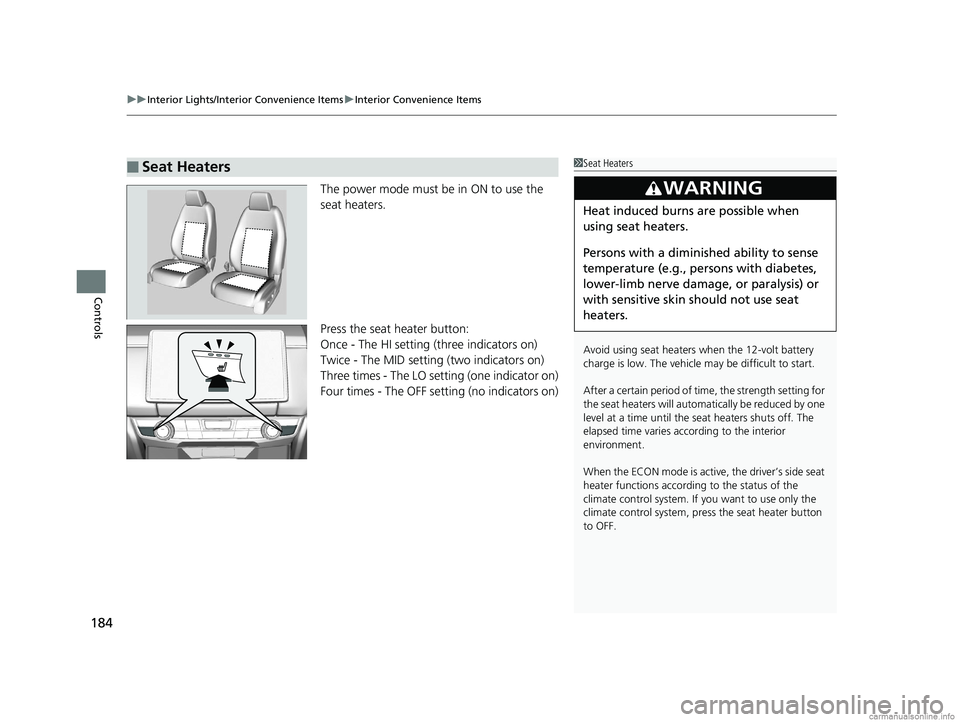
The power mode must be in ON to use the
seat heaters.
Press the seat heater button:
Once - The HI setting (three indicators on)
Twice - The MID setting (two indicators on)
Three times - The LO setting (one indicator on)
Four times - The OFF se tting (no indicators on)
■Seat Heaters1Seat Heaters
Avoid using seat heaters when the 12-volt battery
charge is low. The vehicle may be difficult to start.
After a certain period of time, the strength setting for
the seat heaters will automatically be reduced by one
level at a time until the seat heaters shuts off. The
elapsed time varies according to the interior
environment.
When the ECON mode is active, the driver’s side seat
heater functions accordi ng to the status of the
climate control system. If you want to use only the
climate control system, press the seat heater button
to OFF.
3WARNING
Heat induced burns are possible when
using seat heaters.
Persons with a diminished ability to sense
temperature (e.g., persons with diabetes,
lower-limb nerve damage, or paralysis) or
with sensitive skin should not use seat
heaters.
18 CLARITY ELECTRIC CSS-31TRV6100.book 184 ページ 2018年2月5日 月曜日 午後12時0分
Page 187 of 559
185
uuInterior Lights/Interior Convenience Items uInterior Convenience Items
Controls
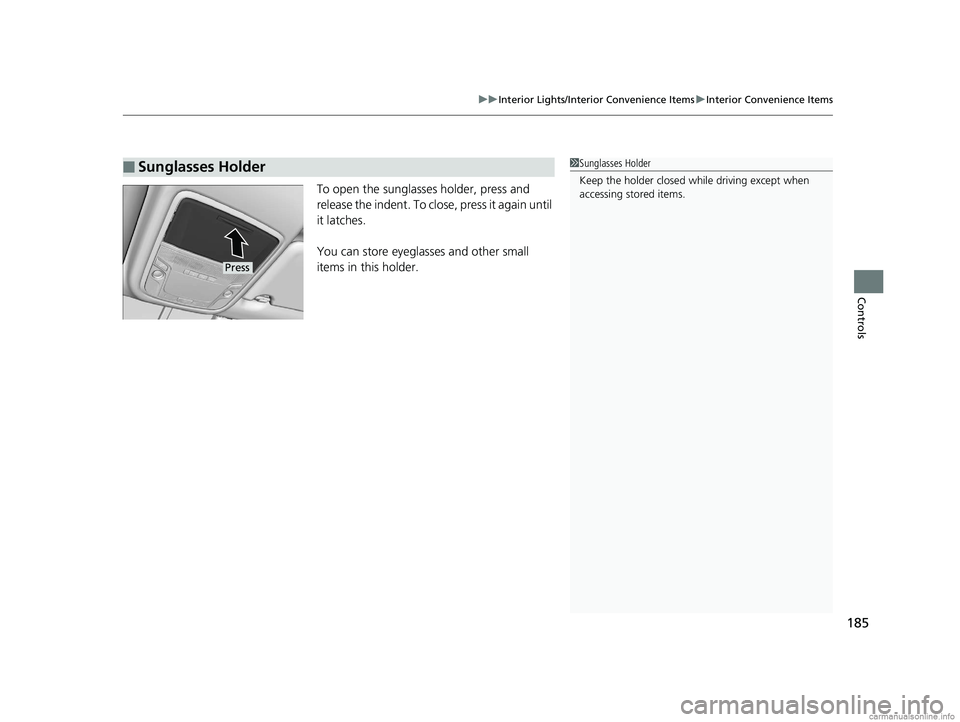
To open the sunglasses holder, press and
release the indent. To close, press it again until
it latches.
You can store eyeglasses and other small
items in this holder.
■Sunglasses Holder1Sunglasses Holder
Keep the holder closed wh ile driving except when
accessing stored items.
Press
18 CLARITY ELECTRIC CSS-31TRV6100.book 185 ページ 2018年2月5日 月曜日 午後12時0分
Page 194 of 559
uuClimate Control System uUsing Automatic Climate Control
192
Controls
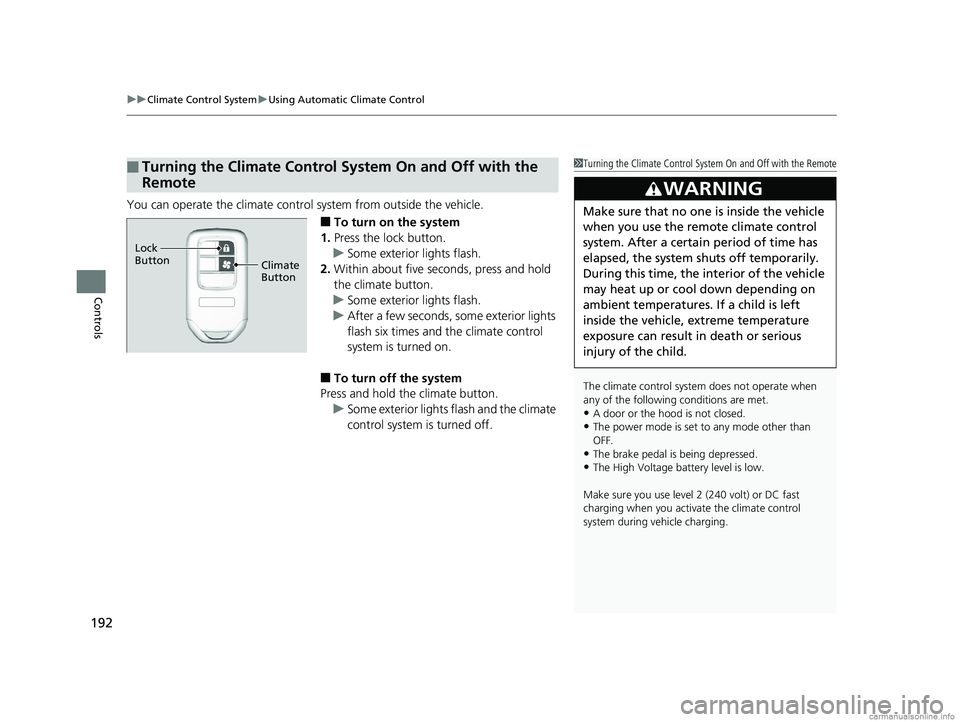
You can operate the climate contro l system from outside the vehicle.
■To turn on the system
1. Press the lock button.
u Some exterior lights flash.
2. Within about five seconds, press and hold
the climate button.
u Some exterior lights flash.
u After a few seconds, some exterior lights
flash six times and the climate control
system is turned on.
■To turn off the system
Press and hold the climate button.
u Some exterior lights flash and the climate
control system is turned off.
■Turning the Climate Control System On and Off with the
Remote1Turning the Climate Control System On and Off with the Remote
The climate control system does not operate when
any of the following conditions are met.
•A door or the hood is not closed.
•The power mode is set to any mode other than
OFF.
•The brake pedal is being depressed.
•The High Voltage battery level is low.
Make sure you use level 2 (240 volt) or DC fast
charging when you activate the climate control
system during vehicle charging.
3WARNING
Make sure that no one is inside the vehicle
when you use the remote climate control
system. After a certain period of time has
elapsed, the system sh uts off temporarily.
During this time, the in terior of the vehicle
may heat up or cool down depending on
ambient temperatures. If a child is left
inside the vehicle, extreme temperature
exposure can result in death or serious
injury of the child.
Climate
Button
Lock
Button
18 CLARITY ELECTRIC CSS-31TRV6100.book 192 ページ 2018年2月5日 月曜日 午後12時0分
Page 199 of 559
197
uuAudio System uUSB Ports
Features
USB Ports
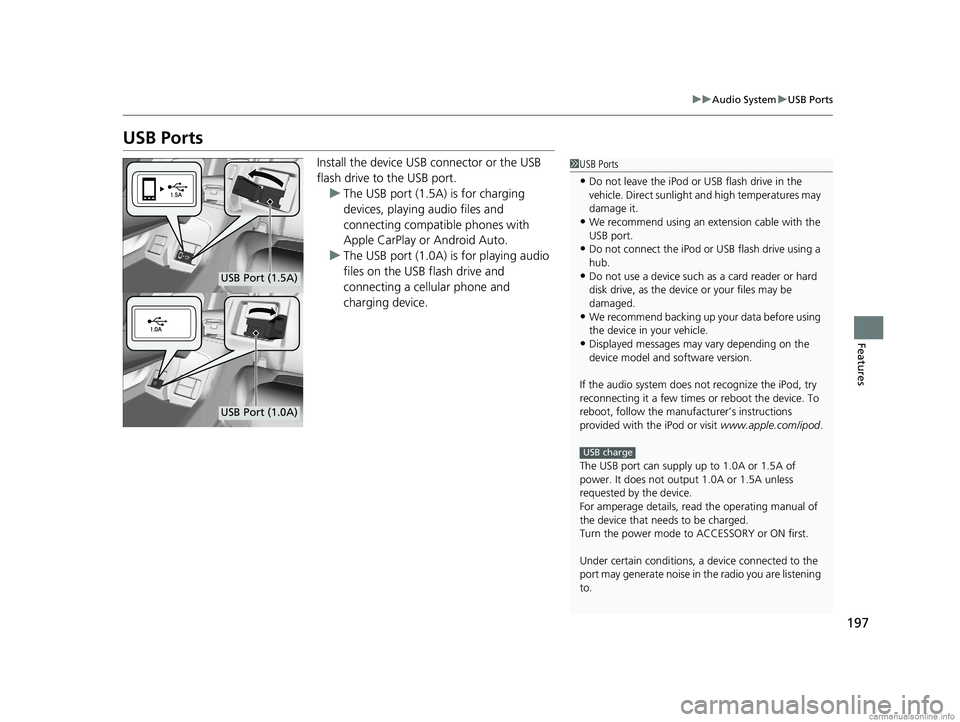
Install the device USB connector or the USB
flash drive to the USB port.
u The USB port (1.5A) is for charging
devices, playing audio files and
connecting compatib le phones with
Apple CarPlay or Android Auto.
u The USB port (1.0A) is for playing audio
files on the USB flash drive and
connecting a cellular phone and
charging device.1USB Ports
•Do not leave the iPod or USB flash drive in the
vehicle. Direct sunlight and high temperatures may
damage it.
•We recommend using an ex tension cable with the
USB port.
•Do not connect the iPod or USB flash drive using a
hub.
•Do not use a device such as a card reader or hard
disk drive, as the device or your files may be
damaged.
•We recommend backing up yo ur data before using
the device in your vehicle.
•Displayed messages may vary depending on the
device model and software version.
If the audio system does not recognize the iPod, try
reconnecting it a few times or reboot the device. To
reboot, follow the manufac turer’s instructions
provided with the iPod or visit www.apple.com/ipod.
The USB port can supply up to 1.0A or 1.5A of
power. It does not output 1.0A or 1.5A unless
requested by the device.
For amperage details, read the operating manual of
the device that ne eds to be charged.
Turn the power mode to ACCESSORY or ON first.
Under certain condi tions, a device connected to the
port may generate noise in the radio you are listening
to.
USB charge
USB Port (1.5A)
USB Port (1.0A)
18 CLARITY ELECTRIC CSS-31TRV6100.book 197 ページ 2018年2月5日 月曜日 午後12時0分
Page 231 of 559
229
uuAudio System Basic Operation uVoice Control Operation
Continued
Features
Voice Control Operation
Your vehicle has a voice control syst em that allows hands-free operation.
The voice control system uses the ( Talk) and (hang-up/back) buttons on
the steering wheel and a microphone near the map lights in the ceiling.
To achieve optimum voice recognition when using the voice control system:
• Make sure the correct screen is displa yed for the voice command that you are
using.
The system recognizes only certain commands.
Available voic e command P. 230
• Close the windows.
• Adjust the dashboard and side vents so air does not blow onto the microphone in
the ceiling.
• Speak clearly in a natural speaking vo ice without pausing between words.
• Reduce any background noise if possible. The system may misinterpret your
command if more than one person is speaking at the same time.
■Voice Recognition
1Voice Control Operation
When you press the button, a helpful prompt asks
what you would like to do. Press and release the
button again to bypass this prompt and give a
command.
1 Voice Recognition
The voice control system can only be used from the
driver’s seat because the microphone unit removes
noises from the front passenger’s side.
18 CLARITY ELECTRIC CSS-31TRV6100.book 229 ページ 2018年2月5日 月曜日 午後12時0分
Page 299 of 559
297
uuCustomized Features u
Continued
Features
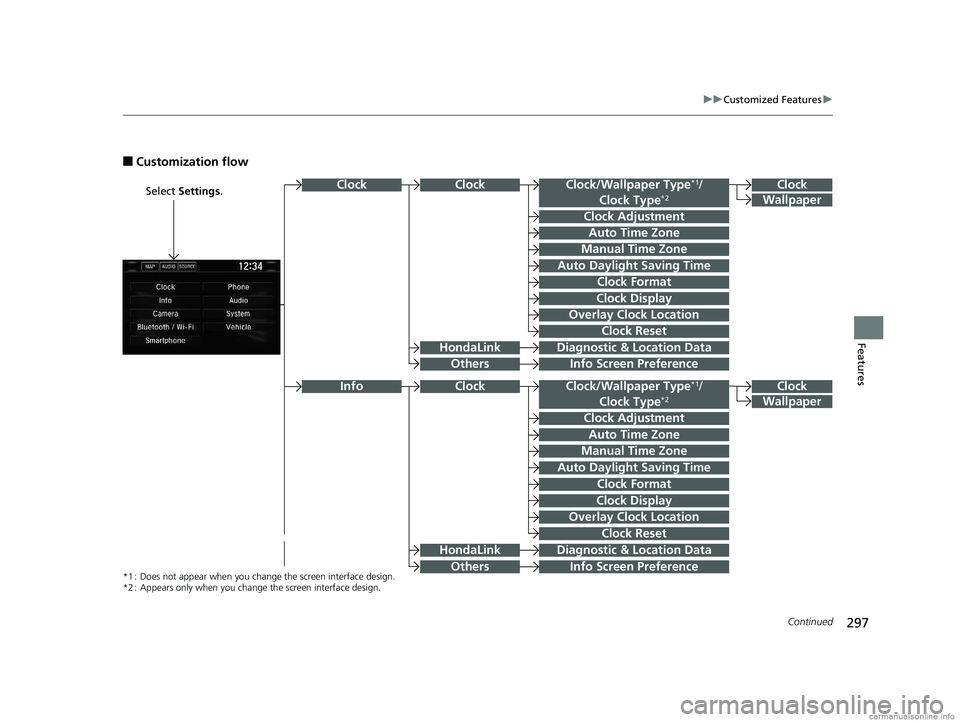
■Customization flow
Select Settings .Clock
Wallpaper
Clock/Wallpaper Type*1/
Clock Type*2
Clock Adjustment
Clock Format
ClockClock
Auto Time Zone
Manual Time Zone
Auto Daylight Saving Time
Clock Display
Overlay Clock Location
Info Screen Preference
Clock
Wallpaper
Clock/Wallpaper Type*1/
Clock Type*2
Clock Adjustment
Clock Format
Auto Time Zone
Manual Time Zone
Auto Daylight Saving Time
Clock Display
Overlay Clock Location
Clock Reset
Info Screen Preference
Info
*1 : Does not appear when you chang e the screen interface design.
*2 : Appears only when you change the screen interface design.
Diagnostic & Location Data
Diagnostic & Location Data
HondaLink
Others
HondaLink
Others
Clock
Clock Reset
18 CLARITY ELECTRIC CSS-31TRV6100.book 297 ページ 2018年2月5日 月曜日 午後12時0分
Page 303 of 559
301
uuCustomized Features u
Continued
Features
ClockClock/Wallpaper Type*1/
Clock Type*2
Clock Adjustment
Clock Format
Auto Time Zone
Manual Time Zone
Auto Daylight Saving Time
Clock Display
Overlay Clock Location
Clock Reset
Clock
Wallpaper
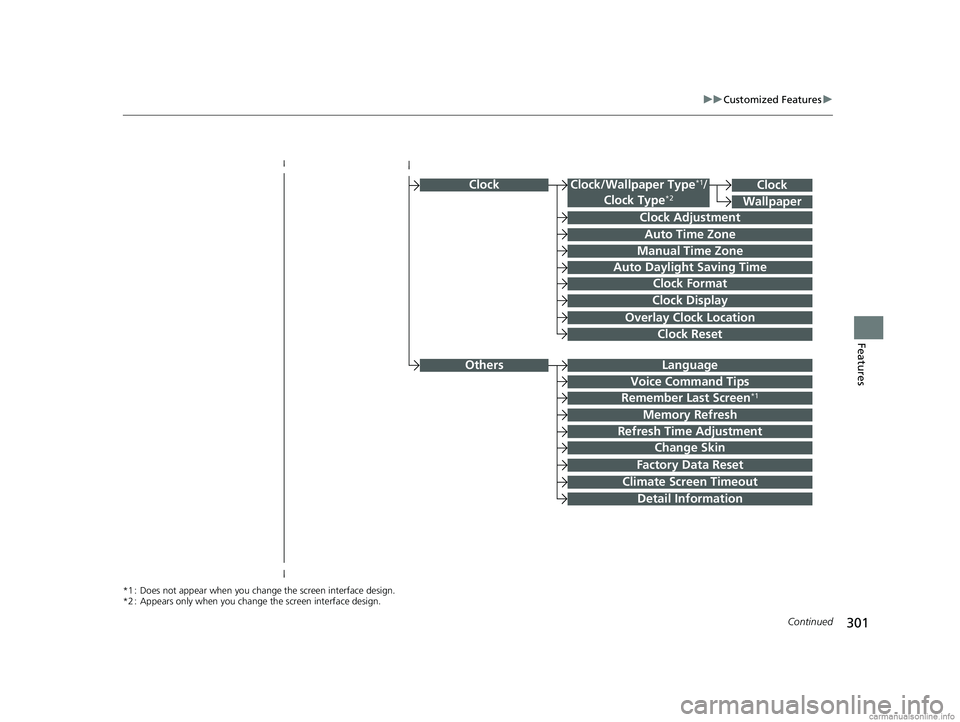
*1 : Does not appear when you chang e the screen interface design.
*2 : Appears only when you change the screen interface design.
OthersLanguage
Voice Command Tips
Remember Last Screen*1
Memory Refresh
Refresh Time Adjustment
Change Skin
Factory Data Reset
Climate Screen Timeout
Detail Information
18 CLARITY ELECTRIC CSS-31TRV6100.book 301 ページ 2018年2月5日 月曜日 午後12時0分