maintenance HONDA CLARITY FUEL CELL 2018 (in English) User Guide
[x] Cancel search | Manufacturer: HONDA, Model Year: 2018, Model line: CLARITY FUEL CELL, Model: HONDA CLARITY FUEL CELL 2018Pages: 551, PDF Size: 27.22 MB
Page 91 of 551
89
uuIndicators u
Continued
Instrument Panel
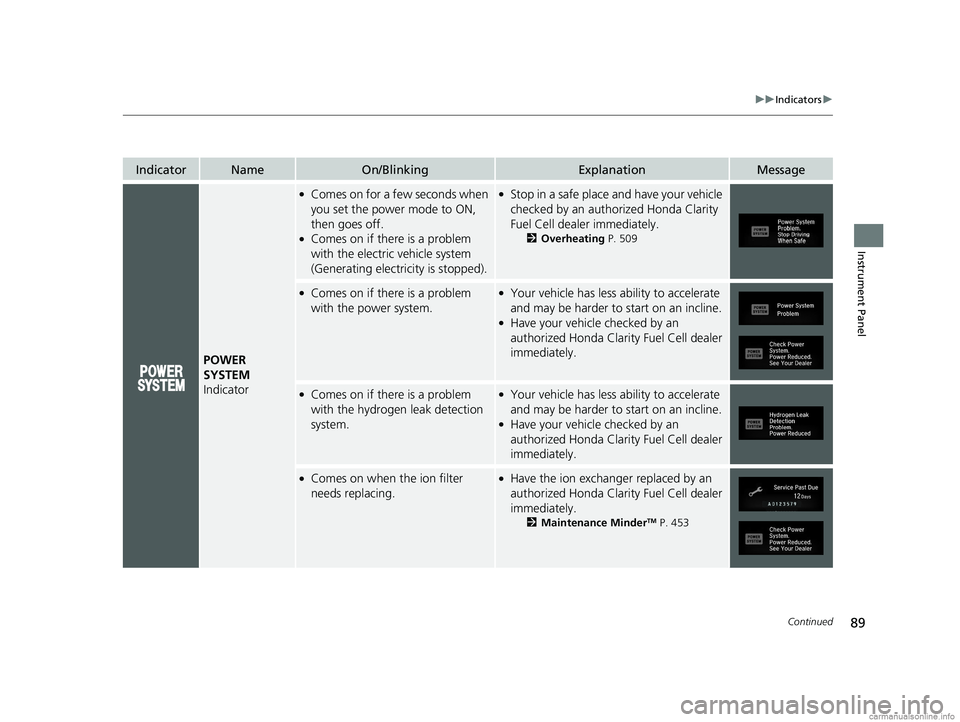
IndicatorNameOn/BlinkingExplanationMessage
POWER
SYSTEM
Indicator
●Comes on for a fe w seconds when
you set the power mode to ON,
then goes off.
●Comes on if there is a problem
with the electric vehicle system
(Generating electricity is stopped).
●Stop in a safe place and have your vehicle
checked by an authorized Honda Clarity
Fuel Cell dealer immediately.
2 Overheating P. 509
●Comes on if there is a problem
with the power system.●Your vehicle has less ability to accelerate
and may be harder to start on an incline.
●Have your vehicle checked by an
authorized Honda Clarity Fuel Cell dealer
immediately.
●Comes on if there is a problem
with the hydrogen leak detection
system.●Your vehicle has less ability to accelerate
and may be harder to start on an incline.
●Have your vehicle checked by an
authorized Honda Clarity Fuel Cell dealer
immediately.
●Comes on when the ion filter
needs replacing.●Have the ion exchange r replaced by an
authorized Honda Clarity Fuel Cell dealer
immediately.
2 Maintenance MinderTM P. 453
18 CLARITY FUEL CELL PPO-31TRT6100.book 89 ページ 2017年11月21日 火曜日 午後3時3分
Page 104 of 551
102
uuIndicators uDriver Information Interface Wa rning and Information Messages
Instrument Panel
Driver Information Interface Warning and Information Messages
The following messages appear only on the driver information interface. Press th e (display/information) button to see the mess age
again with the system message indicator on.
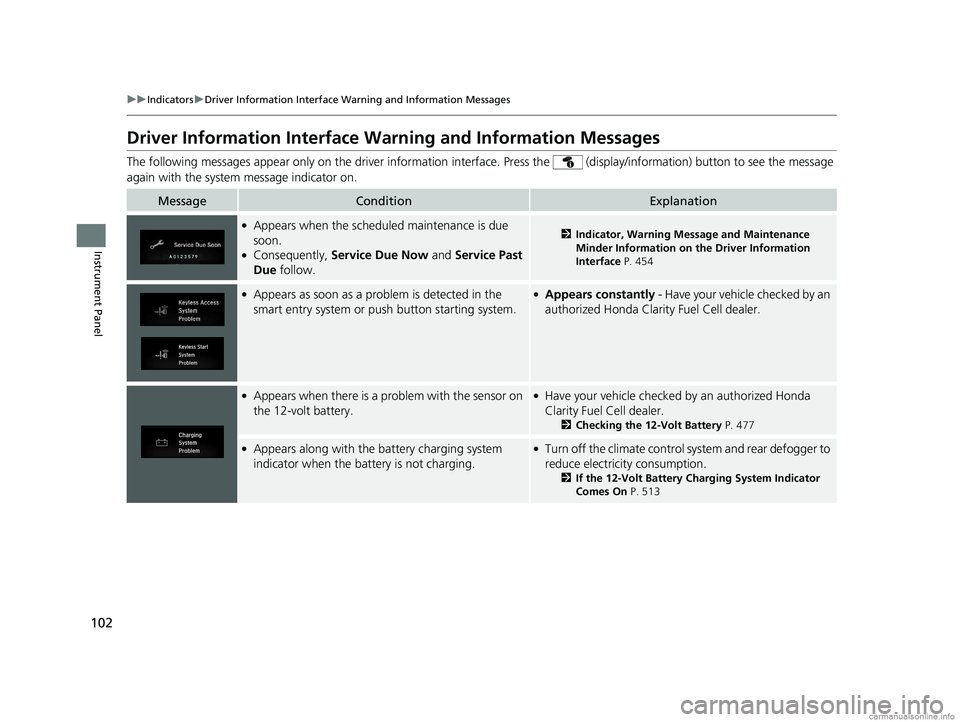
MessageConditionExplanation
●Appears when the schedul ed maintenance is due
soon.
●Consequently, Service Due Now and Service Past
Due follow.
2Indicator, Warning Message and Maintenance
Minder Information on the Driver Information
Interface P. 454
●Appears as soon as a problem is detected in the
smart entry system or pus h button starting system.●Appears constantly - Have your vehicle checked by an
authorized Hond a Clarity Fuel Cell dealer.
●Appears when there is a pr oblem with the sensor on
the 12-volt battery.●Have your vehicle checked by an authorized Honda
Clarity Fuel Cell dealer.
2 Checking the 12-Volt Battery P. 477
●Appears along with the battery charging system
indicator when the battery is not charging.●Turn off the climate control system and rear defogger to
reduce electricity consumption.
2If the 12-Volt Battery Charging System Indicator
Comes On P. 513
18 CLARITY FUEL CELL PPO-31TRT6100.book 102 ページ 2017年11月21日 火曜日 午後3時3分
Page 121 of 551
119
uuGauges and Driver Information Interface uDriver Information Interface
Continued
Instrument Panel
Driver Information Interface
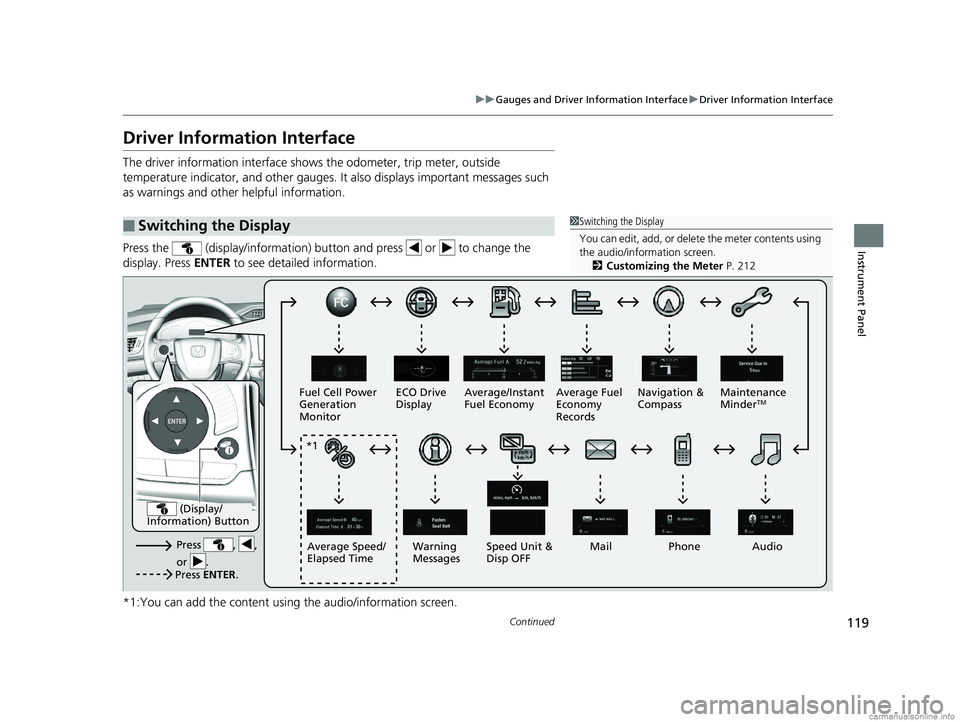
The driver information interface show s the odometer, trip meter, outside
temperature indicator, and other gauges. It also displays important messages such
as warnings and other helpful information.
Press the (display/information) butt on and press or to change the
display. Press ENTER to see detailed information.
*1:You can add the content using the audio/information screen.
■Switching the Display1 Switching the Display
You can edit, add, or delete the meter contents using
the audio/information screen. 2 Customizing the Meter P. 212
Press , ,
or .Speed Unit &
Disp OFF
Fuel Cell Power
Generation
Monitor
ECO Drive
Display
Mail
Warning
Messages Audio
Average Speed/
Elapsed Time Average/Instant
Fuel Economy
Navigation &
CompassMaintenance
Minder
TMAverage Fuel
Economy
Records
Phone
Press ENTER .
(Display/
Information) Button
*1
18 CLARITY FUEL CELL PPO-31TRT6100.book 119 ページ 2017年11月21日 火曜日 午後3時3分
Page 125 of 551
123
uuGauges and Driver Information Interface uDriver Information Interface
Continued
Instrument Panel
Shows the Maintenance MinderTM.
2 Maintenance MinderTM P. 453
Shows the current audio information.
2Audio System Basic Operation P. 204
Shows the current mail information.
2Bluetooth ® HandsFreeLink ® P. 329
Shows the current phone information.
2 Bluetooth ® HandsFreeLink ® P. 329
■Maintenance MinderTM
■Audio
■Mail
■Phone
18 CLARITY FUEL CELL PPO-31TRT6100.book 123 ページ 2017年11月21日 火曜日 午後3時3分
Page 281 of 551
279
uuAudio Error Messages uPandora ®
Features
Pandora ®
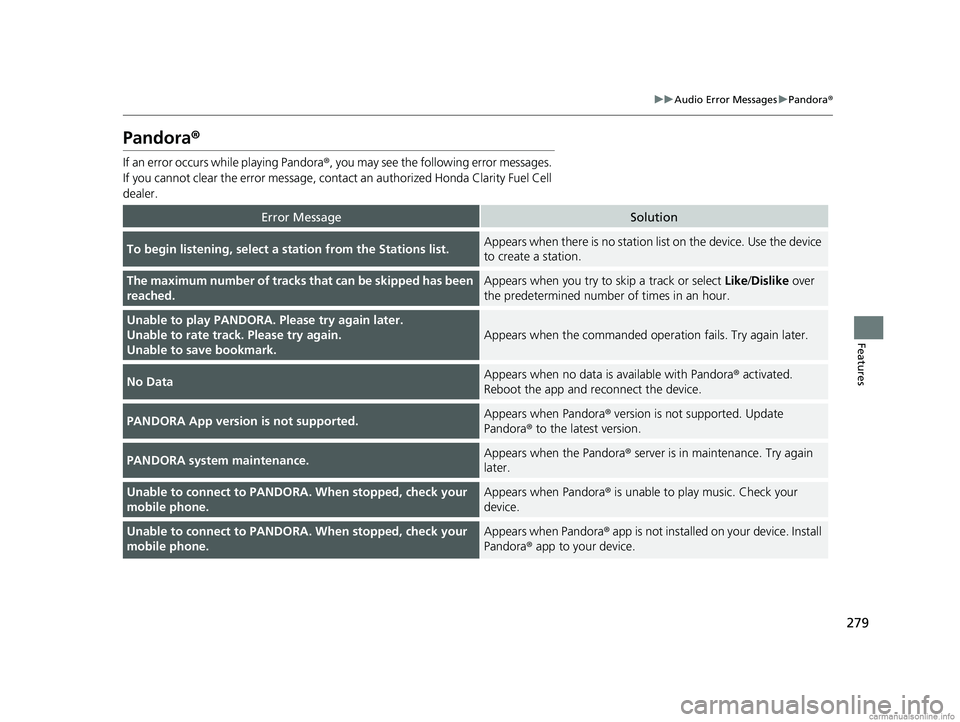
If an error occurs while playing Pandora ®, you may see the following error messages.
If you cannot clear the error message, contac t an authorized Honda Clarity Fuel Cell
dealer.
Error MessageSolution
To begin listening, select a st ation from the Stations list.Appears when there is no station list on the device. Use the device
to create a station.
The maximum number of tracks that can be skipped has been
reached.Appears when you try to skip a track or select Like/Dislike over
the predetermined number of times in an hour.
Unable to play PANDORA. Please try again later.
Unable to rate track. Please try again.
Unable to save bookmark.
Appears when the commanded oper ation fails. Try again later.
No DataAppears when no data is available with Pandora ® activated.
Reboot the app and reconnect the device.
PANDORA App version is not supported.Appears when Pandora® version is not supported. Update
Pandora ® to the latest version.
PANDORA system maintenance.Appears when the Pandora ® server is in maintenance. Try again
later.
Unable to connect to PANDORA . When stopped, check your
mobile phone.Appears when Pandora® is unable to play music. Check your
device.
Unable to connect to PANDORA . When stopped, check your
mobile phone.Appears when Pandora ® app is not installed on your device. Install
Pandora ® app to your device.
18 CLARITY FUEL CELL PPO-31TRT6100.book 279 ページ 2017年11月21日 火曜日 午後3時3分
Page 292 of 551
290
uuGeneral Information on the Audio System uHonda App License Agreement
Features
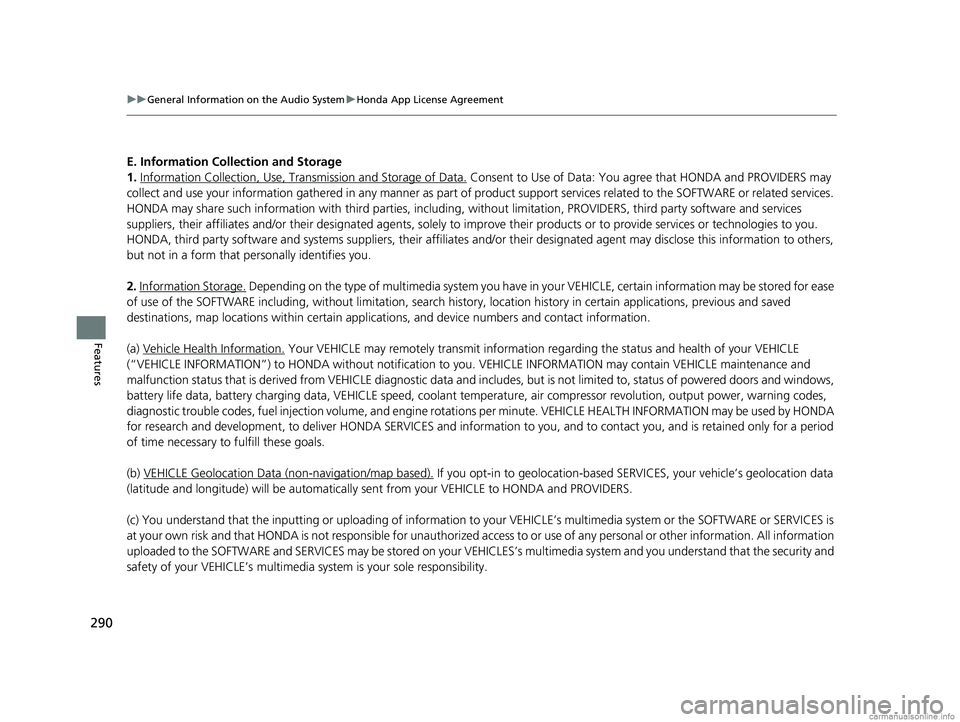
E. Information Coll ection and Storage
1. Information Collection, Use, Tr ansmission and Storage of Data.
Consent to Use of Data: You ag ree that HONDA and PROVIDERS may
collect and use your information gathered in any manner as part of product support services related to the SOFTWARE or related services.
HONDA may share such information with third parties, including, without limitation, PROVIDERS, th ird party software and services
suppliers, their affiliates and/or their desi gnated agents, solely to improve their products or to provide services or technolo gies to you.
HONDA, third party software and systems s uppliers, their affiliates and/or their designated agent may disclose this information to others,
but not in a form that pe rsonally identifies you.
2. Information Storage.
Depending on the type of multimedia system you have in your VEHICLE, certain information may be stored for ease
of use of the SOFTWARE including, without limitation, search hi story, location history in certain applications, previous and saved
destinations, map locations within certain applications, and device numbers and contact information.
(a) Vehicle Health Information.
Your VEHICLE may remotely trans mit information regarding the status and health of your VEHICLE
(“VEHICLE INFORMATION”) to HONDA without notification to you. VEHICLE INFORMATION may contain VEHICLE maintenance and
malfunction status that is derived from VEHICLE diagnostic data and includes, but is not limited to, status of powered doors and windows,
battery life data, battery charging data, VEHICLE speed, coolant temperat ure, air compressor revolution, output power, warning codes,
diagnostic trouble codes, fuel injection volume, and engine rotati ons per minute. VEHICLE HEALTH INFORMATION may be used by HONDA
for research and development, to deliver HONDA SERVICES and information to you, and to contact you, and is retained only for a period
of time necessary to fulfill these goals.
(b) VEHICLE Geolocation Data (non-navigation/map based).
If you opt-in to geolocation-based SERVICES, your vehicle’s geolocation data
(latitude and longitude) will be automatically se nt from your VEHICLE to HONDA and PROVIDERS.
(c) You understand that the inputting or uploading of information to your VEHICLE’s multimedia system or the SOFTWARE or SERVIC ES is
at your own risk and that HONDA is not responsible for unauthorized access to or use of any personal or other information. All information
uploaded to the SOFTWARE and SERVICES may be stored on your VEHICLES’s multimedia system and you understand that the security and
safety of your VEHICLE’s multimedia system is your sole responsibility.
18 CLARITY FUEL CELL PPO-31TRT6100.book 290 ページ 2017年11月21日 火曜日 午後3時3分
Page 299 of 551
297
uuGeneral Information on the Audio System uLegal Information on Apple CarPlay/Android Auto
Features
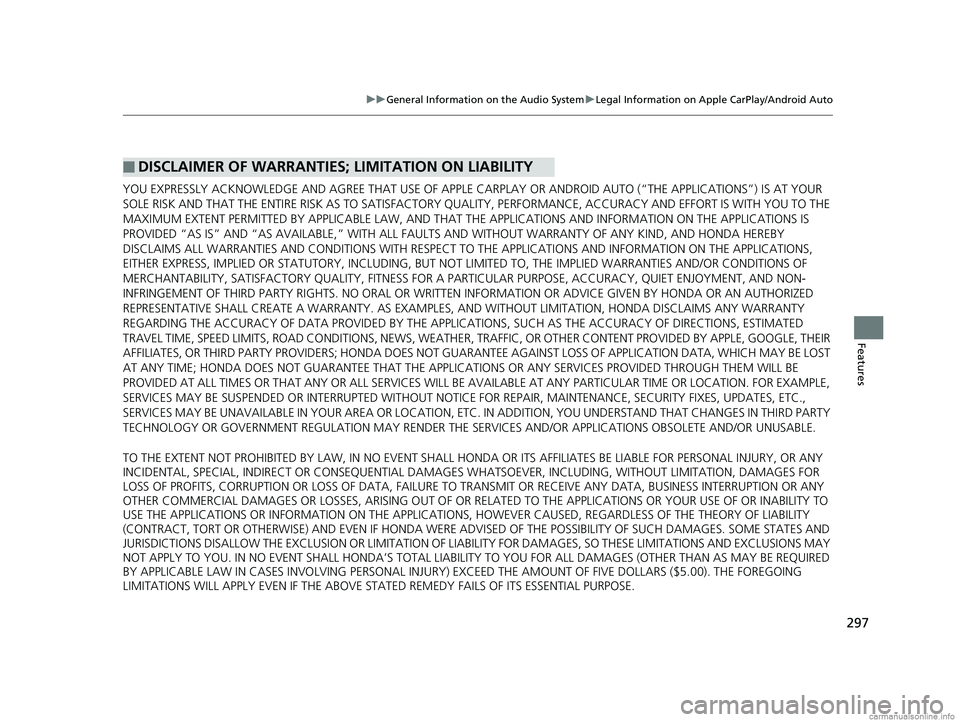
YOU EXPRESSLY ACKNOWLEDGE AND AGREE THAT USE OF APPLE CARPLAY OR ANDROID AUTO (“THE APPLICATIONS”) IS AT YOUR
SOLE RISK AND THAT THE ENTIRE RISK AS TO SATISFACTORY Q UALITY, PERFORMANCE, ACCURACY AND EFFORT IS WITH YOU TO THE
MAXIMUM EXTENT PERMITTED BY APPLICABLE LAW, AND THAT TH E APPLICATIONS AND INFORMATION ON THE APPLICATIONS IS
PROVIDED “AS IS” AND “AS AVAILABLE,” WITH ALL FAUL TS AND WITHOUT WARRANTY OF ANY KIND, AND HONDA HEREBY
DISCLAIMS ALL WARRANTIES AND CONDITIONS WITH RESPECT TO THE APPLICATIONS AND INFORMATION ON THE APPLICATIONS,
EITHER EXPRESS, IMPLIED OR STATUTORY, INCLUDING, BUT NOT LIMITED TO, THE IMPLIED WARRANTIES AND/OR CONDITIONS OF
MERCHANTABILITY, SATISFACTORY QUALITY, FITNESS FOR A PA RTICULAR PURPOSE, ACCURACY, QUIET ENJOYMENT, AND NON-
INFRINGEMENT OF THIRD PARTY RIGHTS. NO ORAL OR WRITTEN INFORMATION OR ADVICE GIVEN BY HONDA OR AN AUTHORIZED
REPRESENTATIVE SHALL CREATE A WARRANTY. AS EXAMPLES, AND WITHOUT LIMITATION, HONDA DISCLAIMS ANY WARRANTY
REGARDING THE ACCURACY OF DATA PROVIDED BY THE APPLI CATIONS, SUCH AS THE ACCURACY OF DIRECTIONS, ESTIMATED
TRAVEL TIME, SPEED LIMITS, ROAD CONDITIONS, NEWS, WEATHER, TRAF FIC, OR OTHER CONTENT PROVIDED BY APPLE, GOOGLE, THEIR
AFFILIATES, OR THIRD PARTY PROVIDERS; HONDA DOES NOT GUARANTEE AGAINST LO SS OF APPLICATION DATA, WHICH MAY BE LOST
AT ANY TIME; HONDA DOES NOT GUARANTEE THAT THE APPLICATIO NS OR ANY SERVICES PROVIDED THROUGH THEM WILL BE
PROVIDED AT ALL TIMES OR THAT ANY OR ALL SERVICES WILL BE AVAILABLE AT ANY PA RTICULAR TIME OR LOCATION. FOR EXAMPLE,
SERVICES MAY BE SUSPENDED OR INTERRUPTED WITHOUT NOTICE FOR REPAIR, MAINTENANCE, SECURITY FIXES, UPDATES, ETC.,
SERVICES MAY BE UNAVAILABLE IN YOUR AREA OR LOCATION, ETC. IN ADDITION, YOU UNDERSTAND THAT CHANGES IN THIRD PARTY
TECHNOLOGY OR GOVERNMENT REGULATION MAY RENDER THE SERVICES AND/OR APPLICATIONS OBSOLETE AND/OR UNUSABLE.
TO THE EXTENT NOT PROHIBITED BY LAW, IN NO EVENT SHALL HONDA OR ITS AFFILIATES BE LIABLE FOR PERSONAL INJURY, OR ANY
INCIDENTAL, SPECIAL, INDIRECT OR CO NSEQUENTIAL DAMAGES WHATSOEVER, INCLUDING, WITHOUT LIMITATION, DAMAGES FOR
LOSS OF PROFITS, CORRUPTION OR LOSS OF DATA, FAILURE TO TRANSMIT OR RECEIVE ANY DATA, BUSINESS INTERRUPTION OR ANY
OTHER COMMERCIAL DAMAGES OR LOSSES, ARISIN G OUT OF OR RELATED TO THE APPLICATIONS OR YOUR USE OF OR INABILITY TO
USE THE APPLICATIONS OR INFORMATION ON THE APPLICATIONS, HOWEVER CAUSED, REGARDLESS OF THE THEORY OF LIABILITY
(CONTRACT, TORT OR OTHERWISE) AND EVEN IF HONDA WERE ADVISED OF THE POSSIBILITY OF SUCH DAMAGES. SOME STATES AND
JURISDICTIONS DISALLOW THE EXCLUSION OR LIMITATION OF LI ABILITY FOR DAMAGES, SO THESE LIMITATIONS AND EXCLUSIONS MAY
NOT APPLY TO YOU. IN NO EVENT SHALL HONDA’S TOTAL LIABILITY TO YOU FOR ALL DAM AGES (OTHER THAN AS MAY BE REQUIRED
BY APPLICABLE LAW IN CASES INVOLVING PERSONAL INJURY) EXCE ED THE AMOUNT OF FIVE DOLLARS ($5.00). THE FOREGOING
LIMITATIONS WILL APPLY EVEN IF THE ABOVE STATED REMEDY FAILS OF ITS ESSENTIAL PURPOSE.
■DISCLAIMER OF WARRANTIES; LIMITATION ON LIABILITY
18 CLARITY FUEL CELL PPO-31TRT6100.book 297 ページ 2017年11月21日 火曜日 午後3時3分
Page 309 of 551
307
uuCustomized Features u
Continued
Features
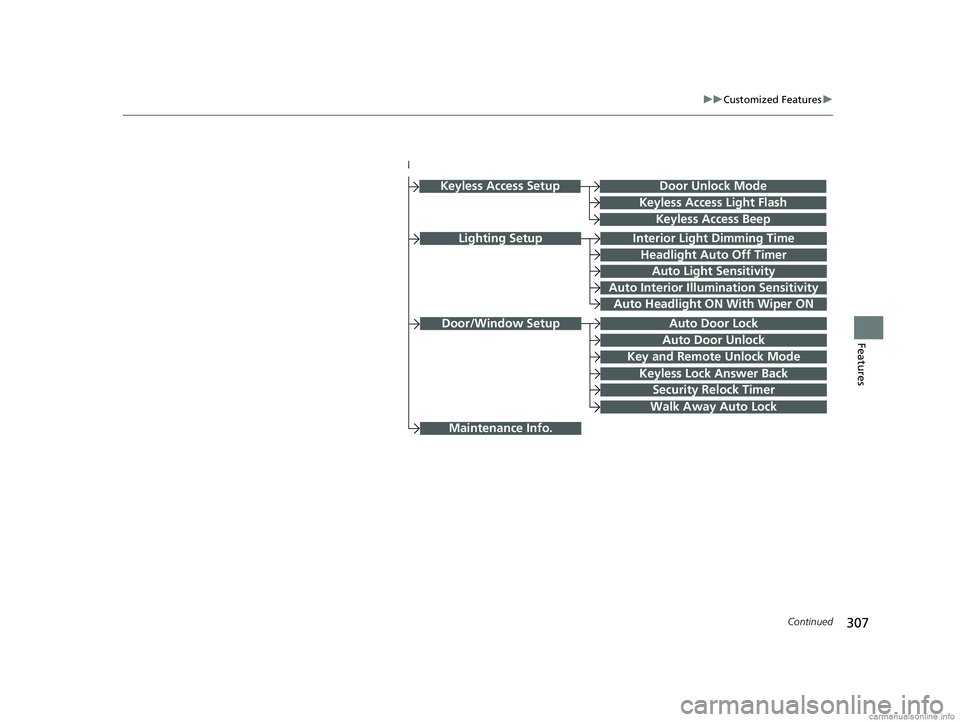
Lighting SetupInterior Light Dimming Time
Headlight Auto Off Timer
Auto Light Sensitivity
Auto Interior Illumination Sensitivity
Auto Door Lock
Key and Remote Unlock Mode
Door/Window Setup
Maintenance Info.
Auto Headlight ON With Wiper ON
Keyless Lock Answer Back
Security Relock Timer
Walk Away Auto Lock
Keyless Access Setup
Keyless Access Light Flash
Keyless Access Beep
Door Unlock Mode
Auto Door Unlock
18 CLARITY FUEL CELL PPO-31TRT6100.book 307 ページ 2017年11月21日 火曜日 午後3時3分
Page 326 of 551
324
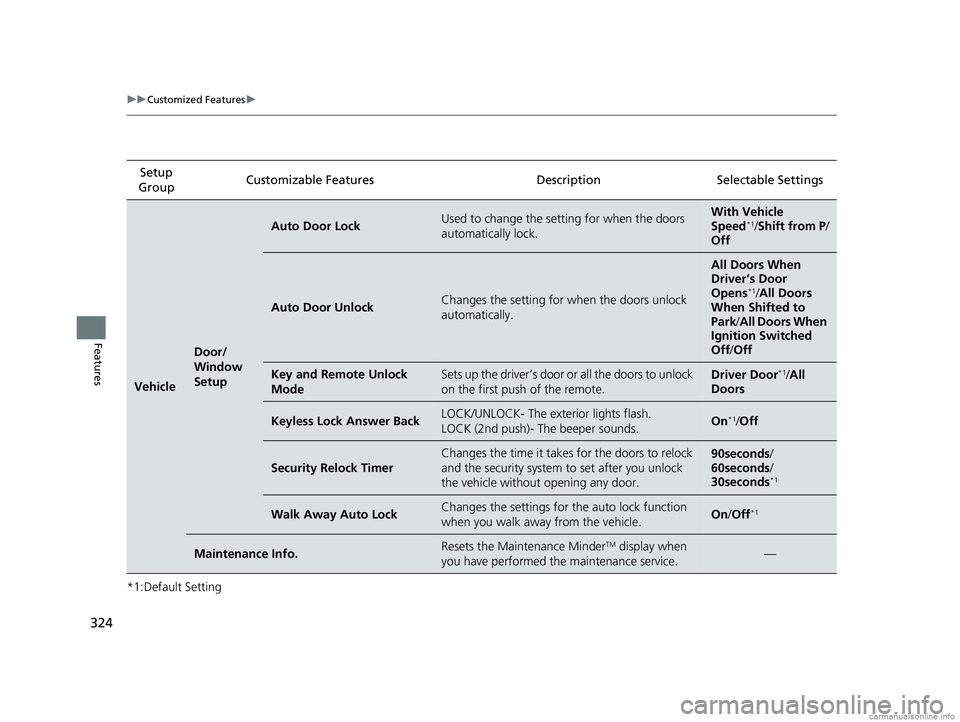
uuCustomized Features u
Features
*1:Default SettingSetup
Group Customizable Features Desc
ription Selectable Settings
Vehicle
Door/
Window
Setup
Auto Door LockUsed to change the setting for when the doors
automatically lock.With Vehicle
Speed*1/ Shift from P /
Off
Auto Door UnlockChanges the setting for when the doors unlock
automatically.
All Doors When
Driver’s Door
Opens
*1/ All Doors
When Shifted to
Park/ All Doors When
Ignition Switched
Off /Off
Key and Remote Unlock
ModeSets up the driver’s door or all the doors to unlock
on the first push of the remote.Driver Door*1/All
Doors
Keyless Lock Answer BackLOCK/UNLOCK- The exterior lights flash.
LOCK (2nd push)- The beeper sounds.On*1/ Off
Security Relock Timer
Changes the time it takes for the doors to relock
and the security system to set after you unlock
the vehicle without opening any door.90seconds /
60seconds /
30seconds
*1
Walk Away Auto LockChanges the settings for the auto lock function
when you walk away from the vehicle.On /Off*1
Maintenance Info.Resets the Maintenance MinderTM display when
you have performed the maintenance service.—
18 CLARITY FUEL CELL PPO-31TRT6100.book 324 ページ 2017年11月21日 火曜日 午後3時3分
Page 366 of 551
364
Driving
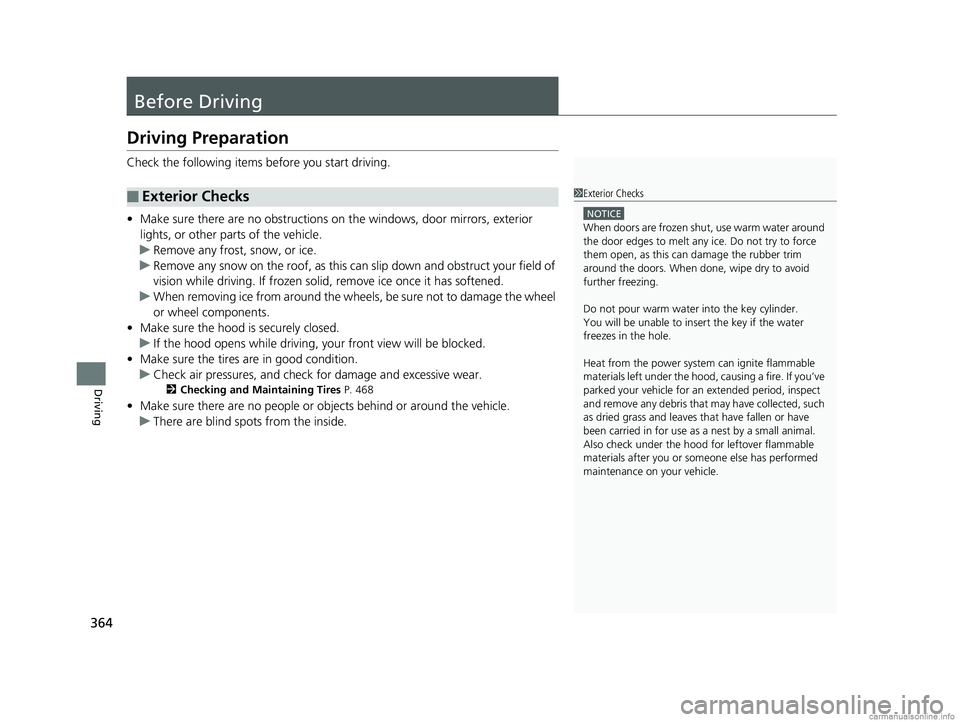
Before Driving
Driving Preparation
Check the following items before you start driving.
• Make sure there are no obstructions on the windows, door mirrors, exterior
lights, or other parts of the vehicle.
u Remove any frost, snow, or ice.
u Remove any snow on the roof, as this can slip down and obstruct your field of
vision while driving. If frozen solid , remove ice once it has softened.
u When removing ice from around the wheels, be sure not to damage the wheel
or wheel components.
• Make sure the hood is securely closed.
u If the hood opens while driving, your front view will be blocked.
• Make sure the tires are in good condition.
u Check air pressures, and check for damage and excessive wear.
2Checking and Maintaining Tires P. 468
•Make sure there are no people or ob jects behind or around the vehicle.
u There are blind spots from the inside.
■Exterior Checks1Exterior Checks
NOTICE
When doors are frozen s hut, use warm water around
the door edges to melt any ice. Do not try to force
them open, as this can damage the rubber trim
around the doors. When done, wipe dry to avoid
further freezing.
Do not pour warm water into the key cylinder.
You will be unable to insert the key if the water
freezes in the hole.
Heat from the power syst em can ignite flammable
materials left under the hood, causing a fire. If you’ve
parked your vehicle for an extended period, inspect
and remove any debris that may have collected, such
as dried grass and leaves th at have fallen or have
been carried in for use as a nest by a small animal.
Also check under the hood fo r leftover flammable
materials after you or so meone else has performed
maintenance on your vehicle.
18 CLARITY FUEL CELL PPO-31TRT6100.book 364 ページ 2017年11月21日 火曜日 午後3時3分