ECO mode HONDA CLARITY FUEL CELL 2019 (in English) Owner's Guide
[x] Cancel search | Manufacturer: HONDA, Model Year: 2019, Model line: CLARITY FUEL CELL, Model: HONDA CLARITY FUEL CELL 2019Pages: 551, PDF Size: 27.39 MB
Page 105 of 551
103
uuIndicators uDriver Information Interface Wa rning and Information Messages
Continued
Instrument Panel
MessageConditionExplanation
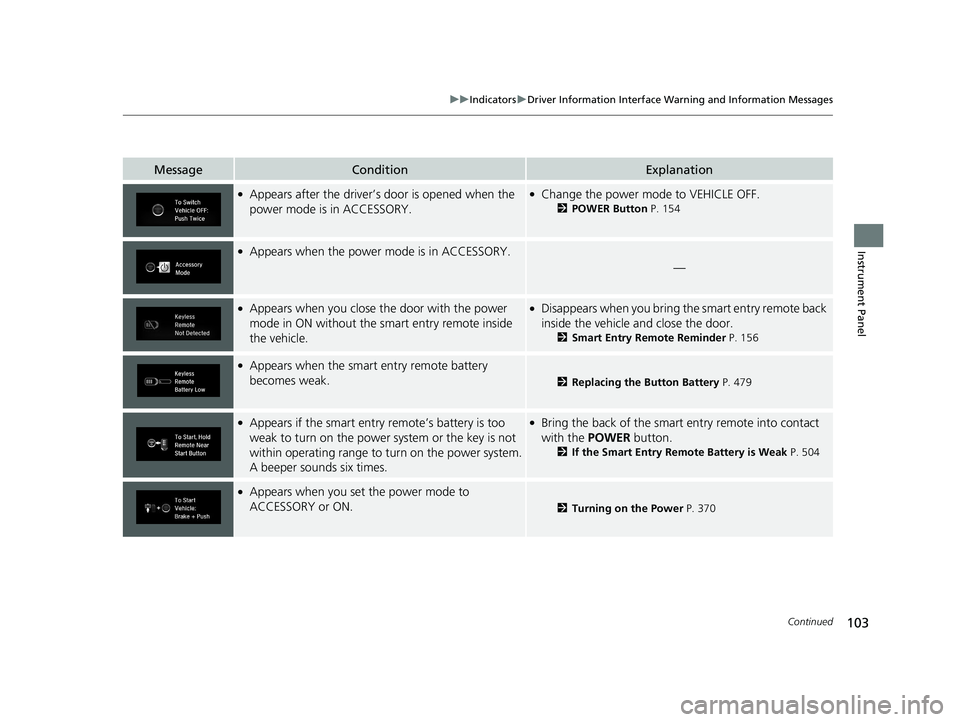
●Appears after the driver’s door is opened when the
power mode is in ACCESSORY.●Change the power mode to VEHICLE OFF.
2POWER Button P. 154
●Appears when the power mode is in ACCESSORY.
—
●Appears when you close th e door with the power
mode in ON without the sm art entry remote inside
the vehicle.●Disappears when you bring the smart entry remote back
inside the vehicle and close the door.
2 Smart Entry Remote Reminder P. 156
●Appears when the smart entry remote battery
becomes weak.
2 Replacing the Button Battery P. 479
●Appears if the smart entry remote’s battery is too
weak to turn on the power system or the key is not
within operating range to turn on the power system.
A beeper sounds six times.●Bring the back of the smart entry remote into contact
with the POWER button.
2If the Smart Entry Remote Battery is Weak P. 504
●Appears when you set the power mode to
ACCESSORY or ON.
2Turning on the Power P. 370
19 CLARITY FCV CSS-31TRT6200.book 103 ページ 2019年1月17日 木曜日 午前11 時54分
Page 106 of 551
104
uuIndicators uDriver Information Interface Wa rning and Information Messages
Instrument Panel
MessageConditionExplanation
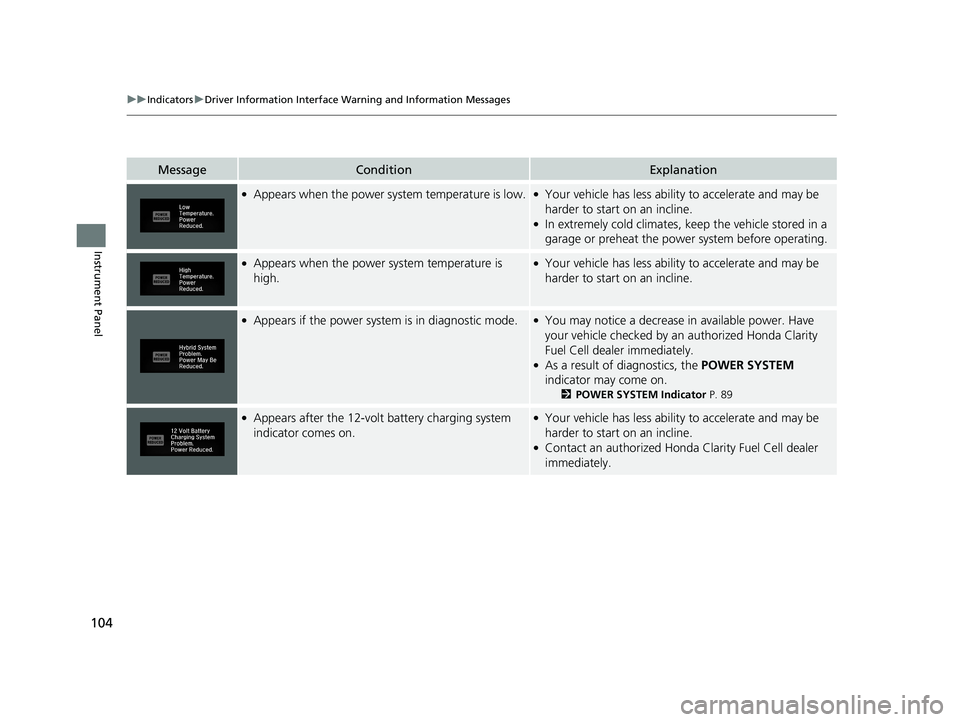
●Appears when the power system temperature is low.●Your vehicle has less ability to accelerate and may be
harder to start on an incline.
●In extremely cold climates, keep the vehicle stored in a
garage or preheat the power system before operating.
●Appears when the power system temperature is
high.●Your vehicle has less ability to accelerate and may be
harder to start on an incline.
●Appears if the power system is in diagnostic mode.●You may notice a decrease in available power. Have
your vehicle checked by an authorized Honda Clarity
Fuel Cell dealer immediately.
●As a result of diagnostics, the POWER SYSTEM
indicator may come on.
2 POWER SYSTEM Indicator P. 89
●Appears after the 12-volt battery charging system
indicator comes on.●Your vehicle has less ability to accelerate and may be
harder to start on an incline.
●Contact an authorized Honda Clarity Fuel Cell dealer
immediately.
19 CLARITY FCV CSS-31TRT6200.book 104 ページ 2019年1月17日 木曜日 午前11 時54分
Page 108 of 551
106
uuIndicators uDriver Information Interface Wa rning and Information Messages
Instrument Panel
MessageConditionExplanation
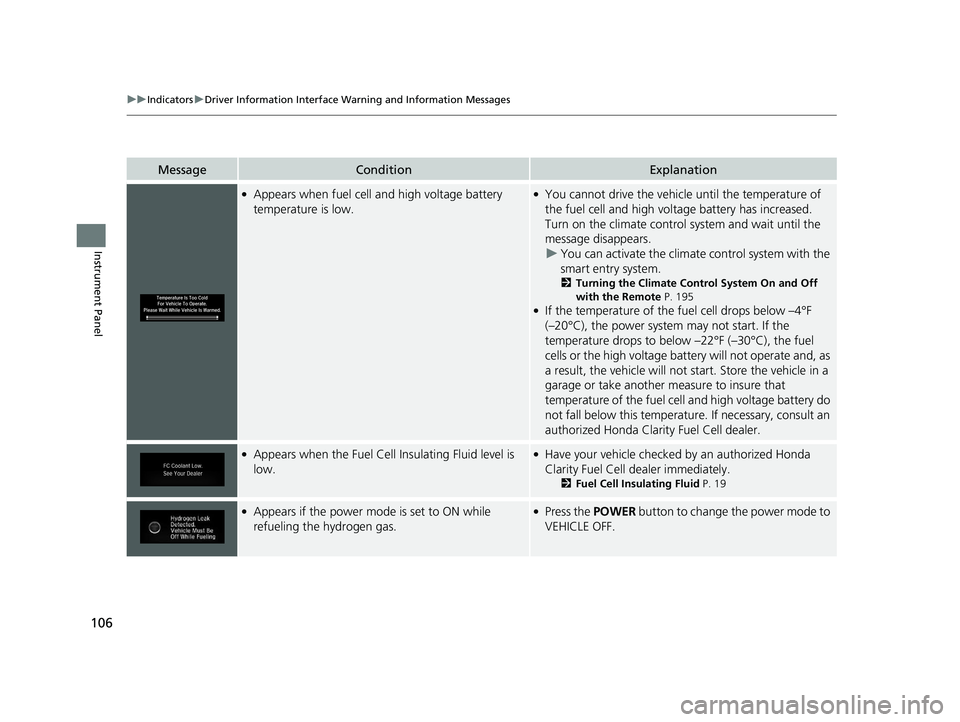
●Appears when fuel cell and high voltage battery
temperature is low.●You cannot drive the vehicl e until the temperature of
the fuel cell and high voltage battery has increased.
Turn on the climate control system and wait until the
message disappears. u You can activate the climate control system with the
smart entry system.
2 Turning the Climate Control System On and Off
with the Remote P. 195
●If the temperature of the fu el cell drops below –4°F
(–20°C), the power system may not start. If the
temperature drops to below –22°F (–30°C), the fuel
cells or the high voltage batt ery will not operate and, as
a result, the vehicle will not start. Store the vehicle in a
garage or take another measure to insure that
temperature of the fuel cell and high voltage battery do
not fall below this temperature. If necessary, consult an
authorized Hond a Clarity Fuel Cell dealer.
●Appears when the Fuel Cell Insulating Fluid level is
low.●Have your vehicle checked by an authorized Honda
Clarity Fuel Cell dealer immediately.
2Fuel Cell Insulating Fluid P. 19
●Appears if the power mode is set to ON while
refueling the hydrogen gas.●Press the POWER button to change the power mode to
VEHICLE OFF.
19 CLARITY FCV CSS-31TRT6200.book 106 ページ 2019年1月17日 木曜日 午前11 時54分
Page 109 of 551
107
uuIndicators uDriver Information Interface Wa rning and Information Messages
Continued
Instrument Panel
MessageConditionExplanation
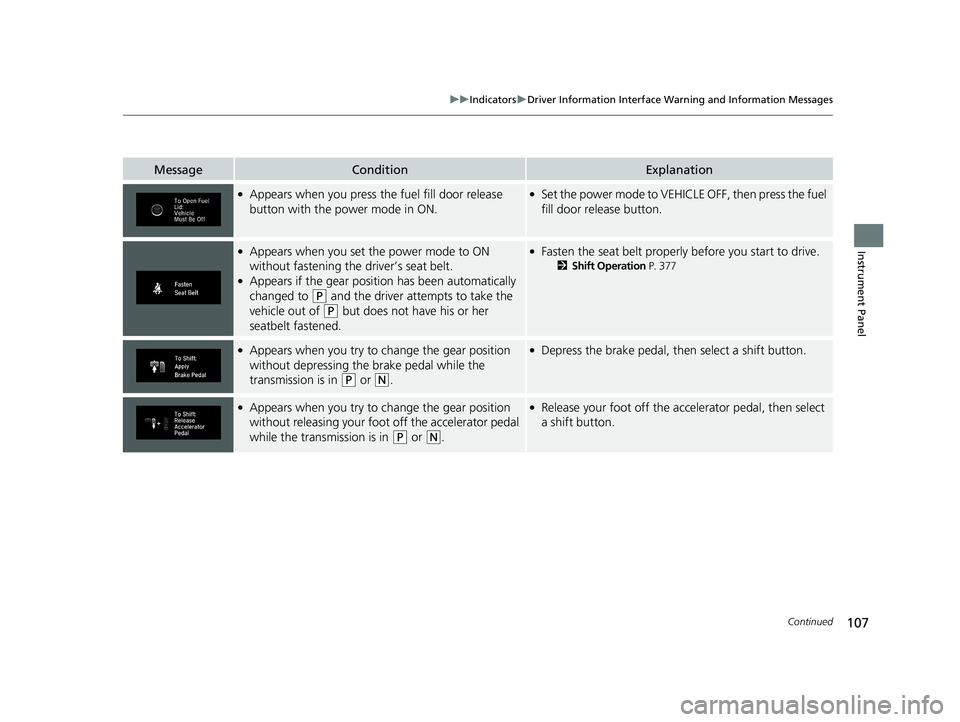
●Appears when you press the fuel fill door release
button with the power mode in ON.●Set the power mode to VEHICLE OFF, then press the fuel
fill door release button.
●Appears when you set the power mode to ON
without fastening the driver’s seat belt.
●Appears if the gear position has been automatically
changed to
(P and the driver attempts to take the
vehicle out of
(P but does not have his or her
seatbelt fastened.
●Fasten the seat belt properly before you start to drive.
2 Shift Operation P. 377
●Appears when you try to change the gear position
without depressing the brake pedal while the
transmission is in
(P or (N.
●Depress the brake pedal, then select a shift button.
●Appears when you try to change the gear position
without releasing your foot off the accelerator pedal
while the transmission is in
(P or (N.
●Release your foot off the acce lerator pedal, then select
a shift button.
19 CLARITY FCV CSS-31TRT6200.book 107 ページ 2019年1月17日 木曜日 午前11 時54分
Page 110 of 551
108
uuIndicators uDriver Information Interface Wa rning and Information Messages
Instrument Panel
MessageConditionExplanation
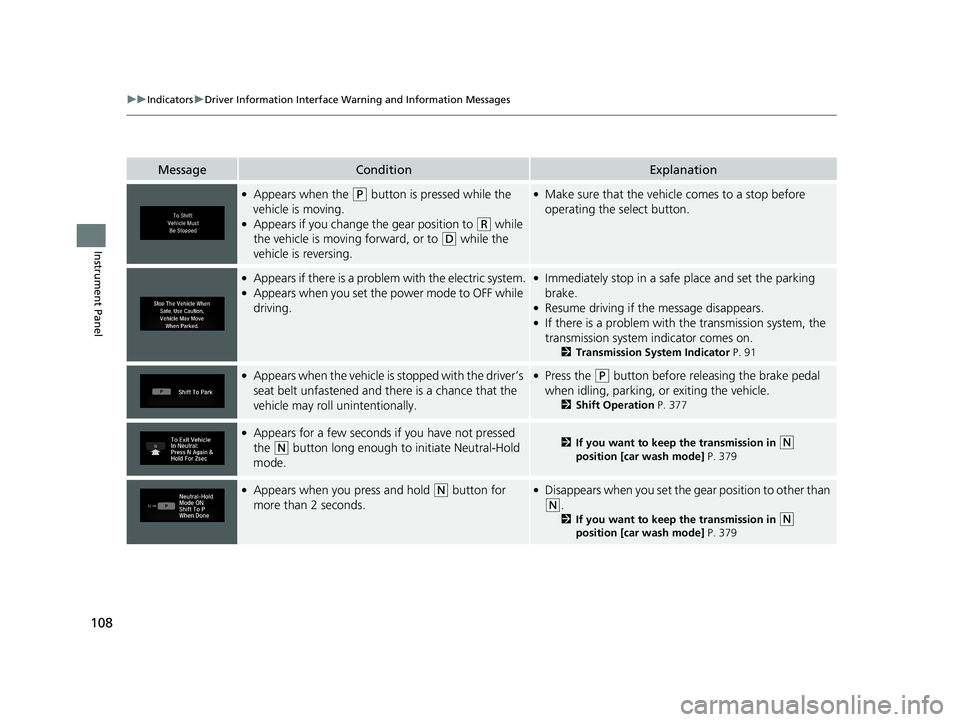
●Appears when the (P button is pressed while the
vehicle is moving.
●Appears if you change the gear position to (R while
the vehicle is moving forward, or to
(D while the
vehicle is reversing.
●Make sure that the vehicle comes to a stop before
operating the select button.
●Appears if there is a proble m with the electric system.●Appears when you set the power mode to OFF while
driving.
●Immediately stop in a safe place and set the parking
brake.
●Resume driving if the message disappears.●If there is a problem with the transmission system, the
transmission system indicator comes on.
2 Transmission System Indicator P. 91
●Appears when the vehicle is stopped with the driver’s
seat belt unfastened and th ere is a chance that the
vehicle may roll unintentionally.●Press the (P button before releasing the brake pedal
when idling, parking, or exiting the vehicle.
2 Shift Operation P. 377
●Appears for a few seconds if you have not pressed
the
(N button long enough to initiate Neutral-Hold
mode.2 If you want to keep the transmission in (N
position [car wash mode] P. 379
●Appears when you press and hold (N button for
more than 2 seconds.●Disappears when you set the g ear position to other than
(N.
2If you want to keep the transmission in (N
position [car wash mode] P. 379
19 CLARITY FCV CSS-31TRT6200.book 108 ページ 2019年1月17日 木曜日 午前11 時54分
Page 118 of 551
116
Instrument Panel
Gauges and Driver Information Interface
Gauges
Gauges include the speedometer, fuel gauge, POWER/CHARGE gauge, high
voltage battery charge level gauge, and rela ted indicators. They are displayed when
the power mode is in ON.
Displays your driving speed in mph or km/h.
Displays the approximate amount of fuel left in the fuel tank.
Shows the estimated distance you can travel on the remaining power and fuel. This
estimate is based on the fuel economy of your previous trips.
■Speedometer
■Fuel Gauge
■Range
1 Gauges
Press the (display /information) button
repeatedly until the icon is shown on the driver
information interface. Press ENTER , then press and
hold it again. The spee dometer reading and the
displayed measurements wi ll switch between mph
and km/h.
1 Fuel Gauge
NOTICE
You should refuel when the needle approaches .
The actual amount of remain ing fuel may differ from
the fuel gauge reading.E
19 CLARITY FCV CSS-31TRT6200.book 116 ページ 2019年1月17日 木曜日 午前11 時54分
Page 126 of 551
124
uuGauges and Driver Information Interface uDriver Information Interface
Instrument Panel
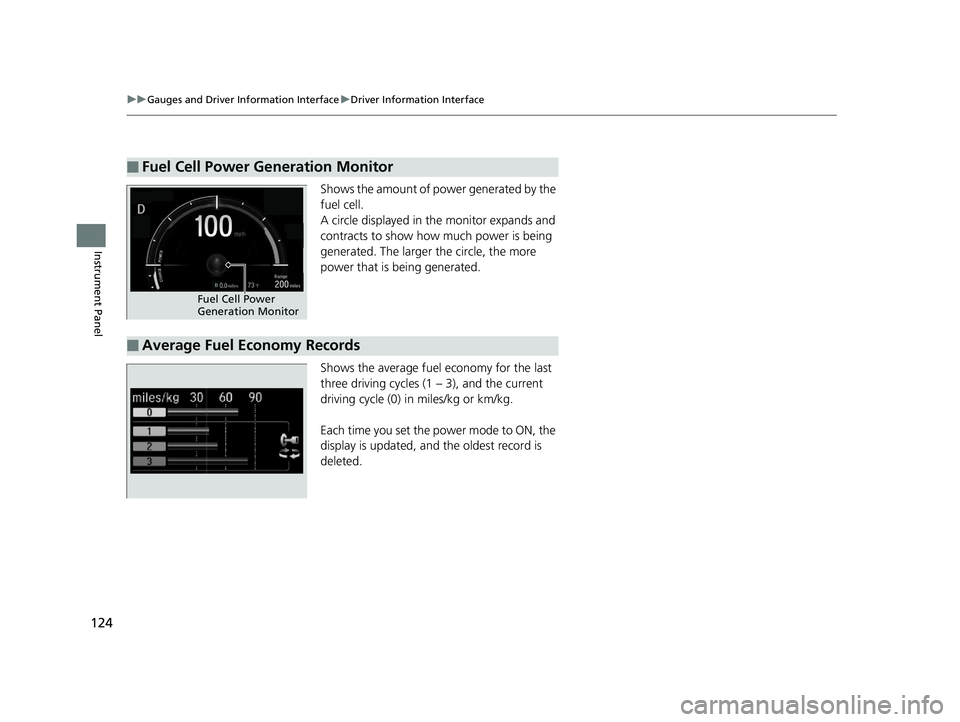
Shows the amount of power generated by the
fuel cell.
A circle displayed in the monitor expands and
contracts to show how much power is being
generated. The larger the circle, the more
power that is being generated.
Shows the average fuel economy for the last
three driving cycles (1 – 3), and the current
driving cycle (0) in miles/kg or km/kg.
Each time you set the power mode to ON, the
display is updated, and the oldest record is
deleted.
■Fuel Cell Power Generation Monitor
Fuel Cell Power
Generation Monitor
■Average Fuel Economy Records
19 CLARITY FCV CSS-31TRT6200.book 124 ページ 2019年1月17日 木曜日 午前11 時54分
Page 127 of 551
125
uuGauges and Driver Information Interface uDriver Information Interface
Continued
Instrument Panel
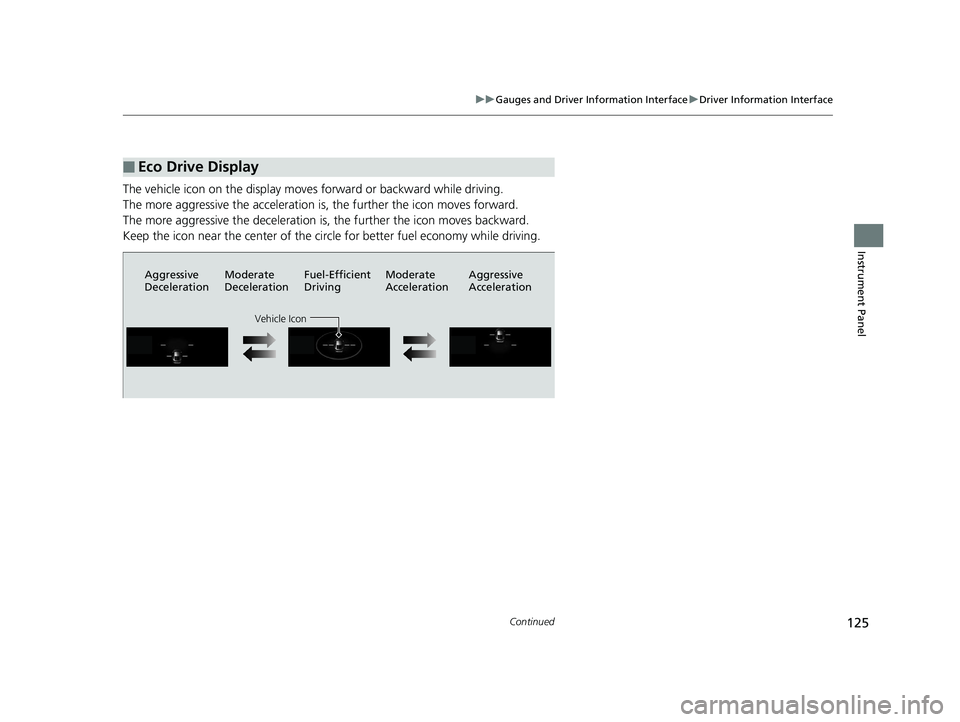
The vehicle icon on the display moves forward or backward while driving.
The more aggressive the acceleration is , the further the icon moves forward.
The more aggressive the deceleration is , the further the icon moves backward.
Keep the icon near the cent er of the circle for better fuel economy while driving.
■Eco Drive Display
Aggressive
DecelerationModerate
DecelerationFuel-Efficient
Driving Moderate
Acceleration Aggressive
Acceleration
Vehicle Icon
19 CLARITY FCV CSS-31TRT6200.book 125 ページ 2019年1月17日 木曜日 午前11
時54分
Page 129 of 551
127
uuGauges and Driver Information Interface uHead-Up Display
Continued
Instrument Panel
Head-Up Display
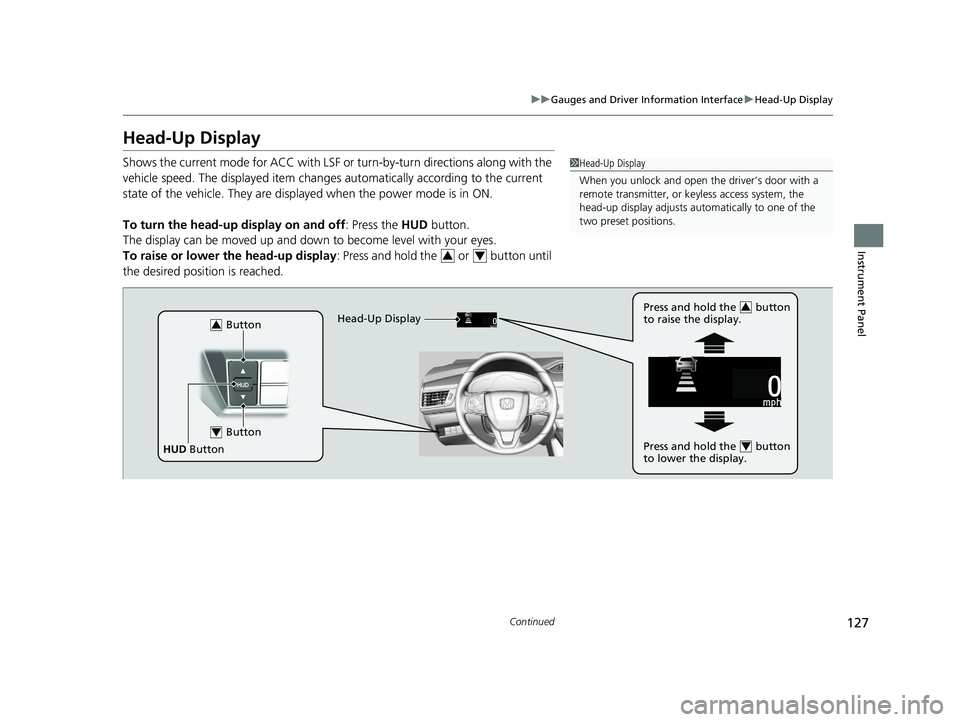
Shows the current mode for ACC with LSF or turn-by-turn directions along with the
vehicle speed. The displaye d item changes automaticall y according to the current
state of the vehicle. They are displa yed when the power mode is in ON.
To turn the head-up display on and off: Press the HUD button.
The display can be moved up and down to become level with your eyes.
To raise or lower the head-up display : Press and hold the or button until
the desired position is reached.1 Head-Up Display
When you unlock and open the driver’s door with a
remote transmitter, or keyless access system, the
head-up display adjusts auto matically to one of the
two preset positions.
34
Button3
Button4
HUD Button Head-Up Display
Press and hold the button
to raise the display.
3
Press and hold the button
to lower the display.4
19 CLARITY FCV CSS-31TRT6200.book 127 ページ 2019年1月17日 木曜日 午前11
時54分
Page 137 of 551
135
uuLocking and Unlocking the Doors uLocking/Unlocking the Doors from the Outside
Continued
Controls
Locking/Unlocking the Doors from the Outside
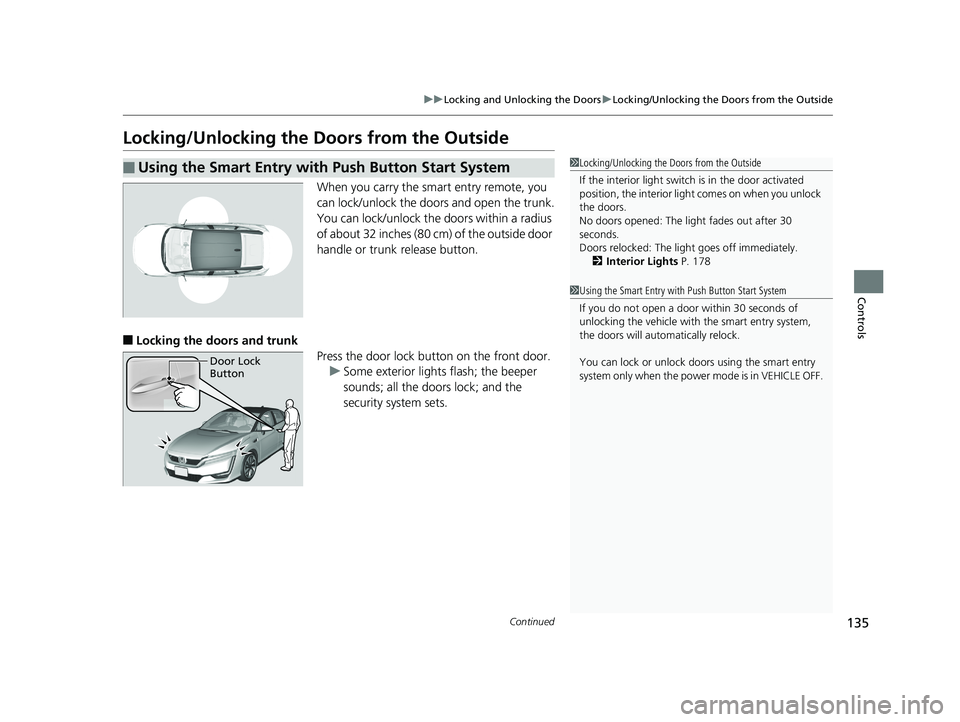
When you carry the smart entry remote, you
can lock/unlock the doors and open the trunk.
You can lock/unlock the doors within a radius
of about 32 inches (80 cm) of the outside door
handle or trunk release button.
■Locking the doors and trunk
Press the door lock button on the front door.u Some exterior lights flash; the beeper
sounds; all the doors lock; and the
security system sets.
■Using the Smart Entry with Push Button Start System1Locking/Unlocking the Doors from the Outside
If the interior light switch is in the door activated
position, the interior light comes on when you unlock
the doors.
No doors opened: The li ght fades out after 30
seconds.
Doors relocked: The light goes off immediately.
2 Interior Lights P. 178
1Using the Smart Entry with Push Button Start System
If you do not open a door within 30 seconds of
unlocking the vehicle with the smart entry system,
the doors will auto matically relock.
You can lock or unlock doors using the smart entry
system only when the power mode is in VEHICLE OFF.
Door Lock
Button
19 CLARITY FCV CSS-31TRT6200.book 135 ページ 2019年1月17日 木曜日 午前11 時54分