alarm HONDA CLARITY FUEL CELL 2021 Owner's Manual (in English)
[x] Cancel search | Manufacturer: HONDA, Model Year: 2021, Model line: CLARITY FUEL CELL, Model: HONDA CLARITY FUEL CELL 2021Pages: 555, PDF Size: 28.21 MB
Page 28 of 555
26
Quick Reference Guide
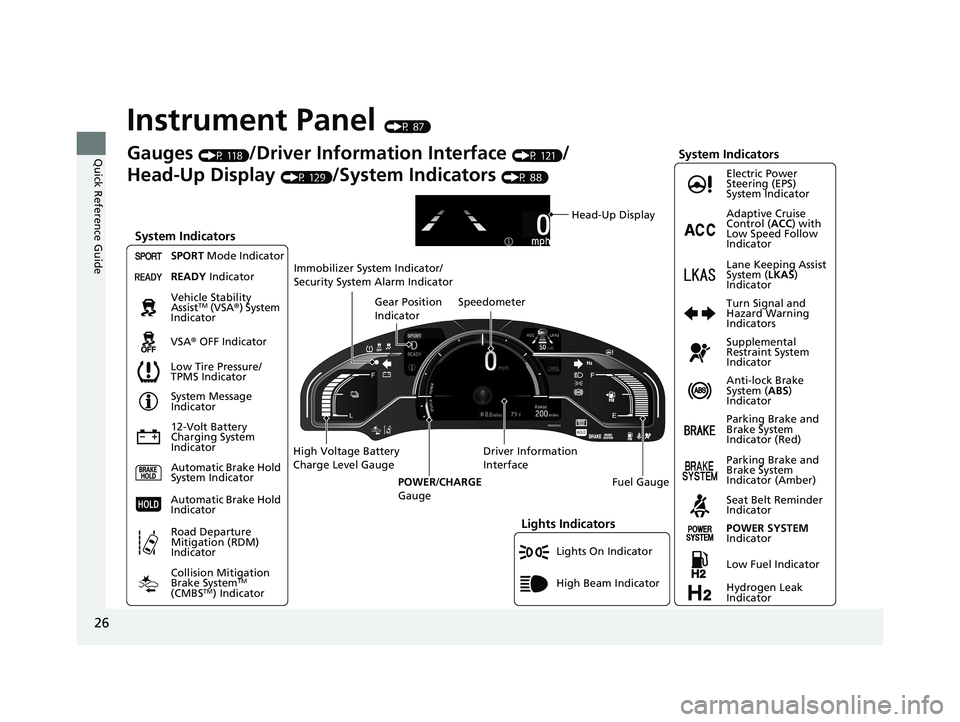
Instrument Panel (P 87)
Lights On Indicator
System Indicators
12-Volt Battery
Charging System
IndicatorAnti-lock Brake
System (
ABS)
Indicator
Vehicle Stability
Assist
TM (VSA
®) System
Indicator
VSA ® OFF Indicator Electric Power
Steering (EPS)
System Indicator
Lights Indicators
High Beam Indicator
Seat Belt Reminder
Indicator
System Indicators
System Message
Indicator
Parking Brake and
Brake System
Indicator (Red) Supplemental
Restraint System
Indicator
Gauges (P 118)/Driver Information Interface (P 121)/
Head-Up Display
(P 129)/System Indicators (P 88)
Low Tire Pressure/
TPMS Indicator Turn Signal and
Hazard Warning
Indicators
Speedometer
Automatic Brake Hold
System Indicator Parking Brake and
Brake System
Indicator (Amber)
SPORT
Mode Indicator
Collision Mitigation
Brake System
TM
(CMBSTM) Indicator
Road Departure
Mitigation (RDM)
Indicator
Immobilizer System Indicator/
Security System Alarm Indicator
Automatic Brake Hold
Indicator
Head-Up Display
READY Indicator
POWER SYSTEM
Indicator
Gear Position
Indicator
Fuel Gauge
Driver Information
Interface
High Voltage Battery
Charge Level Gauge
POWER/CHARGE
Gauge
Low Fuel Indicator
Hydrogen Leak
Indicator Adaptive Cruise
Control ( ACC) with
Low Speed Follow
Indicator
Lane Keeping Assist
System ( LKAS)
Indicator
21 CLARITY FCV CSS-31TRT6400_02.book 26 ページ 2020年9月25日 金曜日 午後3時15分
Page 101 of 555
99
uuIndicators u
Continued
Instrument Panel
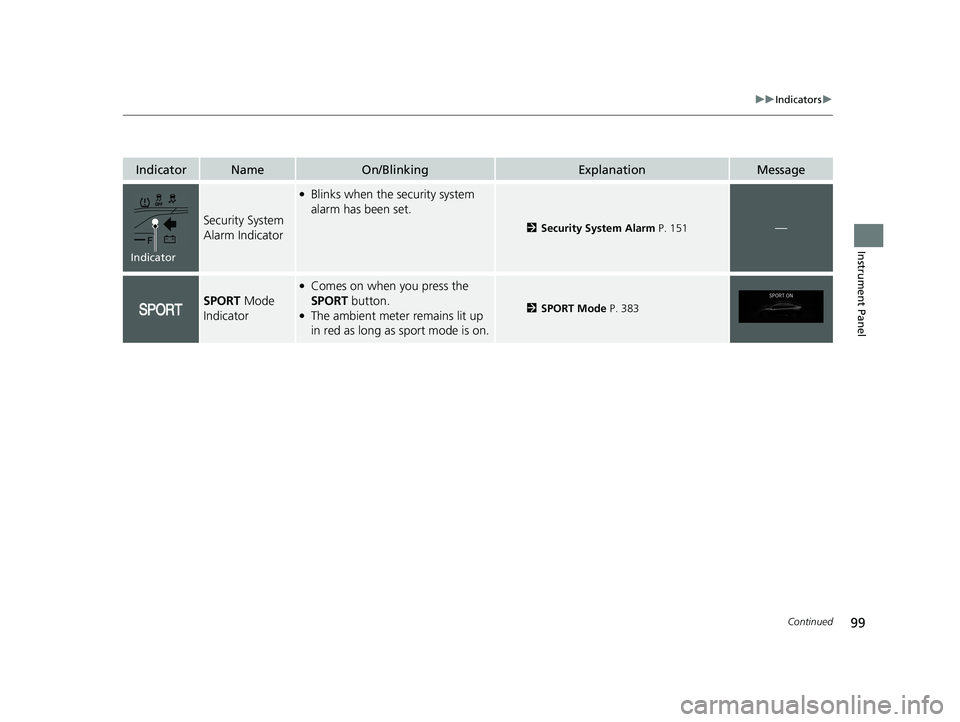
IndicatorNameOn/BlinkingExplanationMessage
Security System
Alarm Indicator
●Blinks when the security system
alarm has been set.
2Security System Alarm P. 151—
SPORT Mode
Indicator
●Comes on when you press the
SPORT button.
●The ambient meter remains lit up
in red as long as sport mode is on.2 SPORT Mode P. 383
Indicator
21 CLARITY FCV CSS-31TRT6400_02.book 99 ページ 2020年9月25日 金曜日 午後3時15分
Page 135 of 555
133
Controls
This chapter explains how to operate the various controls necessary for driving.
Clock.................................................. 134
Locking and Unlocking the Doors Key Types and Functions .................. 135
Low Smart Entry Remote Signal Strength .. 136Locking/Unlocking the Doors from the Outside .......................................... 137
Locking/Unlocking the Doors from the Inside ............................................. 144
Childproof Door Locks ..................... 146
Auto Door Locking/Unlocking .......... 147
Opening and Closing the Trunk ....... 148
Security System ................................ 151
Immobilizer System .......................... 151 Security System Alarm...................... 151
Opening and Closing the Windows ... 154
Operating the Switches Around the
Steering Wheel POWER Button................................. 156
Turn Signals ..................................... 159
Light Switches.................................. 160
Daytime Running Lights ................... 163
Wipers and Washers ........................ 164
Brightness Control ........................... 166
Rear Defogger/Heated Door Mirror Button........................................ 168
Driving Position Memory System ...... 169 Adjusting the Steering Wheel .......... 171
Adjusting the Mirrors ....................... 172
Interior Rearview Mirror ................... 172
Power Door Mirrors ......................... 173
Adjusting the Seats .......................... 174
Front Seats ...................................... 174
Interior Lights/Interior Convenience Items ................................................ 180
Interior Lights .................................. 180
Interior Convenience Items .............. 182
Climate Control System ................... 190
Using Automatic Climate Control .... 190
Automatic Climate Control Sensors ... 198
21 CLARITY FCV CSS-31TRT6400_02.book 133 ページ 2020年9月25日 金曜日 午 後3時15分
Page 153 of 555
151Continued
Controls
Security System
Immobilizer System
The immobilizer system prevents a key that has not been pre-registered from
starting the power system. Each key cont ains electronic transmitters that use
electronic signals to verify the key.
Pay attention to the follo wing when pressing the POWER button:
• Do not allow objects that emit strong radio waves near the POWER button.
• Make sure the key is not covered by or touching a metal object.
• Do not bring a key from another vehicle’s immobilizer system near the POWER
button.
• Do not put the key near magnetic items. Electronic devices, such as televisions
and audio systems emit strong magnetic fields. Note that even a key chain can
become magnetic.
Security System Alarm
The security system alarm activates when the trunk, hood or doors are forcibly
opened. The alarm does not activate if the trunk or doors are opened with the key,
remote transmitter or smart entry system.
However, the alarm activates if a door is op ened with the key and then the hood is
opened before the power mode is set to ON.
■When the security system alarm activates
The horn sounds intermittently and some exterior lights flash.
■To deactivate the security system alarm
Unlock the vehicle using the key, remote transmitter or smart entry system. The
system, along with the horn and flashing lights, is deactivated.
1 Immobilizer System
NOTICE
Leaving the key in the vehicl e can result in theft or
accidental movement of the vehicle.
Always take the key with you whenever you leave the
vehicle unattended.
Do not alter the system or add other devices to it.
Doing so may damage the system and make your
vehicle inoperable.
1 Security System Alarm
Do not alter the system or add other devices to it.
Doing so may damage the system and make your
vehicle inoperable.
The security alarm continues for a maximum of two
minutes until the security system alarm deactivates.
21 CLARITY FCV CSS-31TRT6400_02.book 151 ページ 2020年9月25日 金曜日 午 後3時15分
Page 154 of 555
uuSecurity System uSecurity System Alarm
152
Controls
■Setting the security system alarm
The security system alarm automatically sets when the following conditions have
been met:
• The power mode is set to VEHICLE OFF (LOCK).
• The hood is closed.
• All doors and the trunk are locked from outside with the key, remote transmitter
or smart entry system.
■When the security system alarm sets
The security system alarm indicator in the instrument panel blinks. When the
blinking interval changes after about 15 seconds, the security system alarm is set.
■To cancel the security system alarm
The security system alarm is canceled when the vehicle is unlocked using the remote
transmitter, smart entry system, or the power mode is set to ON. The security system
alarm indicator goes off at the same time.
1 Security System Alarm
Do not set the security system alarm when someone
is in the vehicle or a window is open. The system can
accidentally activate when:
•Unlocking the door with the lock tab.•Opening the trunk with the trunk opener or the
emergency trunk opener.
•Opening the hood with the hood release.
If the 12-volt battery goes dead after you have set the
security system alarm, the security alarm may go off
once the 12-volt battery is recharged or replaced.
If this occurs, deactivate the security system alarm by
unlocking a door using the ke y, remote transmitter or
smart entry system.
21 CLARITY FCV CSS-31TRT6400_02.book 152 ページ 2020年9月25日 金曜日 午 後3時15分
Page 155 of 555
153
uuSecurity System uSecurity System Alarm
Controls
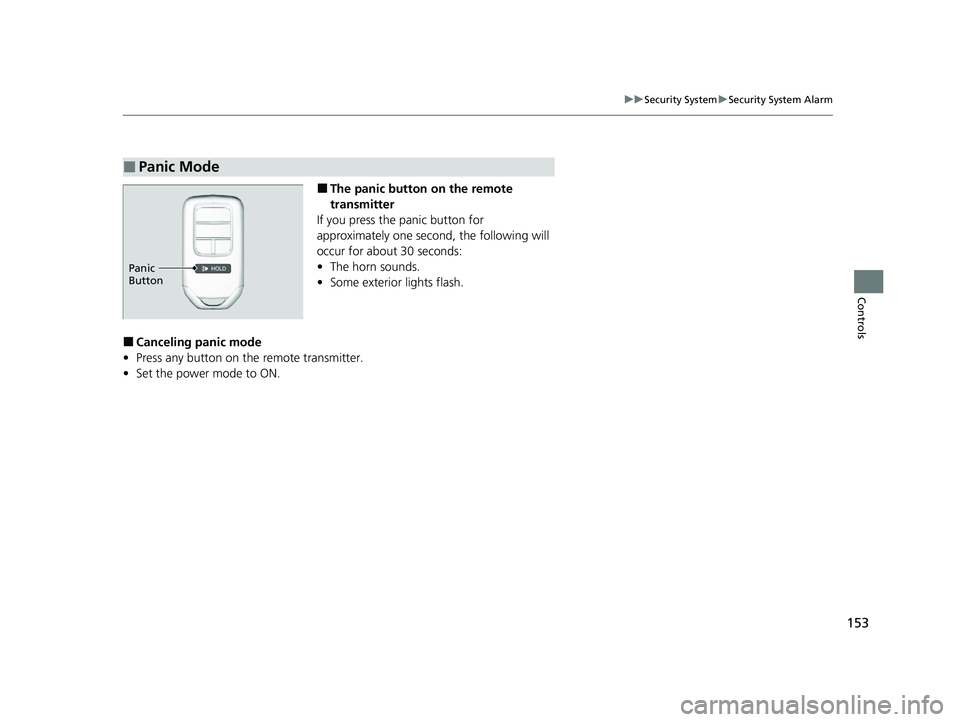
■The panic button on the remote
transmitter
If you press the panic button for
approximately one second, the following will
occur for about 30 seconds:
• The horn sounds.
• Some exterior lights flash.
■Canceling panic mode
• Press any button on the remote transmitter.
• Set the power mode to ON.
■Panic Mode
Panic
Button
21 CLARITY FCV CSS-31TRT6400_02.book 153 ページ 2020年9月25日 金曜日 午 後3時15分
Page 310 of 555
308
uuCustomized Features u
Features
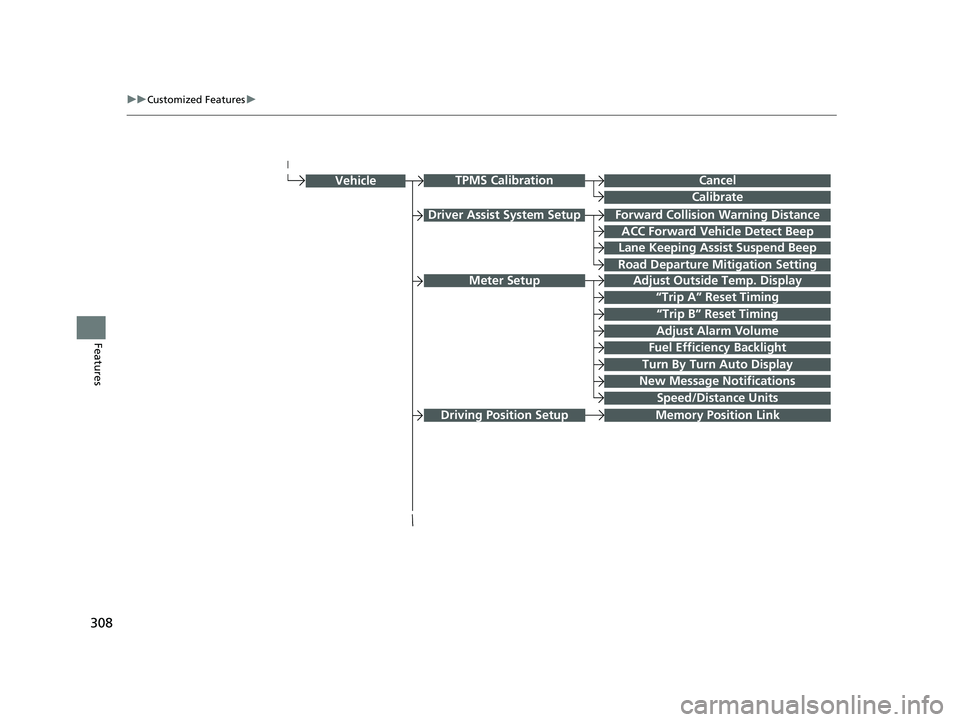
Forward Collision Warning Distance
ACC Forward Vehicle Detect Beep
Lane Keeping Assist Suspend Beep
Road Departure Mi tigation Setting
Adjust Outside Temp. Display
“Trip A” Reset Timing
“Trip B” Reset Timing
Vehicle
Adjust Alarm Volume
New Message Notifications
Turn By Turn Auto Display
Speed/Distance Units
CancelTPMS Calibration
Calibrate
Fuel Efficiency Backlight
Memory Position LinkDriving Position Setup
Meter Setup
Driver Assist System Setup
21 CLARITY FCV CSS-31TRT6400_02.book 308 ページ 2020年9月25日 金曜日 午 後3時15分
Page 325 of 555
323
uuCustomized Features u
Continued
Features
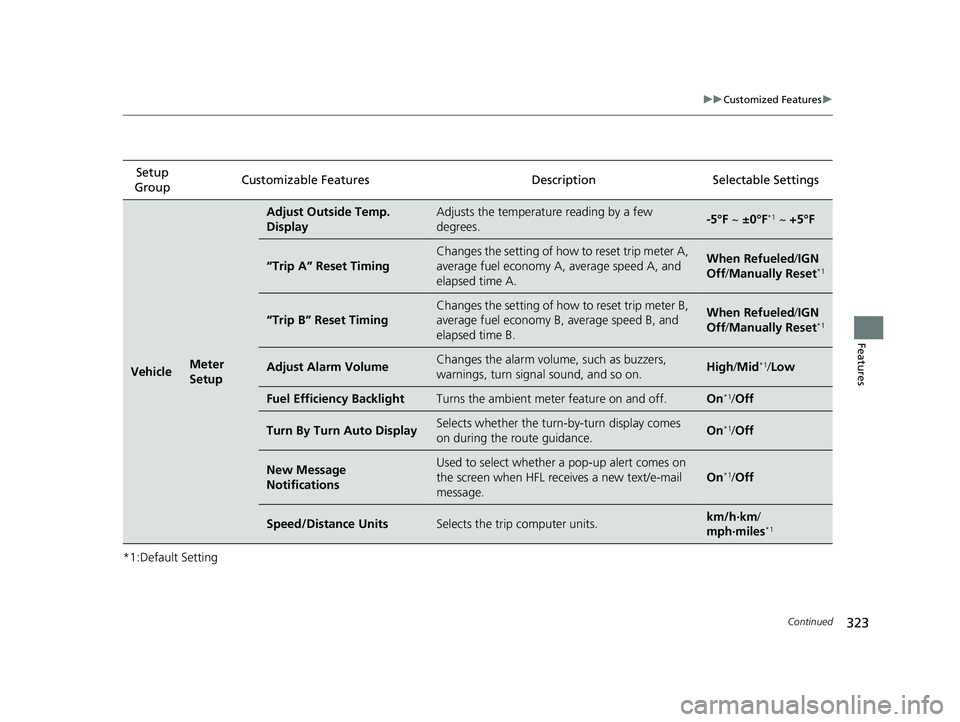
*1:Default SettingSetup
Group Customizable Features Description Selectable Settings
VehicleMeter
Setup
Adjust Outside Temp.
DisplayAdjusts the temperature reading by a few
degrees.-5°F ~
±0°F*1 ~ +5°F
“Trip A” Reset Timing
Changes the setting of how to reset trip meter A,
average fuel economy A, average speed A, and
elapsed time A.When Refueled /IGN
Off /Manually Reset*1
“Trip B” Reset Timing
Changes the setting of how to reset trip meter B,
average fuel economy B, average speed B, and
elapsed time B.When Refueled /IGN
Off /Manually Reset*1
Adjust Alarm VolumeChanges the alarm volu me, such as buzzers,
warnings, turn signal sound, and so on.High /Mid*1/ Low
Fuel Efficiency BacklightTurns the ambient meter feature on and off.On*1/Off
Turn By Turn Auto DisplaySelects whether the turn -by-turn display comes
on during the route guidance.On*1/ Off
New Message
NotificationsUsed to select whether a pop-up alert comes on
the screen when HFL receives a new text/e-mail
message.
On*1/Off
Speed/Distance UnitsSelects the trip computer units.km/h∙km /
mph∙miles*1
21 CLARITY FCV CSS-31TRT6400_02.book 323 ページ 2020年9月25日 金曜日 午 後3時15分
Page 507 of 555
505
Handling the Unexpected
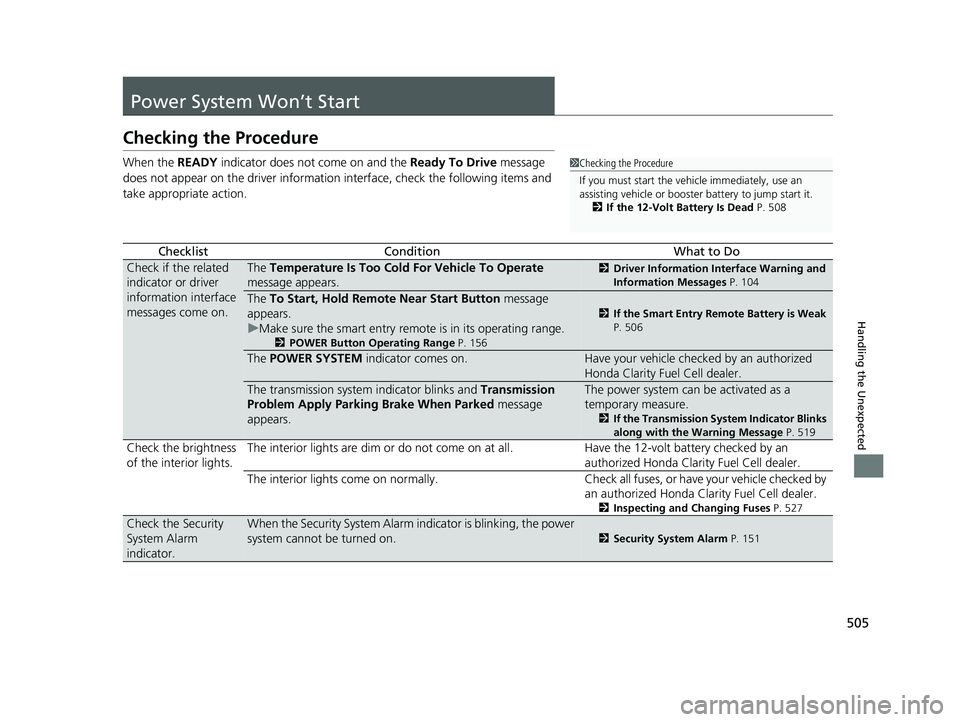
Power System Won’t Start
Checking the Procedure
When the READY indicator does not come on and the Ready To Drive message
does not appear on the driver informatio n interface, check the following items and
take appropriate action.
ChecklistConditionWhat to Do
Check if the related
indicator or driver
information interface
messages come on.The Temperature Is Too Cold For Vehicle To Operate
message appears.2 Driver Information Interface Warning and
Information Messages P. 104
The To Start, Hold Remote Near Start Button message
appears.
u Make sure the smart entry remote is in its operating range.
2 POWER Button Operating Range P. 156
2If the Smart Entry Remote Battery is Weak
P. 506
The POWER SYSTEM indicator comes on.Have your vehicle checked by an authorized
Honda Clarity Fuel Cell dealer.
The transmission system indicator blinks and Transmission
Problem Apply Parking Brake When Parked message
appears.The power system can be activated as a
temporary measure.
2 If the Transmission System Indicator Blinks
along with the Warning Message P. 519
Check the brightness
of the interior lights. The interior lights are dim or do not come on at
all. Have the 12-volt battery checked by an
authorized Honda Clarity Fuel Cell dealer.
The interior lights come on normally. Check all fuses, or have your vehicle checked by
an authorized Honda Clarity Fuel Cell dealer.
2 Inspecting and Changing Fuses P. 527
Check the Security
System Alarm
indicator.When the Security System Alarm indicator is blinking, the power
system cannot be turned on.
2Security System Alarm P. 151
1Checking the Procedure
If you must start the vehi cle immediately, use an
assisting vehicle or booster battery to jump start it.
2 If the 12-Volt Battery Is Dead P. 508
21 CLARITY FCV CSS-31TRT6400_02.book 505 ページ 2020年9月25日 金曜日 午 後3時15分
Page 548 of 555
546
Index
H
Handling the Unexpected........................ 491
HandsFreeLink® (HFL)............................... 331
Automatic Import of Cellular Phonebook
and Call History ..................................... 344
Displaying Messages ................................ 358
HFL Buttons ............................................. 331
HFL Menus .............................................. 334
HFL Status Display.................................... 333
In Case of Emergency .............................. 362
Limitations for Manua l Operation ............ 333
Making a Call .......................................... 352
Options During a Call .............................. 355
Phone Setup ............................................ 339
Phonebook Phonetic M odification ........... 348
Receiving a Call ....................................... 355
Receiving a Text Message/E-mail .............. 356
Ring Tone ................................................ 343
Selecting a Mail Account ......................... 357
Speed Dial ............................................... 345
To Set Up Text Message/E-mail Options ... 342
Hazard Warning Button ............................... 6
HD Radio
TM................................................ 238
Head Restraints ......................................... 176
Headlights ................................................. 160
Aiming .................................................... 465
Automatic Operation ............................... 161
Dimming ......................................... 160, 163
Operating ................................................ 160
Head-Up Display ....................................... 129
Brightness Control ................................... 167 Heated Door Mirror
................................. 168
Heaters (Seat) ........................................... 188
HFL (HandsFreeLink ®)............................... 331
High Beam Indicator .................................. 98
High Voltage Battery ............................... 422
Hill Start Assist System ............................. 374
HomeLink ® Universal Transceiver ............ 328
Honda App License Agreement .............. 286
Honda Sensing ®........................................ 36
HondaLink ®............................................. 264
I
Identification Numbers
Motor, and Transmission ......................... 534
Vehicle Identification ............................... 534
Illumination Control Buttons ........................................... 166, 167
Immobilizer System .................................. 151
Indicator.................................................... 98
Indicators .................................................... 88
12-Volt Battery Charging System ....... 92, 515
Adaptive Cruise Control (ACC) with Low Speed Follow ......................... 101, 391
Anti-lock Brake System (ABS)..................... 94
Automatic Brake Hold ....................... 89, 431
Automatic Brake Hold System ........... 89, 431
Collision Mitigati on Braking System
TM
(CMBSTM) ....................................... 102, 103
Electric Power Steering (EPS) System .. 95, 516
Gear Position............................................. 93 High Beam ................................................ 98
Hydrogen Leak.......................................... 92
Immobilizer System ................................... 98
Lane Keeping Assist System
(LKAS) ........................................... 102, 410
Lights On .................................................. 98
Low Fuel ................................................... 92
Low Tire Pressure/TPMS ............ 96, 418, 420
Parking Brake and Brake System (Amber) .. 90
Parking Brake and Brake System (Red) ..................... 88, 89, 516, 517
POWER SYSTEM ....................................... 91
READY ...................................................... 92
Road Departure Mitigation (RDM) ........... 100
Seat Belt Reminder .............................. 50, 94
Security System Alarm............................... 99
SPORT Mode..................................... 99, 383
Supplemental Restraint System ........... 68, 95
System Message ....................................... 97
Transmission System ................................. 93
Turn Signal and Hazard Warning ............... 98
Vehicle Stability Assist
TM (VSA ®)
System ............................................ 95, 415
VSA ® OFF .......................................... 95, 416
Information .............................................. 531
Instant Fuel Economy .............................. 124
Instrument Panel ........................................ 87
Brightness Control .................................. 166
Interior Lights ........................................... 180
Interior Rearview Mirror ......................... 172
21 CLARITY FCV CSS-31TRT6400_02.book 546 ページ 2020年9月25日 金曜日 午 後3時15分