cruise control HONDA CLARITY FUEL CELL 2021 Owner's Manual (in English)
[x] Cancel search | Manufacturer: HONDA, Model Year: 2021, Model line: CLARITY FUEL CELL, Model: HONDA CLARITY FUEL CELL 2021Pages: 555, PDF Size: 28.21 MB
Page 9 of 555
7
Quick Reference Guide
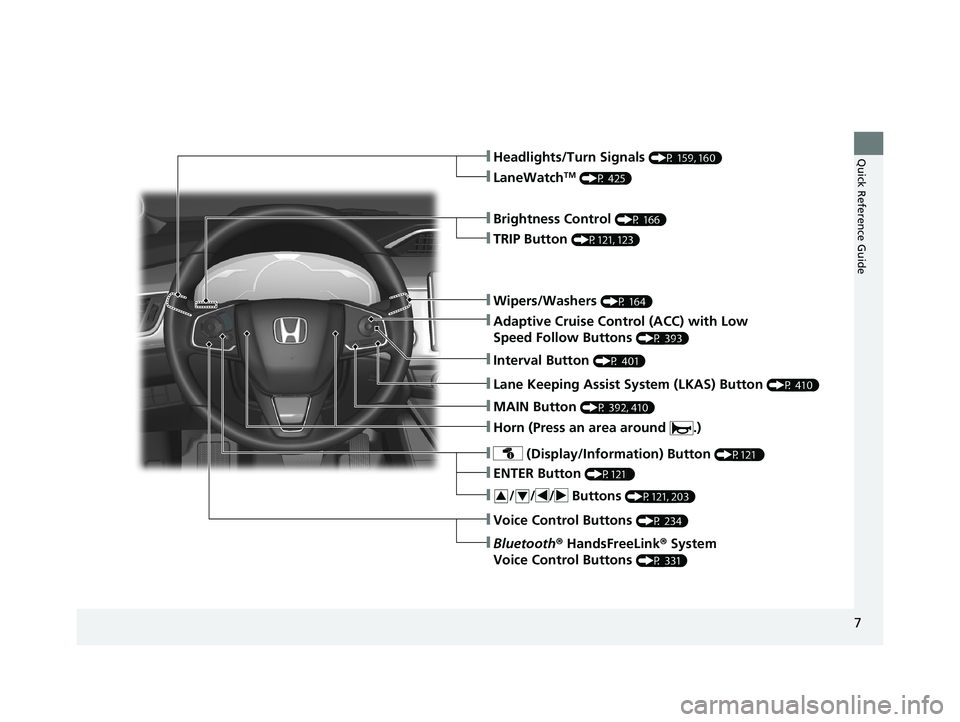
❚Wipers/Washers (P 164)
❚Headlights/Turn Signals (P 159, 160)
❚Brightness Control (P 166)
❚LaneWatchTM (P 425)
❚TRIP Button (P121, 123)
❚Adaptive Cruise Control (ACC) with Low
Speed Follow Buttons
(P 393)
❚ (Display/Information) Button (P121 )
❚/ / / Buttons (P121, 203)34
❚ENTER Button (P121 )
❚Bluetooth® HandsFreeLink ® System
Voice Control Buttons
(P 331)
❚Horn (Press an area around .)
❚Voice Control Buttons (P 234)
❚Interval Button (P 401)
❚Lane Keeping Assist System (LKAS) Button (P 410)
❚MAIN Button (P 392, 410)
21 CLARITY FCV CSS-31TRT6400_02.book 7 ページ 2020年9月25日 金曜日 午後3時15分
Page 28 of 555
26
Quick Reference Guide
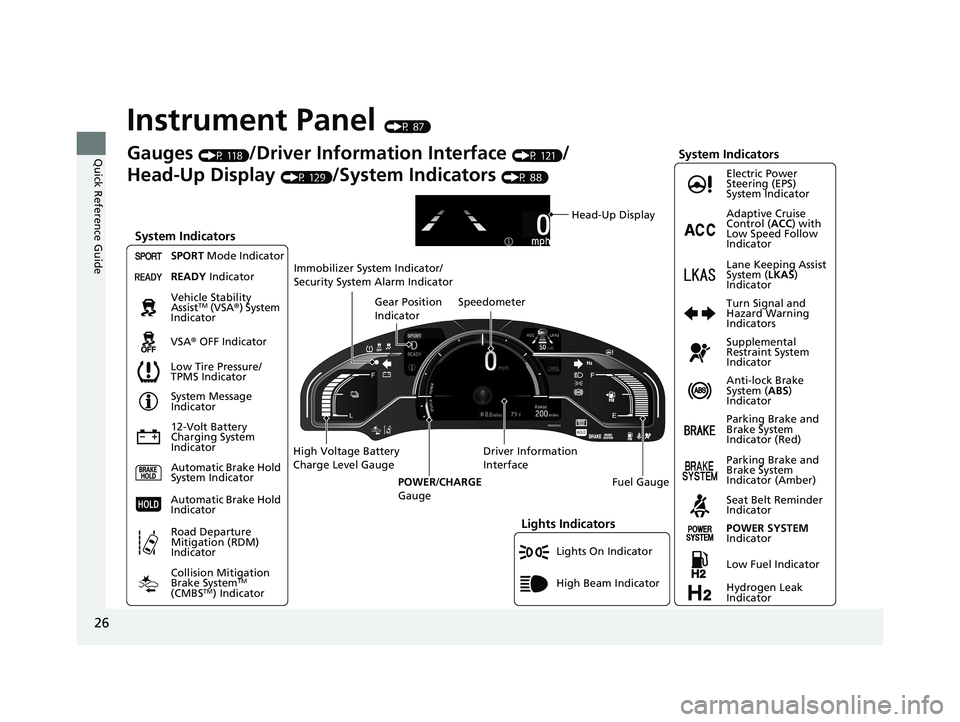
Instrument Panel (P 87)
Lights On Indicator
System Indicators
12-Volt Battery
Charging System
IndicatorAnti-lock Brake
System (
ABS)
Indicator
Vehicle Stability
Assist
TM (VSA
®) System
Indicator
VSA ® OFF Indicator Electric Power
Steering (EPS)
System Indicator
Lights Indicators
High Beam Indicator
Seat Belt Reminder
Indicator
System Indicators
System Message
Indicator
Parking Brake and
Brake System
Indicator (Red) Supplemental
Restraint System
Indicator
Gauges (P 118)/Driver Information Interface (P 121)/
Head-Up Display
(P 129)/System Indicators (P 88)
Low Tire Pressure/
TPMS Indicator Turn Signal and
Hazard Warning
Indicators
Speedometer
Automatic Brake Hold
System Indicator Parking Brake and
Brake System
Indicator (Amber)
SPORT
Mode Indicator
Collision Mitigation
Brake System
TM
(CMBSTM) Indicator
Road Departure
Mitigation (RDM)
Indicator
Immobilizer System Indicator/
Security System Alarm Indicator
Automatic Brake Hold
Indicator
Head-Up Display
READY Indicator
POWER SYSTEM
Indicator
Gear Position
Indicator
Fuel Gauge
Driver Information
Interface
High Voltage Battery
Charge Level Gauge
POWER/CHARGE
Gauge
Low Fuel Indicator
Hydrogen Leak
Indicator Adaptive Cruise
Control ( ACC) with
Low Speed Follow
Indicator
Lane Keeping Assist
System ( LKAS)
Indicator
21 CLARITY FCV CSS-31TRT6400_02.book 26 ページ 2020年9月25日 金曜日 午後3時15分
Page 38 of 555
36
Quick Reference Guide
Honda Sensing®
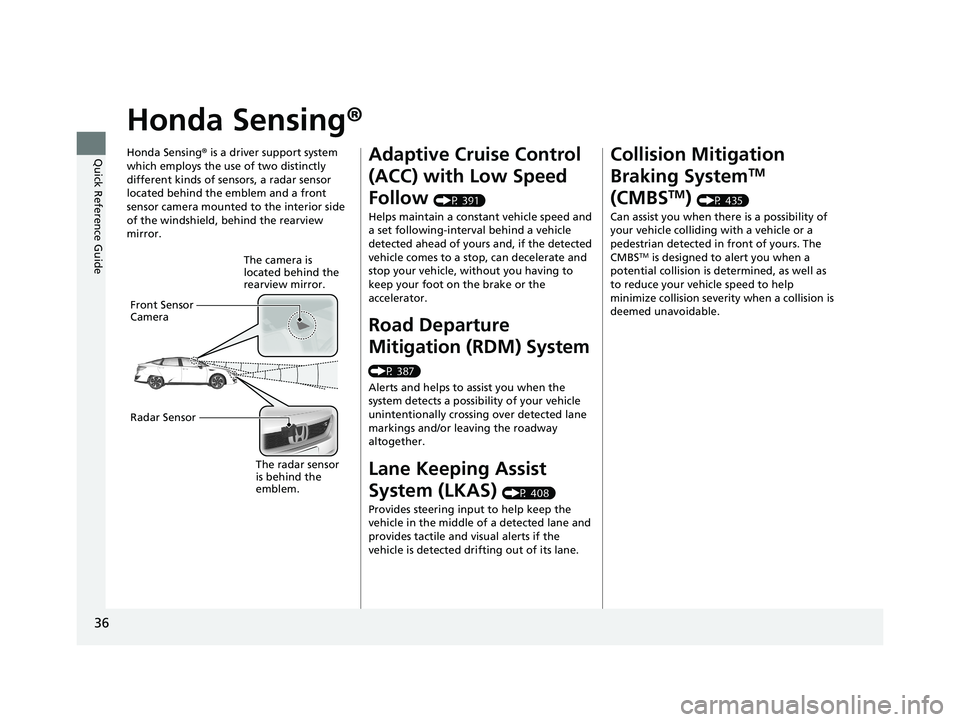
Honda Sensing® is a driver support system
which employs the use of two distinctly
different kinds of sensors, a radar sensor
located behind the emblem and a front
sensor camera mounted to the interior side
of the windshield, behind the rearview
mirror.
The camera is
located behind the
rearview mirror.
Front Sensor
Camera
Radar Sensor
The radar sensor
is behind the
emblem.
Adaptive Cruise Control
(ACC) with Low Speed
Follow
(P 391)
Helps maintain a constant vehicle speed and
a set following-interval behind a vehicle
detected ahead of yours and, if the detected
vehicle comes to a stop, can decelerate and
stop your vehicle, wi thout you having to
keep your foot on the brake or the
accelerator.
Road Departure
Mitigation (RDM) System
(P 387)
Alerts and helps to assist you when the
system detects a possibility of your vehicle
unintentionally crossing over detected lane
markings and/or leaving the roadway
altogether.
Lane Keeping Assist
System (LKAS)
(P 408)
Provides steering input to help keep the
vehicle in the middle of a detected lane and
provides tactile and visual alerts if the
vehicle is detected drifting out of its lane.
Collision Mitigation
Braking System
TM
(CMBS
TM) (P 435)
Can assist you when there is a possibility of
your vehicle colliding with a vehicle or a
pedestrian detected in front of yours. The
CMBS
TM is designed to alert you when a
potential collision is determined, as well as
to reduce your vehicle speed to help
minimize collision severity when a collision is
deemed unavoidable.
21 CLARITY FCV CSS-31TRT6400_02.book 36 ページ 2020年9月25日 金曜日 午後3時15分
Page 103 of 555
101
uuIndicators u
Continued
Instrument Panel
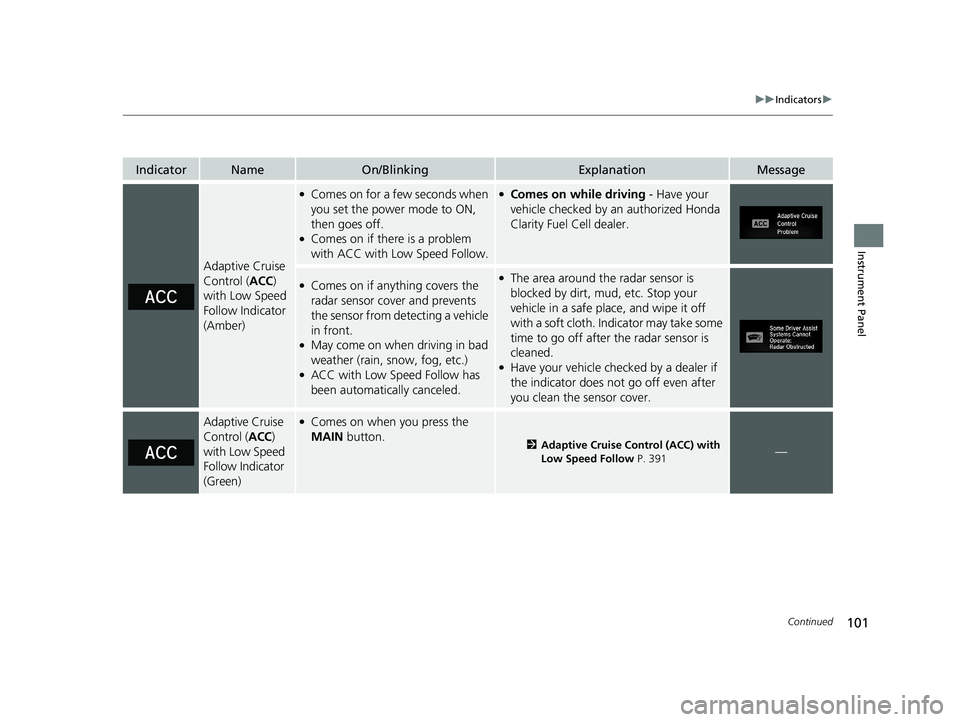
IndicatorNameOn/BlinkingExplanationMessage
Adaptive Cruise
Control (ACC)
with Low Speed
Follow Indicator
(Amber)
●Comes on for a few seconds when
you set the power mode to ON,
then goes off.
●Comes on if there is a problem
with ACC with Low Speed Follow.
●Comes on while driving - Have your
vehicle checked by an authorized Honda
Clarity Fuel Cell dealer.
●Comes on if anything covers the
radar sensor cover and prevents
the sensor from detecting a vehicle
in front.
●May come on when driving in bad
weather (rain, snow, fog, etc.)
●ACC with Low Speed Follow has
been automatically canceled.
●The area around the radar sensor is
blocked by dirt, mud, etc. Stop your
vehicle in a safe place, and wipe it off
with a soft cloth. Indicator may take some
time to go off after the radar sensor is
cleaned.
●Have your vehicle checked by a dealer if
the indicator does not go off even after
you clean the sensor cover.
Adaptive Cruise
Control ( ACC)
with Low Speed
Follow Indicator
(Green)●Comes on when you press the
MAIN button.
2Adaptive Cruise Control (ACC) with
Low Speed Follow P. 391—
21 CLARITY FCV CSS-31TRT6400_02.book 101 ページ 2020年9月25日 金曜日 午 後3時15分
Page 115 of 555
113
uuIndicators uDriver Information Interface Wa rning and Information Messages
Continued
Instrument Panel
MessageConditionExplanation
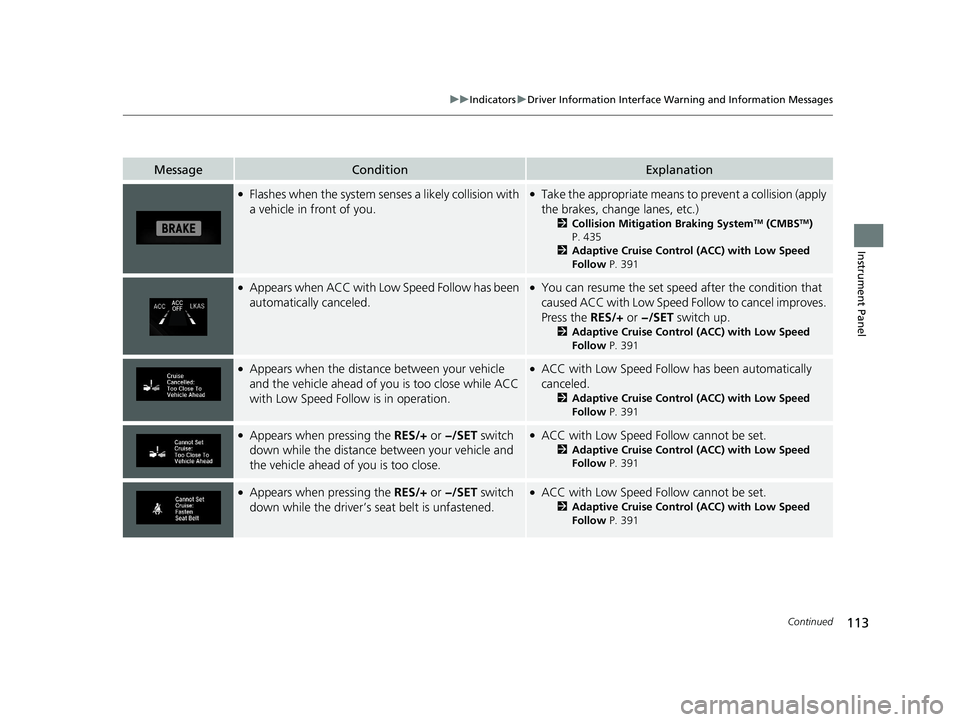
●Flashes when the system senses a likely collision with
a vehicle in front of you.●Take the appropriate means to prevent a collision (apply
the brakes, change lanes, etc.)
2Collision Mitigation Braking SystemTM (CMBSTM)
P. 435
2 Adaptive Cruise Control (ACC) with Low Speed
Follow P. 391
●Appears when ACC with Lo w Speed Follow has been
automatically canceled.●You can resume the set speed after the condition that
caused ACC with Low Speed Fo llow to cancel improves.
Press the RES/+ or −/SET switch up.
2Adaptive Cruise Control (ACC) with Low Speed
Follow P. 391
●Appears when the distance between your vehicle
and the vehicle ahead of you is too close while ACC
with Low Speed Follow is in operation.●ACC with Low Speed Follow has been automatically
canceled.
2 Adaptive Cruise Control (ACC) with Low Speed
Follow P. 391
●Appears when pressing the RES/+ or −/SET switch
down while the distance between your vehicle and
the vehicle ahead of you is too close.●ACC with Low Speed Follow cannot be set.
2 Adaptive Cruise Control (ACC) with Low Speed
Follow P. 391
●Appears when pressing the RES/+ or −/SET switch
down while the driver’s seat belt is unfastened.●ACC with Low Speed Follow cannot be set.
2 Adaptive Cruise Control (ACC) with Low Speed
Follow P. 391
21 CLARITY FCV CSS-31TRT6400_02.book 113 ページ 2020年9月25日 金曜日 午 後3時15分
Page 116 of 555
114
uuIndicators uDriver Information Interface Wa rning and Information Messages
Instrument Panel
MessageConditionExplanation
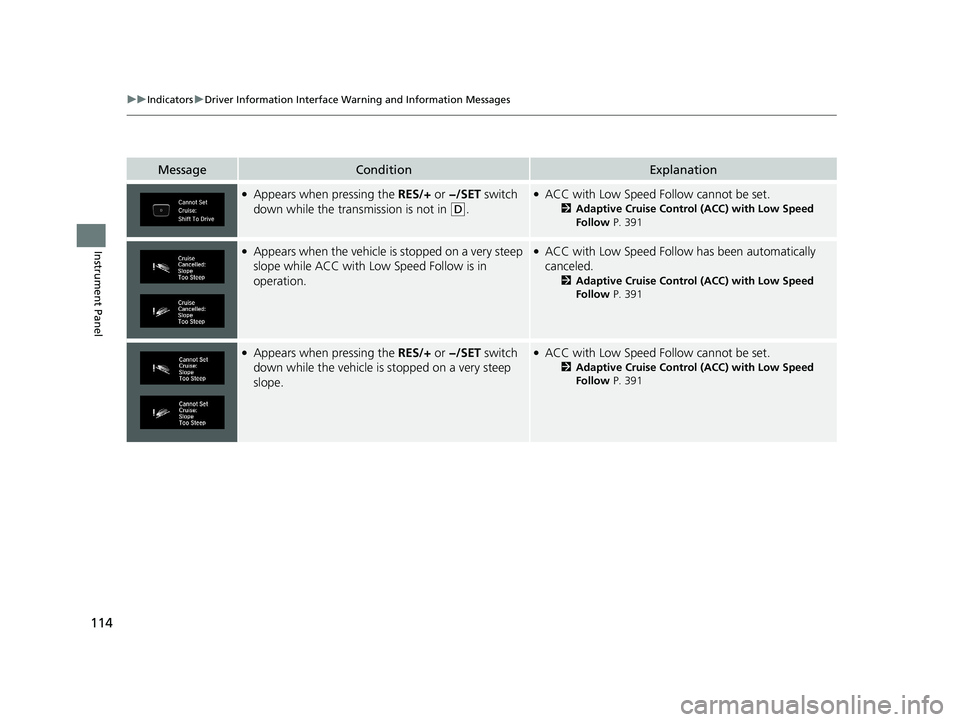
●Appears when pressing the RES/+ or −/SET switch
down while the trans mission is not in
(D.
●ACC with Low Speed Follow cannot be set.
2Adaptive Cruise Control (ACC) with Low Speed
Follow P. 391
●Appears when the vehicle is stopped on a very steep
slope while ACC with Low Speed Follow is in
operation.●ACC with Low Speed Follow has been automatically
canceled.
2 Adaptive Cruise Control (ACC) with Low Speed
Follow P. 391
●Appears when pressing the RES/+ or −/SET switch
down while the vehicle is stopped on a very steep
slope.●ACC with Low Speed Follow cannot be set.
2 Adaptive Cruise Control (ACC) with Low Speed
Follow P. 391
21 CLARITY FCV CSS-31TRT6400_02.book 114 ページ 2020年9月25日 金曜日 午 後3時15分
Page 117 of 555
115
uuIndicators uDriver Information Interface Wa rning and Information Messages
Continued
Instrument Panel
MessageConditionExplanation
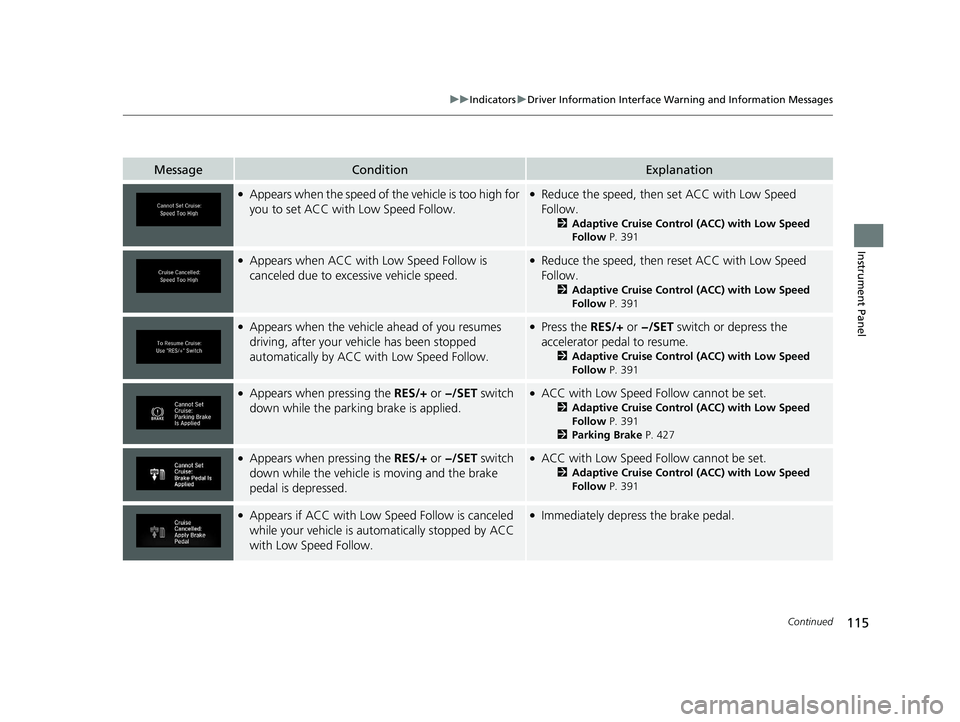
●Appears when the speed of the vehicle is too high for
you to set ACC with Low Speed Follow.●Reduce the speed, then set ACC with Low Speed
Follow.
2Adaptive Cruise Control (ACC) with Low Speed
Follow P. 391
●Appears when ACC with Low Speed Follow is
canceled due to exce ssive vehicle speed.●Reduce the speed, then reset ACC with Low Speed
Follow.
2Adaptive Cruise Control (ACC) with Low Speed
Follow P. 391
●Appears when the vehicl e ahead of you resumes
driving, after your vehicle has been stopped
automatically by ACC with Low Speed Follow.●Press the RES/+ or −/SET switch or depress the
accelerator pedal to resume.
2 Adaptive Cruise Control (ACC) with Low Speed
Follow P. 391
●Appears when pressing the RES/+ or −/SET switch
down while the park ing brake is applied.●ACC with Low Speed Follow cannot be set.
2Adaptive Cruise Control (ACC) with Low Speed
Follow P. 391
2 Parking Brake P. 427
●Appears when pressing the RES/+ or −/SET switch
down while the vehicle is moving and the brake
pedal is depressed.●ACC with Low Speed Follow cannot be set.
2 Adaptive Cruise Control (ACC) with Low Speed
Follow P. 391
●Appears if ACC with Low Sp eed Follow is canceled
while your vehicle is automatically stopped by ACC
with Low Speed Follow.●Immediately depress the brake pedal.
21 CLARITY FCV CSS-31TRT6400_02.book 115 ページ 2020年9月25日 金曜日 午 後3時15分
Page 119 of 555
117
uuIndicators uDriver Information Interface Wa rning and Information Messages
Instrument Panel
MessageConditionExplanation
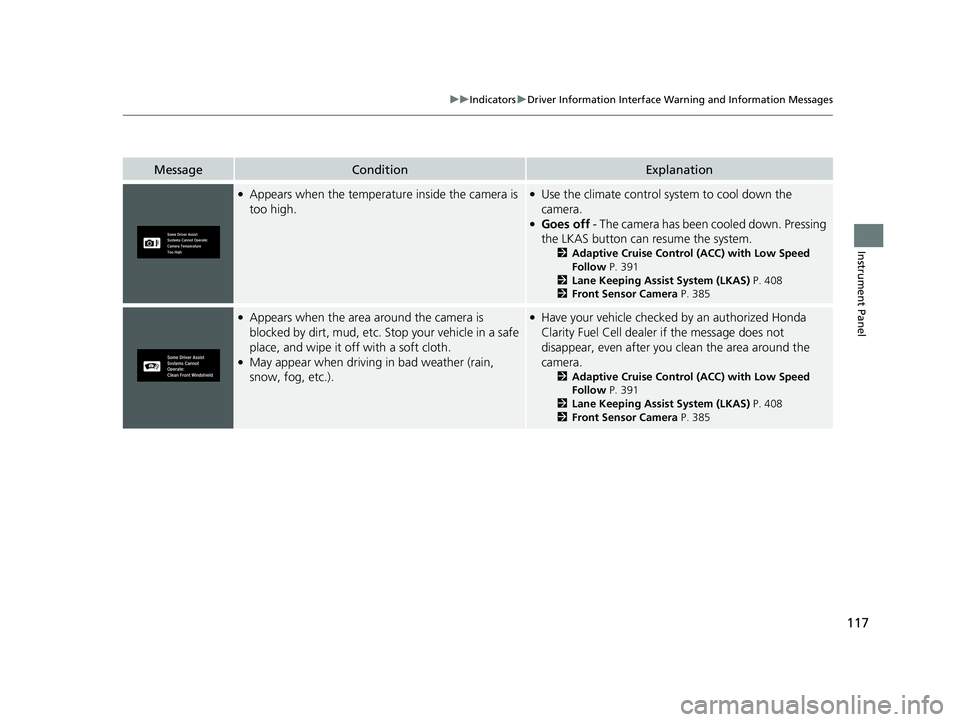
●Appears when the temperature inside the camera is
too high.●Use the climate control system to cool down the
camera.
●Goes off - The camera has been cooled down. Pressing
the LKAS button can resume the system.
2 Adaptive Cruise Control (ACC) with Low Speed
Follow P. 391
2 Lane Keeping Assist System (LKAS) P. 408
2 Front Sensor Camera P. 385
●Appears when the area around the camera is
blocked by dirt, mud, etc. Stop your vehicle in a safe
place, and wipe it off with a soft cloth.
●May appear when driving in bad weather (rain,
snow, fog, etc.).
●Have your vehicle checked by an authorized Honda
Clarity Fuel Cell dealer if the message does not
disappear, even after you clean the area around the
camera.
2 Adaptive Cruise Control (ACC) with Low Speed
Follow P. 391
2 Lane Keeping Assist System (LKAS) P. 408
2 Front Sensor Camera P. 385
21 CLARITY FCV CSS-31TRT6400_02.book 117 ページ 2020年9月25日 金曜日 午 後3時15分
Page 132 of 555
130
uuGauges and Driver Information Interface uHead-Up Display
Instrument Panel
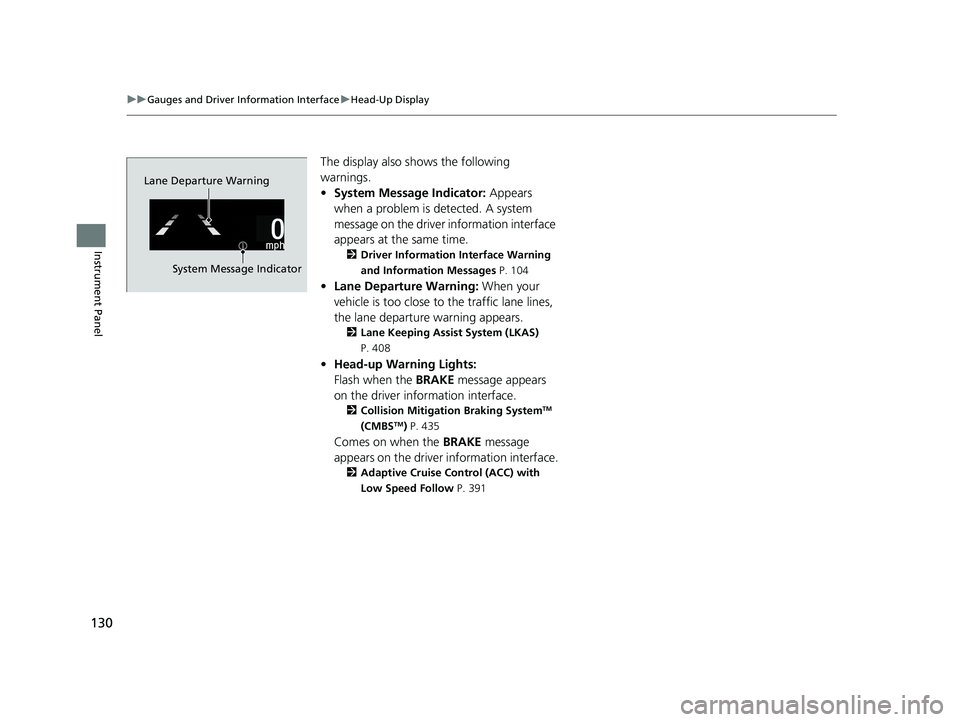
The display also sh ows the following
warnings.
• System Message Indicator: Appears
when a problem is detected. A system
message on the driver information interface
appears at the same time.
2 Driver Information Interface Warning
and Information Messages P. 104
•Lane Departure Warning: When your
vehicle is too close to the traffic lane lines,
the lane departure warning appears.
2 Lane Keeping Assist System (LKAS)
P. 408
• Head-up Warning Lights:
Flash when the BRAKE message appears
on the driver information interface.
2 Collision Mitigation Braking SystemTM
(CMBSTM) P. 435
Comes on when the BRAKE message
appears on the driver information interface.
2 Adaptive Cruise Control (ACC) with
Low Speed Follow P. 391
Lane Departure Warning
System Message Indicator
21 CLARITY FCV CSS-31TRT6400_02.book 130 ページ 2020年9月25日 金曜日 午 後3時15分
Page 133 of 555
131
uuGauges and Driver Information Interface uHead-Up Display
Instrument Panel
Shows your driving speed in mph or km/h.
Shows the current mode for ACC with Low Speed Follow.
2 Adaptive Cruise Control (ACC) with Low Speed Follow P. 391
Shows you turn-by-turn driving directions to your destination linked with the
navigation system.
2 Refer to the Navigation System Manual
■Vehicle Speed
■Current Mode for ACC with Low Speed Follow
■Turn-by-Turn Directions
1Vehicle Speed
Switch between mph and km/h by using the driver
information interface or the customized features on
the audio/information screen.
2 Gauges P. 118
2 Customized Features P. 302
1Turn-by-Turn Directions
You can select whether the turn-by-turn display
comes on during the route guidance.
2 Customized Features P. 302
21 CLARITY FCV CSS-31TRT6400_02.book 131 ページ 2020年9月25日 金曜日 午 後3時15分