steering wheel HONDA CLARITY FUEL CELL 2021 Owner's Manual (in English)
[x] Cancel search | Manufacturer: HONDA, Model Year: 2021, Model line: CLARITY FUEL CELL, Model: HONDA CLARITY FUEL CELL 2021Pages: 555, PDF Size: 28.21 MB
Page 6 of 555
Contents
This manual should be considered a permanent part of the vehicle
and should remain with the vehicle when it is sold.
This manual covers all models of your vehicle. You may find
descriptions of equipment and features that are not on your
particular model.
Images throughout this manual (including the front cover) represent
features and equipment that are available on some, but not all,
models. Your particular model may no t have some of these features.
The information and specifications in cluded in this publication were
in effect at the time of approval for printing. Honda Motor Co., Ltd.
reserves the right, however, to discontinue or change specifications
or design at any time without notice and without incurring any
obligation.2 Safe Driving P. 43
For Safe Driving P. 44 Seat Belts P. 48 Airbags P. 55
2Instrument Panel P. 87
Indicators P. 88 Gauges and Driver Information Interface P. 118
2Controls P. 133
Clock P. 134 Locking and Unlocking the Doors P. 135
Operating the Switches Ar ound the Steering Wheel P. 156
Interior Lights/Interior Convenience Items P. 180
2 Features P. 199
Audio System P. 200 Audio System Basic Operation P. 206
Customized Features P. 302 HomeLink® Universal Transceiver P. 328
2 Driving P. 365
Before Driving P. 366 Towing a Trailer P. 371
Multi-View Rear Camera P. 445 Refueling P. 447
2 Maintenance P. 451
Before Performing Maintenance P. 452 Maintenance MinderTM P. 455
Checking and Maintaining Wiper Blades P. 467
Climate Control System Main tenance P. 482 Cleaning P. 483
2Handling the Unexpected P. 491
If a Tire Goes Flat P. 492 Handling of the Jack P. 504
If Hydrogen Gas is Leaking P. 513 Indicator, Coming On/Blinking P. 515
If You Cannot Unlock the Hydrogen Fuel Lid P. 529
2 Information P. 531
Specifications P. 532 Identification Numbers P. 534
Warranty Coverages P. 537 Authorized Manuals P. 540
21 CLARITY FCV CSS-31TRT6400_02.book 4 ページ 2020年9月25日 金曜日 午後3時15分
Page 8 of 555
6
Quick Reference Guide
Quick Reference Guide
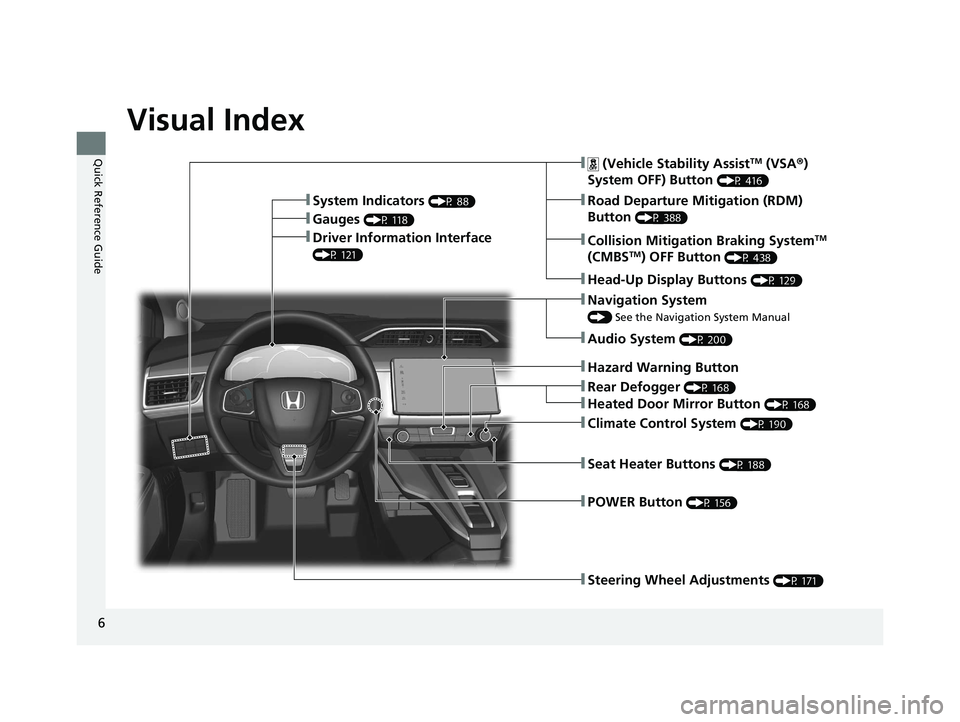
Visual Index
❚Steering Wheel Adjustments (P 171)
❚ (Vehicle Stability AssistTM (VSA®)
System OFF) Button
(P 416)
❚Road Departure Mitigation (RDM)
Button
(P 388)❚Gauges (P 118)
❚Collision Mitigation Braking SystemTM
(CMBSTM) OFF Button (P 438)
❚Head-Up Display Buttons (P 129)
❚Driver Information Interface
(P 121)
❚Navigation System
() See the Navigation System Manual
❚Audio System (P 200)
❚Hazard Warning Button
❚Climate Control System (P 190)
❚POWER Button (P 156)
❚Seat Heater Buttons (P 188)
❚Rear Defogger (P 168)
❚Heated Door Mirror Button (P 168)
❚System Indicators (P 88)
21 CLARITY FCV CSS-31TRT6400_02.book 6 ページ 2020年9月25日 金曜日 午後3時15分
Page 27 of 555
25
Quick Reference Guide
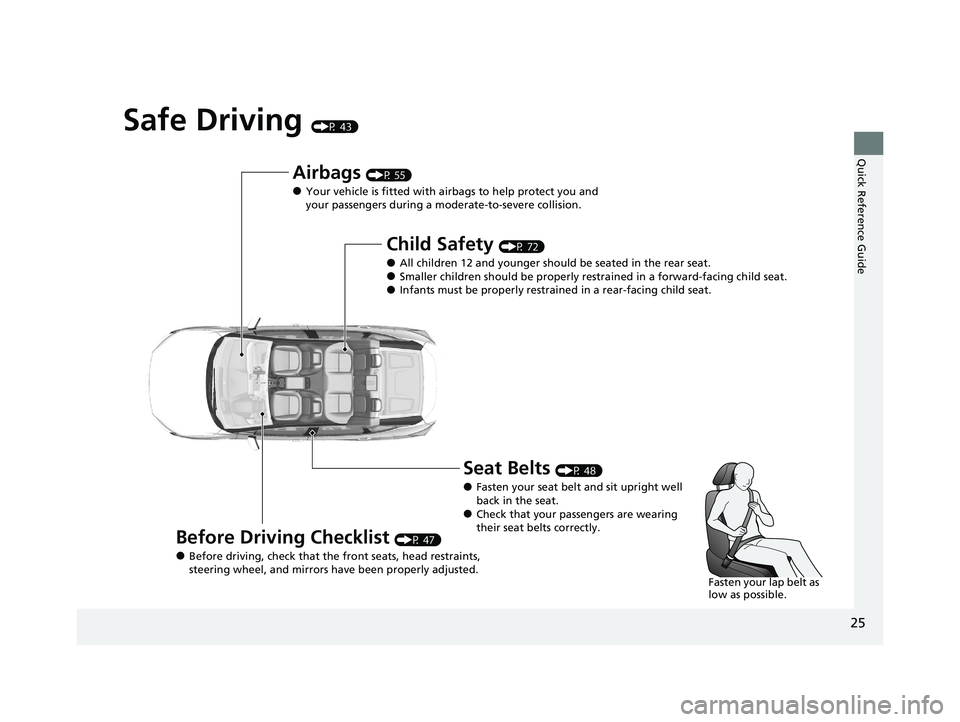
Safe Driving (P 43)
Airbags (P 55)
●Your vehicle is fitted with airbags to help protect you and
your passengers during a moderate-to-severe collision.
Child Safety (P 72)
●All children 12 and younger should be seated in the rear seat.●Smaller children should be properly restra ined in a forward-facing child seat.●Infants must be properly restrained in a rear-facing child seat.
Before Driving Checklist (P 47)
●Before driving, check that the front seats, head restraints,
steering wheel, and mirrors have been properly adjusted.
Seat Belts (P 48)
●Fasten your seat belt and sit upright well
back in the seat.
●Check that your passengers are wearing
their seat belts correctly.
Fasten your lap belt as
low as possible.
21 CLARITY FCV CSS-31TRT6400_02.book 25 ページ 2020年9月25日 金曜日 午後3時15分
Page 30 of 555
28
Quick Reference Guide
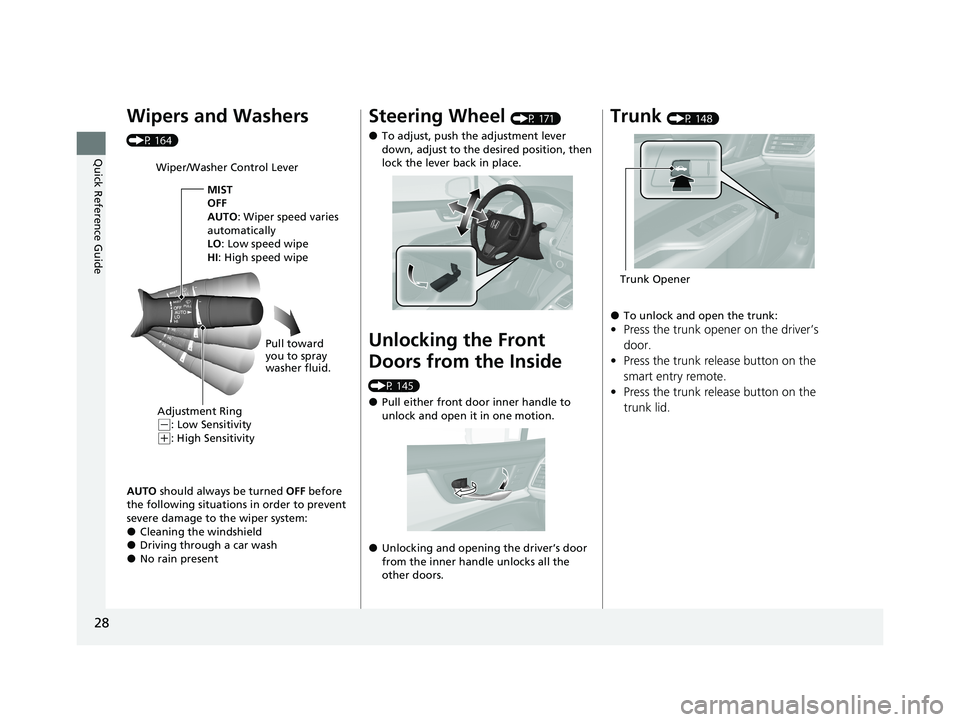
Wipers and Washers
(P 164)AUTO should always be turned OFF before
the following situations in order to prevent
severe damage to the wiper system:
●Cleaning the windshield●Driving through a car wash●No rain present
Wiper/Washer Control Lever
Adjustment Ring
(-: Low Sensitivity
(+: High Sensitivity MIST
OFF
AUTO
: Wiper speed varies
automatically
LO: Low speed wipe
HI: High speed wipe
Pull toward
you to spray
washer fluid.
Steering Wheel (P 171)
●To adjust, push the adjustment lever
down, adjust to the desired position, then
lock the lever back in place.
Unlocking the Front
Doors from the Inside
(P 145)
●Pull either front door inner handle to
unlock and open it in one motion.
●Unlocking and opening the driver’s door
from the inner handle unlocks all the
other doors.
Trunk (P 148)
●To unlock and open the trunk:
•Press the trunk opener on the driver’s
door.
• Press the trunk release button on the
smart entry remote.
• Press the trunk release button on the
trunk lid.
Trunk Opener
21 CLARITY FCV CSS-31TRT6400_02.book 28 ページ 2020年9月25日 金曜日 午後3時15分
Page 58 of 555
56
uuAirbags uAirbag System Components
Safe Driving
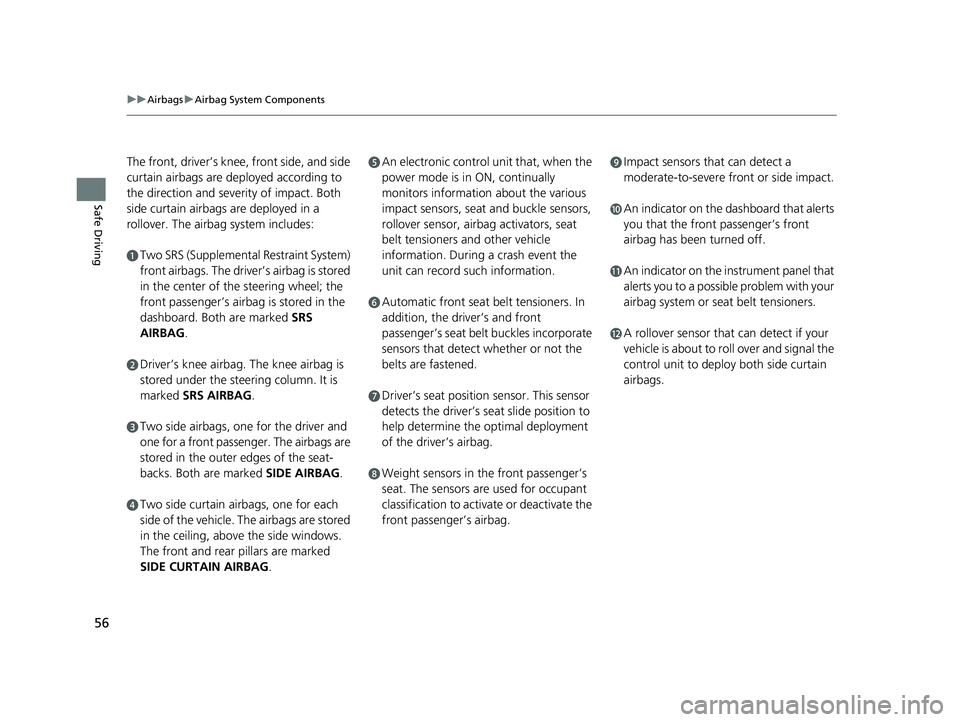
The front, driver’s knee, front side, and side
curtain airbags are deployed according to
the direction and severity of impact. Both
side curtain airbags are deployed in a
rollover. The airbag system includes:
aTwo SRS (Supplemental Restraint System)
front airbags. The driver’s airbag is stored
in the center of the steering wheel; the
front passenger’s airbag is stored in the
dashboard. Both are marked SRS
AIRBAG.
bDriver’s knee airbag. The knee airbag is
stored under the steering column. It is
marked SRS AIRBAG.
cTwo side airbags, one for the driver and
one for a front passenger. The airbags are
stored in the outer edges of the seat-
backs. Both are marked SIDE AIRBAG .
dTwo side curtain airbags, one for each
side of the vehicle. The airbags are stored
in the ceiling, above the side windows.
The front and rear pillars are marked
SIDE CURTAIN AIRBAG.
eAn electronic control unit that, when the
power mode is in ON, continually
monitors information about the various
impact sensors, seat and buckle sensors,
rollover sensor, airbag activators, seat
belt tensioners and other vehicle
information. During a crash event the
unit can record such information.
fAutomatic front seat belt tensioners. In
addition, the driver’s and front
passenger’s seat belt buckles incorporate
sensors that detect whether or not the
belts are fastened.
gDriver’s seat position sensor. This sensor
detects the driver’s seat slide position to
help determine the optimal deployment
of the driver’s airbag.
hWeight sensors in the front passenger’s
seat. The sensors are used for occupant
classification to activate or deactivate the
front passenger’s airbag.
iImpact sensors that can detect a
moderate-to-severe front or side impact.
jAn indicator on the dashboard that alerts
you that the front passenger’s front
airbag has been turned off.
kAn indicator on the instrument panel that
alerts you to a possib le problem with your
airbag system or seat belt tensioners.
lA rollover sensor that can detect if your
vehicle is about to roll over and signal the
control unit to deploy both side curtain
airbags.
21 CLARITY FCV CSS-31TRT6400_02.book 56 ページ 2020年9月25日 金曜日 午後3時15分
Page 59 of 555
57
uuAirbags uAirbag System Components
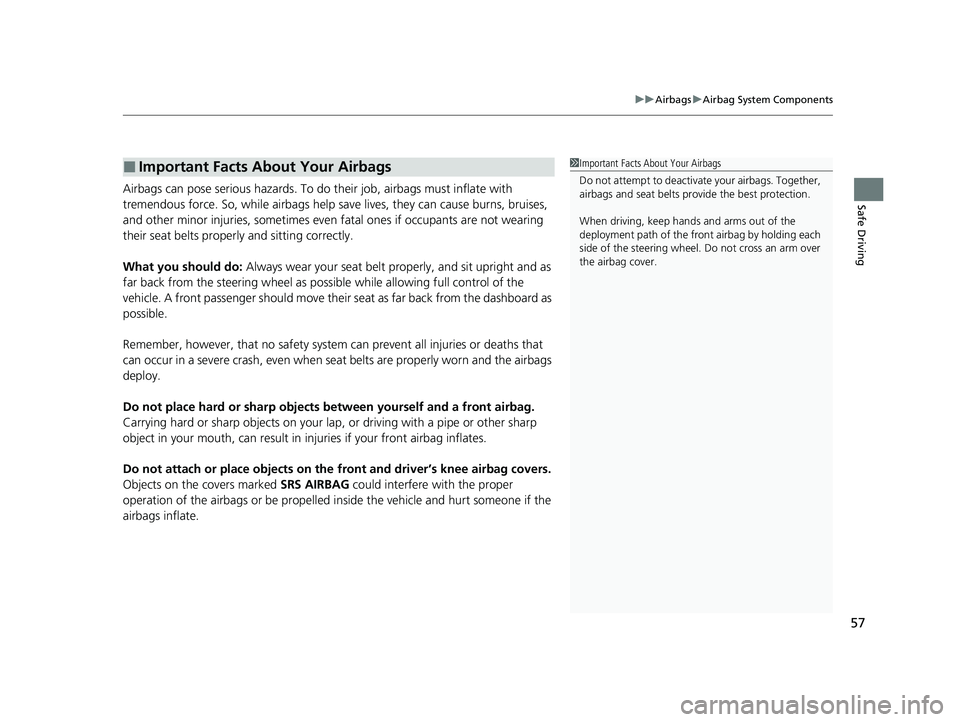
Safe DrivingAirbags can pose serious hazards. To do their job, airbags must inflate with
tremendous force. So, while airbags help sa ve lives, they can cause burns, bruises,
and other minor injuries, sometimes even fatal ones if occupants are not wearing
their seat belts properl y and sitting correctly.
What you should do: Always wear your seat belt properly, and sit upright and as
far back from the steering wheel as possi ble while allowing full control of the
vehicle. A front passenger should move their seat as far back from the dashboard as
possible.
Remember, however, that no safety system ca n prevent all injuries or deaths that
can occur in a severe crash, even when s eat belts are properly worn and the airbags
deploy.
Do not place hard or sharp objects between yourself and a front airbag.
Carrying hard or sharp objects on your lap, or driving with a pipe or other sharp
object in your mouth, can result in in juries if your front airbag inflates.
Do not attach or place objects on the front and driver’s knee airbag covers.
Objects on the covers marked SRS AIRBAG could interfere with the proper
operation of the airbags or be propelled inside the vehicle and hurt someone if the
airbags inflate.
■Important Facts About Your Airbags1 Important Facts About Your Airbags
Do not attempt to deactivate your airbags. Together,
airbags and seat belts pr ovide the best protection.
When driving, keep hands and arms out of the
deployment path of the fro nt airbag by holding each
side of the steering wheel. Do not cross an arm over
the airbag cover.
21 CLARITY FCV CSS-31TRT6400_02.book 57 ページ 2020年9月25日 金曜日 午後3時15分
Page 60 of 555
58
uuAirbags uTypes of Airbags
Safe Driving
Types of Airbags
Your vehicle is equipped with four types of airbags:
• Front airbags: Airbags in front of the driver ’s and front passenger’s seats.
• Driver’s knee airbag: Airbag under the steering column.
• Side airbags: Airbags in the driver’s and front passenger’s seat-backs.
• Side curtain airbags: Airbags above the side windows.
Each is discussed in the following pages.
Front Airbags (SRS)
The front SRS airbags inflate in a moderate-to -severe frontal collision to help protect
the head and chest of the driver and/or front passenger.
SRS (Supplemental Restraint System) indicates that the airbags are designed to
supplement seat belts, not replace them. Seat belts are the occupant’s primary
restraint system.
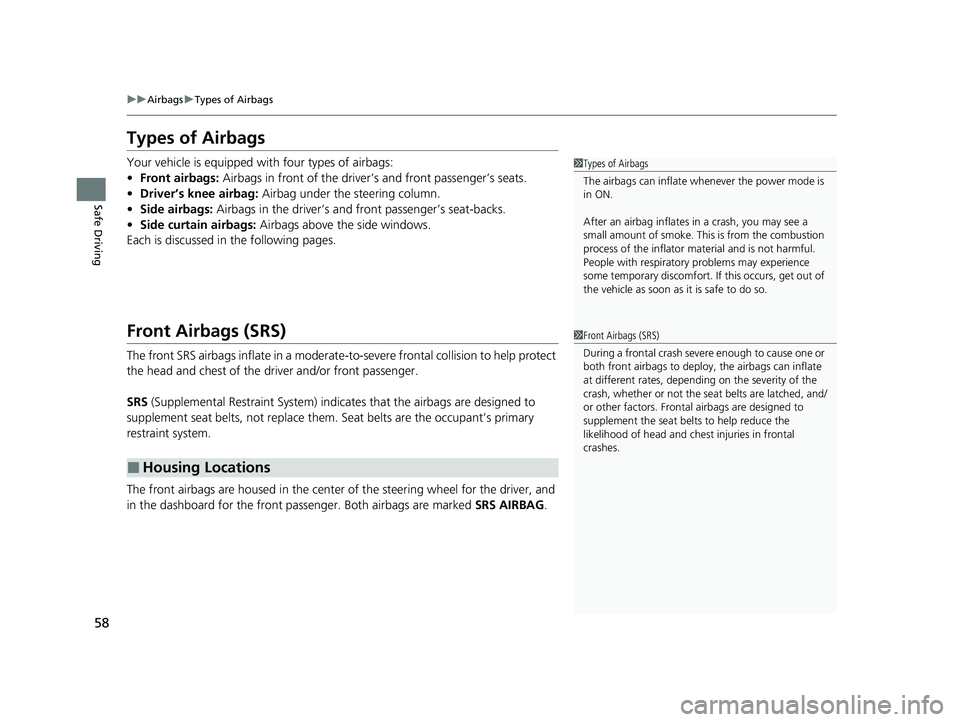
The front airbags are housed in the center of the steering wheel for the driver, and
in the dashboard for the front pass enger. Both airbags are marked SRS AIRBAG.
■Housing Locations
1Types of Airbags
The airbags can inflate whenever the power mode is
in ON.
After an airbag inflates in a crash, you may see a
small amount of smoke. This is from the combustion
process of the infl ator material and is not harmful.
People with respiratory pr oblems may experience
some temporary discomfort. If this occurs, get out of
the vehicle as soon as it is safe to do so.
1 Front Airbags (SRS)
During a frontal crash severe enough to cause one or
both front airbags to deploy, the airbags can inflate
at different rates, dependi ng on the severity of the
crash, whether or not the se at belts are latched, and/
or other factors. Frontal airbags are designed to
supplement the seat belts to help reduce the
likelihood of head and chest injuries in frontal
crashes.
21 CLARITY FCV CSS-31TRT6400_02.book 58 ページ 2020年9月25日 金曜日 午後3時15分
Page 63 of 555
Continued61
uuAirbags uFront Airbags (SRS)
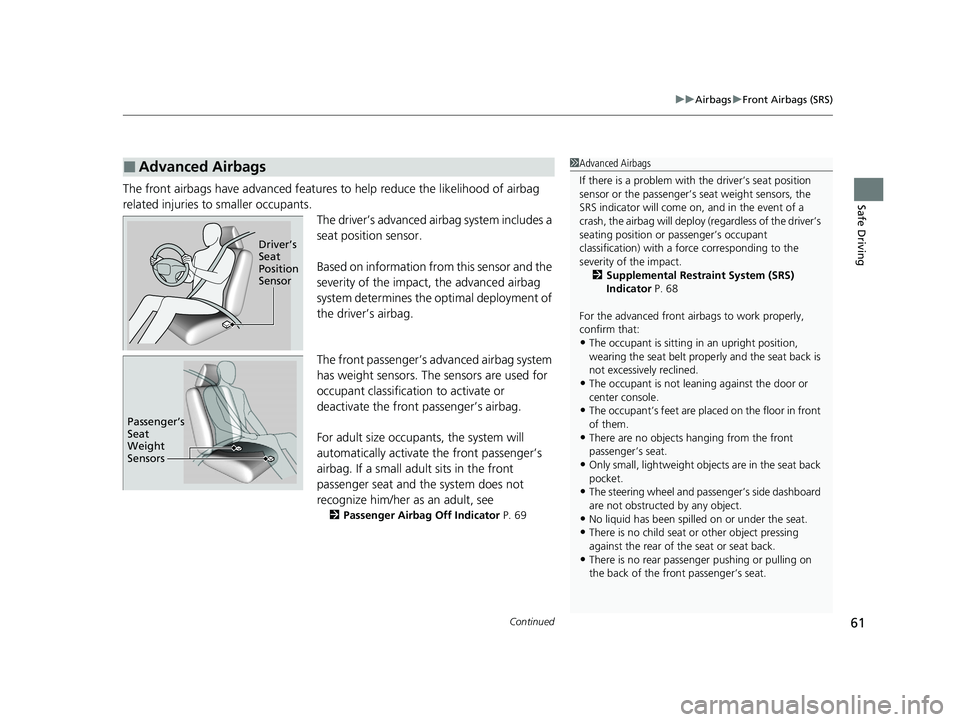
Safe DrivingThe front airbags have advanced features to help reduce the likelihood of airbag
related injuries to smaller occupants. The driver’s advanced airbag system includes a
seat position sensor.
Based on information from this sensor and the
severity of the impact, the advanced airbag
system determines the optimal deployment of
the driver’s airbag.
The front passenger’s ad vanced airbag system
has weight sensors. The sensors are used for
occupant classification to activate or
deactivate the front passenger’s airbag.
For adult size occupant s, the system will
automatically activate the front passenger’s
airbag. If a small adult sits in the front
passenger seat and the system does not
recognize him/her as an adult, see
2 Passenger Airbag Off Indicator P. 69
■Advanced Airbags1Advanced Airbags
If there is a problem with the driver’s seat position
sensor or the passenger’s s eat weight sensors, the
SRS indicator will come on, and in the event of a
crash, the airbag will deploy (regardless of the driver’s
seating position or passenger’s occupant
classification) with a force corresponding to the
severity of the impact. 2 Supplemental Restraint System (SRS)
Indicator P. 68
For the advanced front airbags to work properly,
confirm that:
•The occupant is sitting in an upright position,
wearing the seat belt prope rly and the seat back is
not excessively reclined.
•The occupant is not leaning against the door or
center console.
•The occupant’s feet are plac ed on the floor in front
of them.
•There are no objects ha nging from the front
passenger’s seat.
•Only small, lightweight objec ts are in the seat back
pocket.
•The steering wheel and passenger’s side dashboard
are not obstructed by any object.
•No liquid has been spille d on or under the seat.•There is no child seat or other object pressing
against the rear of the seat or seat back.
•There is no rear passenger pushing or pulling on
the back of the front passenger’s seat.
Driver’s
Seat
Position
Sensor
Passenger’s
Seat
Weight
Sensors
21 CLARITY FCV CSS-31TRT6400_02.book 61 ページ 2020年9月25日 金曜日 午後3時15分
Page 118 of 555
116
uuIndicators uDriver Information Interface Wa rning and Information Messages
Instrument Panel
MessageConditionExplanation
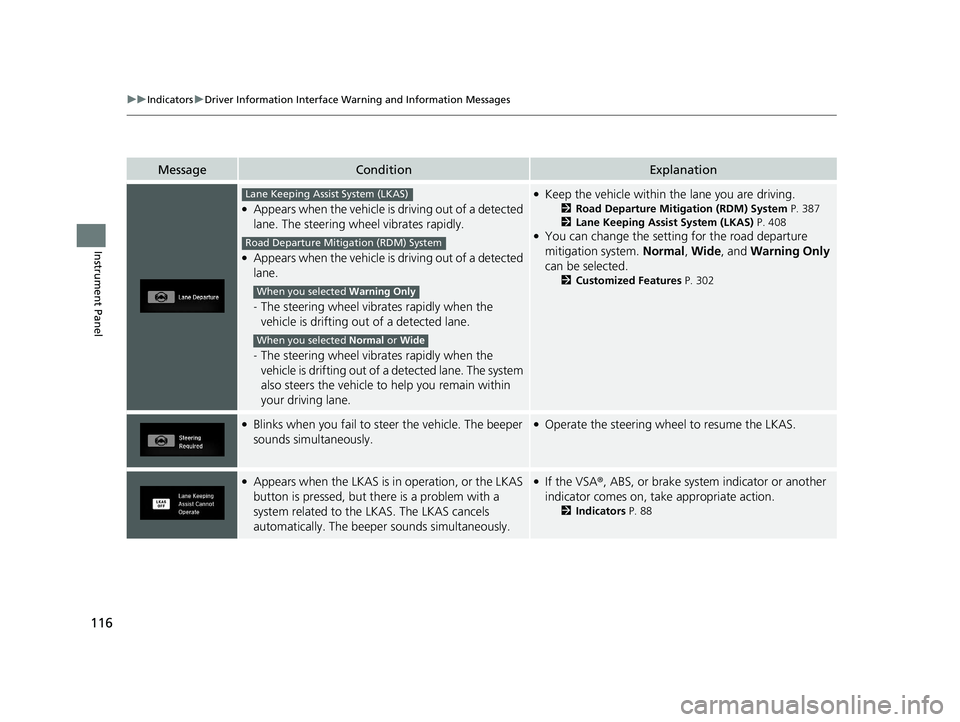
●Appears when the vehicle is driving out of a detected
lane. The steering wheel vibrates rapidly.
●Appears when the vehicle is driving out of a detected
lane.
-The steering wheel vibrates rapidly when the
vehicle is drifting out of a detected lane.
- The steering wheel vibrates rapidly when the
vehicle is drifting out of a detected lane. The system
also steers the vehicle to help you remain within
your driving lane.
●Keep the vehicle within the lane you are driving.
2 Road Departure Mitigation (RDM) System P. 387
2 Lane Keeping Assist System (LKAS) P. 408
●You can change the setting for the road departure
mitigation system. Normal, Wide , and Warning Only
can be selected.
2 Customized Features P. 302
●Blinks when you fail to steer the vehicle. The beeper
sounds simultaneously.●Operate the steering wheel to resume the LKAS.
●Appears when the LKAS is in operation, or the LKAS
button is pressed, but there is a problem with a
system related to the LKAS. The LKAS cancels
automatically. The beeper sounds simultaneously.●If the VSA®, ABS, or brake system indicator or another
indicator comes on, take appropriate action.
2 Indicators P. 88
Lane Keeping Assist System (LKAS)
Road Departure Mitigation (RDM) System
When you selected Warning Only
When you selected Normal or Wide
21 CLARITY FCV CSS-31TRT6400_02.book 116 ページ 2020年9月25日 金曜日 午 後3時15分
Page 135 of 555
133
Controls
This chapter explains how to operate the various controls necessary for driving.
Clock.................................................. 134
Locking and Unlocking the Doors Key Types and Functions .................. 135
Low Smart Entry Remote Signal Strength .. 136Locking/Unlocking the Doors from the Outside .......................................... 137
Locking/Unlocking the Doors from the Inside ............................................. 144
Childproof Door Locks ..................... 146
Auto Door Locking/Unlocking .......... 147
Opening and Closing the Trunk ....... 148
Security System ................................ 151
Immobilizer System .......................... 151 Security System Alarm...................... 151
Opening and Closing the Windows ... 154
Operating the Switches Around the
Steering Wheel POWER Button................................. 156
Turn Signals ..................................... 159
Light Switches.................................. 160
Daytime Running Lights ................... 163
Wipers and Washers ........................ 164
Brightness Control ........................... 166
Rear Defogger/Heated Door Mirror Button........................................ 168
Driving Position Memory System ...... 169 Adjusting the Steering Wheel .......... 171
Adjusting the Mirrors ....................... 172
Interior Rearview Mirror ................... 172
Power Door Mirrors ......................... 173
Adjusting the Seats .......................... 174
Front Seats ...................................... 174
Interior Lights/Interior Convenience Items ................................................ 180
Interior Lights .................................. 180
Interior Convenience Items .............. 182
Climate Control System ................... 190
Using Automatic Climate Control .... 190
Automatic Climate Control Sensors ... 198
21 CLARITY FCV CSS-31TRT6400_02.book 133 ページ 2020年9月25日 金曜日 午 後3時15分