dashboard HONDA CLARITY PLUG-IN 2020 (in English) User Guide
[x] Cancel search | Manufacturer: HONDA, Model Year: 2020, Model line: CLARITY PLUG-IN, Model: HONDA CLARITY PLUG-IN 2020Pages: 595, PDF Size: 30.43 MB
Page 196 of 595
194
uuClimate Control System uUsing Automatic Climate Control
Controls
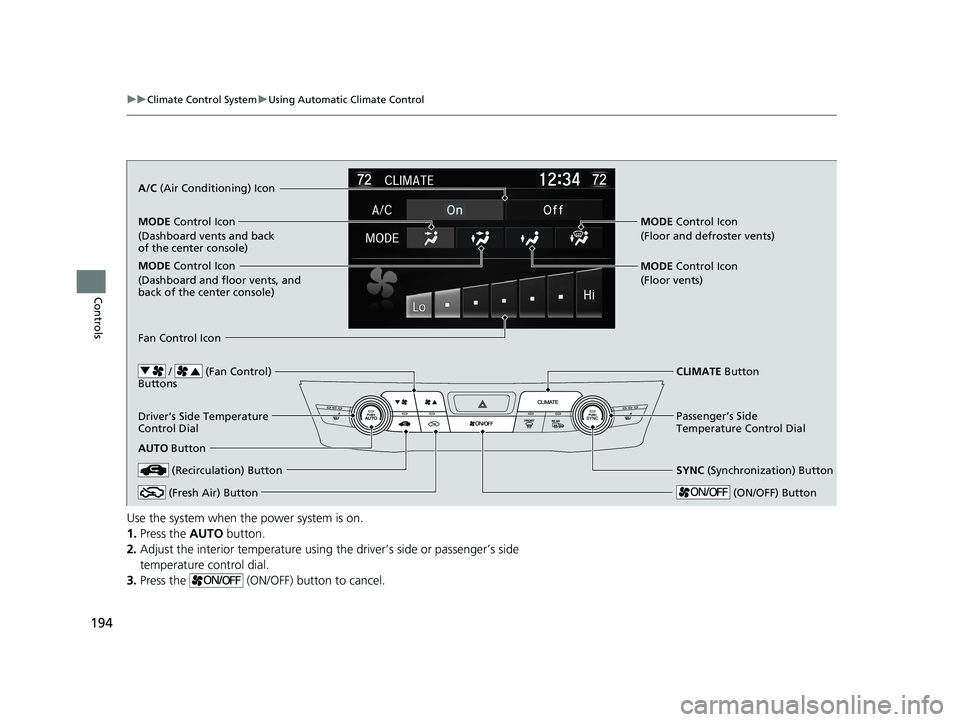
Use the system when the power system is on.
1. Press the AUTO button.
2. Adjust the interior temperature using the driver’s side or passenger’s side
temperature control dial.
3. Press the (ON/OFF) button to cancel.
/ (Fan Control)
Buttons
A/C (Air Conditioning) Icon
MODE Control Icon
(Dashboard vents and back
of the center console)
MODE Control Icon
(Dashboard and floor vents, and
back of the center console)
CLIMATE Button
Driver’s Side Temperature
Control Dial
AUTO Button
SYNC (Synchronization) Button
Passenger’s Side
Temperature Control Dial
MODE Control Icon
(Floor vents) MODE Control Icon
(Floor and defroster vents)
(Recirculation) Button
(Fresh Air) Button (ON/OFF) Button
Fan Control Icon
20 CLARITY PHEV-31TRW6200.book 194 ページ 2019年9月24日 火曜日 午後12時9分
Page 241 of 595
239
uuAudio System Basic Operation uVoice Control Operation
Continued
Features
Voice Control Operation
Your vehicle has a voice control syst em that allows hands-free operation.
The voice control system uses the ( Talk) and (hang-up/back) buttons on
the steering wheel and a microphone near the map lights in the ceiling.
To achieve optimum voice recognition when using the voice control system:
• Make sure the correct screen is displa yed for the voice command that you are
using.
The system recognizes only certain commands.
Available voice command P. 240
• Close the windows.
• Adjust the dashboard and side vents so air does not blow onto the microphone in
the ceiling.
• Speak clearly in a natural speaking vo ice without pausing between words.
• Reduce any background noise if possibl e. The system may misinterpret your
command if more than one person is speaking at the same time.
■Voice Recognition
1Voice Control Operation
When you press the button, a helpful prompt asks
what you would like to do. Press and release the
button again to bypass th is prompt and give a
command.
1 Voice Recognition
The voice control system can only be used from the
driver’s seat because the microphone unit removes
noises from the front passenger’s side.
20 CLARITY PHEV-31TRW6200.book 239 ページ 2019年9月24日 火曜日 午後12時9分
Page 462 of 595
uuCharging uCharge the High Voltage battery using a Level 1 or 2 charger
460
Driving
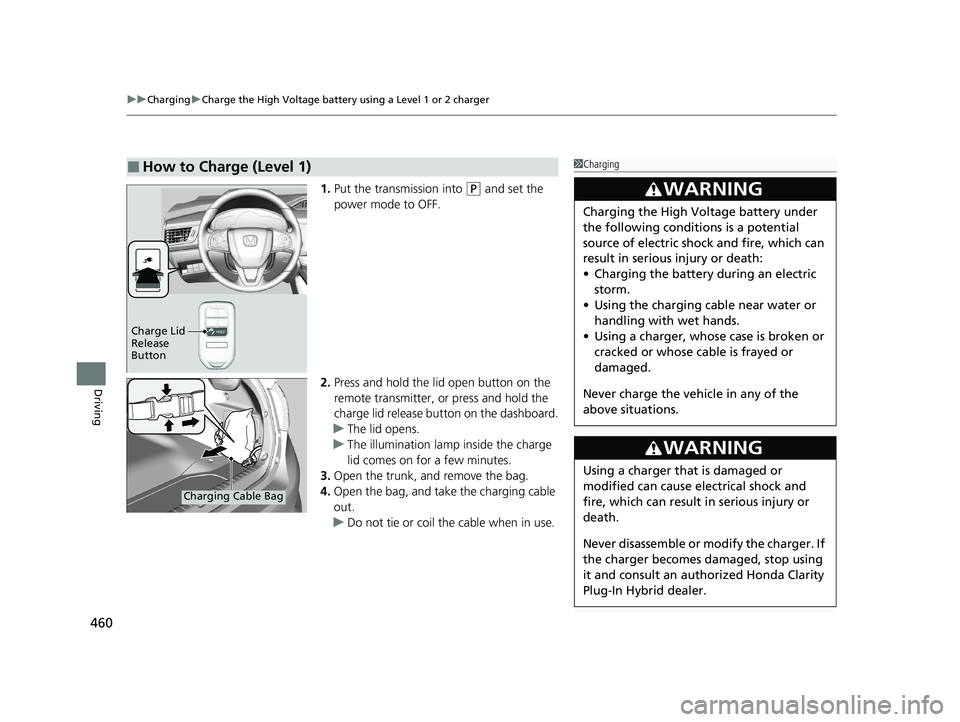
1. Put the transmission into (P and set the
power mode to OFF.
2. Press and hold the lid open button on the
remote transmitter, or press and hold the
charge lid release button on the dashboard.
u The lid opens.
u The illumination lamp inside the charge
lid comes on for a few minutes.
3. Open the trunk, and remove the bag.
4. Open the bag, and take the charging cable
out.
u Do not tie or coil the cable when in use.
■How to Charge (Level 1)1Charging
3WARNING
Charging the High Vo ltage battery under
the following conditions is a potential
source of electric shock and fire, which can
result in serious injury or death:
• Charging the battery during an electric
storm.
• Using the charging cable near water or
handling with wet hands.
• Using a charger, whose case is broken or
cracked or whose cable is frayed or
damaged.
Never charge the vehi cle in any of the
above situations.
3WARNING
Using a charger that is damaged or
modified can cause electrical shock and
fire, which can result in serious injury or
death.
Never disassemble or modify the charger. If
the charger becomes damaged, stop using
it and consult an authorized Honda Clarity
Plug-In Hybrid dealer.
Charge Lid
Release
Button
Charging Cable Bag
20 CLARITY PHEV-31TRW6200.book 460 ページ 2019年9月24日 火曜日 午後12時9分
Page 487 of 595
485
uuMaintenance Under the Hood uOpening the Hood
Maintenance
Opening the Hood
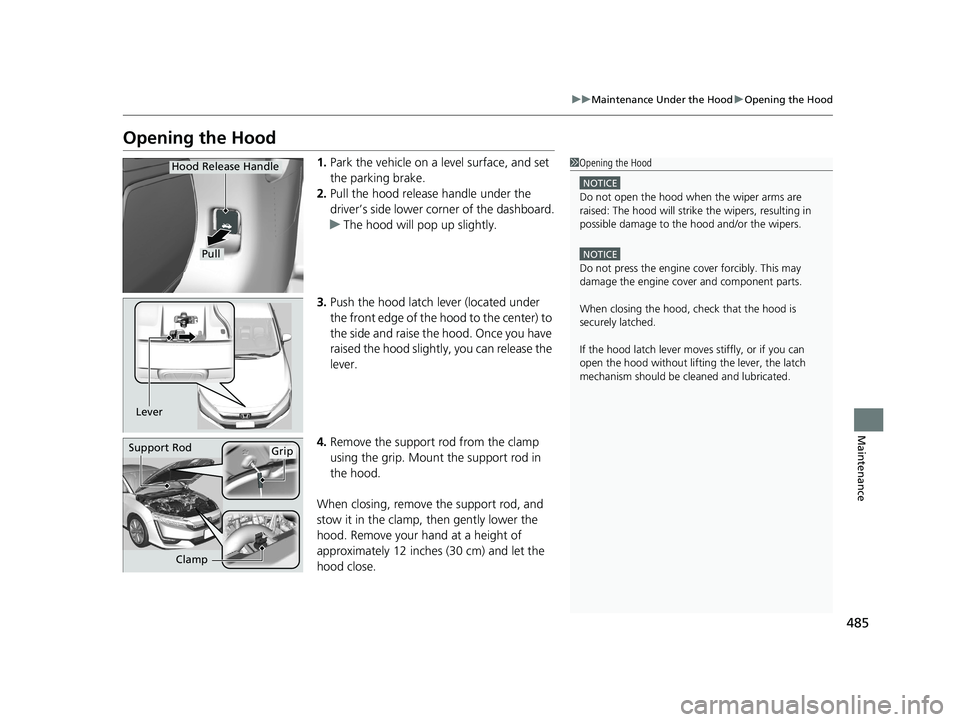
1. Park the vehicle on a level surface, and set
the parking brake.
2. Pull the hood release handle under the
driver’s side lower corner of the dashboard.
u The hood will pop up slightly.
3. Push the hood latch lever (located under
the front edge of the hood to the center) to
the side and raise the hood. Once you have
raised the hood slightly, you can release the
lever.
4. Remove the support rod from the clamp
using the grip. Mount the support rod in
the hood.
When closing, remove the support rod, and
stow it in the clamp, then gently lower the
hood. Remove your hand at a height of
approximately 12 inches (30 cm) and let the
hood close.1 Opening the Hood
NOTICE
Do not open the hood when the wiper arms are
raised: The hood will strike the wipers, resulting in
possible damage to the hood and/or the wipers.
NOTICE
Do not press the engine cover forcibly. This may
damage the engine cover and component parts.
When closing the hood, check that the hood is
securely latched.
If the hood latch lever moves stiffly, or if you can
open the hood without lifti ng the lever, the latch
mechanism should be cl eaned and lubricated.
Pull
Hood Release Handle
Lever
Support RodGrip
Clamp
20 CLARITY PHEV-31TRW6200.book 485 ページ 2019年9月24日 火曜日 午後12時9分
Page 562 of 595
560
uuFuses uFuse Locations
Handling the Unexpected
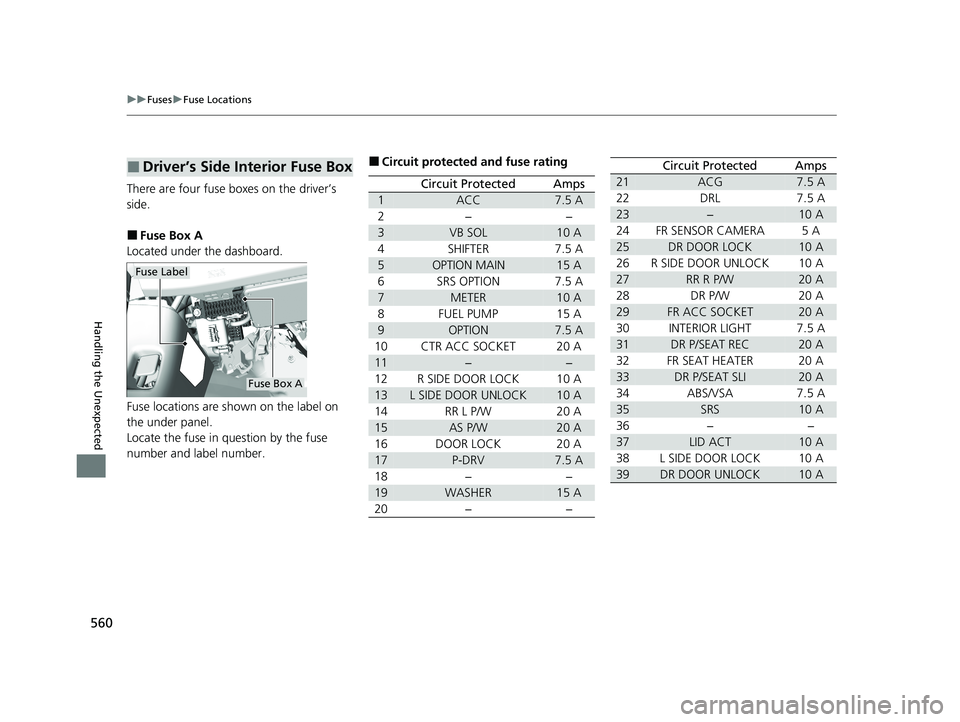
There are four fuse boxes on the driver’s
side.
■Fuse Box A
Located under the dashboard.
Fuse locations are shown on the label on
the under panel.
Locate the fuse in question by the fuse
number and label number.
■Driver’s Side Interior Fuse Box
Fuse Label
Fuse Box A
■Circuit protected and fuse rating
Circuit ProtectedAmps
1ACC7.5 A
2−−
3VB SOL10 A
4SHIFTER7.5 A
5OPTION MAIN15 A
6SRS OPTION7.5 A
7METER10 A
8FUEL PUMP15 A
9OPTION7.5 A
10CTR ACC SOCKET20 A
11−−
12R SIDE DOOR LOCK10 A
13L SIDE DOOR UNLOCK10 A
14RR L P/W20 A
15AS P/W20 A
16DOOR LOCK20 A
17P-DRV7.5 A
18−−
19WASHER15 A
20−−
21ACG7.5 A
22DRL7.5 A
23−10 A
24FR SENSOR CAMERA5A
25DR DOOR LOCK10 A
26R SIDE DOOR UNLOCK10 A
27RR R P/W20 A
28DR P/W20 A
29FR ACC SOCKET20 A
30INTERIOR LIGHT7.5 A
31DR P/SEAT REC20 A
32FR SEAT HEATER20 A
33DR P/SEAT SLI20 A
34ABS/VSA7.5 A
35SRS10 A
36−−
37LID ACT10 A
38L SIDE DOOR LOCK10 A
39DR DOOR UNLOCK10 A
Circuit ProtectedAmps
20 CLARITY PHEV-31TRW6200.book 560 ページ 2019年9月24日 火曜日 午後12時9分
Page 569 of 595
567
Handling the Unexpected
When You Cannot Open the Charge Lid
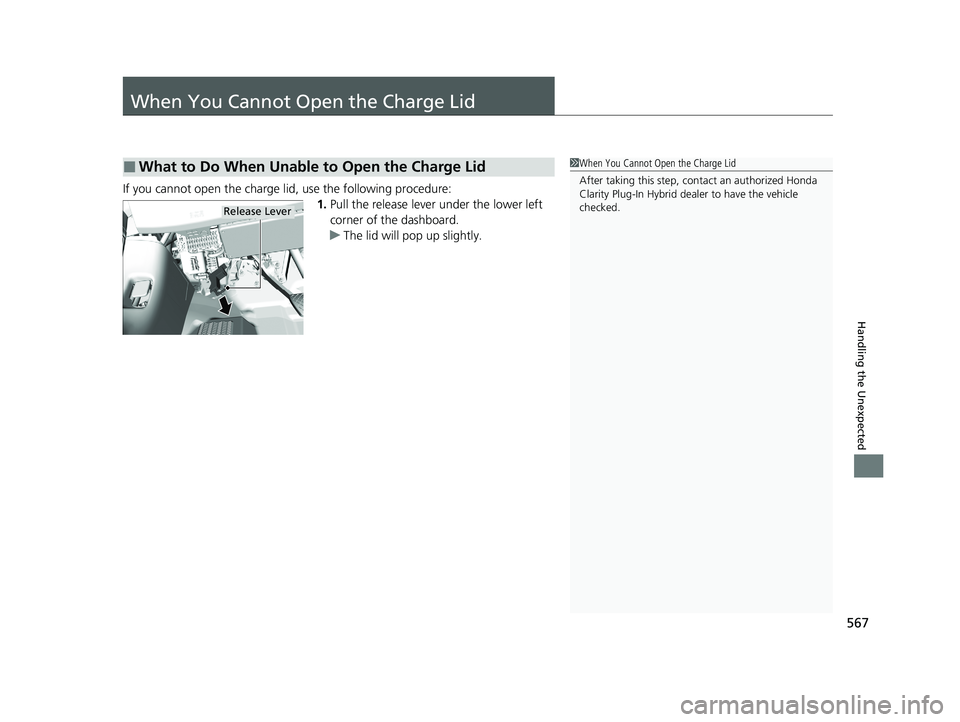
If you cannot open the charge lid, use the following procedure:1.Pull the release lever under the lower left
corner of the dashboard.
u The lid will pop up slightly.
■What to Do When Unable to Open the Charge Lid1When You Cannot Open the Charge Lid
After taking this step, cont act an authorized Honda
Clarity Plug-In Hybrid deal er to have the vehicle
checked.
Release Lever
20 CLARITY PHEV-31TRW6200.book 567 ページ 2019年9月24日 火曜日 午後12時9分