phone HONDA CLARITY PLUG-IN 2020 (in English) Owner's Guide
[x] Cancel search | Manufacturer: HONDA, Model Year: 2020, Model line: CLARITY PLUG-IN, Model: HONDA CLARITY PLUG-IN 2020Pages: 595, PDF Size: 30.43 MB
Page 282 of 595
280
uuAudio System Basic Operation uAndroid Auto
Features
Android Auto
When you connect an Android phone to the Display Audio system via the 1.5A USB
port, Android Auto is automatically initiated. When connected via Android Auto,
you can use the audio/information screen to access the Phone, Google Maps
(Navigation), Google Play Music, and Google Now functions. When you first use
Android Auto, a tutorial w ill appear on the screen.
We recommend that you complete this tuto rial while safely parked before using
Android Auto.
2 USB Ports P. 205
2 Auto Pairing Connection P. 282
1Android Auto
To use Android Auto, you need to download the
Android Auto app from Google Play to your
smartphone.
Only Android 5.0 (Lollipop) or later versions are
compatible with Android Auto.
Bluetooth A2DP cannot be used with Android Auto
phone.
Park in a safe place befo re connecting your Android
phone to Android Auto and when launching any
compatible apps.
To use Android Auto, connect the USB cable to the
USB port (1.5A). The USB port (1.0A) will not enable
Android Auto operation. 2 USB Ports P. 205
When your Android phone is connected to Android
Auto, it is not possible to use the Bluetooth® Audio.
However, other previously paired phones can stream
audio via Bluetooth ® while Android Auto is
connected.
2 Phone Setup P. 345
20 CLARITY PHEV-31TRW6200.book 280 ページ 2019年9月24日 火曜日 午後12時9分
Page 283 of 595
Continued281
uuAudio System Basic Operation uAndroid Auto
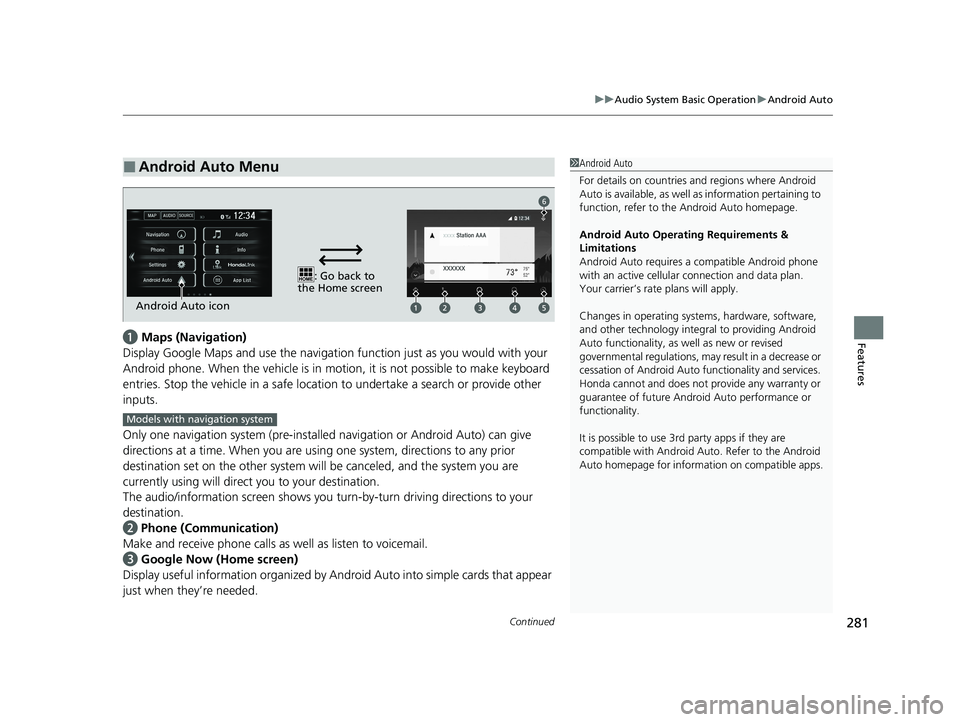
Featuresa Maps (Navigation)
Display Google Maps and use the navigation function just as you would with your
Android phone. When the vehicle is in motion, it is not possible to make keyboard
entries. Stop the vehicle in a safe locati on to undertake a search or provide other
inputs.
Only one navigation system (pre-installed navigation or Android Auto) can give
directions at a time. When you are using one system, directions to any prior
destination set on the other system will be canceled, and the system you are
currently using will direct you to your destination.
The audio/information screen shows you turn-by-turn dr iving directions to your
destination.
b Phone (Communication)
Make and receive phone calls as well as listen to voicemail.
c Google Now (Home screen)
Display useful information organized by Android Auto into simple cards that appear
just when they’re needed.
■Android Auto Menu1 Android Auto
For details on c ountries and regions where Android
Auto is available, as well as information pertaining to
function, refer to the Android Auto homepage.
Android Auto Operating Requirements &
Limitations
Android Auto requires a compatible Android phone
with an active cellular connection and data plan.
Your carrier’s rate plans will apply.
Changes in operating system s, hardware, software,
and other technology integral to providing Android
Auto functionality, as well as new or revised
governmental regulations, may result in a decrease or
cessation of Android Auto functionality and services.
Honda cannot and does not pr ovide any warranty or
guarantee of future Android Auto performance or
functionality.
It is possible to use 3r d party apps if they are
compatible with Android Auto. Refer to the Android
Auto homepage for informat ion on compatible apps.
: Go back to
the Home screen
Android Auto icon
6
Models with navigation system
20 CLARITY PHEV-31TRW6200.book 281 ページ 2019年9月24日 火曜日 午後12時9分
Page 284 of 595
uuAudio System Basic Operation uAndroid Auto
282
Features
d Music and audio
Play Google Play Music and music apps that are compatible with Android Auto.
To switch between music apps, press this icon.
e Go back to the Home Screen.
f Voice
Operate Android Auto with your voice.
When you connect an Android phone to the unit via the 1.5A USB port, Android
Auto is automatically initiated.
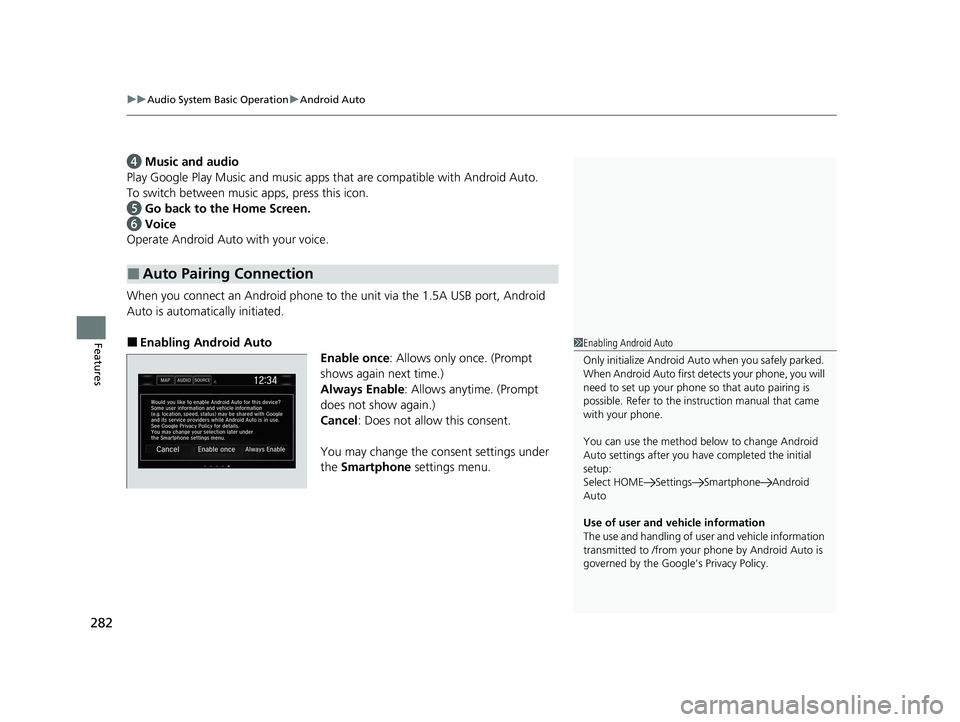
■Enabling Android Auto Enable once: Allows only once. (Prompt
shows again next time.)
Always Enable : Allows anytime. (Prompt
does not show again.)
Cancel : Does not allow this consent.
You may change the consent settings under
the Smartphone settings menu.
■Auto Pairing Connection
1Enabling Android Auto
Only initialize Android Auto when you safely parked.
When Android Auto first detects your phone, you will
need to set up your phone so that auto pairing is
possible. Refer to the inst ruction manual that came
with your phone.
You can use the method below to change Android
Auto settings after you have completed the initial
setup:
Select HOME Settings Smartphone Android
Auto
Use of user and vehicle information
The use and handling of user and vehicle information
transmitted to /from your phone by Android Auto is
governed by the Google’s Privacy Policy.
20 CLARITY PHEV-31TRW6200.book 282 ページ 2019年9月24日 火曜日 午後12時9分
Page 288 of 595
286
uuAudio Error Messages uPandora®
Features
Pandora ®
If an error occurs while playing Pandora ®, you may see the following error messages.
If you cannot clear the error message, cont act an authorized Honda Clarity Plug-In
Hybrid dealer.
Error MessageSolution
To begin listening, select a station from the Stations list.Appears when there is no station list on the device. Use the device
to create a station.
The maximum number of tracks th at can be skipped has been
reached.Appears when you try to skip a track or select Like/Dislike over
the predetermined number of times in an hour.
Unable to play PANDORA. Please try again later.
Unable to rate track. Please try again.
Unable to save bookmark.
Appears when the commanded op eration fails. Try again later.
No DataAppears when no data is available with Pandora® activated.
Reboot the app and reconnect the device.
PANDORA App version is not supported.Appears when Pandora ® version is not supported. Update
Pandora® to the latest version.
PANDORA system maintenance.Appears when the Pandora ® server is in maintenance. Try again
later.
Unable to connect to PANDORA. When stopped, check your
mobile phone.Appears when Pandora ® is unable to play music. Check your
device.
Unable to connect to PANDORA. When stopped, check your
mobile phone.Appears when Pandora ® app is not installed on your device. Install
Pandora® app to your device.
U.S. models
20 CLARITY PHEV-31TRW6200.book 286 ページ 2019年9月24日 火曜日 午後12時9分
Page 292 of 595
290
uuGeneral Information on the Audio System uCompatible iPod, iPhone, and USB Flash Drives
Features
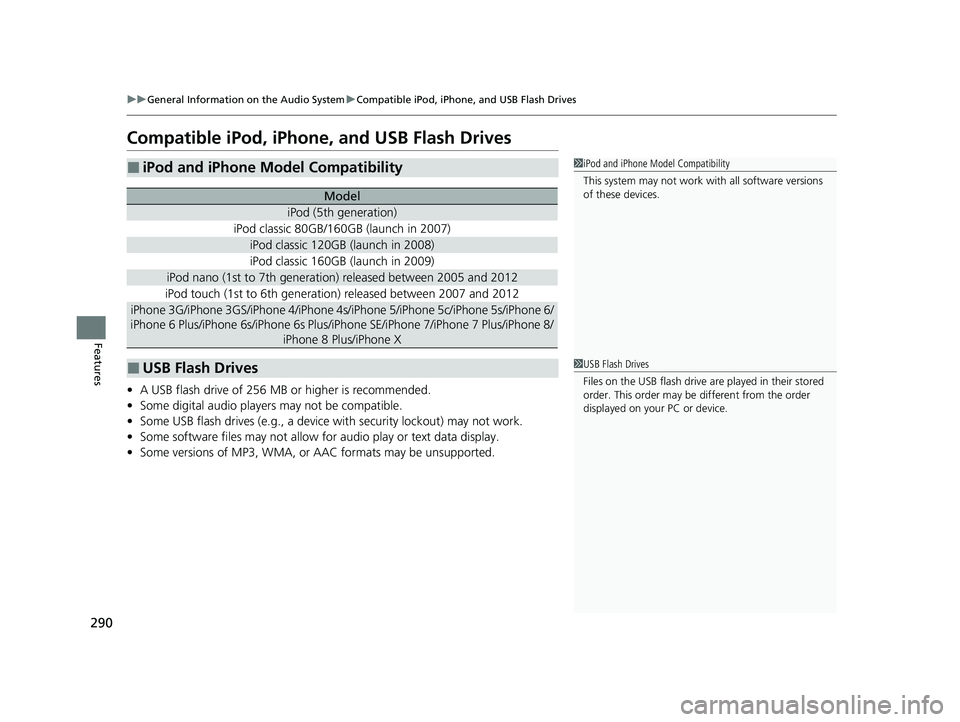
Compatible iPod, iPhone, and USB Flash Drives
• A USB flash drive of 256 MB or higher is recommended.
• Some digital audio players may not be compatible.
• Some USB flash drives (e.g., a device with security lockout) may not work.
• Some software files may not allow for audio play or text data display.
• Some versions of MP3, WMA, or AAC formats may be unsupported.
■iPod and iPhone Model Compatibility
Model
iPod (5th generation)
iPod classic 80GB/160GB (launch in 2007)
iPod classic 120GB (launch in 2008)
iPod classic 160GB (launch in 2009)
iPod nano (1st to 7th generation) released between 2005 and 2012
iPod touch (1st to 6th generation) released between 2007 and 2012
iPhone 3G/iPhone 3GS/iPhone 4/iPhone 4s /iPhone 5/iPhone 5c/iPhone 5s/iPhone 6/
iPhone 6 Plus/iPhone 6s/iPhone 6s Plus/iPhone SE/iPhone 7/iPhone 7 Plus/iPhone 8/
iPhone 8 Plus/iPhone X
■USB Flash Drives
1iPod and iPhone Model Compatibility
This system may not work with all software versions
of these devices.
1USB Flash Drives
Files on the USB flash drive are played in their stored
order. This order may be different from the order
displayed on your PC or device.
20 CLARITY PHEV-31TRW6200.book 290 ページ 2019年9月24日 火曜日 午後12時9分
Page 303 of 595
301
uuGeneral Information on the Audio System uHonda App License Agreement
Continued
Features
L. Changes to the SOFT WARE or SERVICES. WE may change, modify, or update the SOFTWARE or SERVICES from time to time. Unless
explicitly stated otherwise, any new featur es or services that augment or enhance the SOFTWARE or SERVICES in the future shall
respectively be considered part of the SOFTWARE or SERVICES and s ubject to this AGREEMENT. WE reserve the right at any time and from
time to time to interrupt, res trict, modify, suspend, discontinue, temporarily or permanently, the SOFTWARE or SERVICES (or any portion
thereof), with or without notice to you, and you agree that HONDA shall not be li able to you or to any third party for any modification,
suspension or discontinuance of the SOFTWARE or SERVICES.
M. ARBITRATION:
PLEASE READ THIS ARBITRATION PROVISION CAREFULLY TO UNDER STAND YOUR RIGHTS. YOU AGREE THAT ANY CLAIM THAT YOU
MAY HAVE IN THE FUTURE MUST BE RESOLVED THROUGH BIND ING ARBITRATION. YOU WAIVE THE RIGHT TO HAVE YOUR DISPUTE
HEARD IN COURT AND WAIVE THE RIGHT TO BRING CLASS CL AIMS. YOU UNDERSTAND THAT DISCOVERY AND APPEAL RIGHTS ARE
MORE LIMITED IN ARBITRATION.
Arbitration is a method of resolving a claim, dispute or contro versy without filing a lawsuit. By agreeing to arbitrate, the right to go to
court is waived and instead clai ms, disputes or controversies are submitted to binding arbitration. This provision sets forth t he terms and
conditions of our agreement. YOU and HONDA agree and acknowle dge that this Agreement affects interstate commerce and the
Federal Arbitration Act (“FAA”) applies. By using the Software, Vehicle, or Services, YO U elect to have disputes resolved by arbitration.
YOU, HONDA or any involved third party may pursue a Claim. “Claim” means any dispute between YOU, HONDA, or any involved third
party relating to your use of the Software , the Vehicle, or the Services, this Agreement, or our relationship, including any
representations, omissions or warranties. “Claim” does not include personal injury or wrongful death claims. YOU or HONDA may s eek
remedies in small claims court or provisional judicial remedies without arbitrating. In addition, notwithstanding anything here in to the
contrary, YOU or HONDA may seek equitable re lief in a court of competent jurisdiction.
YOU or HONDA may select arbitration with American Arbitration Asso ciation, JAMS or National Arbitration and Mediation. Contact
these sponsors for their rules. The hearing will be in the federal district where YOU reside. If agreed, it may be by telephone or written
submissions. Filing and arbitrator fees to be paid per the sponsor rules. You may contact the sponsor for a fee waiver. If no fee waivers,
HONDA will pay filing and arbitrator fees up to $5,000, unless law requires more. Each party is responsible for other fees. Arbitrator
may award costs or fees to pr evailing party, if permitted by law. HONDA will not seek fees, unless the claims are frivolous.
20 CLARITY PHEV-31TRW6200.book 301 ページ 2019年9月24日 火曜日 午後12時9分
Page 305 of 595
303
uuGeneral Information on the Audio System uLegal Information on Apple CarPlay/Android Auto
Continued
Features
Legal Information on Appl e CarPlay/Android Auto
USE OF APPLE CARPLAY IS SUBJECT TO YOUR AGREEMENT TO THE CARPLAY TERMS OF USE, WHICH ARE INCLUDED AS PART OF THE
APPLE iOS TERMS OF USE. IN SUMMARY, THE CARPLAY TERMS OF USE DISCLAIM APPLE AND ITS SERVICE PROVIDERS’ LIABILITY IF THE
SERVICES FAIL TO PERFORM CORRECTLY OR ARE DISCONTINUED, STRICTLY LIMIT APPLE AND ITS SERVICE PROVIDERS’ OTHER
LIABILITIES, DESCRIBE THE KINDS OF USER INFORMATION (INCLUDING, FOR EXAMPL E, VEHICLE LOCATION, VEHICLE SPEED, AND
VEHICLE STATUS) BEING GATHERED AND STORED BY APPLE AND IT S SERVICE PROVIDERS, AND DISCLOSE CERTAIN POSSIBLE RISKS
ASSOCIATED WITH THE USE OF CARPLAY, INCLUDING THE POTENTIAL FOR DRIVER DISTRACTION. SEE APPLE’S PRIVACY POLICY FOR
DETAILS REGARDING APPLE'S USE AND HANDL ING OF DATA UPLOADED BY CARPLAY.
USE OF ANDROID AUTO IS SUBJECT TO YOUR AGREEMENT TO THE ANDROID AUTO TERMS OF USE WHICH MUST BE AGREED TO WHEN\
THE ANDROID AUTO APPLICATION IS DOWNLOADED TO YOUR ANDR OID PHONE. IN SUMMARY, THE ANDROID AUTO TERMS OF USE
DISCLAIM GOOGLE AND ITS SERVICE PROVIDERS’ LIABILITY IF THE SERVICES FAIL TO PERFORM CORRECTLY OR ARE DISCONTINUED,
STRICTLY LIMIT GOOGLE AND ITS SERVICE PROV IDERS’ OTHER LIABILITIES, DESCRIBE THE KINDS OF USER INFORMATION (INCLUDING,
FOR EXAMPLE, VEHICLE LOCATION, VEHI CLE SPEED, AND VEHICLE STATUS) BEING GATHERED AND STORED BY GOOGLE AND ITS
SERVICE PROVIDERS, AND DISCLOSE CERTAIN POSSIBLE RISKS ASSOCIATED WITH THE USE OF ANDROID AUTO, INCLUDING THE
POTENTIAL FOR DRIVER DISTRACTION. SEE GOOGLE’S PRIVACY PO LICY FOR DETAILS REGARDING GOOGLE’S USE AND HANDLING OF
DATA UPLOADED BY ANDROID AUTO.
■OWNER’S MANUAL LICENSE/LIABILITY STATEMENTS
20 CLARITY PHEV-31TRW6200.book 303 ページ 2019年9月24日 火曜日 午後12時9分
Page 310 of 595
308
uuCustomized Features u
Features
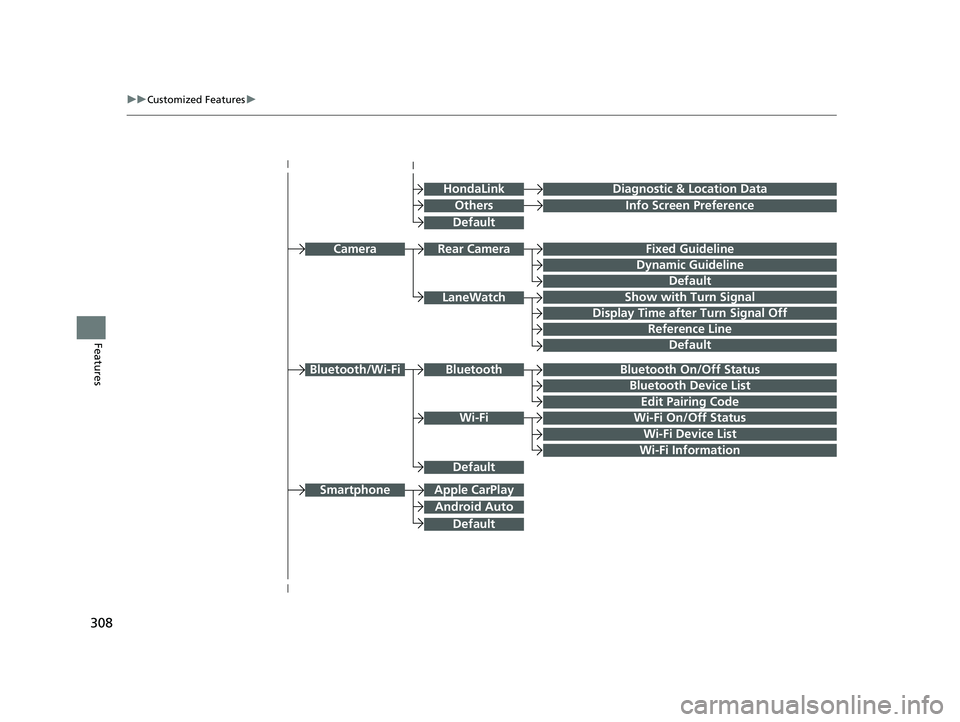
Bluetooth On/Off Status
Bluetooth Device List
Edit Pairing Code
Wi-Fi On/Off Status
Wi-Fi Device List
Bluetooth/Wi-Fi
Wi-Fi Information
Fixed Guideline
Dynamic Guideline
Show with Turn Signal
Camera
Display Time after Turn Signal Off
Reference Line
Apple CarPlay
Android Auto
Smartphone
Rear Camera
LaneWatch
Bluetooth
Default
Default
Default
Default
Info Screen Preference
Diagnostic & Location DataHondaLink
Others
Default
Wi-Fi
20 CLARITY PHEV-31TRW6200.book 308 ページ 2019年9月24日 火曜日 午後12時9分
Page 311 of 595
309
uuCustomized Features u
Continued
Features
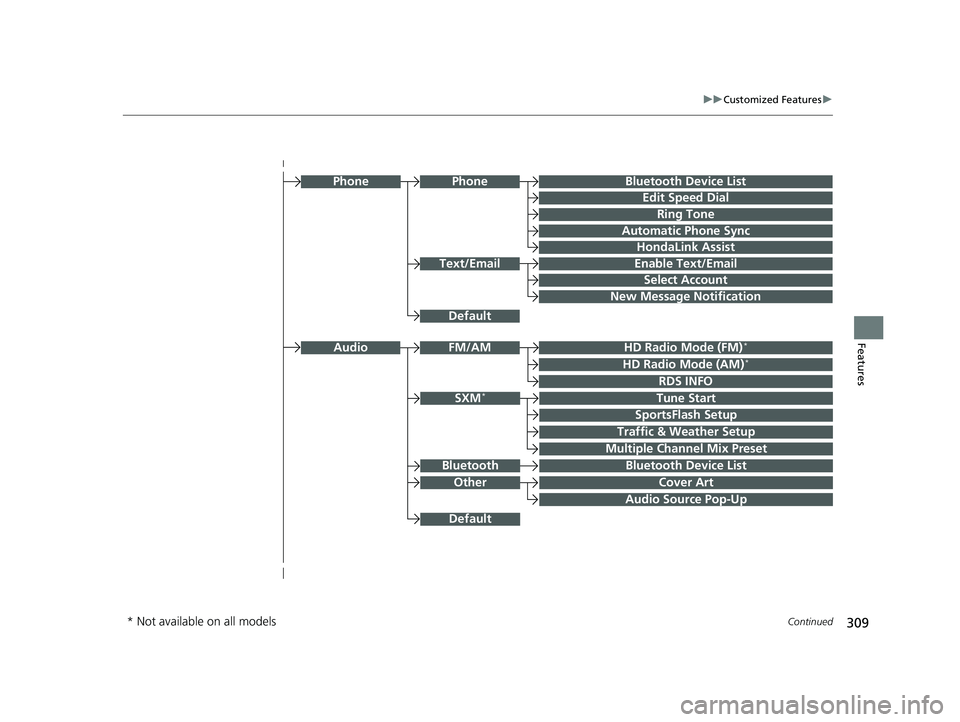
Audio Source Pop-Up
Cover Art
Tune Start
SportsFlash Setup
Traffic & Weather Setup
Other
SXM*
Default
Bluetooth Device ListBluetooth
Multiple Channel Mix Preset
Bluetooth Device List
Edit Speed Dial
Ring Tone
Automatic Phone Sync
HondaLink Assist
Enable Text/Email
Select Account
New Message Notification
Phone
HD Radio Mode (FM)*
RDS INFO
AudioFM/AM
HD Radio Mode (AM)*
Default
Phone
Text/Email
* Not available on all models
20 CLARITY PHEV-31TRW6200.book 309 ページ 2019年9月24日 火曜日 午後12時9分
Page 313 of 595
311
uuCustomized Features u
Continued
Features
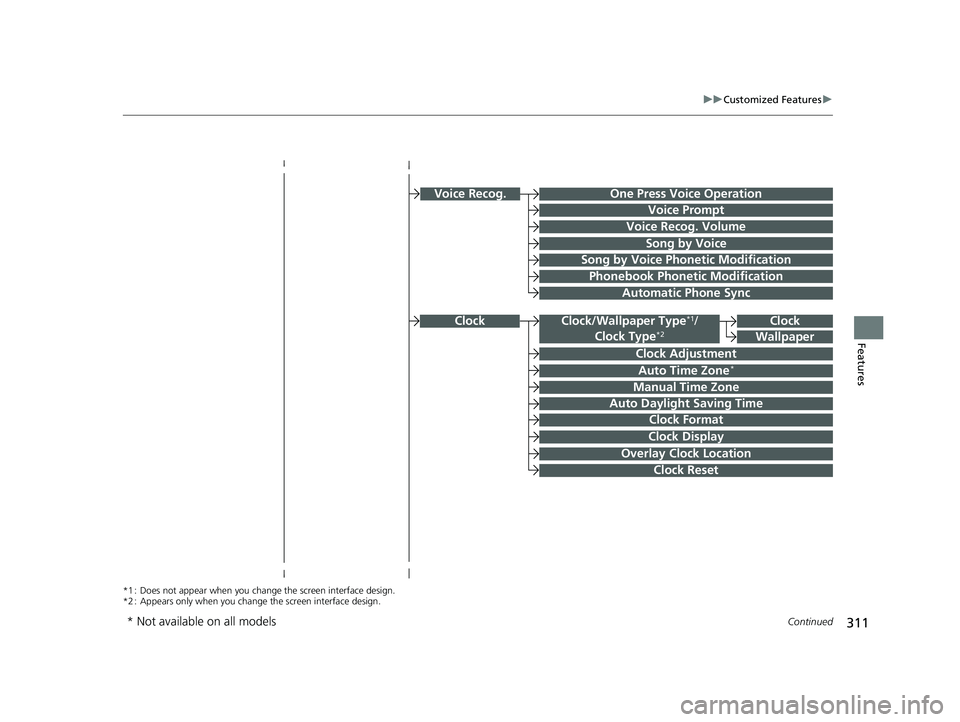
Clock
Clock Adjustment
Clock Format
Auto Time Zone*
Manual Time Zone
Auto Daylight Saving Time
Clock Display
Overlay Clock Location
Clock Reset
Clock
Wallpaper
*1 : Does not appear when you chan ge the screen interface design.
*2 : Appears only when you change the screen interface design.
Voice Prompt
Voice Recog. Volume
Song by Voice
Song by Voice Phonetic Modification
Phonebook Phonetic Modification
Automatic Phone Sync
One Press Voice OperationVoice Recog.
Clock/Wallpaper Type*1/
Clock Type*2
* Not available on all models
20 CLARITY PHEV-31TRW6200.book 311 ページ 2019年9月24日 火曜日 午後12時9分