ad blue HONDA CLARITY PLUG-IN 2021 Owner's Manual (in English)
[x] Cancel search | Manufacturer: HONDA, Model Year: 2021, Model line: CLARITY PLUG-IN, Model: HONDA CLARITY PLUG-IN 2021Pages: 596, PDF Size: 30.45 MB
Page 7 of 596
Contents
Child Safety P. 71Safety Labels P. 85
Opening and Closing the Trunk P. 152 Security System P. 155 Opening and Closing the Windows P. 158
Adjusting the Mirrors P. 175 Adjusting the Seats P. 177
Climate Control System P. 195
Audio Error Messages P. 286 General Information on the Audio System P. 290
Bluetooth ® HandsFreeLink ® P. 339
When Driving P. 380 Braking P. 437Parking Your Vehicle P. 453
Charging P. 460 Fuel Economy and CO
2 Emissions P. 475
Maintenance Under the Hood P. 486 Replacing Light Bulbs P. 500
Checking and Maintaining Tires P. 505 12-Volt Battery P. 514 Remote Transmitter Care P. 516
Accessories and Modifications P. 525
Power System Won’t Start P. 541 If the 12-Volt Battery Is Dead P. 545 Overheating P. 548
Fuses P. 559 Emergency Towing P. 567
If You Cannot Open the Charge Lid P.569 If You Cannot Open the Trunk P. 570
Devices that Emit Radio Waves P. 575 Reporting Safety Defects P. 576
Authorized Manuals P. 582 Customer Service Information P. 583
Quick Reference GuideP. 6
Safe DrivingP. 41
Instrument PanelP. 87
ControlsP. 137
FeaturesP. 205
DrivingP. 373
MaintenanceP. 477
Handling the UnexpectedP. 527
InformationP. 571
IndexP. 585
21 CLARITY PHEV CSS-31TRW6300.book 5 ページ 2020年5月19日 火曜日 午前10時 46分
Page 9 of 596
7
Quick Reference Guide
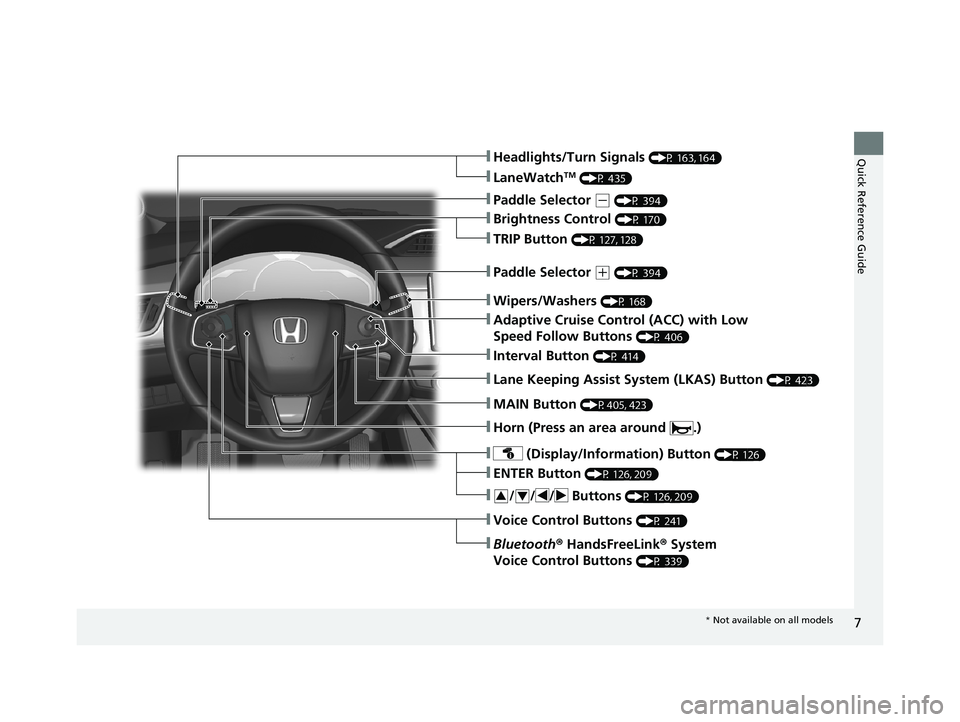
❚Wipers/Washers (P 168)
❚Headlights/Turn Signals (P 163, 164)
❚Brightness Control (P 170)
❚LaneWatchTM (P 435)
❚TRIP Button (P 127, 128)
❚Lane Keeping Assist System (LKAS) Button (P 423)
❚ (Display/Information) Button (P 126)
❚/ / / Buttons (P 126, 209)34
❚ENTER Button (P 126, 209)
❚Voice Control Buttons (P 241)
❚Bluetooth® HandsFreeLink ® System
Voice Control Buttons
(P 339)
❚Horn (Press an area around .)
❚Paddle Selector (- (P 394)
❚Paddle Selector (+ (P 394)
❚MAIN Button (P405, 423)
❚Adaptive Cruise Control (ACC) with Low
Speed Follow Buttons
(P 406)
❚Interval Button (P 414)
* Not available on all models
21 CLARITY PHEV CSS-31TRW6300.book 7 ページ 2020年5月19日 火曜日 午前10時 46分
Page 15 of 596
13
Quick Reference Guide
Auto Engine Stop/Start
The car will select the appropriate source of power depending on the drive mode you select.
As a result, the engine will automatically start or stop as needed to either charge the battery or provide supplemental power.
Under certain circumstances, the engine may turn on or, if it is already on, it may not turn off.
●You are going uphill or accelerating aggressively.●The climate control system is in heavy use.●The Ambient temperature is too hot or too cold.●The High Voltage Battery state of charge is very low.●The engine has not been sufficiently warmed up.●The vehicle is running a system check.
System Check
When the engine initially starts (between the time the POWER button is turned on and turned of f), the vehicle conducts a system check.●While the check is being conducted, the engine may periodically turn on and off. This, however, is normal.●The curved blue line in the POWER/CHARGE Gauge will not appear during the system check ( EV indicator may still turn on).●Once the engine starts, it will continue to run until the system reaches operating temperature.
The curved blue line in the POWER/CHARGE Gauge will reappear once the system check is completed.
2 POWER/CHARGE Gauge (P124)
21 CLARITY PHEV CSS-31TRW6300.book 13 ページ 2020年5月19日 火曜日 午前10 時46分
Page 16 of 596
14
Quick Reference Guide
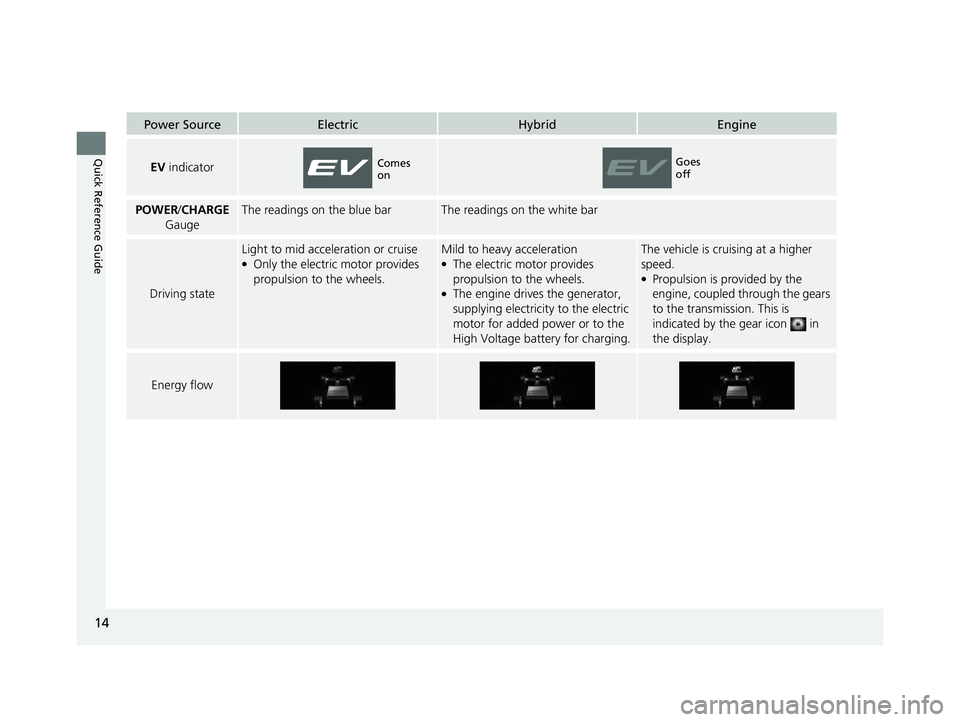
Power SourceElectricHybridEngine
EV indicator
POWER /CHARGE
GaugeThe readings on the blue barThe readings on the white bar
Driving state
Light to mid acceleration or cruise●Only the electric motor provides
propulsion to the wheels.
Mild to heavy acceleration●The electric motor provides
propulsion to the wheels.
●The engine drives the generator,
supplying electricity to the electric
motor for added power or to the
High Voltage battery for charging.
The vehicle is cruising at a higher
speed.
●Propulsion is provided by the
engine, coupled through the gears
to the transmission. This is
indicated by the gear icon in
the display.
Energy flow
Comes
onGoes
off
21 CLARITY PHEV CSS-31TRW6300.book 14 ページ 2020年5月19日 火曜日 午前10 時46分
Page 30 of 596
28
Quick Reference Guide
Features (P 205)
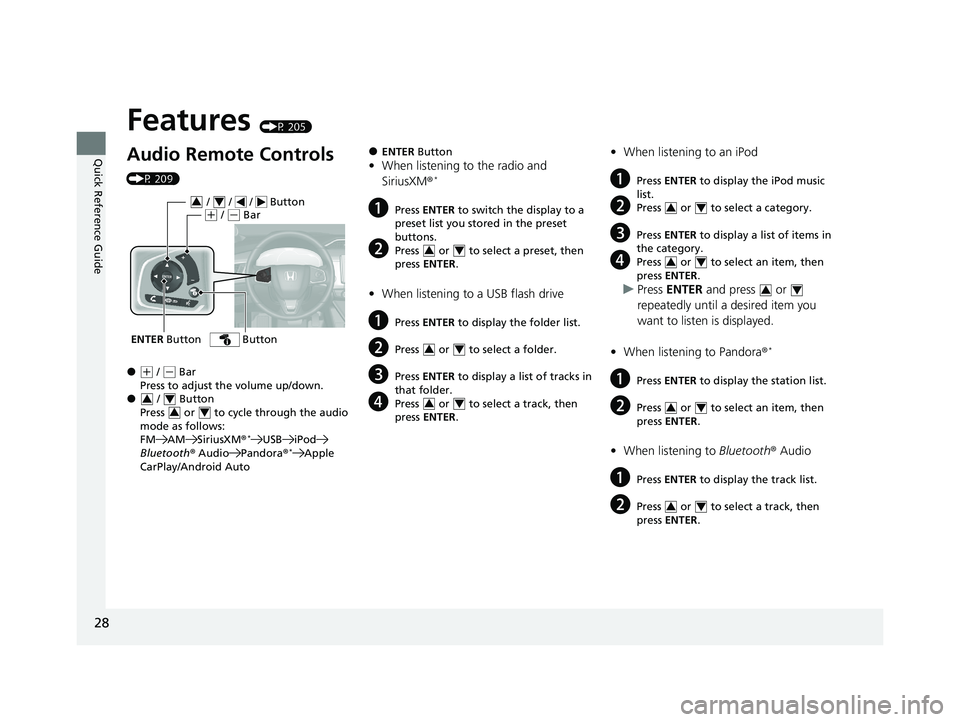
Audio Remote Controls
(P 209)
●(+ / ( - Bar
Press to adjust the volume up/down.
● / Button
Press or to cycle through the audio
mode as follows:
FM AM SiriusXM ®
*USB iPod
Bluetooth ® Audio Pandora®*Apple
CarPlay/Android Auto
ENTER Button
/ / / Button34(+ / (- Bar
Button
34
34
●ENTER Button
•When listening to the radio and
SiriusXM ®*
aPress ENTER to switch the display to a
preset list you stored in the preset
buttons.
bPress or to select a preset, then
press ENTER .
•When listening to a USB flash drive
aPress ENTER to display the folder list.
bPress or to select a folder.
cPress ENTER to display a list of tracks in
that folder.
dPress or to select a track, then
press ENTER .
34
34
34
•When listening to an iPod
aPress ENTER to display the iPod music
list.
bPress or to select a category.
cPress ENTER to display a list of items in
the category.
dPress or to select an item, then
press ENTER .
uPress ENTER and press or
repeatedly until a desired item you
want to listen is displayed.
• When listening to Pandora ®
*
aPress ENTER to display the station list.
bPress or to select an item, then
press ENTER .
•When listening to Bluetooth® Audio
aPress ENTER to display the track list.
bPress or to select a track, then
press ENTER .
34
34
34
34
34
21 CLARITY PHEV CSS-31TRW6300.book 28 ページ 2020年5月19日 火曜日 午前10 時46分
Page 40 of 596
38
Quick Reference Guide
Why doesn’t the curved
blue line in the meter
appear even when the EV
indicator is on?The vehicle is performing a system check.
2Auto Engine Stop/Start (P13)
Why does the beeper
sound when I start driving?The beeper sounds when the driver and/or front passenger are
not wearing their seat belts.
Why does a beeper sound
when I walk away from the
vehicle after I close the
door?The beeper sounds if you move outside the walk away auto lock
operating range before the door completely closes.
2Locking the doors and trunk (Walk away auto lock ®) (P 142)
Pressing the electric
parking brake switch does
not release the parking
brake. Why?Press the electric parking brake switch with the brake pedal
depressed.
Depressing the accelerator
pedal does not release the
parking brake
automatically. Why?●Fasten the driver’s seat belt.
●Check if the transmission is in (P or (N. If so, select any other
position.
21 CLARITY PHEV CSS-31TRW6300.book 38 ページ 2020年5月19日 火曜日 午前10 時46分
Page 126 of 596
uuGauges and Driver Information Interface uGauges
124
Instrument Panel
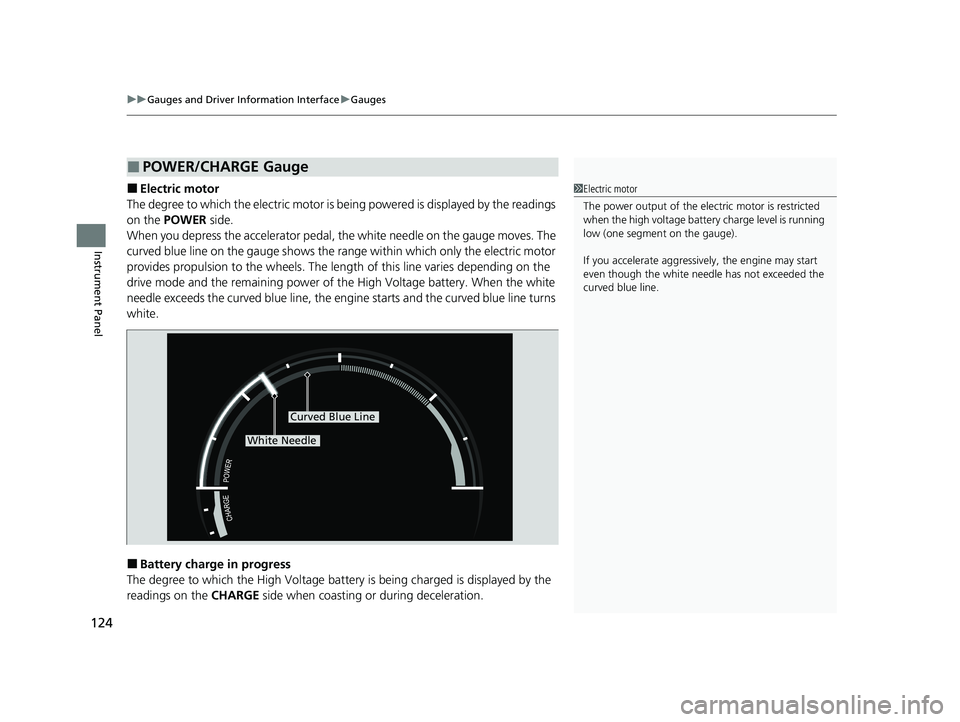
■Electric motor
The degree to which the electric motor is being powered is displayed by the readings
on the POWER side.
When you depress the accelerator pedal, th e white needle on the gauge moves. The
curved blue line on the gauge shows the range within which only the electric motor
provides propulsion to the wheels. The length of this line varies depending on the
drive mode and the remaining power of th e High Voltage battery. When the white
needle exceeds the curved blue line, the engine starts and the curved blue line turns
white.
■Battery charge in progress
The degree to which the High Voltage battery is being charged is displayed by the
readings on the CHARGE side when coasting or during deceleration.
■POWER/CHARGE Gauge
1Electric motor
The power output of the elec tric motor is restricted
when the high voltage battery charge level is running
low (one segment on the gauge).
If you accelerate aggressively, the engine may start
even though the white needle has not exceeded the
curved blue line.
Curved Blue Line
White Needle
21 CLARITY PHEV CSS-31TRW6300.book 124 ページ 2020年5月19日 火曜日 午前10時46分
Page 132 of 596
130
uuGauges and Driver Information Interface uDriver Information Interface
Instrument Panel
Shows the Maintenance MinderTM.
2 Maintenance MinderTM P. 481
Shows the current audio information.
2Audio System Basic Operation P. 212
Shows the current mail information.
2Bluetooth ® HandsFreeLink ® P. 339
Shows the current phone information.
2 Bluetooth ® HandsFreeLink ® P. 339
■Maintenance MinderTM
■Audio
■Mail
■Phone
21 CLARITY PHEV CSS-31TRW6300.book 130 ページ 2020年5月19日 火曜日 午前10時46分
Page 207 of 596
205
Features
This chapter describes how to operate technology features.
Audio SystemAbout Your Audio System ................ 206
USB Ports ......................................... 207
Audio System Theft Protection ......... 208
Audio Remote Controls .................... 209
Audio System Basic Operation ........ 212
Audio/Information Screen ................ 213
Adjusting the Sound ........................ 238
Display Setup ................................... 239
Voice Control Operation .................. 241
Playing AM/FM Radio ....................... 245
Playing SiriusXM ® Radio
*................. 249 Playing an iPod ................................ 257
Song By Voice
TM (SBV) ...................... 260
Playing Pandora ®*1........................... 264
Playing a USB Flash Drive ................. 266
Playing Bluetooth ® Audio................. 269
HondaLink ®..................................... 271
Wi-Fi Connection ............................. 276
Siri Eyes Free .................................... 278
Apple CarPlay .................................. 279
Android Auto................................... 282
Audio Error Messages ...................... 286
General Information on the Audio
System
............................................. 290
Customized Features............................308
HomeLink® Universal Transceiver*......336
Bluetooth ® HandsFreeLink® ............. 339
*1: Available only on U.S. models.
* Not available on all models
21 CLARITY PHEV CSS-31TRW6300.book 205 ページ 2020年5月19日 火曜日 午前10時46分
Page 208 of 596
206
Features
Audio System
About Your Audio System
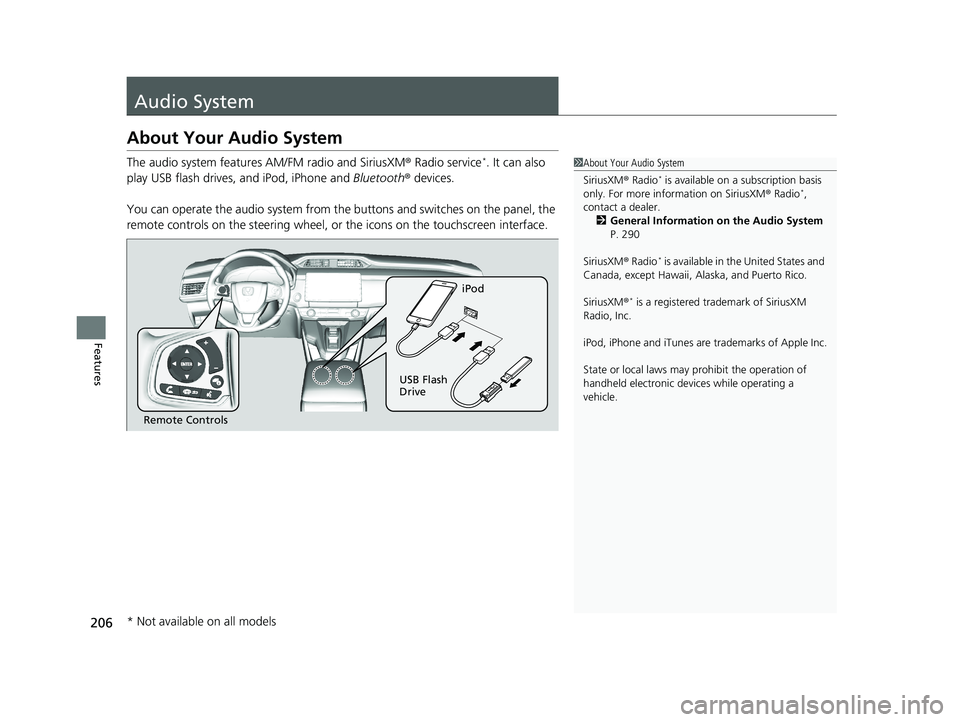
The audio system features AM/FM radio and SiriusXM ® Radio service*. It can also
play USB flash drives, and iPod, iPhone and Bluetooth® devices.
You can operate the audio system from the buttons and switches on the panel, the
remote controls on the steering wheel, or the icons on the touchscreen interface.1About Your Audio System
SiriusXM ® Radio
* is available on a subscription basis
only. For more information on SiriusXM ® Radio*,
contact a dealer.
2 General Information on the Audio System
P. 290
SiriusXM ® Radio
* is available in the United States and
Canada, except Ha waii, Alaska, and Puerto Rico.
SiriusXM ®
* is a registered tra demark of SiriusXM
Radio, Inc.
iPod, iPhone and iTunes are trademarks of Apple Inc.
State or local laws may pr ohibit the operation of
handheld electronic devi ces while operating a
vehicle.
Remote Controls iPod
USB Flash
Drive
* Not available on all models
21 CLARITY PHEV CSS-31TRW6300.book 206 ページ 2020年5月19日 火曜日 午前10時46分