tire pressure HONDA CR-V 2012 RM1, RM3, RM4 / 4.G Owners Manual
[x] Cancel search | Manufacturer: HONDA, Model Year: 2012, Model line: CR-V, Model: HONDA CR-V 2012 RM1, RM3, RM4 / 4.GPages: 361, PDF Size: 7.25 MB
Page 10 of 361
9
Quick Reference Guide
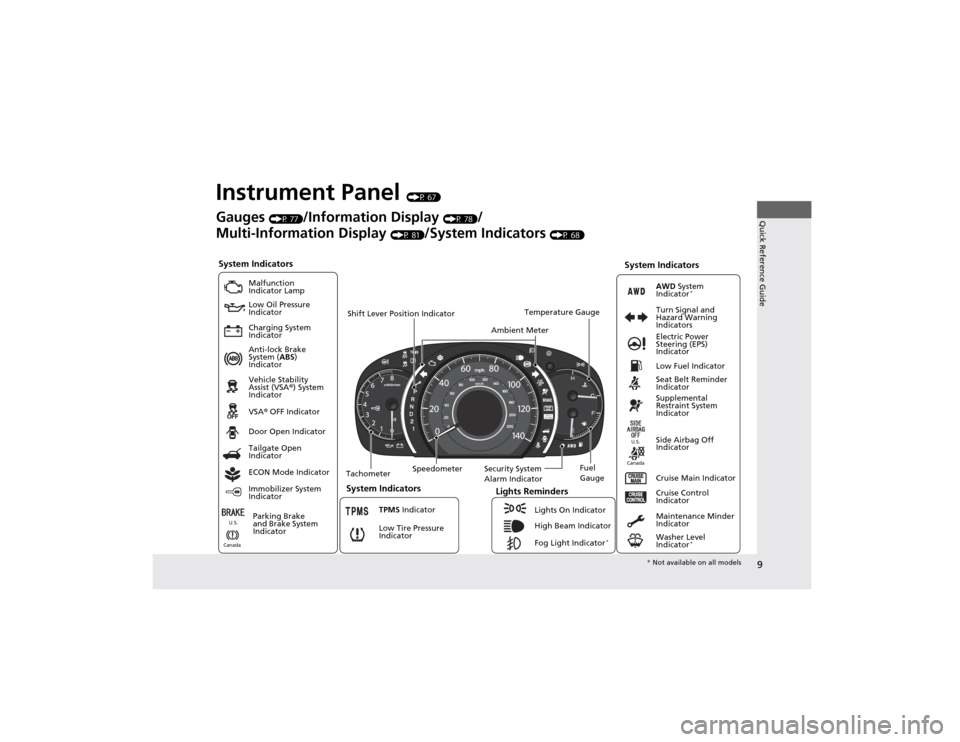
Instrument Panel (P 67)
System Indicators
Malfunction
Indicator Lamp
Low Oil Pressure
Indicator
Charging System
Indicator Anti-lock Brake
System ( ABS)
Indicator Vehicle Stability
Assist (VSA ®) System
Indicator VSA ® OFF Indicator
Low Tire Pressure
Indicator Lights Reminders
Lights On Indicator
High Beam Indicator
Fog Light Indicator *
Immobilizer System
Indicator Seat Belt Reminder
Indicator
System Indicators
Cruise Control
Indicator
Parking Brake
and Brake System
Indicator Supplemental
Restraint System
Indicator
Side Airbag Off
Indicator
Door Open Indicator
Cruise Main Indicator
Tachometer Speedometer
Fuel Gauge
Security System
Alarm Indicator
Shift Lever Position Indicator
Low Fuel Indicator
Gauges
(P 77)/Information Display (P 78)/
Multi-Information Display (P 81)/System Indicators (P 68)
Tailgate Open
Indicator
ECON Mode Indicator TPMS Indicator
Maintenance Minder
Indicator
Washer Level
Indicator*
Ambient Meter
Temperature Gauge
Electric Power
Steering (EPS)
Indicator
Turn Signal and
Hazard Warning
Indicators
AWD
System
Indicator *
System Indicators
Canada U.S.
Canada
U.S.
*
Not available on all models
Page 17 of 361
16
Quick Reference Guide
VSA® OFF Button (P 249)
● The vehicle stability assist (VSA ®) system
helps stabilize the vehicle during
cornering, and helps maintain traction
while accelerating on loose or slippery
road surfaces.
● VSA ® comes on automatically every time
you start the engine.
● To turn VSA ® on or off, press and hold
the button until you hear a beep.
Cruise Control (P 245)
● Cruise control allows you to maintain a
set speed without keeping your foot on
the accelerator pedal.
● To use cruise control, press the CRUISE
button, then press once you have
received the desired speed (above 25 mph or 40 km/h).
Tire Pressure Monitoring System (TPMS) (P 250)
● TPMS monitors tire pressure.
● TPMS is turned on automatically every
time you start the engine.
–/SET
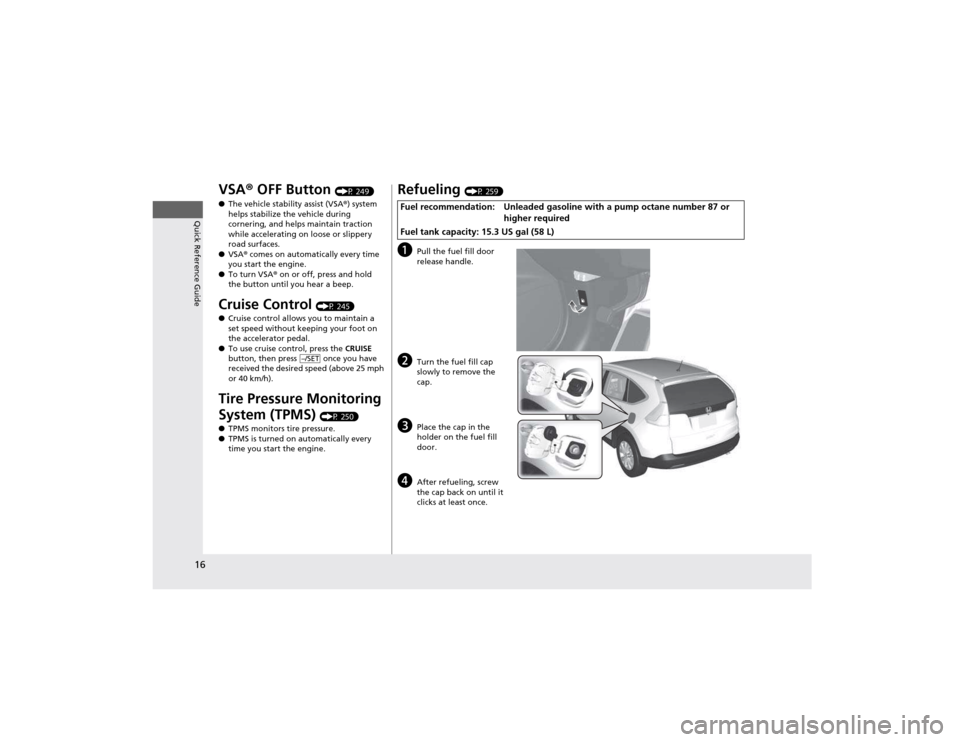
Refueling (P 259)
a Pull the fuel fill door
release handle.
b Turn the fuel fill cap
slowly to remove the cap.
c Place the cap in the
holder on the fuel fill
door.
d After refueling, screw
the cap back on until it
clicks at least once.
Fuel recommendation: Unleaded gasoline with
a pump octane number 87 or
higher required
Fuel tank capacity: 15.3 US gal (58 L)
Page 18 of 361
17
Quick Reference Guide
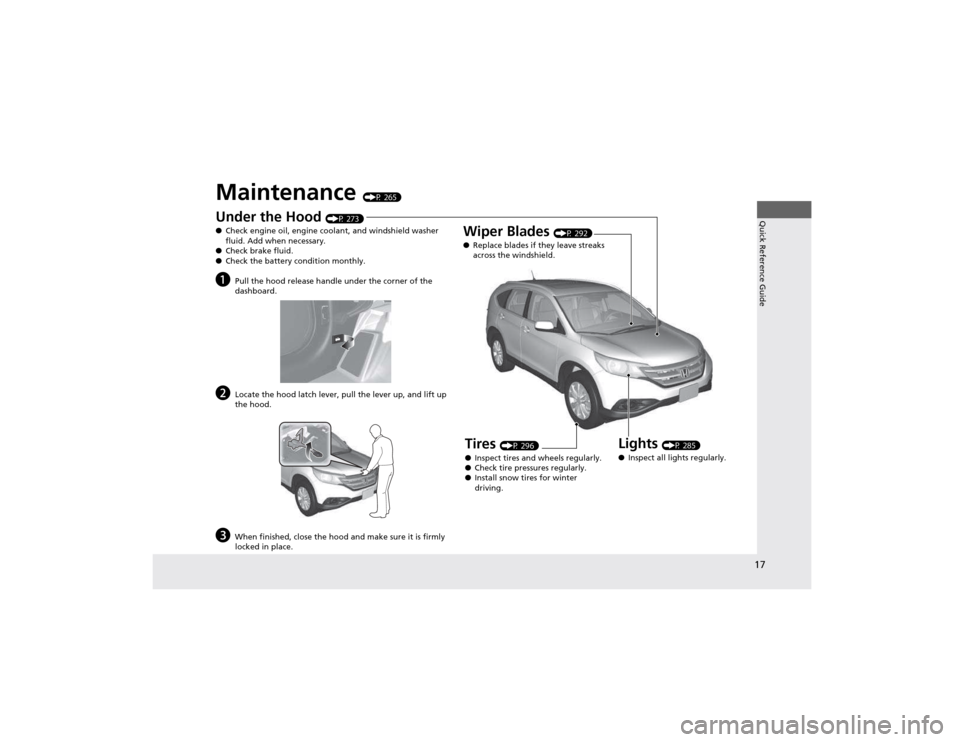
Maintenance (P 265)
Under the Hood (P 273)
● Check engine oil, engine coolant, and windshield washer
fluid. Add when necessary.
● Check brake fluid.
● Check the battery condition monthly.
a Pull the hood release handle under the corner of the
dashboard.
b Locate the hood latch lever, pull the lever up, and lift up
the hood.
c When finished, close the hood and make sure it is firmly
locked in place.
Lights (P 285)
● Inspect all lights regularly.
Wiper Blades
(P 292)
● Replace blades if they leave streaks
across the windshield.
Tires (P 296)
● Inspect tires and wheels regularly.
● Check tire pressures regularly.
● Install snow tires for winter
driving.
Page 26 of 361

25
uuFor Safe DrivinguImportant Safety Precautions
Safe Driving
■Pay appropriate attention to the task of driving safely
Engaging in cell phone conversation or other activities that keep you from paying
close attention to the road, other vehicles, and pedestrians could lead to a crash.
Remember, situations can change quickly, and only you can decide when it is safe to
divert some attention away from driving.
■ Control your speed
Excessive speed is a major factor in crash injuries and deaths. Generally, the higher
the speed, the greater the risk, but serious injuries can also occur at lower speeds.
Never drive faster than is safe for current conditions, regardless of the maximum speed posted.
■ Keep your vehicle in safe condition
Having a tire blowout or a mechanical failure can be extremely hazardous.
To reduce the possibility of such problems, check your tire pressures and condition
frequently, and perform all regularly scheduled maintenance.
Page 74 of 361
73
uuIndicatorsu
Continued
Instrument Panel
IndicatorNameOn/BlinkingExplanation
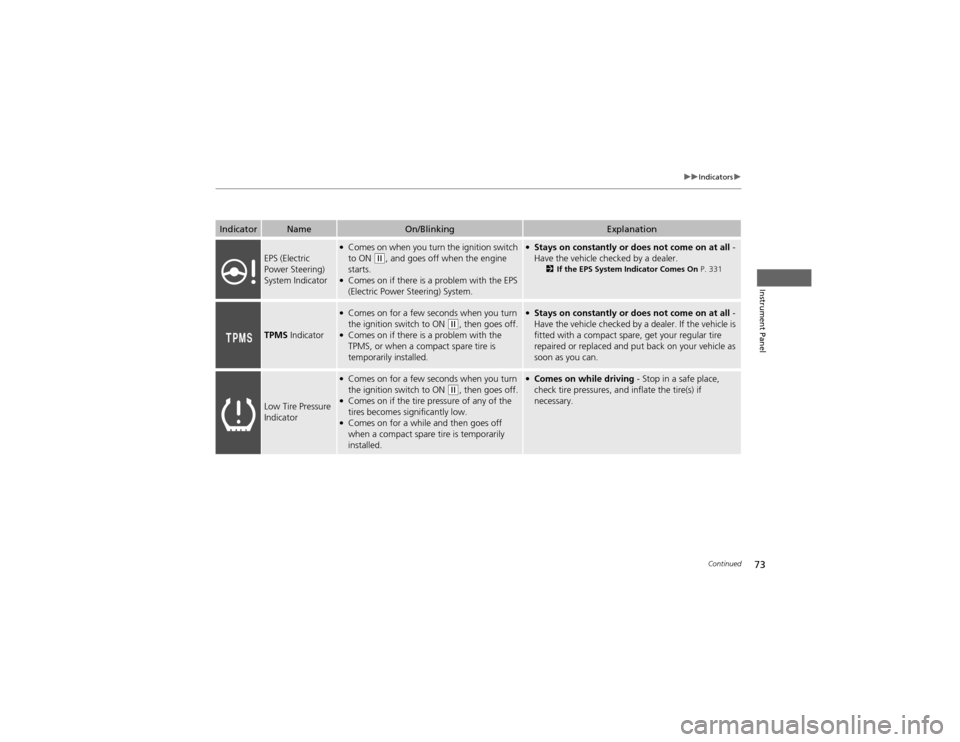
EPS (Electric
Power Steering)
System Indicator
●Comes on when you turn the ignition switch to ON
(w , and goes off when the engine
starts.
● Comes on if there is a problem with the EPS
(Electric Power Steering) System.
● Stays on constantly or does not come on at all -
Have the vehicle checked by a dealer. 2If the EPS System Indicator Comes On P. 331
TPMS Indicator
●
Comes on for a few seconds when you turn
the ignition switch to ON
(w , then goes off.
● Comes on if there is a problem with the
TPMS, or when a compact spare tire is
temporarily installed.
● Stays on constantly or does not come on at all -
Have the vehicle checked by a dealer. If the vehicle is
fitted with a compact spare, get your regular tire
repaired or replaced and put back on your vehicle as
soon as you can.
Low Tire Pressure
Indicator
● Comes on for a few seconds when you turn
the ignition switch to ON
(w , then goes off.
● Comes on if the tire pressure of any of the
tires becomes significantly low.
● Comes on for a while and then goes off
when a compact spare tire is temporarily
installed.
● Comes on while driving - Stop in a safe place,
check tire pressures, and inflate the tire(s) if
necessary.
Page 226 of 361
225
Driving
This chapter discusses driving, refueling, and information on items such as accessories.
Before Driving Driving Preparation .......................... 226
Maximum Load Limit........................ 229
Towing a Trailer Towing Preparation .......................... 231
Driving Safely with a Trailer .............. 234
Towing Your Vehicle ........................ 235
Off-Highway Driving Guidelines General Information ......................... 237
Important Safety Precautions............ 237
Avoiding Trouble ............................. 238
When Driving Starting the Engine .......................... 239
Precautions While Driving................. 241 Automatic Transmission ................... 242
Shifting ............................................ 243
Cruise Control ................................. 245
VSA® (Vehicle Stability Assist), aka ESC
(Electronic Stability Control), System ...... 248
REAL TIME AWD with Intelligent Control System™ *
......................................... 250
TPMS (Tire Pressure Monitoring System) ... 250Tire Pressure Monitoring System (TPMS) -
Required Federal Explanation ......... 251
Braking Brake System ................................... 253
ABS (Anti-lock Brake System) ........... 255 Brake Assist System ......................... 256
Parking Your Vehicle When Stopped ................................ 257
Parking ............................................ 257
Multi-View Rear Camera .................. 258
Refueling
Fuel Information .............................. 259
How to Refuel ................................. 260
Fuel Economy .................................... 262
Improving Fuel Economy .................. 262
Accessories and Modifications Accessories ...................................... 263
Modifications................................... 263
* Not available on all models
Page 227 of 361
226
Driving
Before Driving
Driving Preparation
Check the following items before you start driving. •Make sure there are no obstructions on the windows, door mirrors, exterior
lights, or other parts of the vehicle.
uRemove any frost, snow, or ice.uRemove any snow on the roof, as this can slip down and obstruct your field of
vision while driving. If frozen solid, remove ice once it has softened.
uWhen removing ice from around the wheels, be sure not to damage the wheel
or wheel components.
• Make sure the hood is securely closed.
uIf the hood opens while driving, your front view will be blocked.
• Make sure the tires are in good condition.
uCheck air pressure, and check for damage and excessive wear.
2 Checking and Maintaining Tires P. 296
• Make sure there are no people or objects behind or around the vehicle.
uThere are blind spots from the inside.
■Exterior Checks1Exterior Checks
NOTICEWhen doors are frozen shut, use warm water around
the door edges to melt any ice. Do not try to force
them open, as this can damage the rubber trim
around the doors. When done, wipe dry to avoid further freezing.
Do not pour warm water into the key cylinder.
You will be unable to insert key if the water freezes in
the hole.
Heat from the engine and exhaust can ignite
flammable materials left under the hood, causing a
fire. If you've parked your vehicle for an extended
period, inspect and remove any debris that may have
collected, such as dried grass and leaves that have
fallen or have been carried in for use as a nest by a
small animal. Also check under the hood for leftover
flammable materials after you or someone else has
performed maintenance on your vehicle.
Page 235 of 361
234
uuTowing a TraileruDriving Safely with a Trailer
Driving
Driving Safely with a Trailer •Have the trailer properly serviced and keep it in good condition.
• Make sure that all the weights and load in the vehicle and trailer are within limits.
2 Towing Load Limits P. 231
• Securely attach the hitch, safety chains, and other necessary parts to the trailer.
• Securely store all the items in and on the trailer so that they do not shift while
driving.
• Check if the lights and brakes on the trailer are working properly.
• Check the pressures of the trailer tires, including the spare.
• Drive slower than normal.
• Obey posted speed limits for vehicles with trailers.
• Use the
(D position when towing a trailer on level roads.
• Turn more slowly and with a wider turning arc than normal.
• Allow more time and distance for braking.
• Do not brake or turn suddenly.
• Monitor your temperature gauge. If it nears the red (Hot) mark, turn off the
heating and cooling system *
/climate control system *
and reduce speed. Pull to the
side of the road safely to cool down the engine if necessary.
• Shift to the
(d position if the transmission shifts frequently.
■Things You Need To Know Before Towing a Trailer
■Towing Speeds and Gears
■Turning and Braking
■Driving in Hilly Terrain
1Driving Safely with a Trailer
Parking
In addition to the normal precautions, place wheel
chocks at each of the trailer's tires.
* Not available on all models
Page 239 of 361

238
uuOff-Highway Driving GuidelinesuAvoiding Trouble
Driving
Avoiding Trouble •Check Out Your Vehicle before you leave the pavement and make sure that all
scheduled maintenance has been completed. Pay special attention to the
condition of the tires, and check the tire pressures.
• Remember the route you choose presents limits (too steep or bumpy), you have
limits (driving skill and comfort), and your vehicle has limits (traction, stability, and
power). Failing to recognize these limits will likely put you and your passengers in
a hazardous situation.
• Accelerating and Braking should be done slowly and gradually. Trying to start
or stop too fast can cause a loss of traction and you could lose control.
• Avoiding Obstacles and Debris in the road reduces the likelihood of a rollover
or damage to your suspension or other components.
• Driving on Slopes increasing your risk of a rollover, particularly if you attempt to
drive across a slope that is too steep. Going straight or down a slope is usually the
safest. If you can’t clearly see all conditions or obstacles on a slope, walk it before
you drive it. If there is any doubt whether you can safely pass, don’t try it. Find
another route. If you get stuck when c limbing, do not try to turn around. Back
down slowly following the same route you took up the hill.
• Crossing a Stream - Avoid driving through deep water. If you encounter water
in your route (a small stream or large puddle, for example), evaluate it carefully
before going ahead. Make sure it is shallow, flowing slowly, and has firm ground
underneath. If you are not sure of the depth or the ground, turn around and find
another route. Driving through deep water can also damage your vehicle. The
water can get into the transmission and differential, diluting the lubricant and
causing an eventual failure. It can also wash the grease out of the wheel bearings.
• If You Get Stuck , carefully go in the direction that you think will get you
unstuck. Do not spin the tires as this will only make things worse and could
damage the transmission. If you are unable to free yourself, your vehicle will need
to be towed. Front and rear tow hooks are provided for this purpose.
Page 249 of 361
248
uuWhen DrivinguVSA® (Vehicle Stability Assist), aka ESC (Electronic Stability Control), System
Driving
VSA ® (Vehicle Stability Assist), aka ESC (Electronic
Stability Control), System VSA ® helps to stabilize the vehicle during cornering if the vehicle turns more or less
than what was intended. It also assists in maintaining traction on slippery surfaces.
It does so by regulating engine output and selectively applying the brakes.
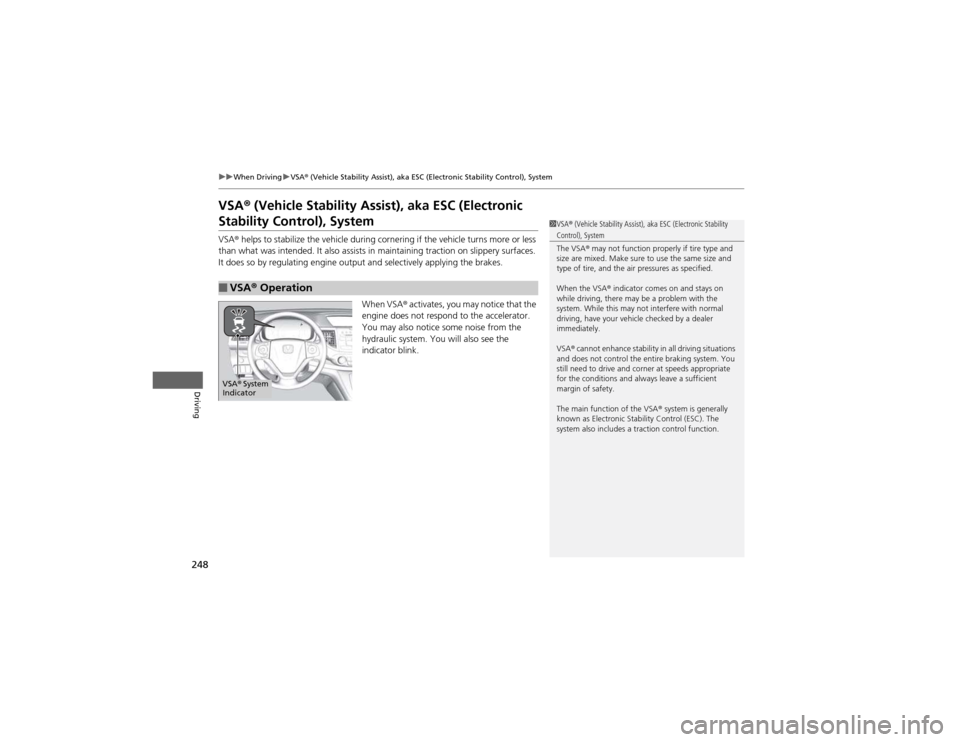
When VSA® activates, you may notice that the
engine does not respond to the accelerator.
You may also notice some noise from the
hydraulic system. You will also see the
indicator blink.
■VSA ® Operation
1VSA ® (Vehicle Stability Assist), aka ESC (Electronic Stability Control), System
The VSA ® may not function properly if tire type and
size are mixed. Make sure to use the same size and
type of tire, and the air pressures as specified.
When the VSA ® indicator comes on and stays on
while driving, there may be a problem with the
system. While this may not interfere with normal
driving, have your vehicle checked by a dealer immediately.
VSA ® cannot enhance stability in all driving situations
and does not control the entire braking system. You
still need to drive and corner at speeds appropriate
for the conditions and always leave a sufficient
margin of safety.
The main function of the VSA ® system is generally
known as Electronic Stability Control (ESC). The
system also includes a traction control function.
VSA ® System
Indicator