p 401 HONDA CR-V 2015 RM1, RM3, RM4 / 4.G Owners Manual
[x] Cancel search | Manufacturer: HONDA, Model Year: 2015, Model line: CR-V, Model: HONDA CR-V 2015 RM1, RM3, RM4 / 4.GPages: 533, PDF Size: 24.82 MB
Page 5 of 533
4
Quick Reference Guide
Quick Reference Guide
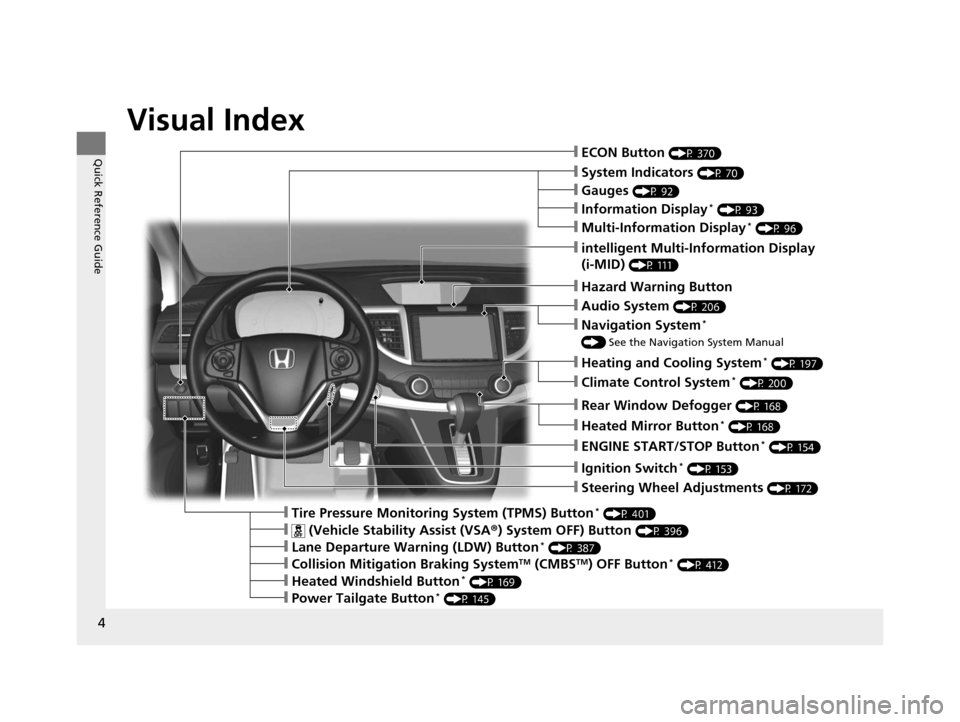
Visual Index
❙ECON Button (P 370)
❙Ignition Switch* (P 153)
❙Steering Wheel Adjustments (P 172)
❙Information Display* (P 93)
❙Tire Pressure Monitoring System (TPMS) Button* (P 401)
❙Hazard Warning Button
❙System Indicators (P 70)
❙Rear Window Defogger (P 168)
❙Heated Mirror Button* (P 168)
❙Gauges (P 92)
❙intelligent Multi-Information Display
(i-MID)
(P 111)
❙Multi-Information Display* (P 96)
❙ENGINE START/STOP Button* (P 154)
❙Heating and Cooling System* (P 197)
❙Audio System (P 206)
❙Navigation System*
() See the Navigation System Manual
❙ (Vehicle Stability Assist (VSA ®) System OFF) Button (P 396)
❙Lane Departure Warning (LDW) Button* (P 387)
❙Collision Mitigation Braking SystemTM (CMBSTM) OFF Button* (P 412)
❙Heated Windshield Button* (P 169)
❙Power Tailgate Button* (P 145)
❙Climate Control System* (P 200)
15 CR-V-31T0A6300.book 4 ページ 2015年2月2日 月曜日 午前10時35分
Page 21 of 533
20
Quick Reference Guide
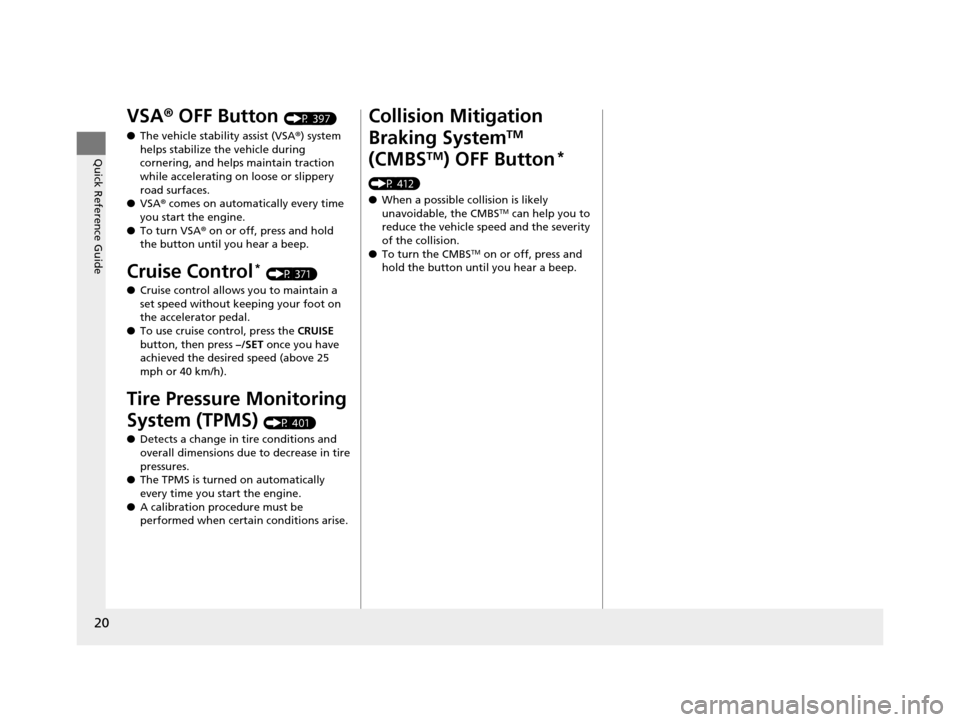
VSA® OFF Button (P 397)
● The vehicle stability assist (VSA® ) system
helps stabilize the vehicle during
cornering, and helps maintain traction
while accelerating on loose or slippery
road surfaces.
● VSA ® comes on automatically every time
you start the engine.
● To turn VSA ® on or off, press and hold
the button until you hear a beep.
Cruise Control* (P 371)
● Cruise control allows you to maintain a
set speed without keeping your foot on
the accelerator pedal.
● To use cruise control, press the CRUISE
button, then press –/SET once you have
achieved the desired speed (above 25
mph or 40 km/h).
Tire Pressure Monitoring
System (TPMS)
(P 401)
● Detects a change in tire conditions and
overall dimensions due to decrease in tire
pressures.
● The TPMS is turned on automatically
every time you start the engine.
● A calibration procedure must be
performed when certain conditions arise.
Collision Mitigation
Braking System
TM
(CMBS
TM) OFF Button*
(P 412)
● When a possible collision is likely
unavoidable, the CMBS
TM can help you to
reduce the vehicle speed and the severity
of the collision.
● To turn the CMBS
TM on or off, press and
hold the button until you hear a beep.
15 CR-V-31T0A6300.book 20 ページ 2015年2月2日 月曜日 午前10時35分
Page 77 of 533
76
uuIndicators u
Instrument Panel
*1:Models with the smart entry system have an ENGINE START/STOP button instead of an ignition switch.
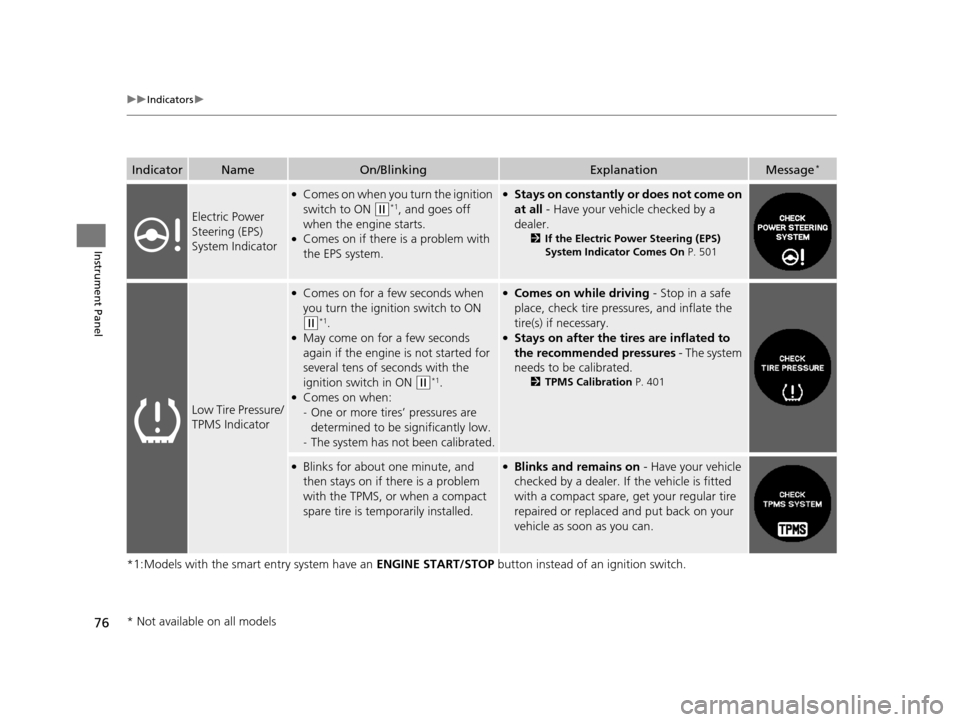
IndicatorNameOn/BlinkingExplanationMessage*
Electric Power
Steering (EPS)
System Indicator
●Comes on when you turn the ignition
switch to ON
(w*1, and goes off
when the engine starts.
●Comes on if there is a problem with
the EPS system.
●Stays on constantly or does not come on
at all - Have your vehicle checked by a
dealer.
2 If the Electric Power Steering (EPS)
System Indicator Comes On P. 501
Low Tire Pressure/
TPMS Indicator
●Comes on for a few seconds when
you turn the ignition switch to ON
(w*1.●May come on for a few seconds
again if the engine is not started for
several tens of seconds with the
ignition switch in ON
(w*1.●Comes on when:
-One or more tires’ pressures are
determined to be significantly low.
- The system has not been calibrated.
●Comes on while driving - Stop in a safe
place, check tire pres sures, and inflate the
tire(s) if necessary.
●Stays on after the tires are inflated to
the recommended pressures - The system
needs to be calibrated.
2 TPMS Calibration P. 401
●Blinks for about one minute, and
then stays on if there is a problem
with the TPMS, or when a compact
spare tire is temporarily installed.●Blinks and remains on - Have your vehicle
checked by a dealer. If the vehicle is fitted
with a compact spare, get your regular tire
repaired or replaced and put back on your
vehicle as soon as you can.
* Not available on all models
15 CR-V-31T0A6300.book 76 ページ 2015年2月2日 月曜日 午前10時35分
Page 348 of 533
347
Driving
This chapter discusses driving, refueling, and information on items such as accessories.
Before Driving................................... 348
Towing a Trailer
Towing Preparation .......................... 353
Driving Safely with a Trailer .............. 356
Towing Your Vehicle ........................ 357
Off-Highway Driving Guidelines General Information ......................... 358
Important Safety Precautions............ 358
Avoiding Trouble ............................. 359
When Driving
Starting the Engine .......................... 360
Starting the Engine .......................... 362
Models without smart entry system
Models with smart entry system
Precautions While Driving ................ 366
Continuously Variable Transmission... 367
Shifting ............................................ 368
ECON Button ................................... 370
Cruise Control
*............................... 371
Front Sensor Camera*..................... 374
Adaptive Cruise Control (ACC)*....... 375
Lane Departure Warning (LDW)*..... 386
Lane Keeping Assist System (LKAS)*.. 390Vehicle Stability Assist (VSA®), aka Electronic
Stability Control (ESC), System............. 396
Real Time AWD with Intelligent Control
SystemTM*...................................... 400Tire Pressure Monitoring System (TPMS) ... 401
Tire Pressure Monitoring System (TPMS) - Required Federal Explanation ......... 403
Braking Brake System ................................... 405
Anti-lock Brake System (ABS) ........... 407
Brake Assist System ......................... 408
Collision Mitigation Braking System
TM
(CMBSTM)*..................................... 409
Parking Your Vehicle When Stopped ................................ 416
Multi-View Rear Camera
*................ 417
Refueling ........................................... 420
Fuel Economy .................................... 423
Accessories and Modifications ........ 424
* Not available on all models
15 CR-V-31T0A6300.book 347 ページ 2015年2月2日 月曜日 午前10時35分
Page 402 of 533
401
uuWhen Driving uTire Pressure Monitoring System (TPMS)
Continued
Driving
Tire Pressure Monitoring System (TPMS)
Instead of directly measuring the pressure in each tire, the TPMS on this vehicle
monitors and compares the rolling radius and rotational characteristics of each
wheel and tire while you are driving to determine if one or more tires are
significantly under-inflated. This will caus e the low tire pressure/TPMS indicator to
come on and a message to appear on the multi-information display
*.
You must start TPMS calibration every time you:
• Adjust the pressure in one or more tires.
• Rotate the tires.
• Replace one or more tires.
u Before calibrating the TPMS, turn the ignition switch to ON
(w*1, and make
sure that the vehicle is at a complete stop.
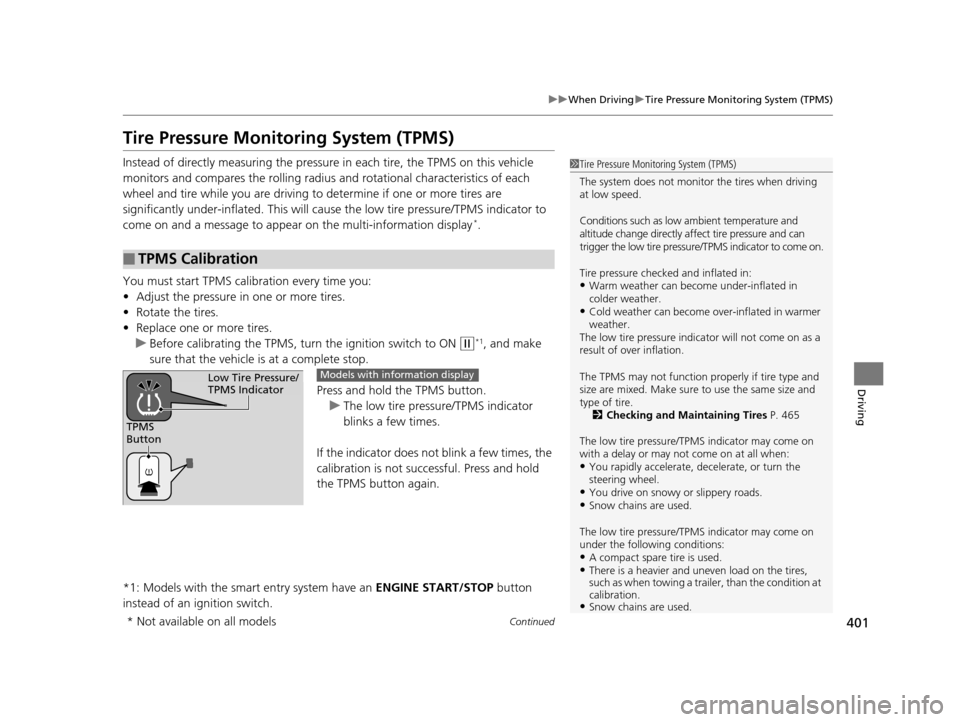
Press and hold the TPMS button.
u The low tire pressure/TPMS indicator
blinks a few times.
If the indicator does not blink a few times, the
calibration is not successful. Press and hold
the TPMS button again.
*1: Models with the smart entry system have an ENGINE START/STOP button
instead of an ignition switch.
■TPMS Calibration
1 Tire Pressure Monitoring System (TPMS)
The system does not monitor the tires when driving
at low speed.
Conditions such as low ambient temperature and
altitude change directly a ffect tire pressure and can
trigger the low tire pressure/TPMS indicator to come on.
Tire pressure checked and inflated in:
•Warm weather can beco me under-inflated in
colder weather.
•Cold weather can become over-inflated in warmer
weather.
The low tire pressure indica tor will not come on as a
result of over inflation.
The TPMS may not function pr operly if tire type and
size are mixed. Make sure to use the same size and
type of tire. 2 Checking and Maintaining Tires P. 465
The low tire pressure/TPMS indicator may come on
with a delay or may not come on at all when:
•You rapidly accelerate, decelerate, or turn the
steering wheel.
•You drive on snowy or slippery roads.•Snow chains are used.
The low tire pressure/TPMS indicator may come on
under the following conditions:
•A compact spare tire is used.•There is a heavier and une ven load on the tires,
such as when towing a trailer, than the condition at
calibration.
•Snow chains are used.
TPMS
Button
Low Tire Pressure/
TPMS IndicatorModels with info rmation display
* Not available on all models
15 CR-V-31T0A6300.book 401 ページ 2015年2月2日 月曜日 午前10時35分
Page 491 of 533
uuIf a Tire Goes Flat uChanging a Flat Tire
490
Handling the Unexpected
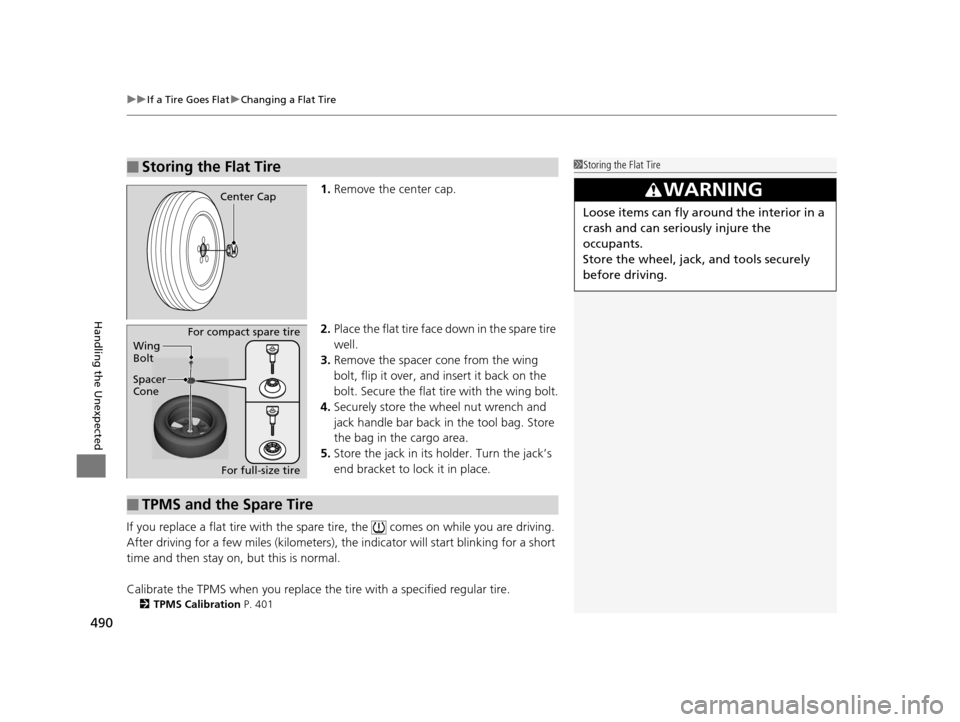
1. Remove the center cap.
2. Place the flat tire face down in the spare tire
well.
3. Remove the spacer cone from the wing
bolt, flip it over, and insert it back on the
bolt. Secure the flat tire with the wing bolt.
4. Securely store the wheel nut wrench and
jack handle bar back in the tool bag. Store
the bag in the cargo area.
5. Store the jack in its holder. Turn the jack’s
end bracket to lock it in place.
If you replace a flat tire with the spare tire, the comes on while you are driving.
After driving for a few miles (kilometers), the indicator will start blinking for a short
time and then stay on, but this is normal.
Calibrate the TPMS when you replace the tire with a specified regular tire.
2TPMS Calibration P. 401
■Storing the Flat Tire1Storing the Flat Tire
3WARNING
Loose items can fly around the interior in a
crash and can seriously injure the
occupants.
Store the wheel, jack, and tools securely
before driving.
Center Cap
Spacer
ConeWing
Bolt
For compact spare tire
For full-size tire
■TPMS and the Spare Tire
15 CR-V-31T0A6300.book 490 ページ 2015年2月2日 月曜日 午前10時35分
Page 503 of 533
502
uuIndicator, Coming On/Blinking uIf the Low Tire Pressure/TPMS Indicator Comes On or Blinks
Handling the Unexpected
If the Low Tire Pressure/TPMS Indicator Comes On or
Blinks
■Reasons for the indicator to come on or blink
A tire pressure is signifi cantly low, or the TPMS has not been calibrated.
If there is a problem with the TPMS or the compact spare tire is installed,
the indicator blinks for about one minute, and then stays on.
■What to do when the indicator comes on
Drive carefully and avoid abrupt cornering and hard braking.
Stop your vehicle in a safe place. Ch eck the tire pressure and adjust the
pressure to the specified level. The sp ecified tire pressure is on a label on
the driver side doorjamb.
u Calibrate the TPMS after the tire pressure is adjusted.
2 TPMS Calibration P. 401
■What to do when the indicator blinks, then remains on
Have the tire inspected by a dealer as soon as possible. If the compact
spare tire causes the indicator to blink, change the tire to a full-size tire.
The indicator goes off after driv ing for a few miles (kilometers).
u Calibrate the TPMS after a full-size tire is reinstalled.
2 TPMS Calibration P. 401
1If the Low Tire Pressure/TPMS Indicator Comes On or Blinks
NOTICE
Driving on an extremely unde rinflated tire can cause
it to overheat. An overheated tire can fail. Always
inflate your tires to the prescribed level.
15 CR-V-31T0A6300.book 502 ページ 2015年2月2日 月曜日 午前10時35分
Page 530 of 533
529
Index
Stopping................................................... 416
Summer Tires ............................................ 473
Sunglasses Holder .................................... 193
Supplemental Restraint System (SRS) ....... 44
Switches (Around the Steering
Wheel) ............................................ 4, 5, 153
Synchronized Mode ................................. 202
T
Tachometer................................................ 92
Tailgate ..................................................... 140
Remote Transmitter ................................ 142
Unable to Open ...................................... 507
Temperature Gauge .................................. 92
Temperature Sensor ................................ 203
Text Message .................................... 296, 308
Time (Setting) ........................................... 128
Tire Pressure Monitoring System (TPMS) ..................................................... 401
Button .................................................... 401
Indicator ................................................... 76
Tires .......................................................... 465
Air Pressure..................................... 466, 511
Checking and Maintaining ...................... 465
Inspection ............................................... 465
Labeling .................................................. 466
Puncture (Flat Tire) .................................. 485
Regulations ............................................. 468
Rotation.................................................. 472
Spare Tire ....................................... 485, 511 Summer .................................................. 473
Tire Chains .............................................. 473
Wear Indicators ....................................... 470
Winter ..................................................... 473
Tonneau Cover ......................................... 195
Tools .......................................................... 484
Towing a Trailer ....................................... 353
Equipment and Accessories ..................... 354
Load Limits .............................................. 353
Towing Your Vehicle ................................ 357
Behind a Motorhome .............................. 357
Emergency .............................................. 506
TPMS (Tire Pressure Monitoring System) .................................................... 401
Button ..................................................... 401
Indicator .................................................... 76
Transmission ............................................. 368
Continuously Variable .............................. 368
Fluid ........................................................ 449
Number ................................................... 512
Shift Lever Position Indicator .............. 71, 369
Trip Meter ............................................. 94, 97
Troubleshooting ....................................... 483
Blown Fuse ...................................... 503, 504
Brake Pedal Vibrates .................................. 24
Buzzer Sounds When Opening Door .......... 25
Emergency Towing .................................. 506
Engine Won’t Start .................................. 491
Noise When Braking .................................. 26
Overheating ............................................ 497
Puncture/Flat Tire ..................................... 485 Rear Door Won’t Open...................... 25, 138
Select Lever Won’t Move ......................... 496
Warning Indicators .................................... 70
Turn Signals .............................................. 158
Indicators (Instrument Panel) ..................... 77
U
Unlocking the Doors ................................ 133
Unlocking the Fron t Doors from the
Inside ......................................................... 14
USB Adapter Cable ........................... 206, 207
USB Flash Drives ....................................... 270
USB Port(s) ........................................ 206, 208
V
Valet Key................................................... 131
Vanity Mirrors ............................................... 7
Vehicle Identification Number ................ 512
Vehicle Stability Assist (VSA ®).................. 396
Off Button............................................... 397
Off Indicator.............................................. 74
System Indicator ........................................ 74
Viscosity (Oil) .................................... 442, 511
VSA ® (Vehicle Stability Assist) .................. 396
W
Wallpaper......................................... 123, 235
Warning and Info rmation Messages ......... 86
Warning Indicator On/Blinking ............... 499
15 CR-V-31T0A6300.book 529 ページ 2015年2月2日 月曜日 午前10時35分