parking brake HONDA CR-V 2015 RM1, RM3, RM4 / 4.G Owners Manual
[x] Cancel search | Manufacturer: HONDA, Model Year: 2015, Model line: CR-V, Model: HONDA CR-V 2015 RM1, RM3, RM4 / 4.GPages: 533, PDF Size: 24.82 MB
Page 7 of 533
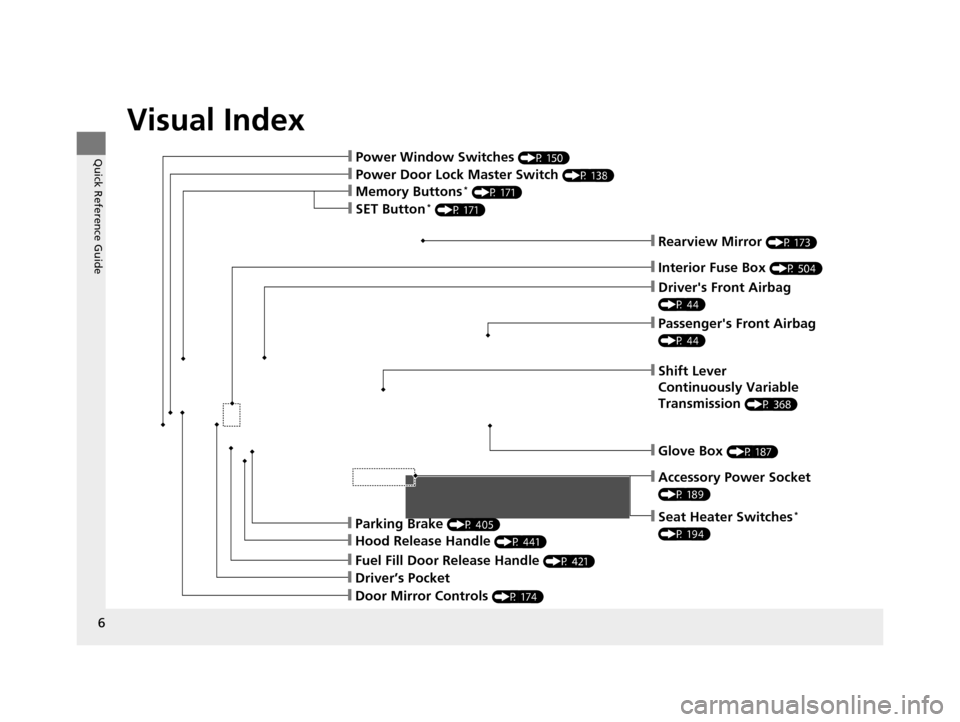
Visual Index
6
Quick Reference Guide
❙Power Door Lock Master Switch (P 138)
❙Power Window Switches (P 150)
❙Rearview Mirror (P 173)
❙Driver's Front Airbag
(P 44)
❙Parking Brake (P 405)
❙Hood Release Handle (P 441)
❙Glove Box (P 187)
❙Driver’s Pocket
❙Fuel Fill Door Release Handle (P 421)
❙Memory Buttons* (P 171)
❙Accessory Power Socket
(P 189)
❙Seat Heater Switches*
(P 194)
❙Interior Fuse Box (P 504)
❙Passenger's Front Airbag
(P 44)
❙Shift Lever
Continuously Variable
Transmission
(P 368)
❙SET Button* (P 171)
❙Door Mirror Controls (P 174)
15 CR-V-31T0A6300.book 6 ページ 2015年2月2日 月曜日 午前10時35分
Page 9 of 533
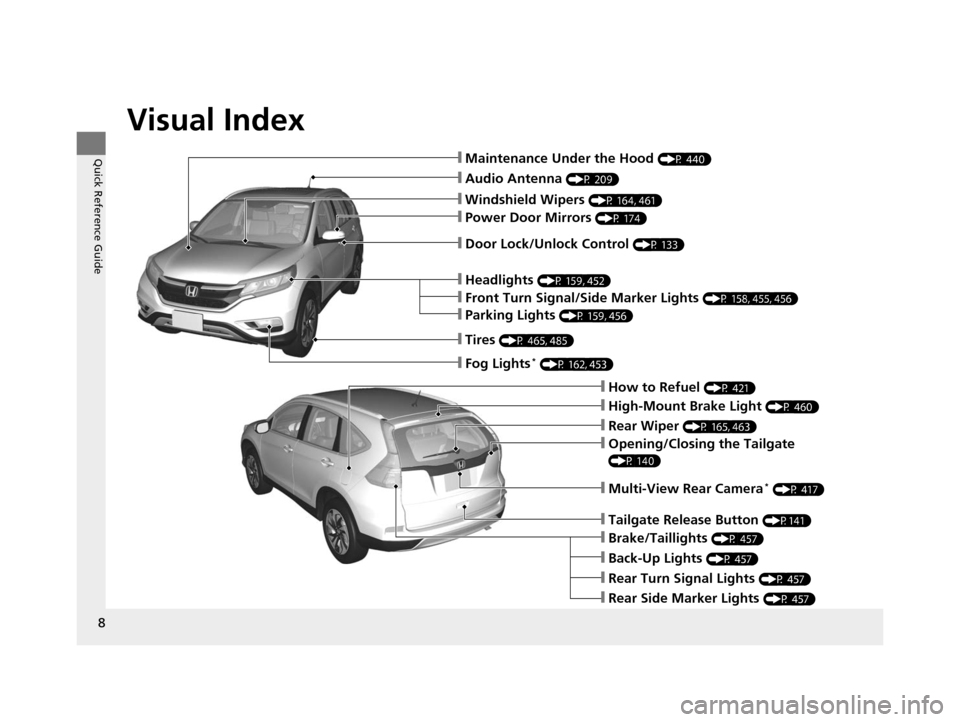
Visual Index
8
Quick Reference Guide
❙Audio Antenna (P 209)
❙Windshield Wipers (P 164, 461)
❙Door Lock/Unlock Control (P 133)
❙How to Refuel (P 421)
❙High-Mount Brake Light (P 460)
❙Rear Wiper (P 165, 463)
❙Back-Up Lights (P 457)
❙Brake/Taillights (P 457)
❙Rear Turn Signal Lights (P 457)
❙Rear Side Marker Lights (P 457)
❙Power Door Mirrors (P 174)
❙Maintenance Under the Hood (P 440)
❙Fog Lights* (P 162, 453)
❙Multi-View Rear Camera* (P 417)
❙Front Turn Signal/Side Marker Lights (P 158, 455, 456)
❙Parking Lights (P 159, 456)
❙Tires (P 465, 485)
❙Headlights (P 159, 452)
❙Opening/Closing the Tailgate
(P 140)
❙Tailgate Release Button (P141)
15 CR-V-31T0A6300.book 8 ページ 2015年2月2日 月曜日 午前10時35分
Page 12 of 533
11
Quick Reference Guide
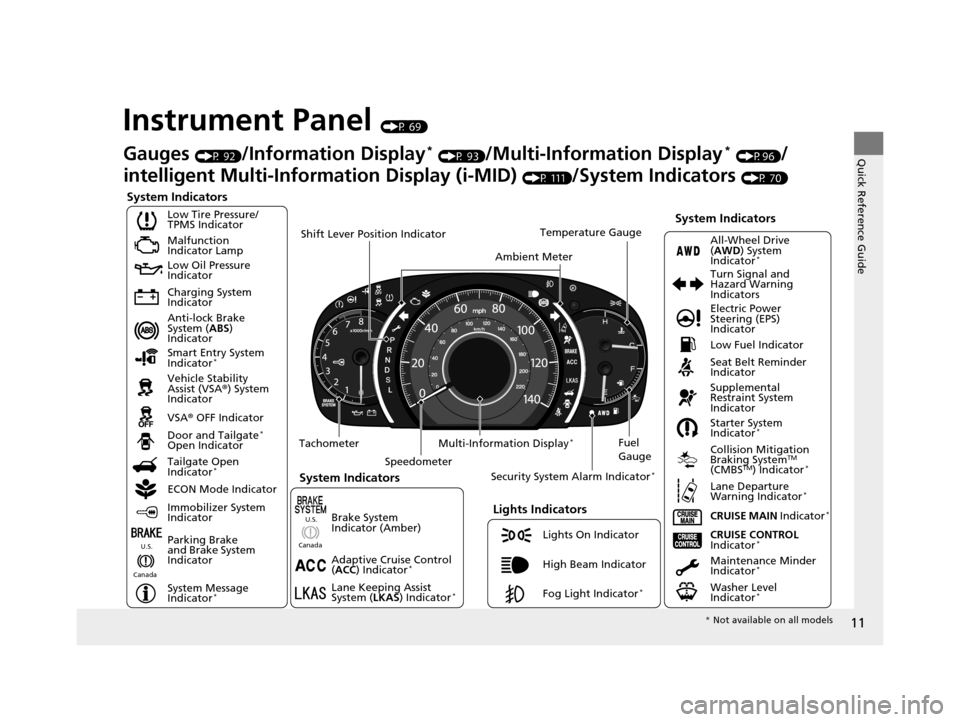
Instrument Panel (P 69)
System Indicators
Malfunction
Indicator Lamp
Low Oil Pressure
Indicator
Charging System
Indicator
Anti-lock Brake
System (ABS)
Indicator
Vehicle Stability
Assist (VSA ®) System
Indicator
VSA ® OFF Indicator
Low Tire Pressure/
TPMS Indicator
Lights Indicators
Lights On Indicator
High Beam Indicator
Fog Light Indicator
*
Immobilizer System
Indicator
Seat Belt Reminder
Indicator
System Indicators
CRUISE CONTROL
Indicator*Parking Brake
and Brake System
Indicator Supplemental
Restraint System
Indicator
Door and Tailgate
*
Open Indicator
CRUISE MAIN Indicator
*
Tachometer
Speedometer Fuel
Gauge
Security System Alarm Indicator
*
Shift Lever Position Indicator
Low Fuel Indicator
Gauges (P 92)/Information Display* (P 93)/Multi-Information Display* (P96)/
intelligent Multi-Inform ation Display (i-MID)
(P 111)/System Indicators (P 70)
Tailgate Open
Indicator
*
ECON Mode Indicator Maintenance Minder
Indicator
*
Washer Level
Indicator*
Ambient MeterTemperature Gauge
Electric Power
Steering (EPS)
Indicator Turn Signal and
Hazard Warning
Indicators
All-Wheel Drive
(
AWD ) System
Indicator
*
System Indicators
Canada U.S.
Smart Entry System
Indicator*
Lane Keeping Assist
System (
LKAS) Indicator*
Adaptive Cruise Control
(ACC ) Indicator*
Starter System
Indicator*
Collision Mitigation
Braking SystemTM
(CMBSTM) Indicator*
Lane Departure
Warning Indicator*
System Message
Indicator*
Multi-Information Display*
Canada U.S.
Brake System
Indicator (Amber)
*
Not available on all models
15 CR-V-31T0A6300.book 11 ページ 2015年2月2日 月曜日 午前10時35分
Page 27 of 533
26
Quick Reference Guide
Why does the beeper
sound when I start driving?The beeper sounds when:
●Driver and/or front passenger are not wearing their seat belts.
●The parking brake lever is not fully released.
Why do I hear a screeching
sound when I apply the
brake pedal?The brake pads may need to be replaced. Have your vehicle
inspected by a dealer.
15 CR-V-31T0A6300.book 26 ページ 2015年2月2日 月曜日 午前10時35分
Page 71 of 533
70
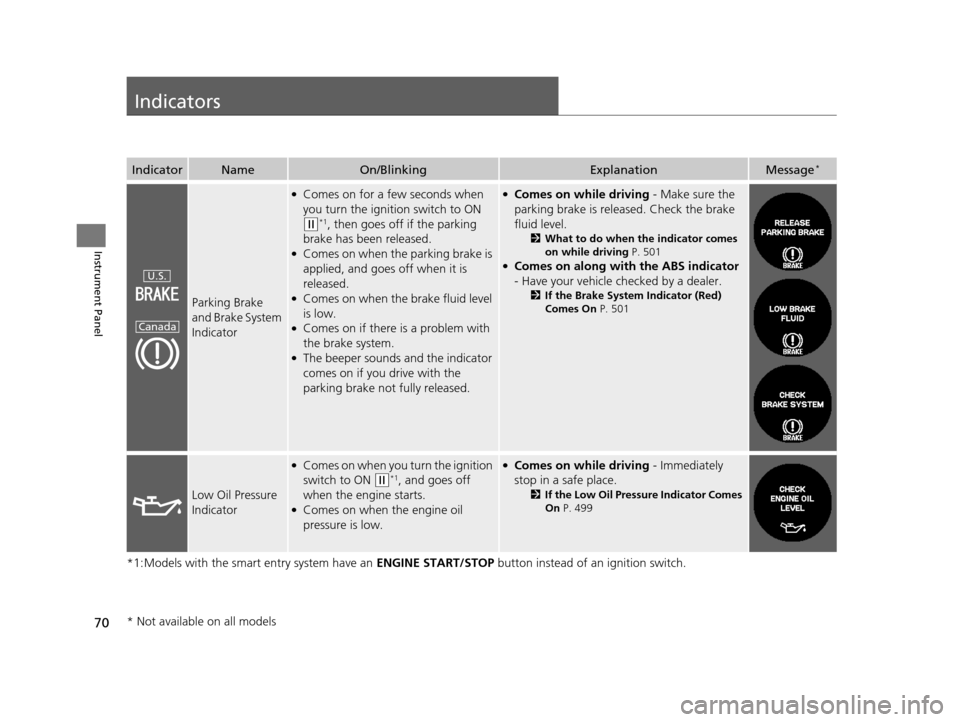
Instrument Panel
Indicators
*1:Models with the smart entry system have an ENGINE START/STOP button instead of an ignition switch.
IndicatorNameOn/BlinkingExplanationMessage*
Parking Brake
and Brake System
Indicator
●Comes on for a few seconds when
you turn the ignition switch to ON
(w*1, then goes off if the parking
brake has been released.
●Comes on when the parking brake is
applied, and goes off when it is
released.
●Comes on when the brake fluid level
is low.
●Comes on if there is a problem with
the brake system.
●The beeper sounds and the indicator
comes on if you drive with the
parking brake not fully released.
●Comes on while driving - Make sure the
parking brake is released. Check the brake
fluid level.
2 What to do when the indicator comes
on while driving P. 501
●Comes on along with the ABS indicator
- Have your vehicle checked by a dealer.
2 If the Brake System Indicator (Red)
Comes On P. 501
Low Oil Pressure
Indicator
●Comes on when you turn the ignition
switch to ON
(w*1, and goes off
when the engine starts.
●Comes on when the engine oil
pressure is low.
●Comes on while driving - Immediately
stop in a safe place.
2 If the Low Oil Pressu re Indicator Comes
On P. 499
U.S.
Canada
* Not available on all models
15 CR-V-31T0A6300.book 70 ページ 2015年2月2日 月曜日 午前10時35分
Page 164 of 533
163
uuOperating the Switches Around the Steering Wheel uDaytime Running Lights
Controls
Daytime Running Lights
The high beam headlights come on slight ly dimmer than normal when the following
conditions have been met:
• The ignition switch is in ON
(w.
• The headlight switch is off.
• The parking brake is released.
The lights remain on even if you set th e parking brake. Turning off the ignition
switch will turn off the daytime running lights.
The high beam headlights return to the original brightness once the headlight
switch is turned on.
The daytime running lights come on when th e following conditions have been met:
• The power mode is set to ON.
• The headlight switch is off.
• The parking brake is released.
The lights remain on even if you set th e parking brake. Setting the power mode to
VEHICLE OFF turns off the daytime running lights.
The daytime running lights are off the headlig ht switch is turned on, or when the
headlight switch is in AUTO and it is getting darker outside.
Models without smart entry system
Models with smart entry system
15 CR-V-31T0A6300.book 163 ページ 2015年2月2日 月曜日 午前10時35分
Page 172 of 533
171
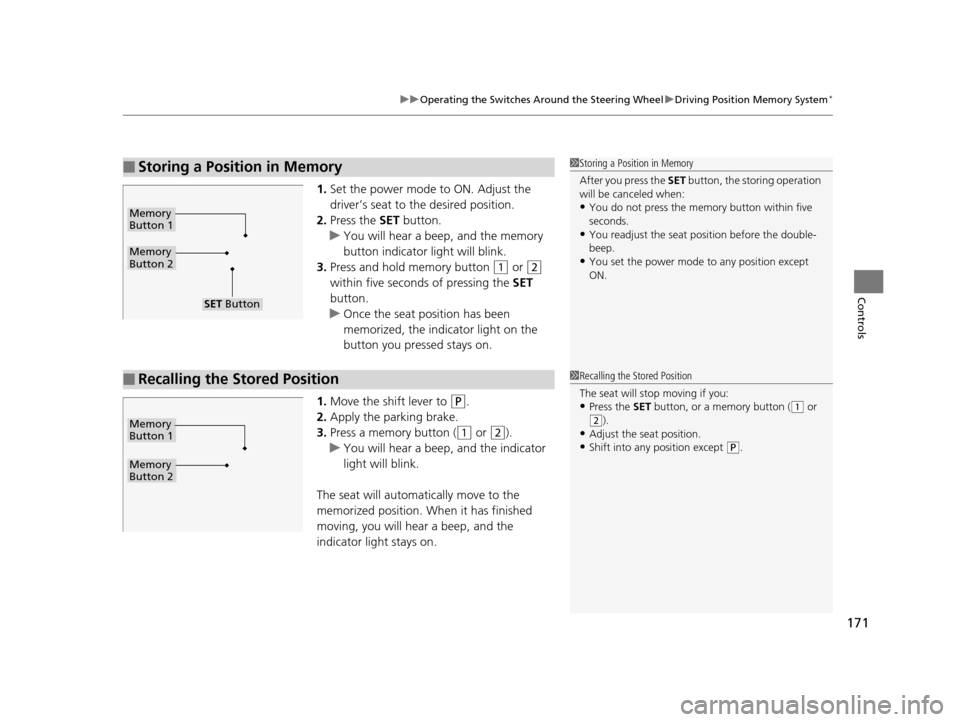
uuOperating the Switches Around the Steering Wheel uDriving Position Memory System*
Controls
1. Set the power mode to ON. Adjust the
driver’s seat to the desired position.
2. Press the SET button.
u You will hear a beep, and the memory
button indicator light will blink.
3. Press and hold memory button
(1 or (2
within five seconds of pressing the SET
button.
u Once the seat position has been
memorized, the indicator light on the
button you pressed stays on.
1. Move the shift lever to
(P.
2. Apply the parking brake.
3. Press a memory button (
(1 or (2).
u You will hear a beep, and the indicator
light will blink.
The seat will automatically move to the
memorized position. When it has finished
moving, you will hear a beep, and the
indicator light stays on.
■Storing a Position in Memory1 Storing a Position in Memory
After you press the SET button, the storing operation
will be canceled when:
•You do not press the memory button within five
seconds.
•You readjust the seat position before the double-
beep.
•You set the power mode to any position except
ON.
Memory
Button 1
Memory
Button 2
SET Button
■Recalling the Stored Position1 Recalling the Stored Position
The seat will st op moving if you:
•Press the SET button, or a memory button ((1 or (2).
•Adjust the seat position.
•Shift into any position except (P.
Memory
Button 1
Memory
Button 2
15 CR-V-31T0A6300.book 171 ページ 2015年2月2日 月曜日 午前10時35分
Page 260 of 533
259
uuAudio System Basic Operation uPlaying a Video Using the HDMI ®
Features
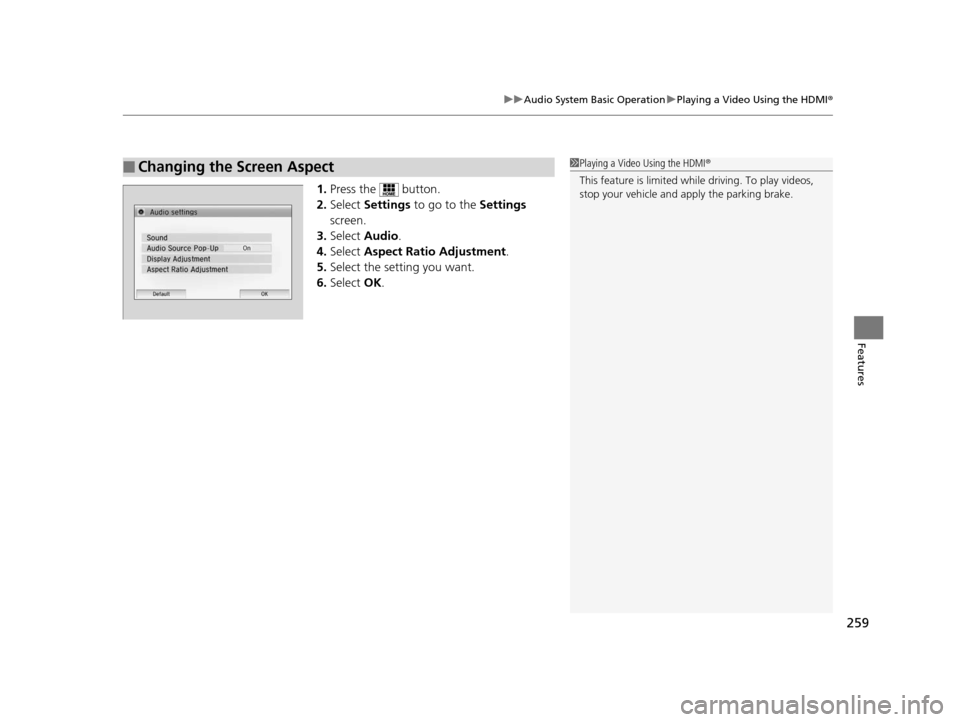
1.Press the button.
2. Select Settings to go to the Settings
screen.
3. Select Audio .
4. Select Aspect Ratio Adjustment .
5. Select the setting you want.
6. Select OK.
■Changing the Screen Aspect1Playing a Video Using the HDMI®
This feature is limited while driving. To play videos,
stop your vehicle and apply the parking brake.
15 CR-V-31T0A6300.book 259 ページ 2015年2月2日 月曜日 午前10時35分
Page 348 of 533
347
Driving
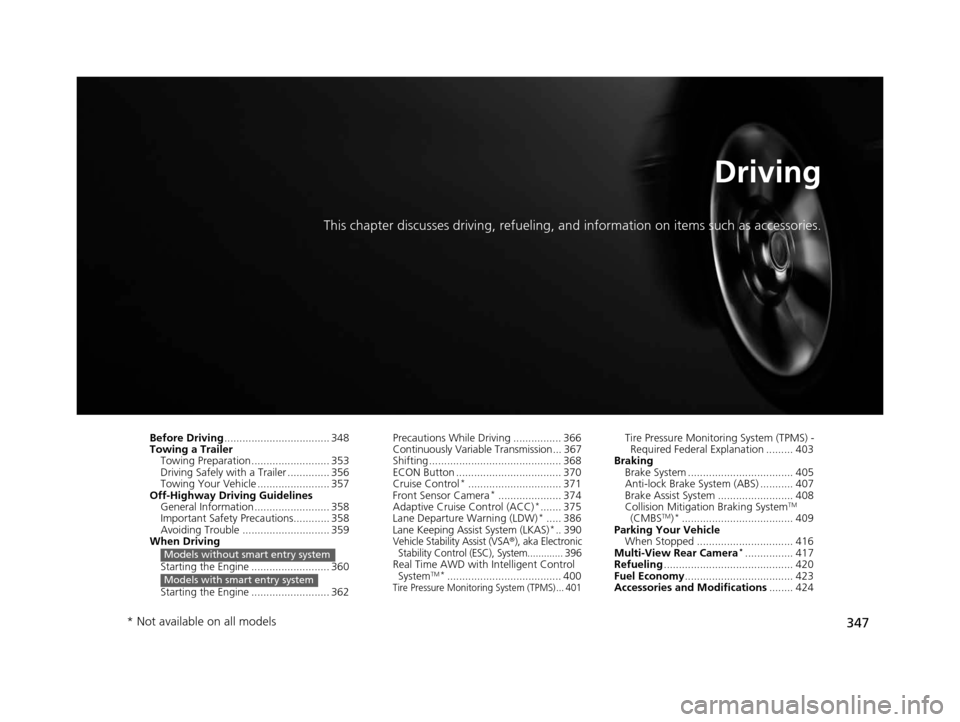
This chapter discusses driving, refueling, and information on items such as accessories.
Before Driving................................... 348
Towing a Trailer
Towing Preparation .......................... 353
Driving Safely with a Trailer .............. 356
Towing Your Vehicle ........................ 357
Off-Highway Driving Guidelines General Information ......................... 358
Important Safety Precautions............ 358
Avoiding Trouble ............................. 359
When Driving
Starting the Engine .......................... 360
Starting the Engine .......................... 362
Models without smart entry system
Models with smart entry system
Precautions While Driving ................ 366
Continuously Variable Transmission... 367
Shifting ............................................ 368
ECON Button ................................... 370
Cruise Control
*............................... 371
Front Sensor Camera*..................... 374
Adaptive Cruise Control (ACC)*....... 375
Lane Departure Warning (LDW)*..... 386
Lane Keeping Assist System (LKAS)*.. 390Vehicle Stability Assist (VSA®), aka Electronic
Stability Control (ESC), System............. 396
Real Time AWD with Intelligent Control
SystemTM*...................................... 400Tire Pressure Monitoring System (TPMS) ... 401
Tire Pressure Monitoring System (TPMS) - Required Federal Explanation ......... 403
Braking Brake System ................................... 405
Anti-lock Brake System (ABS) ........... 407
Brake Assist System ......................... 408
Collision Mitigation Braking System
TM
(CMBSTM)*..................................... 409
Parking Your Vehicle When Stopped ................................ 416
Multi-View Rear Camera
*................ 417
Refueling ........................................... 420
Fuel Economy .................................... 423
Accessories and Modifications ........ 424
* Not available on all models
15 CR-V-31T0A6300.book 347 ページ 2015年2月2日 月曜日 午前10時35分
Page 357 of 533
356
uuTowing a Trailer uDriving Safely with a Trailer
Driving
Driving Safely with a Trailer
• Have the trailer properly serviced and keep it in good condition.
• Make sure that all the weights and load in the vehicle and trailer are within limits.
2Towing Load Limits P. 353
•Securely attach the hitch, safety chains, and other necessary parts to the trailer.
• Securely store all the items in and on the trailer so that they do not shift while
driving.
• Check if the lights and brakes on the trailer are working properly.
• Check the pressures of the traile r tires, including the spare.
• Drive slower than normal.
• Obey posted speed limits for vehicles with trailers.
• Use the
(D position when towing a trailer on level roads.
• Turn more slowly and with a wider turning arc than normal.
• Allow more time and distance for braking.
• Do not brake or turn suddenly.
• Monitor your temperature gauge. If it nears the red (Hot) mark, turn off the
heating and cooling system
*/climate control system* and reduce speed. Pull to the
side of the road safely to cool down the engine if necessary.
■Things You Need To Know Before Towing a Trailer
■Towing Speeds and Gears
■Turning and Braking
■Driving in Hilly Terrain
1Driving Safely with a Trailer
Operating speed when towing a trailer is restricted
up to 65 mph (100 km/h).
Parking
In addition to the normal precautions, place wheel
chocks at each of the trailer's tires.
* Not available on all models
15 CR-V-31T0A6300.book 356 ページ 2015年2月2日 月曜日 午前10時35分