wheel HONDA CR-V 2020 (in English) Repair Manual
[x] Cancel search | Manufacturer: HONDA, Model Year: 2020, Model line: CR-V, Model: HONDA CR-V 2020Pages: 671, PDF Size: 33.11 MB
Page 462 of 671
460
uuTowing a Trailer uDriving Safely with a Trailer
Driving
Driving Safely with a Trailer
• Have the trailer properly serviced and keep it in good condition.
• Make sure that all the weights and load in the vehicle and trailer are within limits.
2Towing Load Limits P. 457
•Securely attach the hitch, safety chains, and other necessary parts to the trailer.
• Securely store all the items in and on the tr ailer so that they do not shift while
driving.
• Check if the lights and brakes on the trailer are working properly.
• Check the pressures of the traile r tires, including the spare.
• Turn off the Auto Idle Stop syst em using the Auto Idle Stop OFF button. The
trailer weight can affect your vehicle's br ake effectiveness if Auto Idle Stop is
activated on a hill while towing a trailer.
• Drive slower than normal.
• Obey posted speed limits for vehicles with trailers.
• Use the
(D position when towing a trailer on level roads.
• Turn more slowly and with a wider turning arc than normal.
• Allow more time and distance for braking.
• Do not brake or turn suddenly.
■Things You Need To Know Before Towing a Trailer
■Towing Speeds and Gears
■Turning and Braking
1Driving Safely with a Trailer
Operating speed when towing a trailer is restricted
up to 65 mph (100 km/h).
Parking
In addition to the normal precautions, place wheel
chocks at each of the trailer's tires.
Models with Auto Idle Stop
20 CR-V PET ELP_MAP_HMIN_HCM_J-31TLA6310.book 460 ページ 2019年10月3日 木曜日 午後4時55分
Page 466 of 671
464
uuOff-Highway Driving Guidelines uAvoiding Trouble
Driving
Avoiding Trouble
• Check Out Your Vehicle before you leave the pavement and make sure that all
scheduled maintenance has been comple ted. Pay special attention to the
condition of the tires, an d check the tire pressures.
• Remember the route you choose presents limits (too steep or bumpy), you have
limits (driving skill and comfort), and your ve hicle has limits (traction, stability, and
power). Failing to recognize these limits will likely put you and your passengers in
a hazardous situation.
• Accelerating and Braking should be done slowly and gradually. Trying to start
or stop too fast can cause a loss of traction and you could lose control.
• Avoiding Obstacles and Debris in the road reduces the likelihood of a rollover
or damage to your suspension or other components.
• Driving on Slopes increases your risk of a rollover, particularly if you attempt to
drive across a slope that is too steep. Going straight or down a slope is usually the
safest. If you can’t clearly see all conditions or obstacles on a slope, walk it before
you drive it. If there is any doubt whethe r you can safely pass, don’t try it. Find
another route. If you get stuck when clim bing, do not try to turn around. Back
down slowly following the same route you took up the hill.
• Crossing a Stream - Avoid driving through deep water. If you encounter water
in your route (a small stream or large pu ddle, for example), evaluate it carefully
before going ahead. Make sure it is shallow, flowing slowly, and has firm ground
underneath. If you are not sure of the depth or the ground, turn around and find
another route. Driving through deep water can also damage your vehicle. The
water can get into the transmission and differential, diluting the lubricant and
causing an eventual failure. It can also wash the grease out of the wheel bearings.
• If You Get Stuck, carefully go in the direction that you think will get you
unstuck. Do not spin the tires as this will only make things worse and could
damage the transmission. If you are unable to free yourself, your vehicle will need
to be towed.
20 CR-V PET ELP_MAP_HMIN_HCM_J-31TLA6310.book 464 ページ 2019年10月3日 木曜日 午後4時55分
Page 472 of 671
uuWhen Driving uStarting the Engine
470
Driving
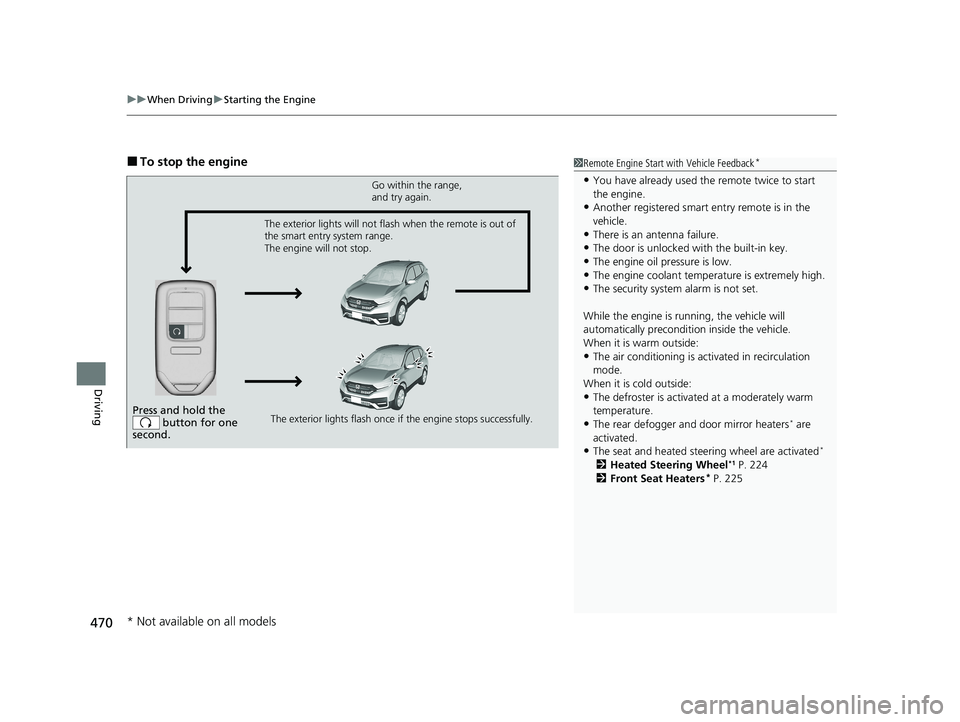
■To stop the engine1Remote Engine Start with Vehicle Feedback*
•You have already used the remote twice to start
the engine.
•Another registered smart entry remote is in the
vehicle.
•There is an antenna failure.
•The door is unlocked with the built-in key.
•The engine oil pressure is low.•The engine coolant temper ature is extremely high.
•The security system alarm is not set.
While the engine is running, the vehicle will
automatically preconditi on inside the vehicle.
When it is warm outside:
•The air conditioning is acti vated in recirculation
mode.
When it is cold outside:
•The defroster is activated at a moderately warm
temperature.
•The rear defogger and door mirror heaters* are
activated.
•The seat and heated steering wheel are activated*
2 Heated Steering Wheel*1 P. 224
2 Front Seat Heaters* P. 225
Press and hold the
button for one
second.
Go within the range,
and try again.
The exterior lights flash once if the engine stops successfully.
The exterior lights will not flash when the remote is out of
the smart entry system range.
The engine will not stop.
* Not available on all models
20 CR-V PET ELP_MAP_HMIN_HCM_J-31TLA6310.book 470 ページ 2019年10月3日 木曜日 午後4時55分
Page 474 of 671
472
uuWhen Driving uPrecautions While Driving
Driving
Precautions While Driving
Utility vehicles have a significantly higher rollover rate than other types of vehicles.
To prevent rollovers or loss of control:
• Take corners at slower speeds than yo u would with a passenger vehicle.
• Avoid sharp turns and abrupt maneuvers whenever possible.
• Do not modify your vehicle in any way that you would raise the center of gravity.
• Roof load capacity is 165 lbs (75 kg), available roof racks/carriers may have lower
capacities. Please check accessory's information (Honda accessory).
Avoid driving in deep water and on flooded roads. This can damage the engine or
driveline, or cause electrical component failure.
If there is a strong impact with something under the vehicle, stop in a safe location.
Check the underside of the vehicle for damage or any fluid leaks.
■Driving Guidelines for Your Utility Vehicle
■In Rain
■Other Precautions
1 Precautions While Driving
NOTICE
Do not operate th e shift lever while pressing the
accelerator pedal. You could damage the
transmission.
NOTICE
If you repeatedly turn the steering wheel at an
extremely low speed, or hold the steering wheel in
the full left or right position for a while, the electric
power steering (EPS) system heats up. The system
goes into a protective mode, and limits its
performance. The steering wheel becomes harder
and harder to operate. Once the system cools down,
the EPS system is restored.
Repeated operation under these conditions can
eventually damage the system.
20 CR-V PET ELP_MAP_HMIN_HCM_J-31TLA6310.book 472 ページ 2019年10月3日 木曜日 午後4時55分
Page 481 of 671
479
uuWhen Driving uAuto Idle Stop
Continued
Driving
■Auto Idle Stop may not activate when:
• The vehicle is stopped by braking suddenly.
• The steering wheel is operated.
• The fan speed is high.
• Altitude is high.
• The vehicle is repeatedly accelera ted and decelerated at a low speed.
• The climate control system is in use, an d there is a significant difference between
the set temperature and the actual interior temperature.
• The climate control system is in use, and humidity in the interior is high.
20 CR-V PET ELP_MAP_HMIN_HCM_J-31TLA6310.book 479 ページ 2019年10月3日 木曜日 午後4時55分
Page 482 of 671
uuWhen Driving uAuto Idle Stop
480
Driving
• When the transmission is put into (P from (D or (N on a slope (without the
automatic brake hold system activated).
• The brake pedal is released (without the automatic brake hold system activated).
• The accelerator pedal is depressed (with the automatic brake hold system
activated).
2 Automatic Brake Hold P. 532
■The engine restarts even if the brake pedal is depressed*1 when:
• The Auto Idle Stop OFF button is pressed.
• A steering wheel is operated.
• The transmission is put into
(R, (S, and (L, or when it is set from (N to (D.
u If you put the transmission into
(P after the Auto Idle Stop activates, the Auto
Idle Stop continues to operate. In this case, the engine restarts when you move
the shift lever other than
(P. When operating the shi ft lever, the brake pedal
must be firmly depressed.
• The pressure on the brake pedal is redu ced and the vehicle starts moving while
stopped on an incline.
• The brake pedal is released slightly during a stop.
• The battery charge becomes low.
• The accelerator pedal is depressed.
• The driver’s seat belt is unlatched.
• is ON (indicator on).
• The climate control system is in us e, and the difference between the set
temperature and actual interior temperature becomes significant.
• The climate control system is bein g used to dehumidify the interior.
• The vehicle ahead of you starts again when your vehicle stops automatically with
ACC with Low Speed Follow.
■The Engine Automatically Restarts When:1 The Engine Automatically Restarts When:
If you are using an electroni c device during Auto Idle
Stop, the device may tempor arily be turned off when
the engine restarts.
1 The engine restarts even if the brake pedal is depressed*1 when:
*1: With the automatic brak e hold system activated,
you can release the brake pedal during Auto Idle Stop
is in operation.
If the automatic brake hold system has been turned
off, or if there is a problem with the system, the
engine will restart automatically when you release
the brake pedal.
20 CR-V PET ELP_MAP_HMIN_HCM_J-31TLA6310.book 480 ページ 2019年10月3日 木曜日 午後4時55分
Page 488 of 671
uuWhen Driving uAdaptive Cruise Control (ACC) with Low Speed Follow
486
Driving
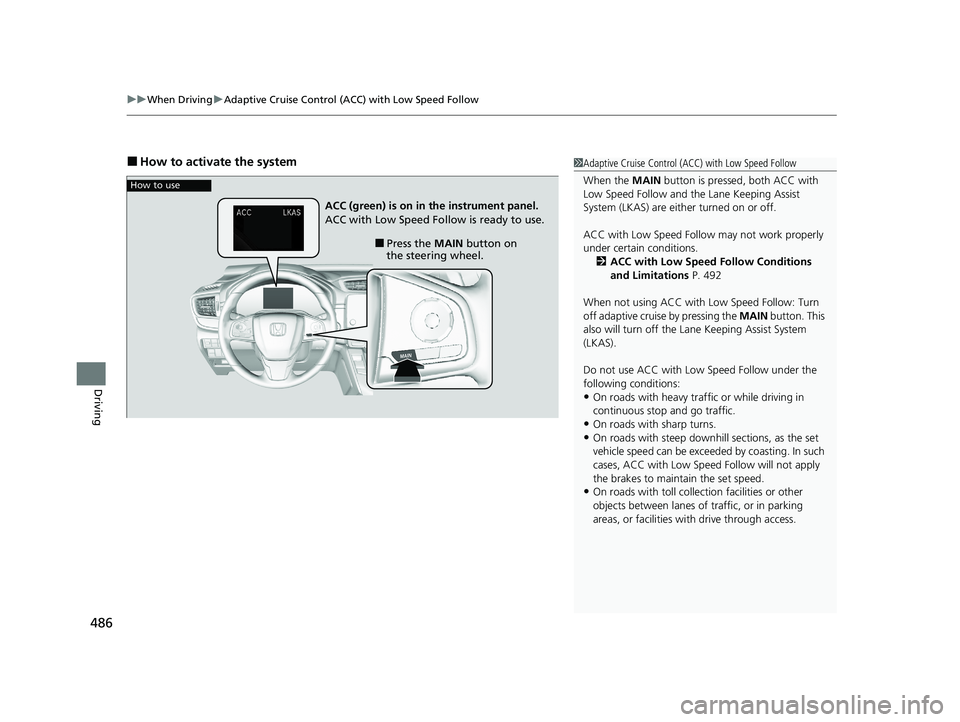
■How to activate the system1Adaptive Cruise Control (ACC) with Low Speed Follow
When the MAIN button is pressed, both ACC with
Low Speed Follow and the Lane Keeping Assist
System (LKAS) are either turned on or off.
ACC with Low Speed Follow may not work properly
under certain conditions.
2 ACC with Low Speed Follow Conditions
and Limitations P. 492
When not using ACC with Low Speed Follow: Turn
off adaptive cruise by pressing the MAIN button. This
also will turn off the Lane Keeping Assist System
(LKAS).
Do not use ACC with Low Speed Follow under the
following conditions:
•On roads with heavy traf fic or while driving in
continuous stop and go traffic.
•On roads with sharp turns.
•On roads with steep downhill sections, as the set
vehicle speed can be exceeded by coasting. In such
cases, ACC with Low Speed Follow will not apply
the brakes to maintain the set speed.
•On roads with toll collection facilities or other
objects between lanes of traffic, or in parking
areas, or faci lities with driv e through access.
How to use
■Press the MAIN button on
the steering wheel.
ACC (green) is on in the instrument panel.
ACC with Low Speed Follow is ready to use.
20 CR-V PET ELP_MAP_HMIN_HCM_J-31TLA6310.book 486 ページ 2019年10月3日 木曜日 午後4時55分
Page 494 of 671
uuWhen Driving uAdaptive Cruise Control (ACC) with Low Speed Follow
492
Driving
The system may automatically shut off and the ACC indicator will come on under
certain conditions. Some examples of th ese conditions are listed below. Other
conditions may reduce some of the ACC functions.
2 Front Sensor Camera P. 483
■Environmental conditions
• Driving in bad weather (rain, fog, snow, etc.).
■Roadway conditions
• Driving on a snowy or wet roadway (obs cured lane marking, vehicle tracks,
reflected lights, road spray, high contrast).
■Vehicle conditions
• The outside of the windshie ld is blocked by dirt, mud, leaves, wet snow, etc.
• An abnormal tire or wheel condition (Wro ng size, varied size or construction,
improperly inflated, comp act spare tire, etc.).
• The camera temperature gets too high.
• The parking brake is applied.
• When the front grille is dirty.
• The vehicle is tilted due to a heav y load or suspension modifications.
• When tire chains are installed.
■ACC with Low Speed Follow Conditions and Limitations1ACC with Low Speed Follow Conditions and Limitations
The radar sensor for ACC with Low Speed Follow is
shared with the collision mitigation braking system
TM
(CMBSTM).
2 Collision Mitigation Braking SystemTM
(CMBSTM) P. 536
You can read about handling information for the
camera equipped with this system. 2 Front Sensor Camera P. 483
Do not put a sticker on the radar sensor cover or
replace the radar sensor cover.
Have your vehicle checked by a dealer if you find any
unusual behavior of the system (e.g., the warning
message appears too frequently).
If the front of the vehicle is impacted in any of the
following situations, the ra dar sensor may not work
properly. Have your vehi cle checked by a dealer:
•The vehicle mounted onto a bump, curb, chock,
embankment, etc.
•You drive the vehicle where the water is deep.•Your vehicle has a frontal collision.
20 CR-V PET ELP_MAP_HMIN_HCM_J-31TLA6310.book 492 ページ 2019年10月3日 木曜日 午後4時55分
Page 496 of 671
uuWhen Driving uAdaptive Cruise Control (ACC) with Low Speed Follow
494
Driving
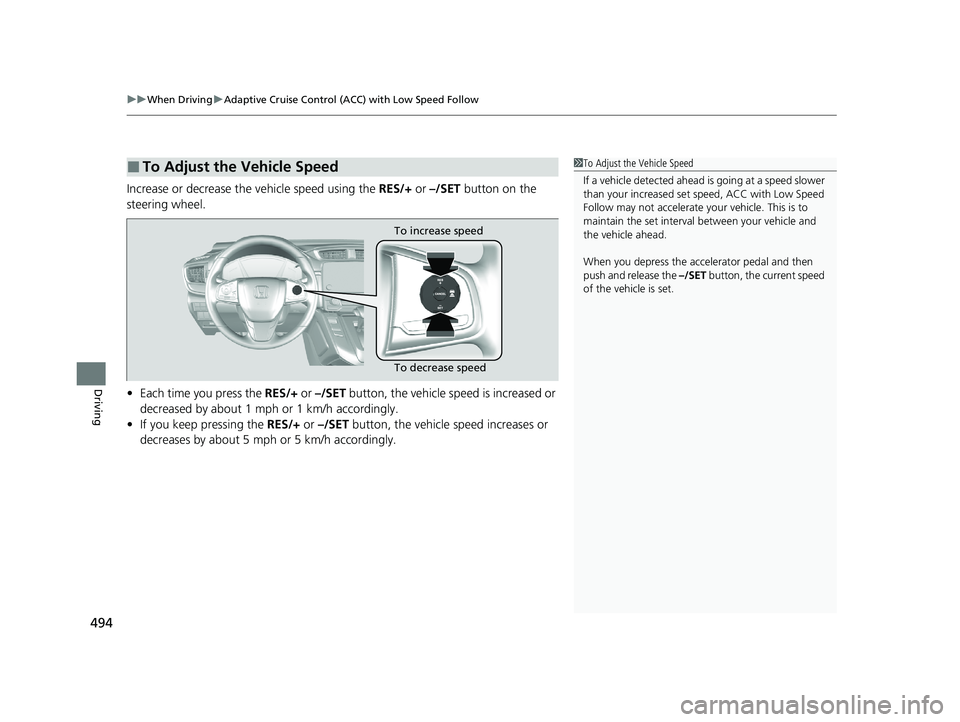
Increase or decrease the vehicle speed using the RES/+ or –/SET button on the
steering wheel.
• Each time you press the RES/+ or –/SET button, the vehicle speed is increased or
decreased by about 1 mph or 1 km/h accordingly.
• If you keep pressing the RES/+ or –/SET button, the vehicle speed increases or
decreases by about 5 mph or 5 km/h accordingly.
■To Adjust the Vehicle Speed1 To Adjust the Vehicle Speed
If a vehicle detected ahead is going at a speed slower
than your increased set speed, ACC with Low Speed
Follow may not accelerate y our vehicle. This is to
maintain the set interval between your vehicle and
the vehicle ahead.
When you depress the accelerator pedal and then
push and release the –/SET button, the current speed
of the vehicle is set.
To increase speed
To decrease speed
20 CR-V PET ELP_MAP_HMIN_HCM_J-31TLA6310.book 494 ページ 2019年10月3日 木曜日 午後4時55分
Page 500 of 671
uuWhen Driving uAdaptive Cruise Control (ACC) with Low Speed Follow
498
Driving
■Automatic cancellation
The beeper sounds and a message appears on the driver information interface when
ACC with Low Speed Follow is automaticall y canceled. Any of these conditions may
cause the ACC with Low Speed Fo llow to automatically cancel:
• Bad weather (rain, fog, snow, etc.)
• When the radar sensor in the front grille gets dirty.
• The vehicle ahead of you cannot be detected.
• An abnormal tire condition is detected, or the tires are skidding.
• Driving on a mountainous road, or driving off road for extended periods.
• Abrupt steering wheel movement.
• When the ABS, VSA ® or CMBS
TM is activated.
• When the ABS or VSA ® system indicator comes on.
• When the vehicle is stopped on a very steep slope.
• When you manually apply the parking brake.
• When the detected vehicle within the ACC with Low Speed Follow range is too
close to your vehicle.
• The camera behind the rearview mirror, or the area around the camera, including
the windshield, gets dirty.
• When the Maximum Load Limit is exceeded.
• When passing through an enclos ed space, such as tunnel.
The ACC with Low Speed Follow automatic ca ncellation can be also triggered by the
following causes. In these cases, the pa rking brake will be automatically applied.
• The driver’s seat belt is unfasten ed when the vehicle is stationary.
• The vehicle stops for mo re than 10 minutes.
• The engine is turned off.
1Automatic cancellation
Even though ACC with Low Speed Follow has been
automatically canceled, you can still resume the prior
set speed. Wait until the condition that caused ACC
with Low Speed Follow to cancel improves, then
press the –/SET button.
20 CR-V PET ELP_MAP_HMIN_HCM_J-31TLA6310.book 498 ページ 2019年10月3日 木曜日 午後4時55分