page 68 HONDA CR-V 2020 Owner's Manual (in English)
[x] Cancel search | Manufacturer: HONDA, Model Year: 2020, Model line: CR-V, Model: HONDA CR-V 2020Pages: 671, PDF Size: 33.11 MB
Page 36 of 671
34
Safe Driving
For Safe Driving
The following pages explain your vehicle's safety features and how to use them
properly. The safety precauti ons below are ones that we consider to be among the
most important.
Important Safety Precautions
■Always wear your seat belt
A seat belt is your best protection in all types of collisions. Airbags are designed to
supplement seat belts, not replace them. So even though your vehicle is equipped
with airbags, make sure you and your passe ngers always wear your seat belts, and
wear them properly.
■Restrain all children
Children ages 12 and under should ride properly restrained in a back seat, not the
front seat. Infants and small children shoul d be restrained in a child seat. Larger
children should use a booster seat and a lap/shoulder seat belt until they can use the
belt properly without a booster seat.
■Be aware of airbag hazards
While airbags can save lives, they can cause serious or fatal injuries to occupants
who sit too close to them, or are not prop erly restrained. Infants, young children,
and short adults are at the greatest risk. Be sure to follow all instructions and
warnings in this manual.
■Don't drink and drive
Alcohol and driving don't mix. Even one dr ink can reduce your ability to respond to
changing conditions, and your reaction time gets worse with every additional drink.
So don't drink and drive, and don't let your friends drink and drive, either.
1Important Safety Precautions
Some states, provinces and te rritories prohibit the use
of cell phones other than hands-free devices by the
driver while driving.
20 CR-V PET ELP_MAP_HMIN_HCM_J-31TLA6310.book 34 ページ 2019年10月3日 木曜日 午後4時55分
Page 53 of 671
51
uuAirbags uTypes of Airbags
Continued
Safe Driving
Types of Airbags
Your vehicle is equipped wi th three types of airbags:
• Front airbags: Airbags in front of the driver's and front passenger's seats.
• Side airbags: Airbags in the driver's and front passenger's seat-backs.
• Side curtain airbags: Airbags above the side windows.
Each is discussed in the following pages.
Front Airbags (SRS)
The front SRS airbags inflate in a moderate-to-severe frontal collision to help protect
the head and chest of the driver and/or front passenger.
SRS (Supplemental Restraint System) indica tes that the airbags are designed to
supplement seat belts, not replace them . Seat belts are the occupant's primary
restraint system.
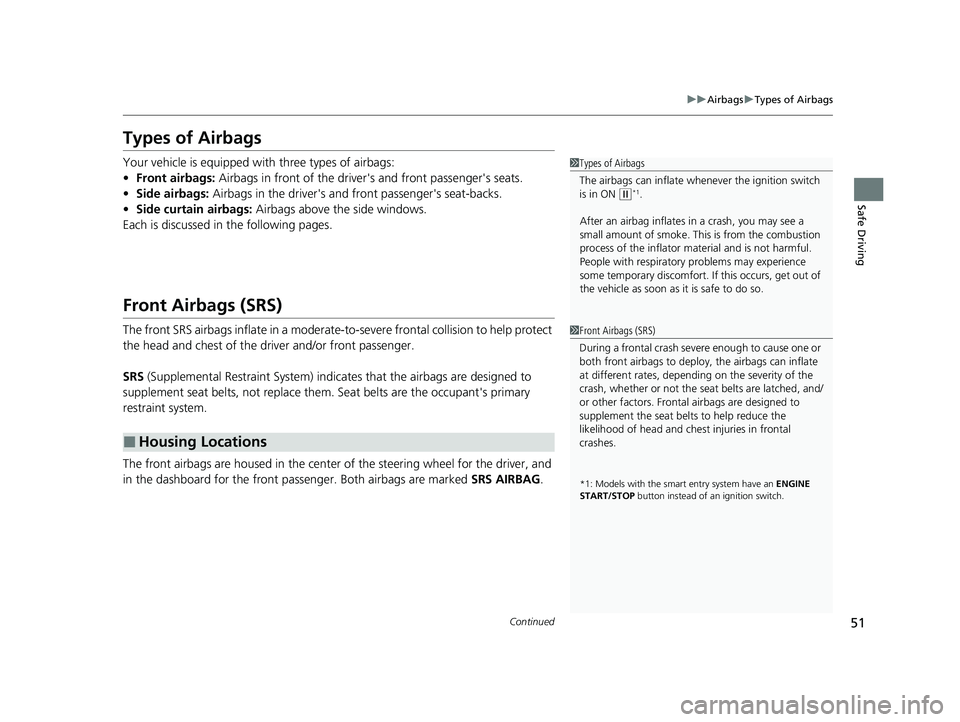
The front airbags are housed in the center of the steering wheel for the driver, and
in the dashboard for the front pass enger. Both airbags are marked SRS AIRBAG.
■Housing Locations
1Types of Airbags
The airbags can inflate whenever the ignition switch
is in ON
(w*1.
After an airbag inflates in a crash, you may see a
small amount of smoke. This is from the combustion
process of the infl ator material and is not harmful.
People with respiratory pr oblems may experience
some temporary discomfort. If this occurs, get out of
the vehicle as soon as it is safe to do so.
1 Front Airbags (SRS)
During a frontal crash severe enough to cause one or
both front airbags to deploy, the airbags can inflate
at different rates, dependi ng on the severity of the
crash, whether or not the se at belts are latched, and/
or other factors. Frontal airbags are designed to
supplement the seat belts to help reduce the
likelihood of head and chest injuries in frontal
crashes.
*1: Models with the sma rt entry system have an ENGINE
START/STOP button instead of an ignition switch.
20 CR-V PET ELP_MAP_HMIN_HCM_J-31TLA6310.book 51 ページ 2019年10月3日 木曜日 午後4時55分
Page 75 of 671
73
uuChild Safety uSafety of Larger Children
Continued
Safe Driving
Safety of Larger Children
The following pages give instructions on how to check proper seat belt fit, what kind
of booster seat to use if one is needed, and important precautions for a child who
must sit in front.
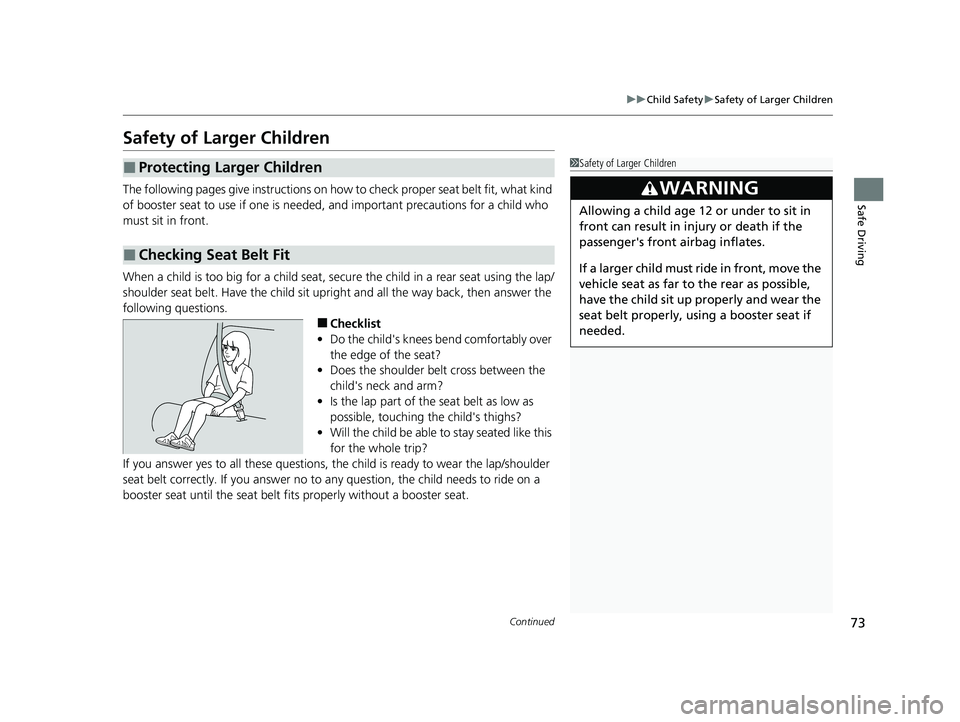
When a child is too big for a child seat, secure the child in a rear seat using the lap/
shoulder seat belt. Have the child sit upri ght and all the way back, then answer the
following questions.
■Checklist
• Do the child's knees bend comfortably over
the edge of the seat?
• Does the shoulder belt cross between the
child's neck and arm?
• Is the lap part of the seat belt as low as
possible, touching the child's thighs?
• Will the child be able to stay seated like this
for the whole trip?
If you answer yes to all these questions, th e child is ready to wear the lap/shoulder
seat belt correctly. If you answer no to any question, the child needs to ride on a
booster seat until the seat belt fits properly without a booster seat.
■Protecting Larger Children
■Checking Seat Belt Fit
1 Safety of Larger Children
3WARNING
Allowing a child age 12 or under to sit in
front can result in injury or death if the
passenger's front airbag inflates.
If a larger child must ride in front, move the
vehicle seat as far to the rear as possible,
have the child sit up properly and wear the
seat belt properly, using a booster seat if
needed.
20 CR-V PET ELP_MAP_HMIN_HCM_J-31TLA6310.book 73 ページ 2019年10月3日 木曜日 午後4時55分
Page 275 of 671
Continued273
uuAudio System Basic Operation uAudio/Information Screen
Features
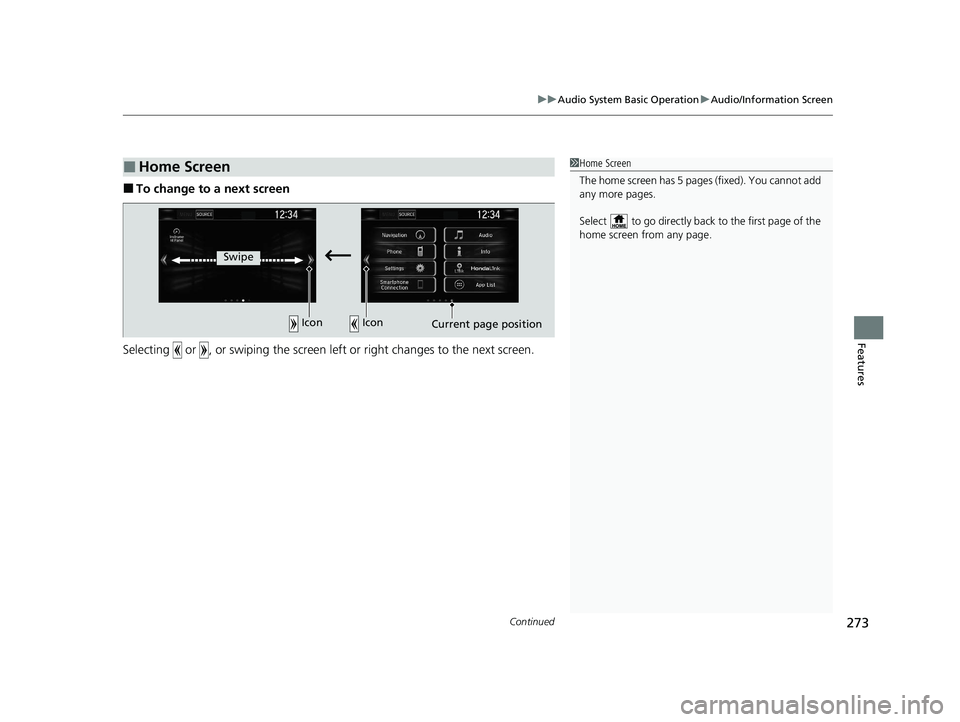
■To change to a next screen
Selecting or , or swiping the screen left or right changes to the next screen.
■Home Screen1Home Screen
The home screen has 5 pages (fixed). You cannot add
any more pages.
Select to go directly back to the first page of the
home screen from any page.
Swipe
Icon Icon
Current page position
20 CR-V PET ELP_MAP_HMIN_HCM_J-31TLA6310.book 273 ページ 2019年10月3日 木曜日 午後4時55分
Page 289 of 671
287
uuAudio System Basic Operation uVoice Control Operation
Continued
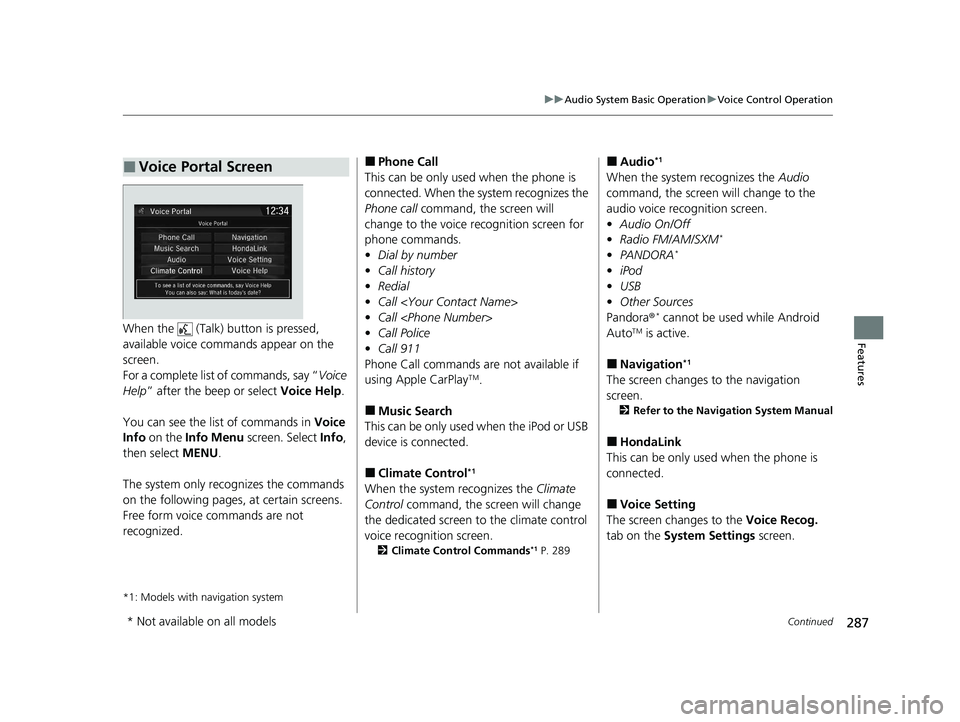
FeaturesWhen the (Talk) button is pressed,
available voice comma nds appear on the
screen.
For a complete list of commands, say “ Voice
Help ” after the beep or select Voice Help.
You can see the list of commands in Voice
Info on the Info Menu screen. Select Info,
then select MENU.
The system only recognizes the commands
on the following pages, at certain screens.
Free form voice commands are not
recognized.
*1: Models with navigation system
■Voice Portal Screen■Phone Call
This can be only used when the phone is
connected. When the sy stem recognizes the
Phone call command, the screen will
change to the voice re cognition screen for
phone commands.
• Dial by number
• Call history
• Redial
• Call
• Call
• Call Police
• Call 911
Phone Call commands are not available if
using Apple CarPlay
TM.
■Music Search
This can be only used when the iPod or USB
device is connected.
■Climate Control*1
When the system recognizes the Climate
Control command, the screen will change
the dedicated screen to the climate control
voice recognition screen.
2 Climate Control Commands*1 P. 289
■Audio*1
When the system recognizes the Audio
command, the screen will change to the
audio voice recognition screen.
• Audio On/Off
• Radio FM/AM/SXM
*
•PANDORA*
•iPod
• USB
• Other Sources
Pandora ®
* cannot be used while Android
AutoTM is active.
■Navigation*1
The screen changes to the navigation
screen.
2 Refer to the Navigation System Manual
■HondaLink
This can be only used when the phone is
connected.
■Voice Setting
The screen changes to the Voice Recog.
tab on the System Settings screen.
* Not available on all models
20 CR-V PET ELP_MAP_HMIN_HCM_J-31TLA6310.book 287 ページ 2019年10月3日 木曜日 午後4時55分
Page 326 of 671
324
uuAudio System Basic Operation uApple CarPlayTM
Features
Apple CarPlayTM
If you connect an Apple CarPlayTM-compatible iPhone to the system via the 1.5A USB
port, you can use the audio/information screen, instead of the iPhone display, to
make a phone call, listen to music, view maps (navigation), and access messages.
2USB Port(s) P. 235
■Phone
Access the contact list, make phone calls, or listen to voice mail.
■Messages
Check and reply to text messages, or have messages read to you.
■Music
Play music stored on your iPhone.
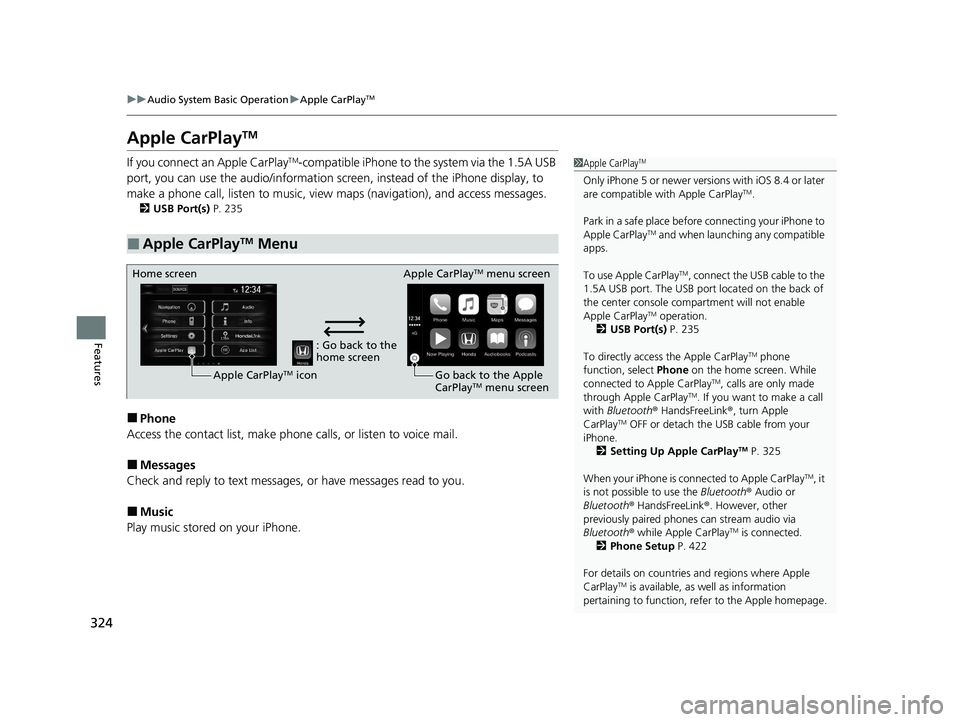
■Apple CarPlayTM Menu
1 Apple CarPlayTM
Only iPhone 5 or newer versi ons with iOS 8.4 or later
are compatible with Apple CarPlayTM.
Park in a safe place before connecting your iPhone to
Apple CarPlay
TM and when launching any compatible
apps.
To use Apple CarPlay
TM, connect the USB cable to the
1.5A USB port. The USB port located on the back of
the center console compartment will not enable
Apple CarPlay
TM operation.
2 USB Port(s) P. 235
To directly access the Apple CarPlay
TM phone
function, select Phone on the home screen. While
connected to Apple CarPlay
TM, calls are only made
through Apple CarPlayTM. If you want to make a call
with Bluetooth ® HandsFreeLink ®, turn Apple
CarPlay
TM OFF or detach the USB cable from your
iPhone.
2 Setting Up Apple CarPlay
TM P. 325
When your iPhone is connected to Apple CarPlay
TM, it
is not possible to use the Bluetooth® Audio or
Bluetooth ® HandsFreeLink ®. However, other
previously paired phones can stream audio via
Bluetooth ® while Apple CarPlay
TM is connected.
2 Phone Setup P. 422
For details on c ountries and regions where Apple
CarPlay
TM is available, as well as information
pertaining to function, refer to the Apple homepage.
: Go back to the
home screen
Home screen
Apple CarPlay
TM icon Apple CarPlay
TM menu screen
Go back to the Apple
CarPlay
TM menu screen
20 CR-V PET ELP_MAP_HMIN_HCM_J-31TLA6310.book 324 ページ 2019年10月3日 木曜日 午後4時55分
Page 327 of 671
Continued325
uuAudio System Basic Operation uApple CarPlayTM
Features
■Maps
Display Apple Maps and use the navigation function just as you would on your
iPhone.
Only one navigation system (pre-ins talled navigation or Apple CarPlay
TM) can give
directions at a time. When you are using one system, directions to any prior
destination set on the other system will be canceled, and the system you are
currently using will direct you to your destination.
After you have connected your iPhone to the system via the 1.5A USB port, use the
following procedure to set up Apple CarPlay
TM. Use of Apple CarPlayTM will result in
the transmission of certain user and vehicle information (such as vehicle location,
speed, and status) to your iPhone to enhance the Apple CarPlay
TM experience. You
will need to consent to the sharing of th is information on the Display Audio Screen.
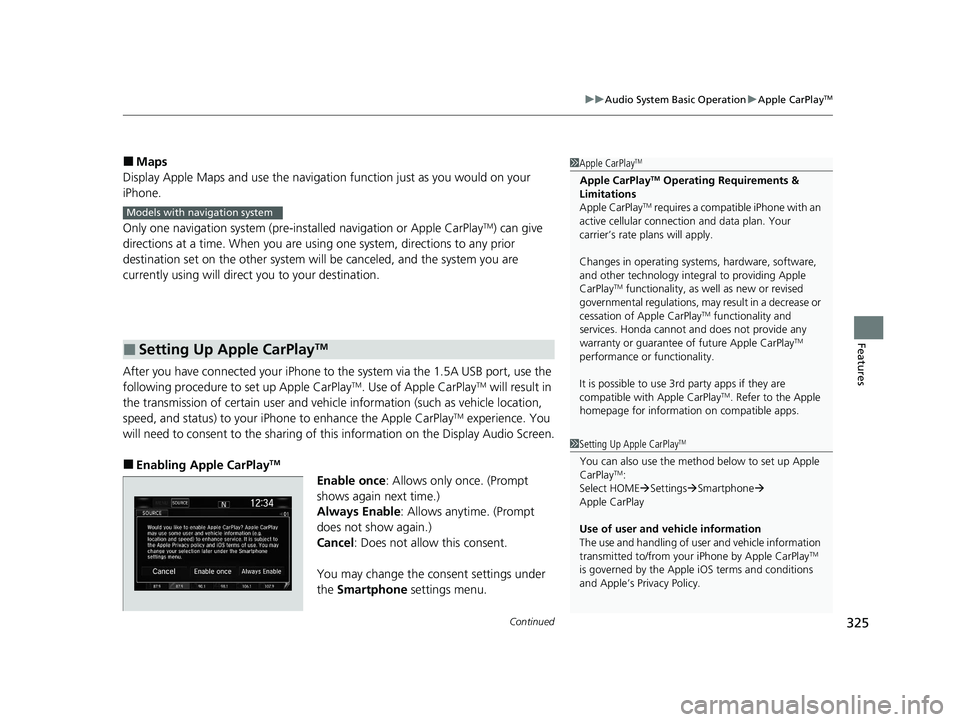
■Enabling Apple CarPlayTM
Enable once: Allows only once. (Prompt
shows again next time.)
Always Enable: Allows anytime. (Prompt
does not show again.)
Cancel : Does not allow this consent.
You may change the consent settings under
the Smartphone settings menu.
■Setting Up Apple CarPlayTM
1Apple CarPlayTM
Apple CarPlayTM Operating Requirements &
Limitations
Apple CarPlay
TM requires a compatible iPhone with an
active cellular connecti on and data plan. Your
carrier’s rate plans will apply.
Changes in operating systems, hardware, software,
and other technology integral to providing Apple
CarPlay
TM functionality, as we ll as new or revised
governmental regulations, may result in a decrease or
cessation of Apple CarPlay
TM functionality and
services. Honda cannot a nd does not provide any
warranty or guarantee of future Apple CarPlay
TM
performance or functionality.
It is possible to use 3r d party apps if they are
compatible with Apple CarPlay
TM. Refer to the Apple
homepage for information on compatible apps.
Models with navigation system
1 Setting Up Apple CarPlayTM
You can also use the method below to set up Apple
CarPlayTM:
Select HOME Settings Smartphone
Apple CarPlay
Use of user and vehicle information
The use and handling of user and vehicle information
transmitted to/from your iPhone by Apple CarPlay
TM
is governed by the Appl e iOS terms and conditions
and Apple’s Privacy Policy.
20 CR-V PET ELP_MAP_HMIN_HCM_J-31TLA6310.book 325 ページ 2019年10月3日 木曜日 午後4時55分
Page 330 of 671
uuAudio System Basic Operation uAndroid AutoTM
328
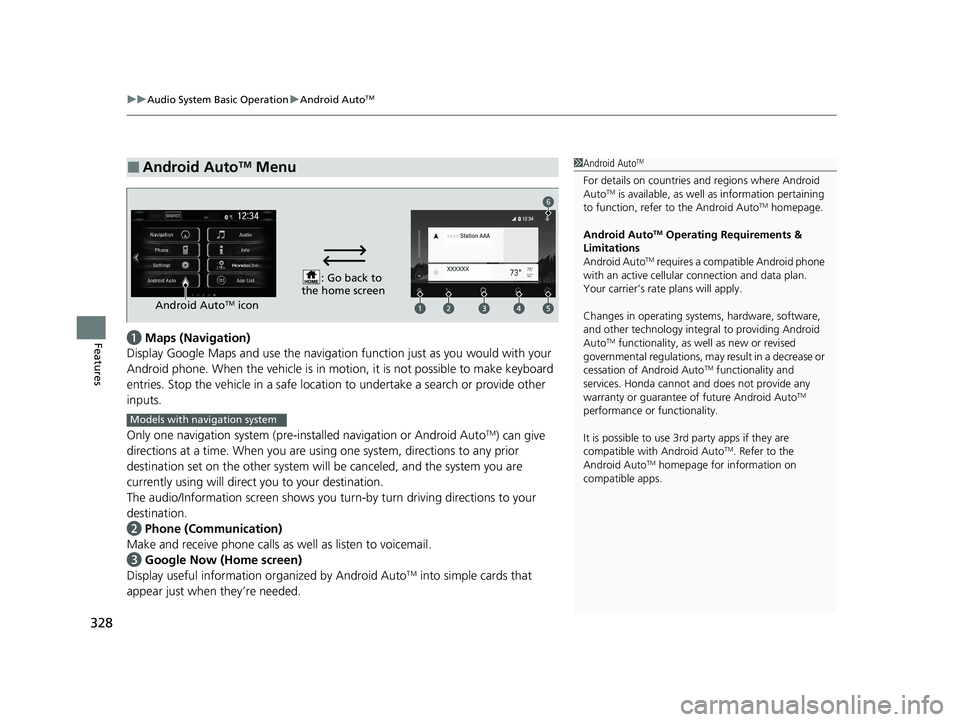
Featuresa Maps (Navigation)
Display Google Maps and use the navigation function just as you would with your
Android phone. When the vehicle is in mo tion, it is not possible to make keyboard
entries. Stop the vehicle in a safe location to undertake a search or provide other
inputs.
Only one navigation system (pre-installed navigation or Android Auto
TM) can give
directions at a time. When you are using one system, directions to any prior
destination set on the other system will be canceled, and the system you are
currently using will direct you to your destination.
The audio/Information screen shows you turn -by turn driving directions to your
destination.
b Phone (Communication)
Make and receive phone calls as well as listen to voicemail.
c Google Now (Home screen)
Display useful information organized by Android Auto
TM into simple cards that
appear just when they’re needed.
■Android AutoTM Menu1Android AutoTM
For details on c ountries and regions where Android
AutoTM is available, as well as information pertaining
to function, refer to the Android AutoTM homepage.
Android Auto
TM Operating Requirements &
Limitations
Android Auto
TM requires a compatible Android phone
with an active cellular connection and data plan.
Your carrier’s rate plans will apply.
Changes in operating systems, hardware, software,
and other technology integral to providing Android
Auto
TM functionality, as we ll as new or revised
governmental regulations, may result in a decrease or
cessation of Android Auto
TM functionality and
services. Honda cannot a nd does not provide any
warranty or guarantee of future Android Auto
TM
performance or functionality.
It is possible to use 3r d party apps if they are
compatible with Android Auto
TM. Refer to the
Android AutoTM homepage for information on
compatible apps.
: Go back to
the home screen
Android AutoTM icon
6
Models with navigation system
20 CR-V PET ELP_MAP_HMIN_HCM_J-31TLA6310.book 328 ページ 2019年10月3日 木曜日 午後4時55分
Page 332 of 671
uuAudio System Basic Operation uAndroid AutoTM
330
Features
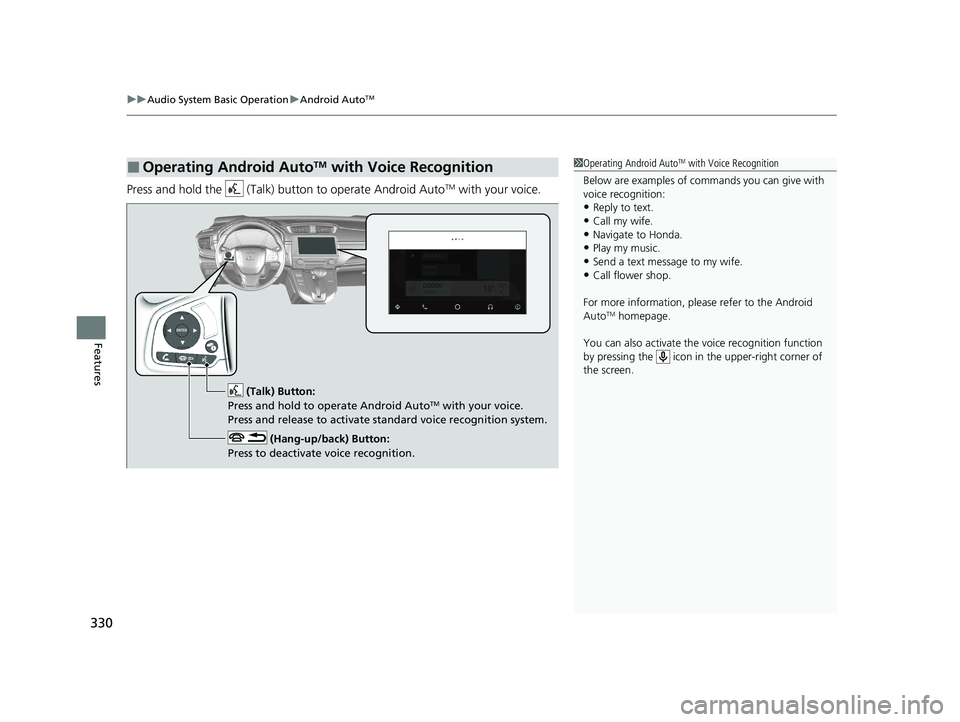
Press and hold the (Talk) bu tton to operate Android AutoTM with your voice.
■Operating Android AutoTM with Voice Recognition1Operating Android AutoTM with Voice Recognition
Below are examples of co mmands you can give with
voice recognition:
•Reply to text.
•Call my wife.•Navigate to Honda.
•Play my music.
•Send a text message to my wife.•Call flower shop.
For more information, please refer to the Android
Auto
TM homepage.
You can also activate the voice recognition function
by pressing the icon in the upper-right corner of
the screen.
(Talk) Button:
Press and hold to operate Android AutoTM with your voice.
Press and release to activate standard voice recognition system.
(Hang-up/back) Button:
Press to deactivate voice recognition.
20 CR-V PET ELP_MAP_HMIN_HCM_J-31TLA6310.book 330 ページ 2019年10月3日 木曜日 午後4時55分
Page 390 of 671
388
uuHomeLink ® Universal Transceiver*u Training HomeLink
Features
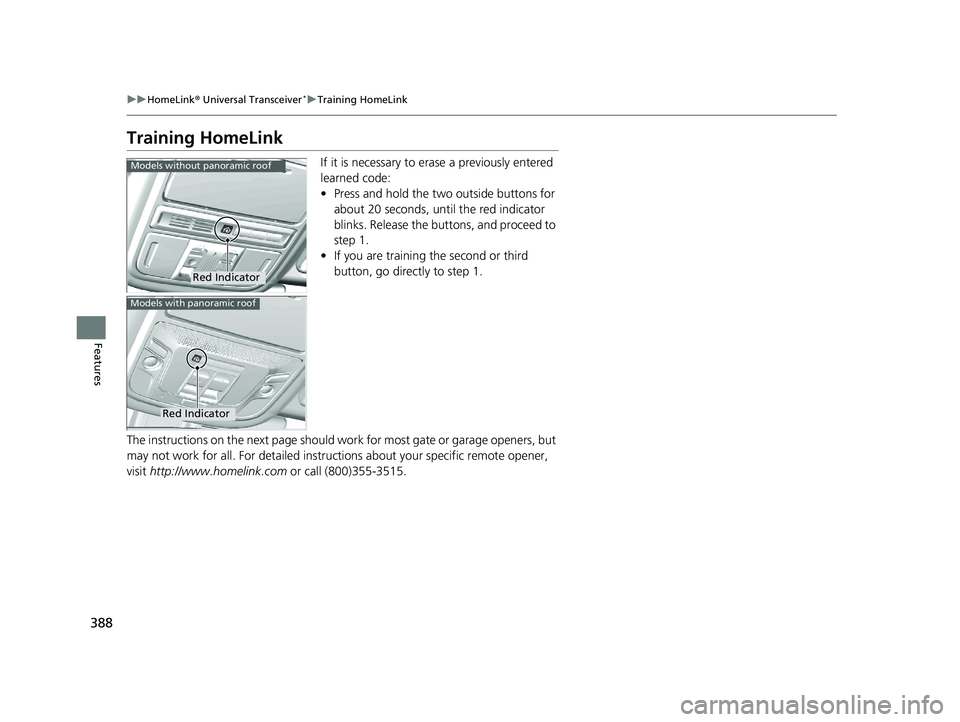
Training HomeLink
If it is necessary to erase a previously entered
learned code:
• Press and hold the two outside buttons for
about 20 seconds, until the red indicator
blinks. Release the bu ttons, and proceed to
step 1.
• If you are training the second or third
button, go directly to step 1.
The instructions on the next page should wo rk for most gate or garage openers, but
may not work for all. For detailed instruct ions about your specific remote opener,
visit http://www.homelink.com or call (800)355-3515.
Red Indicator
Models without panoramic roof
Red Indicator
Models with panoramic roof
20 CR-V PET ELP_MAP_HMIN_HCM_J-31TLA6310.book 388 ページ 2019年10月3日 木曜日 午後4時55分